Palo Alto Networks certification · Exam PCNSE

PCNSE Mock Exam Page 5

Palo Alto Networks Certified Security Engineer (PCNSE) PAN-OS 10.2

Free PCNSE mock exam questions 41–50, each with the answer and an explanation.

20 questions · 33 minutes · free, no sign-up

Free PCNSE questions

41–50 of 96 free
Question 41 Choose 1
Which function does the HA4 interface provide when implementing a firewall cluster which contains firewalls configured as active-passive pairs?
Show answerHide answer

Correct answer: D Perform synchronization of sessions, forwarding tables, and IPSec security associations between firewalls in an HA pair.

Explanation

Explanation:

Why This Option?
1.HA4 Interface Purpose:
The HA4 link (also called the "HA data link") is responsible for synchronizing stateful data between active and passive firewalls in an HA pair.
This includes:
Session information (e.g., TCP/UDP states).
Forwarding tables (for seamless failover).
IPSec security associations (VPN tunnels).

2.Active-Passive HA Workflow:
The active firewall continuously syncs this data to the passive firewall via HA4.
During failover, the passive firewall takes over without dropping sessions.

Why Not Other Options?
A.Packet forwarding is handled by the data plane (data interfaces), not HA4.
B.Routes and User-ID info sync via HA1 (control link), not HA4.
C.HA4 syncs sessions within a pair, not across clusters (cluster ID is irrelevant).

Key HA Links Summary:
HA1: Syncs configs, routes, User-ID (control link).
HA2: Heartbeat/hello packets (optional backup).
HA3: Management sync (optional).
HA4: Session/forwarding table/IPSec SA sync (data link).

Reference:
Palo Alto HA Admin Guide:
"HA4 ensures stateful sync of sessions, forwarding tables, and IPSec SAs for hitless failover."
Question 42 Choose 1
Information Security is enforcing group-based policies by using security-event monitoring on Windows User-ID agents for IP-to-User mapping in the network. During the rollout, Information Security identified a gap for users authenticating to their VPN and wireless networks.
Root cause analysis showed that users were authenticating via RADIUS and that authentication events were not captured on the domain controllers that were being monitored Information Security found that authentication events existed on the Identity Management solution (IDM). There did not appear to be direct integration between PANOS and the IDM solution.
How can Information Security extract and learn iP-to-user mapping information from authentication events for VPN and wireless users?
Show answerHide answer

Correct answer: B Configure the integrated User-ID agent on PAN-OS to accept Syslog messages over TLS.

Explanation

Explanation:

1: Problem restated
Goal: Enforce group-based policies (needs accurate IP-to-User mapping).
Current setup: Using Windows User-ID agent monitoring domain controller security logs.
Gap: VPN + Wireless logins are via RADIUS → auth events not on DCs, but instead on the Identity Management (IDM) solution.
IDM does not have a direct PAN-OS integration.
So, how do we get User-ID mappings from IDM into PAN-OS?

2: Methods for IP-to-User Mapping
PAN-OS supports multiple methods:
Windows security event logs (via User-ID agent).
Syslog parsing from external auth sources (RADIUS, NAC, wireless controllers, VPN concentrators, IDM, etc.).
XML API (push mappings into PAN-OS).
Captive Portal / GlobalProtect.
👉 In this case: IDM generates syslog auth events → The right approach is to configure Syslog Listener in PAN-OS User-ID agent to accept those syslog messages.

3: Analyze the Options
A. Add domain controllers that might be missing to perform security-event monitoring for VPN and wireless users.
❌ Wrong. Auth events are not on DCs at all (root cause already confirmed).

B. Configure the integrated User-ID agent on PAN-OS to accept Syslog messages over TLS.
✅ Correct. PAN-OS User-ID agent (built-in or external) can parse syslog messages from IDM, extract username ↔ IP, and populate User-ID mappings. This solves the issue directly.
C. Configure the User-ID XML API on PAN-OS firewalls to pull the authentication events directly from the IDM solution.
❌ Wrong direction. PAN-OS does not “pull” from IDM via XML API — instead, third-party systems push mappings via XML API.
D. Configure the Windows User-ID agents to monitor the VPN concentrators and wireless controllers for IP-to-User mapping.
❌ Not possible in this case. Those devices authenticate through IDM, not directly exposing logs. Windows User-ID agents can’t just “monitor” VPN controllers unless they emit Windows events (which they don’t).

🔹 Key Takeaways for PCNSE
If auth logs don’t hit the DCs, use Syslog integration to feed mappings.
PAN-OS can parse syslog login events from IDM, RADIUS servers, wireless controllers, NAC, etc.
XML API is push-only — third-party system pushes mappings to PAN-OS, not PAN-OS pulling.

📖 Reference:
Configure User Mapping Using Syslog Senders
“A firewall or User-ID agent can monitor syslog messages from authentication systems to learn IP-to-username mappings.”
Question 43 Choose 1
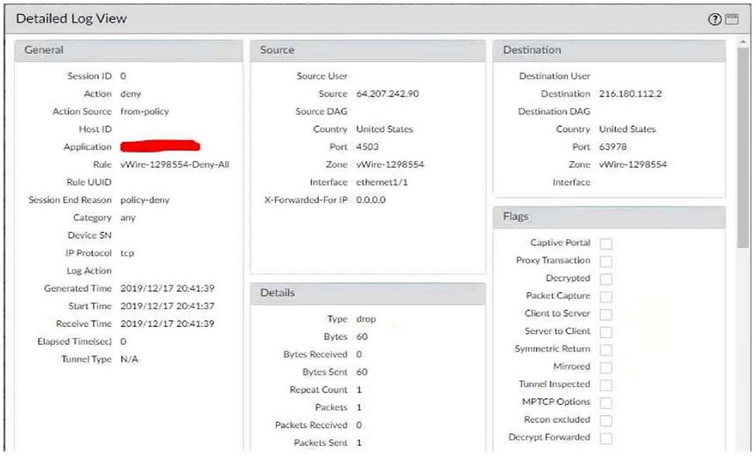
With the default TCP and UDP settings on the firewall, what will be the identified application in the following session?
Show answerHide answer

Correct answer: D not-applicable

Explanation

Explanation:

Why:
The log shows Action: deny and Session End Reason: policy-deny. When traffic is blocked by policy before App-ID can inspect payload, the firewall can’t identify an application and logs it as not-applicable. This is exactly how PAN-OS behaves when a session is denied on the first packet(s)—no app match is attempted, so the Application field is not-applicable.

Why the others are wrong
A. Incomplete → Used when the TCP 3-way handshake didn’t complete or completed with no identifiable data; typically seen on allowed sessions that later age out/reset, not on immediate policy denies.
B. unknown-tcp → Requires a completed handshake and payload that doesn’t match any App-ID; again, not a policy-deny on first packet.
C. Insufficient-data→ Handshake finished and there was some data, but not enough to identify an app; not the case for a policy-denied sess
Question 44 Choose 1
An existing log forwarding profile is currently configured to forward all threat logs to Panorama. The firewall engineer wants to add syslog as an additional log forwarding method. The requirement is to forward only medium or higher severity threat logs to syslog. Forwarding to Panorama must not be changed. Which set of actions should the engineer take to achieve this goal?
Show answerHide answer

Correct answer: C 1. Open the current log forwarding profile.
2. Add a new match list for threat log type.
3. Define the filter.
4. Select the syslog forward method.

Explanation

Explanation:
To achieve the goal of forwarding only medium or higher severity threat logs to a new destination (syslog) while maintaining the existing forwarding to Panorama, the engineer should follow these steps:

1.Open the existing log forwarding profile.
The current profile is already configured to send all threat logs to Panorama. Since you want to keep this configuration, you should modify the existing profile rather than create a new one.
2.Add a new match list for the threat log type.
Log forwarding profiles use a series of "match lists" to define different forwarding rules based on log type and filters. You need to create a new match list specifically for the syslog forwarding.
3.Define the filter.
Within the new match list, you must specify a filter. The filter should be set to capture logs with a severity of "medium" or higher. The filter expression would look something like (severity geq medium).
4.Select the syslog forward method.
For this new match list, you should select the syslog server as the forwarding destination. The existing match list for Panorama will continue to function independently, forwarding all logs as configured.
Question 45 Choose 1
What does the User-ID agent use to find login and logout events in syslog messages?
Show answerHide answer

Correct answer: C Syslog Parse profile

Explanation

Explanation:

Why This Option?
1.User-ID Agent Syslog Processing:
The User-ID agent monitors syslog messages (e.g., from Active Directory, VPN servers) to extract login/logout events.
To interpret these events, it uses a Syslog Parse Profile, which defines:
Patterns (regex) to match syslog messages.
Fields to extract (e.g., username, IP address).
2.Configuration:
Profiles are configured under:
Device > User Identification > User-ID Agents > [Agent] > Syslog Parse Profile.
Predefined profiles exist for common sources (e.g., Cisco ASA, Windows Security Logs).

Why Not Other Options?
A.Syslog Server profile is for receiving syslog, not parsing.
B.Authentication log is a log type, not a parsing tool.
D.Log Forwarding profile sends logs, doesn’t parse them.

Reference:
Palo Alto User-ID Agent Guide:
"Syslog Parse Profiles map raw syslog messages to IP-user mappings for User-ID."
Question 46 Choose 3
An engineer decides to use Panorama to upgrade devices to PAN-OS 10.2. Which three platforms support PAN-OS 10.2? (Choose three.)
Show answerHide answer

Correct answer: A, B, E PA-220PA-800 Series PA-3400 Series

Explanation

Explanation:

Analysis:
PAN-OS 10.2 Support: The compatibility of firewall platforms with a specific PAN-OS version depends on Palo Alto Networks’ hardware and software end-of-life (EOL) policies. PAN-OS 10.2 was released around March 2022, and its support status as of August 2025 would be based on the standard 5-year support period from the initial release date, unless extended or superseded by newer versions (e.g., PAN-OS 11.x).
Upgrade via Panorama: Panorama can push software updates to managed firewalls, but the target platform must be listed as supported for the specified version in the official compatibility matrix or EOL announcements.
Relevant Platforms: The options provided are PA-220, PA-800 Series, PA-5000 Series, PA-500, and PA-3400 Series. We need to identify which three of these are supported for PAN-OS 10.2.

Evaluation of Options:
A. PA-220:
Status: The PA-220 was supported for PAN-OS 10.2 at its release, but an End-of-Sale (EOS) announcement was made on August 1, 2022, with the last supported OS listed as 10.2.x. As of August 2025, support may have ended or be nearing its end (typically 5 years from EOS or first release), but during the active support period, it was compatible. Given the question’s focus on an upgrade to 10.2, it is considered supported if the upgrade occurs within the support window. Likelihood: Supported, assuming the upgrade is within the support timeline.
B. PA-800 Series:
Status: The PA-800 Series (e.g., PA-820, PA-850) is listed as supporting PAN-OS 10.2 in the compatibility matrix. These platforms are mid-range firewalls designed for branch offices and have ongoing support for 10.2 as of its release date, with no EOL indicated by August 2025 for this version.
Likelihood: Supported.
C. PA-5000 Series:
Status: The PA-5000 Series (e.g., PA-5050, PA-5060) supported PAN-OS 10.2 at its release. However, this series is older, with an EOS announced around 2018, and the last supported OS was likely PAN-OS 9.1 or 10.0, depending on hardware EOL dates. By 2025, support for 10.2 on this series is unlikely unless extended, but during the 10.2 release period, it was compatible. Likelihood: Marginally supported, but likely phased out by 2025; however, it was supported at 10.2’s release.
D. PA-500:
Status: The PA-500 is an older platform with an EOS announced on October 31, 2018, and the last supported OS was PAN-OS 8.1. PAN-OS 10.2 is not supported on this hardware due to its age and limited capabilities, as confirmed by EOL documentation. Likelihood: Not supported.
E. PA-3400 Series:
Status: The PA-3400 Series (e.g., PA-3410, PA-3440) was introduced around 2022 and is designed to support newer PAN-OS versions, including 10.2. This series is explicitly listed as compatible with PAN-OS 10.2 in the release notes and datasheets from that period, with ongoing support as of 2025.
Likelihood: Supported.
Selection of Three Platforms:
Based on the compatibility matrix and EOL data up to August 2025, the platforms that support PAN-OS 10.2 include PA-220, PA-800 Series, and PA-3400 Series. The PA-5000 Series may have been supported at 10.2’s release but is likely past its support window by 2025, and the PA-500 is definitively unsupported. Since the question focuses on an upgrade to 10.2 via Panorama, we assume the intent is to identify platforms supported at the time of 10.2’s availability, adjusted for current context.
Final Three: A. PA-220, B. PA-800 Series, and E. PA-3400 Series are the most consistent choices, reflecting a mix of supported platforms from the release period onward.
Conclusion:
The three platforms that support PAN-OS 10.2 for an upgrade via Panorama are PA-220, PA-800 Series, and PA-3400 Series. This selection aligns with the compatibility data and the question’s focus on an upgrade scenario.

References:
Palo Alto Networks Documentation: PAN-OS 10.2 Compatibility Matrix
Palo Alto Networks Documentation: Hardware End-of-Life Dates
ExamTopics PCNSE Discussion: PAN-OS Version Support
Question 47 Choose 1
A new firewall has the Threat Prevention subscription, but the Antivirus does not appear in Dynamic Updates. What must occur to have Antivirus signatures update?
Show answerHide answer

Correct answer: D Install the Application and Threats updates first, then refresh the Dynamic Updates.

Explanation

Explanation:

1: Recall how Antivirus (AV) updates work
Palo Alto Antivirus signatures (for malware, spyware, C2 traffic) are part of the Threat Prevention subscription.
They are not tied to a separate “Antivirus license” (that doesn’t exist as a standalone).
AV updates depend on Application & Threats content being installed first, because the engine relies on the App-ID/Threat framework to identify traffic.
👉 So if you install Applications and Threats updates, then refresh Dynamic Updates, the Antivirus section appears.

2: Analyze the options
A. An Antivirus license is needed first…
❌ Wrong. There is no separate Antivirus license. Antivirus is included in Threat Prevention.
B. An Antivirus license must be obtained…
❌ Same as A — no such license exists.
C. An Advanced Threat Prevention license is required…
❌ Wrong. ATP (formerly Threat Prevention Cloud/ML-based inline detection) is a different subscription. Antivirus signatures are still part of Threat Prevention.
D. Install the Application and Threats updates first, then refresh the Dynamic Updates.
✅ Correct. This is the required step to make the Antivirus option appear in Dynamic Updates.

🔹 Key Takeaway (for PCNSE)
Threat Prevention subscription includes Antivirus, Anti-Spyware, Vulnerability, and DNS signatures.
No standalone AV license.
Antivirus updates require App+Threats content installed first, otherwise they won’t show.

📖 Reference:
Palo Alto Networks — Content and Threat Signatures
“You must install Applications and Threats content before Antivirus updates can be downloaded.”
Question 48 Choose 1
When configuring explicit proxy on a firewall, which interface should be selected under the Listening interface option?
Show answerHide answer

Correct answer: D ingress for the client traffic

Explanation

Explanation:

Why This Option?
1.Explicit Proxy Basics:
Clients must explicitly configure their browser/OS to use the firewall as a proxy.
The firewall listens on a specific interface for incoming client proxy requests.
2.Listening Interface:
This should be the ingress interface where client traffic arrives (e.g., internal LAN interface).
Clients send HTTP/HTTPS requests directly to this interface’s IP and proxy port (e.g., 8080).

Why Not Other Options?
A.Internet egress is irrelevant—clients don’t send requests there.
B.Loopback is for high availability or complex routing, not client proxy traffic.
C.Management interface is for admin access, not proxy services.

Configuration Example:
If clients are on ethernet1/1, set Listening Interface = ethernet1/1.
Clients point their proxy settings to ethernet1/1’s IP:port.

Reference:
Palo Alto Explicit Proxy Guide:
"The listening interface is where clients direct their explicit proxy requests."
Question 49 Choose 2
A network administrator wants to deploy SSL Forward Proxy decryption. What two attributes should a forward trust certificate have? (Choose two.)
Show answerHide answer

Correct answer: B, D A private key A certificate authority (CA) certificate

Explanation

Explanation

🔹1: Recall what a Forward Trust Certificate is
In SSL Forward Proxy, the firewall intercepts TLS sessions, decrypts traffic, and re-signs the server’s certificate with its own Forward Trust Certificate.
For the client to accept this re-signed cert:
The firewall must act as a certificate authority (CA) (so it can generate and sign server certs on the fly).
That certificate must have a private key (so the firewall can actually sign new certs).
Clients must trust this CA (so you import it into browsers/endpoints).

🔹2: Evaluate Options
A. A subject alternative name (SAN)
❌ Not required on the forward trust cert. SANs matter for end-entity server certs, not for the CA signing cert.
B. A private key
✅ Required — without a private key, the firewall cannot dynamically sign certificates.
C. A server certificate
❌ Wrong — it’s not a single server cert; it must be a CA cert used for signing.
D. A certificate authority (CA) certificate
✅ Correct — the forward trust cert must be a CA cert so the firewall can generate child certificates.

🔹 Key Takeaway (PCNSE)
Forward Trust Cert = CA cert + private key → used to sign trusted server certs during SSL Forward Proxy.
Forward Untrust Cert = CA cert + private key → used to re-sign untrusted/invalid server certs.

📖 Reference:
Palo Alto Networks — Configure SSL Forward Proxy
Question 50 Choose 1
An engineer needs to permit XML API access to a firewall for automation on a network segment that is routed through a Layer 3 sub-interface on a Palo Alto Networks firewall. However, this network segment cannot access the dedicated management interface due to the Security policy. Without changing the existing access to the management interface, how can the engineer fulfill this request?
Show answerHide answer

Correct answer: C Enable HTTPS in an Interface Management profile on the subinterface

Explanation

Explanation:

Why This Option?
1.Problem:
The network segment cannot access the dedicated management interface due to Security policy restrictions.
XML API access (which uses HTTPS) is needed for automation.
2.Solution:
Enable HTTPS management access on the Layer 3 sub-interface (where the network segment is connected).
This allows the segment to reach the firewall’s XML API via the sub-interface IP, bypassing the need for the management interface.
3.Steps:
Navigate to Network > Interfaces > [sub-interface] > Advanced > Management Profile.
Create/assign an Interface Management Profile with HTTPS enabled.
Ensure the Security policy allows access to the sub-interface IP.

Why Not Other Options?
A.Only dedicated management interfaces (MGT) can be set as management interfaces; data interfaces cannot.
B."Permitted IP Addresses" only applies to the dedicated management interface, not data interfaces.
DService routes control outbound firewall traffic (e.g., updates), not inbound API access.

Key Note:
XML API uses HTTPS (port 443), so enabling HTTPS on the sub-interface is sufficient.

Reference:
Palo Alto Management Interface Guide:
"Enable HTTPS in an Interface Management Profile to allow API access on data interfaces."
Full mock exam

Sit the PCNSE exam before exam day

Full-length mocks with the same number of questions and the same time limit as the real PCNSE exam. Every attempt draws a new set of questions from the full bank, so you can keep going until you pass comfortably.

Get full PCNSE mock exam
  • 65questions per mock
  • 105 mintime limit
  • 321questions in the bank
  • Newmock on every attempt