Palo Alto Networks certification · Exam PCNSE

PCNSE Mock Exam Page 4

Palo Alto Networks Certified Security Engineer (PCNSE) PAN-OS 10.2

Free PCNSE mock exam questions 31–40, each with the answer and an explanation.

20 questions · 33 minutes · free, no sign-up

Free PCNSE questions

31–40 of 96 free
Question 31 Choose 1
An engineer creates a set of rules in a Device Group (Panorama) to permit traffic to various services for a specific LDAP user group. What needs to be configured to ensure Panorama can retrieve user and group information for use in these rules?
Show answerHide answer

Correct answer: B A Master Device

Explanation

1. Problem restatement
Engineer wants to use LDAP user groups in security rules (inside a Panorama Device Group).
For that, Panorama must know the mapping of users → groups.
Question: What must be configured so Panorama can retrieve user/group info?

2.Review the options
A. A service route to the LDAP server
Service routes define the source interface/IP for management-plane traffic (like LDAP queries, syslog, DNS, etc.).
Useful only if Panorama itself is talking to LDAP.
But Panorama does not retrieve group mappings directly — firewalls (User-ID) or Master Device handle it.

❌ Not the right answer.
B. A Master Device ✅ Correct.
In Panorama, if you want to use User-ID / group-based policies in a Device Group, you must designate a Master Device.
The Master Device is a firewall (in that Device Group) that retrieves group mapping from LDAP (via User-ID or User-ID agent).
Panorama then uses that device’s mappings to show groups for policy creation.
C. Authentication Portal ❌
Auth portal (Captive Portal) is for authenticating unknown users (BYOD, guest, etc.).
Doesn’t solve LDAP group lookup in Panorama.
D. A User-ID agent on the LDAP server ❌
You can run a User-ID agent on Windows or use the firewall’s built-in User-ID.
That’s how group mappings get retrieved.
But for Panorama Device Groups, you still need to configure a Master Device to pull those mappings.

📖 Reference
Palo Alto Networks Admin Guide – “To enable group-based policy in Panorama-managed firewalls, you must configure a Master Device. The Master Device provides the group mappings (retrieved from LDAP through User-ID) to Panorama so that you can reference user groups in policies.”
Question 32 Choose 1
A decryption policy has been created with an action of "No Decryption." The decryption profile is configured in alignment to best practices. What protections does this policy provide to the enterprise?
Show answerHide answer

Correct answer: D It enhances security by actively blocking access to potentially insecure sites with expired certificates or untrusted issuers.

Explanation

Explanation:
The scenario involves a decryption policy with an action set to "No Decryption," paired with a decryption profile configured according to best practices on a Palo Alto Networks firewall. The question asks what protections this policy provides to the enterprise. Let’s analyze the configuration and evaluate the options.

Configuration Context:
Decryption Policy with "No Decryption": This action indicates that the firewall will not decrypt the SSL/TLS traffic matching this policy. Instead, it will allow the traffic to pass through without inspection of the encrypted payload. However, the firewall still evaluates the SSL/TLS handshake and certificate details against the associated decryption profile.
Decryption Profile: A decryption profile defines rules for handling SSL/TLS sessions, such as certificate validation, supported protocols, and ciphers. Best practices for a decryption profile typically include:
Enforcing strict certificate validation (e.g., checking for expired certificates, untrusted issuers, or revoked certificates via CRL/OCSP).
Blocking sessions that fail these checks.
Limiting supported TLS versions and ciphers to enhance security.
Impact: Even with "No Decryption," the firewall can still provide security by enforcing certificate-based controls defined in the decryption profile, rather than allowing all traffic blindly.

Why D. It enhances security by actively blocking access to potentially insecure sites with expired certificates or untrusted issuers?
Purpose:When the decryption action is set to "No Decryption," the firewall does not decrypt the traffic but still inspects the SSL/TLS handshake. The decryption profile, configured to best practices, includes rules to validate certificates. If a certificate is expired, issued by an untrusted Certificate Authority (CA), or otherwise invalid, the firewall can block the session based on the profile’s settings (e.g., "Block" action for failed certificate checks).
Protection Mechanism:
The profile checks the certificate chain, expiration dates, and trust status against the firewall’s trusted CA list.
If the certificate fails validation, the session is blocked, preventing access to insecure or potentially malicious sites.
Best Practice Alignment: A well-configured decryption profile includes options like "Block sessions with expired certificates" and "Block sessions with untrusted issuers," which are active even with "No Decryption."
Reference: Palo Alto Networks documentation states, "Even with No Decryption, the firewall can enforce certificate validation rules from the decryption profile to block insecure connections."

Why Not the Other Options?
A. It allows for complete visibility into certificate data, ensuring secure connections to all websites:
Explanation: "No Decryption" means the firewall does not inspect the encrypted payload or provide visibility into the content of the traffic. While it can see certificate data during the handshake, it does not ensure secure connections to all websites; it only blocks insecure ones based on certificate validation.
Why Incorrect: This overstates the visibility and security assurance, as decryption is not performed.
B. It ensures that the firewall checks its certificate store, enabling sessions with trusted self-signed certificates even when an alternative trust anchor exists:
Explanation: The firewall checks certificates against its trusted CA store, but "No Decryption" does not inherently allow sessions with self-signed certificates unless they are explicitly trusted (added to the firewall’s certificate store). If an alternative trust anchor exists and is untrusted, the session would be blocked, not enabled.
Why Incorrect: This misrepresents the behavior; self-signed certificates are blocked unless pre-trusted, and the focus is on blocking, not enabling.
C. It encrypts all certificate information to maintain privacy and compliance with local regulations:
Explanation: "No Decryption" does not encrypt certificate information; the certificates are already encrypted in the SSL/TLS handshake and visible to the firewall during validation. The policy does not alter or encrypt data; it passes traffic without inspection.
Why Incorrect: This is factually incorrect, as the policy does not perform encryption.

Additional Context:
Decryption Policy Types: Options include "Decrypt" (full inspection), "No Decryption" (pass-through with validation), and "Decrypt & Forward Proxy" (for outbound traffic). "No Decryption" is often used for traffic where decryption is impractical (e.g., performance constraints) but still requires security checks.
Best Practice Configuration:
Enable "Block sessions with expired certificates" and "Block sessions with untrusted issuers" in the decryption profile.
Use a Forward Trust certificate or external CA for trusted sites.
Exclude high-risk traffic from decryption only after validating certificates.

Monitoring:
Check Monitor > Logs > Threat for blocked sessions due to certificate issues. PCNSE Exam Relevance: This question tests your understanding of decryption policies and profiles, a key topic in the PCNSE exam. It requires knowledge of how "No Decryption" interacts with certificate validation.

Conclusion:
A decryption policy with an action of "No Decryption" and a best-practices decryption profile enhances security by actively blocking access to potentially insecure sites with expired certificates or untrusted issuers, leveraging certificate validation without decrypting the traffic.

References:
Palo Alto Networks Documentation: Decryption Policy Configuration
Palo Alto Networks Documentation: Decryption Profile Best Practices
ExamTopics PCNSE Discussion: Decryption and Certificate Validation
Question 33 Choose 1
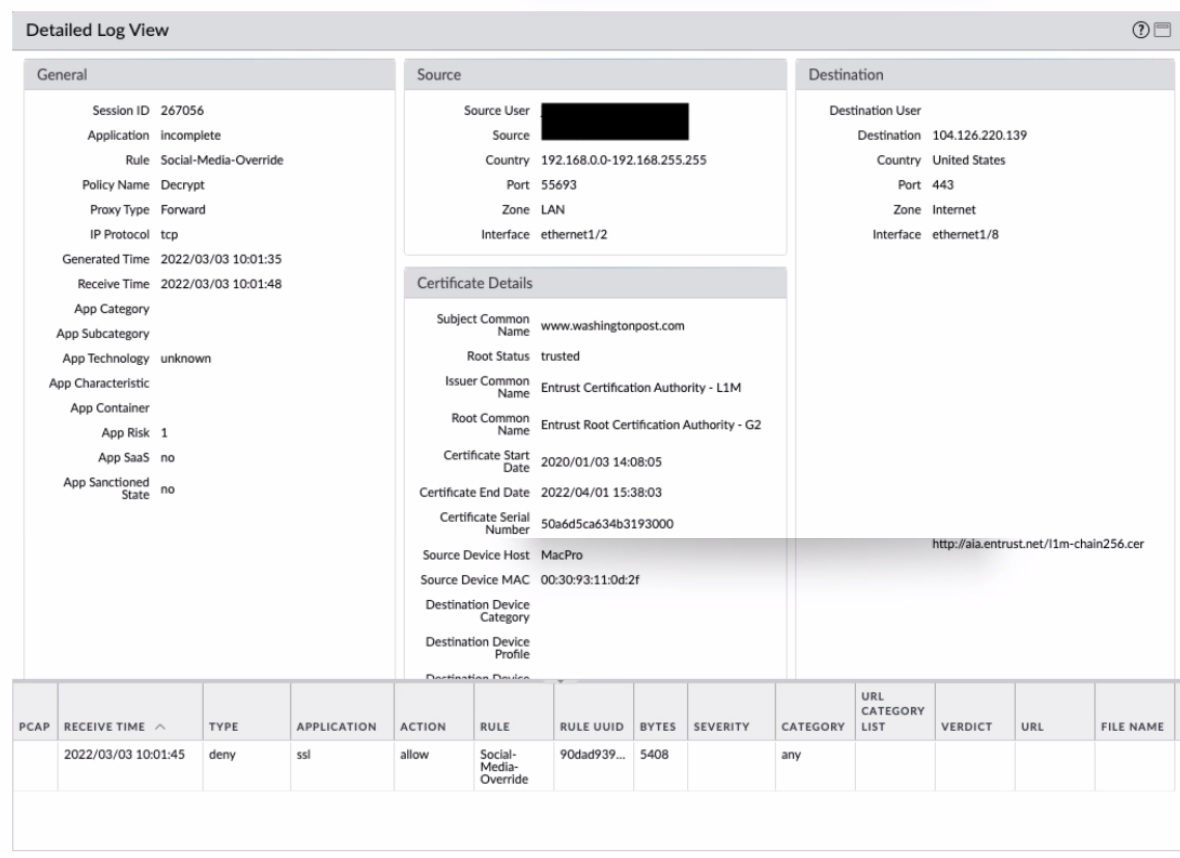
Review the screenshots.

What is the most likely reason for this decryption error log?
Show answerHide answer

Correct answer: C The client received a CA certificate that has expired or is not valid.

Explanation

Explanation:

Key Evidence from the Log:
1.Certificate Details:
Issuer: Entrust Certification Authority - L1M
Root CA: Entrust Root Certification Authority - G2 (trusted).
Expiry Date: 2022/04/01 15:38:03 (log timestamp: 2022/03/03).
The certificate was still valid at the time of the session, but the log shows a deny action.
2.Error Context:
Action: deny (blocked by rule Social-Media-Override).
Application: ssl (TLS/SSL handshake failure).
3.Possible Causes:
Intermediate CA (L1M) expired/revoked: Though the root CA is trusted, the chain might be broken.
Certificate validation failure: The firewall or client rejected the intermediate CA.

Why Not Other Options?
ANo mention of fingerprint mismatch in the log.
BThe log confirms the expected CA (Entrust).
DEntrust is trusted (Root CA is listed as trusted).

Root Cause Analysis:
The intermediate CA (L1M) might have been:
Revoked (not shown in the log but plausible).
Expired post-log (though the log shows it was valid at the time).
The firewall’s decryption profile likely enforced strict validation, rejecting the chain.

Reference:
Palo Alto Decryption Troubleshooting:
"Denied SSL sessions often result from invalid intermediate CA certificates or revocation checks."
Question 34 Choose 1
An administrator needs to build Security rules in a Device Group that allow traffic to specific users and groups defined in Active Directory. What must be configured in order to select users and groups for those rules from Panorama?
Show answerHide answer

Correct answer: D A master device with Group Mapping configured must be set in the device group where the Security rules are configured.

Explanation

Explanation:
To allow an administrator to select users and groups from Active Directory (AD) when building security rules in a Panorama Device Group, the Group Mapping configuration must be a part of a Master Device within that Device Group.

1.Master Device:
In a Panorama Device Group, a "Master Device" is the firewall that serves as the source of configuration for shared settings, including User-ID and Group Mapping. By designating a firewall as the master, Panorama pulls the user and group information that the firewall has learned from Active Directory.
2.Group Mapping:
This is the specific configuration that tells the Palo Alto Networks firewall how to connect to Active Directory (via LDAP) to pull user group information. The firewall queries AD and creates a mapping of users to their group memberships. This is the crucial step that makes AD groups available for use in security policies.
By making one of the firewalls a master device and ensuring it has a correctly configured Group Mapping, Panorama can then retrieve the user and group information from that device. This information becomes visible in Panorama's user and group selectors, allowing the administrator to build rules using AD groups for any firewall in that device group.

Why the other options are incorrect:
A. A User-ID Certificate profile must be configured on Panorama:
A certificate profile is used for authenticating with various services, but it is not the mechanism for pulling user and group mappings from a directory server. That is the job of Group Mapping.
B. The Security rules must be targeted to a firewall in the device group and have Group Mapping configured:
While Group Mapping must be configured, it is not configured on the security rules themselves. It is a separate configuration on the firewall, and its information is then made available to Panorama.
C. User-ID Redistribution must be configured on Panorama to ensure that all firewalls have the same mappings:
User-ID Redistribution is used to share user-to-IP address mappings among firewalls. This is different from Group Mapping, which is about mapping usernames to group memberships. While both are related to User-ID, Redistribution itself doesn't make the AD groups selectable in Panorama's rule-building interface.
Question 35 Choose 2
A consultant advises a client on designing an explicit Web Proxy deployment on PAN-OS 11 0 The client currently uses RADIUS authentication in their environment. Which two pieces of information should the consultant provide regarding Web Proxy authentication? (Choose two.)
Show answerHide answer

Correct answer: A, D Kerberos or SAML authentication need to be configured RADIUS is not supported for explicit or transparent Web Proxy

Explanation

Explanation:
PAN-OS 11.0 explicit Web Proxy supports only Kerberos, SAML, and Cloud Identity Engine for authentication. RADIUS is not supported for either explicit or transparent proxy modes.

A. Kerberos or SAML authentication need to be configured
✔️ Correct — These are the supported methods for explicit proxy authentication in PAN-OS 11.0 Reference:
Palo Alto TechDocs – Configure Authentication for Explicit Web Proxy
D. RADIUS is not supported for explicit or transparent Web Proxy
✔️ Correct — RADIUS is not a supported authentication method for either proxy mode

❌ Incorrect Options:
B. LDAP or TACACS+ authentication need to be configured
❌ LDAP/TACACS+ are not supported for Web Proxy authentication in PAN-OS 11.0
C. RADIUS is only supported for a transparent Web Proxy
❌ Misleading — RADIUS is not supported for transparent proxy either
Question 36 Select all that apply
An engineer is configuring a firewall with three interfaces:
  • MGT connects to a switch with internet access.
  • Ethernet1/1 connects to an edge router.
  • Ethernet1/2 connects to a visualization network.
The engineer needs to configure dynamic updates to use a data plane interface for internet traffic. What should be configured in Setup > Services > Service Route Configuration to allow this traffic?
Show answerHide answer

Correct answer: A Set DNS and Palo Alto Networks Services to use the ethernet1/1 source interface.

Explanation

Explanation:

Why This Option?
1.Service Route Configuration Purpose:
Determines which interface is used for outbound management traffic (e.g., DNS, updates, license checks).
By default, the MGT interface is used, but this can be overridden to use a data plane interface (e.g., ethernet1/1).
2.Key Requirements:
Dynamic updates (e.g., threat updates, PAN-DB URL filtering) require internet access.
The edge router-connected interface (ethernet1/1) is the logical choice for internet-bound traffic.
3.Configuration Steps:
Navigate to: Setup > Services > Service Route Configuration.
Set DNS and Palo Alto Networks Services to use ethernet1/1 as the source interface.

Why Not Other Options?
B (ethernet1/2)
Visualization network likely lacks internet access.
C/D (MGT)
Defeats the goal of using a data plane interface for updates.
D (DDNS)
Dynamic DNS is irrelevant for threat/update traffic.

Reference:
Palo Alto Admin Guide (Service Routes):
"Service routes allow dynamic updates to use data plane interfaces for internet access."
Question 37 Choose 1
An administrator is required to create an application-based Security policy rule to allow Evernote. The Evernote application implicitly uses SSL and web browsing. What is the minimum the administrator needs to configure in the Security rule to allow only Evernote?
Show answerHide answer

Correct answer: D Add only the Evernote application to the Security policy rule.

Explanation

Explanation:

Palo Alto Networks firewalls use App-ID, a patented technology that identifies applications regardless of the port, protocol, or encryption used. App-ID works by using multiple classification techniques, including application signatures, protocol decoding, and heuristics, to accurately identify the application running on the network.
When you add the Evernote application to a security policy, the firewall's App-ID engine takes care of identifying and allowing all the necessary components for that application to function correctly, including its implicit use of SSL and web browsing.

App-ID Dependency:
The firewall understands the dependencies of applications. For example, it knows that Evernote traffic includes both the core Evernote application traffic and the underlying SSL and web-browsing protocols that it uses to communicate.
Default Behavior:
By default, when you select a higher-level application like evernote, the firewall implicitly allows the dependent applications like ssl and web-browsing. You don't need to manually add them to the rule. Doing so would be redundant and could potentially open up your network to unwanted traffic from other applications that also use SSL and web-browsing.
Therefore, the minimum and most secure configuration is to add only the Evernote application to the security policy rule. The firewall's App-ID will handle the rest.

The other options are incorrect:
A & C: Adding separate rules or including http and ssl in the same rule would be redundant and less secure. It would allow any traffic using HTTP/SSL to pass through, not just Evernote.
B: Application Override is used to bypass App-ID's default behavior, typically for custom or non-standard applications. It's not the correct approach here, as the firewall already has a signature for Evernote.

References:
App-ID Overview, Create a Security Policy Rule
Question 38 Choose 1
Refer to the diagram. Users at an internal system want to ssh to the SSH server. The server is configured to respond only to the ssh requests coming from IP 172.16.16.1. In order to reach the SSH server only from the Trust zone, which Security rule and NAT rule must be configured on the firewall?
Show answerHide answer

Correct answer: D NAT Rule:
Source Zone: Trust -
Source IP: Any -
Destination Zone: Server -
Destination IP: 172.16.15.10 -
Source Translation: dynamic-ip-and-port / ethernet1/4
Security Rule:
Source Zone: Trust -
Source IP: Any -
Destination Zone: Server -
Destination IP: 172.16.15.10 -
Application: ssh

Explanation

Explanation:
The SSH server is configured to only respond to requests from IP 172.16.16.1. To meet this requirement, the firewall must perform Source NAT so that outbound SSH traffic from the Trust zone appears to originate from that specific IP.
The correct configuration is:

1.NAT Rule:
Source Zone: Trust
Source IP: Any
Destination Zone: Server
Destination IP: 172.16.15.10
Source Translation: dynamic-ip-and-port / ethernet1/4

2.Security Rule:
Source Zone: Trust
Source IP: Any
Destination Zone: Server
Destination IP: 172.16.15.10
Application: ssh

3.This setup ensures:
Traffic from internal users is NATed to the expected source IP.
The SSH server receives traffic that matches its configured source filter.
The firewall allows the traffic through the correct zones and application.

📘 Reference:
Verified via Exam4Training PCNSE Question #71 and Ace4Sure PCNSE Scenario
Question 39 Choose 1
Which GlobalProtect gateway selling is required to enable split-tunneling by access route, destination domain, and application?
Show answerHide answer

Correct answer: B Tunnel mode

Explanation

Explanation:

Why Tunnel Mode?
1.Split-Tunneling Granularity:
Tunnel mode is the only GlobalProtect gateway setting that supports split-tunneling by access route, destination domain, and application simultaneously.
It allows administrators to define:
Access Routes: Specific IP subnets to tunnel (e.g., corporate networks).
Domains: Destination domains (e.g., *.company.com) to tunnel.
Applications: Specific executables (e.g., outlook.exe) to tunnel.

2.How It Works:
Traffic matching any of these criteria is routed through the VPN tunnel.
Non-matching traffic (e.g., general web browsing) accesses the internet directly.

Why Not Other Options?
ADisables split-tunneling entirely (forces all traffic through VPN).
CIPSec mode is legacy and does not support domain/application-based split-tunneling.
DSatellite mode is for cloud gateways and lacks granular split-tunneling controls.

Configuration Steps:
Navigate to: Network > GlobalProtect > Gateways > [Gateway] > Agent > Split Tunnel.
Set Tunnel Mode = Enabled.
Configure:
Access Routes (e.g., 10.0.0.0/8).
Domains (e.g., *.internal.com).
Applications (e.g., ms-outlook.exe).

Reference:
Palo Alto GlobalProtect Admin Guide
"Tunnel mode enables advanced split-tunneling by access route, domain, and application."
Question 40 Choose 2
An engineer is deploying multiple firewalls with common configuration in Panorama. What are two benefits of using nested device groups? (Choose two.)
Show answerHide answer

Correct answer: A, D Inherit settings from the Shared groupInherit parent Security policy rules and objects

Explanation

Explanation:
The scenario involves an engineer deploying multiple firewalls with a common configuration using Panorama, and the question asks for two benefits of using nested device groups. Nested device groups in Panorama allow for a hierarchical structure where settings and policies can be inherited from parent groups, providing flexibility and centralized management. Let’s evaluate the options to determine the correct benefits.

Why A. Inherit settings from the Shared group?
Purpose: In Panorama, the Shared group is a top-level container that holds configurations (e.g., network settings, templates, and objects) applicable to all device groups unless overridden. Nested device groups can inherit these settings, allowing the engineer to define common configurations (e.g., DNS, NTP, or interface settings) at the Shared level and apply them to all firewalls, reducing redundancy.
Benefit: This enables consistent baseline configurations across all firewalls while allowing nested groups to customize specific settings as needed. It simplifies management by centralizing common settings.
Reference:
Palo Alto Networks documentation states, "Nested device groups can inherit settings from the Shared group, providing a foundation for common configurations."

Why D. Inherit parent Security policy rules and objects?
Purpose: Nested device groups inherit Security policy rules and objects (e.g., addresses, services, applications) from their parent device groups. This hierarchical inheritance allows the engineer to define broad policies at a higher-level parent group (e.g., allowing HTTP traffic) and refine or add specific rules in lower-level nested groups (e.g., restricting HTTP to certain users), tailoring policies to specific firewall subsets.
Benefit: It promotes reusability and consistency across firewalls while enabling granular control. Changes at the parent level automatically propagate to nested groups unless overridden, streamlining policy management.
Reference:
Palo Alto Networks documentation notes, "Nested device groups inherit Security policy rules and objects from parent groups, allowing for layered policy design."

Why Not the Other Options?
B. Inherit IPSec crypto profiles:
Explanation: IPSec crypto profiles (e.g., encryption algorithms, authentication methods) are configured within network templates or template stacks, not device groups. Device groups handle policies (e.g., Security, NAT), while templates manage network and device settings (e.g., IPSec profiles). Nested device groups do not inherit IPSec crypto profiles directly; these are inherited via template stacks.
Why Incorrect:
This is a template-level setting, not a device group benefit.

C. Inherit all Security policy rules and objects:
Explanation: This option suggests inheritance from all levels (e.g., Shared and all parent groups), but nested device groups inherit only from their immediate parent group in the hierarchy, not all groups. They can also inherit from the Shared group independently. The inheritance is selective and hierarchical, not a blanket inheritance of all rules and objects. Why Incorrect: This overstates the scope of inheritance; it’s limited to the parent group’s rules and objects.

Additional Context:
Nested Device Groups: These are organized in a parent-child hierarchy within Panorama. For example, a parent group might contain baseline Security rules, while a child group adds specific exceptions. The Shared group provides a global baseline.

Configuration Steps:
Navigate to Panorama > Device Groups.
Create a parent device group (e.g., "Global-Policies") and a nested group (e.g., "Regional-Policies").
Define common settings/rules in the Shared group and parent group, then refine in the nested group.
Push the configuration to the firewalls.

Best Practices:
Use nested groups to reflect organizational structure (e.g., regions, departments).
Minimize overrides to maintain consistency.
Test policy inheritance with Panorama > Preview Changes.

PCNSE Exam Relevance:
This question tests your understanding of Panorama’s device group hierarchy and inheritance, a key topic in the PCNSE exam. It requires knowledge of how nested groups enhance configuration management.

Conclusion:
Two benefits of using nested device groups are that they inherit settings from the Shared group (providing a common baseline) and inherit parent Security policy rules and objects (enabling layered policy design), improving efficiency and consistency across multiple firewalls.

References:
Palo Alto Networks Documentation: Panorama Device Groups and Inheritance
Palo Alto Networks Documentation: Nested Device Group Configuration
ExamTopics PCNSE Discussion: Panorama Nested Groups
Full mock exam

Sit the PCNSE exam before exam day

Full-length mocks with the same number of questions and the same time limit as the real PCNSE exam. Every attempt draws a new set of questions from the full bank, so you can keep going until you pass comfortably.

Get full PCNSE mock exam
  • 65questions per mock
  • 105 mintime limit
  • 321questions in the bank
  • Newmock on every attempt