Palo Alto Networks certification · Exam PCNSE

PCNSE Mock Exam Page 3

Palo Alto Networks Certified Security Engineer (PCNSE) PAN-OS 10.2

Free PCNSE mock exam questions 21–30, each with the answer and an explanation.

20 questions · 33 minutes · free, no sign-up

Free PCNSE questions

21–30 of 96 free
Question 21
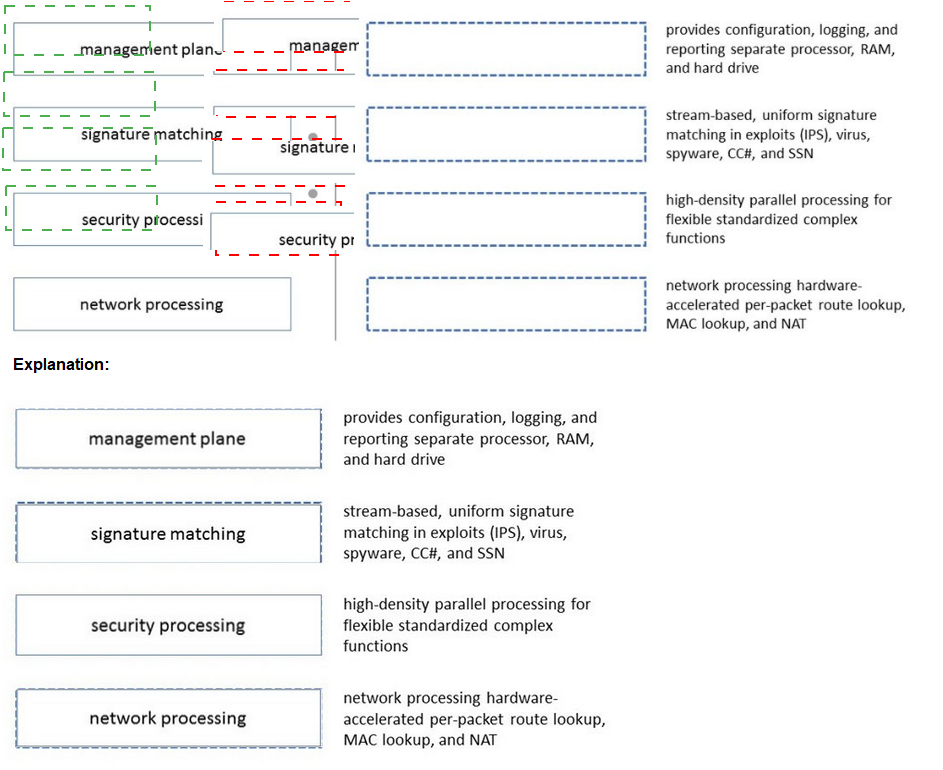
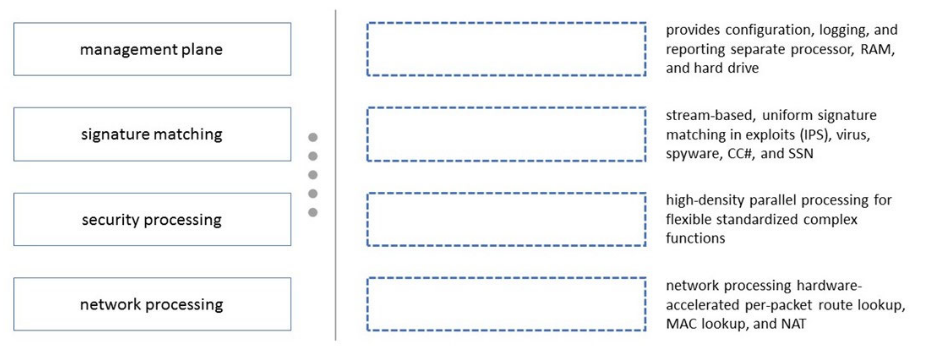
Please match the terms to their corresponding definitions.
Show answerHide answer

Explanation


Explanation:

1.management plane:
This plane handles administrative tasks such as configuration, logging, and reporting. It is supported by a separate processor, RAM, and hard drive to ensure these tasks do not interfere with real-time traffic processing.
2.signature matching:
This involves identifying threats using stream-based, uniform signature matching techniques. It targets exploits (via Intrusion Prevention System - IPS), viruses, spyware, command-and-control (C2) traffic, and stolen sensitive data (SSN).
3.security processing:
This plane performs advanced security functions using high-density parallel processing, enabling flexible and standardized handling of complex security tasks across multiple cores or processors.
4.network processing:
This focuses on network-related tasks, leveraging hardware-accelerated processing for per-packet route lookups, MAC address lookups, and Network Address Translation (NAT) to optimize performance.
These mappings align with the Palo Alto Networks firewall architecture, where different planes are dedicated to specific functions, supported by specialized hardware or processing capabilities. This design ensures efficient handling of management, security, and network tasks.

References:
Palo Alto Networks Documentation:
Firewall Architecture Overview
Palo Alto Networks Technical Whitepapers:
Single-Pass Parallel Processing Architecture
Question 22 Choose 1
An administrator has a Palo Alto Networks NGFW. All security subscriptions and decryption are enabled and the system is running close to its resource limits. Knowing that using decryption can be resource-intensive, how can the administrator reduce the load on the firewall?
Show answerHide answer

Correct answer: C Use ECDSA instead of RSA for traffic that isn't sensitive or high-priority.

Explanation

Explanation:

Why ECDSA Over RSA?
1.Performance Impact:
ECDSA (Elliptic Curve Cryptography) is less CPU-intensive than RSA for decryption, especially for bulk traffic.
RSA relies on large prime numbers, requiring more computational power for key exchanges and signing operations.
Switching non-sensitive traffic to ECDSA reduces decryption overhead while maintaining security.
2.Resource Optimization:
The firewall is near capacity, so optimizing decryption efficiency is critical.
ECDSA provides comparable security to RSA with shorter key lengths (e.g., 256-bit ECDSA ≈ 3072-bit RSA)

. Why Not the Other Options?
A. Use RSA
Increases load (RSA is more resource-intensive than ECDSA).
B. Highest TLS version
TLS 1.3 improves security but doesn’t reduce decryption load (may even increase it).
D. SSL Forward Proxy
Irrelevant—this is for outbound decryption, not reducing resource usage.

Additional Optimization Tips:
Exclude low-risk traffic from decryption (e.g., public websites).
Use Session Timeouts to limit long-lived decrypted sessions.
Monitor Decryption Profiles to fine-tune policies.

Reference:
Palo Alto Networks Decryption Best Practices:
"ECDSA is recommended for reducing CPU load during decryption, particularly for non-critical traffic."
Question 23 Choose 1
Which Panorama mode should be used so that all logs are sent to. and only stored in. Cortex Data Lake?
Show answerHide answer

Correct answer: D Management Only

Explanation

Explanation:

Recall Panorama Deployment Modes
1.Panorama Mode
Full management + log collection.
Logs stored locally (Panorama / Dedicated Log Collectors).
2.Log Collector Mode
Panorama works only as a log collector.
Stores logs locally.
3.Legacy Mode
Pre–PAN-OS 8.0, combined mgmt + logging.
Deprecated.
4.Management Only Mode
Panorama manages devices (device-groups, templates, policies).
Does not store logs locally.
All logs can be forwarded to Cortex Data Lake (CDL).
✔ Exactly what the question requires.

Evaluate the options
A. Log Collector → Stores logs locally → ❌
B. Panorama → Stores logs locally → ❌
C. Legacy → Deprecated, still stores locally → ❌
D. Management Only → Sends logs only to Cortex Data Lake → ✅

Official Reference
Palo Alto Networks – Panorama Deployment Modes
“Use Management Only mode if you want Panorama to manage firewalls while all logs are forwarded to Cortex Data Lake, with no local log storage.”
Question 24 Choose 1
An engineer is troubleshooting a traffic-routing issue. What is the correct packet-flow sequence?
Show answerHide answer

Correct answer: C PBF > Static route > Security policy enforcement

Explanation

Explanation:

Why This Sequence?
1.Policy-Based Forwarding (PBF):
Evaluated first (before routing).
Overrides normal routing if a matching PBF rule exists.
2.Static Route (or Routing Table):
If no PBF match, the firewall checks the routing table (static/dynamic routes).
3.Security Policy Enforcement:
After routing is determined, traffic must pass security policies before egress.

Why Not Other Options?
AZone Protection and Packet Buffer Protection are security features, not routing steps.
BGP is a routing protocol (processed after PBF, but NAT happens before routing).
DOSPF is a routing protocol (evaluated after NAT and security policies).

Reference:
Palo Alto Packet Flow Order:
PBF → 2. Routing (Static/Dynamic) → 3. Security Policies → 4. Egress.
Question 25 Choose 2
Which two profiles should be configured when sharing tags from threat logs with a remote User-ID agent? (Choose two.)
Show answerHide answer

Correct answer: B, C HTTPLog Forwarding

Explanation

Explanation:

1. Recall how tag sharing works
Palo Alto firewalls can tag IPs based on log events (e.g., threat logs, traffic logs).
Those tags can be exported to a remote User-ID agent for consumption (for example, to populate Dynamic Address Groups).
To make this happen, you need two things:
A Log Forwarding profile to send the log entries.
An HTTP profile to define how logs are forwarded (via XML API to the User-ID agent).

2. Analyze the options
A. Log Ingestion
Not a configurable profile in PAN-OS. PAN-OS ingests logs, but this isn’t a profile type you configure. ❌
B. HTTP
✅ Yes. You need an HTTP Server Profile that defines how logs are sent (destination = User-ID agent or Cortex Data Lake, etc.).
C. Log Forwarding
✅ Yes. You attach a Log Forwarding Profile to the security rule or threat log, specifying that logs should be forwarded to the HTTP server.
D. LDAP
LDAP profiles are used for authentication and group mapping, not for sharing tags via logs. ❌

📖 Reference
Palo Alto Networks:
Forward Logs to an HTTP Destination
Palo Alto Networks:
Use Log Forwarding to Tag/Detag
Question 26 Choose 1

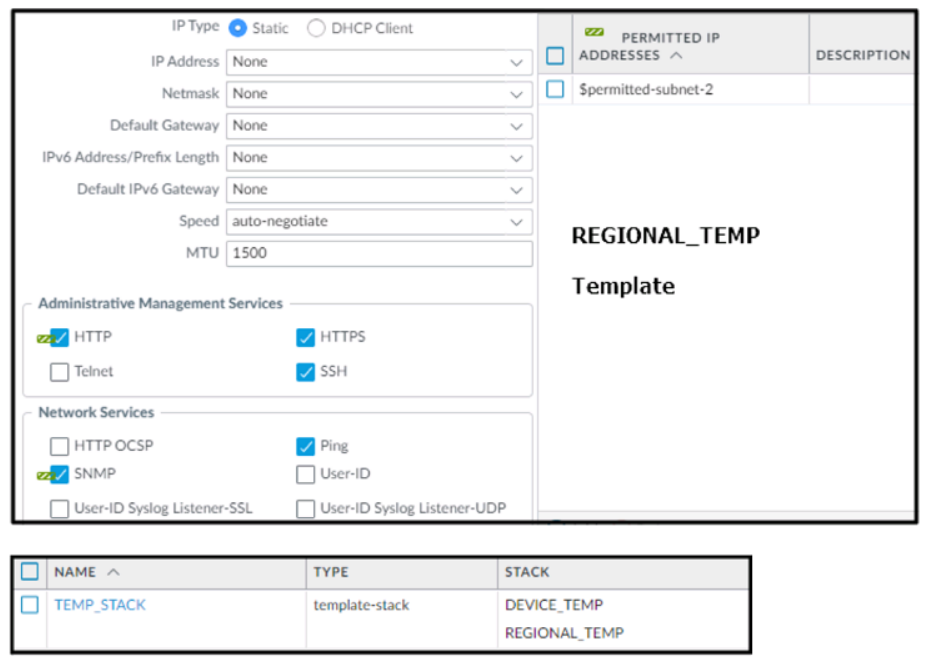
Based on the screenshots above, and with no configuration inside the Template Stack itself, what access will the device permit on its Management port?
Show answerHide answer

Correct answer: B The firewall will allow HTTP Telnet, HTTPS, SSH, and Ping from IP addresses defined as $permitted-subnet-2.

Explanation

Explanation:

Key Observations from the Screenshot:
1.Administrative Management Services:
Enabled Services: HTTP, HTTPS, Telnet, SSH (explicitly listed).
Disabled Services: No mention of SNMP (though it appears under Network Services, it is not enabled for management access).
2.Permitted IP Addresses:
Only $permitted-subnet-2 is configured under PERMITTED IP ADDRESSES.
$permitted-subnet-1 is not listed, so it is not allowed.
3.Network Services:
Ping is enabled (under Network Services), but SNMP and others are separate from management access controls.

Why Not Other Options?
AIncorrectly includes $permitted-subnet-1, which is not configured.
CIncorrectly includes SNMP (not enabled for management) and $permitted-subnet-1.
DIncorrectly includes $permitted-subnet-1, which is absent.

Access Summary:
Allowed Protocols: HTTP, Telnet, HTTPS, SSH, Ping.
Permitted Source IPs: Only $permitted-subnet-2.

Reference:
Palo Alto Management Interface Documentation:
"Permitted IP addresses restrict management access to explicitly defined subnets."
Question 27 Choose 1
Which CLI command displays the physical media that are connected to ethernet1/8?
Show answerHide answer

Correct answer: B > show system state filter-pretty sys.sl.p8.phy

Explanation

Explanation:
The question asks for the CLI command that displays the physical media connected to ethernet1/8 on a Palo Alto Networks firewall. This requires identifying a command that provides detailed interface information, specifically related to the physical layer (e.g., media type, connection status). Let’s evaluate the options to determine the correct one.

Why > show system state filter-pretty sys.sl.p8.phy?
Purpose:
The show system state filter-pretty command is used to display detailed system state information in a human-readable format, filtered by specific parameters. The filter sys.sl.p8.phy targets the physical layer details of slot 1, port 8 (corresponding to ethernet1/8, where "p8" denotes port 8). This command provides information about the physical media, such as the type of cable or connection (e.g., copper, fiber) and its status.
Output:
The command will display details like the media type, link state, and speed/duplex settings for ethernet1/8. This is useful for troubleshooting physical connectivity issues.
Syntax Breakdown:
sys: System state.
sl: Slot (typically 1 for most firewalls, as ethernet1/8 is in slot 1).
p8: Port 8 (matching ethernet1/8).
phy: Physical layer information.
Reference:
Palo Alto Networks CLI Reference Guide indicates that show system state filter-pretty sys.sl.pX.phy is used to view physical media details for a specific port, where pX is the port number.

Why Not the Other Options?
A. > show system state filter-pretty sys.si.p8.stats:
Explanation:
The filter sys.si.p8.stats likely refers to interface statistics (e.g., packet counters) for port 8 in slot 1. While this provides performance data, it does not specifically display physical media details (e.g., cable type or connection status).
Why Incorrect: This command focuses on statistics, not physical media.
C. > show system state filter-pretty sys.sl.p8.med:
Explanation:
The filter sys.sl.p8.med appears to be a typo or incorrect syntax. There is no standard med parameter in the show system state command for physical media; the correct term is phy for physical layer details. This command would likely return no meaningful output or an error.
Why Incorrect: Invalid filter syntax makes this option non-functional.
D. > show interface ethernet1/8:
Explanation:
The show interface ethernet1/8 command displays operational status and configuration details for the specified interface, including IP address, speed, duplex, and link state. While it provides some physical layer information (e.g., link up/down), it is less detailed than the show system state filter-pretty sys.sl.p8.phy command for physical media specifics (e.g., media type).
Why Incorrect: This command is broader and less targeted to physical media details compared to the correct option.

Additional Context:
Interface Naming: On Palo Alto Networks firewalls, ethernet1/8 refers to slot 1, port 8. The CLI uses this notation to identify physical interfaces.
Troubleshooting Tip: To verify physical connectivity, use > show system state filter-pretty sys.sl.p8.phy alongside > show interface ethernet1/8 for a comprehensive view. Best Practices:
Check cable type and compatibility (e.g., copper vs. fiber) using the physical media details. Ensure the interface is administratively up (> configure; set interface ethernet1/8 enable yes).
PCNSE Exam Relevance: This question tests your knowledge of CLI commands for interface troubleshooting, a key skill in the PCNSE exam. It requires understanding the nuances of show system state filters.

Conclusion:
The CLI command that displays the physical media connected to ethernet1/8 is > show system state filter-pretty sys.sl.p8.phy, as it specifically targets the physical layer details for that port.

References:
Palo Alto Networks CLI Reference Guide: System State Commands
Palo Alto Networks Documentation: Interface Management
ExamTopics PCNSE Discussion: CLI Interface Commands
Question 28 Choose 1
After implementing a new NGFW, a firewall engineer sees a VoIP traffic issue going through the firewall After troubleshooting the engineer finds that the firewall performs NAT on the voice packets payload and opens dynamic pinholes for media ports What can the engineer do to solve the VoIP traffic issue?
Show answerHide answer

Correct answer: D Disable ALG under SIP application

Explanation

Explanation:

Why Disable SIP ALG?
1.The Problem:
The firewall is modifying SIP/H.323 payloads (e.g., NATing internal IPs/ports in VoIP packets).
This breaks VoIP signaling, as endpoints expect original headers for media negotiation.
2.The Cause:
SIP ALG (Application Layer Gateway) is enabled by default on NGFWs.
ALG inspects and rewrites SIP/H.323 packets, often misinterpreting VoIP traffic.
3.The Fix:
Disabling SIP ALG stops the firewall from:
Altering SIP packet payloads.
Opening incorrect dynamic pinholes for RTP/RTCP media streams.

Steps to Disable SIP ALG:
Navigate to: Device > Setup > Session
Under Application Identification, uncheck:
SIP (and optionally H.323 if used).

Why Not Other Options?
A.H.323 ALG is unrelated if SIP is the primary VoIP protocol.
B/C.Timeout adjustments don’t fix NAT-induced payload corruption.

Additional VoIP Best Practices:
Use dedicated SIP security profiles (e.g., allow only SIP/RTP/RTCP).
Ensure NAT policies exclude VoIP traffic (or use static NAT).

Reference:
Palo Alto VoIP Troubleshooting Guide:
"Disable SIP ALG when endpoints handle NAT traversal independently (e.g., via STUN/ICE)."
Question 29 Choose 1
Following a review of firewall logs for traffic generated by malicious activity, how can an administrator confirm that WildFire has identified a virus?
Show answerHide answer

Correct answer: A By navigating to Monitor > Logs > WildFire Submissions, applying filter "(subtype eq wildfire-virus)"

Explanation

Explanation:
To confirm that WildFire has identified a virus, the administrator must check the WildFire Submissions log. This log specifically tracks files submitted to WildFire and their verdicts.
The filter (subtype eq wildfire-virus) targets entries where WildFire has classified a file as malware (virus).
Threat logs (options B and D) show broader threat activity but do not confirm WildFire verdicts.
Traffic logs (option C) do not contain WildFire verdicts at all.

📘 Reference:
WildFire Log Review – Palo Alto Networks
PCNSE WildFire Log Filter Guide
Question 30 Choose 1
A company requires that a specific set of ciphers be used when remotely managing their Palo Alto Networks appliances. Which profile should be configured in order to achieve this?
Show answerHide answer

Correct answer: B SSL/TLS Service profile

Explanation

Explanation:

Why SSL/TLS Service Profile?
1.Purpose:
The SSL/TLS Service Profile controls the cipher suites and protocols used for:
HTTPS management access (web interface).
API/CLI over TLS (e.g., Panorama communications).
2.Configuration:
Navigate to Device > Certificate Management > SSL/TLS Service Profile.
Specify allowed protocols (TLS 1.2/1.3) and custom cipher suites (e.g., AES256-GCM-SHA384).

Why Not Other Options?
A. SSH Service Profile
Only governs SSH ciphers (not HTTPS/API).
C. Certificate Profile
Defines trust for certificates, not cipher enforcement.
D. Decryption Profile
Used for traffic inspection, not management plane crypto.

Key Notes:
SSH Service Profile (Option A) is separate and controls SSH-specific ciphers (e.g., for CLI access).
Changes require commit and restart of management services.

Reference:
Palo Alto Admin Guide (SSL/TLS Profiles):
"SSL/TLS Service Profiles enforce cipher requirements for management interfaces."
Full mock exam

Sit the PCNSE exam before exam day

Full-length mocks with the same number of questions and the same time limit as the real PCNSE exam. Every attempt draws a new set of questions from the full bank, so you can keep going until you pass comfortably.

Get full PCNSE mock exam
  • 65questions per mock
  • 105 mintime limit
  • 321questions in the bank
  • Newmock on every attempt