Palo Alto Networks certification · Exam PCNSE

PCNSE Mock Exam Page 7

Palo Alto Networks Certified Security Engineer (PCNSE) PAN-OS 10.2

Free PCNSE mock exam questions 61–70, each with the answer and an explanation.

20 questions · 33 minutes · free, no sign-up

Free PCNSE questions

61–70 of 96 free
Question 61 Choose 1
A firewall administrator needs to check which egress interface the firewall will use to route the IP 10.2.5.3. Which command should they use?
Show answerHide answer

Correct answer: D test routing fib-lookup ip 10.2.5.3 virtual-router default

Explanation

Explanation:

Why This Command?
1.Purpose:
The command test routing fib-lookup checks the Forwarding Information Base (FIB) to determine the egress interface for a specific IP.
It simulates how the firewall will route the packet.

Syntax:
test routing fib-lookup ip virtual-router

Example:
test routing fib-lookup ip 10.2.5.3 virtual-router default

Why Not Other Options?
A.Invalid syntax (missing virtual-router parameter).
B.test routing route is for checking route table, not FIB.
C.Uses a subnet (10.2.5.0/24) instead of the specific IP (10.2.5.3).

Key Difference:
FIB is the optimized forwarding table derived from the routing table.
fib-lookup gives the actual egress interface, while route shows route table matches.

Reference:
Palo Alto CLI Reference:
"Use test routing fib-lookup to determine the egress interface for a destination IP."
Question 62 Choose 2
Which two actions must an engineer take to configure SSL Forward Proxy decryption? (Choose two.)
Show answerHide answer

Correct answer: B, C Define a Forward Trust CertificateConfigure SSL decryption rules

Explanation

Explanation:
To deploy SSL Forward Proxy decryption, an engineer must perform a series of steps. The two most fundamental are:

Define a Forward Trust Certificate (B):
The firewall must act as a trusted intermediary. To do this, it needs to have a Forward Trust Certificate, which is a Certificate Authority (CA) certificate that is trusted by the clients on the network. The firewall will use this certificate to sign the new, dynamically generated certificates it presents to the clients during the decryption process. Without this trusted CA, clients will receive certificate errors.

Configure SSL decryption rules (C):
After the certificate is in place, the engineer must create a decryption rule. This rule specifies which traffic to decrypt (e.g., all traffic, specific applications, specific URLs). The action of the rule is set to Decrypt, which tells the firewall to perform a man-in-the-middle decryption on the matching traffic.
The other options are important but are secondary to these two core actions:
A. Configure the decryption profile:
A decryption profile is an object that defines the details of the decryption process (e.g., protocols, ciphers, handling of untrusted certificates). It is an essential part of a best-practice decryption policy, but the policy itself (the rule) must be configured to use it.

D. Configure a SSL/TLS service profile:
This profile is used to secure the firewall's own management services, not to decrypt traffic passing through the firewall.
Question 63 Choose 1
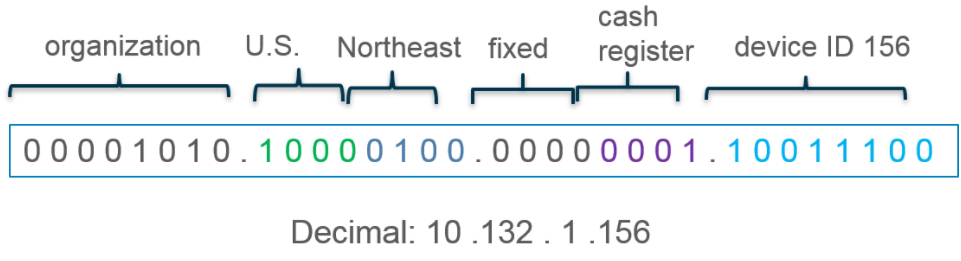
What type of address object would be useful for internal devices where the addressing structure assigns meaning to certain bits in the address, as illustrated in the diagram?
Show answerHide answer

Correct answer: B IP Wildcard Mask

Explanation

Explanation:

Why Wildcard Mask?
1.Address Structure with Meaningful Bits:
The diagram shows an IP address (10.132.1.156) where certain bits represent specific attributes (e.g., organization, region, device type).
To create an address object that matches devices based on these meaningful bits (ignoring others), a wildcard mask is ideal.
2.Wildcard Mask Flexibility:
Unlike a subnet mask (which matches contiguous bits), a wildcard mask allows selective matching of non-contiguous bits.
Example:
To match all devices in the "Northeast" region (regardless of other attributes), set wildcard bits to 0 for fixed bits and 1 for variable bits.

Why Not Other Options?
A. IP Netmask
Only matches contiguous networks (e.g., 10.132.1.0/24), not arbitrary bits.
C. IP Address
Matches a single IP, not a group.
D. IP Range
Matches a sequential range, not bit-based patterns.

Example Configuration:
To match all Northeast devices (assuming bits 8-15 represent region):
Address: 10.132.0.0
Wildcard Mask: 0.0.255.255 (ignore last two octets).

Reference:
Palo Alto Address Objects Guide:
"Wildcard masks enable matching based on arbitrary bit positions in IP addresses."
Question 64 Choose 1
What does SSL decryption require to establish a firewall as a trusted third party and to establish trust between a client and server to secure an SSL/TLS connection'?
Show answerHide answer

Correct answer: A certificates

Explanation

Explanation:
To establish a Palo Alto Networks firewall as a trusted third party for SSL/TLS decryption, the firewall must use certificates—specifically:
A Forward Trust Certificate:
Used to sign impersonated server certificates during SSL Forward Proxy. This certificate must:
Be a CA certificate
Include the private key
Be trusted by client devices (either self-signed and distributed, or signed by an enterprise CA)
A Forward Untrust Certificate:
Presented to clients when the firewall encounters a server certificate that is untrusted, ensuring users receive proper warnings.
These certificates allow the firewall to intercept, decrypt, inspect, and re-encrypt SSL/TLS traffic while maintaining trust between client and server.

📘 Authoritative Source:
Palo Alto Networks – Configure SSL Forward Proxy
Question 65 Choose 1
Which log type would provide information about traffic blocked by a Zone Protection profile?
Show answerHide answer

Correct answer: D Threat

Explanation

Explanation:
The question asks which log type would provide information about traffic blocked by a Zone Protection profile on a Palo Alto Networks firewall. A Zone Protection profile is a security feature that protects a zone from various threats, such as floods (e.g., SYN, ICMP), reconnaissance, and packet-based attacks, by defining thresholds and actions (e.g., block, alert). The log type must reflect the security events triggered by these protective actions. Let’s evaluate the options to determine the correct log type.

Why D. Threat?
Purpose: The Threat log (available under Monitor > Logs > Threat) records security events, including traffic blocked or alerted on by security features like Zone Protection profiles, Antivirus, Anti-Spyware, and Vulnerability Protection. When a Zone Protection profile blocks traffic (e.g., due to exceeding a SYN flood threshold), the event is logged as a threat with details such as the source/destination, action (block), and rule name.

Details in Log:
Type: Zone Protection (e.g., "flood" or "reconnaissance").
Action: Block, Alert, or Drop.
Source/Destination: IPs and zones involved.
Rule: The Zone Protection profile name.
Configuration:Enable logging in the Zone Protection profile under Network > Network Profiles > Zone Protection > Flood Protection or Reconnaissance Protection, setting the action to "Block" with logging enabled.
Behavior: The firewall logs the block action in the Threat log when the profile’s thresholds are exceeded, providing visibility into protected traffic.
Reference: Palo Alto Networks documentation states, "Zone Protection profile actions, such as blocking flood traffic, are logged in the Threat log."

Why Not the Other Options?
A. Data Filtering:
Explanation: The Data Filtering log (under Monitor > Logs > Data Filtering) records events related to data loss prevention (DLP) policies, such as file transfers or sensitive data detection. It is unrelated to Zone Protection profiles, which focus on network-layer threats, not content filtering. Why Incorrect: This log type is for DLP, not zone protection.

B. IP-Tag:
Explanation: The IP-Tag log (under Monitor > Logs > IP-Tag) tracks the assignment and expiration of IP-to-User or IP-to-Device mappings by User-ID. It is used for identity-based policies, not for logging traffic blocked by Zone Protection profiles. Why Incorrect: This is for User-ID tracking, not security blocks.

C. Traffic:
Explanation:The Traffic log (under Monitor > Logs > Traffic) records all allowed and denied traffic flows based on Security policies, including source, destination, application, and action (allow/deny). However, blocks due to Zone Protection profiles (e.g., SYN floods) are logged as threats, not traffic, because they are security events triggered by a protection mechanism, not a policy-based deny rule
Why Incorrect:
Traffic logs capture policy-based denials, not Zone Protection blocks.

Additional Context:
Zone Protection Profile: Configured under Network > Network Profiles > Zone Protection, it includes settings for flood protection (e.g., SYN, UDP), reconnaissance protection, and packet-based attack protection. Blocking actions generate threat logs. Log Verification:
Check the Zone Protection profile settings for logging.
Review Monitor > Logs > Threat and filter by "Zone Protection" or "flood".
Use CLI command > show log threat to confirm.

Best Practices:
Set appropriate thresholds to avoid false positives.
Enable alerts for monitoring.
Correlate with Traffic logs for context.
PCNSE Exam Relevance: This question tests your understanding of log types and Zone Protection features, a key topic in the PCNSE exam. It requires knowledge of where security events are logged.

Conclusion:
The log type that provides information about traffic blocked by a Zone Protection profile is the Threat log, as it records security events triggered by the profile’s protective actions.

References:
Palo Alto Networks Documentation: Zone Protection Profiles
Palo Alto Networks Documentation: Threat Log Details
ExamTopics PCNSE Discussion: Zone Protection Logging
Question 66 Choose 1
A network security administrator wants to begin inspecting bulk user HTTPS traffic flows egressing out of the internet edge firewall. Which certificate is the best choice to configure as an SSL Forward Trust certificate?
Show answerHide answer

Correct answer: D A subordinate Certificate Authority certificate signed by the organization's PKI

Explanation

Explanation:

Why a Subordinate CA Certificate?
1.SSL Forward Proxy Trust Model:
The firewall acts as a man-in-the-middle (MITM) for HTTPS traffic.
It generates dynamic certificates for websites visited by users.
These dynamic certificates must be signed by a Certificate Authority (CA) that is trusted by all clients.

2.Benefits of a Subordinate CA:
Signed by the organization's root PKI: Already trusted by all domain-joined clients.
Delegated authority: Allows the firewall to issue certificates without involving the root CA.
Security best practice: Limits exposure of the root CA.

Why Not Other Options?
A. Self-signed CA
Not inherently trusted by clients—requires manual installation on every device.
B. Machine Certificate
Used for firewall identity (e.g., management), not signing dynamic certificates.
C. Web Server Certificate
Issued to servers, not for signing other certificates.

Deployment Steps:
Generate a subordinate CA certificate from the organization’s PKI.
Import it on the firewall under Device > Certificate Management > Certificates.
Reference it in the Decryption Profile (Forward Trust Certificate).

Reference:
Palo Alto Decryption Best Practices:
"Use a subordinate CA from your enterprise PKI as the forward trust certificate for seamless client trust."
Question 67 Choose 3
An administrator is assisting a security engineering team with a decryption rollout for inbound and forward proxy traffic. Incorrect firewall sizing is preventing the team from decrypting all of the traffic they want to decrypt. Which three items should be prioritized for decryption? (Choose three.)
Show answerHide answer

Correct answer: A, C, E Financial, health, and government traffic categories Known malicious IP space Less-trusted internal IP subnets

Explanation

Explanation:
When firewall sizing limits the ability to decrypt all traffic, Palo Alto Networks recommends a staged and prioritized decryption rollout. The goal is to maximize security impact while minimizing resource consumption. The following traffic types should be prioritized:

A. Financial, health, and government traffic categories
✔️ These categories are high-value targets for data exfiltration and fraud. Decrypting them helps detect:
Malware hidden in encrypted sessions
Unauthorized data transfers
Compliance violations

C. Known malicious IP space
✔️ Decrypting traffic to/from known bad IPs allows:
Full inspection of payloads
Detection of command-and-control (C2) activity
Prevention of encrypted malware delivery

E. Less-trusted internal IP subnets
✔️ Internal segments that are not fully trusted (e.g., guest networks, unmanaged devices) should be decrypted to:
Detect lateral movement
Prevent insider threats
Enforce granular security policies

❌ Incorrect Options:
B. Known traffic categories
✖️ These are typically low-risk or well-understood applications (e.g., Microsoft updates, Zoom) and may not need decryption.

D. Public-facing servers
✖️ These are typically handled via SSL Inbound Inspection, not Forward Proxy, and are not bulk user traffic.

Authoritative Source:
Palo Alto Networks – Size the Decryption Firewall Deployment
Question 68 Choose 1
An administrator is troubleshooting intermittent connectivity problems with a user's GlobalProtect connection. Packet captures at the firewall reveal missing UDP packets, suggesting potential packet loss on the connection. The administrator aims to resolve the issue by enforcing an SSL tunnel over TCP specifically for this user. What configuration change is necessary to implement this troubleshooting solution for the user?
Show answerHide answer

Correct answer: C Enable SSL tunnel over TCP in a new agent configuration for the specific user.

Explanation

Explanation:

Why This Option?
1.Problem:
Intermittent connectivity due to UDP packet loss (as seen in packet captures).
Solution: Force the user’s GlobalProtect client to use TCP instead of UDP for reliability.

2.Configuration:
Create a new Agent Configuration (under Network > GlobalProtect > Agent Settings) with:
Tunnel Mode = SSL (which uses TCP port 443).
Assign this configuration to the specific user via User/Group ID or Source IP.

Why Not Other Options?
A.GlobalProtect gateways don’t have per-user SSL tunnel settings—this is configured in agent settings.
B.Prioritizing UDP would worsen the packet loss issue.
D.Bandwidth allocation doesn’t fix packet loss; it only manages throughput.

Steps:
Navigate to: Network > GlobalProtect > Agent Settings > Add.
Set Tunnel Protocol = SSL (forces TCP).
Scope to the user via Source User or Source IP.

Reference:
GlobalProtect Admin Guide:
"Use Agent Configurations to enforce TCP-based SSL tunnels for users experiencing UDP issues."
Question 69 Choose 1
When you import the configuration of an HA pair into Panorama, how do you prevent the import from affecting ongoing traffic?
Show answerHide answer

Correct answer: B Disable config sync.

Explanation

Explanation:

Why Disable Config Sync?
1.HA Pair Behavior:
In an active/passive HA pair, the active firewall handles traffic while the passive firewall syncs configuration and sessions.
When you import the HA pair into Panorama, Panorama pushes configurations to both firewalls.

2.Risk of Disruption:
If the configuration push occurs during sync, it may cause temporary inconsistencies or restart services (e.g., routing daemons).
Disabling config sync temporarily prevents the passive firewall from receiving changes, avoiding disruptions.

3.Safe Import Steps:
Disable config sync on the HA pair:
> set high-availability state-synchronization enabled no Import the configuration into Panorama.
Re-enable config sync after import.

Why Not Other Options?
A.Shutting down the passive link breaks HA integrity (may trigger failover).
C.Disabling HA2 breaks session sync (causes session loss on failover).
D.Disabling HA entirely breaks redundancy and may disrupt traffic.

Reference:
Panorama HA Integration Guide:
"Temporarily disable state synchronization before importing HA configurations to avoid traffic impact."
Question 70 Choose 1
An administrator configures a site-to-site IPsec VPN tunnel between a PA-850 and an external customer on their policy-based VPN devices. What should an administrator configure to route interesting traffic through the VPN tunnel?
Show answerHide answer

Correct answer: A Proxy IDs

Explanation

Explanation:

Why Proxy IDs?
1.Policy-Based VPNs:
For policy-based VPNs (common with third-party devices), Proxy IDs define the "interesting traffic" that should be routed through the tunnel.
They specify the source and destination subnets (and sometimes protocols/ports) that trigger encryption.

2.Configuration:
On the Palo Alto firewall, Proxy IDs are set under: Network > IPsec Tunnels > [Tunnel] > Proxy IDs.
Must match exactly on both ends of the VPN.

Why Not Other Options?
B. GRE Encapsulation
Used for GRE tunnels, not IPsec policy-based VPNs.
C. Tunnel Monitor
Checks tunnel liveliness (doesn’t define traffic).
D. ToS Header
Used for QoS, not traffic selection.

Reference:
Palo Alto IPsec VPN Guide:
"Proxy IDs determine which traffic is encrypted in policy-based VPNs."
Full mock exam

Sit the PCNSE exam before exam day

Full-length mocks with the same number of questions and the same time limit as the real PCNSE exam. Every attempt draws a new set of questions from the full bank, so you can keep going until you pass comfortably.

Get full PCNSE mock exam
  • 65questions per mock
  • 105 mintime limit
  • 321questions in the bank
  • Newmock on every attempt