Fortinet certification · Exam NSEI_OTS_AR-7.6

NSEI_OTS_AR-7.6 Mock Exam

Fortinet NSE I - OT Security 7.6 Architect

Free NSEI_OTS_AR-7.6 questions on Network security, each with the answer and an explanation.

12 questions · 18 minutes · free, no sign-up

Network security questions

1–3 of 3 free
Question 1 Select all that apply
Refer to the exhibit
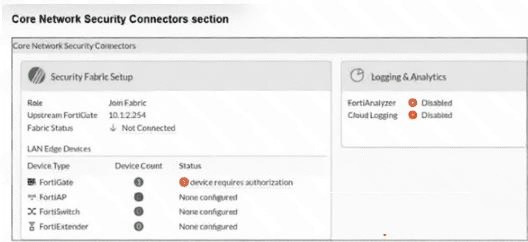
The Core Network Security Connectors page of the FortiGate-2 device is shown. Which statement is correct? (Choose one answer)
Show answerHide answer

Correct answer: D FortiGate-2 is not authorized on the root FortiGate.

Explanation

Explanation

D. FortiGate-2 is not authorized on the root FortiGate. – This is correct. The exhibit clearly shows that FortiGate-2 has a Role of "Join Fabric" and an Upstream FortiGate of 10.1.2.254, indicating that it is attempting to connect to the root FortiGate at that IP address. However, the Fabric Status is "Not Connected," and under LAN Edge Devices > FortiGate, the status shows "device requires authorization." In the Fortinet Security Fabric, a downstream FortiGate must be explicitly authorized by the root FortiGate before the fabric connection becomes active. Therefore, FortiGate-2 has not yet been authorized on the root FortiGate.

Why Other Options Are Incorrect:

A. FortiGate-2 serves as Fabric Root: Incorrect. The Role field explicitly states "Join Fabric," not "Root." A Fabric Root would have the root role and would not have an Upstream FortiGate configured. Therefore, FortiGate-2 is a downstream device rather than the fabric root.

B. You must enable Security Fabric Connection on the FortiGate-2 interface: Incorrect. The Upstream FortiGate IP, 10.1.2.254, is already populated, and the device is attempting to establish the fabric connection. This indicates that the Security Fabric connection settings have already been configured on FortiGate-2. The issue is the pending authorization on the root FortiGate, not a missing connection configuration on FortiGate-2.

C. You must configure the FortiAnalyzer settings on FortiGate-2: Incorrect. FortiAnalyzer provides logging, reporting, and analytics and is separate from the Security Fabric connection process. Although FortiAnalyzer is disabled in the exhibit, it is not a prerequisite for establishing the Security Fabric connection. The downstream FortiGate must instead be authorized by the root FortiGate.

References:

Fortinet NSE I - OT Security 7.6 Architect Study Guide, Module: Security Fabric Setup – Explains that a downstream FortiGate joining the Security Fabric appears on the root FortiGate with a status such as "device requires authorization" and must be authorized by the administrator to complete the fabric connection.
Question 2 Choose 1
Refer to the exhibit. 
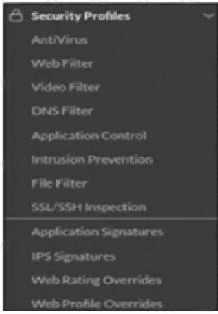
 The OT devices behind the ruggedized FortiGate have vulnerabilities and you want to apply a virtual patching profile in the firewall policy. Why is Virtual Patching not available in the Security Profiles section? (Choose one answer)
Show answerHide answer

Correct answer: A You must enable Virtual Patching in the Feature Visibility section.

Explanation

Explanation

A. You must enable Virtual Patching in the Feature Visibility section.
– This is correct. In FortiOS, certain security features, including Virtual Patching, are not visible by default in the Security Profiles section. They must first be enabled under System > Feature Visibility before they appear as configurable options in firewall policies. Virtual Patching for OT environments uses IPS signatures designed to protect vulnerable OT devices against known vulnerabilities. Since the question states that Virtual Patching is not available, the most likely cause is that it has not been enabled in Feature Visibility.

Why Other Options Are Incorrect:

B. You must have a ruggedized FortiGate allowing the virtual patching feature:
Incorrect. Virtual Patching is not a hardware-dependent feature that requires a ruggedized FortiGate specifically. It is a software-based IPS capability available on supported FortiGate models. Ruggedized FortiGates are designed for harsh industrial environments but do not exclusively provide Virtual Patching functionality.

C. You must enable OT signatures:
Incorrect. OT signatures are part of the Virtual Patching solution, but enabling OT signatures alone does not make the Virtual Patching profile appear in the Security Profiles section. OT signatures are configured as part of the applicable IPS or Virtual Patching configuration. The absence of the profile from the Security Profiles list is a feature visibility issue, so the feature must first be enabled through Feature Visibility.

References:

Fortinet NSE I - OT Security 7.6 Architect Study Guide, Module: Virtual Patching – Explains that Virtual Patching uses IPS signatures to protect vulnerable OT devices without requiring vendor patches and that the feature must be enabled through Feature Visibility before it can be configured in firewall policies.
Question 3 Choose 2
Refer to the exhibit.
 A simplified OT network is shown. You want to optimize the protection of this OT network. Which two controls must you implement? (Choose two answers)
Show answerHide answer

Correct answer: B, D IPS on FortiGate_Level5. OT signature on FortiGate_Level5.

Explanation

Explanation

B. IPS on FortiGate_Level5 and D. OT signature on FortiGate_Level5. – These are correct.

In the Purdue Model, Level 5 (Enterprise/Corporate) is the primary entry point for external traffic into the OT network. Deploying IPS at this boundary provides active threat prevention, inspecting all north-south traffic and blocking known exploits before they reach critical OT assets. Simultaneously, enabling OT signatures on the same FortiGate ensures that industrial protocols (Modbus, DNP3, S7, etc.) are deeply inspected for OT-specific attacks, such as command injection or unauthorized register writes. Together, these controls create a strong first line of defense at the outermost layer, optimizing protection by preventing threats from ever entering the lower Purdue Levels (0–4).

❌ Why Other Options Are Incorrect

A. Offline IDS on FortiGate_Level3. – Incorrect. Offline IDS is passive (monitoring only) and does not actively block threats. The question asks for optimized protection, which requires active prevention (IPS), not passive detection.

C. Virtual patching on FortiGate_Level2. – Incorrect. Virtual patching protects vulnerable devices (PLCs, RTUs) using IPS signatures but is better placed at Level 3.5 or Level 3, closer to the devices. Deploying it at Level 2 is less optimal because it does not prevent threats from entering the wider OT network at the perimeter.

📚 References

Fortinet NSE I - OT Security 7.6 Architect Study Guide, Module: Purdue Model – IPS and OT signatures should be deployed at the Level 5 boundary to inspect all traffic entering the OT network.

That's the last free question in Network security

You've seen the free 30% (3 of 12 questions). Full access unlocks every question and full-length NSEI_OTS_AR-7.6 mock exams, a different mock on every attempt.

Unlock full mock exam
Full mock exam

Sit the NSEI_OTS_AR-7.6 exam before exam day

Full-length mocks with the same number of questions and the same time limit as the real NSEI_OTS_AR-7.6 exam. Every attempt draws a new set of questions from the full bank, so you can keep going until you pass comfortably.

Get full NSEI_OTS_AR-7.6 mock exam
  • —questions per mock
  • —time limit
  • 45questions in the bank
  • Newmock on every attempt