Fortinet certification · Exam NSEI_OTS_AR-7.6

NSEI_OTS_AR-7.6 Mock Exam

Fortinet NSE I - OT Security 7.6 Architect

Find out if you're ready for NSEI_OTS_AR-7.6. Take the free timed mock exam and get your score in minutes, or study the free NSEI_OTS_AR-7.6 questions below with answers and explanations.

12 questions · 18 minutes · free, no sign-up

Free NSEI_OTS_AR-7.6 questions

1–10 of 12 free
Question 1 Select all that apply
Refer to the exhibit
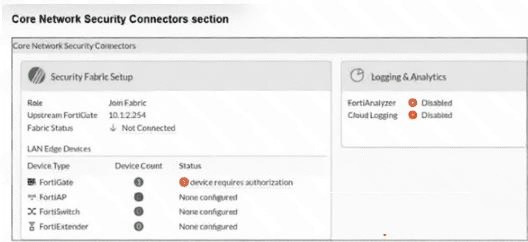
The Core Network Security Connectors page of the FortiGate-2 device is shown. Which statement is correct? (Choose one answer)
Show answerHide answer

Correct answer: D FortiGate-2 is not authorized on the root FortiGate.

Explanation

Explanation

D. FortiGate-2 is not authorized on the root FortiGate. – This is correct. The exhibit clearly shows that FortiGate-2 has a Role of "Join Fabric" and an Upstream FortiGate of 10.1.2.254, indicating that it is attempting to connect to the root FortiGate at that IP address. However, the Fabric Status is "Not Connected," and under LAN Edge Devices > FortiGate, the status shows "device requires authorization." In the Fortinet Security Fabric, a downstream FortiGate must be explicitly authorized by the root FortiGate before the fabric connection becomes active. Therefore, FortiGate-2 has not yet been authorized on the root FortiGate.

Why Other Options Are Incorrect:

A. FortiGate-2 serves as Fabric Root: Incorrect. The Role field explicitly states "Join Fabric," not "Root." A Fabric Root would have the root role and would not have an Upstream FortiGate configured. Therefore, FortiGate-2 is a downstream device rather than the fabric root.

B. You must enable Security Fabric Connection on the FortiGate-2 interface: Incorrect. The Upstream FortiGate IP, 10.1.2.254, is already populated, and the device is attempting to establish the fabric connection. This indicates that the Security Fabric connection settings have already been configured on FortiGate-2. The issue is the pending authorization on the root FortiGate, not a missing connection configuration on FortiGate-2.

C. You must configure the FortiAnalyzer settings on FortiGate-2: Incorrect. FortiAnalyzer provides logging, reporting, and analytics and is separate from the Security Fabric connection process. Although FortiAnalyzer is disabled in the exhibit, it is not a prerequisite for establishing the Security Fabric connection. The downstream FortiGate must instead be authorized by the root FortiGate.

References:

Fortinet NSE I - OT Security 7.6 Architect Study Guide, Module: Security Fabric Setup – Explains that a downstream FortiGate joining the Security Fabric appears on the root FortiGate with a status such as "device requires authorization" and must be authorized by the administrator to complete the fabric connection.
Question 2 Choose 1
Refer to the exhibit. 
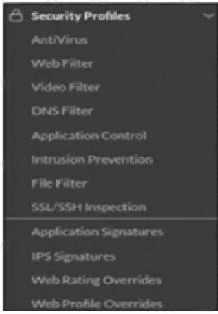
 The OT devices behind the ruggedized FortiGate have vulnerabilities and you want to apply a virtual patching profile in the firewall policy. Why is Virtual Patching not available in the Security Profiles section? (Choose one answer)
Show answerHide answer

Correct answer: A You must enable Virtual Patching in the Feature Visibility section.

Explanation

Explanation

A. You must enable Virtual Patching in the Feature Visibility section.
– This is correct. In FortiOS, certain security features, including Virtual Patching, are not visible by default in the Security Profiles section. They must first be enabled under System > Feature Visibility before they appear as configurable options in firewall policies. Virtual Patching for OT environments uses IPS signatures designed to protect vulnerable OT devices against known vulnerabilities. Since the question states that Virtual Patching is not available, the most likely cause is that it has not been enabled in Feature Visibility.

Why Other Options Are Incorrect:

B. You must have a ruggedized FortiGate allowing the virtual patching feature:
Incorrect. Virtual Patching is not a hardware-dependent feature that requires a ruggedized FortiGate specifically. It is a software-based IPS capability available on supported FortiGate models. Ruggedized FortiGates are designed for harsh industrial environments but do not exclusively provide Virtual Patching functionality.

C. You must enable OT signatures:
Incorrect. OT signatures are part of the Virtual Patching solution, but enabling OT signatures alone does not make the Virtual Patching profile appear in the Security Profiles section. OT signatures are configured as part of the applicable IPS or Virtual Patching configuration. The absence of the profile from the Security Profiles list is a feature visibility issue, so the feature must first be enabled through Feature Visibility.

References:

Fortinet NSE I - OT Security 7.6 Architect Study Guide, Module: Virtual Patching – Explains that Virtual Patching uses IPS signatures to protect vulnerable OT devices without requiring vendor patches and that the feature must be enabled through Feature Visibility before it can be configured in firewall policies.
Question 3 Choose 2
Refer to the exhibit.
 A simplified OT network is shown. You want to optimize the protection of this OT network. Which two controls must you implement? (Choose two answers)
Show answerHide answer

Correct answer: B, D IPS on FortiGate_Level5. OT signature on FortiGate_Level5.

Explanation

Explanation

B. IPS on FortiGate_Level5 and D. OT signature on FortiGate_Level5. – These are correct.

In the Purdue Model, Level 5 (Enterprise/Corporate) is the primary entry point for external traffic into the OT network. Deploying IPS at this boundary provides active threat prevention, inspecting all north-south traffic and blocking known exploits before they reach critical OT assets. Simultaneously, enabling OT signatures on the same FortiGate ensures that industrial protocols (Modbus, DNP3, S7, etc.) are deeply inspected for OT-specific attacks, such as command injection or unauthorized register writes. Together, these controls create a strong first line of defense at the outermost layer, optimizing protection by preventing threats from ever entering the lower Purdue Levels (0–4).

❌ Why Other Options Are Incorrect

A. Offline IDS on FortiGate_Level3. – Incorrect. Offline IDS is passive (monitoring only) and does not actively block threats. The question asks for optimized protection, which requires active prevention (IPS), not passive detection.

C. Virtual patching on FortiGate_Level2. – Incorrect. Virtual patching protects vulnerable devices (PLCs, RTUs) using IPS signatures but is better placed at Level 3.5 or Level 3, closer to the devices. Deploying it at Level 2 is less optimal because it does not prevent threats from entering the wider OT network at the perimeter.

📚 References

Fortinet NSE I - OT Security 7.6 Architect Study Guide, Module: Purdue Model – IPS and OT signatures should be deployed at the Level 5 boundary to inspect all traffic entering the OT network.
Question 4 Choose 1
Refer to the exhibit

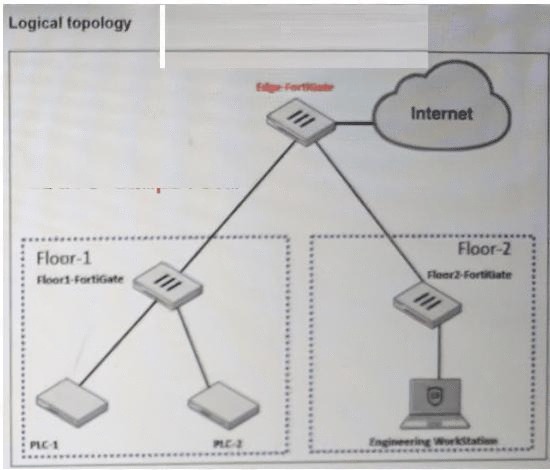
A partial OT network is shown. You have encountered many disconnections in the links and want to improve the availability of this network. Which action can you perform? (Choose one answer)
Show answerHide answer

Correct answer: C You can implement parallel redundancy protocol.

Explanation

Explanation:

The OT network shown in the exhibit has experienced many disconnections in the links, indicating a need for improved network availability and resilience. In operational technology (OT) environments, network redundancy is critical to ensure continuous operation.

C. You can implement parallel redundancy protocol –  Parallel Redundancy Protocol (PRP) is a network redundancy protocol defined by IEC 62439-3 that provides seamless failover by transmitting duplicate packets over two independent, parallel networks. PRP is specifically designed for OT and industrial environments where high availability is required, and it allows for zero recovery time in the event of a link failure. This is the most appropriate action for improving link availability in the OT network shown.

❌ Why Other Options Are Incorrect:

A. You can implement HA clusters – High Availability (HA) clusters provide device-level redundancy, such as two FortiGate devices in active-passive mode. While HA improves device availability, it does not address  link-level redundancy or protect against disconnections in the network links themselves. The issue described is link disconnections, not device failure.

B. You can implement SD-WAN at Floor-1-FortiGate and Floor-2-FortiGate – SD-WAN is typically used for WAN connectivity and optimizing traffic between multiple WAN links. In this OT network, the connections appear to be within a local industrial network, including floor-level switches and PLCs. SD-WAN is not the appropriate solution for improving link availability within an OT network.

D. You can implement VDOMs in Edge-FortiGate – VDOMs (Virtual Domains) are used to logically partition a single FortiGate into multiple virtual firewalls for segmentation and multi-tenancy. They do not improve network link availability or address disconnections.

📚 References:

* IEC 62439-3 – Parallel Redundancy Protocol (PRP) – Defines PRP as a standard for zero-loss network redundancy in industrial automation networks.
Question 5 Choose 1
Which industrial protocol does not support VLANs? (Choose one answer)
Show answerHide answer

Correct answer: C EtherCAT

Explanation

Explanation:

EtherCAT (Ethernet for Control Automation Technology) is a real-time industrial Ethernet protocol that operates at the data link layer and is optimized for high-speed, deterministic communication. It does not natively support VLANs (Virtual Local Area Networks).

C. EtherCAT – EtherCAT uses a specific frame structure that is processed on the fly by each device in the network. It does not support standard IEEE 802.1Q VLAN tagging because the protocol's frame format is proprietary and does not accommodate VLAN headers. Additionally, EtherCAT operates using a master-slave architecture with minimal processing overhead, and VLAN functionality is not part of its specification.

❌ Why Other Options Are Incorrect:

B. Ethernet over industrial protocol – Ethernet/IP (Ethernet Industrial Protocol) is based on standard Ethernet and supports VLANs. It uses TCP/IP and UDP/IP, which are compatible with VLAN tagging.

D. Modbus over TCP – Modbus TCP operates on top of standard TCP/IP and runs over standard Ethernet. It fully supports VLANs because it uses conventional IP networking, which is VLAN-compatible.

A. [Not clearly visible in the exhibit] – Since the option is not clearly visible, it cannot be evaluated. However, based on the information provided, EtherCAT is the correct answer among the visible options.

📚 References:

* EtherCAT Technology Group – EtherCAT Specification – Confirms that EtherCAT does not support VLAN tagging in its frame structure.
Question 6 Choose 1
Refer to the exhibit.

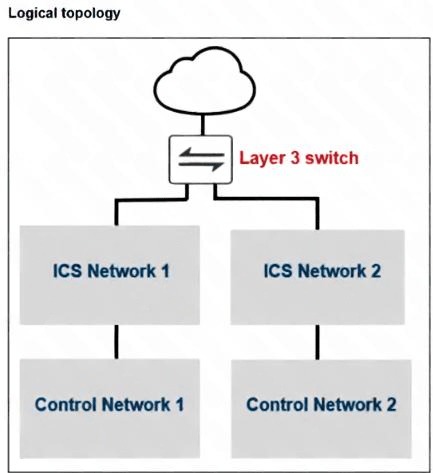
A partial OT network is shown. You must improve the security of this OT network and implement internal segmentation between network 1 and network 2. How can you achieve the segmentation? (Choose one answer)
Show answerHide answer

Correct answer: C You can configure an explicit software switch.

Explanation

Explanation:

To improve security and implement internal segmentation between ICS Network 1 and ICS Network 2, you need to control and inspect traffic between the two networks. An explicit software switch on the FortiGate allows you to segment traffic while applying security policies.

C. You can configure an explicit software switch
– An explicit software switch in FortiGate acts as a Layer 2 device that can forward traffic between interfaces while allowing you to apply firewall policies for inspection and segmentation. By placing both networks behind a software switch, you can enforce security rules between them, providing internal segmentation without requiring additional hardware.

❌ Why Other Options Are Incorrect:

A. You can configure universal ZTNA
– Universal ZTNA (Zero Trust Network Access) is used for secure access to applications and services, typically for remote users. It does not provide internal network segmentation between two local ICS networks.

B. You can configure one traffic VDOM
– VDOMs (Virtual Domains) are used to logically partition a FortiGate into multiple virtual firewalls. While VDOMs can provide segmentation, the configuration of "one traffic VDOM" would not segment the two networks. It would place them in the same virtual firewall. To segment, you would need separate VDOMs, not one.

D. You can configure forward domain IDs for each network
– Forward domain IDs are used in VXLAN and EVPN configurations for network virtualization and overlay networks. They are not used for internal segmentation on a single FortiGate device in an OT network. This is not a relevant feature for this scenario.

📚 References:

* FortiOS 7.6 Administration Guide – Software Switch – Explains how to configure software switches to segment and inspect traffic between networks.
Question 7 Choose 1
Refer to the exhibit.

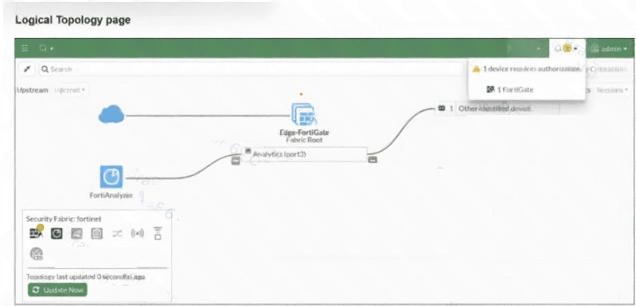
A Logical Topology page of a FortiGate device is shown. Your OT company wants to gain visibility into the network. You decide to implement device detection with the Security Fabric. Based on the exhibit, which statement is correct? (Choose one answer)
Show answerHide answer

Correct answer: B The other identified device must be authorized on the root FortiGate.

Explanation

Explanation:

The exhibit shows a Logical Topology page of a FortiGate device with Security Fabric enabled. The display indicates "1 device resolution authorization..." and "1 Other client-side domain." This suggests that an unauthorized device has been detected in the network. For the Security Fabric to fully recognize and integrate this device, it must be authorized on the root FortiGate. Device authorization allows the Security Fabric to trust, monitor, and manage the device as part of the fabric topology. Without authorization, the device is recognized but not fully integrated.

❌ Why Other Options Are Incorrect:

A. Device Detection is enabled on the other identified device.
– The exhibit shows that an "other identified device" exists, but there is no indication of Device Detection being enabled on that device itself. Device Detection is a feature of the FortiGate, not a property of the detected devices.

C. The other identified device must be authorized on FortiAnalyzer.
– FortiAnalyzer is used for logging and reporting, not for device authorization within the Security Fabric. Authorization is performed on the root FortiGate, which serves as the primary device in the Security Fabric.

D. Device Detection is enabled on port3.
– The exhibit does not mention port3, nor does it provide any information about which specific interfaces have Device Detection enabled. The topology page does not indicate any port-specific settings.

📚 References:

* FortiOS 7.6 Administration Guide – Security Fabric – Explains that detected devices must be authorized on the root FortiGate for full integration.
Question 8 Choose 2
During layer 2 polling , which two pieces of information are gathered by FortiNAC to identify a device? (Choose two answers)
Show answerHide answer

Correct answer: A, B Where it was learned The MAC-to-IP correlation learned

Explanation

Explanation:

During Layer 2 polling, FortiNAC gathers information about devices on the network by communicating with network infrastructure devices such as switches and routers. The primary purpose of Layer 2 polling is to discover devices and their network attachment points. The following two pieces of information are collected:

A. Where it was learned – FortiNAC records the network location where a device was discovered, including the specific switch and port through which the device is connected. This information is critical for network access control, policy enforcement, and troubleshooting.

B. The MAC-to-IP correlation learned – FortiNAC correlates the MAC address of a device with its assigned IP address. This mapping is essential for identifying devices, tracking their activity, and enforcing security policies based on both Layer 2 and Layer 3 information.

❌ Why Other Options Are Incorrect:

C. The system name learned – The system name (hostname) is not gathered during Layer 2 polling. It is typically collected through Layer 3 polling methods such as SNMP or NetBIOS queries, not during Layer 2 discovery.

D. The time it was learned – While FortiNAC may track timestamps for when a device was discovered, this is not a primary piece of information gathered specifically during Layer 2 polling. It is a metadata attribute, not a core identifier.

📚 References:

* FortiNAC Administration Guide – Layer 2 Polling – Explains that the switch and port (where learned) and MAC-to-IP correlation are key pieces of information gathered during polling.
Question 9 Choose 2
Refer to the exhibit.

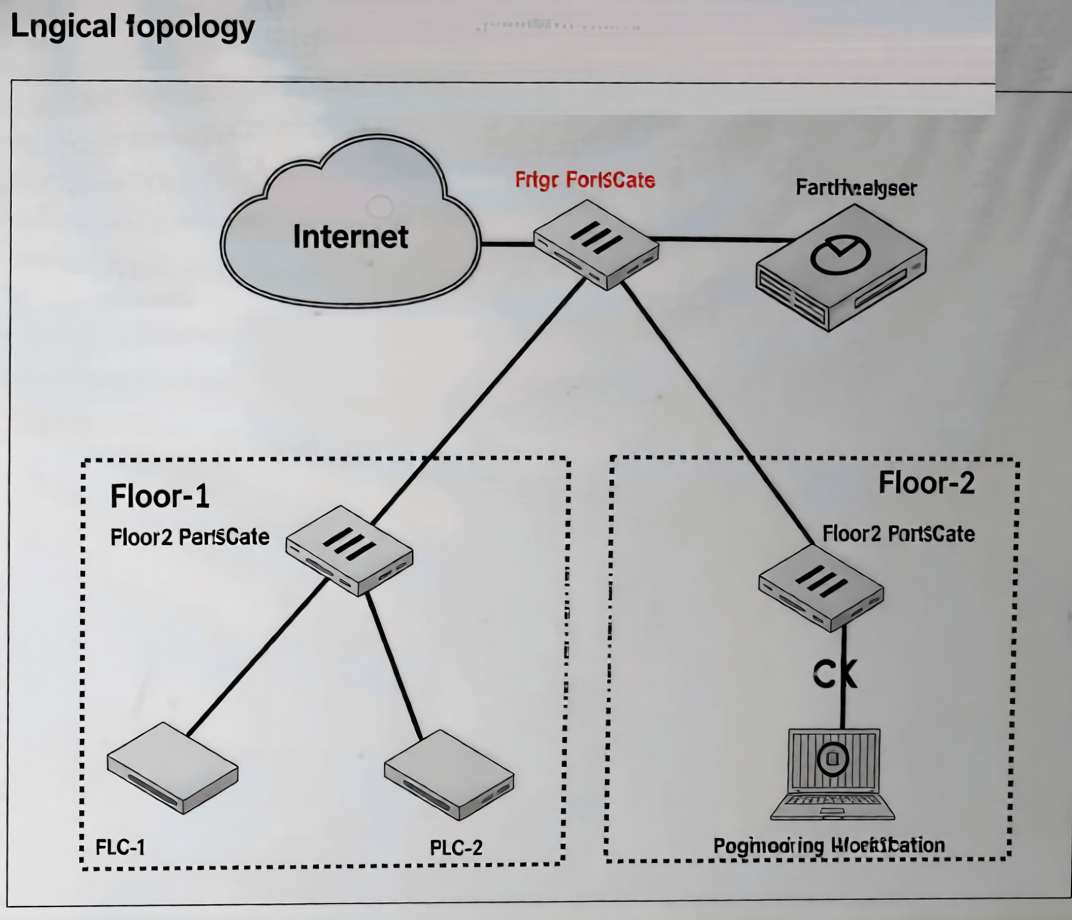
A partial OT network is shown. You want to configure an automated alert sent by FortiAnalyzer when an attack occurs on a FortiGate device. Which two configurations must you implement? (Choose two answers)
Show answerHide answer

Correct answer: B, D You must configure a LOCALHOST task in the FortiAnalyzer playbook. You must configure an event handler on FortiAnalyzer.

Explanation

Explanation:

To configure an automated alert sent by FortiAnalyzer when an attack occurs on a FortiGate device, you need to set up the appropriate automation components on FortiAnalyzer. The following two configurations are required:

B. You must configure a LOCALHOST task in the FortiAnalyzer playbook – In FortiAnalyzer, a playbook defines a sequence of automated actions triggered by events. A LOCALHOST task is used to execute actions directly on the FortiAnalyzer itself, such as sending an email alert, generating a report, or logging the incident. This task is essential for automating the alert process when an attack is detected.

D. You must configure an event handler on FortiAnalyzer – An event handler in FortiAnalyzer monitors logs and events received from FortiGate devices. When a specific event (e.g., an IPS signature match or attack detection) is triggered, the event handler initiates the corresponding playbook or action. Configuring an event handler is required to detect the attack event and trigger the automated alert.

❌ Why Other Options Are Incorrect:

A. You must configure a stitch on the root FortiGate – A stitch is an automation feature on FortiGate, not FortiAnalyzer. While stitches can trigger actions on FortiGate, the requirement is for FortiAnalyzer to send the alert. This option is not relevant to the FortiAnalyzer automation workflow.

C. You must configure an intrusion prevention security profile on all FortiGate devices – An IPS security profile is required on FortiGate to detect attacks. However, the question asks about configuring the alert on FortiAnalyzer, not the detection itself. IPS profiles on FortiGate are a prerequisite for attack detection, but they are not part of the FortiAnalyzer configuration for sending the alert.

📚 References:

* FortiAnalyzer 7.6 Administration Guide – Playbooks – Explains the use of LOCALHOST tasks to execute actions on FortiAnalyzer.
Question 10 Choose 2
Refer to the exhibit.

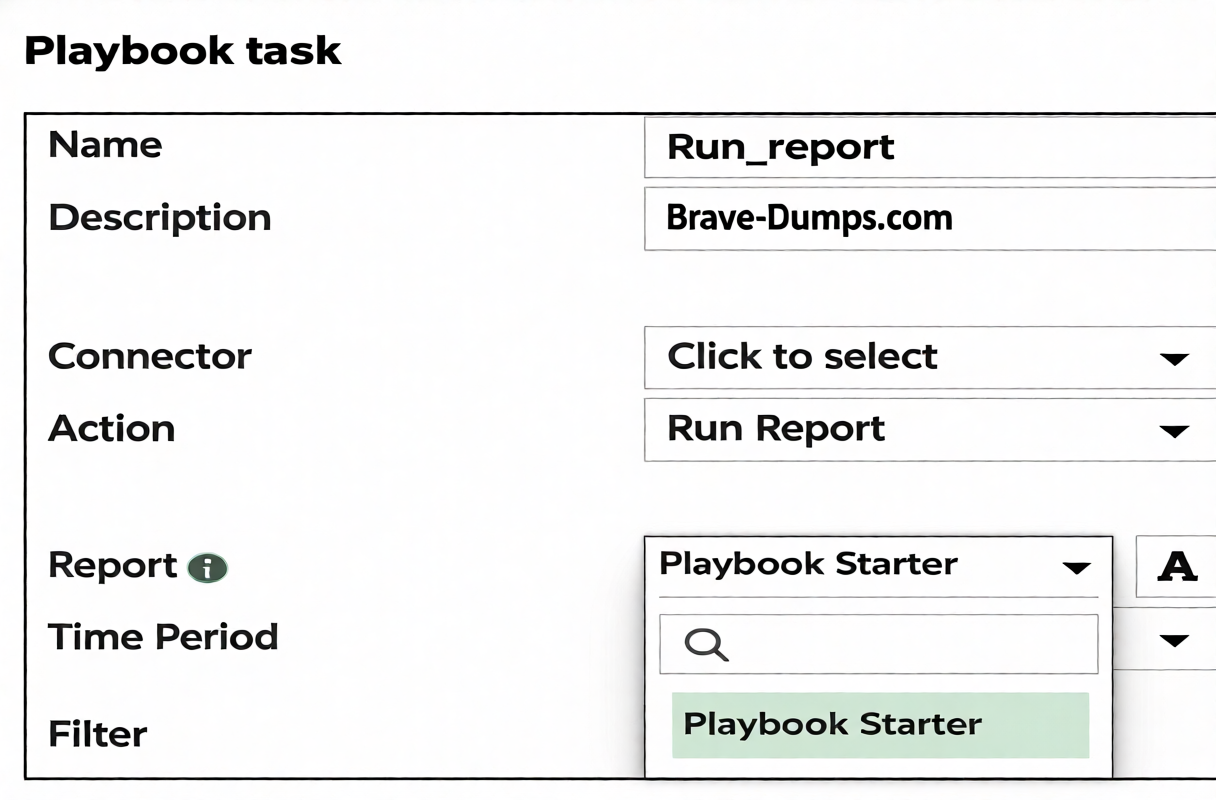
A Run_report task is shown. You want to automate the generation of a newly created report on FortiAnalyzer . When you configure the Run_report task in Playbook, why is the report not shown in the Report field? (Choose two answers)
Show answerHide answer

Correct answer: A, B You must first configure the connector.

Explanation

Explanation:

In FortiAnalyzer, when configuring a Run_report task in a Playbook, the report may not appear in the Report field until specific prerequisites are met. The following two configurations are required:

A. You must first configure the connector – The connector defines how FortiAnalyzer accesses the report data source (e.g., FortiGate, FortiWeb, or other log sources). If the connector is not properly configured, the report cannot retrieve the necessary data and will not be available for selection in the Run_report task.

B. You must first enable Extended Log Filtering in the report – Extended Log Filtering allows the report to use dynamic filters and time-based conditions. This feature must be enabled in the report configuration before the report can be used in a Run_report task. Without it, the report will not appear in the task's Report field.

❌ Why Other Options Are Incorrect:

C. You must first enable Auto-cache in the report – Auto-cache is used to pre-generate report data for faster access, but it is not required for the report to appear in the Run_report task. It is an optimization, not a prerequisite.

D. You must first configure an event handler – An event handler triggers a Playbook based on specific log events. While event handlers are used to start Playbooks, they are not required for a report to appear in a Run_report task within a Playbook.

E. You must first select Playbook Starter, and then select the newly created report – Playbook Starter is a trigger type, not a configuration step for making a report available. Selecting Playbook Starter does not affect which reports appear in the Report field.

📚 References:

* FortiAnalyzer 7.6 Administration Guide – Playbooks – Explains that connectors and Extended Log Filtering are prerequisites for reports to appear in Run_report tasks.
Full mock exam

Sit the NSEI_OTS_AR-7.6 exam before exam day

Full-length mocks with the same number of questions and the same time limit as the real NSEI_OTS_AR-7.6 exam. Every attempt draws a new set of questions from the full bank, so you can keep going until you pass comfortably.

Get full NSEI_OTS_AR-7.6 mock exam
  • —questions per mock
  • —time limit
  • 45questions in the bank
  • Newmock on every attempt