Fortinet certification · Exam NSEI_OTS_AR-7.6

NSEI_OTS_AR-7.6 Mock Exam

Fortinet NSE I - OT Security 7.6 Architect

Free NSEI_OTS_AR-7.6 questions on Monitoring and risk assessment, each with the answer and an explanation.

12 questions · 18 minutes · free, no sign-up

Monitoring and risk assessment questions

1–4 of 4 free
Question 1 Choose 2
Refer to the exhibit.
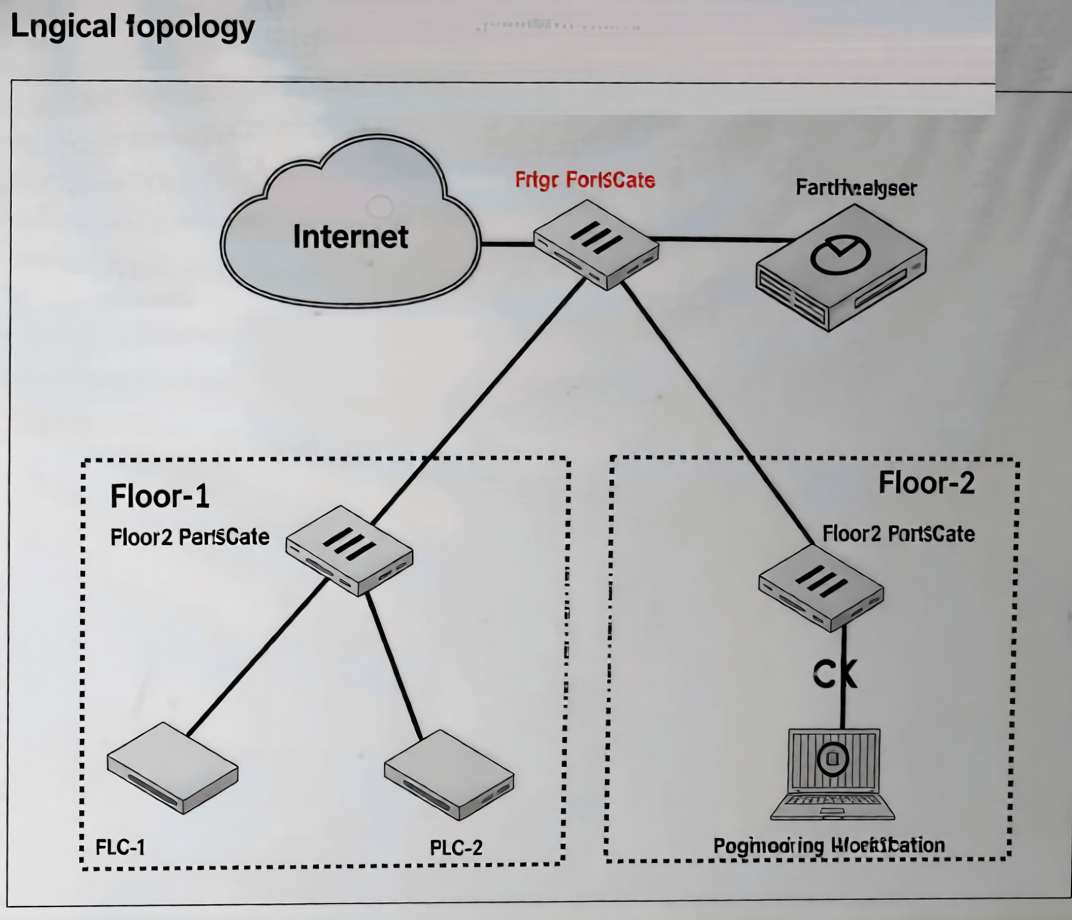
A partial OT network is shown. You want to configure an automated alert sent by FortiAnalyzer when an attack occurs on a FortiGate device. Which two configurations must you implement? (Choose two answers)
Show answerHide answer

Correct answer: B, D You must configure a LOCALHOST task in the FortiAnalyzer playbook. You must configure an event handler on FortiAnalyzer.

Explanation

Explanation:

To configure an automated alert sent by FortiAnalyzer when an attack occurs on a FortiGate device, you need to set up the appropriate automation components on FortiAnalyzer. The following two configurations are required:

B. You must configure a LOCALHOST task in the FortiAnalyzer playbook – In FortiAnalyzer, a playbook defines a sequence of automated actions triggered by events. A LOCALHOST task is used to execute actions directly on the FortiAnalyzer itself, such as sending an email alert, generating a report, or logging the incident. This task is essential for automating the alert process when an attack is detected.

D. You must configure an event handler on FortiAnalyzer – An event handler in FortiAnalyzer monitors logs and events received from FortiGate devices. When a specific event (e.g., an IPS signature match or attack detection) is triggered, the event handler initiates the corresponding playbook or action. Configuring an event handler is required to detect the attack event and trigger the automated alert.

❌ Why Other Options Are Incorrect:

A. You must configure a stitch on the root FortiGate – A stitch is an automation feature on FortiGate, not FortiAnalyzer. While stitches can trigger actions on FortiGate, the requirement is for FortiAnalyzer to send the alert. This option is not relevant to the FortiAnalyzer automation workflow.

C. You must configure an intrusion prevention security profile on all FortiGate devices – An IPS security profile is required on FortiGate to detect attacks. However, the question asks about configuring the alert on FortiAnalyzer, not the detection itself. IPS profiles on FortiGate are a prerequisite for attack detection, but they are not part of the FortiAnalyzer configuration for sending the alert.

📚 References:

* FortiAnalyzer 7.6 Administration Guide – Playbooks – Explains the use of LOCALHOST tasks to execute actions on FortiAnalyzer.
Question 2 Choose 2
Refer to the exhibit.

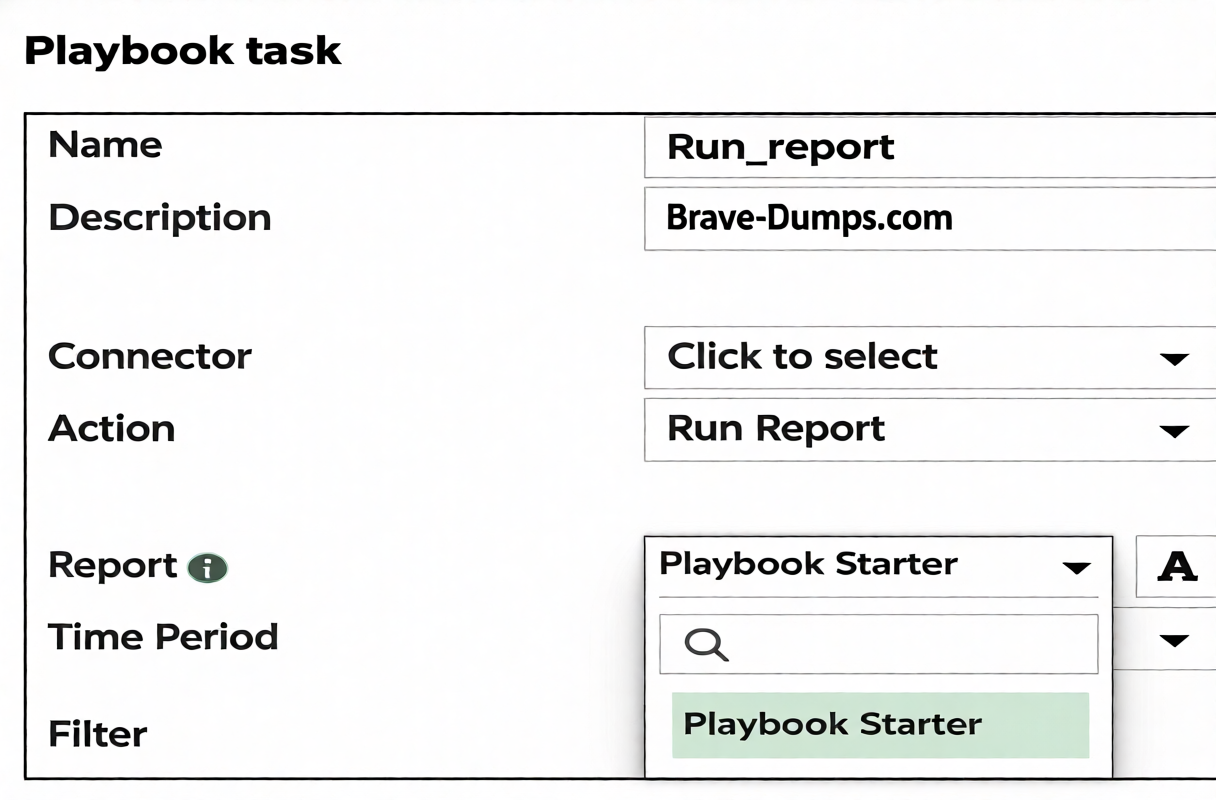
A Run_report task is shown. You want to automate the generation of a newly created report on FortiAnalyzer . When you configure the Run_report task in Playbook, why is the report not shown in the Report field? (Choose two answers)
Show answerHide answer

Correct answer: A, B You must first configure the connector.

Explanation

Explanation:

In FortiAnalyzer, when configuring a Run_report task in a Playbook, the report may not appear in the Report field until specific prerequisites are met. The following two configurations are required:

A. You must first configure the connector – The connector defines how FortiAnalyzer accesses the report data source (e.g., FortiGate, FortiWeb, or other log sources). If the connector is not properly configured, the report cannot retrieve the necessary data and will not be available for selection in the Run_report task.

B. You must first enable Extended Log Filtering in the report – Extended Log Filtering allows the report to use dynamic filters and time-based conditions. This feature must be enabled in the report configuration before the report can be used in a Run_report task. Without it, the report will not appear in the task's Report field.

❌ Why Other Options Are Incorrect:

C. You must first enable Auto-cache in the report – Auto-cache is used to pre-generate report data for faster access, but it is not required for the report to appear in the Run_report task. It is an optimization, not a prerequisite.

D. You must first configure an event handler – An event handler triggers a Playbook based on specific log events. While event handlers are used to start Playbooks, they are not required for a report to appear in a Run_report task within a Playbook.

E. You must first select Playbook Starter, and then select the newly created report – Playbook Starter is a trigger type, not a configuration step for making a report available. Selecting Playbook Starter does not affect which reports appear in the Report field.

📚 References:

* FortiAnalyzer 7.6 Administration Guide – Playbooks – Explains that connectors and Extended Log Filtering are prerequisites for reports to appear in Run_report tasks.
Question 3 Choose 1
You want FortiAnalyzer to trigger an automation stitch on a FortiGate device automatically. What must you configure on FortiAnalyzer to enable direct communication with FortiGate? (Choose one answer)
Show answerHide answer

Correct answer: A A Fabric connector

Explanation

Explanation:

To enable FortiAnalyzer to trigger an automation stitch on a FortiGate device automatically, FortiAnalyzer must have a Fabric connector configured. The Fabric connector establishes the communication channel between FortiAnalyzer and the FortiGate device, allowing FortiAnalyzer to send commands (such as triggering an automation stitch) directly to the FortiGate.

A. A Fabric connector – Fabric connectors are used in the Security Fabric to enable communication between Fortinet devices, such as FortiGate and FortiAnalyzer. By configuring a Fabric connector on FortiAnalyzer, it can communicate with the FortiGate's automation framework and trigger stitches in response to events.

❌ Why Other Options Are Incorrect:

B. A playbook task – Playbook tasks define what action to take within a FortiAnalyzer playbook (e.g., send email, run a report, trigger a stitch). However, to trigger a stitch on a remote FortiGate, the playbook task relies on a Fabric connector to communicate with that device.

C. The Fabric settings – Fabric settings are general configuration parameters for the Security Fabric, but they do not establish the direct communication channel for triggering stitches. The Fabric connector is the specific component that enables this.

D. An event handler – Event handlers monitor logs and trigger playbooks, but they do not directly communicate with FortiGate. Event handlers initiate playbooks, which then use Fabric connectors to communicate with FortiGate.

📚 References:

* FortiAnalyzer 7.6 Administration Guide – Fabric Connectors – Explains that Fabric connectors enable communication between FortiAnalyzer and FortiGate devices.
Question 4 Choose 1
Refer to the exhibit.

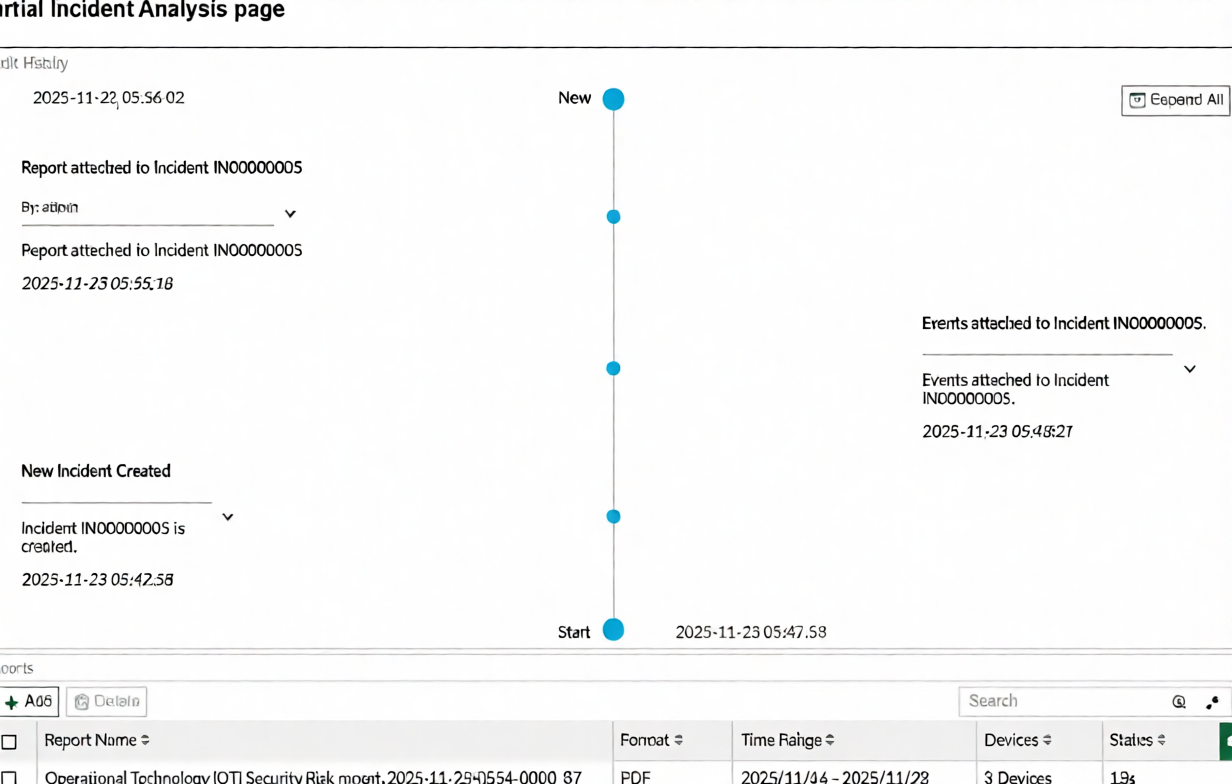
A partial Incident Analysis page is shown. How was the 360-Degree Security Review OT report attached to the incident? (Choose one answer)
Show answerHide answer

Correct answer: D Manually by an administrator

Explanation

Explanation:

The Incident Analysis page shows an entry:  "Report Attached to Incident INO0000005" with the detail  "By: admin". This explicitly indicates that the report was attached by an administrator user account, not automatically by the system.

D. Manually by an administrator – The presence of  "By: admin" in the event history confirms that the report was manually attached to the incident by an administrator. In FortiAnalyzer, when a report is attached automatically through automation (e.g., playbook, event handler, or stitch), the event would typically show the automation trigger name or system action, not a specific user.

❌ Why Other Options Are Incorrect:

A. Automatically by a stitch – A stitch is an automation feature on FortiGate, not FortiAnalyzer. Even if it were, the event history does not indicate any automation trigger—it explicitly shows "By: admin."

B. Automatically by an event handler – Event handlers trigger playbooks based on log events. While they can automate tasks, the event history shows manual action, not automated attachment.

C. Automatically by a playbook – Playbooks can run reports and attach them to incidents, but the event history would show a system action, not "By: admin." Since it clearly shows the administrator's name, this was a manual action.

📚 References:

* FortiAnalyzer 7.6 Administration Guide – Incident Analysis – Explains that manual actions are logged with the administrator's username, while automated actions show system triggers.

That's the last free question in Monitoring and risk assessment

You've seen the free 30% (4 of 14 questions). Full access unlocks every question and full-length NSEI_OTS_AR-7.6 mock exams, a different mock on every attempt.

Unlock full mock exam
Full mock exam

Sit the NSEI_OTS_AR-7.6 exam before exam day

Full-length mocks with the same number of questions and the same time limit as the real NSEI_OTS_AR-7.6 exam. Every attempt draws a new set of questions from the full bank, so you can keep going until you pass comfortably.

Get full NSEI_OTS_AR-7.6 mock exam
  • —questions per mock
  • —time limit
  • 45questions in the bank
  • Newmock on every attempt