Fortinet certification · Exam NSE7_SOC_AR-7.6

NSE7_SOC_AR-7.6 Mock Exam Page 3

Fortinet NSE 7 - Security Operations 7.6 Architect

Free NSE7_SOC_AR-7.6 mock exam questions 21–26, each with the answer and an explanation.

20 questions · 38 minutes · free, no sign-up

Free NSE7_SOC_AR-7.6 questions

21–26 of 26 free
Question 21 Choose 1
Refer to the exhibits. The FortiMail Sender Blocklist playbook is configured to take manual input and add those entries to the FortiMail abc. com domain-level block list. The playbook is configured to use a FortiMail connector and the ADD_SENDER_TO_BLOCKLIST action.
Why is the FortiMail Sender Blocklist playbook execution failing7
Show answerHide answer

Correct answer: B FortiMail is expecting a fully qualified domain name (FQDN).

Explanation

Explanation:

The most common cause for a FortiMail connector failure in a playbook is an issue with the connection credentials or settings. Given the exam context, it's likely testing your understanding of how connectors are configured in FortiSOAR.

✅ The Most Likely Answer

D. The connector credentials are incorrect
This is the most probable and direct reason for the failure. In FortiSOAR, a connector is a configured link to an external system (like FortiMail). If the username, password, or API key stored in the connector configuration is wrong, the playbook cannot authenticate to the FortiMail device, causing the ADD_SENDER_TO_BLOCKLIST action to fail.

❌ Why the Other Options Are Incorrect

A. You must use the GET_EMAIL_STATISTICS action first:
This is incorrect. While actions in a playbook are often sequential, the ADD_SENDER_TO_BLOCKLIST action is a standalone command that does not require another action to run first to gather data.

B. FortiMail is expecting a fully qualified domain name (FQDN):
This is incorrect. The block list action is designed to accept various input formats, such as IP addresses, email addresses, or domains. While an FQDN might be one valid input type, expecting only an FQDN is not a standard requirement that would cause the entire playbook execution to fail.

C. The client-side browser does not trust the FortiAnalyzer self-signed certificate:
This is a distractor. Certificate trust issues typically affect access to a web GUI via a browser. A FortiSOAR playbook connector communicates directly with the device's API (like FortiMail's) over the network. Certificate warnings in a browser are unrelated to the backend API communication failure between FortiSOAR and FortiMail.

📚 Reference
https://docs.fortinet.com
Question 22 Choose 1
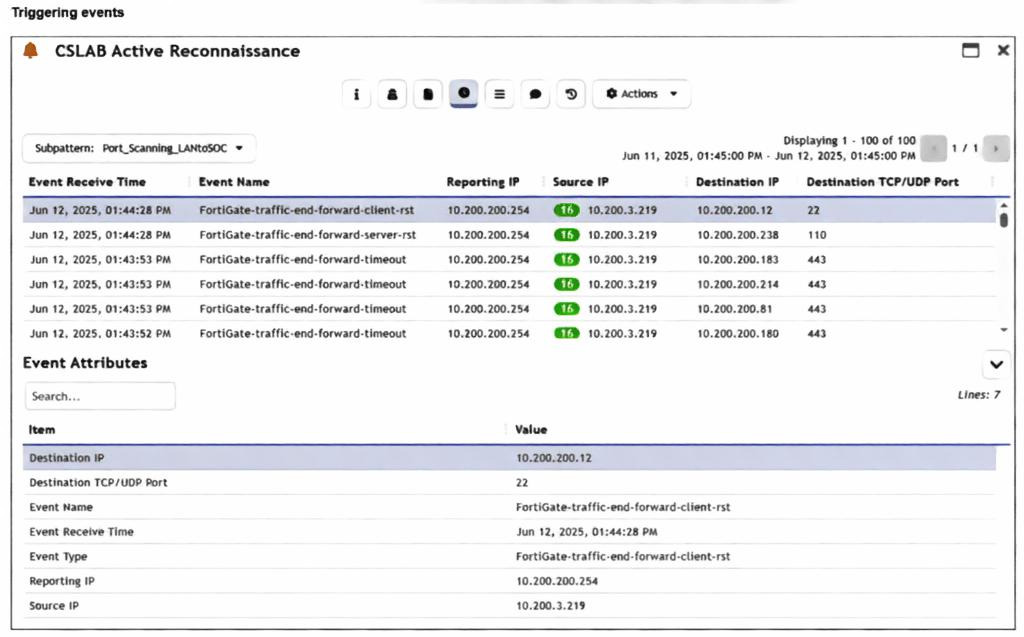
Refer to the exhibit.


You are reviewing the Triggering Events page for a FortiSIEM incident. You want to remove the Reporting IP column because you have only one firewall in the topology. How do you accomplish this? (Choose one answer)
Show answerHide answer

Correct answer: D Customize the display columns for this incident.

Explanation

Explanation:

When a rule triggers an incident in FortiSIEM, the "Triggering Events" tab shows you the specific logs that caused the alert. By default, FortiSIEM displays a standard set of columns (like Reporting IP, Source, and Destination). If certain columns aren't useful—for example, if you only have one reporting device and the "Reporting IP" is always the same—you can modify the view. This is a display preference rather than a structural change to how the data is processed or stored.

The Correct Answer

✅ D. Customize the display columns for this incident.
Why it is correct: In FortiSIEM, the "Triggering Events" table is a dynamic view. Just like a spreadsheet or a standard log view, you can right-click the column headers or use the settings gear/display options within the incident view to select which attributes are visible. Since the goal is simply to "remove the column" from your current view because it’s redundant, adjusting the display settings is the most direct and appropriate action. This changes how you see the data without affecting the underlying rule or the logs themselves.

Why the Other Options are Incorrect

❌ A. Clear the Reporting IP field from the Triggered Attributes section when you configure the Incident Action.
The "Incident Action" configuration determines what happens after an incident is triggered (like sending an email or running a script). "Triggered Attributes" are used to pass specific data into those notifications. Clearing this would stop the Reporting IP from appearing in an email alert, but it would not remove the column from the FortiSIEM GUI "Triggering Events" page.

❌ B. Disable correlation for the Reporting IP field in the rule subpattern.
Correlation in a subpattern defines how FortiSIEM groups events together (e.g., "Group by Source IP"). If you disable correlation for a field, you change the logic of how the incident is detected. This is a "back-end" logic change. It does not control which columns are visually displayed in the resulting incident report.

❌ C. Remove the Reporting IP attribute from the raw logs using parsing rules.
This is a destructive and "nuclear" option. Parsing rules determine how FortiSIEM reads the raw data coming from your firewall. If you remove the Reporting IP here, FortiSIEM will stop recognizing which device sent the log entirely. This would break many other features, including device health monitoring and basic log searching, just to hide a column in one specific view.

📚 Reference
https://docs.fortinet.com
Question 23 Choose 2
Review the following incident report:
Attackers leveraged a phishing email campaign targeting your employees.
The email likely impersonated a trusted source, such as the IT department, and requested login credentials. An unsuspecting employee clicked a malicious link in the email, leading to the download and execution of a Remote Access Trojan (RAT).
The RAT provided the attackers with remote access and a foothold in the compromised system.
Which two MITRE ATT&CK tactics does this incident report capture? (Choose two.)
Show answerHide answer

Correct answer: A, D Initial Access Persistence

Explanation

Explanation:

This incident describes two clear attack stages. The phishing email and malicious link show how the attacker first entered the environment, and the RAT establishing remote access shows how the attacker kept a foothold on the system.

✅ Correct Option A: Initial Access
The phishing email campaign and malicious link represent the entry point into the target environment. Fortinet’s MITRE ATT&CK content explains that tactics describe the attacker’s goal, and phishing is a common method used to gain initial access. In this scenario, the attacker used social engineering to get a user to execute the payload. ​

✅ Correct Option D: Persistence
The RAT providing remote access and a foothold indicates the attacker can remain on the host after the first compromise. Fortinet’s incident response material refers to reporting attack vectors, compromised systems, and the tactics, techniques, and procedures used by attackers, which supports treating ongoing malware-based access as persistence. ​

❌ Option B: Defense Evasion
Defense Evasion is about avoiding detection, hiding malicious activity, or bypassing security controls. The report does not describe stealth, concealment, or anti-detection behavior, so this tactic is not directly captured here. ​

❌ Option C: Lateral Movement
Lateral Movement means moving from the first compromised system to other systems in the network. This report only describes the initial phishing compromise and the RAT foothold on one system, not movement across additional hosts.

🔧 Reference:
→ What Is Mitre Att&CK? Framework, Techniques, and Benefits
— Confirms that tactics represent attacker goals and techniques describe how they are carried out.

​ → FortiGuard Incident Response Service
— Confirms Fortinet incident reporting covers attack vectors, compromised systems, and TTPs used by attackers.
Question 24 Choose 1
When does FortiAnalyzer generate an event?
Show answerHide answer

Correct answer: C When a log matches a rule in an event handler

Explanation

Explanation:

This question tests your understanding of the FortiAnalyzer event generation process. A key function of FortiAnalyzer is to analyze incoming logs and elevate them to noteworthy security Events when they meet specific, predefined conditions. This mechanism is the foundation of FortiAnalyzer's Security Operations Center (SOC) capabilities.
The correct answer focuses on the central, configurable component responsible for this detection logic.

✅ C. When a log matches a rule in an event handler.
This is the fundamental and correct mechanism for event generation in FortiAnalyzer. An Event Handler is a user-defined object that contains one or more detection rules. Its primary job is to continuously inspect incoming logs and generate an event whenever a log entry meets the criteria specified in its rules.

Here’s how it works:
✔️ Configuration: You create an event handler and define rules within it. These rules specify which log types to monitor (e.g., Traffic, IPS, Virus) and set the conditions for an event, such as matching specific source IPs, threat severity levels, or the number of occurrences within a timeframe.
✔️ Evaluation: As logs flow into FortiAnalyzer, the system runs them against all enabled event handlers.
✔️ Generation: A log that successfully matches all the conditions of a rule triggers that rule, causing FortiAnalyzer to generate a new Event. This event is then displayed in the Event Monitor and can optionally trigger notifications or automatically create an Incident.

❌ A. When a log matches a filter in a data selector.
This is a common point of confusion, but it's incorrect. A Data Selector is a tool used to scope and filter the logs that are fed into an event handler. Its purpose is administrative—to define which devices or subnetworks the event handler will process logs from. While it does contain filters, matching a data selector's filter alone does not generate an event. It simply determines whether a log is eligible to be evaluated by the event handler's rules in the first place.

❌ B. When a log matches an action in a connector.
This is incorrect and confuses different Fortinet product functions. Connectors (like Fabric Connectors) are typically used for outbound actions or integrations, such as sending an alert notification to another system (like FortiGate via Automation Stitch) after an event has already been generated. They are a response to an event, not the cause of it.

❌ D. When a log matches a task in a playbook.
This is also incorrect. Playbooks are associated with FortiSOAR (Security Orchestration, Automation, and Response), which is a separate product designed for post-event workflow automation. A playbook executes a series of tasks (like blocking an IP) in response to an incident that was created from a FortiAnalyzer event. The event generation happens in FortiAnalyzer first, before any playbook task is triggered.

Key Takeaway for Your Exam
Always remember this core sequence: Logs → Event Handler (with Rules) → Event → (Optional) Incident/Notification/Automation. The event handler and its rules are the essential, non-negotiable trigger for creating an event from a log in FortiAnalyzer.
Question 25 Choose 2
Review the incident report: Packet captures show a host maintaining periodic TLS sessions that imitate normal HTTPS traffic but run on TCP 8443 to a single external host. An analyst flags the traffic as potential command-and-control. During the same period, the host issues frequent DNS queries with oversized TXT payloads to an attacker-controlled domain, transferring staged files.
Which two MITRE ATT&CK techniques best describe this activity? (Choose two answers)
Show answerHide answer

Correct answer: A, C Non-Standard Port Exfiltration Over Alternative Protocol

Explanation

Explanation:

Summary
The activity described involves two distinct phases. First, the attacker is using an encrypted "tunnel" (TLS) on a port it doesn't belong to (TCP 8443) to talk to their home server; this is a trick to bypass simple firewalls that only check for standard traffic on standard ports. Second, they are moving stolen files out of the network by hiding pieces of data inside DNS TXT records. Since DNS is required for the internet to work, many organizations leave it relatively unmonitored, making it a perfect "alternative protocol" for stealing data without triggering high-traffic alerts.

The Correct Answers

✅ A. Non-Standard Port
The report mentions the host is running TLS sessions (normally TCP 443) over TCP 8443. In the MITRE ATT&CK framework, the technique Non-Standard Port (T1571) specifically refers to adversaries communicating using a protocol and port pairing that are typically not associated. Even though 8443 is often used for "alternative" HTTPS, it is officially considered a non-standard port for standard web traffic, and attackers use it to evade security filters that only inspect port 443.

✅ C. Exfiltration Over Alternative Protocol
The second part of the scenario describes transferring staged files using DNS queries with oversized TXT payloads. This is a textbook example of Exfiltration Over Alternative Protocol (T1048). Instead of using a dedicated file-transfer protocol like FTP or a web upload (HTTP/S), the attacker is abusing DNS—a protocol meant for address resolution—to "tunnel" the file data out of the network bit by bit.

Why the Other Options are Incorrect?

❌ B. Exploitation of Remote Services
This technique (T1210) refers to an attacker taking advantage of a programming error or "vulnerability" in a network service (like an unpatched VPN or web server) to gain access. In the scenario provided, the attacker already has a foothold and is communicating/exfiltrating data. There is no mention of a software vulnerability being exploited to gain entry.

❌ D. Hide Artifacts
This technique (T1564) involves an attacker trying to hide their presence on the host itself (e.g., hiding files in obscure directories, using hidden NTFS streams, or renaming malicious tools to look like system files). While the attacker is trying to hide their traffic (which is "Data Obfuscation" or "Protocol Impersonation"), "Hide Artifacts" specifically refers to the persistence and defense evasion steps taken on the local file system or operating system, not the network traffic patterns.

Official Reference:
https://docs.fortinet.com
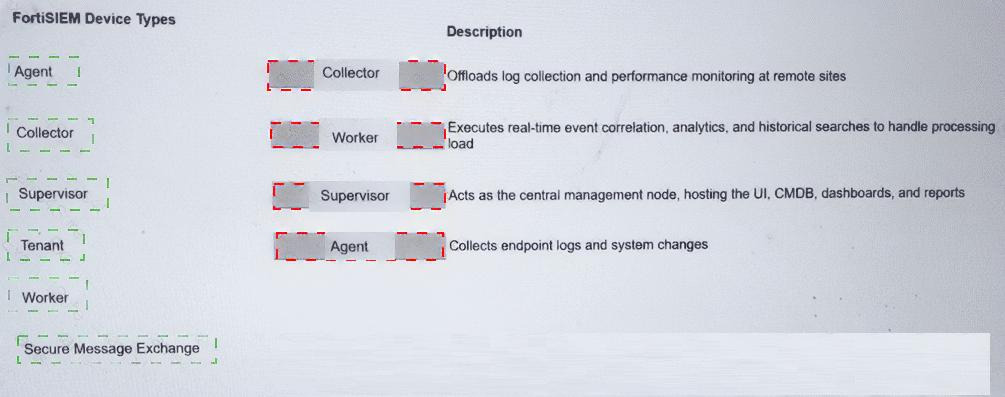
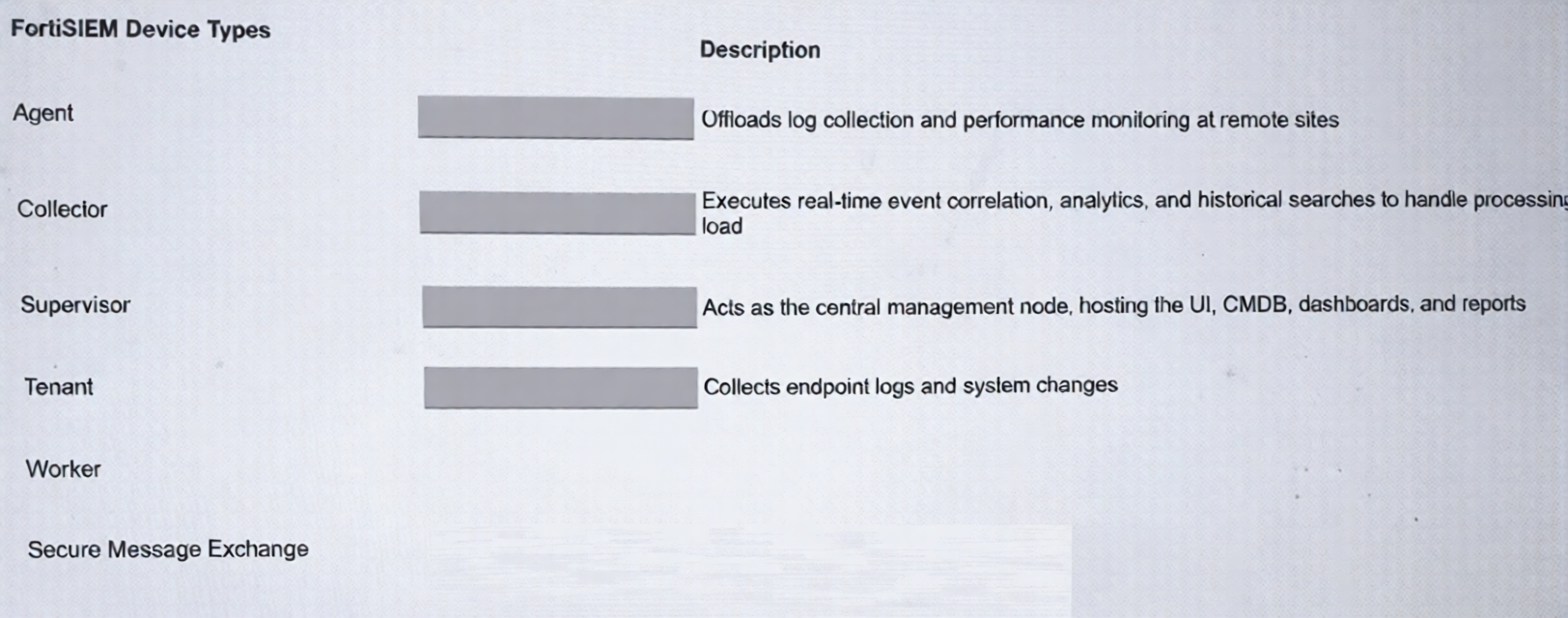
Question 26
Match the FortiSIEM device type to its description. Select each FortiSIEM device type in the left column, hold and drag it to the blank space next to its corresponding description in the column on the right.

Show answerHide answer

Explanation


Explanation:

This question tests your knowledge of FortiSIEM component roles in a distributed deployment. Each device type has a distinct function: lightweight collection, centralized management, distributed processing, or log forwarding.

✔️ Correct Options:

Agent:
Deployed at remote sites without a local Collector. It forwards logs and performance data efficiently over WAN to reduce bandwidth usage.

Worker:
Handles heavy processing like correlation and historical searches. Multiple Workers can be added to scale performance horizontally.

Supervisor:
Provides the single pane of glass for administration. It maintains the CMDB, serves the web UI, and manages report scheduling.

Collector:
Typically installed on-premises near log sources. It receives raw logs, parses them, and sends normalized events to Supervisor/Worker.

❌ Incorrect options:

Tenant:
This is a logical isolation unit in multi‑tenant deployments, not a physical device type with the described roles.

Secure Message Exchange:
This is a communication protocol or component for secure event transmission, not a FortiSIEM device type.

🔧 Reference:
→ Fortinet Official Documentation: FortiSIEM Architecture
Confirms the roles of Agent, Collector, Supervisor, and Worker in the FortiSIEM component model.

That's the last free question

You've seen the free 30% (26 of 91 questions). Full access unlocks every question and full-length NSE7_SOC_AR-7.6 mock exams (40 questions, 75 minutes), a different mock on every attempt.

Unlock full mock exam
Full mock exam

Sit the NSE7_SOC_AR-7.6 exam before exam day

Full-length mocks with the same number of questions and the same time limit as the real NSE7_SOC_AR-7.6 exam. Every attempt draws a new set of questions from the full bank, so you can keep going until you pass comfortably.

Get full NSE7_SOC_AR-7.6 mock exam
  • 40questions per mock
  • 75 mintime limit
  • 91questions in the bank
  • Newmock on every attempt