Fortinet certification · Exam NSE7_SOC_AR-7.6

NSE7_SOC_AR-7.6 Mock Exam

Fortinet NSE 7 - Security Operations 7.6 Architect

Free NSE7_SOC_AR-7.6 questions on Logging, Reporting, and Analytics, each with the answer and an explanation.

20 questions · 38 minutes · free, no sign-up

Logging, Reporting, and Analytics questions

1–2 of 2 free
Question 1 Choose 1
Refer to the exhibit.
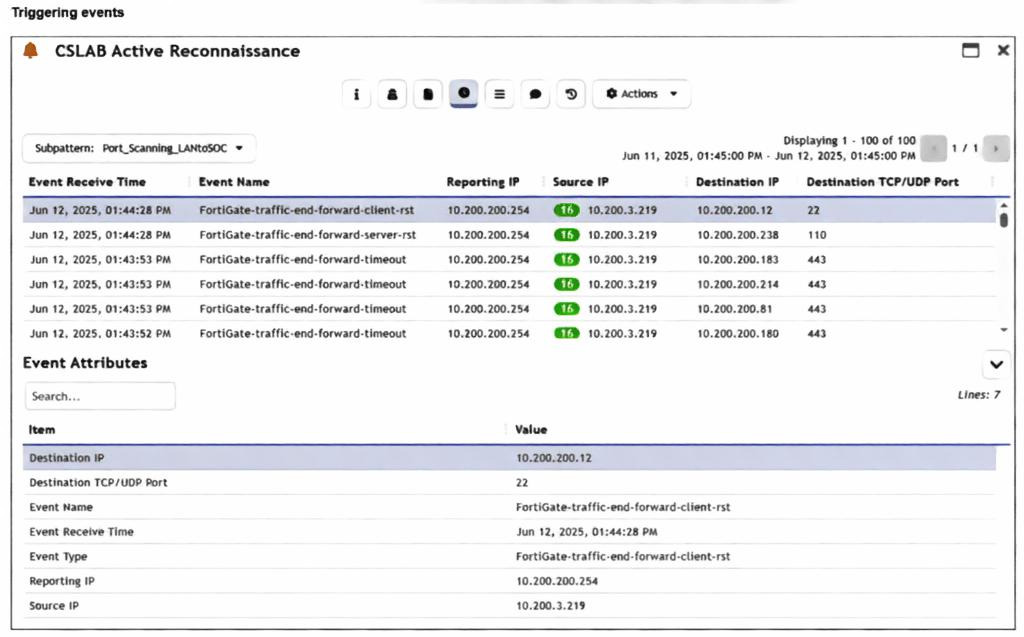


You are reviewing the Triggering Events page for a FortiSIEM incident. You want to remove the Reporting IP column because you have only one firewall in the topology. How do you accomplish this? (Choose one answer)
Show answerHide answer

Correct answer: D Customize the display columns for this incident.

Explanation

Explanation:

When a rule triggers an incident in FortiSIEM, the "Triggering Events" tab shows you the specific logs that caused the alert. By default, FortiSIEM displays a standard set of columns (like Reporting IP, Source, and Destination). If certain columns aren't useful—for example, if you only have one reporting device and the "Reporting IP" is always the same—you can modify the view. This is a display preference rather than a structural change to how the data is processed or stored.

The Correct Answer

✅ D. Customize the display columns for this incident.
Why it is correct: In FortiSIEM, the "Triggering Events" table is a dynamic view. Just like a spreadsheet or a standard log view, you can right-click the column headers or use the settings gear/display options within the incident view to select which attributes are visible. Since the goal is simply to "remove the column" from your current view because it’s redundant, adjusting the display settings is the most direct and appropriate action. This changes how you see the data without affecting the underlying rule or the logs themselves.

Why the Other Options are Incorrect

❌ A. Clear the Reporting IP field from the Triggered Attributes section when you configure the Incident Action.
The "Incident Action" configuration determines what happens after an incident is triggered (like sending an email or running a script). "Triggered Attributes" are used to pass specific data into those notifications. Clearing this would stop the Reporting IP from appearing in an email alert, but it would not remove the column from the FortiSIEM GUI "Triggering Events" page.

❌ B. Disable correlation for the Reporting IP field in the rule subpattern.
Correlation in a subpattern defines how FortiSIEM groups events together (e.g., "Group by Source IP"). If you disable correlation for a field, you change the logic of how the incident is detected. This is a "back-end" logic change. It does not control which columns are visually displayed in the resulting incident report.

❌ C. Remove the Reporting IP attribute from the raw logs using parsing rules.
This is a destructive and "nuclear" option. Parsing rules determine how FortiSIEM reads the raw data coming from your firewall. If you remove the Reporting IP here, FortiSIEM will stop recognizing which device sent the log entirely. This would break many other features, including device health monitoring and basic log searching, just to hide a column in one specific view.

📚 Reference
https://docs.fortinet.com
Question 2 Choose 2
Review the following incident report:
Attackers leveraged a phishing email campaign targeting your employees.
The email likely impersonated a trusted source, such as the IT department, and requested login credentials. An unsuspecting employee clicked a malicious link in the email, leading to the download and execution of a Remote Access Trojan (RAT).
The RAT provided the attackers with remote access and a foothold in the compromised system.
Which two MITRE ATT&CK tactics does this incident report capture? (Choose two.)
Show answerHide answer

Correct answer: A, D Initial Access Persistence

Explanation

Explanation:

This incident describes two clear attack stages. The phishing email and malicious link show how the attacker first entered the environment, and the RAT establishing remote access shows how the attacker kept a foothold on the system.

✅ Correct Option A: Initial Access
The phishing email campaign and malicious link represent the entry point into the target environment. Fortinet’s MITRE ATT&CK content explains that tactics describe the attacker’s goal, and phishing is a common method used to gain initial access. In this scenario, the attacker used social engineering to get a user to execute the payload. ​

✅ Correct Option D: Persistence
The RAT providing remote access and a foothold indicates the attacker can remain on the host after the first compromise. Fortinet’s incident response material refers to reporting attack vectors, compromised systems, and the tactics, techniques, and procedures used by attackers, which supports treating ongoing malware-based access as persistence. ​

❌ Option B: Defense Evasion
Defense Evasion is about avoiding detection, hiding malicious activity, or bypassing security controls. The report does not describe stealth, concealment, or anti-detection behavior, so this tactic is not directly captured here. ​

❌ Option C: Lateral Movement
Lateral Movement means moving from the first compromised system to other systems in the network. This report only describes the initial phishing compromise and the RAT foothold on one system, not movement across additional hosts.

🔧 Reference:
→ What Is Mitre Att&CK? Framework, Techniques, and Benefits
— Confirms that tactics represent attacker goals and techniques describe how they are carried out.

​ → FortiGuard Incident Response Service
— Confirms Fortinet incident reporting covers attack vectors, compromised systems, and TTPs used by attackers.

That's the last free question in Logging, Reporting, and Analytics

You've seen the free 30% (2 of 8 questions). Full access unlocks every question and full-length NSE7_SOC_AR-7.6 mock exams (40 questions, 75 minutes), a different mock on every attempt.

Unlock full mock exam
Full mock exam

Sit the NSE7_SOC_AR-7.6 exam before exam day

Full-length mocks with the same number of questions and the same time limit as the real NSE7_SOC_AR-7.6 exam. Every attempt draws a new set of questions from the full bank, so you can keep going until you pass comfortably.

Get full NSE7_SOC_AR-7.6 mock exam
  • 40questions per mock
  • 75 mintime limit
  • 91questions in the bank
  • Newmock on every attempt