Fortinet certification · Exam NSE7_SOC_AR-7.6

NSE7_SOC_AR-7.6 Mock Exam

Fortinet NSE 7 - Security Operations 7.6 Architect

Find out if you're ready for NSE7_SOC_AR-7.6. Take the free timed mock exam and get your score in minutes, or study the free NSE7_SOC_AR-7.6 questions below with answers and explanations.

20 questions · 38 minutes · free, no sign-up

Free NSE7_SOC_AR-7.6 questions

1–10 of 26 free
Question 1 Choose 3
Which three are threat hunting activities? (Choose three answers)
Show answerHide answer

Correct answer: A, C, D Enrich records with threat intelligence. Generate a hypothesis. Perform packet analysis.

Explanation

Explanation:

This question tests understanding of core threat hunting activities, which are proactive and investigation-driven. Threat hunting focuses on forming hypotheses, enriching and analyzing data, and deeply inspecting traffic to uncover hidden threats. It is distinct from automation or rule tuning, which belong to SOC operations and engineering.

🟢 Correct Option A: Enrich records with threat intelligence
Threat hunters enrich logs and events with threat intelligence such as IOCs, reputation data, and known malicious indicators. This added context helps identify suspicious activity that would otherwise look normal, enabling more accurate detection of compromised systems and attacker behavior.

🟢 Correct Option C: Generate a hypothesis
Threat hunting is fundamentally hypothesis-driven. Hunters start with an assumption about potential attacker behavior and validate it through investigation. This structured approach allows them to proactively search for threats that have bypassed traditional detection mechanisms.

🟢 Correct Option D: Perform packet analysis
Packet analysis provides deep visibility into network traffic, allowing hunters to detect hidden payloads, anomalies, or suspicious communication patterns. It goes beyond logs and is essential for identifying advanced or stealthy threats that evade standard security tools.

đź”´ Incorrect Option B: Automate workflows
Automation is part of SOAR and operational efficiency, not threat hunting. Hunting requires manual investigation, critical thinking, and analysis rather than predefined automated processes.

đź”´ Incorrect Option E: Tune correlation rules
Tuning correlation rules is a SIEM engineering activity aimed at improving detection accuracy. While it may be informed by hunting results, it is not itself a threat hunting activity.

đź”§ Reference:
→ FortiAnalyzer Threat Hunting
– Confirms that threat hunting involves hypothesis-driven investigation, enrichment with threat intelligence, and deep analysis of network and log data.
Question 2 Choose 1
Which FortiAnalyzer connector can you use to run automation stitches9
Show answerHide answer

Correct answer: C Local

Explanation

Explanation:

FortiAnalyzer uses connectors to link automation (like playbooks) to different systems or itself. These connectors provide actions you can run when a playbook triggers. The question is asking which connector lets you execute FortiAnalyzer's own built-in automation stitches (or related local actions) as part of that flow. Automation stitches are primarily a FortiGate feature, but FortiAnalyzer integrates with them through event handlers and connectors. The key is the "local" one handles FortiAnalyzer-native stuff, including actions tied to stitches or similar automation.

Correct answer

âś… C. Local
This is the right one. The Local connector is built-in and always there on FortiAnalyzer. It gives you a list of predefined FortiAnalyzer actions that you can use directly in playbooks or automation flows. In the context of the exam (and docs for 7.6), this is the connector that supports running local FortiAnalyzer automation features, which tie into things like event handler-triggered stitches or playbook tasks that interact with stitches. People sometimes confuse it with FortiOS because stitches live on FortiGate, but when the question says "FortiAnalyzer connector" for running them (likely meaning triggering or executing related automation from FAZ side), Local is the one that fits.

Incorrect options

❌ A. FortiCASB
No, this connector is for integrating with FortiCASB cloud access security broker stuff—like pulling in CASB logs or actions related to cloud app security. It doesn't provide any way to run or trigger automation stitches. Common mix-up: thinking any Fabric connector can do everything, but each is purpose-built.

❌ B. FortiMail
This one's for FortiMail integration—things like email quarantine actions, pulling mail logs, or email-related remediation in playbooks. It has zero to do with executing automation stitches, which are more about broader Security Fabric responses (quarantine, CLI scripts, etc.). Easy to rule out if you remember connectors match the product they're named after.

❌ D. FortiOS
Close but not quite. The FortiOS connector appears once you authorize a FortiGate in the ADOM, and it exposes FortiGate-side actions (like running CLI scripts, enabling/disabling interfaces, or triggering things on the device itself). While FortiGate is where stitches actually live and can be triggered (e.g., via FAZ event handlers sending notifications), the connector for running them from FortiAnalyzer's perspective isn't labeled FortiOS—it's the Local one for FAZ-native execution. Many people pick this because stitches feel "FortiOS-y," but the question is specifically about the FortiAnalyzer connector.

📚 Reference
Fortinet Documentation: https://docs.fortinet.com/product/fortianalyzer/7.6
Question 3
Refer to the exhibits.


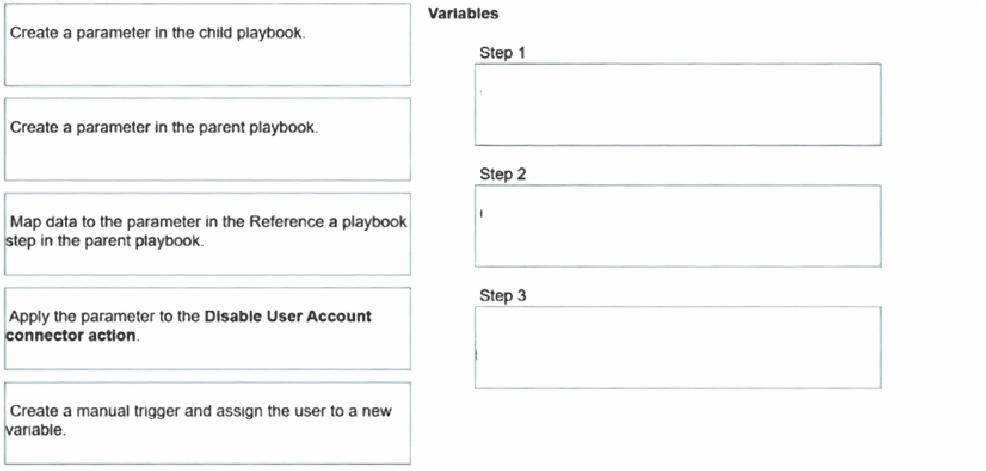
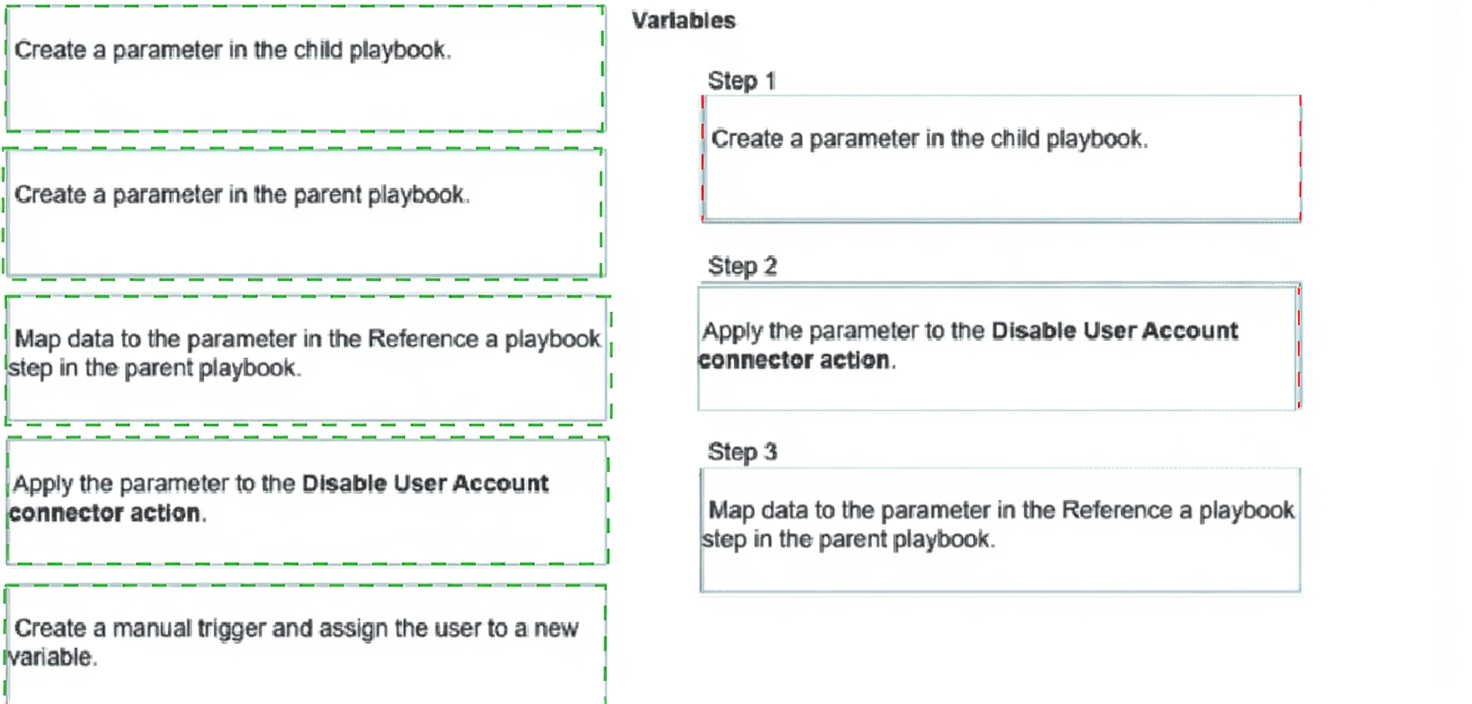
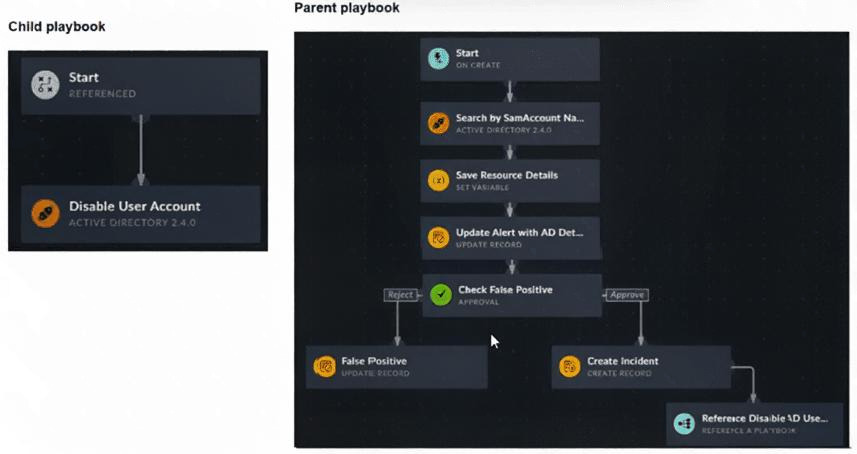
You have a playbook that, depending on whether an analyst deems the alert to be a true positive, could reference a child playbook. You need to pass variables from the parent playbook to the child playbook.
Place the steps needed to accomplish this in the correct order.

Show answerHide answer

Explanation


Explanation:

In FortiAnalyzer (and its underlying FortiSOAR engine for playbooks), you often build modular automation: a parent playbook handles the main logic (like checking if an alert is real), then calls a child playbook for specific tasks (here, disabling a user account in Active Directory if approved). To make the child useful, the parent needs to send data over—like the username or account details. This is done with input parameters. You define them first in the child (so it knows what to expect), use them in the child's actions, and then map actual values from the parent when you call it via the "Reference a Playbook" step. The exhibits show exactly this setup: parent has approval branching, then references the child to do the disable.

Correct order of steps

The steps go in this sequence:

Create a parameter in the child playbook.
This is step 1. You start here because the child has to be ready to receive data. In the child's playbook (under its Start/Referenced trigger), go to Tools > Parameters (or the parameters section) and add an input parameter (e.g., something like "samAccountName" or "userDN"). Without this, there's nothing for the parent to send to. This is the foundation—child declares what it needs.

Apply the parameter to the Disable User Account connector action.
This is step 3 in the list (but logically step 2 after defining it). In the child playbook, edit the "Disable User Account" task (Active Directory connector). In the field where it needs the account to disable (like User DN or SamAccountName), use a Jinja expression to pull from the parameter, e.g., {{vars.input.params.userDN}} or similar. This makes the action actually use whatever data comes from the parent.

Map data to the parameter in the Reference a playbook step in the parent playbook.
This is step 2 in the list (but completes the flow). Back in the parent, in the "Reference a Playbook" task that calls the child, you'll see fields for the parameters you defined in the child. Map values from the parent's context—like pulling the account name from the alert/record using dynamic variables (e.g., {{record.samAccountName}} or from earlier steps like the search). This is how the data actually crosses over.

The other options don't fit:
Creating a parameter in the parent isn't required for passing to child (parents pass data out, but don't need new params just for this). Creating a manual trigger and assigning a user to a new variable is unrelated—manual triggers are for on-demand playbooks, not passing data to referenced/child ones.

Why this order makes sense?
Think of it like handing off a package: first the receiver (child) tells you their address (create parameter), then labels the box inside their house with that address (apply to action), then you write the address on the package and ship it (map in reference step). Reverse any of that and it fails.

Reference
Fortinet Documentation: https://docs.fortinet.com/product/fortianalyzer/7.6
Question 4 Choose 2
Which two playbook triggers enable the use of trigger events in later tasks as trigger variables? (Choose two.)
Show answerHide answer

Correct answer: A, B EVENT INCIDENT

Explanation

Explanation:

FortiAnalyzer playbooks start with a trigger that decides when they run. Some triggers bring in real "event" or "incident" data from the system—like details from a newly created event (alert) or incident—and make that data available as variables (often called trigger variables, formatted like ${trigger.something}) for use in later playbook tasks. This lets you reference things like the source IP, user name, or event severity dynamically in actions such as searches, updates, or notifications. Not all triggers provide this incoming context: scheduled or manual ones usually don't carry the same live trigger payload.

Correct answers

âś… A. EVENT
This is correct. The EVENT_TRIGGER (or EVENT) starts the playbook when a matching event is created in FortiAnalyzer. The event details—like fields from the log or event record—are passed in and accessible as trigger variables throughout the playbook. You can pull things like ${trigger.epip} (endpoint IP), ${trigger.user}, or other event attributes directly into tasks. This is one of the main ways playbooks react to security detections automatically.

âś… B. INCIDENT
This is also correct. The INCIDENT_TRIGGER runs when a new incident matches your filters. Just like with events, the incident's data (fields, linked events, status, etc.) becomes available as trigger variables. You reference them the same way (e.g., ${trigger.incident_id} or ${trigger.severity}) to make decisions or enrich actions. It's designed for incident-response flows where you want to act based on the incident itself.

Incorrect options

❌ C. ON SCHEDULE
This doesn't work for trigger variables from an event/incident. ON_SCHEDULE runs the playbook at set times (like every hour or daily), but there's no incoming "trigger event" or record to provide context—it's just time-based execution. No dynamic data from a specific alert or incident gets passed in automatically. People sometimes think schedules could loop over recent events, but the trigger itself doesn't supply variables like the others do.

❌ D. ON DEMAND
This is manual—someone clicks to run it from the Playbooks list or an incident page. While you can select a record to pass in when starting it (especially if configured to require input), the standard trigger doesn't inherently provide automatic "trigger event" variables from a system-generated event or incident the way EVENT and INCIDENT do. It's more for ad-hoc runs, so the exam distinguishes it here.

Reference
Fortinet Documentation: https://docs.fortinet.com/product/fortianalyzer/7.6
Question 5 Choose 2
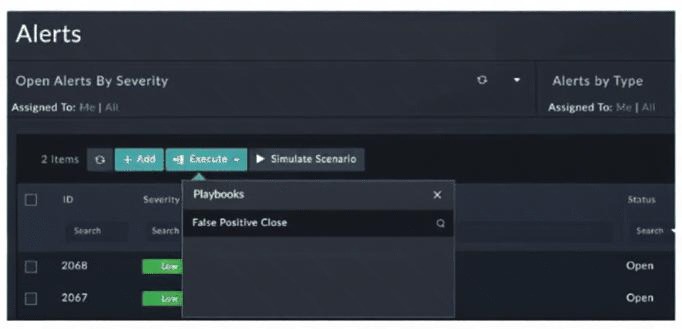
Refer to the exhibit.


You configured a playbook namedFalse Positive Close, and want to run it to verify if it works. However, when you clickExecuteand search for the playbook, you do not see it listed. Which two reasons could be the cause of the problem? (Choose two answers)
Show answerHide answer

Correct answer: A, C The playbook must first be published using the Application Editor. The Alerts module is not among the list of modules the playbook can execute on.

Explanation

Explanation:

🔍 Concept summary
This question is about why a FortiSOAR playbook does not appear in the Execute list, even though it exists. When a playbook is missing from the Execute menu, the problem is almost never a runtime issue. It is a visibility and eligibility problem.
For a playbook to appear under Execute in a specific module like Alerts, three things must be true:
🔹 The playbook must be published.
🔹 The playbook must be allowed to run on that module.
🔹 The trigger type must be compatible with how you are trying to run it.
If any of these conditions fail, the playbook is simply hidden from the list.

âś… Correct answers: A and C

âś… A. The playbook must first be published using the Application Editor.
Unpublished playbooks do not appear anywhere outside the editor.
If the playbook is still in Draft state:
🔹 It will not show up in the Execute menu.
🔹 It cannot be triggered manually.
🔹 It cannot be associated with alerts or incidents.
This is a very common oversight when testing new playbooks. Saving is not enough. Publishing is mandatory.

âś… C. The Alerts module is not among the list of modules the playbook can execute on.
Playbooks are module-scoped.
If the playbook is not configured to run on the Alerts module:
🔹 It will not appear when you click Execute from Alerts.
🔹 Even if the playbook is published, it remains invisible in that context.

This typically happens when:
🔹 The playbook was created for Incidents, not Alerts.
🔹 The module selection was skipped or misconfigured.
FortiSOAR does not warn you. It simply hides the playbook.

❌ Incorrect options

❌ B. Another instance of the playbook is currently executing.
This does not prevent the playbook from appearing in the Execute list.
Even if another instance is running:
🔹 The playbook remains visible.
🔹 Execution may fail or queue depending on configuration, but visibility is unaffected.
This option confuses execution control with playbook eligibility.

❌ D. The manual trigger is configured to require record input to run.
This is not the issue here.
When executing from the Alerts module, record input is automatically provided by the selected alert(s). A manual trigger that requires record input is actually expected behavior for alert-based playbooks.
This would only be a problem if you tried to run the playbook outside of any module context, which is not the case in the exhibit.

Reference
Fortinet Documentation: https://docs.fortinet.com
Question 6 Choose 1
Refer to Exhibit:

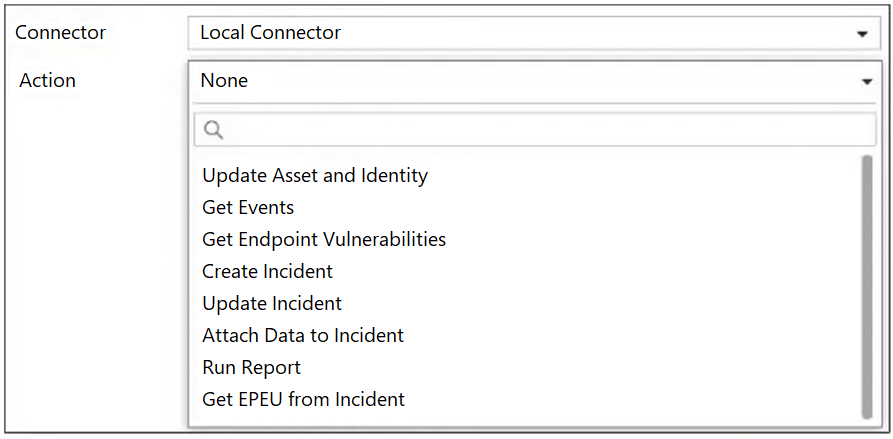
A SOC analyst is designing a playbook to filter for a high severity event and attach the event information to an incident.
Which local connector action must the analyst use in this scenario?
Show answerHide answer

Correct answer: D Attach Data to Incident

Explanation

Explanation:

This question tests your knowledge of FortiAnalyzer's Local Connector actions used within playbook automation. The scenario specifically requires a two-step logic: filtering a high-severity event and then attaching that event's information to an existing incident. Understanding which action serves the "attach" function is essential for SOC playbook design.

✔️ Correct Answer:

D. Attach Data to Incident
This action is purpose-built to link and attach event data to an existing incident within a FortiAnalyzer playbook. When a high-severity event is filtered, "Attach Data to Incident" enables the analyst to associate that event's details directly to the relevant incident record — fulfilling both the filtering and attachment requirements described in the scenario.

❌ Incorrect Answers:

A. Get Events
This action retrieves event data from FortiAnalyzer but does not attach anything to an incident. It is used earlier in a playbook workflow to fetch or query events based on conditions. While it may precede the correct action in a full playbook, it alone does not satisfy the attachment requirement of this scenario.

B. Update Incident
This action modifies existing fields within an incident record, such as status, severity, or assignee. It does not attach event information to an incident. Updating an incident's attributes is a different operation from linking or associating event data to it as a related object.

C. Update Asset and Identity
This action is used to modify asset or identity records stored in FortiAnalyzer's database. It has no relevance to attaching event data to incidents. It serves a different purpose in playbooks focused on asset enrichment or identity management workflows, not event-to-incident correlation.

đź”§ Reference:
→ FortiAnalyzer 7.6.3 Administration Guide – Connector Actions
Confirms that the Local Connector is the default connector for FortiAnalyzer and lists all predefined actions available for use within playbooks, including Attach Data to Incident.

→ FortiAnalyzer 7.0.0 New Features – Attach Connector Actions to Incidents
Demonstrates a real playbook example using the Local Connector with the Attach Data to Incident action to link connector results directly to an incident record.
Question 7 Choose 1
Refer to Exhibit:

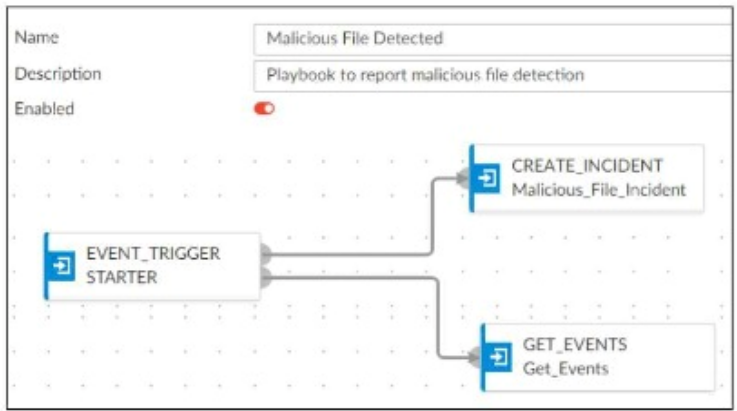
A SOC analyst is creating the Malicious File Detected playbook to run when FortiAnalyzer generates a malicious file event. The playbook must also update the incident with the malicious file event data.
What must the next task in this playbook be?
Show answerHide answer

Correct answer: B A local connector with the action Attach Data to Incident

Explanation

Explanation:

This question evaluates your understanding of the logical flow required in a FortiAnalyzer playbook to automate incident enrichment. The objective is to ensure that the specific event data triggering the playbook is not just identified but actively linked to the newly created incident record for investigation.

âś… Correct Option:

âś… B. A local connector with the action Attach Data to Incident:
In the exhibit, the playbook has already initiated the "CREATE_INCIDENT" and "GET_EVENTS" tasks. To fulfill the requirement of updating the incident with the malicious file event data, the next logical step is to use the "Attach Data to Incident" action. This connector bridges the gap between the retrieved event logs and the incident container, ensuring all relevant forensic evidence is automatically attached and visible within the incident's management tab.

❌ Incorrect options:

❌ A. A local connector with the action Update Asset and Identity:
This action is used to refresh information about devices or users within the Fabric's asset database. While identifying the host that downloaded the malicious file is part of an investigation, this specific action does not satisfy the requirement of linking the "malicious file event data" to the incident record itself.

❌ C. A local connector with the action Run Report:
The "Run Report" action triggers the generation of a pre-defined PDF or HTML document. While reports provide historical summaries, they are not used as a dynamic playbook step to attach real-time event data to a specific incident record. This action would be more appropriate for end-of-week summaries rather than immediate incident enrichment.

❌ D. A local connector with the action Update Incident:
The "Update Incident" action is primarily used to modify administrative metadata, such as changing the incident status to "In Progress," adjusting the severity level, or assigning the case to a specific SOC analyst. It does not possess the specific functional mapping required to ingest and attach raw event data or log evidence to the incident.

đź”§ Reference:
→ FortiAnalyzer Playbook Tasks and Actions
This official documentation describes how the "Attach Data to Incident" task functions as the primary method for enriching incidents with event-specific evidence in a playbook workflow.
Question 8 Choose 1
Refer to the exhibits.

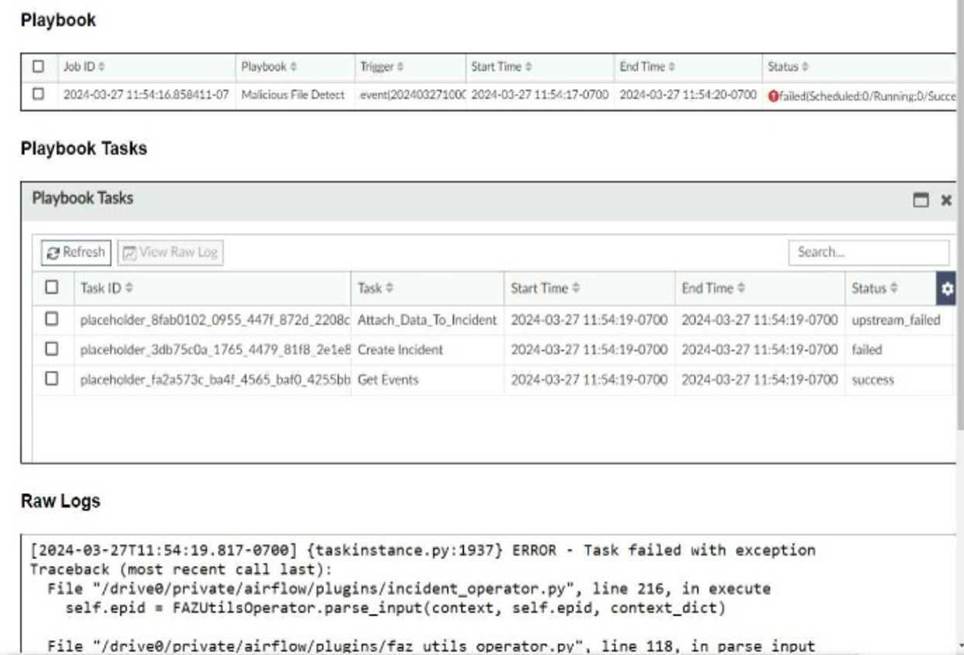
The Malicious File Detect playbook is configured to create an incident when an event handler generates a malicious file detection event.
Why did the Malicious File Detect playbook execution fail?
Show answerHide answer

Correct answer: A The Create Incident task was expecting a name or number as input, but received an incorrect data format

Explanation

Explanation:

This question tests your ability to interpret FortiAnalyzer playbook execution logs and task status results. The exhibit shows three tasks with distinct statuses — Get Events (success), Create Incident (failed), and Attach_Data_To_Incident (upstream_failed). The raw log error traceback in incident_operator.py with FAZUtilsOperator.parse_input directly identifies where and why the failure occurred.

✔️ Correct Answer:

A. The Create Incident Task Was Expecting a Name or Number as Input, but Received an Incorrect Data Format
The raw log traceback points to incident_operator.py line 216 where self.epid = FAZUtilsOperator.parse_input(context, self.epid, context_dict) failed. This confirms the Create Incident task encountered a data format mismatch — it expected a valid name or numeric identifier (epid) but received incompatible input. This caused Create Incident to fail, which in turn caused Attach_Data_To_Incident to report upstream_failed.

❌ Incorrect Answers:

B. The Get Events Task Did Not Retrieve Any Event Data
The Playbook Tasks table explicitly shows Get Events status as "success", meaning event data was retrieved successfully. This option is directly contradicted by the exhibit. The failure did not originate from Get Events — it occurred in the downstream Create Incident task that processed the retrieved data.

C. The Attach_Data_To_Incident Task Was Expecting an Integer, but Received an Incorrect Data Format
The status of Attach_Data_To_Incident is "upstream_failed" — not "failed." This means it never even executed; it was blocked because the Create Incident task before it had already failed. The error traceback in the raw logs also points exclusively to the incident_operator, not to the Attach Data task.

D. The Attach Data To Incident Task Failed, Which Stopped the Playbook Execution
This reverses the actual failure sequence. The Attach_Data_To_Incident task shows "upstream_failed" status, meaning it was never executed due to the prior failure of Create Incident. It did not independently fail or stop the playbook — it was simply prevented from running by the upstream error.

đź”§ Reference:
→ FortiAnalyzer 7.6.0 Administration Guide – Playbook Monitor
Confirms how the Playbook Monitor displays task-level statuses including "failed" and "upstream_failed", and how failed tasks cascade through the playbook execution chain.

→ FortiAnalyzer 7.6.4 Administration Guide – Raising an Incident
Confirms the Create Incident action's required input fields — including the Affected Endpoint (epid) — and how an incorrectly formatted input value causes the task to fail during playbook execution.
Question 9 Choose 1
A customer wants FortiAnalyzer to run an automation stitch that executes a CLI command on FortiGate to block a predefined list of URLs, if a botnet command-and-control (C&C) server IP is detected.
Which FortiAnalyzer feature must you use to start this automation process?
Show answerHide answer

Correct answer: C Event handler

Explanation

Explanation:

This question tests how automation is triggered in FortiAnalyzer. The scenario requires detecting a specific security event (botnet C&C IP) and then initiating an automated response. The key is identifying which component is responsible for detecting conditions and triggering actions.

🟢 Correct Option:

C. Event handler
Event handlers in FortiAnalyzer are used to define conditions based on logs and detect security events such as botnet C&C communication. When the defined condition is met, the event handler triggers an action, such as launching an automation stitch or playbook. This makes it the correct feature to initiate the automation process based on detected threats.

đź”´ Incorrect Options:

A. Playbook
A playbook defines the sequence of automated actions but does not independently detect events. It requires a trigger, such as an event handler, to start execution. Without a triggering mechanism, a playbook cannot initiate automation on its own.

B. Data selector
A data selector is used to filter and retrieve logs for analysis or reporting. It does not perform detection or trigger automation workflows, so it cannot initiate an automation stitch based on security events.

D. Connector
A connector integrates FortiAnalyzer with external systems or devices. While it enables communication, it does not detect events or trigger automation. It is not responsible for starting automation processes.

đź”§ Reference:
→ FortiAnalyzer Event Handler Documentation
Confirms event handlers detect log-based conditions and trigger automation actions such as playbooks or stitches.
Question 10 Choose 1
Refer to the exhibits. You configured a spearphishing event handler and the associated rule. However. FortiAnalyzer did not generate an event.
When you check the FortiAnalyzer log viewer, you confirm that FortiSandbox forwarded the appropriate logs, as shown in the raw log exhibit.
What configuration must you change on FortiAnalyzer in order for FortiAnalyzer to generate an event?
Show answerHide answer

Correct answer: B Configure a FortiSandbox data selector and add it tothe event handler.

Explanation

Explanation:

🔍 Concept summary
This question tests how FortiAnalyzer event handlers actually match logs. Even when logs are present in the log viewer, FortiAnalyzer will not generate an event unless the event handler is explicitly linked to the correct log source. Seeing logs is not enough. The event handler must be told which device and log type to evaluate.
The core issue here is missing log selection, not filtering logic or trigger conditions.

âś… Correct answer: B. Configure a FortiSandbox data selector and add it to the event handler.
FortiSandbox logs are not evaluated by default unless you explicitly include them using a data selector.
In this case:
  • FortiSandbox is forwarding logs correctly.
  • The logs are visible in the FortiAnalyzer log viewer.
  • But the event handler does not reference FortiSandbox as a log source.
Without a FortiSandbox data selector, the event handler never evaluates those logs, so no event is generated. Once you add the FortiSandbox selector to the handler, FortiAnalyzer knows to inspect those logs and the event triggers correctly.
This is a classic FortiAnalyzer pitfall: logs exist, but the handler is blind to them.

❌ Incorrect options

❌ A. In the Log Type field, change the selection to AntiVirus Log (malware).
FortiSandbox logs are not AntiVirus logs. They have their own log structure and device type.
Changing the log type to AntiVirus would cause FortiAnalyzer to look in the wrong place entirely. The logs would still be ignored because they are coming from FortiSandbox, not FortiGate AV inspection.

❌ C. In the Log Filter by Text field, type the value: subtype=malware.
This assumes the problem is text filtering, which it isn’t.
The logs are already confirmed to contain the correct malware information. The issue is that the event handler never evaluates FortiSandbox logs at all. Adding a text filter does nothing if the handler is not tied to the FortiSandbox data source.
This is a common misunderstanding: filters only work after the correct log source is selected.

❌ D. Change trigger condition by selecting: Within a group, the log field Malware Name (mname) has 2 or more unique values.
Trigger conditions define how an event fires, not whether logs are evaluated.
If FortiAnalyzer is not even looking at FortiSandbox logs, changing grouping or thresholds is irrelevant. This option treats the symptom instead of the root cause.

Reference
Fortinet Documentation: https://docs.fortinet.com
Full mock exam

Sit the NSE7_SOC_AR-7.6 exam before exam day

Full-length mocks with the same number of questions and the same time limit as the real NSE7_SOC_AR-7.6 exam. Every attempt draws a new set of questions from the full bank, so you can keep going until you pass comfortably.

Get full NSE7_SOC_AR-7.6 mock exam
  • 40questions per mock
  • 75 mintime limit
  • 91questions in the bank
  • Newmock on every attempt

From Beginner to Specialist: Your Roadmap to Fortinet NSE 7 Security Operations 7.6 Architect


Becoming a Fortinet NSE 7 Security Operations 7.6 Architect is a major step for cybersecurity professionals aiming to design, manage, and optimize advanced security operations. This certification validates your ability to work with complex Fortinet-based SOC environments and respond effectively to modern threats.

Step 1: Build a Strong Foundation


Start by understanding core networking concepts, firewall policies, and security fundamentals. Hands-on familiarity with FortiGate, FortiAnalyzer, and FortiManager is essential before moving into advanced SOC-level operations.

Step 2: Advance to Security Operations Expertise


At this stage, focus on real-world SOC workflows such as threat detection, incident response, automation, and log analysis. Deep knowledge of how Fortinet solutions integrate within a security operations center is critical.

Step 3: Master the NSE7_SOC_AR-7.6 Exam Topics


The NSE7_SOC_AR-7.6 exam covers advanced and practical topics, including:

SOC architecture and design
Log management and analytics
Threat hunting and incident response
Security automation and orchestration
FortiAnalyzer and FortiManager integration
Monitoring, reporting, and troubleshooting

Exam Information

Exam Code: NSE7_SOC_AR-7.6
Number of Questions: Approximately 60 multiple-choice questions
Exam Duration: 90 minutes
Format: Proctored, scenario-based questions

Step 4: Practice and Refine Your Skills


Consistent practice is the key to success. High-quality NSE7_SOC_AR-7.6 practice tests from prepforti.com closely mirror real exam scenarios, helping you identify weak areas, improve time management, and gain confidence before the actual exam.

Results Customers Are Seeing


"The simulations on Responding to a Multi-Vector Attack were the clincher for me. I recognized that exact workflow during my exam. It did not just help me pass; it provided the blueprint for how we are restructuring our SOCs escalation procedures. The platform focus on architectural decision-making over simple recall is its real value."
- Jamal Ray

“Prepforti NSE7_SOC_AR-7.6 practice tests felt extremely close to the real exam style. The scenario-based questions and detailed explanations helped me understand why an answer was correct, not just memorize it. I went into the exam confident—and passed on my first attempt.”
- Michael Carter

The SOC Architect exam demands deep knowledge of detection and response workflows. Prepforti.com NSE7_SOC_AR-7.6 practice tests were incredibly accurate, they mirrored the complex FortiSIEM and FortiSOAR integration scenarios perfectly. I walked into the exam confident and passed without hesitation.
Jonathan Myers, Security Operations Architect | Dallas, TX