Refer to the exhibits
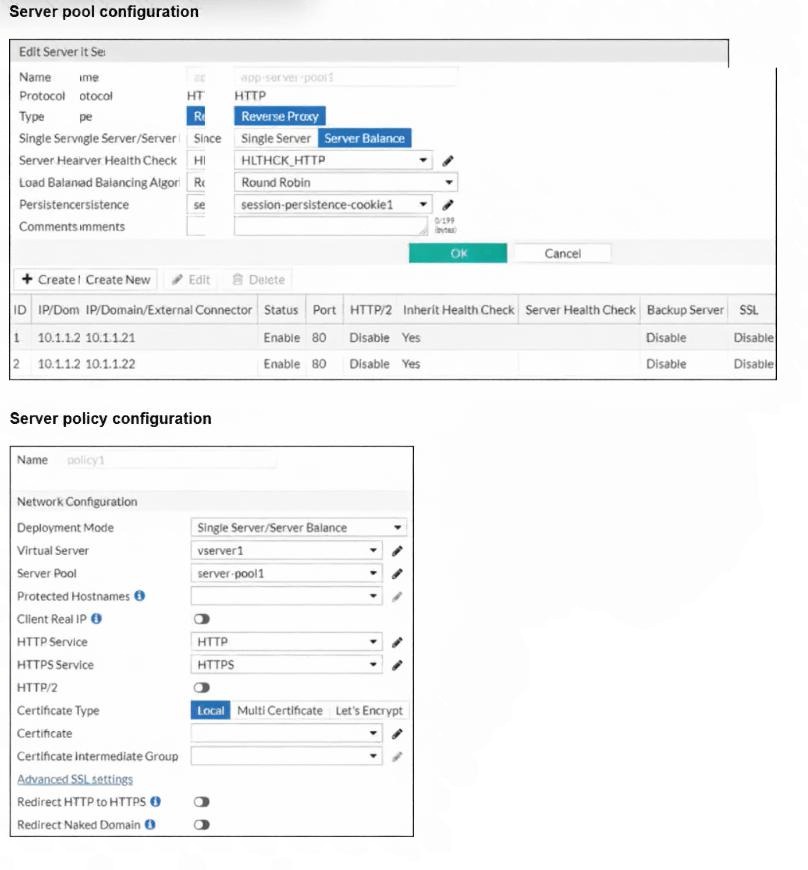
You are configuring a FortiWeb device in reverse proxy mode, placed downstream from a FortiGate. The server pool includes two back-end web servers: 10.1.1.21 and 10.1.1.22, and you’ve defined a health check policy. After completing the server policy configuration and applying it to a virtual server, you notice that FortiWeb is not forwarding traffic to the back-end servers. No errors or health check failures appear in the logs. Based on the configuration shown in the exhibit, which change should you make to restore back-end traffic flow?
You are configuring a FortiWeb device in reverse proxy mode, placed downstream from a FortiGate. The server pool includes two back-end web servers: 10.1.1.21 and 10.1.1.22, and you’ve defined a health check policy. After completing the server policy configuration and applying it to a virtual server, you notice that FortiWeb is not forwarding traffic to the back-end servers. No errors or health check failures appear in the logs. Based on the configuration shown in the exhibit, which change should you make to restore back-end traffic flow?
Show answerHide answer
Correct answer: A Select the correct server pool in the FortiWeb server policy.
Explanation
✅ ExplanationThis is the most direct configuration requirement. In Reverse Proxy mode, traffic destined for a virtual server must be mapped to a server pool through a server policy; otherwise, no forwarding will occur.
The key evidence from the exhibit is that the Virtual Server field is set to vserver1, but the Server Pool field is blank. A server policy cannot forward traffic without a defined server pool. As documented, a policy combines a virtual server with a server pool: the virtual server receives client traffic, and the server pool defines the back-end web servers to which FortiWeb forwards that traffic.
Health checks show no errors because without a server pool, FortiWeb has no destination to check; it is simply not in the forwarding path.
❌ Why Other Options Are Incorrect
B. Enable Client Real IP to ensure traffic goes to the back-end servers. The Client Real IP setting affects the IP address logged by the web server, not the forwarding decision. By default, in Reverse Proxy mode, FortiWeb uses its own IP as the source when connecting to back-end servers, but this does not prevent it from forwarding traffic; the core issue is the missing server pool.
C. Change the virtual server IP address to match one of the back-end servers. This is incorrect and would cause an IP address conflict and break the proxy logic. A virtual server IP must be distinct from the back-end server IPs.
D. Configure FortiGate to forward traffic to the back-end IP addresses directly.
This would bypass FortiWeb entirely, removing the protection it is designed to provide. The goal is to use FortiWeb as the forwarder, which requires a correctly mapped server policy.
📚 Reference
Fortinet Administration Guide: Configuring a server policy – A policy must combine a Virtual Server and a Server Pool to forward traffic.
Fortinet Administration Guide: Traffic flow of Reverse Proxy mode – The back-end server receives traffic from FortiWeb's IP; a Client Real IP setting is for logging, not forwarding.