Fortinet certification · Exam NSE5_FWB_AD-8.0

NSE5_FWB_AD-8.0 Mock Exam

Fortinet NSE 5 - FortiWeb 8.0 Administrator

Find out if you're ready for NSE5_FWB_AD-8.0. Take the free timed mock exam and get your score in minutes, or study the free NSE5_FWB_AD-8.0 questions below with answers and explanations.

9 questions · 17 minutes · free, no sign-up

Free NSE5_FWB_AD-8.0 questions

1–9 of 9 free
Question 1 Choose 1
A third-party penetration test reveals that users can bypass login controls through a mobile API. Your current FortiWeb configuration includes zero trust network access (ZTNA) profiles and cookie security, but API protection and client management are not enabled. The security team asks you to recommend the most effective way to close this gap. Which FortiWeb adjustment would best prevent future unauthorized API access?
Show answerHide answer

Correct answer: B Enable API protection and client management to enforce identity checks on mobile API traffic.

Explanation

Explanation:

The vulnerability described (bypassing login controls through a mobile API) is fundamentally an identity and authentication issue. Mobile clients can be authenticated using JSON Web Tokens (JWT), a standard (RFC 7519) for transmitting authentication information between parties . FortiWeb's Mobile API Protection module directly addresses this by validating whether the request carries a valid JWT token header and taking appropriate action when the token is missing or invalid . To further restrict access, API Gateway features enable API key verification, allowing you to create API users and groups and verify that the key belongs to a valid user . This ensures only authenticated, authorized mobile clients can access the API.

❌ Why Other Options Are Ineffective

A. Switch to reverse-proxy mode:
Changing the deployment mode is a topological adjustment. While it can provide authentication offloading features , it is not the direct solution to enforcing JWT token validation or API client identity checks . It addresses how traffic is processed, not the missing authentication logic itself.

C. Replace ZTNA with bot protection:
While Bot Protection is vital for mitigating malicious automation (e.g., scraping, credential stuffing) , the core issue is unauthorized access via a valid mobile application, not distinguishing human users from bots. Bot protection would not enforce identity checks for legitimate mobile clients.

D. Log only API traffic:
Logging is a passive function. It provides visibility into unauthorized access attempts but does not actively prevent them, leaving the vulnerability unpatched.
Question 2 Choose 3
A FortiWeb administrator wants to create a machine learning (ML)-based bot detection system. Which three actions must the administrator take to build and activate this ML model? (Choose three.)
Show answerHide answer

Correct answer: A, B, D Collect traffic samples for training. Verify the model manually on test data only. Build the detection model using collected data.

Explanation

Explanation:

To build and activate the ML bot detection model, the administrator must oversee a process that involves three distinct stages, not perform manual algorithmic analysis. The system handles the complex computations automatically .

A. Collect traffic samples for training.
This is the essential first stage. The system gathers samples of user behavior, splitting them into a training set (75%) and a testing set (25%) to build and validate the model .

B. Verify the model manually on test data only.
While this option's phrasing is slightly imprecise, it correctly identifies the model building stage. During this phase, the system automatically uses the testing sample set to verify the model's accuracy. The administrator's manual action is to initiate this build process and then review the resulting accuracy metrics (Training Accuracy, Cross-Validation Value, Testing Accuracy) to decide if the model is valid .

D. Build the detection model using collected data.
This describes the core of the model building stage. Using the collected samples, the system employs the Support Vector Machine (SVM) algorithm to self-learn user behavior profiles and constructs the mathematical detection model .

Why other options are incorrect:

C. Apply Bayesian analysis to the model output.
This is incorrect. FortiWeb's bot detection uses the SVM algorithm, not Bayesian analysis .

References:

Fortinet Documentation: "FortiWeb uses SVM (Support Vector Machine) algorithm to build up the bot detection model" .

The official process is defined as having three stages: sample collecting, model building, and model running
Question 3 Choose 1
A FortiWeb administrator sees the following request:
GET /api/v1/data HTTP/1.1
Host: example.com
Authorization: ApiKey abc123def456
The API key belongs to a user in group B who is authorized to access only /api/v1/reports.
What should the administrator do to prevent this unauthorized access?
Show answerHide answer

Correct answer: A Restrict access to /api/v1/data using user group–based access control.

Explanation

Explanation:

This scenario represents a classic Broken Object Level Authorization (BOLA) or unauthorized privilege escalation attempt at the API layer. The user possesses a valid credential (a legitimate API key), but they are attempting to access a resource path (/api/v1/data) that they do not have the authorization to view, as their group (Group B) is strictly restricted to /api/v1/reports.

Why Choice A is correct: FortiWeb provides granular API Gateway and Web Access Control capabilities. To remediate this, the administrator should implement User Group-Based Access Control (or Role-Based Access Control). By mapping API keys to specific user groups and binding those groups to precise URL protection rules/path matches, FortiWeb can validate not just that the API key is valid, but that the identity tied to that key has the explicit privilege to execute the requested HTTP method on that specific URI path.

Why the other options are incorrect:

B is incorrect because blocking the endpoint for all user groups would cause a denial of service for legitimate users (e.g., administrative groups or Group A users) who actually require access to /api/v1/data.

C is incorrect because arbitrarily moving the user to a higher-privileged group violates the security principle of least privilege. If the user is only supposed to see reports, they should not be granted access to raw data.

D is incorrect because allowing all valid API keys to access any endpoint completely eliminates authorization controls, leaving the API vulnerable to data exposure.

Reference

FortiWeb 8.0 Administration Guide: API Protection > API Access Control / User-Group Based Authentication

Section Overview: Configuring Access Control Rules allows administrators to define path-based permissions and map them to specific authenticated User Groups or API protection profiles to enforce strict authorization boundaries.
Question 4 Choose 1
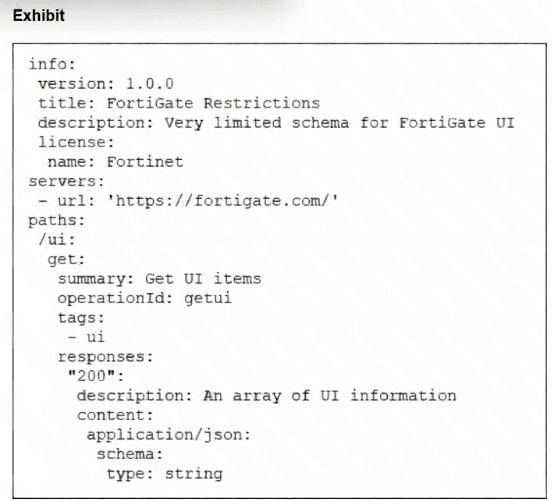
Refer to the exhibit.

What does the exhibit show?
Show answerHide answer

Correct answer: D An API schema file.

Explanation

Explanation:

The exhibit shows an OpenAPI Specification (formerly known as Swagger) document written in YAML format. This is a standard machine-readable schema file used to define, document, and describe RESTful API endpoints, their parameters, authentication requirements, and expected responses.

Key indicators in the file confirm this:
openapi: 3.0.1 – Explicitly declares this as an OpenAPI 3.0.0+ specification.
info: – Contains metadata about the API (title, description, version).
servers: – Defines the base URL where the API is hosted (https://fortigate.com/).
paths: – Maps out the available endpoint (/uri) and its HTTP method (get), along with operation details, tags, and response structures.

This file is use responses: – Describes the expected HTTP response codes and content types (e.g., 200 OK with application/json).

This file is used by tools like Swagger UI or Postman to generate interactive API documentation and client SDKs. It is not a live response, a UI interface, or a CLI command output.

❌ Why Other Options Are Incorrect

A. The FortiGate UI interface in HTML. – Incorrect. This is a structured YAML file, not an HTML document. It describes an API, not a graphical user interface.

B. A sample response returned by the FortiGate API at https://fortigate.com/ui. – Incorrect. The file defines the structure of a response, not an actual response payload. A live response would contain data like {"data": "ui_info"}, not a schema definition.

C. The result of a show ui details command on a FortiWeb server. – Incorrect. FortiWeb CLI commands produce text-based output in a tabular or key-value format, not an OpenAPI YAML specification.

📚 Reference

OpenAPI Specification (OAS) – The file format shown is the industry standard for describing RESTful APIs, as defined by the OpenAPI Initiative.
Question 5 Choose 1
Refer to the exhibit.

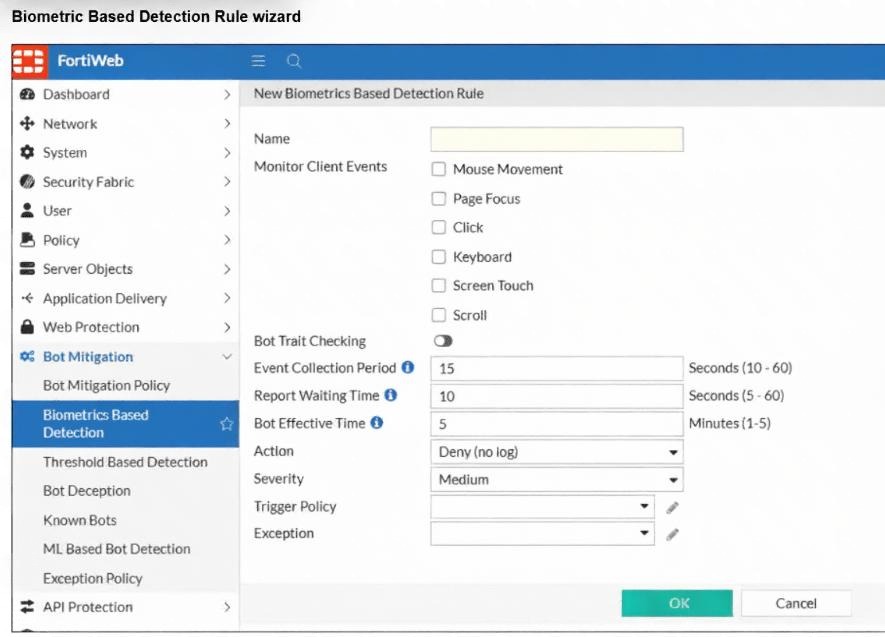
You are a FortiWeb administrator reviewing the biometrics-based detection rule shown in the exhibit. Your goal is to configure a rule that detects bots that avoid typical human interactions like using a mouse or clicking. You also want to log the detection event and apply a high-severity alert. Based on the current configuration, which settings should you change to meet this goal?
Show answerHide answer

Correct answer: C Select Mouse Movement and Click , change the action to Alert , and set the severity to High .

Explanation

✅ Explanation

The administrator's goal has three specific requirements:
Detect bots that avoid human interactions – The rule must monitor the client events that typical human users perform. Mouse Movement and Click are the most fundamental human interactions. Bots that lack genuine user input will not generate these events, triggering the detection rule. Selecting these options correctly identifies the intended bot behavior.

Log the detection event – The current Action is set to Deny (no log), which means the detection is blocked but no log entry is generated. To meet the logging requirement, the administrator must change the action to Alert. The Alert action generates a log entry without blocking the request, or optionally, the administrator could set it to Deny with logging enabled. However, among the given options, Alert is the correct choice to fulfill the logging requirement. Apply a high-severity alert – The current Severity is set to Medium. The administrator must change this to High to meet the requirement for a high-severity alert. This ensures the event is properly prioritized in logs and monitoring systems.

❌ Why Other Options Are Incorrect

A. Select Screen Touch and Page Focus, set severity to Low, and keep action as Deny (no log).
Screen Touch and Page Focus are not the primary human interactions targeted for bot detection; Mouse Movement and Click are more relevant.
Severity Low and Deny (no log) fail to meet both the high-severity alert and logging requirements.

B. Select Keyboard and Scroll, change action to Alert, and set severity to High.
While this option correctly changes Action to Alert and Severity to High, the selected client events (Keyboard and Scroll) are less reliable indicators. Many legitimate automated scripts (e.g., API clients or headless browsers) may trigger these events, while bots that simply scrape content may never generate keyboard or scroll events. Mouse Movement and Click are more definitive for detecting non-human interaction.

D. Do not select any client events to monitor, enable Bot Trait Checking, keep the current severity, and keep action as Deny (no log).
Selecting no client events renders the rule ineffective, as there is no behavioral trigger.
Keeping Severity as Medium and Action as Deny (no log) fails both the high-severity and logging objectives.

📚 Reference

FortiWeb 8.0 Administrator Guide – Bot Mitigation: Biometrics-Based Detection rules monitor client-side events like mouse movement, clicks, keyboard inputs, and scrolling to differentiate human users from automated bots. The detection action can be set to Alert (log only), Deny (block with log), or Deny (no log) (block without logging). Severity levels (Low, Medium, High) are used for alert prioritization in SIEM and log analysis workflows.
Question 6 Choose 1
Refer to the exhibits

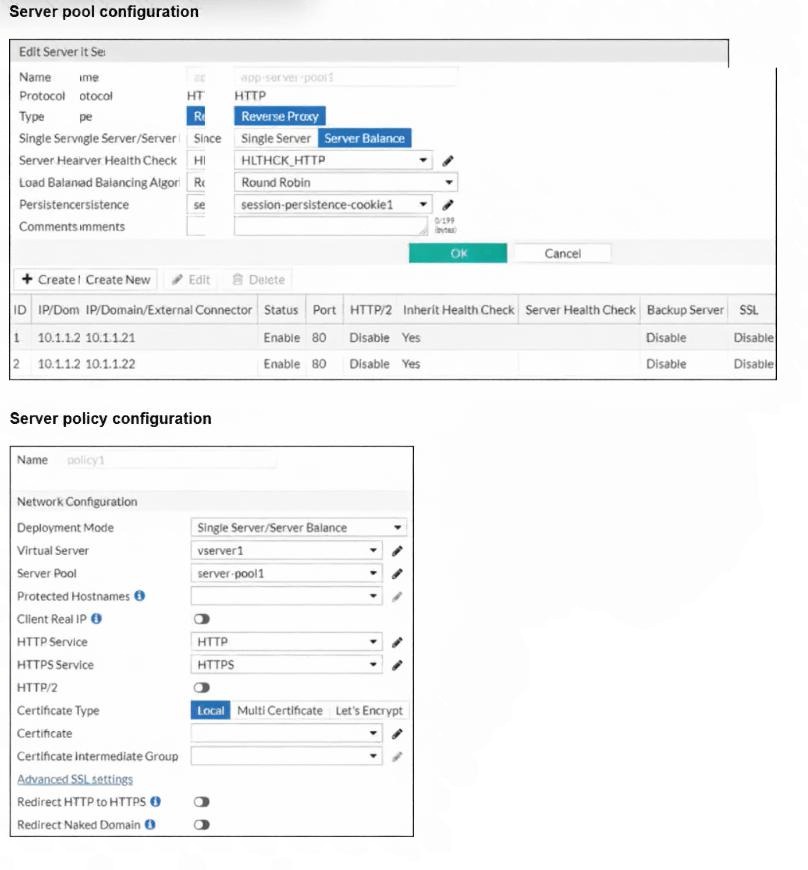
You are configuring a FortiWeb device in reverse proxy mode, placed downstream from a FortiGate. The server pool includes two back-end web servers: 10.1.1.21 and 10.1.1.22, and you’ve defined a health check policy. After completing the server policy configuration and applying it to a virtual server, you notice that FortiWeb is not forwarding traffic to the back-end servers. No errors or health check failures appear in the logs. Based on the configuration shown in the exhibit, which change should you make to restore back-end traffic flow?
Show answerHide answer

Correct answer: A Select the correct server pool in the FortiWeb server policy.

Explanation

✅ Explanation

This is the most direct configuration requirement. In Reverse Proxy mode, traffic destined for a virtual server must be mapped to a server pool through a server policy; otherwise, no forwarding will occur.

The key evidence from the exhibit is that the Virtual Server field is set to vserver1, but the Server Pool field is blank. A server policy cannot forward traffic without a defined server pool. As documented, a policy combines a virtual server with a server pool: the virtual server receives client traffic, and the server pool defines the back-end web servers to which FortiWeb forwards that traffic.

Health checks show no errors because without a server pool, FortiWeb has no destination to check; it is simply not in the forwarding path.

❌ Why Other Options Are Incorrect

B. Enable Client Real IP to ensure traffic goes to the back-end servers. The Client Real IP setting affects the IP address logged by the web server, not the forwarding decision. By default, in Reverse Proxy mode, FortiWeb uses its own IP as the source when connecting to back-end servers, but this does not prevent it from forwarding traffic; the core issue is the missing server pool.

C. Change the virtual server IP address to match one of the back-end servers. This is incorrect and would cause an IP address conflict and break the proxy logic. A virtual server IP must be distinct from the back-end server IPs.

D. Configure FortiGate to forward traffic to the back-end IP addresses directly.
This would bypass FortiWeb entirely, removing the protection it is designed to provide. The goal is to use FortiWeb as the forwarder, which requires a correctly mapped server policy.

📚 Reference

Fortinet Administration Guide: Configuring a server policy – A policy must combine a Virtual Server and a Server Pool to forward traffic.

Fortinet Administration Guide: Traffic flow of Reverse Proxy mode – The back-end server receives traffic from FortiWeb's IP; a Client Real IP setting is for logging, not forwarding.
Question 7 Choose 2
You are reviewing SSL-related issues on FortiWeb. An administrator reports that they receive a certificate warning when they access the FortiWeb GUI over HTTPS. Separately, your FortiWeb device also makes outbound HTTPS requests to a back-end API server. In which two situations would FortiWeb use its own certificates to establish or secure the connection? (Choose two.)
Show answerHide answer

Correct answer: C, D When an administrator connects to the FortiWeb GUI using HTTPS in a browser. When FortiWeb connects to a back-end server over HTTPS as a client.

Explanation

✅ Explanation:

FortiWeb uses its own certificates in two primary scenarios: to authenticate its administrative interface to an administrator, and to authenticate itself as a client to a back-end server. The connection details are key to understanding this.

✅ Correct Answers

C. When an administrator connects to the FortiWeb GUI using HTTPS in a browser.
This is a dedicated function. The FortiWeb appliance presents its own HTTPS Server Certificate for secure connections to its web UI . A default factory certificate is used, but you can replace it with a custom certificate in the Admin Cert Local settings . If you don't, browsers will display a certificate warning .

D. When FortiWeb connects to a back-end server over HTTPS as a client.
FortiWeb can act as an SSL client when initiating connections to backend servers. In this situation, it can use its own certificate to authenticate itself to the server (e.g., in a mutual TLS/mTLS scenario) . This certificate is configured within the server pool settings to ensure both parties are authenticated and trusted .

❌ Why Other Options Are Incorrect

A. When a client browser initiates an SSL session and FortiWeb is in transparent inspection mode.
This scenario is a key distinction. In Transparent Inspection (TI) mode, FortiWeb does not perform SSL/TLS offloading and does not present a certificate to the client. Instead, the web server terminates the SSL/TLS connection with its own certificate .

B. When FortiWeb is routing an HTTPS connection to a FortiGate without decrypting it.
This is incorrect. To perform inspection or offloading on an HTTPS connection, FortiWeb must decrypt the traffic. If it did not decrypt it, it wouldn't present its own certificate. This function would be analogous to a router forwarding traffic based on IP headers, requiring no SSL certificate use at the application level.
Question 8
Refer to the exhibit.

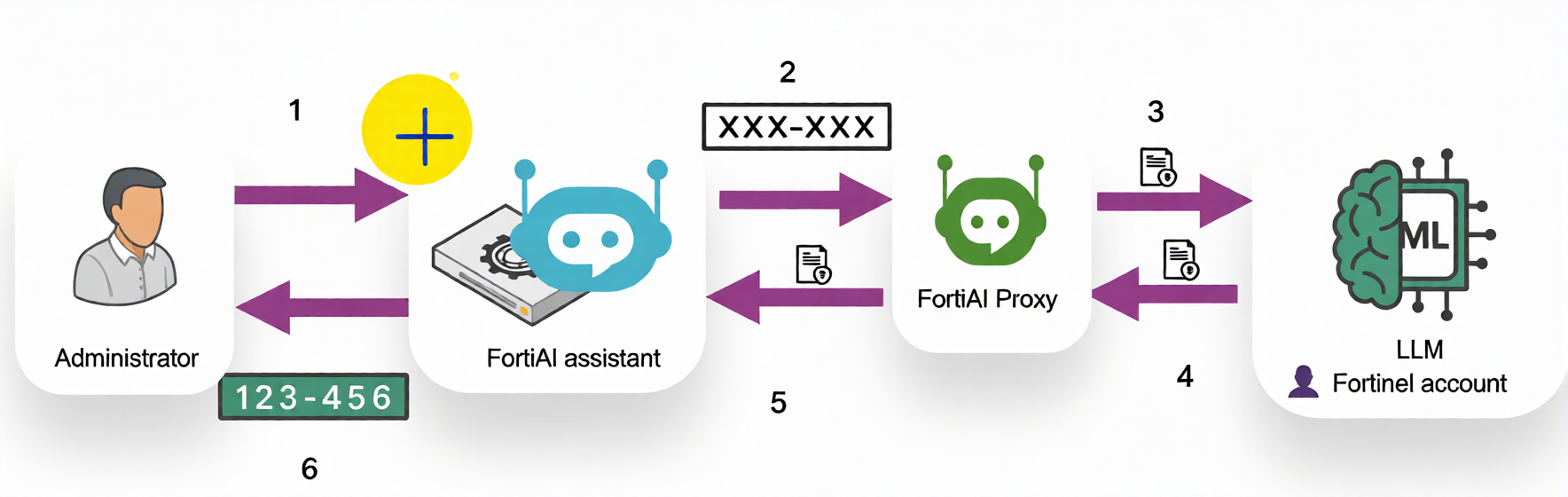
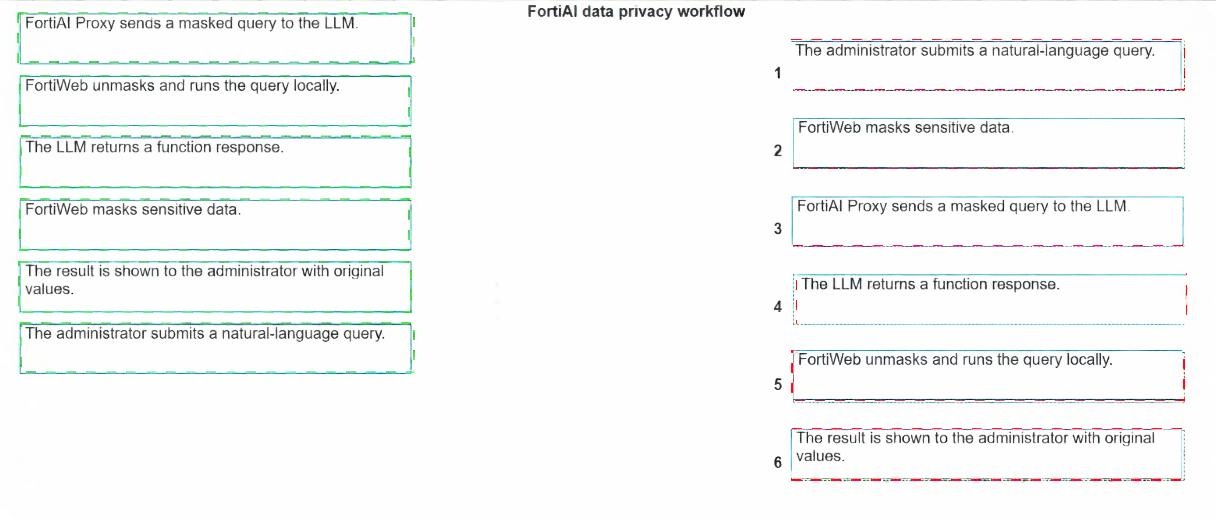
You are a FortiWeb administrator reviewing how FortiAI protects sensitive data when interacting with a large language model (LLM).
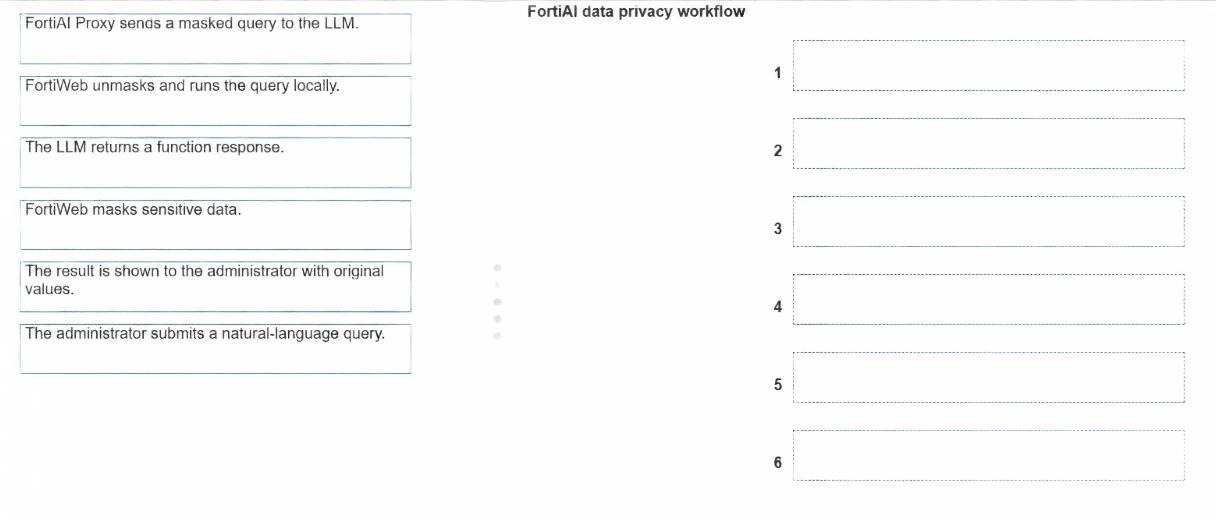
Drag each label to the corresponding step in the FortiAI data privacy workflow.
Show answerHide answer

Explanation


Explanation

The FortiAI data privacy workflow is designed to ensure sensitive data is never exposed to the large language model (LLM) while still allowing the administrator to use natural language queries. The process follows this exact sequence:

The administrator submits a natural-language query. The workflow begins when an administrator types a query into the FortiAI assistant interface.

FortiWeb masks sensitive data. Before the query is sent to the LLM, FortiWeb scans and identifies sensitive information (e.g., IP addresses, user credentials, session tokens) and replaces them with placeholder values (like 123-456 shown in the exhibit). This ensures no private data leaves the FortiWeb environment.

FortiAI Proxy sends a masked query to the LLM. The FortiAI Proxy (which is a separate virtual machine) receives the masked query and securely forwards it to the external LLM for processing. The LLM never sees the actual sensitive data, only the placeholders .

The LLM returns a function response. The LLM processes the masked query and returns a function response that may include the placeholder values. This response is sent back through the FortiAI Proxy.

FortiWeb unmasks and runs the query locally. FortiWeb receives the response and reverses the masking process—it replaces the placeholder values with the original sensitive data and then executes any generated command or script locally on the FortiWeb appliance.

The result is shown to the administrator with original values. After the local execution is complete, FortiWeb displays the final result to the administrator with all original values intact, providing a seamless and secure experience.

❌ Why Other Mappings Are Incorrect

Any deviation from this sequence would break the logical flow of the privacy protection mechanism. The order is critical: masking must happen before the query leaves FortiWeb, and unmasking can only occur after the LLM's response is received. Placing "FortiWeb masks sensitive data" after the LLM processes the query would expose sensitive data to the external model, defeating the purpose of the feature. Similarly, "FortiWeb unmasks and runs the query locally" cannot occur before the LLM returns its function response, as there would be nothing to unmask and execute.

📚 Reference

Fortinet Documentation: FortiAI data privacy workflow – Describes the end-to-end process of masking sensitive data before sending queries to the LLM and unmasking after the LLM returns a response .
Question 9 Choose 1
A FortiWeb administrator is deciding between using SAML SSO or HTML authentication. They want to minimize the number of credential prompts users receive across multiple Fortinet services. Which statement accurately describes which option is best, and why?
Show answerHide answer

Correct answer: A SAML SSO, because it supports identity authentication on Fortinet devices.

Explanation

✅ Explanation:

SAML SSO supports identity authentication across Fortinet devices and other integrated services. Its core function is to enable users to authenticate once and gain access to multiple applications without being prompted for credentials again. This directly meets the administrator's goal of minimizing repeated credential prompts across multiple Fortinet services.

FortiWeb documentation confirms that SAML integration supports SSO for both administrators and end users, allowing a single authentication event to grant access to multiple services. Additionally, FortiWeb supports SAML SSO with various identity providers (IdPs) such as FortiGate and Azure AD, further extending the single sign-on capability across the broader environment.

❌ Why Other Options Are Incorrect

B. SAML, because it blocks users from accessing anything not approved in FortiWeb policy. While FortiWeb can enforce access policies, this describes authorization, not the core functionality of SSO. SAML's primary purpose is authentication (verifying identity), not blocking access based on policies.


C. HTML form authentication, because it's faster and doesn't need external systems. HTML form authentication does not inherently provide SSO capabilities across multiple services. It typically requires users to authenticate separately for each application, which contradicts the goal of minimizing credential prompts. While it may not need external systems, this comes at the cost of reduced user experience.

D. HTML form, because it provides token-based access to remote services. HTML form authentication does not inherently provide token-based SSO across remote services. SAML, not HTML forms, is the protocol designed for token-based authentication federation across multiple service providers.

📚 Reference

Fortinet Documentation confirms SAML SSO enables single sign-on authentication across Fortinet devices

Site Publishing feature documentation describes how SSO eliminates repeated authentication prompts across multiple applications

That's the last free question

You've seen the free 30% (9 of 36 questions). Full access unlocks every question and full-length NSE5_FWB_AD-8.0 mock exams (40 questions, 75 minutes), a different mock on every attempt.

Unlock full mock exam
Full mock exam

Sit the NSE5_FWB_AD-8.0 exam before exam day

Full-length mocks with the same number of questions and the same time limit as the real NSE5_FWB_AD-8.0 exam. Every attempt draws a new set of questions from the full bank, so you can keep going until you pass comfortably.

Get full NSE5_FWB_AD-8.0 mock exam
  • 40questions per mock
  • 75 mintime limit
  • 36questions in the bank
  • Newmock on every attempt