Fortinet certification · Exam NSE5_FSW_AD-7.6

NSE5_FSW_AD-7.6 Mock Exam Page 3

Fortinet NSE 5 - FortiSwitch 7.6 Administrator

Free NSE5_FSW_AD-7.6 mock exam questions 21–30, each with the answer and an explanation.

20 questions · 35 minutes · free, no sign-up

Free NSE5_FSW_AD-7.6 questions

21–30 of 33 free
Question 21 Choose 1
How are the 'by VLAN redirect MAC address quarantine' mode and the 'by redirect MAC address quarantine' mode on FortiGate similar?
Show answerHide answer

Correct answer: A Both modes move quarantined devices to the quarantine VLAN.

Explanation

Explanation:
The core similarity between these two quarantine modes lies in their ultimate isolation goal: both redirect the traffic of the quarantined device to the FortiGate for processing. Although they differ in implementation, the "by VLAN" mode moves the device to a dedicated quarantine VLAN, while the "by redirect" mode redirects traffic on the original VLAN to the FortiGate. Both rely on the FortiGate's security policies to control the quarantined device, preventing it from accessing normal network resources, thereby achieving the effect of network isolation.

Correct Option:

A. Both modes move quarantined devices to the quarantine VLAN.
Isolation Mechanism: The "by VLAN" mode directly moves the device to the quarantine VLAN (default 4093); the "by redirect" mode, although the device remains on the original VLAN, also directs its traffic to the FortiGate for processing through redirection technology. From the perspective of traffic control, both modes effectively "isolate" the device from the normal forwarding path and hand it over to the FortiGate for management.

Incorrect Option:

B. Both modes require firewall policies to block inter-VLAN traffic.
The "by VLAN" mode typically has no firewall policies by default in the quarantine VLAN, and the device cannot access the external network unless an explicit allow policy is configured. In contrast, the "by redirect" mode requires administrators to manually configure firewall policies to block the traffic of the quarantined address group; otherwise, the device may still communicate normally.

C. Both modes add quarantined device MAC addresses to the blocked firewall address group.
Only the "by redirect" mode adds the MAC address of the quarantined device to the QuarantinedDevices firewall address group for policy matching. The "by VLAN" mode relies on VLAN division rather than address groups to achieve isolation.

D. Both modes block intra-VLAN traffic by FortiGate automatically.
This statement is inaccurate. In the "by VLAN" mode, the quarantine VLAN by default has access VLAN functionality enabled, which may allow communication between quarantined devices; in the "by redirect" mode, the device remains on the original VLAN, and intra-VLAN traffic is not necessarily automatically blocked by the FortiGate.

Reference:
Fortinet Document Library: FortiGate Administration Guide (6.4.2), "Quarantine" section, which explains the operational differences between by-redirect and by-vlan modes and their dependence on firewall policies.
Question 22 Choose 1
You need to mirror traffic from a source port on Switch A to a monitoring device on Switch C. For that purpose, you’re configuring Remote Switched Port Analyzer (RSPAN).1Due to the nature of RSPAN, what is the best practice when setting it up? (Choose one answer)
Show answerHide answer

Correct answer: B Use a dedicated VLAN assigned only to monitoring devices.

Explanation

Explanation:
RSPAN works by encapsulating mirrored traffic within a dedicated VLAN and transmitting it across switches to a remote monitoring device. Using a dedicated monitoring VLAN prevents the mirrored traffic from mixing with regular user data traffic, which is the recommended best practice. Fortinet documentation explicitly identifies an "rspan" VLAN as a dedicated VLAN for RSPAN/ERSPAN mirrored traffic, and warns that RSPAN traffic appearing on the VLAN may be subject to storm control, further reinforcing the need to isolate it .

Correct Option:

B. Use a dedicated VLAN assigned only to monitoring devices.

Traffic Isolation: RSPAN encapsulates mirrored traffic in a VLAN header and forwards it across Layer 2 domains. Using a dedicated VLAN ensures that this encapsulated traffic remains separate from production traffic, avoiding unnecessary broadcast or flooding impact on user devices .

Fortinet Best Practice: FortiSwitch provides a default "rspan" VLAN template specifically intended for RSPAN and ERSPAN mirrored traffic, and this is the recommended deployment approach .

Incorrect Option:

A. Use the same VLAN already configured for regular data traffic.
Mixing RSPAN encapsulated traffic with regular user traffic on the same VLAN causes the mirrored traffic to be treated as unknown unicast/multicast/broadcast within that VLAN, and it is subject to storm control rate limiting, potentially causing packet loss and impacting normal business traffic .

C. Use a dynamic VLAN that includes all switch ports.
A dynamic VLAN that includes all ports is typically used for onboarding or default access scenarios; it cannot provide a clean, isolated transport channel for RSPAN. Including all ports in the RSPAN VLAN would cause encapsulated traffic to be flooded throughout the network, increasing the burden on all ports and reducing security .

D. Use the RSPAN VLAN as a native VLAN on all trunk ports.
Configuring the RSPAN VLAN as the native VLAN on all trunk ports would cause a large amount of untagged RSPAN traffic to flood into the native VLAN of each trunk, creating serious traffic pollution and security risks. RSPAN VLANs should be explicitly allowed and tagged on specific trunk links, rather than becoming the default untagged VLAN on all trunks.

Reference:
Fortinet Document Library: FortiSwitchOS Administration Guide (7.4.4), "Configuring an RSPAN mirror" section (RSPAN VLAN storm control considerations) ; FortiSwitch 7.6 FortiLink Guide, "Configuring FortiSwitch port mirroring" .
Question 23 Choose 1


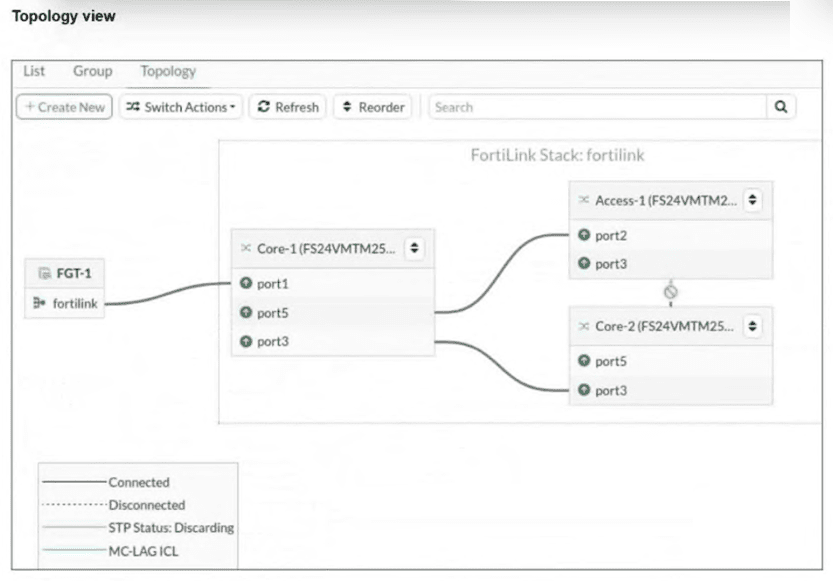
You just connected three FortiSwitch devices:Core-1,Core-2, andAccess-1. Core-1 and Core-2 both connect to Access-1 for redundancy. All switches are managed by FortiGate, which uses port4 as the FortiLink interface. After you enable the uplink ports on Core-2, you notice that port3 on Access-1 enters the Discarding STP state. What is the most likely cause of this behavior? (Choose one answer)
Show answerHide answer

Correct answer: C Core-2 has the lowest bridge priority.

Explanation

Explanation:
The exhibit shows a topology where Core-1 and Core-2 both connect to Access-1 for redundancy, creating a Layer 2 loop. Spanning Tree Protocol (STP) prevents this loop by electing a root bridge and placing redundant ports into a Discarding (blocking) state. When port3 on Access-1 enters Discarding, it means STP has detected a redundant path and is blocking that port to prevent a loop. The root cause is that Core-2 has a lower bridge priority than Core-1, causing STP to select a different path and block Access-1's port3 to Core-2 .

Correct Option:

C. Core-2 has the lowest bridge priority.

Root Bridge Election: STP elects the switch with the lowest bridge priority (numerically) as the root bridge . If Core-2 has a lower bridge priority than Core-1, it may become the root or influence path selection differently.

Port State Impact: This changes the STP topology calculation, causing Access-1 to block its port3 connection to Core-2 to maintain a loop-free topology, resulting in the Discarding state .

Incorrect Option:

A. Bridge Protocol Data Unit (BPDU) Guard is enabled, which shuts down the port after it receives BPDUs.
BPDU Guard disables a port when it receives BPDUs on an edge port. However, the question states port3 enters Discarding (STP blocking state), not err-disabled or shutdown. BPDU Guard would cause a different error state, not a normal STP Discarding state.

B. Access-1 is not authorized by FortiGate.
If Access-1 were not authorized, it would not be managed by FortiGate and its ports would not participate in the STP topology in the way described. The exhibit shows Access-1 as part of the managed topology, and the issue is STP-related, not authorization-related.

D. FortiGate is not running Spanning Tree Protocol (STP) on the FortiLink interface.
Fortinet documentation explicitly states that STP is not supported between a FortiGate and FortiSwitch in FortiLink mode . STP runs on the FortiSwitch ports (Core and Access switches), not on the FortiLink interface itself. Therefore, this is not the cause of the Discarding state on Access-1's port3.

Reference:
Fortinet Document Library: FortiSwitchOS Administration Guide, "STP" section (bridge priority and port states); FortiLink Guide noting STP is not supported between FortiGate and FortiSwitch in FortiLink mode .
Question 24 Choose 2
You are managing FortiSwitch ports from a FortiGate device with multiple VDOMs. Which two methods can you use to assign FortiSwitch ports to VDOMs? (Choose two answers)
Show answerHide answer

Correct answer: A, D Assigning the port directly to a specific VDOM for dedicated physical isolationUsing a virtual port pool (VPP) to create virtualized ports that can be assigned to different VDOMs

Explanation

Explanation:
In a multi-VDOM FortiGate environment, FortiSwitch ports are managed by the root VDOM by default. To assign ports to other VDOMs, Fortinet supports two primary methods: direct port export and virtual port pools (VPP). Direct export uses the set export-to command to assign a specific physical port to a designated VDOM, providing physical isolation. Alternatively, the VPP method allows administrators to create a pool of ports that tenant VDOMs can dynamically request and claim, offering more flexible resource sharing .

Correct Option:

A. Assigning the port directly to a specific VDOM for dedicated physical isolation

Mechanism: Using the config switch-controller managed-switch command, administrators can set export-to on a specific port, which moves the port's management and configuration control to the target VDOM.

Use Case: This method is ideal for multitenancy scenarios where a specific physical connection must be dedicated to a single business unit or tenant, ensuring complete separation of traffic and management.

D. Using a virtual port pool (VPP) to create virtualized ports that can be assigned to different VDOMs

Mechanism: Administrators create a virtual port pool in the management VDOM and assign physical ports to it. Tenant VDOMs can then use the execute switch-controller virtual-port-pool request command to claim a port from the pool.

Use Case: This provides a more flexible "shared" infrastructure model, where ports are not permanently bound to a single VDOM until they are requested, allowing for dynamic resource allocation.

Incorrect Option:

B. Use FortiGate policies to control inter-VDOM traffic for FortiSwitch ports
Why Incorrect: Firewall policies control traffic flow between VDOMs (routing/filtering), but they do not assign the physical management of a FortiSwitch port to a specific VDOM. Port assignment is a switch-controller function, not a policy function .

C. Use interface role mapping to dynamically assign FortiSwitch ports to VDOMs based on Dynamic Host Configuration Protocol (DHCP) scope
Why Incorrect: Interface role mapping and DHCP scope-based assignment are used for dynamic VLAN assignment or device identification, not for assigning the management ownership of a physical FortiSwitch port to a VDOM. This option confuses Layer 2/3 dynamic assignment with VDOM resource partitioning .

Reference:
Fortinet Document Library: FortiSwitch 8.0.1 FortiLink Guide, "Multitenancy and VDOMs" (direct export via set export-to and virtual-port-pool) ; FortiSwitch multi-tenant support (VPP request procedure) .
Question 25 Choose 2
When Dynamic Host Configuration Protocol (DHCP) snooping is enabled on a FortiSwitch VLAN, which two statements are true? (Choose two answers)
Show answerHide answer

Correct answer: A, C DHCP replies are accepted only on trusted ports.Option 82 can be inserted into DHCP requests.

Explanation

Explanation:
When DHCP snooping is enabled on a FortiSwitch VLAN, all ports are untrusted by default. The switch only accepts DHCP server replies (offers/acks) on ports explicitly configured as trusted. Additionally, FortiSwitch can insert Option 82 data (Circuit ID and Remote ID) into DHCP requests to identify the client's originating port and VLAN, enhancing security and traceability .

Correct Option:

A. DHCP replies are accepted only on trusted ports.

Trust Model: DHCP snooping monitors traffic from untrusted sources. Server replies are only accepted on ports configured as trusted, preventing rogue DHCP servers on host ports from distributing invalid leases .

Default State: ll ports are untrusted by default; administrators must explicitly configure the port connected to the legitimate DHCP server as trusted .

C. Option 82 can be inserted into DHCP requests.

Circuit/Remote ID:FortiSwitch supports dhcp-snooping-option82, which inserts Option 82 data (including Circuit ID with VLAN/port info and Remote ID with MAC address) into client requests .

Security Benefit: This enables the DHCP server or controller to identify the exact switch port a request originated from, preventing spoofing and aiding in IP-MAC binding .

Incorrect Option:

B. DHCP snooping blocks all unicast traffic.
DHCP snooping does not block unicast traffic generally; it filters invalid DHCP messages on untrusted ports. Other unicast traffic (e.g., HTTP, SSH) is unaffected.

D. DHCP requests are dropped if sent from trusted ports.
Trusted ports are meant for DHCP servers or uplinks. Client requests (from untrusted host ports) are forwarded; dropping requests from trusted ports is not the standard behavior—trusted ports accept server replies, and client requests from trusted ports are not the focus of the filter.

Reference:
Fortinet Document Library: FortiSwitchOS Administration Guide (7.0.4), "DHCP snooping" section (trusted port behavior) ; FortiOS New Features (7.4.0), "Support configuring DHCP-snooping option-82 settings" .
Question 26 Choose 1
Which statement about 802.1X security profiles using MAC-based authentication mode is true?
Show answerHide answer

Correct answer: B FortiSwitch can grant each device a different access level based on the credentials provided

Explanation

Explanation:
The core feature of 802.1X MAC-based authentication mode is that the switch creates an independent authentication session for each MAC address. Unlike port-based mode (which authenticates the entire port), MAC-based mode allows multiple devices connected to the same port to be authenticated individually. The RADIUS server can return different VLAN attributes (such as Tunnel-Private-Group-ID) for each MAC address, enabling granular access control based on device identity .

Correct Option:

B. FortiSwitch can grant each device a different access level based on the credentials provided

Per-MAC Session: In MAC-based authentication mode, the switch authenticates and maintains a session for each device MAC address independently. The port's native VLAN remains unchanged, but the switch assigns a specific VLAN to each authenticated MAC address .

Dynamic Authorization: The RADIUS server can return different authorization attributes (such as VLAN ID) for each MAC address. This means that different devices on the same port can obtain different network access permissions, achieving precise access control .

Incorrect Option:

A. FortiSwitch allows connectivity to all hosts connected to a port, if one host is authenticated.
This describes the behavior of port-based 802.1X, not MAC-based mode. In port-based mode, once one device is authenticated, all devices on the port gain access. However, in MAC-based mode, each MAC must be authenticated independently; unauthenticated devices cannot access the network .

C. FortiSwitch performs faster when using this security mode on the ports.
MAC-based authentication requires the switch to maintain sessions for each MAC address, with a maximum of 20 sessions per port, and the total number of sessions per switch is also limited . This mode does not provide performance advantages; there is no documentation indicating it is faster than other modes.

D. FortiSwitch must communicate with the RADIUS server to authenticate devices
While MAC-based authentication indeed requires a RADIUS server for authentication, this is not a unique characteristic of this mode—port-based authentication also requires RADIUS communication. This statement does not reflect the specific advantage of MAC-based mode (granular per-device authorization). Additionally, if MAB (MAC Authentication Bypass) is enabled, the switch still uses the MAC address as the username and password to send to the RADIUS server .

Reference:
Fortinet Document Library: FortiSwitch 7.6.5 FortiSwitchOS Administration Guide, "Dynamic VLAN assignment" section (MAC-based authentication assigns independent VLANs per MAC) ; "Port security" section (maximum sessions per port 20, global limit) .
Question 27 Choose 2
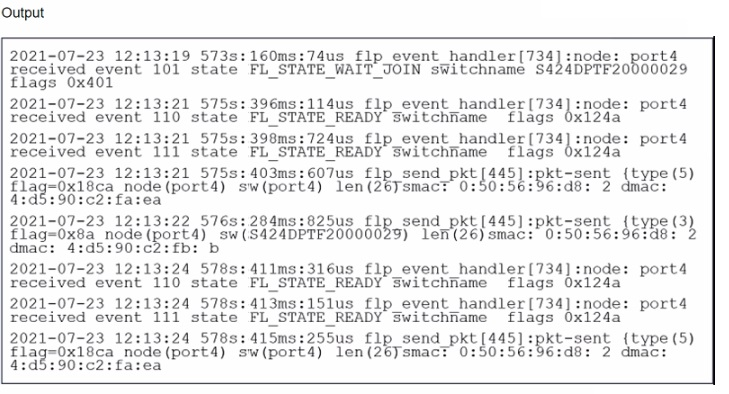
Refer to the exhibit.


Which two statements best describe what is displayed in the FortiLink debug output shown in the exhibit? (Choose two.)
Show answerHide answer

Correct answer: A, B FortiSwitch is sending FortiLink heartbeats to FortiGate.FortiSwitch is discovered and authorized by FortiGate.

Explanation

Explanation:
The FortiLink debug output exhibit (not visible in the prompt) typically shows a switch in an operational FortiLink state. Based on standard FortiLink behavior, when a FortiSwitch is successfully managed, it sends periodic heartbeat/CAPWAP echo requests to the FortiGate to maintain the connection . Simultaneously, the output indicates that the FortiSwitch has been discovered and authorized, confirming it is a recognized managed device . These two conditions reflect an active, healthy FortiLink session.

Correct Option:

A. FortiSwitch is sending FortiLink heartbeats to FortiGate.
Heartbeat Mechanism: A managed FortiSwitch continuously monitors FortiLink health by sending CAPWAP echo requests (heartbeats) to the FortiGate every 30 seconds . The debug output showing this exchange confirms the link is operational and the switch is actively communicating.

B. FortiSwitch is discovered and authorized by FortiGate.
Authorization State: Before heartbeats are exchanged, the FortiSwitch must be discovered and authorized by the FortiGate via FortiLink . The debug output typically reflects this authorized status, indicating the switch is a trusted managed device ready for configuration.

Incorrect Option:

C. FortiSwitch is in a waiting state to join the stack group on FortiGate.
Stacking Context: Joining a stack group is a separate operation from basic FortiLink discovery and heartbeating. A switch can be authorized and sending heartbeats without being part of a FortiSwitch stack. The debug output for a normally managed switch does not indicate a "waiting to join stack" state unless stacking is explicitly being configured.

D. FortiSwitch is ready to push its new hostname to FortiGate.
Hostname Direction: The FortiGate is the controller that pushes configuration (including hostname) to the FortiSwitch, not the other way around. A hostname change on the FortiSwitch triggers a reconnection, but the switch does not "push" its hostname to the FortiGate as a normal operational state .

Reference:
Fortinet Document Library: FortiLink Introduction Guide (FSW heartbeat mechanism, CAPWAP echo) ; FortiOS Administration Guide (FortiSwitch discovery and authorization)
Question 28 Choose 1
Which QoS mechanism maps packets with specific class of service (COS) or Differentiated Services Code Point (DSCP) markings to an egress queue? (Choose one answer)
Show answerHide answer

Correct answer: B Queuing for egress traffic

Explanation

Explanation:
The QoS mechanism that maps packets with specific Class of Service (CoS) or Differentiated Services Code Point (DSCP) markings to an egress queue is the queuing function for egress traffic. According to the FortiSwitch documentation, FortiSwitchOS supports mapping IEEE 802.1p and Layer 3 QoS values (DSCP and IP Precedence) to outbound QoS queue numbers, and this mapping is implemented during the egress queuing process. Classification is responsible for determining packet priority, while queuing is responsible for placing packets into different egress queues based on the classification results.

Correct Option:

B. Queuing for egress traffic

Egress queue mapping: The FortiSwitch QoS policy defines mapping rules from CoS or DSCP values to egress queue numbers (such as the dot1p-map and ip-dscp-map configuration commands), which act on egress traffic.

Determining queue based on trust mode: When a port trusts DSCP and Dot1p, the switch uses the DSCP value to look up the queue mapping; when only Dot1p is trusted, it uses the CoS value to look up the mapping. This process ultimately determines which egress queue the packet enters.

Incorrect Option:

A. Classification for ingress traffic
Classification is responsible for identifying and marking packet priority (such as trusting existing CoS/DSCP values in packets or matching based on ACL), but classification itself does not directly complete the action of "mapping to an egress queue." Mapping to an egress queue is a subsequent queuing action.

C. Policing for ingress traffic
Policing is used to limit the rate of ingress traffic and handle packets that exceed the rate (such as dropping or remarking), and does not involve mapping CoS/DSCP to egress queues.

D. Shaping for egress traffic
Shaping is used to buffer egress traffic to smooth out rate fluctuations, but it does not perform the core function of mapping CoS/DSCP markings to specific queues. Shaping acts on traffic that has already entered a queue.

Reference:
Fortinet Document Library: FortiSwitchOS Administration Guide (7.4.2), "QoS" section, which clarifies that FortiSwitch supports mapping IEEE 802.1p and Layer 3 QoS values (DSCP and IP Precedence) to outbound QoS queue numbers; and "Determining the egress queue" section regarding the queue lookup process based on trust mode.
Question 29 Choose 1
You are deploying a small office network with a single FortiGate and a single FortiSwitch. The office currently has moderate traffic, but the IT team expects the network to grow in the near future, adding more FortiSwitch devices and endpoints. Which FortiLink configuration should you deploy to provide the best combination of current performance and scalability for future growth? (Choose one answer)
Show answerHide answer

Correct answer: C Configure FortiLink as a link aggregation group (LAG) interface.

Explanation

Explanation:
When deploying a single FortiGate and a single FortiSwitch, while considering future scalability and current performance, configuring FortiLink as a Link Aggregation Group (LAG) is the best practice. LAG not only provides higher bandwidth and link redundancy compared to a single physical link, but also has fewer restrictions compared to hardware/software switch interfaces (which route all traffic through the FortiGate CPU and are not recommended for high traffic), and it is simpler than MCLAG (which requires at least two FortiSwitches). Fortinet's official documentation clearly states that LAG is supported on all FortiSwitch models and is a recommended FortiLink logical interface configuration method.

Correct Option:

C. Configure FortiLink as a link aggregation group (LAG) interface.

Performance and Redundancy: LAG bundles multiple physical links into one logical link, providing higher throughput and link-level redundancy. If one link fails, traffic automatically switches to other available links, ensuring business continuity.

Scalability and Versatility: LAG is supported on all FortiSwitch models and can be easily expanded by adding physical member ports when bandwidth needs increase in the future. This is the officially recommended FortiLink logical interface configuration method.

Incorrect Option:

A. Configure FortiLink using hardware-based switch interfaces.
Hardware switch interfaces are only supported on some FortiGate models. More critically, Fortinet documentation explicitly points out that using hardware switch interfaces for FortiLink is "not recommended in most cases" because all traffic between switches must go through the FortiGate, which can cause performance bottlenecks when traffic is heavy.

B. Configure FortiLink using software-based switch interfaces.
Software switch interfaces rely on the FortiGate's CPU for forwarding, resulting in much lower performance than hardware or LAG. Similar to hardware switch interfaces, it is only suitable for very low-traffic scenarios and cannot meet the performance requirements for future network growth.

D. Configure FortiLink as a multichassis LAG (MCLAG) interface.
MCLAG is an ideal solution for eliminating STP loops and achieving active-active redundancy, but it must be configured between at least two FortiSwitch devices. The question scenario is "a single FortiSwitch," which does not meet the prerequisite for deploying MCLAG. Although it has advantages in scalability, it cannot be deployed in the current network environment.

Reference:
Fortinet Document Library: FortiGate Administration Guide, "Using the FortiGate GUI" section, which clarifies that FortiLink can be configured as a LAG and that LAG is supported on all FortiSwitch models; FortiOS Handbook, "FortiLink support" section, which explicitly states that hardware/software switch interfaces are not recommended for FortiLink in most cases.
Question 30 Choose 1
How is traffic routed on FortiSwitch?
Show answerHide answer

Correct answer: D Layer 3 routing can be configured on FortiSwitch, while managed by FortiGate.

Explanation

Explanation:
FortiSwitch supports Layer 3 routing even when managed by a FortiGate over FortiLink. Fortinet documentation confirms that FortiSwitchOS allows configuration of Layer 3 features like Switch Virtual Interfaces (SVIs) and static routes, enabling inter-VLAN routing directly on the switch . While some models can offload routing to hardware, the fundamental capability to configure and perform Layer 3 routing remains available under FortiGate management.

Correct Option:

D. Layer 3 routing can be configured on FortiSwitch, while managed by FortiGate.

Supported Functionality: FortiSwitchOS supports Layer 3 routing configurations, including SVIs (used for inter-VLAN routing) and static routes, even when the device operates in FortiLink mode managed by a FortiGate .

Integration: The FortiGate acts as the switch controller, but the FortiSwitch retains the ability to perform local Layer 3 forwarding decisions based on its routing table, which can be beneficial for reducing traffic load on the FortiGate.

Incorrect Option:

A. Hardware-based routing on FortiSwitch is handled by the CPU.
This is incorrect. Hardware-based routing, when supported by the model, is handled by the ASIC, not the CPU . The CPU handles software-based routing, but the statement incorrectly generalizes hardware routing to the CPU.

B. FortiSwitch looks up the hardware routing table and then the forwarding information base (FIB).
This statement misrepresents the process. The FIB is the forwarding table programmed into the hardware (ASIC) that the switch uses for lookups. It does not "look up the hardware routing table and then the FIB"; the FIB itself is the hardware table used for forwarding decisions .

C. ASIC hardware routing can only handle dynamic routing, if supported.
This is false. Hardware-based Layer 3 forwarding on supported FortiSwitch models handles both static routes and directly connected networks, not exclusively dynamic routing protocols .

Reference:
Fortinet Document Library: FortiSwitch Manager Administration Guide (7.2.5), "Configuring layer-3 routing on FortiSwitch units" ; FortiSwitchOS Administration Guide (7.6.0), "Layer-3 routing in hardware" .
Full mock exam

Sit the NSE5_FSW_AD-7.6 exam before exam day

Full-length mocks with the same number of questions and the same time limit as the real NSE5_FSW_AD-7.6 exam. Every attempt draws a new set of questions from the full bank, so you can keep going until you pass comfortably.

Get full NSE5_FSW_AD-7.6 mock exam
  • 40questions per mock
  • 70 mintime limit
  • 111questions in the bank
  • Newmock on every attempt