Fortinet certification · Exam NSE5_FSW_AD-7.6

NSE5_FSW_AD-7.6 Mock Exam

Fortinet NSE 5 - FortiSwitch 7.6 Administrator

Find out if you're ready for NSE5_FSW_AD-7.6. Take the free timed mock exam and get your score in minutes, or study the free NSE5_FSW_AD-7.6 questions below with answers and explanations.

20 questions · 35 minutes · free, no sign-up

Free NSE5_FSW_AD-7.6 questions

1–10 of 33 free
Question 1 Choose 1
Which statement best describes a benefit of using MAC, IP address, or protocol-based VLAN assignments on FortiSwitch? (Choose one answer)
Show answerHide answer

Correct answer: D It offers dynamic segmentation benefits similar to 802.1X authentication.2

Explanation

Explanation:
The question asks about the core benefit of MAC, IP, or protocol-based VLAN assignment on FortiSwitch. These features allow the switch to dynamically assign VLANs based on packet characteristics (source MAC, IP subnet, or Layer 2 protocol) rather than static port configuration . This provides granular traffic segmentation and access control flexibility that mirrors the dynamic nature of 802.1X authentication, but without requiring a RADIUS authentication exchange for every device . It is a segmentation tool, not an authentication replacement.

Correct Option:

D. It offers dynamic segmentation benefits similar to 802.1X authentication.

Dynamic Assignment: The switch inspects ingress packets and assigns VLANs on the fly based on MAC, IP, or protocol, eliminating the need to manually reconfigure ports when devices move .

Segmentation Similarity:Like 802.1X, this method allows for precise traffic isolation and policy enforcement based on device identity or traffic type, achieving similar segmentation outcomes through different (non-authentication) mechanisms .

Incorrect Option:

A. It disables 802.1X authentication while preserving user access control.
This is false. MAC/IP/protocol-based VLANs do not disable 802.1X; they are separate features. In fact, Fortinet documentation notes that MAC/IP/protocol-based VLAN assignment is unavailable on interfaces configured as Routed VLAN Interfaces (RVIs), which also disables 802.1X features, but the VLAN assignment feature itself does not actively "disable" authentication .

B. It requires devices to authenticate through a RADIUS server before VLAN tagging.
This describes 802.1X dynamic VLAN assignment, not MAC/IP/protocol-based VLANs. The MAC/IP/protocol method relies on static configuration matching packet headers (e.g., a specific MAC address or IP subnet), with no RADIUS authentication exchange required for the assignment to occur .

C. It assigns ports to VLANs regardless of device type or traffic.
This is the opposite of the feature's purpose. The assignment is strictly based on device type or traffic characteristics—specifically the source MAC, IP address/subnet, or Ethernet protocol of the ingress packets. It is highly selective, not indiscriminate .

Reference:
Fortinet Document Library: FortiSwitchOS Administration Guide (7.4.x/7.6.x), "MAC/IP/protocol-based VLANs" section; and ExamTopics discussion referencing the dynamic segmentation benefit
Question 2 Choose 1
You are designing a FortiSwitch backbone where every FortiSwitch device must connect to every other FortiSwitch for maximum redundancy. To maintain connectivity while preventing loops, which protocol or feature must you configure on the switches? (Choose one answer)
Show answerHide answer

Correct answer: B Spanning Tree Protocol (STP)

Explanation

Explanation:
The scenario requires a full-mesh topology where every FortiSwitch connects to every other switch for maximum redundancy. In a full mesh, multiple redundant paths inevitably create Layer 2 loops. Spanning Tree Protocol (STP) is specifically designed to prevent these loops by logically blocking redundant ports while maintaining a loop-free topology . While the physical mesh provides redundancy, STP ensures the logical topology remains stable without broadcast storms.

Correct Option:

B. Spanning Tree Protocol (STP)

Loop Prevention: STP is the standard Layer 2 protocol that ensures a loop-free network topology by electing a root bridge and blocking redundant paths .

Full Mesh Compatibility: In a full mesh design, STP detects the multiple redundant links between switches and selectively puts some ports into a blocking state to prevent loops while keeping the physical connections available for failover .

Incorrect Option:

A. Multichassis link aggregation group (MCLAG)
MCLAG provides node-level redundancy by pairing exactly two switches to appear as one logical device . It is limited to a maximum of two switches per MCLAG group and is not designed to manage the complex loop topology of a full mesh involving every switch connecting to every other switch .

C. Full mesh high availability (HA)
"Full mesh high availability" is not a standard FortiSwitch loop-prevention protocol. FortiSwitch HA typically refers to FortiGate clustering or specific redundancy features, but it does not inherently prevent Layer 2 loops in a mesh topology without a protocol like STP running underneath.

D. Link aggregation group (LAG)
LAG bundles multiple physical links between two devices into a single logical link for increased bandwidth and link redundancy . It does not solve the loop problem in a full mesh where a switch has connections to multiple different switches; LAG only manages parallel links between the same two endpoints .

Reference: Fortinet Document Library: FortiSwitchOS Administration Guide (7.4.3), "STP" section, which defines STP as a link-management protocol ensuring a loop-free Layer-2 network topology .
Question 3 Choose 1
Which feature should you enable to reduce the number or unwanted IGMP reports processed by the IGMP querier?
Show answerHide answer

Correct answer: C Enable IGMP snooping proxy.

Explanation

Explanation:
IGMP snooping proxy is designed to suppress redundant IGMP report and leave messages on a VLAN. When enabled, the proxy intercepts IGMP reports from hosts and only forwards a single report for each multicast group to the upstream querier. This directly reduces the number of unwanted IGMP reports processed by the querier. The other options deal with flooding behavior, which increases traffic rather than reducing report volume.

Correct Option:

C. Enable IGMP snooping proxy.

Report Suppression: The proxy suppresses IGMP reports and leave messages. For each multicast group, only one report is sent to the upstream interface, eliminating redundant reports from multiple hosts .

Querier Offload: The proxy also replies to generic queries on behalf of hosts and only sends leave messages upstream when no members remain, further reducing processing burden on the IGMP querier .

Incorrect Option:

A. Enable the IGMP flood setting on the static port for all multicast groups.
This option would flood IGMP traffic to ports, increasing the volume of IGMP messages in the network. It does not reduce the number of reports reaching the querier; it does the opposite by spreading them more widely.

B. Enable the IGMP flood reports setting on the mRouter port.
Enabling flood reports on the mRouter port causes IGMP reports to be flooded toward the multicast router, which increases the number of reports the querier must process. It is not a suppression mechanism.

D. Enable IGMP flood unknown multicast traffic on the global setting.
This setting controls whether unknown multicast data traffic is flooded within the VLAN . It has no effect on IGMP report processing by the querier and does not reduce control-plane IGMP messages.

Reference:
Fortinet Document Library: FortiSwitchOS Administration Guide (7.6.2), "IGMP snooping" section; and FortiSwitchOS 6.2.0 release notes describing IGMP snooping proxy report suppression behavior .
Question 4 Choose 2
Which two statements about VLAN assignments on FortiSwitch ports are true? (Choose two.)
Show answerHide answer

Correct answer: C, D Only assign one native VLAN on a portAssign untagged VLANs using FortiGate CLI

Explanation

Explanation:
This question examines the specific constraints and configuration methods for FortiSwitch port VLAN assignment. According to FortiSwitch documentation, each port can have only one native VLAN, and untagged VLANs (untagged-vlans) can typically only be configured through the CLI . Other options describe configuration behaviors that do not match the actual functionality, such as configuring a native VLAN on FortiLink, assigning IP addresses to VLANs, etc., which are not direct operations for port VLAN assignment.

Correct Option:

C. Only assign one native VLAN on a port

The native VLAN determines which VLAN untagged frames on a port belong to. A port can have only one native VLAN at the same time .

In FortiSwitch's GUI and CLI, the native-vlan field can only accept a single VLAN ID, and there is no option to configure multiple native VLANs .

D. Assign untagged VLANs using FortiGate CLI

The untagged VLAN list (untagged-vlans) is used to specify which VLANs' tags should be stripped when frames are sent out from the port .

In the FortiGate switch controller configuration, the untagged-vlans parameter can be configured through the CLI; while the GUI typically only provides native VLAN and allowed VLAN settings .

Incorrect Option:

A. Configure a native VLAN on the FortiLink
FortiLink is the management/aggregation link between FortiGate and FortiSwitch. Configuring a native VLAN on FortiLink is to define the untagged VLAN for that link itself, not a direct operation for assigning VLANs to ordinary ports. This statement confuses the VLAN configuration of the FortiLink interface with the VLAN assignment of switch ports, and is not one of the core facts about port VLAN assignment.

B. Assign an IP address and subnet mask to FortiSwitch VLANs
Assigning an IP address and subnet mask is an operation for Layer 3 interfaces (such as VLAN interfaces or management interfaces) and is used for management access or routing. The VLAN assignment of switch ports is a Layer 2 concept and does not involve configuring IP addresses for VLANs. This option confuses Layer 2 VLAN division with Layer 3 interface configuration.

Reference:
Fortinet Document Library: FortiSwitchOS Administration Guide (7.4.1), "Configuring VLANs" section, specifying that each port can configure only one native-vlan, and untagged-vlans need to be configured through CLI ; see also ExamTopics discussion on this question .
Question 5 Choose 1
Which drop policy mode, if assigned to a congested port, will drop incoming packets until there is no congestion on the egress port?
Show answerHide answer

Correct answer: A Tail-drop mode

Explanation

Explanation:
The question asks which drop policy mode causes a congested port to discard incoming packets until the egress port is no longer congested. According to Fortinet documentation, the tail-drop policy is the default drop policy: when a queue is full, additional incoming packets are dropped until there is space available in the queue. This matches the behavior described in the question. Random early detection (RED) and weighted random early detection (WRED) proactively drop packets when the queue exceeds a minimum threshold, rather than waiting until the queue is full before dropping packets.

Correct Option:

A. Tail-drop mode

Packet drop behavior: When the queue is full, tail-drop discards all additional incoming packets until space becomes available in the queue.

Default policy: Tail-drop is the default drop policy on FortiSwitch and is suitable for scenarios where strict queue-full-then-drop behavior is required.

Incorrect Option:

B. Weighted round robin mode
Weighted round robin (WRR) is a queue scheduling algorithm used to determine the order in which queues are served, not a packet drop policy. It allocates egress opportunities to each queue according to weights, but it does not define the behavior when a queue overflows, nor does it involve "dropping incoming packets until the egress port is no longer congested."

C. Random early detection mode
The RED policy begins to drop packets at a constant rate when the queue size exceeds the minimum threshold, until the queue is full. It proactively drops packets before the queue is full, aiming to improve throughput during congestion, rather than waiting until the queue is full before dropping packets.

D. Strict mode
Strict mode (strict priority scheduling) means that higher-priority queues are always scheduled first; lower-priority queues are served only when higher-priority queues are empty. It is a queue scheduling policy, not a drop policy, and does not directly define the packet drop behavior when the queue is full.

Reference:
Fortinet Document Library: FortiSwitch 7.2.5 Administration Guide, "Queuing" section, which states that tail-drop is the default policy and that additional incoming packets are dropped when the queue is full until space becomes available in the queue.
Question 6 Choose 1
Which is a requirement to enable SNMP v2c on a managed FortiSwitch?
Show answerHide answer

Correct answer: D Configure SNMP agent and communities.

Explanation

Explanation:
Enabling SNMP v2c on a managed FortiSwitch requires configuring the SNMP agent (to enable the SNMP service) and SNMP communities (to define access permissions and management hosts). Fortinet documentation clearly states that the SNMP agent must be enabled first, and then an SNMP v1/v2c community must be added, specifying the community name, query/trap ports, and allowed host IP addresses. These two steps form the foundation for SNMP v2c operation.

Correct Option:

D. Configure SNMP agent and communities.

SNMP Agent: Must be enabled in the SNMP system information (config system snmp sysinfo or config switch-controller snmp-sysinfo), and basic information such as contact and location should be set.

SNMP Community: The community defines the grouping for SNMP v1/v2c access, including the community name, enabling v2c queries/traps, and configuring the SNMP manager host IP addresses (up to 8 hosts supported).

Incorrect Option:

A. Create an SNMP user to use for authentication and encryption.
SNMP users are required for SNMPv3 (which supports authentication and encryption), not for v2c. SNMPv2c uses community strings for access control and does not involve user authentication or encryption mechanisms.

B. Specify an SNMP host to send traps to.
Configuring a host is part of community configuration (specifying which SNMP managers receive traps), but it is not the entry-level requirement for enabling v2c. Merely configuring a host without creating a community or enabling the agent prevents v2c from functioning.

C. Enable an SNMP v3 to handle traps messages with SNMP hosts.
SNMPv3 is a separate version from v2c; enabling v3 is unrelated to v2c operation. v2c does not depend on v3 configuration, and enabling v3 does not satisfy the v2c requirements.

Reference:
Fortinet Document Library: FortiSwitchOS Administration Guide (7.0.0), "SNMP" chapter, "SNMP agent" and "Adding an SNMP v1/v2c community" sections; and FortiLink Guide (7.6.4), "Configuring SNMP globally" section.
Question 7 Choose 2
Refer to the configuration:
Which two conditions does FortiSwitch need to meet to successfully configure the options shown in the exhibit above? (Choose two.)
Show answerHide answer

Correct answer: A, B The FortiSwitch model is equipped with a maximum of 54 interfacesFortiSwitch would need to be rebooted.

Explanation

Explanation:
The exhibit (not shown) involves a config switch phy-mode command where port53 is configured as 4x10G and port54 is disabled. According to FortiSwitch documentation, splitting a port requires the original port to support the full speed being split (e.g., a 40G or 100G QSFP port), and after applying the split configuration, the FortiSwitch must be rebooted for the change to take effect. The option about "maximum 54 interfaces" relates to the specific model's port count and the disable-port54 setting required to free up resources for splitting .

Correct Option:

A. The FortiSwitch model is equipped with a maximum of 54 interfaces.

Contextual Relevance: The command set port-configuration disable-port54 is used on models like the FS-548D, which has 54 ports. Disabling port54 is a specific requirement to allow port53 to be split into 4x10G, as the model's hardware/software limits require freeing up port resources .

Model Dependency: This confirms the configuration is specific to a 54-port FortiSwitch model, making this condition true for the exhibit's successful configuration.

B. FortiSwitch would need to be rebooted.

Mandatory Reboot: Fortinet documentation explicitly states that after changing the phy-mode split configuration on a FortiSwitch, the system must be rebooted to apply the new port layout and configuration .

Operational Impact: The switch will prompt that ports will be added/removed and that a reboot is required, confirming this as a necessary condition for the split to function .

Incorrect Option:

C. The split port can be assigned to a native VLAN.
While a split port can eventually be assigned to a VLAN (including as native/untagged), this is a post-configuration step and not a prerequisite for the phy-mode split command itself to succeed. The split configuration is a Layer 1 physical operation, independent of VLAN assignment logic .

D. The Dort full speed prior to the split was 100G QSFP+.
This is incorrect for the specific exhibit. The option 4x10G is commonly used on 40G QSFP ports (splitting into 4x10G), whereas a 100G QSFP28 port typically splits into 4x25G (or 4x10G in some configurations, but the standard 4x10G breakout is associated with 40G). The exhibit's 4x10G setting strongly implies the original port was a 40G QSFP+ port, not a 100G port .

Reference:
Fortinet Document Library: FortiSwitchOS Administration Guide (7.4.4), "Configuring split ports" and FortiLink Guide (7.6.3), "Configuring FortiSwitch split ports (phy-mode)" .
Question 8 Choose 1


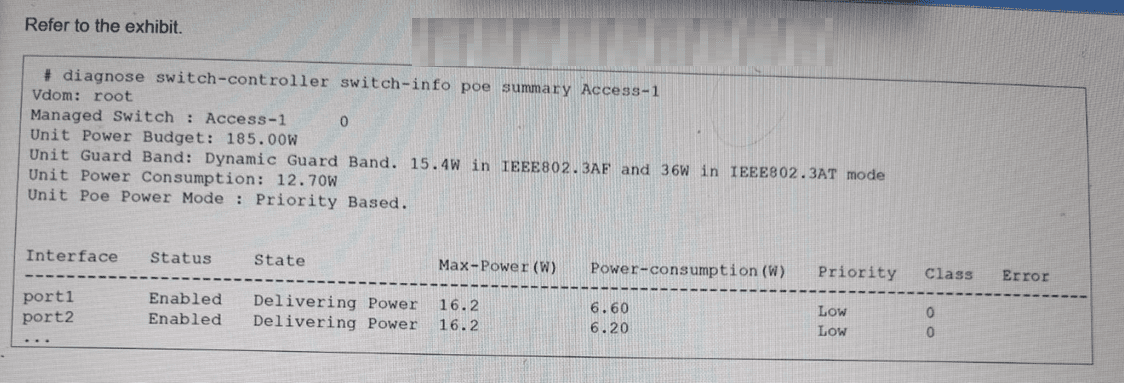
The FortiSwitch CLI output of the diagnose switch-controller switch-info poe summary command for the switch Access-1 is shown. It shows that two ports have Power over Ethernet (PoE) enabled and are already in use. What is the most important consideration if you want to connect additional PoE devices to FortiSwitch? (Choose one answer)
Show answerHide answer

Correct answer: D The total PoE consumption must not exceed the FortiSwitch power budget.

Explanation

Explanation:
The exhibit shows that the switch's total power budget (Unit Power Budget) is 185.00W, and the current power consumption (Unit Power Consumption) is 12.70W. PoE power supply is a finite resource; when adding new PoE devices, one must ensure that the total power demand of all devices does not exceed the switch's total power budget; otherwise, new devices may fail to power on, or existing devices may be powered off due to priority policies. Other options, although related to PoE configuration, are not the most critical constraint for determining whether additional devices can be connected.

Correct Option:

D. The total PoE consumption must not exceed the FortiSwitch power budget.

Finite Resources: The switch's PoE power budget is fixed (185W in the exhibit). Each PoE device consumes a certain amount of power (such as the 6.6W and 6.2W already in use), and once the total demand exceeds the budget, new devices cannot be powered.

Protection Mechanism: When the budget is insufficient, the switch will refuse to power on new devices based on priority policies (such as Priority Based) to protect the stability of existing powered devices.

Incorrect Option:

A. All plugged devices use the same PoE standard: 802.3af/at.
The switch can typically support both 802.3af and 802.3at standards simultaneously, automatically negotiating and supplying power based on the device's class. While this affects power allocation (af is 15.4W, at is 30W or higher), it is not the fundamental limiting factor for whether additional devices can be connected.

B. The FortiSwitch model supports the number of PoE devices that you want to connect.
This statement itself is correct—the switch's physical port count and PoE capabilities indeed limit the number of connectable devices. However, compared to the total power budget, port count is usually not the bottleneck; more commonly, there are free ports but insufficient power. Therefore, from a "most important consideration" perspective, the power budget is the key constraint.

C. The PoE power mode matches the PoE standard of the device. The power mode (such as IEEE802_3AF/AT) needs to match the device's standard for the device to receive appropriate power. However, this is a configuration consistency issue rather than a capacity planning issue; mismatches may cause individual devices to fail to power on, but do not directly determine whether the overall system can accommodate additional devices.

Reference:
Fortinet Document Library: FortiSwitchOS Administration Guide (7.4.2), "PoE" chapter, which describes the PoE power budget settings and the impact of insufficient budget on new devices.
Question 9 Choose 2
Which two statements about the FortiLink authorization process are true? (Choose two.)
Show answerHide answer

Correct answer: C, D A FortiLink frame is sent by FortiGate to FortiSwitch to complete the authorization.FortiLink authorization sets the FortiSwitch management mode to FortiLink.

Explanation

Explanation:
The FortiLink authorization process involves the FortiGate sending a FortiLink frame to the FortiSwitch to complete authorization, and the process changes the FortiSwitch's management mode to FortiLink. Pre-authorization is optional, and a reboot occurs after authorization is complete, not as a requirement to complete the authorization itself.

Correct Option:

C. A FortiLink frame is sent by FortiGate to FortiSwitch to complete the authorization.

The authorization is completed when FortiGate sends a FortiLink frame to the FortiSwitch, signaling that the switch is now managed.

This frame exchange establishes the management channel between the FortiGate and the FortiSwitch.

D. FortiLink authorization sets the FortiSwitch management mode to FortiLink.

Authorizing a FortiSwitch through FortiLink transitions the switch from standalone mode to FortiLink mode.

In FortiLink mode, the FortiSwitch is managed by the FortiGate as part of the security fabric.

Incorrect Option:

A. The administrator must manually pre-authorize FortiGate on FortiSwitch by adding the FortiGate serial number.

Pre-authorization is not mandatory; FortiGate can be configured to automatically authorize devices.

The administrator does not need to add the FortiGate serial number on the FortiSwitch to enable authorization.

B. FortiSwitch requires a reboot to complete the authorization process.
While the FortiSwitch may reboot after being authorized (to apply FortiLink mode), the reboot is not a requirement to complete the authorization process itself. The authorization is completed by the FortiLink frame exchange, not by the reboot.

Reference:
Fortinet Document Library: FortiLink Guide (7.4.4), "Authorizing" section; FortiSwitch 6.4.2 "Authorizing the FortiSwitch unit" documentation.
Question 10 Choose 2
Which two types of Layer 3 interfaces can participate in dynamic routing on FortiSwitch? (Choose two.)
Show answerHide answer

Correct answer: B, C Loopback interfacesSwitch virtual interfaces

Explanation

Explanation:
On FortiSwitch, the interfaces capable of participating in dynamic routing protocols (such as OSPF and BGP) are primarily Switch Virtual Interfaces (SVI) and Loopback interfaces. SVIs are used for Layer 3 routing between VLANs and can run routing protocols; Loopback interfaces, because they are always up, are commonly used to provide stable Router IDs or as sources for routing protocol peering. Detected management interfaces and physical interfaces typically do not directly participate in dynamic routing processes (physical ports usually need to be bound to SVIs or RVIs to perform Layer 3 functions).

Correct Option:

B. Loopback interfaces

Loopback interfaces are logical interfaces that remain Up as long as the device is operational, providing extremely high stability.

In dynamic routing, Loopbacks are commonly used to configure Router IDs, or as source addresses for BGP/OSPF peering, ensuring that routing sessions are not affected by physical port failures.

C. Switch virtual interfaces

SVIs are virtual Layer 3 interfaces associated with VLANs and are the core interfaces for implementing inter-VLAN routing on FortiSwitch.

SVIs can be assigned IP addresses and support dynamic routing protocols such as OSPF and BGP, enabling the switch to exchange routes with other Layer 3 devices.

Incorrect Option:

A. Detected management interfaces
Management interfaces are typically used for out-of-band management of the device (such as HTTPS, SSH access) and do not participate in the data plane's dynamic routing. Even if they have IP addresses, they are not used as interfaces for dynamic routing protocols to advertise or learn routes.

D. Physical interfaces
On FortiSwitch, physical interfaces (ports) are Layer 2 by default. To enable them to perform Layer 3 routing, they need to be configured as Routed VLAN Interfaces (RVI) or bound to SVIs. Bare physical interfaces cannot directly run dynamic routing protocols for route exchange.

Reference:
Fortinet Document Library: FortiSwitchOS Administration Guide (7.4.x), "Layer-3 routing" section; related exam explanations also point out that Loopback and SVI are interface types supporting dynamic routing.
Full mock exam

Sit the NSE5_FSW_AD-7.6 exam before exam day

Full-length mocks with the same number of questions and the same time limit as the real NSE5_FSW_AD-7.6 exam. Every attempt draws a new set of questions from the full bank, so you can keep going until you pass comfortably.

Get full NSE5_FSW_AD-7.6 mock exam
  • 40questions per mock
  • 70 mintime limit
  • 111questions in the bank
  • Newmock on every attempt