Fortinet certification · Exam NSE5_FSW_AD-7.6

NSE5_FSW_AD-7.6 Mock Exam Page 2

Fortinet NSE 5 - FortiSwitch 7.6 Administrator

Free NSE5_FSW_AD-7.6 mock exam questions 11–20, each with the answer and an explanation.

20 questions · 35 minutes · free, no sign-up

Free NSE5_FSW_AD-7.6 questions

11–20 of 33 free
Question 11 Choose 1


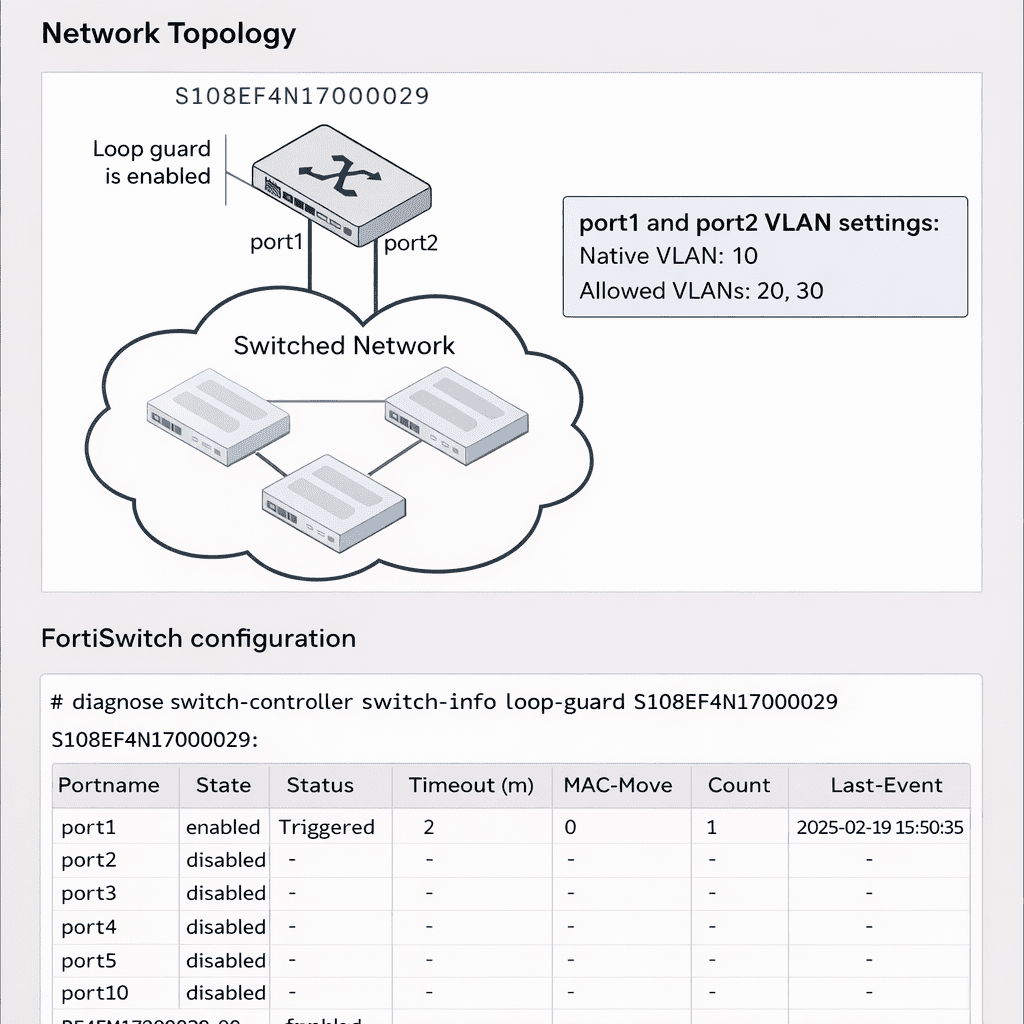
You run the command diagnose switch-controller switch-info loopguard access-1 and see that theMAC-Movecolumn displays a value of0forport1.

What does this indicate? (Choose one answer)
Show answerHide answer

Correct answer: C The MAC move feature is not enabled.

Explanation

Explanation:
In FortiSwitch's loop guard mechanism, the MAC-Move column displays the configured MAC move threshold, which is the number of MAC address moves per second used to trigger loop detection. By default, this threshold is 0, meaning the traditional Loop Guard Data Packet (LGDP) detection method is used, rather than the MAC-move-based loop detection . Therefore, when MAC-Move is 0, it indicates that MAC move detection is not enabled, rather than loop guard being disabled or the port not being monitored.

Correct Option:

C. The MAC move feature is not enabled.

Threshold meaning: When loop-guard-mac-move-threshold is set to 0, it indicates that the MAC move detection feature is turned off, and the system uses the traditional LGDP method to detect loops .

Default behavior: The default MAC move threshold for loop guard is 0. When enabled, a value between 1 and 100 needs to be configured to indicate the threshold of MAC address moves per second .

Incorrect Option:

A. Loop guard is disabled on port1.
The exhibit shows that port1's status is Triggered and State is enabled, indicating that loop guard has been enabled on the port and a loop has been detected and triggered . If loop guard were disabled, the status would not be Triggered.

B. Port1 is not being monitored by loop guard.
The fact that port1's status is Triggered proves that it is being monitored by loop guard and a loop has already been detected. The Last-Event column shows the timestamp of the last trigger, further confirming that monitoring is active.

D. Port1 will shut down if a loop occurs on any VLAN.
Traditional loop guard (when MAC-Move is 0) only sends detection packets on the port's native VLAN. If a loop occurs on other VLANs (such as allowed VLAN 20, 30), traditional loop guard may not be able to detect it—this is precisely the limitation that the MAC move feature was designed to address . Therefore, this statement is incorrect.

Reference:
Fortinet Document Library: FortiSwitch 7.2.7 Administration Guide, "Loop guard" section, specifying that the default MAC move threshold is 0, indicating the use of traditional loop guard instead of MAC-move loop guard .
Question 12 Choose 1
You are configuring FortiSwitch to perform layer 3 inter-VLAN routing while managed by FortiGate over FortiLink. On supported hardware models, FortiSwitch can offload routing decisions for better performance.1How does FortiSwitch perform routing between VLANs? (Choose one answer)
Show answerHide answer

Correct answer: A By using a hardware forwarding table (FIB) programmed into ASIC.

Explanation

Explanation:
On supported hardware models, FortiSwitch performs inter-VLAN routing by using a hardware forwarding information base (FIB) programmed into the ASIC. This hardware offload allows the switch to make routing decisions at wire speed, bypassing the general-purpose CPU. The option correctly describes this mechanism, which is a key performance benefit when FortiSwitch is managed by FortiGate over FortiLink and routing offload is enabled.

Correct Option:

A. By using a hardware forwarding table (FIB) programmed into ASIC.

Hardware Offload: FortiSwitch models that support hardware-based Layer 3 forwarding use the ASIC to look up routes and forward packets, which significantly improves performance for inter-VLAN traffic .

FIB Programming: When routing offload is enabled, the FortiGate pushes routing information to the switch, and the switch programs the FIB into the ASIC for wire-speed forwarding .

Incorrect Option:

B. By supporting only dynamic routing protocols in hardware.
Hardware-based routing on FortiSwitch is not limited to dynamic protocols. Static routes and directly connected networks can also be hardware-forwarded, and the offload mechanism primarily handles inter-VLAN gateway traffic and static routing use cases .

C. By disabling routing when managed by FortiGate.
This is incorrect. FortiLink management does not disable routing on FortiSwitch. In fact, Fortinet provides specific guidance for deploying inter-VLAN routing offload, which moves basic Layer 3 functionality for trusted VLANs from the FortiGate to the FortiSwitch .

D. By relying entirely on the CPU in software.
This contradicts the purpose of hardware offload. While some FortiSwitch models may not support hardware Layer 3 forwarding, the question explicitly states "on supported hardware models," where routing is offloaded to the ASIC rather than handled entirely by the CPU .

Reference:
Fortinet Document Library: FortiSwitchOS Administration Guide (7.6.0), "Layer-3 routing in hardware" section; and Enterprise Data Center Switching with FortiLink Deployment Guide (7.4.3), which describes inter-VLAN routing offload to FortiSwitch .
Question 13 Choose 1
Which statement about using MAC, IP, and protocol-based VLANs on FortiSwitch is true?
Show answerHide answer

Correct answer: C It provides benefits that can be obtained when using 802.1X authentication.

Explanation

Explanation:
MAC, IP, and protocol-based VLAN assignment on FortiSwitch dynamically assigns traffic to VLANs based on packet header fields (source MAC, IP address/subnet, or Layer 2 protocol) . This mechanism achieves granular traffic isolation and access control similar to 802.1X, but does not require RADIUS authentication exchanges. Therefore, the statement that it provides benefits comparable to 802.1X authentication is correct; the other options either misdescribe the matching fields or confuse the feature's purpose.

Correct Option:

C. It provides benefits that can be obtained when using 802.1X authentication.

Dynamic Segmentation: Like 802.1X, this feature can automatically place devices into specific VLANs without manual port reconfiguration .

Granular Control: VLAN assignment is based on device identity (MAC/IP) or traffic type (protocol), achieving access control effects similar to 802.1X .

Incorrect Option:

A. It is a scalable and secure solution in comparison to other Layer 2 security measures.
While it offers a degree of segmentation, it relies on static configuration rather than authentication; it does not inherently surpass other Layer 2 security measures in "scalability and security," and lacks identity verification mechanisms.

B. FortiSwitch uses only the Ethernet type to assign traffic to VLANs.
This description is incomplete. The feature supports MAC address, IP address/subnet, and Ethernet protocol type; it is not limited to Ethernet type .

D. Endpoints are required to use the same FortiSwitch port to remain members of the VLAN.
This is incorrect. Because assignment is based on MAC/IP/protocol rather than port, devices can move between ports within the same switch (or within the allowed range) while maintaining VLAN membership.

Reference:
Fortinet Document Library: FortiSwitchOS Administration Guide (7.4.1), "MAC/IP/protocol-based VLANs" section; ExamTopics discussion on this question .
Question 14 Choose 2
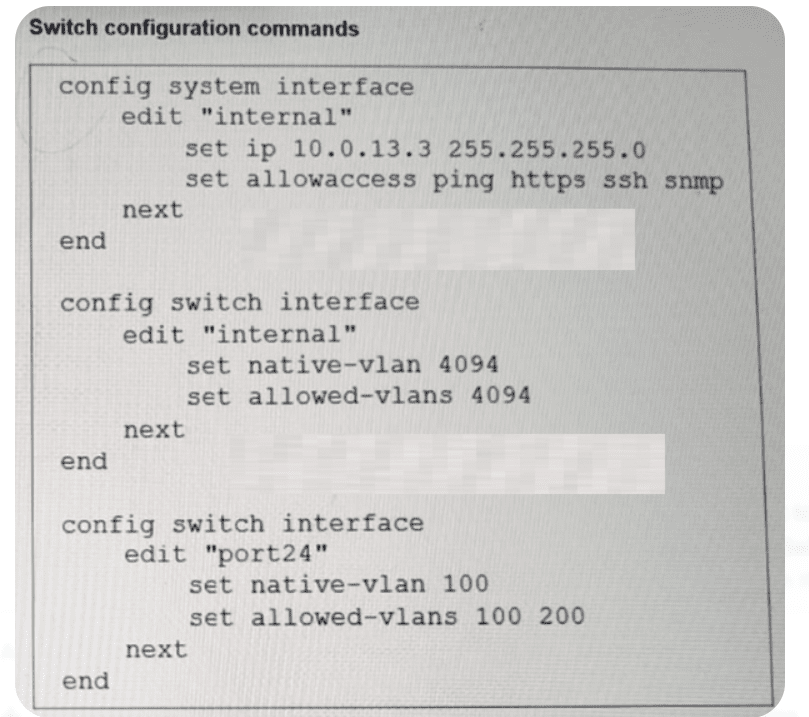
Exhibit.
port24 is the only uplink port connected to the network where access to FortiSwitch management services is possible. However, FortiSwitch is still not accessible on the management interface. Which two actions should you take to fix the issue and access FortiSwitch? (Choose two.)
Show answerHide answer

Correct answer: A, C You must add port24 native VLAN as an allowed VLAN on internal.You must allow VLAN ID 4094 on port24, if management traffic is tagged.

Explanation

Explanation:
On FortiSwitch models with a dedicated management port, the internal interface defaults to VLAN ID 4094 . For the management IP to be reachable via an uplink port (port24), the port must permit the management VLAN. If management traffic is tagged, VLAN 4094 must be added to the allowed VLANs on port24 . Additionally, the internal interface must allow the native VLAN of port24 so that untagged traffic from the uplink can reach the management interface .

Correct Option:

A. You must add port24 native VLAN as an allowed VLAN on internal.

The internal interface is the switch's management interface. For traffic arriving on port24 with the native VLAN tag to reach the internal interface, that VLAN must be permitted on internal .

This ensures untagged management traffic from the network is accepted by the switch's internal management plane.

C. You must allow VLAN ID 4094 on port24, if management traffic is tagged.

The default management VLAN on models with a dedicated management port is 4094 . If the management traffic is tagged with VLAN 4094, port24 must include 4094 in its allowed VLAN list to accept those frames .

Without this, tagged management frames would be dropped at ingress on port24.

Incorrect Option:

B. You must add VLAN ID 200 to the allowed VLANS on internal.
VLAN 200 is not the default management VLAN (4094 is). Adding an arbitrary VLAN does not resolve the reachability issue for the management interface .
The problem is specifically about permitting the correct management VLAN on the uplink and internal interface, not adding unrelated VLANs.

D. You should use VLAN ID 4094 as the native VLAN on port24.
While 4094 is the default management VLAN on the internal interface, making it the native VLAN on port24 is not required. The management traffic may be tagged, in which case it only needs to be in the allowed VLAN list .
Changing the native VLAN on port24 could disrupt other untagged traffic on that uplink.

Reference:
Fortinet Document Library: FortiSwitchOS Administration Guide (7.6.1), "Models with a dedicated management port" (internal default VLAN 4094) ; FortiLink Guide (8.0.1), "Configuring VLANs" (allowed VLANs and native VLAN behavior) .
Question 15 Choose 1
Which statement about the IGMP snooping querier when enabled on a VLAN is true?
Show answerHide answer

Correct answer: A Active multicast receiver entries are aging on each IGMP query sent on the VLAN

Explanation

Explanation:
The IGMP snooping querier on FortiSwitch sends periodic IGMP queries to maintain multicast group membership entries. This query mechanism triggers the aging process for active multicast receiver entries, ensuring that stale entries are eventually removed if no hosts respond. Without the querier, entries might not age out properly in environments without an external multicast router.

Correct Option:

A. Active multicast receiver entries are aging on each IGMP query sent on the VLAN.
The querier sends IGMP queries at a configured interval (default 125 seconds) to solicit membership reports from hosts.
The aging time for multicast snooping entries is refreshed or allowed to expire based on these queries, ensuring dynamic membership tracking.

Incorrect Option:

B. IGMP reports on the VLAN are forwarded to all switch ports.
IGMP snooping prunes multicast traffic; reports are not flooded to all ports. They are typically forwarded only to mRouter ports or the querier, not broadcast to every switch port.

C. The setting can only be enabled using the FortiSwitch CLI.
The IGMP snooping querier can be enabled through FortiGate's FortiLink configuration (via the FortiOS CLI or GUI), not exclusively through the FortiSwitch CLI.

D. All other indirectly connected switches will be unable to get IGMP multicast traffic.
Enabling a querier on one VLAN does not block multicast traffic for indirectly connected switches; it helps maintain the snooping table for that VLAN. Other switches can still receive multicast traffic based on their own snooping tables.

Reference:
Fortinet Document Library: FortiSwitchOS Administration Guide (7.6.x), "IGMP snooping" section, which describes querier operation and aging-time behavior .
Question 16 Choose 1
Which LLDP-MED Type-Length-Values does FortiSwitch collect from endpoints to track network devices and determine their characteristics?
Show answerHide answer

Correct answer: D Inventory management

Explanation

Explanation:
LLDP-MED defines four TLV categories (Inventory Management, Network Policy, Location Identification, and Power Management). Among these, the Inventory Management TLV is specifically designed to collect endpoint characteristics such as manufacturer, model, serial number, and asset number. FortiSwitch uses this information to track network devices and identify their hardware attributes. The other options either describe TLVs used for configuration delivery (Network Policy, Power Management) or physical location (Location), rather than for inventory tracking.

Correct Option:

D. Inventory management

Device Tracking: Inventory Management TLVs allow the switch to learn detailed endpoint attributes including manufacturer, model, and serial/asset numbers.

Purpose: This TLV is specifically intended for maintaining an inventory of connected devices, matching the question's requirement to "track network devices and determine their characteristics."

Incorrect Option:

A. Network policy
Network Policy TLVs are used by the switch to send VLAN, priority, and DSCP configuration to endpoints (like IP phones), not to collect inventory data from them.

B. Power management
Power Management TLVs handle Power over Ethernet (PoE) negotiation and reporting (e.g., power requirements), which is unrelated to tracking device inventory characteristics.

C. Location
Location Identification TLVs describe the physical location of the endpoint (e.g., civic address or ELIN), not the device's hardware characteristics or inventory data.

Reference:
Fortinet Document Library: FortiSwitchOS Administration Guide, "LLDP-MED" section, which lists Inventory Management TLVs as the mechanism for learning endpoint characteristics including manufacturer and serial number.
Question 17 Choose 2
Which two requirements must be met before FortiGate can manage a FortiSwitch stack? (Choose two answers)
Show answerHide answer

Correct answer: B, D The switch controller feature must be enabled.The FortiSwitchOS version must be compatible with FortiOS.

Explanation

Explanation:
To manage a FortiSwitch stack, the FortiGate must first have the switch controller feature enabled. Additionally, the FortiSwitchOS version must be compatible with the FortiOS version running on the FortiGate; otherwise, FortiLink management will fail. While having the latest firmware is ideal, it is not a strict requirement—only compatibility is mandatory.

Correct Option:

B. The switch controller feature must be enabled.
The Switch Controller (FortiLink) feature is the core mechanism that allows the FortiGate to discover, authorize, and manage FortiSwitch units .
Without enabling this feature on the FortiGate, the FortiGate will not act as a switch controller, and management of the stack cannot be established.

D. The FortiSwitchOS version must be compatible with FortiOS.
Fortinet maintains a compatibility matrix between FortiOS and FortiSwitchOS. Running an incompatible FortiSwitchOS version can prevent FortiLink from functioning correctly .
Compatibility ensures that features such as stacking, VLAN configuration, and firmware upgrades can be properly managed by the FortiGate.

Incorrect Option:

A. The latest FortiOS and FortiSwitchOS versions must be running.
While running the latest versions is recommended for security and features, it is not a requirement for management to work. As long as the versions are compatible, older releases can be managed successfully .

C. All existing FortiLink interfaces must be disabled.
This is incorrect. In fact, the FortiGate requires an active FortiLink interface to manage FortiSwitch units, including stacks . Disabling FortiLink interfaces would prevent management entirely.

Reference:
Fortinet Document Library: FortiSwitch Devices Managed by FortiOS (compatibility requirements) ; Switch Controller Administration Guide (FortiLink feature) .
Question 18 Choose 1


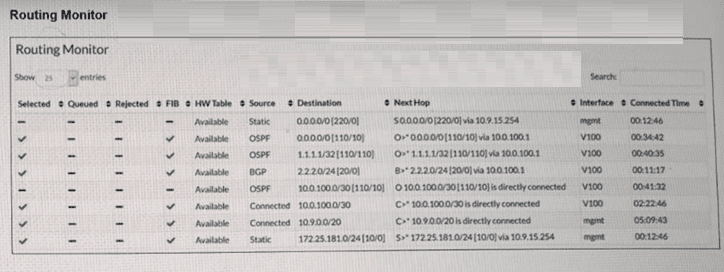
Two routes in the routing monitor are marked as available but are not installed in the forwarding information base (FIB). Which statement correctly explains why the routes have this status? (Choose one answer)
Show answerHide answer

Correct answer: A They are excluded from the FIB because a more preferred route exists for the same destination.

Explanation

Explanation:
According to the Routing Monitor display, routes marked as "Available" but not selected for the FIB typically have a higher administrative distance (AD). FortiGate only installs the route with the lowest administrative distance into the FIB for forwarding decisions . In the exhibit, although two default routes (OSPF and Static) are available, the system only selects the route with the lower AD for the FIB, and the other route becomes a backup path, remaining in an available state until the primary route fails.

Correct Option:

A. They are excluded from the FIB because a more preferred route exists for the same destination.

Route Selection Mechanism: FortiGate uses administrative distance to determine the priority of routes from different sources. When multiple routes to the same destination exist, the route with the lowest AD wins and is installed in the FIB .

Backup Role: Routes not selected due to higher AD will not be used for forwarding, but they remain "Available" and will immediately take effect and become the primary route if the preferred route is removed .

Incorrect Option:

B. They are unavailable due to invalid next-hop addresses.
If the next-hop is invalid or unreachable, the route typically becomes inactive or is removed, rather than remaining "Available" while not being installed.

C. They are not included in the FIB due to route-policy filtering.
If a route is filtered by route-policy, it usually does not appear in the routing table, or is explicitly marked as rejected. The "Available" status indicates it passed policy checks but lost in the route selection process.

D. They are installed in the FIB but cannot be offloaded to hardware.
The exhibit clearly shows these two routes are not installed in the FIB, so there is no "installed but not offloaded to hardware" situation.

Reference:
Fortinet Document Library: FortiOS Administration Guide, "Routing concepts" section, regarding administrative distance and FIB route selection mechanisms.
Question 19 Choose 1
Your team is deploying a single FortiGate and a single FortiSwitch across 100 branch offices. The goal is to expedite deployment while avoiding manual configuration errors.

Which method would allow you to achieve this goal most efficiently? (Choose one answer)
Show answerHide answer

Correct answer: C Use zero-touch provisioning (ZTP) through FortiManager.

Explanation

Explanation:
The goal is to deploy 100 branch offices efficiently while avoiding manual configuration errors. Zero-touch provisioning (ZTP) through FortiManager is the most suitable approach. FortiManager centrally manages FortiGate and FortiSwitch, supporting automatic configuration push and firmware deployment. Administrators only need to pre-add device models on FortiManager; after devices are powered on and connected to the network, they can automatically obtain configurations, eliminating manual intervention.

Correct Option:

C. Use zero-touch provisioning (ZTP) through FortiManager.

Centralized Management: FortiManager can manage FortiGate and subordinate FortiSwitch devices, automating configuration and deployment processes.

Zero-Touch Deployment: ZTP supports batch deployment of remote devices by pre-configuring model devices and serial numbers; devices automatically obtain configurations after connecting to the network, reducing on-site operations and human errors.

Incorrect Option:

A. Push FortiGate and FortiSwitch configurations through FortiEdge Cloud.
FortiEdge Cloud is not a standard centralized management platform for batch deployment of FortiGate and FortiSwitch, and lacks official documentation support.

B. Use the cloud Model-as-a-Service (MaaS) to push the configuration of both FortiGate and FortiSwitch.
MaaS is not a deployment solution for Fortinet devices; it is a distractor option.

D. Ensure that devices engage FortiSwitch Manager to retrieve their configurations.
FortiSwitch Manager is a module within FortiManager and is not a standalone device service; this option misrepresents the architecture.

Reference:
Fortinet Document Library: FortiManager Administration Guide (7.6.8), "Using zero-touch deployment for FortiSwitch" section, which describes the process of achieving automatic configuration deployment through FortiManager ZTP.
Question 20 Choose 2


Port24 is the only uplink port connected to the network where you need access to FortiSwitch management services. However, FortiSwitch is not accessible on its management interface with IP address 10.0.13.3. Based on the configuration shown in the exhibit, which two actions should you take to fix the issue and access FortiSwitch? (Choose two answers)
Show answerHide answer

Correct answer: B, D Change the native VLAN on port24 to VLAN 4094.Add VLAN 4094 to the allowed VLANs on port24.

Explanation

Explanation:
The exhibit shows that the management interface (internal) is configured with IP 10.0.13.3 and uses VLAN 4094 as its native VLAN. However, the uplink port (port24) has its native VLAN set to 100 and only allows VLANs 100 and 200. Because port24 drops untagged traffic belonging to VLAN 4094, management traffic cannot reach the switch. To fix this, the native VLAN on port24 must match the management VLAN (4094), or VLAN 4094 must be explicitly allowed if the management traffic is tagged.

Correct Option:

B. Change the native VLAN on port24 to VLAN 4094.

The management interface (internal) uses VLAN 4094. If the upstream network sends untagged management traffic for this VLAN, port24 must have its native VLAN set to 4094 to accept it.

Changing the native VLAN on port24 from 100 to 4094 aligns the untagged VLAN with the management VLAN, allowing the switch to process management frames.

D. Add VLAN 4094 to the allowed VLANs on port24.

Even if the management traffic arrives tagged with VLAN 4094, port24 currently only allows VLANs 100 and 200, meaning it will drop tagged frames for VLAN 4094.

Adding VLAN 4094 to the allowed VLANs on port24 ensures that tagged management traffic is accepted by the switch.

Incorrect Option:

A. Change the management IP address to use the VLAN 100 subnet.
While this might theoretically work if the upstream network uses VLAN 100, it does not address the fundamental issue: the management interface is bound to VLAN 4094, not VLAN 100. Changing the IP would require reconfiguring the entire management VLAN structure.

C. Remove VLAN 200 from the allowed VLANs on port24.
Removing VLAN 200 does not resolve the issue. VLAN 4094 is still not allowed on port24, so management traffic will continue to be dropped regardless of whether VLAN 200 is allowed.

Reference:
Fortinet Document Library: FortiSwitchOS Administration Guide (7.4.x), "Configuring VLANs" section (native VLAN and allowed VLANs on switch ports); Fortinet Training Institute NSE5_FSW_AD-7.6 course materials.
Full mock exam

Sit the NSE5_FSW_AD-7.6 exam before exam day

Full-length mocks with the same number of questions and the same time limit as the real NSE5_FSW_AD-7.6 exam. Every attempt draws a new set of questions from the full bank, so you can keep going until you pass comfortably.

Get full NSE5_FSW_AD-7.6 mock exam
  • 40questions per mock
  • 70 mintime limit
  • 111questions in the bank
  • Newmock on every attempt