Microsoft certification · Exam MS-102

MS-102 Mock Exam Page 8

Microsoft 365 Administrator

Free MS-102 questions on Topic 5, Misc. Questions, each with the answer and an explanation.

20 questions · 33 minutes · free, no sign-up

Topic 5, Misc. Questions questions

71–80 of 83 free
Question 71

You have a Microsoft 365 E5 tenant.

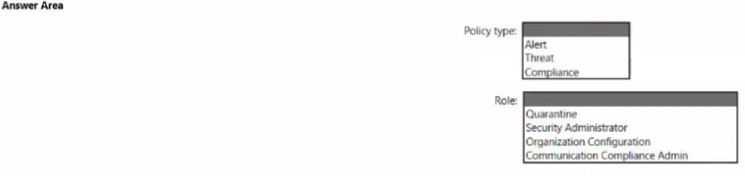
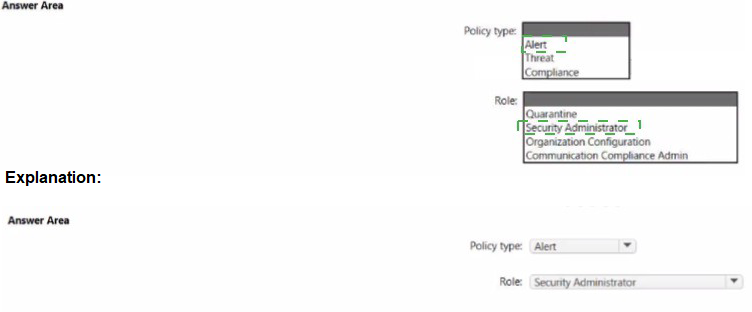
You need to ensure that administrators are notified when a user receives an email message that contains malware. The solution must use the principle of least privilege. Which type of policy should you create and which Microsoft 365 compliance center role is required to create the pokey? To answer, select the appropriate options in the answer area.

NOTE: Each correct selection is worth one point.

Show answerHide answer

Explanation

Question 72

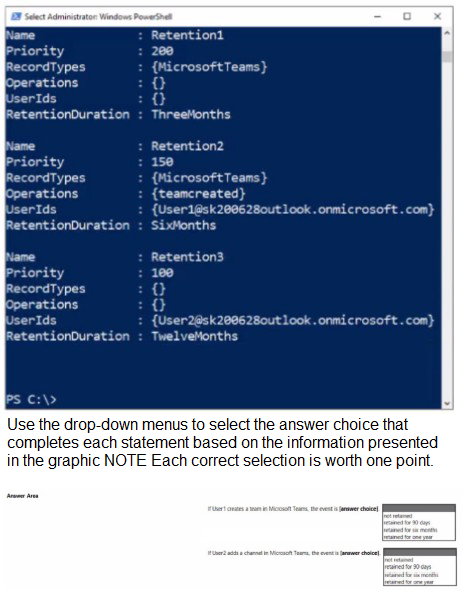
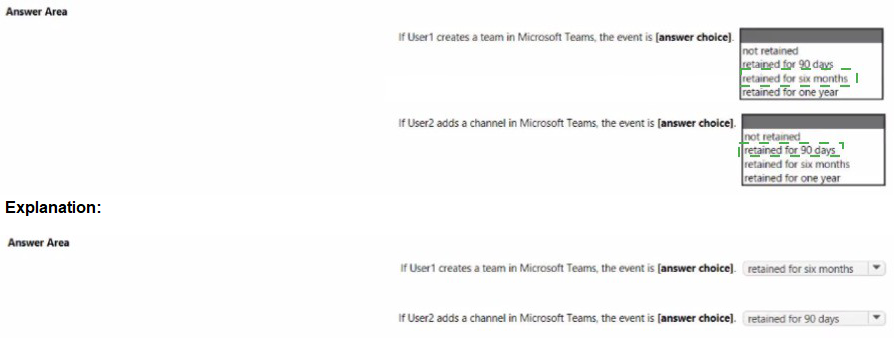
You have a Microsoft 365 ES subscription that has three auto retention policies as show in the following exhibit.

Show answerHide answer

Explanation

Question 73 Choose 1

You have a Microsoft 365 E5 subscription.
You need to create Conditional Access policies to meet the following requirements:
All users must use multi-factor authentication (MFA) when they sign in from outside the corporate network.
Users must only be able to sign in from outside the corporate network if the sign-in originates from a compliant device.
All users must be blocked from signing in from outside the United States and Canada.
Only users in the R&D department must be blocked from signing in from both Android and iOS devices.
Only users in the finance department must be able to sign in to an Azure AD enterprise application named App1. All other users must be blocked from signing in to App1.
What is the minimum number of Conditional Access policies you should create?

Show answerHide answer

Correct answer: B

4

Explanation

* Only users in the finance department must be able to sign in to an Azure AD enterprise application named App1. All other users must be blocked from signing in to App1. 

One Policy.
* Only users in the R&D department must be blocked from signing in from both Android and iOS devices.

One Policy.
* Users must only be able to sign in from outside the corporate network if the sign-in originates from a compliant device.
All users must use multi-factor authentication (MFA) when they sign in from outside the corporate network.

One policy
* All users must be blocked from signing in from outside the United States and Canada. Only users in the R&D department must be blocked from signing in from both Android One Policy

Reference:
https://learn.microsoft.com/en-us/azure/active-directory/conditional-access/planconditional-access

Question 74 Choose 1

Your company has a Microsoft 365 E5 subscription.
Users in the research department work with sensitive data.
You need to prevent the research department users from accessing potentially unsafe websites by using hyperlinks embedded in email messages and documents. Users in other departments must not be restricted.
What should you do?

Show answerHide answer

Correct answer: D

Create a new safe links policy.

Explanation

Explanation:
Use the Microsoft 365 Defender portal to create Safe Links policies
In the Microsoft 365 Defender portal at https://security.microsoft.com, go to Email & Collaboration > Policies & Rules > Threat policies > Safe Links in the Policies section. Or, to go directly to the Safe Links page, use https://security.microsoft.com/safelinksv2.

1. On the Safe Links page, select Create to start the new Safe Links policy wizard.
2. On the Name your policy page, configure the following settings:

Name: Enter a unique, descriptive name for the policy.
Description: Enter an optional description for the policy.

3. When you're finished on the Name your policy page, select Next.
4. On the Users and domains page, identify the internal recipients that the policy applies to (recipient conditions):

Users: The specified mailboxes, mail users, or mail contacts.
*-> Groups:
Members of the specified distribution groups (including non-mail-enabled security groups within distribution groups) or mail-enabled security groups (dynamic distribution groups aren't supported).

The specified Microsoft 365 Groups.
Domains: All recipients in the specified accepted domains in your organization.
Question 75

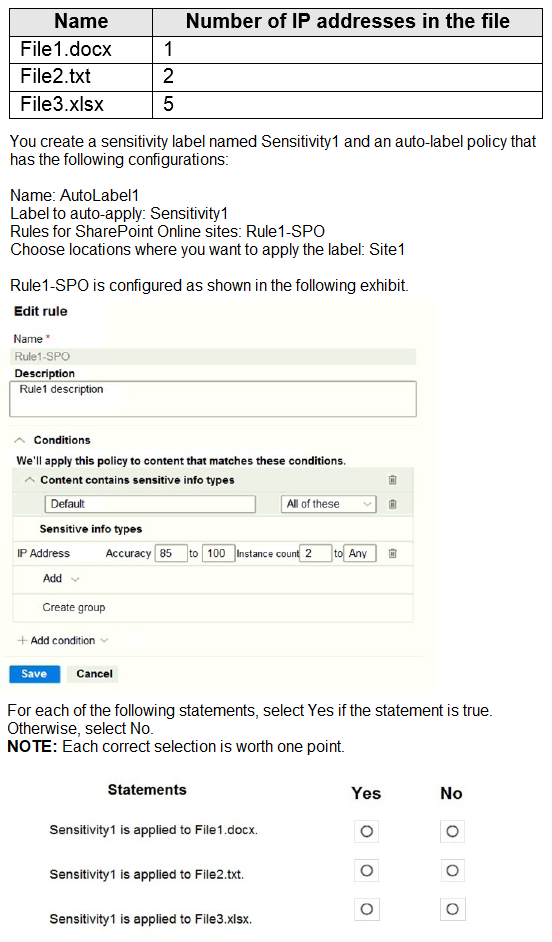
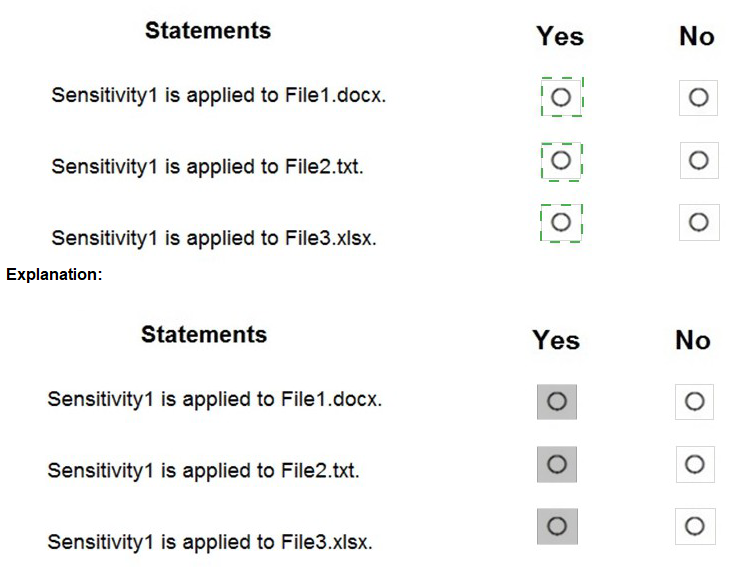
You have a Microsoft 365 E5 tenant that contains a Microsoft SharePoint Online site named Site1. Site1 contains the files shown in the following table.


Show answerHide answer

Explanation

Question 76 Choose 1

Your on-premises network contains an Active Directory domain named Contoso.com and 500 devices that run either macOS, Windows 8.1. Windows 10, or Windows 11. All the devices are managed by using Microsoft Endpoint Configuration Manager. The domain syncs with Azure Active Directory (Azure AD).
You plan to implement a Microsoft 365 E5 subscription and enable co-management. Which devices can be co-managed after the implementation?


Show answerHide answer

Correct answer: C

Windows 11 and macOS only

Question 77

You have a Microsoft 365 E5 subscription linked to an Azure Active Directory (Azure AD) tenant. The tenant contains a group named Group1 and the users shown in the following table:

Show answerHide answer

Explanation

Question 78

You have a Microsoft 365 E5 tenant.
You create a retention label named Retention1 as shown in the following exhibit.

When users attempt to apply Retention1, the label is unavailable.
You need to ensure that Retention1 is available to all the users.
What should you do?

Show answerHide answer

Correct answer: A

Create a new label policy

Question 79 Choose 1

Your company has 10,000 users who access all applications from an on-premises data center.
You plan to create a Microsoft 365 subscription and to migrate data to the cloud.
You plan to implement directory synchronization.
User accounts and group accounts must sync to Azure AD successfully.
You discover that several user accounts fail to sync to Azure AD.
You need to resolve the issue as quickly as possible.
What should you do?

Show answerHide answer

Correct answer: B

Run idfix.exe, and then click Edit.

Explanation

Explanation:
IdFix is used to perform discovery and remediation of identity objects and their attributes in an on-premises Active Directory environment in preparation for migration to Azure Active Directory. IdFix is intended for the Active Directory administrators responsible for directory synchronization with Azure Active Directory.

Reference:
https://docs.microsoft.com/en-us/office365/enterprise/prepare-directory-attributes-forsynch- with-idfix

Question 80

You have a Microsoft 365 E5 subscription. The subscription contains users that have the following types of devices:
• Windows 10
• Android
• OS
On which devices can you configure the Endpoint DLP policies?

Show answerHide answer

Correct answer: C

Windows 10 and macO Sonly

Explanation

Endpoint data loss prevention (Endpoint DLP) extends the activity monitoring and protection capabilities of DLP to sensitive items that are physically stored on Windows 10, Windows 11, and macOS (Catalina 10.15 and higher) devices. Once devices are onboarded into the Microsoft Purview solutions, the information about what users are doing with sensitive items is made visible in activity explorer and you can enforce protective actions on those items via DLP policies.

https://docs.microsoft.com/en-us/microsoft-365/compliance/endpoint-dlp-learnabout?view=o365-worldwide

Full mock exam

Sit the MS-102 exam before exam day

Full-length mocks with the same number of questions and the same time limit as the real MS-102 exam. Every attempt draws a new set of questions from the full bank, so you can keep going until you pass comfortably.

Get full MS-102 mock exam
  • 65questions per mock
  • 105 mintime limit
  • 310questions in the bank
  • Newmock on every attempt