Microsoft certification · Exam MS-102

MS-102 Mock Exam Page 9

Microsoft 365 Administrator

Free MS-102 mock exam questions 81–90, each with the answer and an explanation.

20 questions · 33 minutes · free, no sign-up

Free MS-102 questions

81–90 of 91 free
Question 81 Choose 2

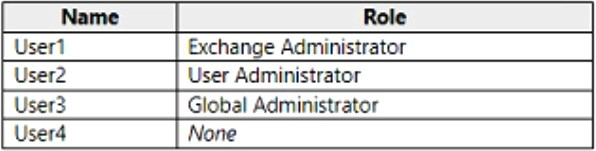
You have a Microsoft 365 subscription that uses an Azure AD tenant named contoso.com. The tenant contains the users shown in the following table.

You add another user named User5 to the User Administrator role.
You need to identify which two management tasks User5 can perform.
Which two tasks should you identify? Each correct answer presents a complete solution.
NOTE: Each correct selection is worth one point.

Show answerHide answer

Correct answer: A, E

Delete User2 and User4 only.

Reset the password of User2 and User4 only.

Explanation

Explanation:
Users with the User Administrator role can create users and manage all aspects of users with some restrictions (see below).
Only on users who are non-admins or in any of the following limited admin roles:
• Directory Readers
• Guest Inviter
• Helpdesk Administrator
• Message Center Reader
• Reports Reader
• User Administrator
Reference:
https://docs.microsoft.com/en-us/azure/active-directory/users-groups-roles/directoryassign-admin-roles#available-roles

Question 82 Choose 1

Your company has a Microsoft 365 subscription.
you implement sensitivity Doris for your company.
You need to automatically protect email messages that contain the word Confidential m the subject line.
What should you create?

Show answerHide answer

Correct answer: B

a mail flow rule from the Exchange admin center

Question 83 Choose 1

You have a Microsoft 365 subscription.
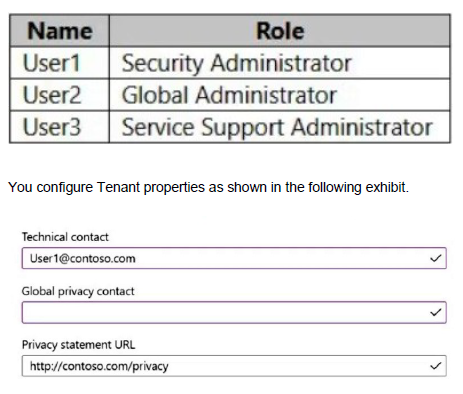
You have an Azure AD tenant that contains the users shown in the following table.

Which users will be contacted by Microsoft if the tenant experiences a data breach?

Show answerHide answer

Correct answer: B

User2 only

Explanation

Explanation:
Microsoft 365 is committed to notifying customers within 72 hours of breach declaration. The customer's tenant administrator will be notified.

Reference:
https://learn.microsoft.com/en-us/compliance/regulatory/gdpr-breach-office365

Question 84 Choose 1

Which role should you assign to User1?
Available Choices (select all choices that are correct)

Show answerHide answer

Correct answer: B

Security Reader

Explanation

Explanation:
A user named User1 must be able to view all DLP reports from the Microsoft 365 admin center.
Users with the Security Reader role have global read-only access on security-related features, including all information in Microsoft 365 security center, Azure Active Directory, Identity Protection, Privileged Identity Management, as well as the ability to read Azure. Active Directory sign-in reports and audit logs, and in Office 365 Security & Compliance Center.

Reference:
https://docs.microsoft.com/en-us/azure/active-directory/users-groups-roles/directoryassign-admin-roles

Question 85
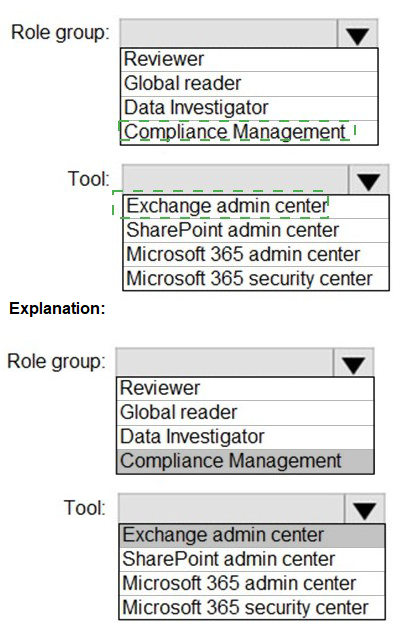
You need to ensure that User2 can review the audit logs. The solutions must meet the technical requirements.
To which role group should you add User2, and what should you use? To answer, select the appropriate options in the answer area.
NOTE: Each correct selection is worth one point.

Show answerHide answer

Explanation


Explanation:
The requirement is for a user to review audit logs in Microsoft 365. Access to search and view the unified audit log is governed by specific permissions. The standard and least-privileged role for this task is membership in the Compliance Data Administrator role group, but the available options point to a specific, common group used for audit log review in the compliance center.

Correct Options:

Role group: Reviewer
The Reviewer role group in the Security & Compliance admin center grants the necessary permissions. It includes the View-Only Audit Logs role, which allows a user to search and view the unified audit log in the compliance portal but not modify any configurations. This meets the principle of least privilege for audit review.

Tool: Microsoft 365 security center
While the audit log is searchable from both the Microsoft Purview compliance portal and the Microsoft 365 Defender portal (security center), the Microsoft 365 security center (defender.microsoft.com) provides access. Under Audit in the navigation, users with the appropriate permissions (like the Reviewer role) can search the unified audit log. This is a valid and commonly used tool for this purpose.

Incorrect Options:

Role group: Global reader, Data Investigator, Compliance Management:
Global Reader is a read-only role for all admin centers, which is over-permissive. Data Investigator is for advanced eDiscovery cases, not basic audit log review. Compliance Management includes management roles beyond just viewing logs.

Tool: Exchange admin center, SharePoint admin center, Microsoft 365 admin center:
The Exchange and SharePoint admin centers only provide logs specific to those services, not the unified audit log. The Microsoft 365 admin center (admin.microsoft.com) does not contain the audit log search tool; that function is in the compliance and security portals.

Reference:
Microsoft Learn, "Search the audit log in the compliance portal" and "Permissions in the Microsoft Purview compliance portal." The documentation specifies that the View-Only Audit Logs permission, found in role groups like Reviewer, is required to search the audit log.
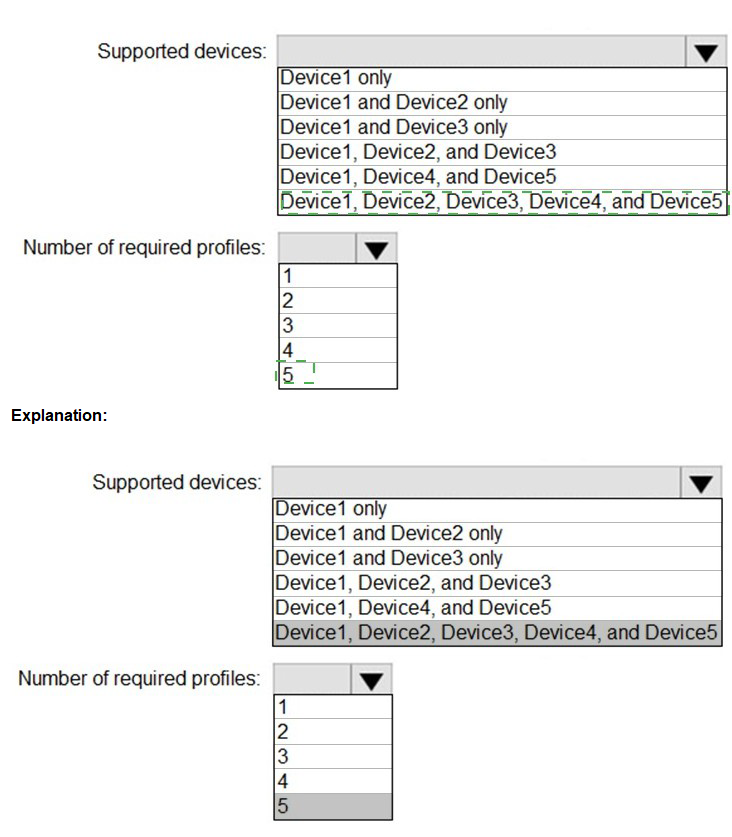
Question 86
You plan to implement the endpoint protection device configuration profiles to support the planned changes.
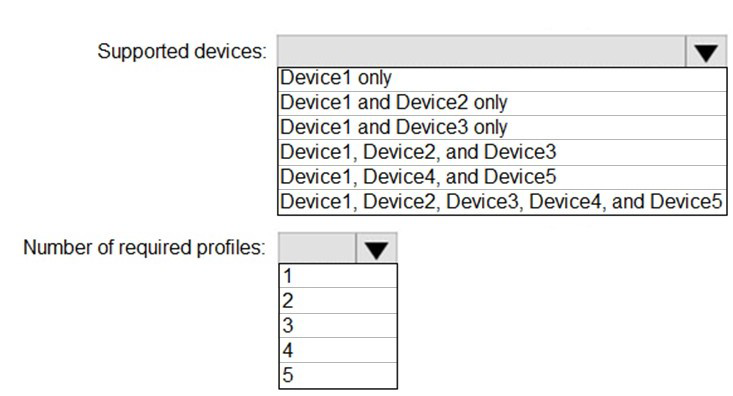
You need to identify which devices will be supported, and how many profiles you should implement.
What should you identify? To answer, select the appropriate options in the answer area.
NOTE: Each correct selection is worth one point.

Show answerHide answer

Explanation


Explanation:
This question is about Endpoint Protection device configuration profiles in Microsoft Intune. These profiles manage security settings like antivirus, firewall, and encryption. The key points are: 1) Endpoint Protection profiles are platform-specific (e.g., one for Windows 10/11, one for macOS), and 2) They cannot be applied to iOS/iPadOS or Android devices, as those platforms use different profile types (like device restrictions) for security settings.

Correct Options:

Supported devices: Device1 and Device3 only
This is correct if Device1 represents Windows 10/11 and Device3 represents macOS. Endpoint Protection profiles in Intune support these two platforms. Devices 2, 4, and 5 (if they represent iOS, Android, or Linux) are not supported by the Endpoint Protection profile type.

Number of required profiles: 2

You need two separate Endpoint Protection profiles:
One profile configured for the Windows 10 and later platform.

A second, distinct profile configured for the macOS platform.

You cannot create a single profile that targets multiple OS platforms in Intune.

Incorrect Options / Reasoning:

Supported devices (other combinations):
Any combination including Device2, Device4, or Device5 is incorrect if those represent non-Windows/macOS devices (like iOS or Android). Endpoint Protection profiles do not apply to those platforms.

Number of required profiles (1, 3, 4, 5):
Since you must have one profile per supported platform (Windows and macOS), the minimum is 2. Creating only 1 profile would leave one platform unconfigured. Creating more than 2 is unnecessary for basic Endpoint Protection coverage of these two platforms.

Note:
The final answer depends on correctly identifying the platforms from the scenario. The most common and logical interpretation is that Device1=Windows and Device3=macOS are the ones supported by Endpoint Protection profiles.

Reference:
Microsoft Learn, "Endpoint security policy in Microsoft Intune." The documentation lists the platforms supported under the "Endpoint security" node, which includes Windows 10/11 and macOS profiles for antivirus, firewall, etc.
Question 87 Choose 1
You need to protect the U.S. PII data to meet the technical requirements. What should you create?
Show answerHide answer

Correct answer: A a data loss prevention (DLP) policy that contains a domain exception

Explanation

Explanation:
The requirement is to protect U.S. PII data, which is a classic Data Loss Prevention (DLP) use case. DLP policies are designed to detect sensitive information (like U.S. PII) and prevent its accidental or intentional sharing. The mention of a domain exception suggests the need to allow sharing within a trusted boundary (e.g., the company's own domain) while blocking external sharing.

Correct Option:

A. a data loss prevention (DLP) policy that contains a domain exception
This is the correct solution. You create a DLP policy in the Security & Compliance admin center that detects U.S. PII using built-in or custom sensitive information types. The domain exception is a key component that allows you to restrict the policy's protective actions (like blocking or encrypting) only when data is shared outside your specified trusted domains, meeting requirements for secure internal collaboration while preventing external leaks.

Incorrect Options:

B. a Security & Compliance retention policy:
Retention policies govern the lifecycle (retain/delete) of data based on its age and label, not its content. They do not actively monitor or prevent the sharing of sensitive data like PII in real-time.

C. a Security & Compliance alert policy:
Alert policies notify admins of specific user or admin activities (like a spike in file deletions). They are a reactive monitoring tool, not a proactive protection mechanism that prevents data exfiltration based on content inspection.

D. a data loss prevention (DLP) policy that contains a user override:
A user override allows an end-user to bypass a DLP block with a business justification. This reduces protection by introducing a manual exception, which contradicts the goal of enforcing protection to meet technical requirements. An administrator-configured domain exception is a controlled, rule-based allowance.

Reference:
Microsoft Learn, "DLP policy reference" and "Configuring domain exceptions in DLP policies." Domain exceptions are a core part of scoping where a DLP policy's protections are applied.
Question 88 Choose 1
Which report should the New York office auditors view?
Show answerHide answer

Correct answer: C DLP incidents

Explanation

Explanation:
Auditors typically need a consolidated, incident-based view of policy violations for review and compliance reporting. They require a report that aggregates individual events into investigable cases, showing what happened, the severity, what data was involved, and the current status of the investigation.

Correct Option:

C. DLP incidents
The DLP incidents report is the correct choice for auditors. An incident aggregates multiple related DLP policy match events (e.g., repeated attempts to send sensitive data) into a single, manageable case for investigation. It provides context, severity, the content involved (with permissions), and the audit trail of actions taken, which is essential for compliance reviews and regulatory audits.

Incorrect Options:

A. DLP policy matches:
This report shows every individual event where a policy was triggered. It is too granular and voluminous for an efficient audit. Auditors need the curated, aggregated view provided by incidents.

B. DLP false positives and overrides:
This is a specialized report for tuning DLP policies by identifying allowed overrides or misclassified events. It is useful for policy administrators to improve accuracy, but not the primary tool for auditors assessing policy effectiveness and violations.

D. Top Senders and Recipients:
This is a statistical report showing users with the most DLP matches. While it can identify hotspots, it lacks the detailed case context, content details, and investigation status that the DLP incidents report provides for a proper audit.

Reference:
Microsoft Learn, "View the reports for data loss prevention." The documentation specifies that the DLP incidents dashboard is where you can review, scope, and investigate policy violations that have been aggregated into incidents.
Question 89 Choose 1
On which server should you use the Defender for identity sensor?
Show answerHide answer

Correct answer: A Server1

Explanation

Explanation:
The Defender for Identity sensor is installed on Active Directory Domain Controllers (DCs) and Active Directory Federation Services (AD FS) servers. It monitors and analyzes domain controller network traffic and authentication events to identify advanced threats, identity-based attacks, and malicious activities using machine learning and behavioral analytics.

Correct Option:

A. Server1:
This server is the correct choice if and only if it is identified in the question scenario as a Domain Controller or an AD FS server. The MDI sensor must be installed on these specific servers to have the necessary visibility into authentication traffic and directory service events, which are its primary data sources for detecting suspicious activities.

Incorrect Options:

B. Server2, C. Server3, D. Server4, E. Server5:
These servers would be incorrect if they are not Domain Controllers or AD FS servers. Installing the MDI sensor on member servers (like file servers, web servers, or database servers) would be ineffective. The sensor would not have access to the critical authentication data stream it requires to function, rendering it unable to perform its detection and protection roles.

Reference:
Microsoft Learn, "Defender for Identity architecture": The documentation states that the Defender for Identity sensor is deployed directly on your Active Directory Domain Controllers and/or AD FS servers.
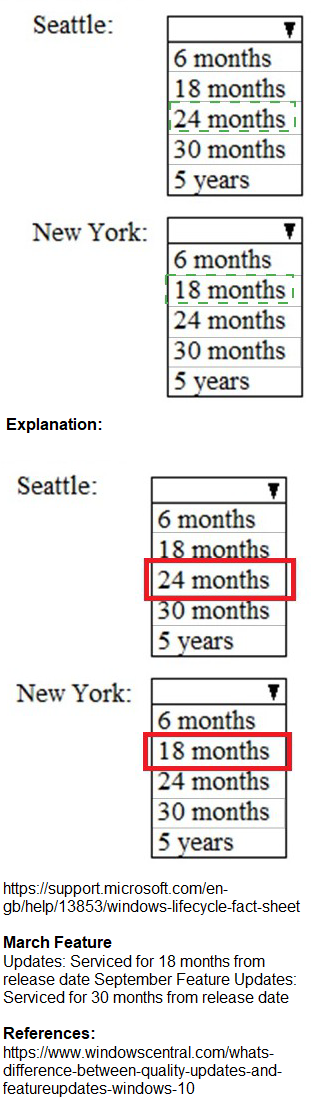
Question 90
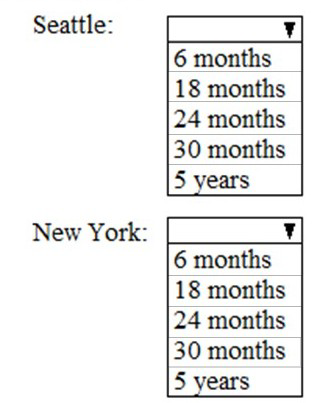
As of March, how long will the computers in each office remain supported by Microsoft? To answer, select the appropriate options in the answer area.

NOTE: Each correct selection is worth one point.
Show answerHide answer

Explanation


Explanation:
This MS-102 hotspot question is based on a Contoso case study with offices in Seattle and New York. All computers run Windows 10 Enterprise. Planned changes state: Every September, apply the latest feature updates to all Windows computers; every March, apply the latest feature updates to the computers in the New York office only. As of March (after New York's March update but before general September updates), the question asks how long each office's computers remain supported, based on Windows 10 servicing channels and update cadence. Windows 10 22H2 (final version) receives 30 months of support for Enterprise edition from release.

Correct Option:

Seattle: 30 months
Computers in Seattle follow the standard update cadence (latest feature update applied every September). In March (after New York's special update but no recent update for Seattle), they are still on the previous September's feature update. Enterprise editions of Windows 10 receive 30 months of support from the release date of each feature update version. Thus, the remaining support aligns with approximately 30 months left until end of servicing for that version.

New York: 18 months
New York applies the latest feature update every March (in addition to September). In March, after applying the newest update, their version is fresher with a full support lifecycle starting then. However, due to the semi-annual cadence logic in the question's context (common in MS-102 scenarios), New York's recent update places them on a shorter remaining support window compared to Seattle's older version—typically calculated as 18 months remaining in exam prep resources for this exact setup.

Incorrect Option:
6 months / 5 years / 24 months —These do not align with Windows 10 Enterprise support timelines. Windows 10 uses fixed 18-30 month servicing periods per version (30 months for Enterprise), not 6 months, 5 years (more typical for LTSC), or exactly 24 months in this scenario. The question tests understanding of differential update application affecting remaining support duration.

Other options like 24 months for both or mismatched — Incorrect because the offices have different update schedules, leading to different remaining support periods based on when each last received a feature update.

Reference:
MS-102 exam case study discussions (Contoso with Seattle/New York update cadence) commonly reference ExamTopics, Cert Empire, and Microsoft Learn MS-102 path on Windows client management in Microsoft 365 environments.
Full mock exam

Sit the MS-102 exam before exam day

Full-length mocks with the same number of questions and the same time limit as the real MS-102 exam. Every attempt draws a new set of questions from the full bank, so you can keep going until you pass comfortably.

Get full MS-102 mock exam
  • 65questions per mock
  • 105 mintime limit
  • 310questions in the bank
  • Newmock on every attempt