Your company has a Microsoft 365 E5 tenant.
Users access resources in the tenant by using both personal and company-owned Android devices. Company policies requires that the devices have a threat level of medium or lower to access Microsoft Exchange Online mailboxes.
You need to recommend a solution to identify the threat level of the devices and to control access of the devices to the resources.
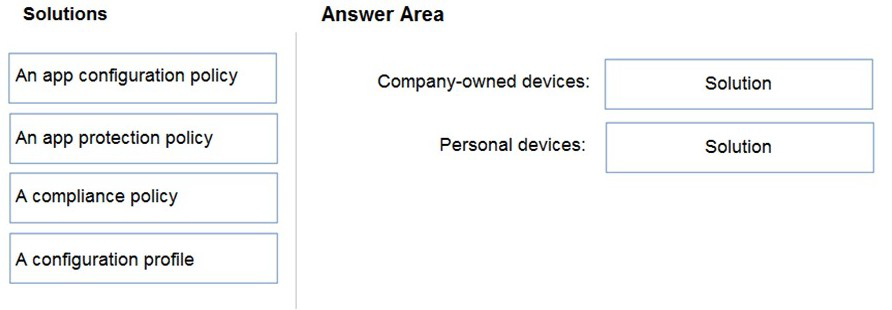
What should you include in the solution for each device type? To answer, drag the appropriate components to the correct devices. Each component may be used once, more than once, or not at all. You may need to drag the split bar between panes or scroll to view content.
NOTE: Each correct selection is worth one point.
Show answerHide answer
Explanation
Explanation:
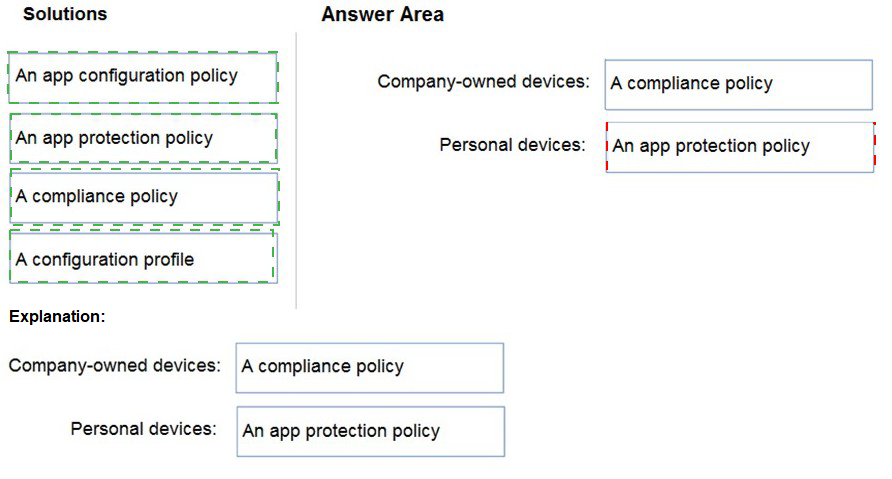
This scenario requires implementing Conditional Access with device compliance and threat detection. Microsoft Defender for Endpoint integrates with Intune to assess device threat levels. Company-owned devices should be managed with configuration profiles to enforce compliance policies that include threat level requirements. Personal devices should be controlled via app protection policies, which can require a managed app (like Outlook) to check device threat level through Microsoft Defender for Endpoint before allowing access.
Correct Option:
Company-owned devices:
A configuration profile. A device configuration profile in Microsoft Intune is used to deploy settings and compliance rules to company-owned, fully managed devices. It can integrate with Microsoft Defender for Endpoint to enforce a "Require the device to be at or under the machine risk score" rule (e.g., Medium).
Personal devices:
An app protection policy. For personal (BYOD) devices, an Intune App Protection Policy (APP) applied to the Outlook app can include a conditional launch rule that blocks access if the device threat level, assessed by Microsoft Defender for Endpoint, is above "Medium." This protects data without requiring full device management.
Incorrect Options:
An app configuration policy:
This is used to push specific settings (like username or URL) into an app, not to evaluate device threat levels or enforce access control based on security posture.
A compliance policy:
While a device compliance policy defines the rules a device must meet (like threat level), it is primarily used in conjunction with a configuration profile for enrollment. For Conditional Access, compliance policies are typically applied to company-owned devices, but the question's provided option for these devices is correctly a configuration profile, which deploys the compliance settings. A compliance policy alone does not "identify" the threat level; it consumes the signal from Defender.
Reference:
Microsoft Learn: Create a Mobile Threat Defense app protection policy with Intune