You need to assist the development department with setting up Visual Studio Code to
design the purchase department extension, meeting the quality department requirements.
How should you complete the app.json file? To answer, select the appropriate options in the answer area.
NOTE: Each correct selection is worth one point.
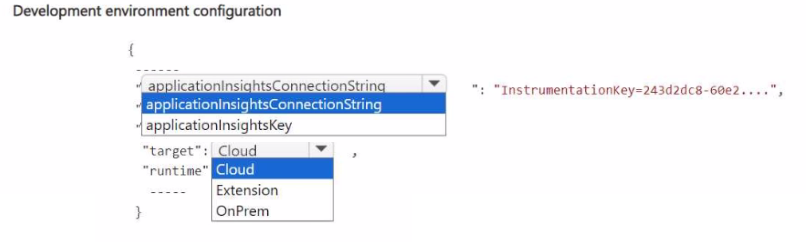
How should you complete the app.json file? To answer, select the appropriate options in the answer area.
NOTE: Each correct selection is worth one point.
Show answerHide answer
Explanation
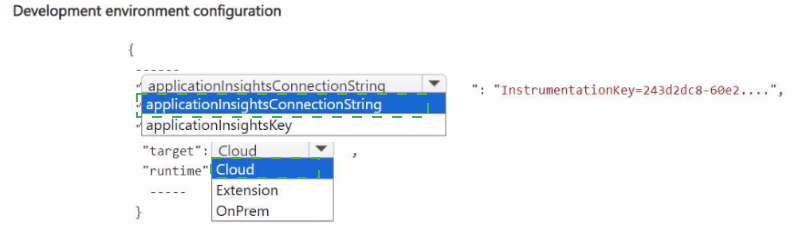
Explanation:
This question focuses on correctly configuring the app.json file for an extension in Visual Studio Code, specifically to meet deployment and telemetry requirements. The key is to understand the purpose of each configuration property: applicationInsightsInstrumentationKey is for enabling telemetry, while target and runtime must be set to "Cloud" for deploying extensions to the cloud-hosted Dynamics 365 environment. "OnPrem" would be used for on-premises deployments.
Correct Option (Based on typical configuration):
To complete the app.json file for a cloud deployment with telemetry, the configuration should be:
applicationInsightsInstrumentationKey:
This property must be set to the actual Instrumentation Key string (e.g., "243d2dc8-60e2....") provided by the Azure Application Insights resource. This enables the extension to send trace and telemetry data to Application Insights, meeting the quality department's monitoring requirements.
"target": "Cloud":
This property defines the intended deployment target. For extensions designed to run in the Dynamics 365 Finance and Operations cloud service (SaaS), this must be set to "Cloud".
"runtime": "Cloud":
This property specifies the runtime environment. For cloud-hosted extensions, this must also be set to "Cloud" to ensure the extension uses the correct cloud runtime services and libraries.
Incorrect/Alternative Options:
applicationInsightsConnectionString:
While a valid property in some contexts, the app.json file for Dynamics 365 extensions primarily uses the applicationInsightsInstrumentationKey property for telemetry configuration. The connection string is a more modern approach, but the standard key-based property is shown in the snippet and is the direct match.
target: "OnPrem" / runtime: "OnPrem":
These values would be incorrect for the scenario. The development department is designing an extension for the purchase department in the cloud environment, as implied by the quality department's cloud-based monitoring requirements. Using "OnPrem" would configure the extension for an on-premises deployment, which would fail to deploy or run correctly in the cloud tenant.
Reference:
Microsoft Learn, "Application settings (app.json)": The documentation specifies the app.json schema, including the target and runtime properties (set to "Cloud" or "OnPremises"), and the applicationInsightsInstrumentationKey property for enabling telemetry logging to Azure Application Insights.