Microsoft certification · Exam MB-820

MB-820 Mock Exam

Microsoft Dynamics 365 Business Central Developer

Find out if you're ready for MB-820. Take the free timed mock exam and get your score in minutes, or study the free MB-820 questions below with answers and explanations.

20 questions · 33 minutes · free, no sign-up

Free MB-820 questions

1–10 of 34 free
Question 1
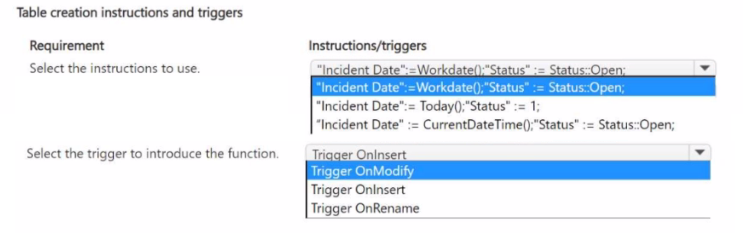
You need to populate the Incident Date and Status fields in the Room Incident table.
Which instructions or trigger should you use? To answer, select the appropriate options in the answer area
NOTE: Each correct selection is worth one point
Show answerHide answer

Explanation


Explanation:
The goal is to automatically populate the Incident Date and Status fields when a new "Room Incident" record is created.

Instructions:

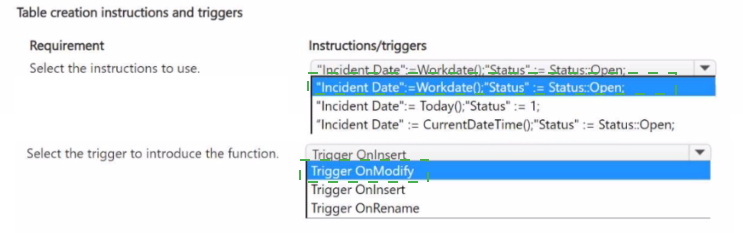
"Incident Date":=Workdate(); is the correct function to assign the current work date (which is often the session date) to a date field. Today() could also be acceptable, but WorkDate() is more aligned with business application context in Business Central. CurrentDateTime() is incorrect as it returns a DateTime value, which is not suitable for a pure Date field.

"Status":=Status:Open; is the correct way to assign an enum value. Using the enum's symbolic name (Status:Open) is the modern, readable, and recommended practice in AL. Using the underlying integer value ("Status":=1;) is fragile and should be avoided, as the integer mapping can change if the enum is modified.

Trigger:
The OnInsert trigger is the correct choice. This trigger fires automatically when a new record is first saved to the database. It is the standard and intended place for initializing default field values for a new record.
OnModify fires when an existing record is changed, which is too late.
OnRename fires when a record's primary key is changed, which is irrelevant for setting initial values.
Question 2
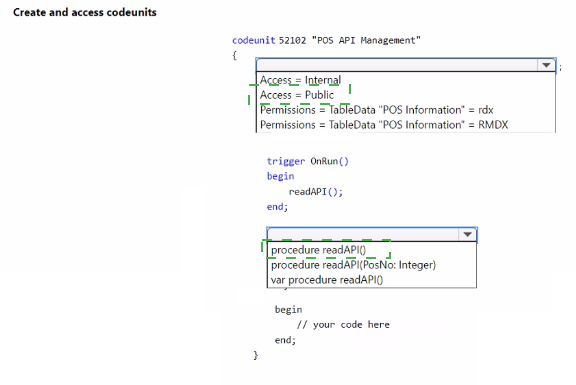
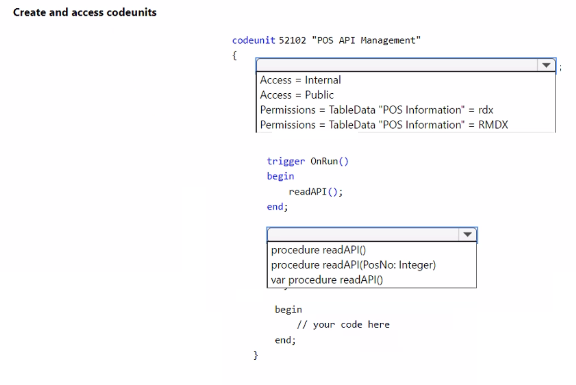
You need to create the codeunit to read the POS terminal APIs.
How should you complete the code segment? To answer, select the appropriate options in the answer area.
NOTE; Each correct selection is worth one point.

Show answerHide answer

Explanation


Explanation:
Let's break down each required component for creating a robust and secure codeunit.

1. Access Property: Access = Internal
Internal restricts the use of this codeunit to the extension in which it is defined. It cannot be called from other extensions or from the base application. This is the secure, modern practice for encapsulating logic that is not intended to be a public API.

Why not Public? While Public would allow the codeunit to be called from anywhere, it is unnecessary for internal logic and violates the principle of encapsulation. It exposes the codeunit's interface, making future changes more difficult without breaking dependent code.

2. Permissions: Permissions = TableData "POS Information" = RIMD
RIMD grants the codeunit the necessary permissions to Read, Insert, Modify, and Delete records in the "POS Information" table. This full set of permissions is typical for a codeunit that manages data for an entity, as it will likely need to create, read, update, and delete records.

Why not rdx or RMDX?
rdx is syntactically incorrect and uses lowercase letters, which is not standard.
RMDX is also incorrect. The standard permission letters are R (Read), I (Insert), M (Modify), and D (Delete). The X is not a valid permission for table data; it is sometimes used in end-user permission sets to grant the "Execute" permission for objects like codeunits.

3. Procedure Signature: procedure readAPI(PosNo: Integer)
A parameterized procedure (PosNo: Integer) is the correct choice. It allows the caller to specify which POS terminal to read the API for, making the codeunit flexible and reusable. The logic inside the procedure would use this PosNo parameter to filter or identify the correct terminal.

Why not the others?
procedure readAPI() (no parameters) is too rigid. It implies the codeunit can only ever read from one, predefined POS terminal.

var procedure readAPI() is syntactically incorrect. The var keyword is used to define variable parameters, not the procedure itself.

Reference:

Microsoft Learn Documentation: Codeunit Object

This documentation details the properties and structure of a codeunit. It explains the Access property and the difference between Internal and Public scopes. It also covers how to define the Permissions property and the standard permission set letters (RIMD).
Question 3 Choose 2
You need to define the data types for the fields of the N on-conformity table.
Which two data types should you use? Each correct answer presents part of the solution.
NOTE: Each correct selection is worth one point.
Show answerHide answer

Correct answer: C, E Char for the Non-Conformity Number fieldCode for the Non-Conformity Number field

Explanation

Explanation:
When defining fields in a Business Central table, it's crucial to select the most appropriate data type based on the nature of the data and how it will be used.

E. Code for the Non-Conformity Number field:
The Code data type is specifically designed for alphanumeric identifiers, such as document numbers, codes, and IDs. It automatically handles uppercase conversion and trimming of leading/trailing spaces, ensuring data consistency. It is the standard and correct choice for any numbered field that is an identifier (like "Non-Conformity Number").

Why not A (Integer)? An Integer is for whole numbers without any alphabetic characters. A "Number" field in a business context often includes prefixes or is part of a formatted number series (e.g., "NC-0001"), which an Integer cannot store.

Why not C (Char)? A Char (Text) field stores text as-is without automatic formatting. It is less rigid than Code and can lead to inconsistent data (e.g., "nc1", "NC1", " NC1 ").

D. Date for the Non-Conformity Date field:
The Date data type is the standard and correct choice for storing a calendar date without a specific time component. A "Non-Conformity Date" is a point in time on the calendar, making Date the logical fit.

Why not B (Date Time)?
A DateTime data type includes both a date and a time. Unless the specific time of the non-conformity is a business requirement, using DateTime is unnecessary and adds complexity. A simple Date is sufficient and more appropriate for this context.

Reference:

Microsoft Learn Documentation: Data Types

You can find the official documentation by searching for "AL Data Types" on the Microsoft Learn site. It explicitly describes the purpose of each type:

Code:
"Use this data type for a textual value that contains only alphanumeric characters and no space... The text is stored in uppercase and is padded with the number of spaces that is defined by the length of the variable."

Date:
"Use this data type to store a date ranging from January 1, 1753, to December 31, 9999."

DateTime:
"Use this data type to store any date and time ranging from January 1, 1753, 00:00:00.000 to December 31, 9999, 23:59:59.999."
Question 4
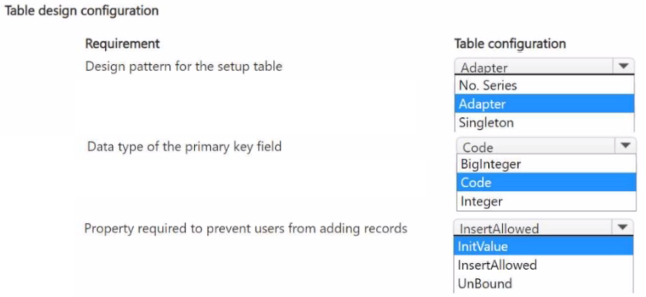
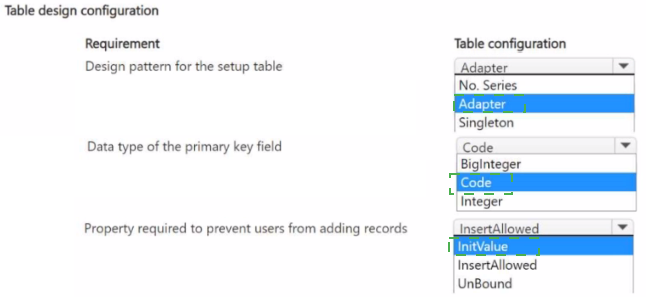
You need to create the configuration table and page for the non-conformity functionality.
Which table configurations should you use? To answer, select the appropriate options in the answer area.
NOTE: Each correct selection is worth one point

Show answerHide answer

Explanation


Explanation:
For a configuration/setup table that stores global settings for a functionality (like non-conformity), the standard pattern is a Singleton table.

Design pattern: Singleton
A Singleton table is designed to hold only one configuration record for the entire company. This is the standard pattern for setup tables in Business Central (e.g., "Sales & Receivables Setup", "Inventory Setup"). It ensures there is only one set of configuration values.
Why not "Adapter"? An Adapter pattern is for integrating external systems, not for internal configuration.

Data type of the primary key field: Code
The primary key for a singleton table is typically a Code field with a fixed length (e.g., Code[10]). A common practice is to have a single, hard-coded value like 'SETUP' or 'GLOBAL' as the primary key for the one and only record. The Code data type is perfect for this kind of identifier.

Why not "Integer" or "BigInteger"? These are for numeric sequences, which are not needed for a singleton table's primary key.

Property to prevent users from adding records: InsertAllowed
Setting InsertAllowed = false; on the table object is the direct and correct way to prevent users from manually creating new records through the UI. This is crucial for a singleton table to maintain its single-record integrity. The configuration page should have logic to create the single record if it doesn't exist, typically in the OnOpenPage trigger.

Why not "InitValue"? This property sets a default value for a field when a new record is created, but it does not prevent the creation of new records.

Why not "UnBound"? This is a page control property, not a table property, and is unrelated to record insertion.

Reference:

Microsoft Learn Documentation: Table Properties
The InsertAllowed property is documented to "Specifies whether users can add records to the table by using the user interface."

Business Central Development Patterns:
The Singleton pattern for setup tables is a well-established standard in the Business Central application. You can observe this by examining base application tables like "Sales & Receivables Setup" or "Inventory Setup", which all use a Code primary key and are designed to hold a single record.
Question 5
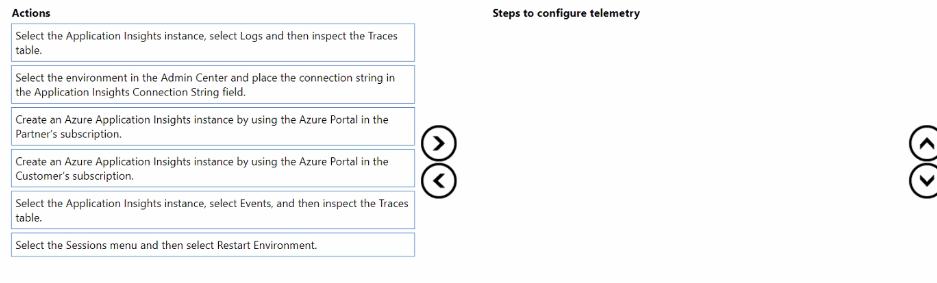
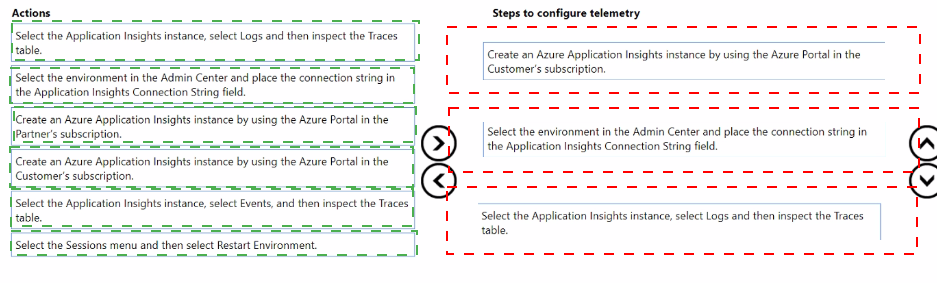
You need to configure telemetry for the SaaS tenant and test whether the ingested signals are displayed.
Which three actions should you perform in sequence? To answer, move the appropriate actions from the list of actions to the answer area and arrange them in the correct order.

Show answerHide answer

Explanation


Explanation:
Configuring telemetry for a SaaS (Software-as-a-Service) Business Central tenant involves a specific sequence of steps across different administrative portals.

Step 1: Create an Azure Application Insights instance by using the Azure Portal in the Partner’s subscription.

Reasoning: The foundational step is to create the destination where telemetry data will be sent. For a SaaS tenant, the partner (the developer or ISV creating the extension) is responsible for providing the Application Insights resource. This is created in the partner's Azure subscription, not the customer's, because the partner typically analyzes the telemetry for their extension's performance and usage.

Step 2: Select the environment in the Admin Center and place the connection string in the Application Insights Connection String field.

Reasoning: After the Application Insights resource exists, you must configure the Business Central environment to send data to it. This is done in the Business Central Admin Center. You select the specific SaaS environment and paste the "Connection String" from the Application Insights resource into the designated field. This action links the environment to the telemetry data sink.

Step 3: Select the Application Insights instance, select Logs, and then inspect the Traces table.

Reasoning: This is the correct method to verify that telemetry is being ingested. After performing actions in Business Central (like using the extension), you go to the Application Insights resource in the Azure portal, open the Logs query interface (not the "Events" view), and run a query against the traces table. This table contains the detailed log traces sent from Business Central, confirming the configuration is working. The "Sessions menu" and "Restart Environment" are not part of this process.

Reference:

Microsoft Learn Documentation: Enabling Application Insights for an Environment
The official documentation outlines this exact process: creating an Application Insights resource and then configuring the environment in the admin center with the connection string. It also directs users to use the Logs experience in Application Insights to query data, specifically mentioning the traces table.
Question 6
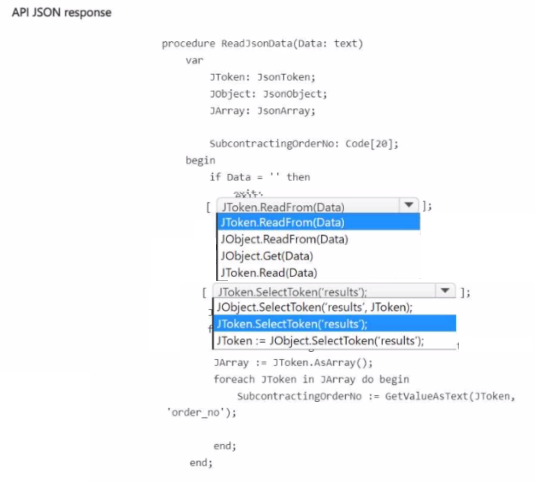
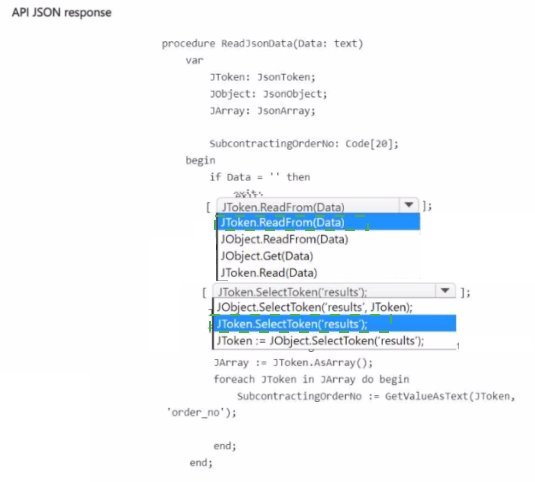
You need to parse the API JSON response and retrieve each order no. in the response body.
How should you complete the code segment? To answer select the appropriate options in the answer area.
NOTE: Each correct selection is worth one point.

Show answerHide answer

Explanation


Explanation:
Parsing JSON in AL follows a specific sequence: you read the raw text into a JSON structure, then navigate through the object hierarchy to extract the values you need.

First blank: JToken.ReadFrom(Data)
The JsonToken.ReadFrom method is the initial step that parses the raw JSON text (Data) into a hierarchical JSON structure represented by a JsonToken. This token becomes the root from which you can navigate the entire JSON document.

Why not the others?
JObject.ReadFrom(Data) would fail if the root of the JSON is not an object (e.g., if it's an array). ReadFrom for a specific type is less flexible than using a generic JsonToken.
JObject.Get(Data) and JToken.Read(Data) are not valid methods.
Second blank: JToken := JObject.SelectToken('results');

After reading the data into a JsonToken, you typically convert it to a JsonObject to access its properties. The SelectToken method is used to navigate the JSON path and retrieve a specific token. The path 'results' indicates we are looking for a property named "results" in the JSON object. This line correctly assigns the value of the "results" property (which is likely the array containing the orders) to the JToken variable for further processing.

Why not the others?
JToken.SelectToken('results'); is incorrect because SelectToken is a method of JsonObject and JsonArray, not JsonToken. You must first convert the root token to a JsonObject.
JObject.SelectToken('results'); JToken); is syntactically incorrect.

Note on the subsequent code: The line JArray := JToken.AsArray(); is correct after the second blank has been properly filled, as it converts the token retrieved by SelectToken('results') into a JsonArray so it can be iterated with the foreach loop.

Reference:

Microsoft Learn Documentation: JSON Data Type
The official documentation details the methods for working with JSON. It explains that JsonToken.ReadFrom is used to parse a text string into a token, and JsonObject.SelectToken is used to get a token based on a JSON Path. The AsArray method is then used to treat a token as an array.
Question 7
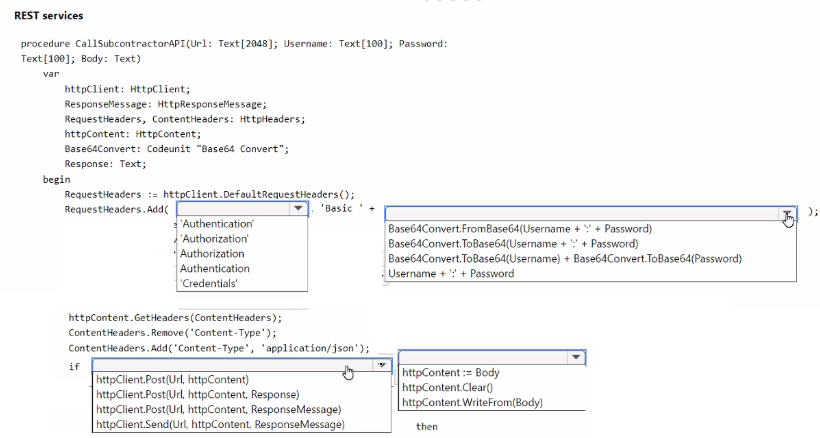
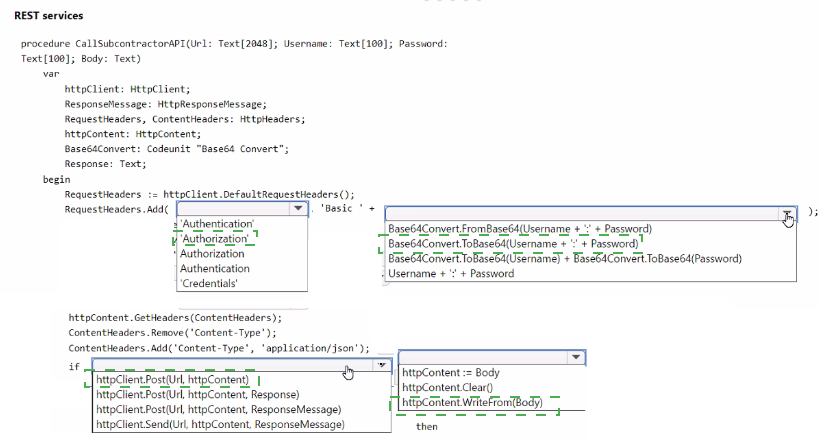
You need to write the code to call the subcontractor's REST API.
How should you complete the code segment? To answer, select the appropriate options in the answer area.
NOTE: Each correct selection is worth one point.

Show answerHide answer

Explanation


Explanation:
This code sets up an HTTP call with Basic Authentication to a REST API.

First blank: 'Authorization'
The HTTP header for Basic Authentication is named Authorization. The value of this header will be the word Basic followed by the base64-encoded credentials.

Second blank: Base64Convert.ToBase64(Username + ':' + Password)
Basic Authentication requires the credentials to be in the format username:password and then base64 encoded. The Base64 Convert codeunit's ToBase64 method performs this encoding. Concatenating the username and password with a colon (Username + ':' + Password) before encoding is the correct format.

Third blank: httpContent.WriteFrom(Body)
This method writes the JSON string (the Body parameter) into the HttpContent object, which will be sent as the request body. httpContent := Body is invalid because you cannot assign text directly to an HttpContent object.

Fourth blank: httpClient.Post(Url, HttpContent, ResponseMessage)
The HttpClient.Post method is used to send a POST request. It takes the URL, the content (body), and an HttpResponseMessage variable to store the server's response. The other options are either invalid method names or incorrect parameters.

Reference:

Microsoft Learn Documentation: HttpClient Data Type
The documentation for the HttpClient data type shows the Post method signature which requires the URL, content, and a response message variable. It also details how to use HttpContent.WriteFrom to set the request body. The use of the Authorization header with a base64-encoded string for Basic Auth is standard HTTP protocol.
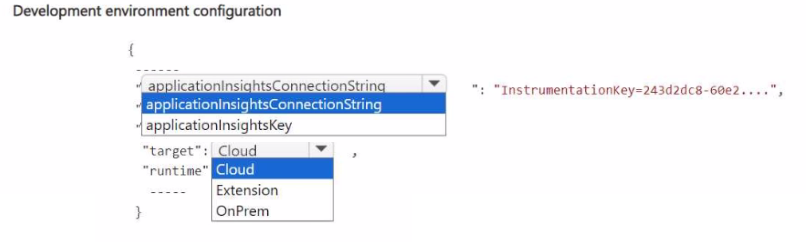
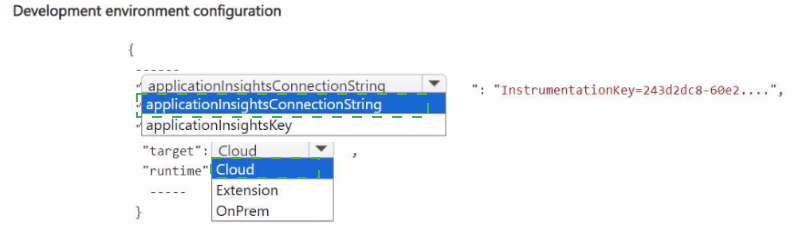
Question 8
You need to assist the development department with setting up Visual Studio Code to design the purchase department extension, meeting the quality department requirements.
How should you complete the app.json file? To answer, select the appropriate options in the answer area.
NOTE: Each correct selection is worth one point.

Show answerHide answer

Explanation


Explanation:
This question focuses on correctly configuring the app.json file for an extension in Visual Studio Code, specifically to meet deployment and telemetry requirements. The key is to understand the purpose of each configuration property: applicationInsightsInstrumentationKey is for enabling telemetry, while target and runtime must be set to "Cloud" for deploying extensions to the cloud-hosted Dynamics 365 environment. "OnPrem" would be used for on-premises deployments.

Correct Option (Based on typical configuration):
To complete the app.json file for a cloud deployment with telemetry, the configuration should be:

applicationInsightsInstrumentationKey:
This property must be set to the actual Instrumentation Key string (e.g., "243d2dc8-60e2....") provided by the Azure Application Insights resource. This enables the extension to send trace and telemetry data to Application Insights, meeting the quality department's monitoring requirements.

"target": "Cloud":
This property defines the intended deployment target. For extensions designed to run in the Dynamics 365 Finance and Operations cloud service (SaaS), this must be set to "Cloud".

"runtime": "Cloud":
This property specifies the runtime environment. For cloud-hosted extensions, this must also be set to "Cloud" to ensure the extension uses the correct cloud runtime services and libraries.

Incorrect/Alternative Options:

applicationInsightsConnectionString:
While a valid property in some contexts, the app.json file for Dynamics 365 extensions primarily uses the applicationInsightsInstrumentationKey property for telemetry configuration. The connection string is a more modern approach, but the standard key-based property is shown in the snippet and is the direct match.

target: "OnPrem" / runtime: "OnPrem":
These values would be incorrect for the scenario. The development department is designing an extension for the purchase department in the cloud environment, as implied by the quality department's cloud-based monitoring requirements. Using "OnPrem" would configure the extension for an on-premises deployment, which would fail to deploy or run correctly in the cloud tenant.

Reference:
Microsoft Learn, "Application settings (app.json)": The documentation specifies the app.json schema, including the target and runtime properties (set to "Cloud" or "OnPremises"), and the applicationInsightsInstrumentationKey property for enabling telemetry logging to Azure Application Insights.
Question 9
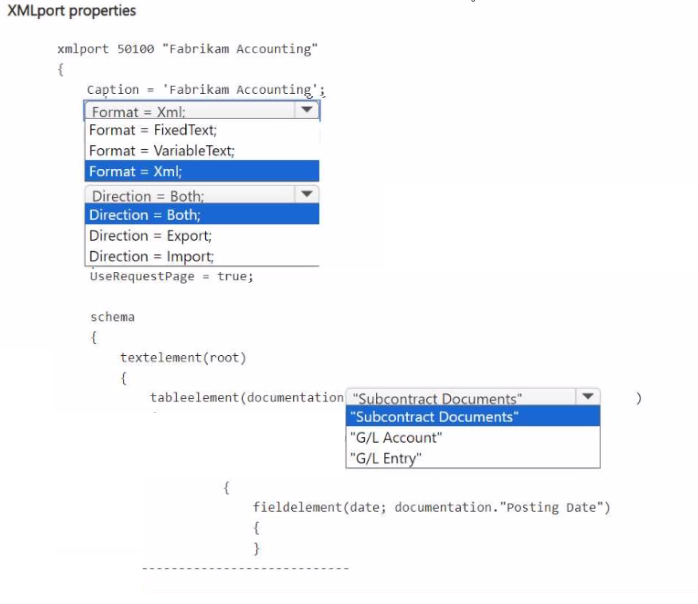
You need to define the XML file properties for the accounting department.
How should you complete the code segment? To answer, select the appropriate options in the answer area.
NOTE: Each correct selection is worth one point.

Show answerHide answer

Explanation

Explanation:
This question involves configuring an XMLport object in AL for Dynamics 365 Business Central. The goal is to export data to an XML file for the accounting department. The key properties to set are Format (which defines the file type) and Direction (which defines if the XMLport is for importing, exporting, or both). The tableelement must also correctly map to the source data table.

Correct Option (Based on typical XML export requirements):
To complete the XMLport definition for exporting accounting data to an XML file, the configuration should be:

Format = Xml;:
The accounting department requires an XML file. Therefore, the Format property must be set to Xml. The other options (FixedText, VariableText) are for text-based formats.

Direction = Export;:
Since the need is to generate an XML file from the system for the accounting department, the XMLport's Direction must be set to Export. Import would be for reading files, and Both is unnecessary for a one-way export.

tableelement(documentation;"G/L Entry"):
The most likely source table for accounting department data is the General Ledger Entry table ("G/L Entry"). This table contains the posted financial transactions. The other options ("Subcontract Documents", "G/L Account") are less likely to be the primary source for a generic accounting export.

Incorrect/Alternative Options:

Format = FixedText; / Format = VariableText;:
These are incorrect formats. They define text files with fixed-width or delimited columns, not the requested XML file format.

Direction = Import; / Direction = Both;:
Setting Direction to Import would configure the XMLport to read an XML file into the system, which is the opposite of the export requirement. Both is possible but not the best practice for a dedicated export task and adds unnecessary complexity.

tableelement(documentation;"Subcontract Documents"):
While possible for a specific process, this is too narrow. The accounting department typically needs comprehensive financial data, making the General Ledger a more standard and complete source.

tableelement(documentation;"G/L Account"):
This table contains the chart of accounts (master data), not the transactional entries. An export for accounting reporting usually requires the actual posted transactions from the "G/L Entry" table.

Reference:
Microsoft Learn, "XMLports Overview": Details the properties of an XMLport object, including Format (Xml, VariableText, FixedText) and Direction (Import, Export, Both). The tableelement defines the root data source for the export.
Question 10
You need to configure the Subcontract Docs extension to translate the fields.
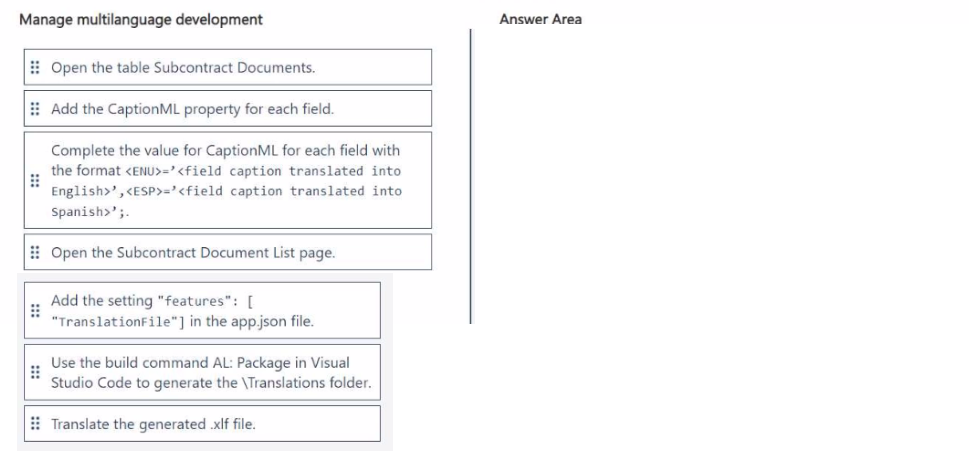
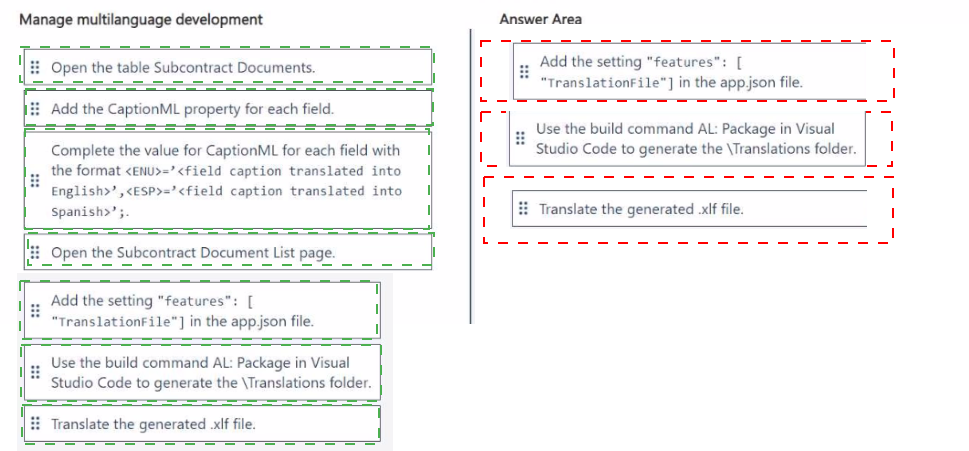
Which three actions should you perform in sequence? To answer, move the appropriate actions from the list of actions to the answer area and arrange them in the correct order.

Show answerHide answer

Explanation


Explanation:
This scenario describes the process for adding multi-language support (specifically English and Spanish) to an extension's table and page fields. The correct sequence follows the standard AL development workflow: first define the translatable properties in the objects, then enable the translation feature in the project, and finally use the development tool to generate the translation file.

Correct Sequence:

Open the table Subcontract Documents. Add the CaptionML property for each field. Complete the value for CaptionML for each field...
This is the first and foundational step. Multi-language captions are defined directly in the AL code for each object (tables, pages, etc.) using the CaptionML property (or the modern Caption property with multi-language syntax). You must specify the language IDs (like ENU, ESP) and their corresponding translated strings for each field.

Add the setting "features": [ "TranslationFile" ] in the app.json file.
This is the second step. To generate a translatable external file (an .xlf file), you must explicitly enable the TranslationFile feature in the project's app.json file. This tells the AL compiler to extract the translatable strings during the next build step.

Use the build command AL: Package in Visual Studio Code to generate the Translations folder.
This is the third step. After enabling the feature, you build or package the extension. This process parses the AL code, extracts all strings tagged with CaptionML/Caption, and automatically generates a Translations folder containing an .xlf (XML Localization Interchange File Format) file with the source language strings ready for translation.

Incorrect / Out-of-Sequence Actions:

Open the Subcontract Document List page.
This action is implied within step 1. While you would also add CaptionML properties to the page fields, the step is redundant as a separate action. The core task is adding the property to all relevant objects, which is covered by the first step.

Translate the generated .xlf file.
This is a necessary subsequent step but comes after the sequence defined by the question. The question asks for the actions to configure the extension for translation, which culminates in generating the .xlf file. The actual translation of that file is the next phase of work, not part of the configuration setup sequence.

Reference:
Microsoft Learn, "Working with Translation Files": The documentation outlines the workflow: 1) Define captions using the multi-language properties in AL objects, 2) Add the "TranslationFile" feature to app.json, 3) Build the app to generate the .xlf file in the Translations folder.
Full mock exam

Sit the MB-820 exam before exam day

Full-length mocks with the same number of questions and the same time limit as the real MB-820 exam. Every attempt draws a new set of questions from the full bank, so you can keep going until you pass comfortably.

Get full MB-820 mock exam
  • 65questions per mock
  • 105 mintime limit
  • 117questions in the bank
  • Newmock on every attempt
These MB-820 practice questions with explanations help candidates master development in Dynamics 365 Business Central. Topics include AL programming, extensions, integrations, and debugging. Each explanation clearly describes the reasoning behind the correct answer, helping learners understand development concepts more effectively. This approach enhances both coding skills and conceptual clarity. By practicing regularly, candidates can improve their development expertise, identify knowledge gaps, and confidently prepare for the certification exam.

MB-820 - Microsoft Dynamics 365 Business Central Developer Official Exam Blueprint and Weight:

1. Describe Business Central
Official Exam Weight: 10-15%
Subtopics: Describe components and capabilities of Business Central, describe core solution and extensions approach for Business Central, describe update lifecycle for customizations of Business Central, differentiate Business Central online and Business Central on-premises features, differentiate between base app and system app, describe functionality of apps, describe process of bringing an app to AppSource.

2. Install, Develop, and Deploy for Business Central
Official Exam Weight: 10-15%
Subtopics: Describe development environment for Business Central, install and configure development environment, manage configuration files for AL extension, manage multiple AL extensions in one workspace, debug extension with Visual Studio Code, deploy extension, create or modify Business Central extension in Visual Studio Code, manage multilanguage development, maintain extensions.

3. Develop by Using AL Objects
Official Exam Weight: 35-40%
Subtopics: Develop Role Center pages, identify different page types, build and extend page objects, build and extend tables, build and extend enums, substitute report, create report layout, create document reports, design data model of report, implement multilanguage in reports, use report triggers functions and processing-only reports, develop report request page, configure different XMLport properties, configure nodes and their properties, use XMLports in AL code, create and access codeunits, use events and triggers, implement interfaces, create installation and upgrade codeunits, create and extend permission sets, override entitlements with inherent permissions, troubleshoot permission sets, link and join data items, apply filters in query objects, use queries instead of record variables, aggregate data in query objects, use query to create report.

4. Develop by Using AL
Official Exam Weight: 15-20%
Subtopics: Create profiles in AL, use and create views in AL, develop UI using user assistance model, integrate assisted setup, create teaching tips and in-app tours to onboard users, create onboarding checklist, implement data process model in Business Central, define different functional table types and characteristics, use document standards in Business Central, implement master data standards and design patterns, create custom procedures, use data types in code, manage files, manipulate data using code, describe basics of AL, use different types of expressions, use AL built-in functions and AL statements, work with variables and define them in AL code, manage errors, use access modifiers to limit access.

5. Work with Development Tools
Official Exam Weight: 10-15%
Subtopics: Test applications in Business Central, install and run Test Toolkit, develop test codeunits and procedures, monitor and analyze telemetry, configure telemetry, create custom telemetry signals.

6. Integrate Business Central with Other Applications
Official Exam Weight: 10-15%
Subtopics: Use different HTTP classes and their functions, get data from and send data to external REST service, use and read JSON, create and work with APIs, create and manage OData bound and unbound actions, use Read Scale-Out to improve performance.


Domain Title Exam Weight
1 Describe Business Central 10-15%
2 Install, Develop, and Deploy for Business Central 10-15%
3 Develop by Using AL Objects 35-40%
4 Develop by Using AL 15-20%
5 Work with Development Tools 10-15%
6 Integrate Business Central with Other Applications 10-15%

Results That Speak for Themselves


Development concepts for Microsoft Certified: Dynamics 365 Business Central Developer Associate (MB-820) became clearer with MSmcqs.com practice exam. The questions covered AL development, extensions, and integrations thoroughly.
Emma Johansson | Sweden