Microsoft certification · Exam MB-820

MB-820 Mock Exam

Microsoft Dynamics 365 Business Central Developer

Free MB-820 questions on Topic 1: Case Study Alpine Ski House, each with the answer and an explanation.

20 questions · 33 minutes · free, no sign-up

Topic 1: Case Study Alpine Ski House questions

1–4 of 4 free
Question 1
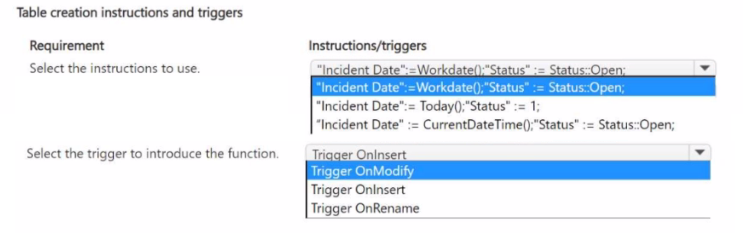
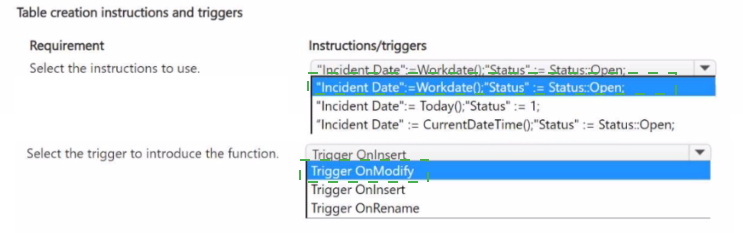
You need to populate the Incident Date and Status fields in the Room Incident table.
Which instructions or trigger should you use? To answer, select the appropriate options in the answer area
NOTE: Each correct selection is worth one point
Show answerHide answer

Explanation


Explanation:
The goal is to automatically populate the Incident Date and Status fields when a new "Room Incident" record is created.

Instructions:

"Incident Date":=Workdate(); is the correct function to assign the current work date (which is often the session date) to a date field. Today() could also be acceptable, but WorkDate() is more aligned with business application context in Business Central. CurrentDateTime() is incorrect as it returns a DateTime value, which is not suitable for a pure Date field.

"Status":=Status:Open; is the correct way to assign an enum value. Using the enum's symbolic name (Status:Open) is the modern, readable, and recommended practice in AL. Using the underlying integer value ("Status":=1;) is fragile and should be avoided, as the integer mapping can change if the enum is modified.

Trigger:
The OnInsert trigger is the correct choice. This trigger fires automatically when a new record is first saved to the database. It is the standard and intended place for initializing default field values for a new record.
OnModify fires when an existing record is changed, which is too late.
OnRename fires when a record's primary key is changed, which is irrelevant for setting initial values.
Question 2
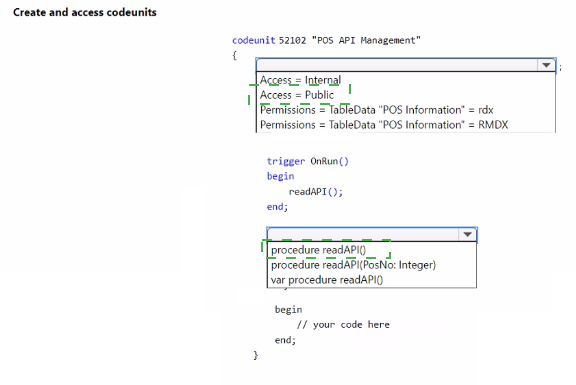
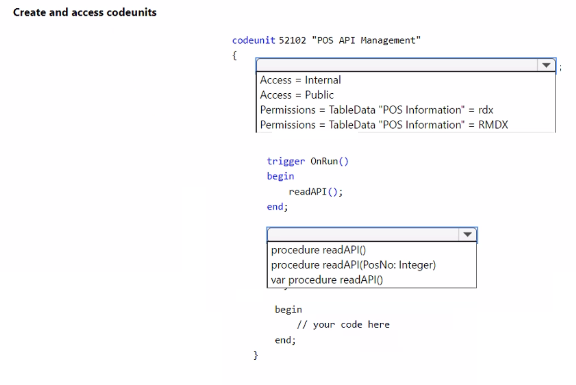
You need to create the codeunit to read the POS terminal APIs.
How should you complete the code segment? To answer, select the appropriate options in the answer area.
NOTE; Each correct selection is worth one point.

Show answerHide answer

Explanation


Explanation:
Let's break down each required component for creating a robust and secure codeunit.

1. Access Property: Access = Internal
Internal restricts the use of this codeunit to the extension in which it is defined. It cannot be called from other extensions or from the base application. This is the secure, modern practice for encapsulating logic that is not intended to be a public API.

Why not Public? While Public would allow the codeunit to be called from anywhere, it is unnecessary for internal logic and violates the principle of encapsulation. It exposes the codeunit's interface, making future changes more difficult without breaking dependent code.

2. Permissions: Permissions = TableData "POS Information" = RIMD
RIMD grants the codeunit the necessary permissions to Read, Insert, Modify, and Delete records in the "POS Information" table. This full set of permissions is typical for a codeunit that manages data for an entity, as it will likely need to create, read, update, and delete records.

Why not rdx or RMDX?
rdx is syntactically incorrect and uses lowercase letters, which is not standard.
RMDX is also incorrect. The standard permission letters are R (Read), I (Insert), M (Modify), and D (Delete). The X is not a valid permission for table data; it is sometimes used in end-user permission sets to grant the "Execute" permission for objects like codeunits.

3. Procedure Signature: procedure readAPI(PosNo: Integer)
A parameterized procedure (PosNo: Integer) is the correct choice. It allows the caller to specify which POS terminal to read the API for, making the codeunit flexible and reusable. The logic inside the procedure would use this PosNo parameter to filter or identify the correct terminal.

Why not the others?
procedure readAPI() (no parameters) is too rigid. It implies the codeunit can only ever read from one, predefined POS terminal.

var procedure readAPI() is syntactically incorrect. The var keyword is used to define variable parameters, not the procedure itself.

Reference:

Microsoft Learn Documentation: Codeunit Object

This documentation details the properties and structure of a codeunit. It explains the Access property and the difference between Internal and Public scopes. It also covers how to define the Permissions property and the standard permission set letters (RIMD).
Question 3 Choose 2
You need to define the data types for the fields of the N on-conformity table.
Which two data types should you use? Each correct answer presents part of the solution.
NOTE: Each correct selection is worth one point.
Show answerHide answer

Correct answer: C, E Char for the Non-Conformity Number fieldCode for the Non-Conformity Number field

Explanation

Explanation:
When defining fields in a Business Central table, it's crucial to select the most appropriate data type based on the nature of the data and how it will be used.

E. Code for the Non-Conformity Number field:
The Code data type is specifically designed for alphanumeric identifiers, such as document numbers, codes, and IDs. It automatically handles uppercase conversion and trimming of leading/trailing spaces, ensuring data consistency. It is the standard and correct choice for any numbered field that is an identifier (like "Non-Conformity Number").

Why not A (Integer)? An Integer is for whole numbers without any alphabetic characters. A "Number" field in a business context often includes prefixes or is part of a formatted number series (e.g., "NC-0001"), which an Integer cannot store.

Why not C (Char)? A Char (Text) field stores text as-is without automatic formatting. It is less rigid than Code and can lead to inconsistent data (e.g., "nc1", "NC1", " NC1 ").

D. Date for the Non-Conformity Date field:
The Date data type is the standard and correct choice for storing a calendar date without a specific time component. A "Non-Conformity Date" is a point in time on the calendar, making Date the logical fit.

Why not B (Date Time)?
A DateTime data type includes both a date and a time. Unless the specific time of the non-conformity is a business requirement, using DateTime is unnecessary and adds complexity. A simple Date is sufficient and more appropriate for this context.

Reference:

Microsoft Learn Documentation: Data Types

You can find the official documentation by searching for "AL Data Types" on the Microsoft Learn site. It explicitly describes the purpose of each type:

Code:
"Use this data type for a textual value that contains only alphanumeric characters and no space... The text is stored in uppercase and is padded with the number of spaces that is defined by the length of the variable."

Date:
"Use this data type to store a date ranging from January 1, 1753, to December 31, 9999."

DateTime:
"Use this data type to store any date and time ranging from January 1, 1753, 00:00:00.000 to December 31, 9999, 23:59:59.999."
Question 4
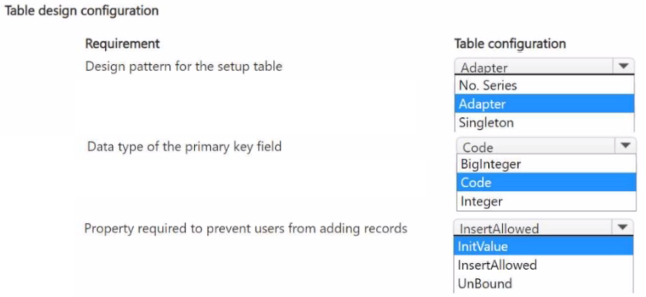
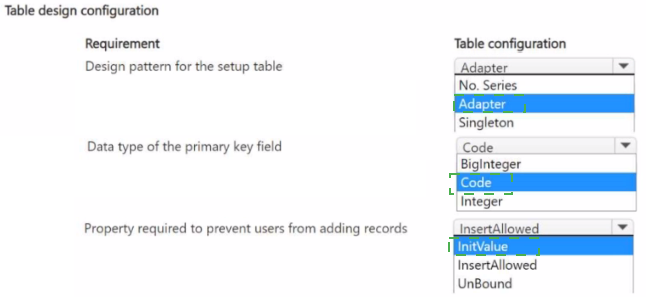
You need to create the configuration table and page for the non-conformity functionality.
Which table configurations should you use? To answer, select the appropriate options in the answer area.
NOTE: Each correct selection is worth one point

Show answerHide answer

Explanation


Explanation:
For a configuration/setup table that stores global settings for a functionality (like non-conformity), the standard pattern is a Singleton table.

Design pattern: Singleton
A Singleton table is designed to hold only one configuration record for the entire company. This is the standard pattern for setup tables in Business Central (e.g., "Sales & Receivables Setup", "Inventory Setup"). It ensures there is only one set of configuration values.
Why not "Adapter"? An Adapter pattern is for integrating external systems, not for internal configuration.

Data type of the primary key field: Code
The primary key for a singleton table is typically a Code field with a fixed length (e.g., Code[10]). A common practice is to have a single, hard-coded value like 'SETUP' or 'GLOBAL' as the primary key for the one and only record. The Code data type is perfect for this kind of identifier.

Why not "Integer" or "BigInteger"? These are for numeric sequences, which are not needed for a singleton table's primary key.

Property to prevent users from adding records: InsertAllowed
Setting InsertAllowed = false; on the table object is the direct and correct way to prevent users from manually creating new records through the UI. This is crucial for a singleton table to maintain its single-record integrity. The configuration page should have logic to create the single record if it doesn't exist, typically in the OnOpenPage trigger.

Why not "InitValue"? This property sets a default value for a field when a new record is created, but it does not prevent the creation of new records.

Why not "UnBound"? This is a page control property, not a table property, and is unrelated to record insertion.

Reference:

Microsoft Learn Documentation: Table Properties
The InsertAllowed property is documented to "Specifies whether users can add records to the table by using the user interface."

Business Central Development Patterns:
The Singleton pattern for setup tables is a well-established standard in the Business Central application. You can observe this by examining base application tables like "Sales & Receivables Setup" or "Inventory Setup", which all use a Code primary key and are designed to hold a single record.

That's the last free question in Topic 1: Case Study Alpine Ski House

You've seen the free 30% (4 of 14 questions). Full access unlocks every question and full-length MB-820 mock exams (65 questions, 105 minutes), a different mock on every attempt.

Unlock full mock exam
Full mock exam

Sit the MB-820 exam before exam day

Full-length mocks with the same number of questions and the same time limit as the real MB-820 exam. Every attempt draws a new set of questions from the full bank, so you can keep going until you pass comfortably.

Get full MB-820 mock exam
  • 65questions per mock
  • 105 mintime limit
  • 117questions in the bank
  • Newmock on every attempt