Juniper certification · Exam JN0-106

JN0-106 Mock Exam Page 2

Junos - Associate (JNCIA-Junos) Junos OS 21.2

Free JN0-106 mock exam questions 11–20, each with the answer and an explanation.

20 questions · 28 minutes · free, no sign-up

Free JN0-106 questions

11–20 of 25 free
Question 11 Choose 2
Which two statements about route preference in Junos OS are correct? (Choose two.)
Show answerHide answer

Correct answer: B, C Route preference is considered after evaluating the longest prefix match.Lower route preference values indicate higher priority.

Explanation

Explanation:
Route preference (also called administrative distance) in Junos OS is a numeric value where lower values indicate higher priority. It is used to select the active route when multiple protocols provide routes to the same destination. Preference is evaluated before the longest prefix match.

Correct Option:

B: Route preference is considered after evaluating the longest prefix match.
This statement requires careful interpretation. In Junos route selection, the longest prefix match is evaluated first to find candidate routes. Among those with the same prefix length, the lowest route preference (highest priority) determines the active route. So preference is considered after prefix length is matched.

C: Lower route preference values indicate higher priority.
This is the core rule of route preference in Junos. Direct routes have preference 0, OSPF internal 10, Static 5, BGP 170 (or 20 for local preference). Lower number = more trusted = higher priority.

Incorrect Option:

A: Higher route preference values indicate higher priority.
This is the opposite of how Junos works. Higher preference values indicate lower priority (less trusted). For example, BGP (170) is less preferred than OSPF (10) unless overridden.

D: Route preference determines the forwarding table size.
The forwarding table size is determined by the number of active routes and hardware capacity, not by route preference values. Preference only affects which route becomes active but does not change the table size.

Reference:
Juniper TechLibrary – "Routing Policy, Route Preference, and Administrative Distance": Junos selects the route with the lowest preference value among routes to the same destination with the same prefix length. Preference is evaluated after longest prefix match.
Question 12 Choose 1
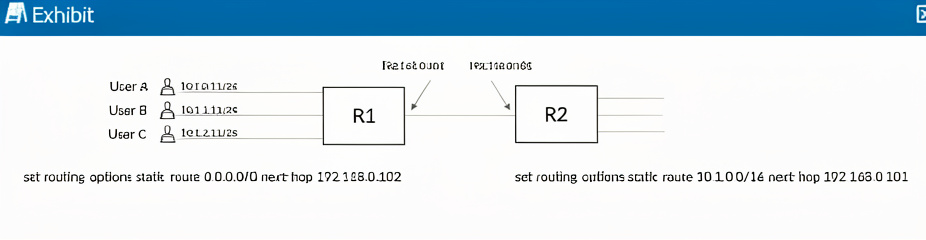
Which statement is correct about traffic flow in the network shown in the exhibit?

Show answerHide answer

Correct answer: A A routing loop can occur if one of the users sends packets to 10.1.99.1.

Explanation

Explanation:
The exhibit shows R1 with two static routes: a default route (0.0.0.0/0) pointing to R2 (192.168.0.102), and a route for 10.1.0.0/16 pointing back to R1's own interface (192.168.0.101). No route exists on R2 back to the 10.1.0.0/16 network, creating potential asymmetry and loops.

Correct Option:

A: A routing loop can occur if one of the users sends packets to 10.1.99.1.
10.1.99.1 falls within the 10.1.0.0/16 summary route on R1. R1 forwards such packets toward 192.168.0.101 (itself?), which is problematic. More importantly, if R2 receives a packet for 10.1.0.0/16 and has only a default route back to R1, a loop forms between R1 and R2.

Incorrect Option:

B: Only User A can reach destinations beyond Router R1.
All users (10.1.0.0/24, 10.1.1.0/24, 10.1.2.0/24) are within the 10.1.0.0/16 network, so R1's summary route applies to all. However, the next-hop 192.168.0.101 is likely R1's own interface, which is invalid. No user will properly reach beyond R1 without correct next-hop.

C: Router R2 will drop packets destined for user B and user C.
R2 may have a default route pointing to R1, so it would forward packets toward R1 rather than dropping them. Dropping would occur only if no route exists, but default routes often exist in such topologies.

D: Router R1 will discard all packets from all three users.
R1 will not discard packets; it will attempt to route them according to its static routes. The issue is forwarding misconfiguration (next-hop pointing to itself), not discarding.

Reference:
Juniper TechLibrary – "Static Routing and Routing Loops": A routing loop occurs when two or more routers have inconsistent routing information, causing packets to bounce between them. Invalid next-hop addresses (pointing to self) also cause forwarding failures.
Question 13 Choose 1


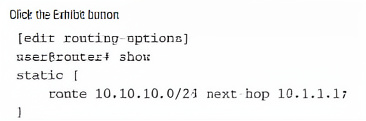
Referring to the exhibit, you are configuring a Junos router to provide connectivity to a building across town on the network 10.10.10.0/24. The next-hop router is at 10.10.1.1, which is reachable using interface ge-0/0/1. After committing the configuration in the exhibit, users report they still cannot reach the 10.10.10.0/24 network, and the route does not appear as active in the routing table. In this scenario, which statement is correct?
Show answerHide answer

Correct answer: A The next-hop address 10.1.1.1 is not directly connected or reachable through another route.

Explanation

Explanation:
A static route in Junos becomes active (appears in the routing table) only if its next-hop address is resolvable. The next-hop must be directly connected via an interface with an active IP address, or recursively reachable through an existing route. In this case, 10.1.1.1 is not in the same subnet as ge-0/0/1 (which reaches 10.10.1.1), causing resolution failure.

Correct Option:

A: The next-hop address 10.1.1.1 is not directly connected or reachable through another route.
The exhibit shows next-hop 10.1.1.1, but the description states the actual gateway is 10.10.1.1. The mismatch means the router cannot resolve 10.1.1.1 to an active interface. For the route to install, the next-hop must be directly connected or recursively resolved via another active route.

Incorrect Option:

B: Static routes must include the outgoing interface as the next hop.
Junos static routes can use either a next-hop IP address or an outgoing interface (e.g., next-hop ge-0/0/1). Using an IP address is valid and commonly used; the issue here is an incorrect or unreachable IP address.

C: The static route requires a preference value to be specified or it will not install.
Static routes have a default preference value of 5. Specifying a preference is optional and only needed to override the default for route selection purposes. Lack of a preference value does not prevent installation.

D: The static route requires the retain keyword to remain active in the routing table.
The retain keyword keeps a static route in the forwarding table even if the next-hop becomes unreachable. It is not required for normal route activation. The route fails to install due to resolution failure, not because retain is missing.

Reference:
Juniper TechLibrary – "Static Routes: Next-hop Resolution": For a static route to be installed, the next-hop address must be reachable via an active directly connected interface or resolved through an existing route in the routing table.
Question 14 Choose 1
You want to automatically back up your Junos device configuration to an external server every time you commit a configuration change. In this scenario, which command would accomplish this task?
Show answerHide answer

Correct answer: C set system archival configuration transfer-on-commit

Explanation

Explanation:
Junos OS provides an automated configuration archival feature. The transfer-on-commit statement under set system archival configuration triggers an automatic backup of the candidate configuration to a specified archive site every time a commit operation is performed.

Correct Option:

C: set system archival configuration transfer-on-commit
This command enables automatic configuration backup upon every commit. When configured together with archive-sites, the device will transfer the active configuration to the external server each time a configuration change is committed.

Incorrect Option:

A: set system commit synchronize
This command is used only on chassis with dual Routing Engines. It forces both REs to commit simultaneously. It has no relation to configuration backup or archival.

B: set system archival configuration transfer-interval
This sets periodic time‑based backups (e.g., daily or hourly), not backup triggered by commit events. It does not satisfy the "every time you commit" requirement.

D: set system archival configuration archive-sites
This defines the destination (e.g., FTP, SCP, or HTTP URL) for archived configurations. However, without transfer-on-commit, no automatic backup occurs on commit. This command alone is insufficient.

Reference:
Juniper TechLibrary – "Automatically Archiving Configurations": Use transfer-on-commit under system archival configuration to back up configuration to archive-sites after each commit operation.
Question 15 Choose 1
You successfully committed a configuration change. You now realize an issue exists and must revert back to the previous configuration. Which command entered in configuration mode will accomplish this task when committed?
Show answerHide answer

Correct answer: D rollback 1

Explanation

Explanation:
Junos OS maintains a committed configuration history (0 = active, 1 = most recent previous, up to 49). After committing a problematic change, the previous working configuration is stored as rollback 1. Using rollback 1 in configuration mode restores that configuration, which then takes effect after a commit.

Correct Option:

D: rollback 1
rollback 1 in configuration mode replaces the candidate configuration with the configuration that was active before the most recent commit. After issuing rollback 1, you must run commit to activate the reverted configuration.

Incorrect Option:

A: show | compare
This command displays the differences between the candidate configuration and the active configuration. It is used for viewing changes, not for reverting to a previous configuration.

B: save config
The save command writes the current configuration to a file. It does not revert or roll back any changes. This is used for backup purposes.

C: rollback 0
rollback 0 replaces the candidate configuration with the currently active (committed) configuration. Since the problematic change is already committed, rollback 0 discards any uncommitted edits but does not revert the active configuration.

Reference:
Juniper TechLibrary – "Rolling Back to a Previous Configuration": Use rollback 1 to revert to the configuration prior to the most recent commit. Follow with commit to activate the rolled‑back version.
Question 16 Choose 2
Which two statements describe rollback configuration behavior in Junos OS? (Choose two.)
Show answerHide answer

Correct answer: A, C Rollback configurations are applied automatically after a commit confirmed timeout.Rollback files are stored automatically after each commit.

Explanation

Explanation:
Junos OS automatically stores committed configurations as rollback files (numbered 0 through 49 by default). Rollback 0 is the currently active configuration. The commit confirmed feature automatically rolls back to the previous configuration (rollback 1) if not confirmed within the specified timeout.

Correct Option:

A: Rollback configurations are applied automatically after a commit confirmed timeout.
When you issue commit confirmed, the device commits the changes and starts a timer. If you do not issue commit before the timer expires, Junos automatically performs a rollback 1 followed by commit, reverting to the previous active configuration.

C: Rollback files are stored automatically after each commit.
Every successful commit automatically saves the newly committed configuration as a rollback file. The previous rollback files shift (e.g., rollback 0 becomes rollback 1, rollback 1 becomes rollback 2, etc.). This provides a history of configuration changes.

Incorrect Option:

B: Rollback 0 always refers to the factory default configuration.
Rollback 0 refers to the currently active (committed) configuration, not factory defaults. Factory default configuration is typically rollback 0 only on a freshly zeroized device before any changes are made.

D: Up to 100 rollback configurations are maintained by default.
The default number of rollback files maintained is 50 (rollback 0 through rollback 49), not 100. This can be increased using set system max-configurations-on-flash up to 49 additional files.

Reference:
Juniper TechLibrary – "Configuration Rollback and Commit Confirmed": Junos stores up to 50 rollback files by default. commit confirmed automatically reverts to the previous configuration if not confirmed. Each successful commit generates a new rollback file.
Question 17 Choose 1
Which statement describes the primary purpose of a routing policy in Junos OS?
Show answerHide answer

Correct answer: A It controls which routes are accepted or advertised by a routing protocol.

Explanation

Explanation:
Routing policies in Junos OS are used to control routing information flow. They evaluate routes based on conditions (prefix, protocol, next-hop, etc.) and apply actions such as accept, reject, or modify route attributes (preference, metric, tags) for routes being imported or exported by routing protocols.

Correct Option:

A: It controls which routes are accepted or advertised by a routing protocol.
This is the primary purpose. Routing policies are applied to protocol import/export statements (e.g., import my-policy under OSPF or BGP) to filter which routes enter the routing table or are advertised to neighbors. Policies can also modify route characteristics like local preference or MED.

Incorrect Option:

B: It determines the physical interface used for forwarding traffic.
Physical interface selection is determined by the forwarding table and routing decisions, not routing policies. Policies affect route acceptance and attributes, but the actual forwarding interface is chosen based on the active route's next-hop.

C: It sets the maximum number of routes in the routing table.
Route limits are configured using routing-options (e.g., maximum routes) or protocol-specific limits. Routing policies do not impose global maximums on the routing table size.

D: It enables automatic rollback of routing changes.
Automatic rollback is a configuration management feature (commit and rollback), unrelated to routing policies. Routing policies do not provide auto-rollback capabilities for routing changes.

Reference:
Juniper TechLibrary – "Routing Policy Overview": Routing policies control the import and export of routing information, allowing you to filter routes and set routing attributes for routes exchanged between routing protocols.
Question 18 Choose 2
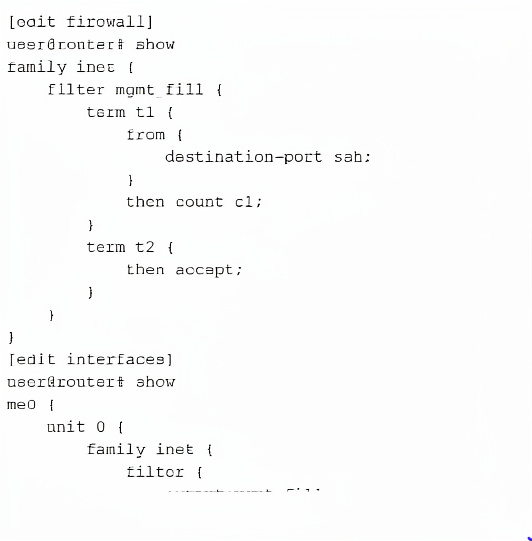
Which two statements are true about the firewall filter configuration shown in the exhibit? (Choose two.)

Show answerHide answer

Correct answer: A, C It applies the filter to a physical interface.It evaluates SSH packets egressing from the management interface.

Explanation

Explanation:
The exhibit shows a firewall filter mgmt_fill (likely a typo for mgmt_filter) defined under family inet with a term matching SSH destination port. However, the filter is not yet applied to any interface because the filter stanza under me0 is empty. The question asks about what would happen if properly applied.

Correct Option:

A: It applies the filter to a physical interface.
The filter is intended to be applied to me0 (management Ethernet interface), which is a physical interface. Firewall filters are always applied to logical units on physical interfaces.

C: It evaluates SSH packets egressing from the management interface.
When applied to me0 unit 0 as an egress filter (the exhibit does not specify input/output, but typically filters on management interfaces are applied to input or output), packets with destination-port SSH exiting the management interface would be evaluated by term t1.

Incorrect Option:

B: It counts the number of SSH packets that egress from the source SSH interface.
The counter is named c1 but is placed inside the then clause of term t1. However, there is no accept or discard action alongside count, so counted packets would still be evaluated further. Also, the filter as shown is not actually applied (empty filter stanza).

D: It sends filtered data to a syslog file.
The filter does not contain any syslog action. To send logs to syslog, the action log or syslog must be explicitly configured in the then clause. This filter only has count and implicit evaluation.

Reference:
Juniper TechLibrary – "Firewall Filter Syntax": A firewall filter must be applied to an interface under family inet filter (input/output). The count action increments a counter; logging requires log or syslog. Empty filter brackets mean no filter is applied.
Question 19 Choose 1
You want to redeploy a Junos device by clearing the existing configuration and resetting it to factory defaults. In this scenario, which command would help to accomplish this task?
Show answerHide answer

Correct answer: C request system zeroize

Explanation

Explanation:
The request system zeroize command is the standard Junos method for securely erasing all configuration data, logs, and user-created files, then rebooting the device to factory default settings. This is used before redeploying or decommissioning a device to ensure no sensitive data remains.

Correct Option:

C: request system zeroize
This command permanently removes all configuration, commits, rollback files, logs, and user files, then reboots the device. After reboot, the device loads the factory-default configuration, ready for redeployment. The operation is irreversible and typically requires confirmation.

Incorrect Option:

A: show system storage
This command displays disk usage statistics (e.g., available space, filesystem usage). It provides visibility into storage but does not modify or clear any configuration or reset the device.

B: request system storage cleanup dry-run
This command simulates the storage cleanup process, showing which log and temporary files would be deleted without actually removing them. It does not reset configuration or restore factory defaults.

D: request system storage cleanup
This command deletes unnecessary log files, temporary files, and old core dumps to free up storage space. It does not clear configuration or perform a factory reset.

Reference:
Juniper TechLibrary – "request system zeroize": This command erases all user configuration, log files, and generates a new SSH key, then reboots the device to factory‑default settings. Use before redeployment or disposal.
Question 20 Choose 1
A network administrator must set up the initial configuration of the out-of-band management interface on a new Juniper router to ensure management traffic is isolated from the default routing table (inet.0). In this scenario, which configuration step is required to accomplish this task in Junos OS?
Show answerHide answer

Correct answer: D Assign an IP address to interface fxp0.0 or em0.0 and use the command set system managementinstance to enable the management routing instance.

Explanation

Explanation:
In Junos OS, the out-of-band management interface is typically fxp0 (on older platforms) or em0 (on newer platforms like vMX or certain appliances). To isolate management traffic from the default inet.0 routing table, you enable the management instance using set system management-instance, which places the management interface into a dedicated routing instance called mgmt_junos.

Correct Option:

D: Assign an IP address to interface fxp0.0 or em0.0 and use the command set system management-instance to enable the management routing instance.
The management-instance feature automatically moves fxp0 or em0 into a separate routing instance (mgmt_junos). This isolates all management traffic (SSH, SNMP, NTP, syslog) from transit traffic in inet.0, improving security and avoiding routing conflicts.

Incorrect Option:

A: Configure an IP address on interface ge-0/0/0.0 and enable ethernet-switching family.
ge-0/0/0 is typically a data-plane interface, not out-of-band management. Enabling ethernet-switching is for Layer 2 switching, not for isolating management traffic into a separate routing instance.

B: Configure the lo0.0 loopback interface with a management IP and apply it to the [edit system services] hierarchy.
lo0.0 is a loopback interface used for router IDs and stable management addresses, but it does not provide out-of-band isolation. Applying it under system services is not a valid method for creating a separate management routing instance.

C: Assign an IP address to the me0.0 interface and set the routing-options to instance-type virtual-router.
me0.0 is the management Ethernet interface on some Juniper platforms (e.g., MX series). However, setting instance-type virtual-router under routing-options is incorrect syntax; the management instance is enabled via set system management-instance, not by manually defining a virtual-router.

Reference:
Juniper TechLibrary – "Configuring the Management Instance": Use set system management-instance to isolate management traffic on fxp0 or em0 into a dedicated routing instance called mgmt_junos. Management and transit traffic remain separate.
Full mock exam

Sit the JN0-106 exam before exam day

Full-length mocks with the same number of questions and the same time limit as the real JN0-106 exam. Every attempt draws a new set of questions from the full bank, so you can keep going until you pass comfortably.

Get full JN0-106 mock exam
  • 65questions per mock
  • 90 mintime limit
  • 94questions in the bank
  • Newmock on every attempt