Juniper certification · Exam JN0-106

JN0-106 Mock Exam

Junos - Associate (JNCIA-Junos) Junos OS 21.2

Free JN0-106 questions on User Interfaces, each with the answer and an explanation.

20 questions · 28 minutes · free, no sign-up

User Interfaces questions

1–4 of 4 free
Question 1 Choose 2
Which two statements describe the result when you enter ? at the command-line prompt? (Choose two.)
Show answerHide answer

Correct answer: A, D It lists the available commands and options.It displays summary information about the commands and options.

Explanation

Explanation:
In Junos OS CLI, typing ? (question mark) at the command-line prompt activates context-sensitive help. It lists all available commands, statements, or options at the current hierarchy level and provides a summary of their functions without executing any command.

Correct Option:

A: It lists the available commands and options.
The ? displays all possible completions for the current input context, including commands, options, and variables. This helps users discover syntax without consulting external documentation.

D: It displays summary information about the commands and options.
Alongside listing available commands and options, the ? output includes a brief one-line description or summary for each item, explaining what the command or option does.

Incorrect Option:

B: It lists tips for the help menu.
Junos ? does not provide meta‑tips about the help system itself. Tips or help usage instructions are typically obtained through commands like help or help reference, not through the ? operator.

C: It displays help about a text string contained in a statement.
Searching for a text string within statements is done using help grep or help reference . The ? only shows completions for the current word or position, not searching across statement contents.

Reference:
Juniper TechLibrary – "CLI Tips and Tools" (Junos OS Operational Mode): Using ? at the CLI prompt displays a list of available commands, options, and a brief description for each, providing context‑sensitive help.
Question 2 Choose 1
You are creating a new user account on your Junos device. The user must be able to validate the routing table and interface statistics but should not be able to make any configuration changes. In this scenario, which permission flag would satisfy this requirement?
Show answerHide answer

Correct answer: C view

Explanation

Explanation:
In Junos OS, user permissions are controlled by class flags. The view permission flag allows read-only access to operational commands, including viewing the routing table and interface statistics, while completely blocking any configuration changes.

Correct Option:

C: view
The view flag provides read-only access to show, monitor, and help commands. Users can display routing tables (show route), interface statistics (show interfaces), and other operational data but cannot enter configuration mode or modify any device settings.

Incorrect Option:

A: configure
The configure flag explicitly grants access to configuration mode and the ability to modify the device's configuration. This would violate the requirement of preventing configuration changes.

B: all
The all flag grants superuser access with full read and write privileges, including configuration changes, file operations, and all operational commands. This exceeds the required permissions.

D: network
The network flag controls access to routing protocols and network-level operations. While it may allow viewing some routing information, it is not designed as a read-only permission and could potentially allow certain network-level changes depending on other flags assigned.

Reference:
Juniper TechLibrary – "Login Classes and Permission Flags": The view permission flag restricts users to operational mode commands without configuration or maintenance capabilities, ideal for monitoring roles.
Question 3 Choose 1
You are creating a new user account using a predefined login class on a Junos device. The account should be able to run operational mode commands such as show interfaces and ping, but should not be allowed to change or commit configuration. Which login class should you assign to this user?
Show answerHide answer

Correct answer: D operator

Explanation

Explanation:
Junos OS provides predefined login classes with specific permission sets. The operator class allows users to execute operational mode commands (show, ping, monitor, etc.) for monitoring and troubleshooting but explicitly denies access to configuration mode and commit operations.

Correct Option:

D: operator
The operator class is designed for network monitoring staff. It grants permissions for operational commands (show, ping, traceroute, monitor) and troubleshooting tools, but has no configuration or commit privileges. This matches the requirement exactly.

Incorrect Option:

A: maintenance
The maintenance class allows users to perform system maintenance tasks including clearing logs, restarting processes, and some diagnostic commands. However, it may also permit certain configuration-level changes and file manipulations.

B: read-only
There is no predefined read-only class in standard Junos. The closest is the view permission flag or custom class. The default class for read‑only access is typically operator or a custom view class.

C: super-user
The super-user class provides full, unrestricted access including configuration mode, commit operations, file system access, and all operational commands. This would violate the requirement of preventing configuration changes.

Reference:
Juniper TechLibrary – "Understanding Predefined Login Classes": The operator class provides permissions to run operational commands for monitoring and diagnosis but cannot change the configuration.
Question 4 Choose 1
Exhibit:


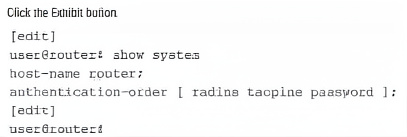
You have configured multiple authentication methods on your Junos device, including RADIUS, TACACS+, and local user accounts. A user attempts to log in, but the RADIUS server is unavailable. Referring to the exhibit, which statement is correct?
Show answerHide answer

Correct answer: D Junos attempts the next configured authentication method.

Explanation

Explanation:
The authentication-order statement defines the sequence in which Junos checks authentication methods. In the exhibit, the order is RADIUS first, then TACACS+, then local password. When RADIUS is unavailable (timeout or no response), Junos automatically proceeds to the next configured method.

Correct Option:

D: Junos attempts the next configured authentication method.
With authentication-order [ radius tacplus password ], if RADIUS servers are unreachable or do not respond, Junos moves to TACACS+. If TACACS+ also fails, it falls back to the local password database. This ensures continued access even if an external server is down.

Incorrect Option:

A: The user is prompted to select a different authentication method.
Junos does not prompt the user to choose a method. The authentication order is system‑defined and automatic. The user simply provides credentials; the system tries each method sequentially.

B: The login attempt fails immediately.
The login attempt does not fail immediately when RADIUS is unavailable. Junos only fails after exhausting all configured authentication methods in the specified order.

C: Junos will continue to attempt to authenticate with the RADIUS server until it responds.
Junos does not retry the same unreachable server indefinitely for a single login attempt. It respects the timeout and then moves to the next method in the list.

Reference:
Juniper TechLibrary – "Authentication Order": Junos attempts authentication methods in the order specified. If a method is unavailable, the system proceeds to the next method in the list.

That's the last free question in User Interfaces

You've seen the free 30% (4 of 14 questions). Full access unlocks every question and full-length JN0-106 mock exams (65 questions, 90 minutes), a different mock on every attempt.

Unlock full mock exam
Full mock exam

Sit the JN0-106 exam before exam day

Full-length mocks with the same number of questions and the same time limit as the real JN0-106 exam. Every attempt draws a new set of questions from the full bank, so you can keep going until you pass comfortably.

Get full JN0-106 mock exam
  • 65questions per mock
  • 90 mintime limit
  • 94questions in the bank
  • Newmock on every attempt