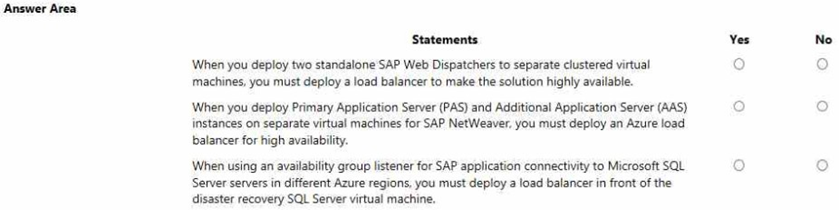
For each of the following statements, select Yes if the statement is true. Otherwise, select No.
NOTE: Each correct selection is worth one point.
Show answerHide answer
Explanation
Answer:
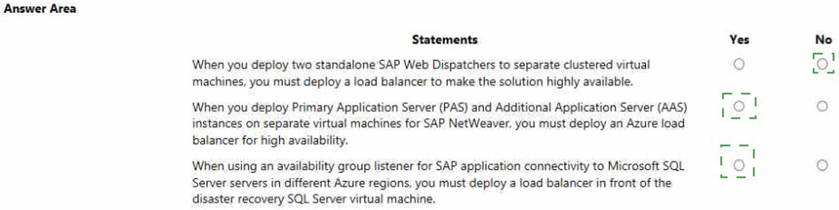
Explanation:
Planning and Administering Microsoft Azure for SAP Workloads (beta)
Free AZ-120 mock exam questions 51–60, each with the answer and an explanation.
20 questions · 33 minutes · free, no sign-up
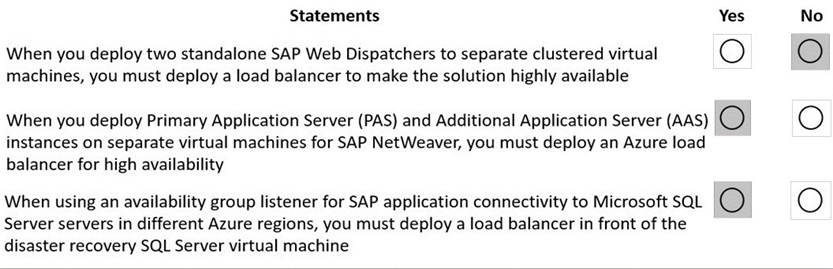
For each of the following statements, select Yes if the statement is true. Otherwise, select No.
NOTE: Each correct selection is worth one point.
Answer:
Explanation:
You have a n SAP environment on Azure. Your on-premises network uses a 1-Gbps ExpresRoute circuit to connect to Azure Private peering is enabled on the circuit. The default route (0.0.0.0/0) from the on-premises network is advertised You need to resolve the issue without modifying the ExpresRoute circuit. The solution must minimize administrative effort. What should you do?
Correct answer: D
Enable virtual network service endpoints.
Explanation:
Private endpoint enables connectivity between the consumers from the same ExpressRoute.
Note: Consult with SAP HANA on Microsoft Service Management. If they advise you to increase the bandwidth of the SAP HANA on Azure (Large Instances) ExpressRoute circuit, create an Azure support request. (You can request an increase for a single circuit bandwidth up to a maximum of 10 Gbps.)
Your company has a an on-premises SAP environment. Recently, the company split into two companies named Litware, inc and Contoso.Ltd. Litware retained the SAP environment. Litware plans to export data that is relevant only to Contoso. The export will be 1.5 TB. Contoso build a new SAP environment on Azure. You need to recommend a solution for Litware to make the data available to Contoso in Azure. The solution must meet the following requirements:
Minimize the impact on the network. Minimize the administrative effort for Litware. What should you include in the recommendation?
Correct answer: D
Azure import/Export service
You have an Azure Active Directory (Azure AD) tenant and an SAP Cloud Platform Identity Authentication Service tenant.
You need to ensure that users can use their Azure AD credentials to authenticate to SAP applications and services that trust the SAP Cloud Platform Identity Authentication Service tenant.
In which order should you perform the actions? To answer, move all actions from the list of actions to the answer area and arrange them in the correct order.
Description automatically generated
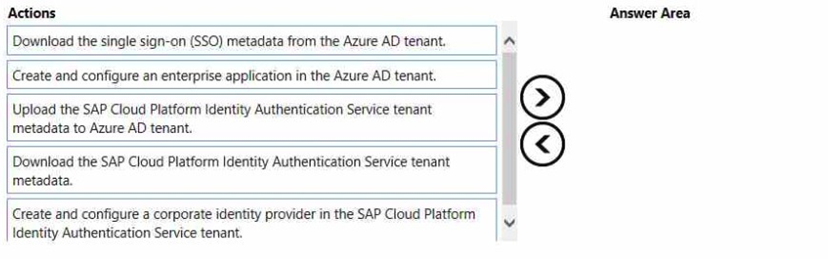
Answer:
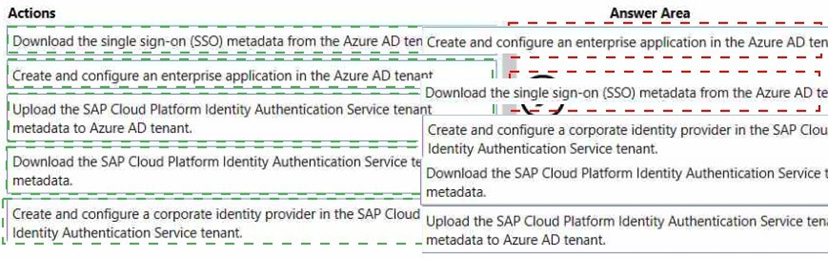
Explanation:
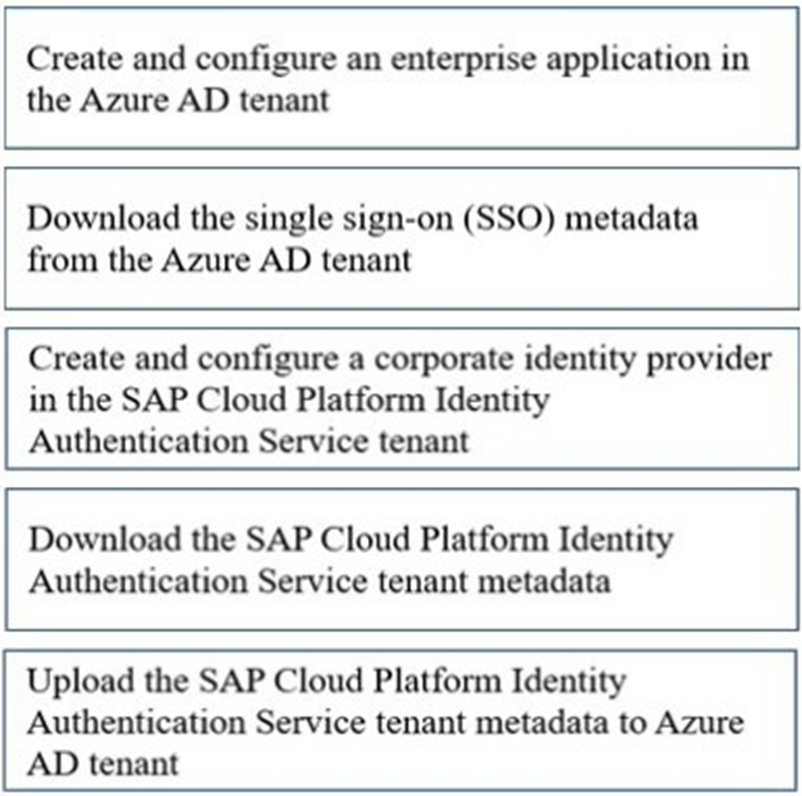
Step 1: Create and configure an enterprise application in the Azure AD tentant
To configure the integration of SAP Cloud Platform Identity Authentication into Azure AD, you need to add SAP Cloud Platform Identity Authentication from the gallery to your list of managed SaaS apps.
Sign in to the Azure portal using either a work or school account, or a personal
Microsoft account.
On the left navigation pane, select the Azure Active Directory service. Navigate to Enterprise Applications and then select All Applications. To add new application, select New application.
In the Add from the gallery section, type SAP Cloud Platform Identity Authentication in the search box.
Select SAP Cloud Platform Identity Authentication from results panel and then add the app. Wait a few seconds while the app is added to your tenant.
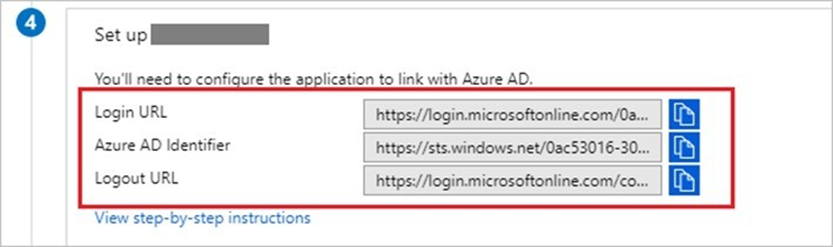
Graphical user interface, text, application Description automatically generated
Step 2: Download the single sign-on (SSO) metadata from the Azure AD tenant. Download single sign-on metadata from Azure Active Directory.
Step 3: Create and configure a corporate identity provider. Create corporate identity provider.
Step 4: Download the SAP Cloud Platform Identity Authentication Service tenant metadata. Download Identity Authentication service tenant metadata.
Step 5: Upload the SAP Cloud Platform Identity Authentication Service tenant metadata to Azure AD tenant.
Upload Identity Authentication service tenant metadata to Azure Active Directory. You have already uploaded the metadata file from Azure Active Directory to Identity
Authentication service. It’s time to do it the other way round now and upload the metadata of Identity Authentication service to Azure Active Directory.
You deploy an SAP environment on Azure. You need to configure SAP NetWeaver to authenticate by using Azure Active Directory (Azure AD). Which four actions should you perform in sequence? To answer, move the appropriate actions from the list of actions to the answer area and arrange them in the correct order.
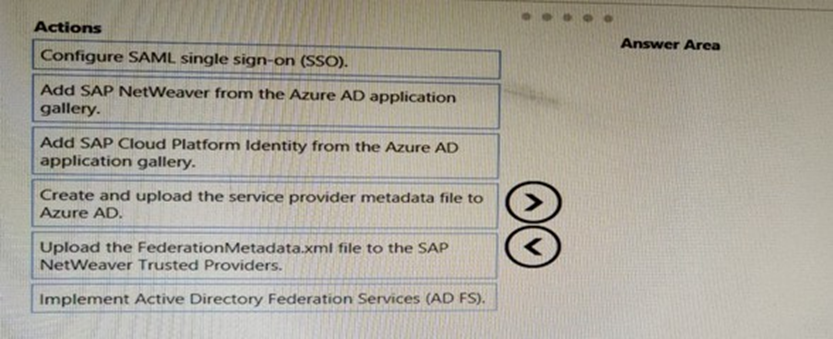
Answer:
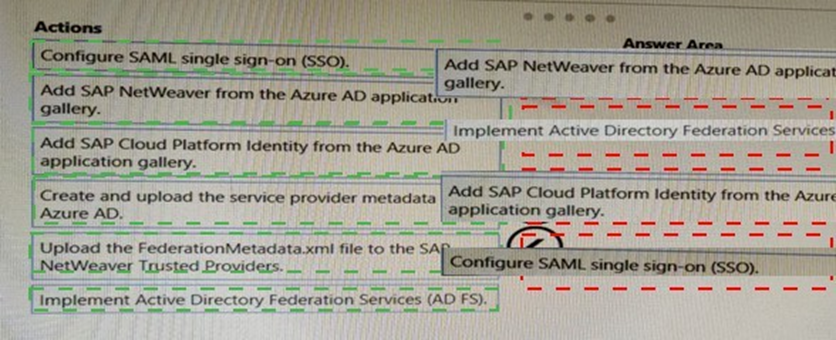
You deploy an SAP environment on Azure. Your company has a Service Level Agreement (SLA) of 99.99% for SAP. You implement Azure Availability Zones that have the following components: Redundant SAP application servers ASCS/ERS instances that use a failover cluster
Database high availability that has a primary instance and a secondary instance You need to validate the high availability configuration of the ASCS/ERS cluster. What should you use?
Correct answer: C
SAPControl
Explanation:
https://documentation.suse.com/sbp/all/pdf/SAP_NW740_SLE12_SetupGuide_color_en.pd f
You have an SAP landscape on Azure. You plan to deploy a new SAP application server by using an Azure Resource Manager template. You need to ensure that all new servers are deployed with Azure Disk Encryption enabled. How should you complete the relevant component of the template? To answer, select the appropriate options in the answer area. NOTE: Each correct selection is worth one point.

Answer:

Explanation:

Graphical user
interface, text, application, email Description automatically generated
Box 1: extensions
Azure Disk Encryption can be enabled via Azure PowerShell or Azure CLI. That is normally seen in remediation. In a real-world scenario you would like to see a virtual machine during its creation include disk encryption process. This is technically possible thanks to Disk
Encryption VM extension.
Box 2: AzureDiskEncryption Example:
"type": "Microsoft.Compute/virtualMachines/extensions", "name": "[concat(parameters('vmName'),'/diskEncryption')]", "apiVersion": "2019-03-01",
"location": "[parameters('location')]", "dependsOn": [
"[resourceId('Microsoft.Compute/virtualMachines/', parameters('vmName'))]"
],
"properties": {
"publisher": "Microsoft.Azure.Security", "type": "AzureDiskEncryption",
You are implementing a highly available deployment of SAP HANA on Azure virtual machines. You need to ensure that the deployment meets the following requirements:
• Supports host auto-failover
• Minimizes cost
How should you configure the highly available components of the deployment? To answer, select the appropriate options in the answer area. NOTE: Each correct selection is worth one point.
Answer:
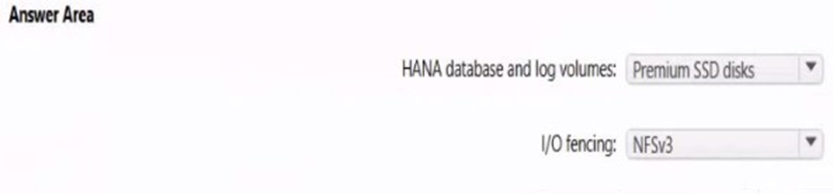
Answer: Answer: see the explanation for below image:
Explanation:
Answer selected as in image below.
You are planning an SAP NetWeaver deployment on Azure. The database her will consist of Two Azure virtual machines that have Microsoft SQL Server 2017 installed. Each virtual machine will be deployed to a separate availability zone.
You need to perform the following:
• Minimize network latency between the virtual machines.
• Measure network latency between the virtual machines.
What should you do? To answer, select the appropriate options in the answer area.
Answer:

Answer: Answer: see the explanation for below image:
Explanation:
Answer selected as in image below.
Your on-premises network contains an Active Directory domain. You are deploying a new SAP environment on Azure.
You need to configure SAP Single Sign-On to ensure that users can authenticate lo SAP GUI and SAP WebGUI.
Which four actions should you perform in sequence? To answer, move the appropriate actions from the list of actions to the answer area and arrange them in the correct order.
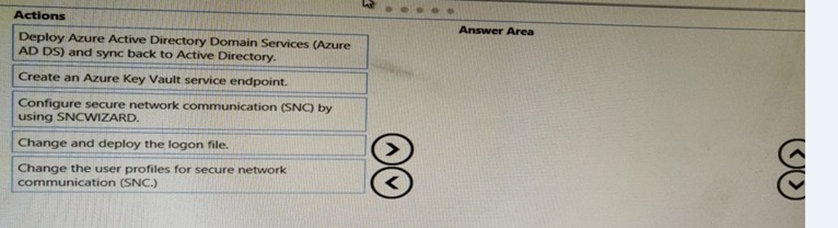
Answer:
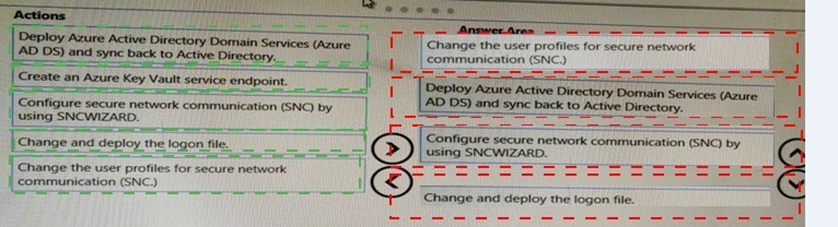
Full-length mocks with the same number of questions and the same time limit as the real AZ-120 exam. Every attempt draws a new set of questions from the full bank, so you can keep going until you pass comfortably.
Get full AZ-120 mock exam