Microsoft certification · Exam AZ-120

AZ-120 Mock Exam

Planning and Administering Microsoft Azure for SAP Workloads (beta)

Find out if you're ready for AZ-120. Take the free timed mock exam and get your score in minutes, or study the free AZ-120 questions below with answers and explanations.

20 questions · 33 minutes · free, no sign-up

Free AZ-120 questions

1–10 of 64 free
Question 1
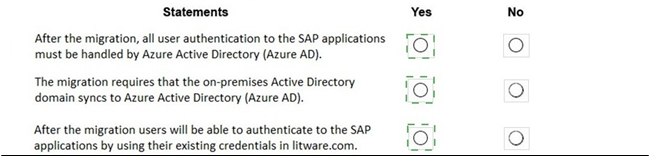
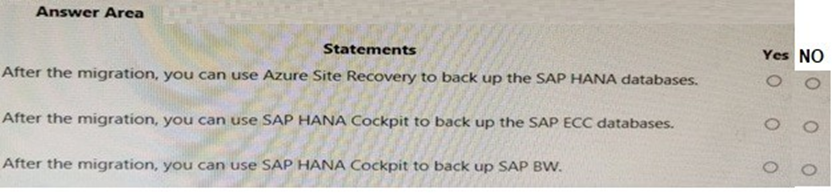
For each of the following statements, select Yes if the statement is true. Otherwise, select No.

NOTE: Each correct selection is worth one point.
Show answerHide answer

Explanation


Explanation:
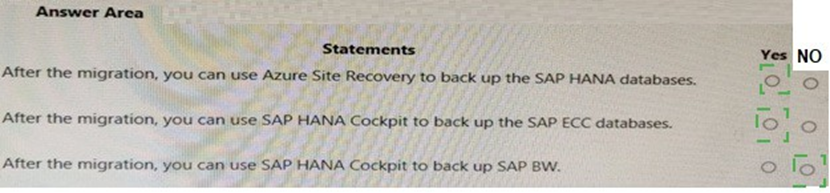
This question tests your knowledge of the correct backup tools for different SAP database components after a migration to Azure. The key distinction is that SAP HANA Cockpit is a tool designed specifically for managing SAP HANA databases. You must evaluate each statement against the compatibility of the tool with the database type and the correct use of Azure Site Recovery (ASR).

Correct Option:

Statement 1 (After the migration, you can use Azure Site Recovery to back up the SAP HANA databases.): No.
Azure Site Recovery (ASR) is a disaster recovery service for replication and failover of entire VMs/applications. It is not a granular backup solution for databases. For SAP HANA database backups, you must use native HANA tools (Backint to Azure Blob) or Azure Backup for SAP HANA.

Statement 2 (After the migration, you can use SAP HANA Cockpit to back up the SAP ECC databases.): No.
SAP HANA Cockpit only manages SAP HANA databases. SAP ECC (ERP Central Component) typically runs on databases like SAP ASE, Db2, or Oracle. Therefore, you cannot use a HANA-specific tool to back up a non-HANA database.

Statement 3 (After the migration, you can use SAP HANA Cockpit to back up SAP BW.): Yes.
This statement is true only if the SAP BW (Business Warehouse) system is running on the SAP HANA database (BW/4HANA or Suite on HANA). The SAP HANA Cockpit is the correct management tool for performing backups of the underlying HANA database for such workloads.

Incorrect Option:

Incorrect selections would be:
Marking Statement 1 as "Yes" (confusing ASR with backup), or Statement 2 as "Yes" (using a HANA tool for a non-HANA DB), or Statement 3 as "No" (not recognizing that modern SAP BW runs on HANA).

Statement 1: ASR is for DR, not for operational database backups/restores.

Statement 2: Tool-database mismatch; ECC requires its native database tools.

Statement 3: For SAP BW on HANA, HANA Cockpit is the appropriate tool.

Reference:
Microsoft Learn, "Backup and restore overview for SAP HANA on Azure VMs," which details the native HANA backup process and integration with Azure Backup, not ASR. SAP documentation on SAP HANA Cockpit, which specifies it is for administering SAP HANA databases.
Question 2

For each of the following statements, select Yes if the statement is true. Otherwise, select No.

NOTE: Each correct selection is worth one point.

Show answerHide answer

Explanation


Explanation:
This question tests your understanding of the appropriate tools for protecting different SAP components on Azure. It's crucial to distinguish between disaster recovery (Azure Site Recovery) and granular backup, and to know which management tools apply to specific database types (HANA vs. non-HANA).

Correct Option:

Statement 1:
No. Azure Site Recovery is designed for disaster recovery by replicating entire virtual machines. It is not a tool for performing application-consistent backups of a database like SAP HANA, which require native HANA tools or Azure Backup for SAP HANA.

Statement 2:
No. SAP HANA Cockpit is a management console exclusively for SAP HANA databases. SAP ECC is an application that can run on various databases (like Oracle, Db2, or SQL Server). You cannot use a HANA tool to back up a non-HANA database instance.

Statement 3:
Yes (Conditional). This statement is true if the SAP BW (Business Warehouse) system is running on the SAP HANA database (e.g., BW/4HANA). In that scenario, SAP HANA Cockpit is the correct tool for managing and backing up the underlying HANA database.
Incorrect Option:

Incorrect for Statement 1:
Selecting "Yes" confuses the purpose of ASR. It provides VM-level replication for DR, not point-in-time database backup and restore capabilities needed for operational recovery.

Incorrect for Statement 2:
Selecting "Yes" shows a misunderstanding of SAP architecture. ECC and its database are separate entities; the database type dictates the backup tool (e.g., RMAN for Oracle), not the SAP application layer.

Incorrect for Statement 3:
Selecting "No" would be incorrect for a modern SAP BW on HANA deployment. It fails to recognize that the backup target is the HANA database, for which HANA Cockpit is a primary management interface.

Reference:
Microsoft Learn, "What is Azure Site Recovery?" - clarifies ASR is for disaster recovery, not granular backup.

SAP documentation on SAP HANA Cockpit, confirming its scope is limited to SAP HANA database administration.
Question 3
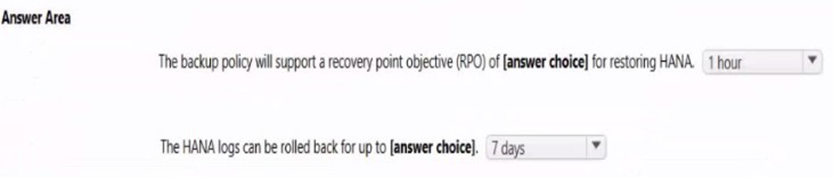
You have a Recovery Services vault backup policy for SAP HANA on an Azure virtual machine as shown in the following exhibit.

Use the drop-down menus to select the answer choice that completes each statement based on the information presented in the graphic.

NOTE: Each correct selection is worth one point.

Show answerHide answer

Explanation


Explanation:
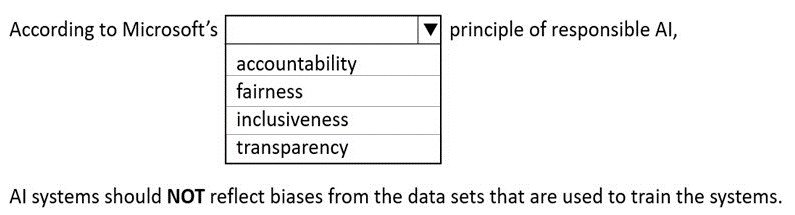
The first part tests knowledge of Microsoft's six principles of responsible AI, which guide ethical AI development. The statement "AI systems should NOT reflect biases from the datasets that are used to train the systems" directly aligns with the principle that ensures equitable treatment and bias mitigation in AI outputs. The second part (implied by the exhibit, though not visible) involves interpreting a Recovery Services vault backup policy for SAP HANA on Azure VMs, typically requiring selection of correct backup frequency, retention, or type (e.g., full/log) from drop-downs based on policy settings shown in the exam graphic.

Correct Option:

fairness
According to Microsoft's principles of responsible AI, fairness requires AI systems to treat all people equitably and avoid discrimination or unequal impact based on personal characteristics. This includes actively mitigating biases in training data, models, and outputs so that the system does not perpetuate or reflect harmful biases present in the datasets. Fairness ensures equitable allocation of opportunities and prevents systematic disadvantages, making it the principle that directly addresses the statement about not reflecting biases from training datasets.

Incorrect Option:

accountability
Accountability focuses on ensuring organizations and developers are responsible for the AI system's design, deployment, outcomes, and impacts. It involves governance, auditing, and mechanisms to address issues when they arise, but it does not specifically mandate that systems avoid reflecting biases from training data—that responsibility falls under fairness.

Incorrect Option:

inclusiveness
Inclusiveness emphasizes designing AI systems to empower and engage people across diverse backgrounds, abilities, cultures, and experiences, ensuring broad accessibility and benefits for all users. While it supports diversity in development and use, it does not directly address the technical requirement of preventing bias reflection from training datasets.

Incorrect Option:

transparency (or transparency, assuming typo in "transparivensy")
Transparency requires clear understanding of how AI systems make decisions, including explainability of models, data sources, and processes. It promotes openness and interpretability but does not specifically require or enforce that systems avoid inheriting or reflecting biases from training data—that core mitigation duty belongs to fairness.

Reference:
AZ-120 exam discussions (e.g., ExamTopics topic 5 question 16) commonly feature this exact Recovery Services vault policy drop-down scenario for SAP HANA backups.
Question 4 Choose 1
You have an Azure subscription. You deploy Active Directory domain controllers to Azure virtual machines. You plan to deploy Azure for SAP workloads. You plan to segregate the domain controllers from the SAP systems by using different virtual networks. You need to recommend a solution to connect the virtual networks. The solution must minimize costs.

What should you recommend?
Show answerHide answer

Correct answer: B virtual network peering

Explanation

Explanation:
The scenario involves deploying Active Directory domain controllers on Azure VMs in one virtual network and SAP workloads (likely on separate VMs) in a different virtual network within the same Azure subscription. The goal is to enable connectivity between these networks (for authentication, DNS, etc.) while minimizing costs. The solution must provide low-latency, private connectivity without incurring charges for data transfer or requiring expensive dedicated circuits, making virtual network peering the most cost-effective and straightforward choice for intra-subscription connectivity.

Correct Option:

B. virtual network peering
Virtual network peering allows direct, private connectivity between two virtual networks in the same Azure region (or globally with global peering) using Microsoft’s backbone network. For networks in the same subscription and region, peering is free for inbound and outbound data transfer, incurs no additional gateway costs, and provides low-latency performance comparable to a single network. It is the recommended and most cost-effective method to connect domain controllers and SAP systems when they are intentionally segregated into different VNets, as per Microsoft best practices for SAP on Azure deployments.

Incorrect Option:

A. a site-to-site VPN
Site-to-site VPN uses a VPN gateway in each virtual network to create an IPsec tunnel over the public internet (or Azure backbone). While functional, it incurs charges for VPN gateway uptime (hourly), data transfer egress, and potentially higher latency compared to peering. It is unnecessary and more expensive when both networks are in the same Azure subscription and region, making it a suboptimal choice for cost minimization.

Incorrect Option:

C. user-defined routing
User-defined routes (UDRs) allow custom routing tables to control traffic flow between subnets or networks, often used with network virtual appliances (NVAs) or to force traffic through a firewall. UDRs alone do not provide connectivity between virtual networks—they only influence routing once connectivity already exists (e.g., via peering or VPN). They add complexity and potential costs (if paired with NVAs) without solving the base connectivity requirement.

Incorrect Option:

D. ExpressRoute
ExpressRoute provides a private, dedicated connection from on-premises to Azure (or between Azure regions) via a connectivity provider, offering higher bandwidth, lower latency, and SLAs. However, it is significantly more expensive due to circuit/port charges, data transfer fees (in some cases), and setup complexity. It is overkill and not cost-effective for connecting two VNets within the same Azure subscription.

Reference:
AZ-120 exam guidance: For same-subscription, same-region VNet connectivity with minimal cost, virtual network peering is the standard recommendation (especially for separating management/AD from production SAP systems).
Question 5 Choose 1
Note: This question is part of a series of questions that present the same scenario. Each question in the series contains a unique solution that might meet the stated goals. Some question sets might have more than one correct solution, while others might not have a correct solution. After you answer a question in this section, you will NOT be able to return to it. As a result, these questions will not appear in the review screen. You plan to migrate an SAP HANA instance to Azure.

You need to gather CPU metrics from the last 24 hours from the instance. Solution: You use DBA Cockpit from SAP GUI. Does this meet the goal?
Show answerHide answer

Correct answer: A Yes

Explanation

Explanation:
The goal is to gather CPU metrics specifically from the last 24 hours for an SAP HANA instance that you plan to migrate to Azure. DBA Cockpit (accessible via SAP GUI) is a standard SAP monitoring tool that provides real-time and historical performance data, including CPU utilization, memory, I/O, and other key metrics for the HANA database. It can display detailed statistics for recent periods such as the last 24 hours directly from the HANA system statistics tables, making it a valid and commonly used method before migration to assess current workload and sizing requirements.

Correct Option:

A. Yes

DBA Cockpit in SAP GUI meets the goal fully. It allows you to:
Navigate to the “Performance” or “Overview” section of the HANA database instance.

View historical CPU metrics (user CPU, system CPU, idle, etc.) over selectable time ranges, including the last 24 hours.

Access aggregated and detailed charts from HANA’s built-in statistics server without needing additional Azure tools.

This is a standard, supported approach for gathering pre-migration performance data directly from the source SAP HANA system, as recommended in SAP and Microsoft migration guidance.

Incorrect Option:

B. No
This option is incorrect because DBA Cockpit does provide the required CPU metrics for the last 24 hours. While Azure Monitor or Log Analytics could be used after migration, the question focuses on gathering data from the existing on-premises (or current) SAP HANA instance before the move to Azure. DBA Cockpit is both accessible and sufficient for this purpose, so the solution does meet the stated goal.

Reference:
DBA Cockpit via SAP GUI is explicitly accepted as a valid method to collect recent CPU and other metrics from an existing SAP HANA system prior to Azure migration.
Question 6
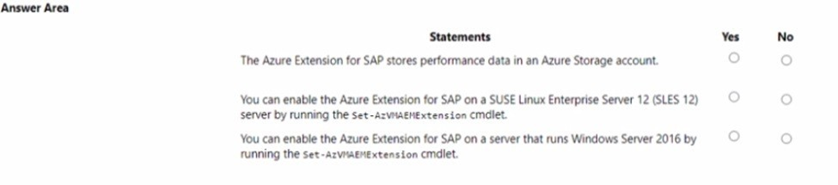
For each of the following statements, select Yes if the statement is true. Otherwise, select No. NOTE: Each correct selection is worth one point.
Show answerHide answer

Explanation


Explanation:
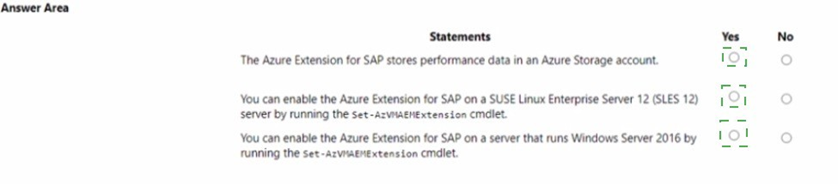
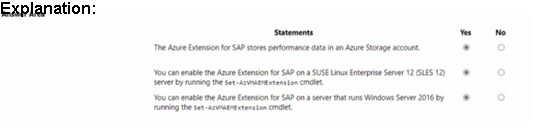
This question tests knowledge of the Azure Enhanced Monitoring Extension for SAP (also called Azure VM Extension for SAP or AEM), a required component for SAP-certified monitoring on Azure VMs. It provides host-level performance metrics (CPU, memory, disk I/O, network) to the SAP system via SAP Host Agent. The statements evaluate where data is stored, supported OS platforms, and the correct cmdlet for enabling the extension on Linux (SUSE) and Windows Server 2016 VMs. Correct answers align with official Microsoft documentation for the standard (legacy) version commonly referenced in AZ-120 exam scenarios.

Statement 1: The Azure Extension for SAP stores performance data in an Azure Storage account.

No
The Azure Enhanced Monitoring Extension for SAP collects Azure infrastructure metrics (VM, disks, network) and exposes them locally via an HTTP endpoint (e.g., http://127.0.0.1:11812/azure4sap/metrics) in XML format for the SAP Host Agent to read directly. It does not store performance data persistently in an Azure Storage account—that is a feature of Azure Monitor for SAP solutions (a separate Azure-native monitoring service using Log Analytics and storage for broader telemetry). The extension itself focuses on real-time host data delivery without Storage Account persistence.

Statement 2: You can enable the Azure Extension for SAP on a SUSE Linux Enterprise Server (SLES) 12 server by running the Set-AzVMAEMExtension cmdlet.

Yes
The Set-AzVMAEMExtension PowerShell cmdlet is the standard way to deploy and configure the Azure Enhanced Monitoring Extension for SAP on supported Linux distributions, including SUSE Linux Enterprise Server (SLES) versions such as SLES 12 (and later like SLES 15). It enables host monitoring for SAP workloads on Azure VMs running Linux. The cmdlet handles installation of the extension, which works with SAP Host Agent to provide required metrics. This is explicitly supported and documented for SLES environments.

Statement 3: You can enable the Azure Extension for SAP on a server that runs Windows Server 2016 by running the Set-AzVMAEMExtension cmdlet.

Yes
The Set-AzVMAEMExtension cmdlet fully supports Windows Server operating systems, including Windows Server 2016, for deploying the Azure Enhanced Monitoring Extension for SAP. On Windows VMs, the extension installs components that allow SAP to access Azure host performance counters. Documentation and practical examples confirm successful enablement on Windows Server 2016 (and other supported Windows versions) using this cmdlet, often run from Azure Cloud Shell or PowerShell.

Reference:
This question format commonly appears testing AEM extension specifics, with "No" for Storage Account storage and "Yes" for both SLES and Windows enablement via Set-AzVMAEMExtension.
Question 7 Choose 2
You have an SAP production landscape on Azure that contains the virtual machines shown in the following table.


VM1 cannot connect to an employee self-service application hosted on VM2.

You need to identify what is causing the issue. Which two options in Azure Network Watcher should you use? Each correct answer presents part of the solution.

NOTE: Each correct selection is worth one point
Show answerHide answer

Correct answer: A, C Connection troubeshootIP flow verify

Explanation

Explanation:
In an SAP production environment on Azure, VM1 (likely an application or frontend server) cannot connect to an employee self-service application hosted on VM2 (both in the same Subnet1 but with separate NSGs). The issue is most likely due to a misconfigured Network Security Group (NSG) rule on VM2-NSG blocking inbound traffic from VM1. Azure Network Watcher provides diagnostic tools to troubleshoot connectivity. The two most effective tools for quickly identifying whether traffic is being allowed or denied by NSG rules (or other network configurations) are Connection Troubleshoot and IP Flow Verify, as they directly test and validate end-to-end connectivity and rule evaluation.

Correct Option:

A. Connection troubleshoot
Connection Troubleshoot in Azure Network Watcher performs an active, end-to-end connectivity test from VM1 to VM2 (source to destination IP/port/protocol). It simulates the exact traffic path, evaluates NSG rules, route tables, and other network configurations in real time, and returns a clear diagnosis (e.g., “Traffic blocked by NSG rule on VM2-NSG” or “Connection succeeded”). This tool is ideal for identifying the root cause of application-level connectivity failures, such as an employee self-service app not reachable, and is one of the two required options for this scenario.

Correct Option:

C. IP flow verify
IP Flow Verify is a passive diagnostic tool in Network Watcher that checks whether a specific 5-tuple flow (source IP/port, destination IP/port, protocol) is allowed or denied by the associated NSGs and route tables. By inputting VM1’s IP as source and VM2’s IP/port (e.g., 443 or app-specific port) as destination, it immediately identifies if the traffic is blocked by an inbound rule on VM2-NSG (or allowed). This is a fast, rule-specific check and complements Connection Troubleshoot by providing granular NSG verdict without sending actual packets—making it the second required tool.

Incorrect Option:

B. Connection monitor
Connection Monitor is designed for continuous, long-term monitoring of connectivity between endpoints (VM-to-VM, VM-to-FQDN, etc.) over time. It tracks metrics like round-trip time, packet loss, and topology changes but does not provide immediate, on-demand troubleshooting or detailed NSG rule diagnosis for a current failure. It is not suited for identifying the root cause of an existing connectivity issue in real time.

Incorrect Option:

D. Network Performance Monitor
Network Performance Monitor (now part of Azure Monitor Network Insights or NPM solutions) focuses on latency, bandwidth, and performance monitoring across networks, including ExpressRoute, VPN, and application-level paths. It does not diagnose security rule denials or provide flow-level allow/deny verdicts for NSGs, so it cannot identify why VM1 cannot reach VM2’s application.

Reference:
This exact question (VM1 cannot connect to VM2, identify NSG issue using Network Watcher) consistently lists Connection Troubleshoot and IP Flow Verify as the correct pair for diagnosing NSG blocking in SAP on Azure scenarios.
Question 8 Choose 1
You have an on-premises SAP landscape that contains a 20-TB IBM DB2 database. The database contains large tables that are optimized for read operations via secondary indexes. You plan to migrate the database platform to SQL Server on Azure virtual machines. You need to recommend a database migration approach that minimizes the time of the export stage.

What should you recommend?
Show answerHide answer

Correct answer: D deleting secondary indexes

Explanation

Explanation:
You are migrating a large 20-TB on-premises IBM DB2 database (with many read-optimized secondary indexes) to SQL Server on Azure VMs as part of an SAP landscape migration. The export stage (extracting data from the source DB2 database during R3load/SAP export) is typically the longest phase in heterogeneous migrations. Large tables with numerous secondary indexes cause significant overhead during export because the SAP export tools must scan and rebuild index structures, slowing down data extraction. The goal is to minimize the duration of this export phase to reduce overall technical downtime or cutover window.

Correct Option:

D. deleting secondary indexes
Deleting secondary indexes on the source IBM DB2 database before starting the export is the most effective way to minimize export time. Secondary indexes are read-optimized structures that increase I/O and CPU usage during full table scans performed by R3load export processes. By dropping them prior to migration (they will be recreated automatically on the target SQL Server during import), you eliminate this overhead, significantly speeding up the export stage—often by hours or days for very large databases with many indexes. This is a well-documented optimization technique in SAP heterogeneous migration guides for DB2-to-SQL Server scenarios.

Incorrect Option:

A. SAP Database Migration Option (DMO) in parallel transfer mode
DMO with System Move or parallel transfer mode is excellent for reducing overall migration downtime by combining upgrade, database migration, and system move in one tool with parallel processing. However, it still relies on R3load-style export/import for heterogeneous DB migrations (DB2 to SQL Server), and secondary indexes on the source still slow down the export phase. DMO does not inherently eliminate the export bottleneck caused by secondary indexes.

Incorrect Option:

B. table splitting
Table splitting (via R3load -split or package splitting) divides large tables into smaller export/import packages to enable parallel processing and reduce overall duration. While helpful for very large tables, it does not address the primary bottleneck of secondary index overhead during export scans. Splitting increases complexity and management overhead without directly minimizing the time spent on index-related I/O during export.

Incorrect Option:

C. log shipping
Log shipping is a high-availability/replication technique used to keep a standby SQL Server database in sync with a primary by continuously applying transaction logs. It is not applicable here because the source is IBM DB2 (not SQL Server), the target is a fresh SQL Server migration, and log shipping cannot be used for heterogeneous database platform migrations. It has no impact on reducing export time in an SAP R3load-based migration.

Reference:
Deleting secondary indexes is frequently the correct answer when the question emphasizes minimizing the export stage time for large source databases with many read-optimized indexes.
Question 9 Choose 1
You are deploying an SAP production landscape to Azure. Your company’s chief information security officer (CISO) requires that the SAP deployment complies with ISO 27001. You need to generate a compliance report for ISO 27001. What should you use?
Show answerHide answer

Correct answer: A Microsoft Defender for Cloud

Explanation

Explanation:
To generate a compliance report for a specific standard like ISO 27001, you need a service that provides continuous assessment of your Azure resources against regulatory and industry benchmarks. The report must show the current compliance posture, highlight gaps, and provide actionable recommendations to meet the CISO's requirements.

Correct Option:

A. Microsoft Defender for Cloud is the correct answer.
Microsoft Defender for Cloud's Regulatory Compliance dashboard is the dedicated tool for this task. It continuously assesses your Azure environment (including deployed VMs, networking, and data configurations) against built-in ISO 27001 compliance controls. It generates detailed reports showing your compliance status, failed controls, and remediation steps, which can be exported for audit purposes.

Incorrect Option:

B. Azure Log Analytics:
This is a core repository and query engine for logs. While you can store security and audit logs in a Log Analytics workspace, it does not have a native feature to map these logs to ISO 27001 control frameworks or generate a structured compliance report. Defender for Cloud uses Log Analytics under the hood but adds the compliance assessment layer.

C. Azure Active Directory (Azure AD):
This is an identity and access management service. It plays a crucial role in meeting specific identity-related controls (like multi-factor authentication) for ISO 27001, but it is not a comprehensive compliance reporting tool for an entire SAP landscape on Azure, which includes compute, networking, and storage.

D. Azure Monitor:
This is a comprehensive service for collecting, analyzing, and acting on telemetry (metrics, logs). While it is essential for monitoring the performance and health of your SAP deployment, it is not designed to map telemetry to compliance frameworks or generate attestation reports for standards like ISO 27001. That is the specific function of Defender for Cloud.

Reference:
Microsoft Learn, "Manage regulatory compliance in Microsoft Defender for Cloud," explicitly details how the Regulatory Compliance dashboard in Defender for Cloud provides built-in compliance assessments and reports for standards like ISO 27001, PCI DSS, and more.
Question 10 Choose 1
You have an on-premises SAP NetWeaver application server and SAP HANA database deployment. You plan to migrate the on-premises deployment to Azure. You provision new Azure virtual machines to host the application server and database roles.

You need to initiate SAP Database Migration Option (DMO) with System Move. On which server should you start Software Update Manager (SUM)?
Show answerHide answer

Correct answer: B the on-premises application server

Explanation

Explanation:
This scenario describes a heterogeneous system migration (changing the database and OS) using DMO with SYSTEM MOVE. The key is understanding where the SUM (Software Update Manager) tool, which orchestrates the entire migration, must be installed and launched. SUM runs the migration from the source system perspective and requires direct access to both the source database and the target system files.

Correct Option:

B. The on-premises application server is the correct answer.
For DMO with SYSTEM MOVE, the SUM tool must be installed and executed on the source SAP (ABAP) application server. This is because SUM needs direct access to the source SAP kernel, transport directory, and application layer to extract the application data and coordinate the migration to the new target (Azure). It connects from there to the source database for extraction and to the target Azure VMs for deployment.

Incorrect Option:

A. The virtual machine that will host the application server:
This is the target application server in Azure. SUM cannot be initiated here because this server does not yet exist as part of the SAP system. It will be provisioned and configured by the SUM process running on the source system.

C. The on-premises database server:
SUM is an SAP ABAP-based tool. It is installed and runs within the SAP application server environment, not directly on the database server OS. It connects to the database via standard interfaces (e.g., RFC, DBCON).

D. The virtual machine that will host the database:
This is the target HANA database server in Azure. Similar to option A, this server is the destination. The SUM process, running from the source app server, will push the converted database to this target.

Reference:
SAP Note 2630416 (DMO of SAP NetWeaver-based systems) and the official DMO guide specify the prerequisite: "You must install and start SUM in your source system." The SYSTEM MOVE variant explicitly requires the source SAP application server as the launchpad.
Full mock exam

Sit the AZ-120 exam before exam day

Full-length mocks with the same number of questions and the same time limit as the real AZ-120 exam. Every attempt draws a new set of questions from the full bank, so you can keep going until you pass comfortably.

Get full AZ-120 mock exam
  • 65questions per mock
  • 105 mintime limit
  • 218questions in the bank
  • Newmock on every attempt
These AZ-120 practice questions with explanations help candidates prepare for deploying and managing SAP workloads on Azure. The questions cover infrastructure design, high availability, disaster recovery, and performance optimization. Each explanation provides clarity on complex technical topics, helping learners understand the reasoning behind correct answers. This approach supports deeper learning and practical understanding of Azure and SAP integration. By practicing these questions, candidates can improve their technical expertise and confidently handle real-world and exam scenarios.

People Who Trust Us


The AZ-120 exam sits at the intersection of Azure infrastructure and SAP workloads, two complex worlds. MSmcqs.com provided practice tests that covered virtual machines, high availability, and disaster recovery for SAP on Azure perfectly. The mcqs questions mirrored the real exam difficulty and helped me pass on my first attempt. Now I architect SAP solutions on Azure with confidence!
Jonathan Myers, Cloud Architect | Atlanta, GA