Microsoft certification · Exam AI-200

AI-200 Mock Exam Page 4

Developing AI Cloud Solutions on Azure

Free AI-200 questions on Topic 3, Standalone Questions Set, each with the answer and an explanation.

20 questions · 40 minutes · free, no sign-up

Topic 3, Standalone Questions Set questions

31–38 of 38 free
Question 31 Choose 1
You have an Azure subscription named Sub1 that contains a resource group named RG1 and a Service Bus queue named SB1. You plan to implement an Azure Event Grid push even: subscription that will deliver an event lo SB1 whenever a resource is created, modified, or deleted in RG1. You must minimize the development and configuration efforts. You need to create an Event Grid topic for your planned implementation Which type of event topic should you create?
Show answerHide answer

Correct answer: B system

Explanation

Explanation

You should create a system topic. In Azure Event Grid, system topics are automatically created and managed by Azure services (in this case, Azure Resource Manager). They represent events that originate from Azure resources, such as resource creation, modification, or deletion within a resource group.

Because you are subscribing to events generated by the Azure platform itself (resource changes in RG1) and the requirement is to minimize development and configuration efforts, using a system topic is the correct approach. You do not need to write custom code to publish events to a custom topic; you simply create an Event Grid subscription on the resource group, and Azure automatically provisions the system topic and routes the events to your Service Bus queue.

Why the Other Options Are Incorrect

A. custom: Custom topics are used when you need to publish your own application events to Event Grid. You would have to build and configure an application to publish events to the topic, which violates the requirement to minimize development efforts.

C. event domain: Event domains are used to manage events for multi-tenant SaaS applications where you need to route events to thousands of different customers. They are unnecessary for a single resource group scenario.

D. namespace: (Assuming this refers to Event Grid Namespaces, which are part of the newer Event Grid Namespaces feature for MQTT and pull-based delivery). It is not the standard topic type for Azure resource events.

References

Microsoft Learn: System topics in Azure Event Grid
Question 32
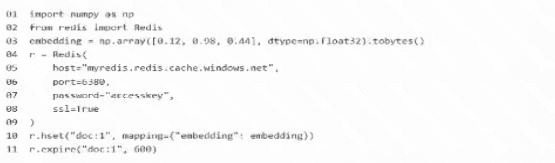
You are building a semantic search feature for a chatbot. You store document embeddings in Redis. You review the following Python code that connects to Redis and stores an embedding value:

For each of the following statements, select Yes if the statement is true. Otherwise, select No. NOTE: Each correct selection is worth one point.
Show answerHide answer

Explanation


Explanation

Statement 1 (Yes): Line 10 uses the r.hset("doc:1", mapping={"embedding": embedding}) command. HSET is the Redis command for setting fields in a hash. This stores the embedding as a field within the hash named doc:1.

Statement 2 (No): The code only saves the embedding as a raw byte string (using tobytes() on line 3). It does not create a vector index or specify a vector distance metric. Without defining an index (e.g., using FT.CREATE via Redis Search), Redis cannot perform similarity searches on this field; it can only store and retrieve it.

Statement 3 (Yes): Line 11 uses the r.expire("doc:1", 600) command. The expire command sets a timeout on a key in seconds. Since 600 seconds equals 10 minutes, the key (and its hash field) will automatically expire after exactly 10 minutes.

References

Microsoft Learn: Redis HSET command
Question 33 Choose 1
You deploy a production Azure Function app that connects to an Azure SQL Database.
The solution must provide the following functionality:

• Prevent secrets from being exposed in source control.
• Support secret rotation without redeploying the function app.
• Avoid downtime during credential updates.

You need to configure secure and maintainable secret management. What should you configure?
Show answerHide answer

Correct answer: A Application settings with Key Vault references

Explanation


Explanation

Application settings with Key Vault references is the only option that meets all three requirements:

Prevent secrets from being exposed in source control: By storing the actual connection string in Azure Key Vault and only placing a reference URI in the Function App's application settings, no sensitive data is ever stored in your code repository.

Support secret rotation without redeploying: When the secret is rotated in Key Vault, the Function App automatically fetches the new version. You do not need to change code or redeploy the application.

Avoid downtime during credential updates: Key Vault references are resolved at runtime. Because the Function App retrieves the latest secret seamlessly, there is no need to restart or redeploy, preventing service interruptions during credential updates.

Why the Other Options Are Incorrect

B. Environment variables in local.settings.json: This file is typically used for local development and is often (or should be) excluded from source control. It does not support dynamic secret rotation without manual updates and redeployments, and storing secrets in plaintext locally is a security risk.

C. Parameter file stored in source control: Storing any file containing plaintext secrets in source control violates the first requirement directly, as anyone with repository access could view the credentials.

D. Hard coded connection string in the startup class: This is the worst security practice. It exposes secrets directly in the codebase and requires a full code change and redeployment to rotate credentials.

References

Microsoft Learn: Use Key Vault references as app settings in Azure App Service and Azure Functions
Question 34
You are developing a .NET application that uses Azure Cosmos DB for NoSQL to store application data The application uses the Azure Cosmos DB for NoSQL SDK to interact with the database account. The application must perform the following tasks
• Initialize the connection by using the account endpoint and key.
• Define shared throughput.
• Perform create, read, update, and delete (CRUD) operations on items stored in a container
Show answerHide answer

Explanation


Explanation

CosmosClient: This is the top-level object in the SDK hierarchy. It represents the connection to the Cosmos DB account. You initialize it by passing the account's endpoint URI and key to establish the connection and manage the client lifecycle.

Database: In Cosmos DB, a database acts as a logical grouping for containers. When you provision throughput at the database level, it is called shared throughput, meaning the allocated Request Units (RUs) are shared across all containers within that database.

Container: The container is the actual storage unit where your JSON documents reside. To perform Create, Read, Update, and Delete (CRUD) operations, you obtain a reference to the specific container from the database object and use its methods to manipulate the items.

Why the Other Option Is Incorrect

Indexing policy: This is a configuration setting applied to a container that defines how data is automatically indexed for query performance. It is not used to initialize connections, define throughput, or execute CRUD operations.

References

Microsoft Learn: Azure Cosmos DB .NET SDK v3 - CosmosClient class
Question 35
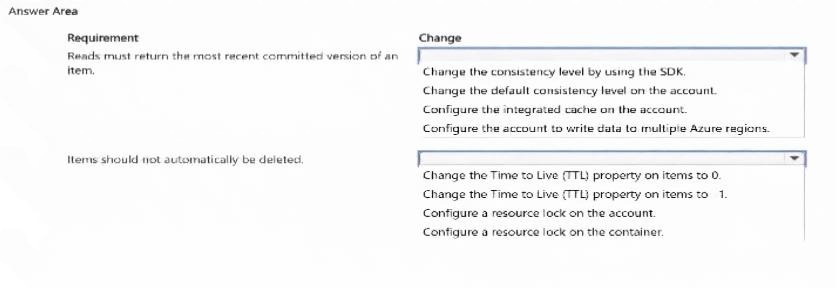
A company has an Azure Cosmos DB for NoSQL account. The account is configured for session consistency.
Data is written to a single Azure region and data can be read from three Azure regions.
An application that will access the Azure Cosmos DB for NoSQL container data using an SDK has the following requirements:
• Roads from the application must return the most recent committed version of an Item from any Azure region.
The container items should not automatically be deleted.
You need to implement the changes to the Azure Cosmos DB for NoSQL account. What should you do? To answer, select the appropriate options in the answer area
Show answerHide answer

Explanation


Explanation

Change the consistency level by using the SDK: The account is configured for Session consistency, which only guarantees reads reflect the most recent write within the same session. To guarantee reading the most recently committed version globally (from any of the read regions), you need Strong consistency. Because changing the account default affects all applications globally and can cause higher latency, the best practice is to override the consistency level to Strong on a per-request basis in your application code using the SDK's request options.

Change the Time to Live (TTL) property on items to -1: If you want to ensure that items are never automatically deleted by the database's background cleanup process, the TTL must be disabled. In Cosmos DB, setting the TTL to -1 signifies "no expiration" (items will not be deleted automatically).

Why the Other Options Are Incorrect

Change the default consistency level on the account: While this would achieve Strong consistency, it forces this strict level on all operations and applications, which can heavily impact performance and availability. SDK-level overrides are preferred for specific reads.

Configure a resource lock: Resource locks prevent users from accidentally deleting the account, database, or container via the Azure management plane. They do not prevent Cosmos DB from expiring and deleting individual items based on a TTL policy.

References

Microsoft Learn: Override consistency level in the SDK
Question 36
A Python API retrieves a document from Azure Database for PostgreSQL by using a SQL statement. The API accepts the document ID from user input. The current implementation inserts the document ID directly into the SQL statement.
You need to secure the SQL statement execution by using a parameterized query. You must minimize the possibility of SQL injection.
How should you update the implementation to execute the SQL statement safely? To answer, move the appropriate configurations to the correct requirements. You may use each configuration once, more than once, or not at all. you may need to move the split bar between panes or scroll to view content.
NOTE: Each correct selection is worth one point.
Show answerHide answer

Explanation


Explanation

Use a parameterized query: Instead of string concatenation (e.g., "SELECT * FROM docs WHERE id = '" + input + "'"), you must modify the SQL statement to use placeholders (e.g., %s for Python's psycopg2). This structurally separates the SQL command from the data.

Pass the ID as an argument: To bind the user input safely, you pass the ID through a separate tuple or dictionary argument. This ensures the database driver handles the input strictly as data, neutralizing any malicious SQL syntax (preventing SQL injection).

Supply the parameter tuple to the SDK method: When executing the query via the Python database driver (e.g., cursor.execute(query, (user_id,))), you supply the parameter tuple as the second argument. The driver then safely escapes and binds the data to the placeholders.

Why the Other Option Is Incorrect

Escape quotation marks in the ID: Manual escaping is error-prone and relies on the developer perfectly anticipating every possible malicious input. Parameterization is the industry standard because it delegates safe input handling entirely to the database driver.

References

Microsoft Learn: Prevent SQL injection in Azure Database for PostgreSQL
Question 37
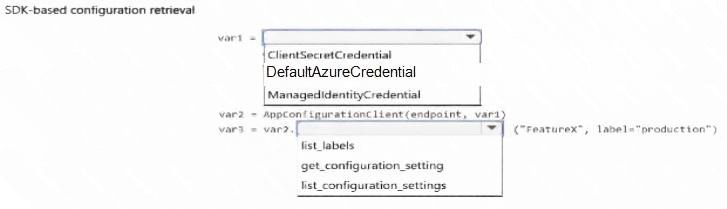
You are using the Python SDK to develop a containerized AI application that retrieves the value of a runtime setting stored in an Azure App Configuration resource. The application will run in Azure in the security context of a managed identity.
The application must work in a local development environment without any code changes.
You need to complete the code that implements the retrieval.
How should you complete the code? To answer, select the appropriate options in the answer area. NOTE: Each correct selection is worth one point.
Show answerHide answer

Explanation


Explanation

DefaultAzureCredential: The application must work both in a local development environment and in Azure using a managed identity, all without code changes. DefaultAzureCredential is designed specifically for this scenario. It automatically attempts a chain of authentication methods: locally, it will use your developer credentials (like Azure CLI or Visual Studio), and when deployed to Azure, it will automatically detect and use the assigned Managed Identity.

get_configuration_setting: The goal is to retrieve the value of a specific runtime setting ("FeatureX" with the label "production"). The get_configuration_setting method is the correct SDK method to fetch a single key-value pair. It takes the key and optional keyword arguments (like label) and returns the specific configuration setting.

Why the Other Options Are Incorrect

ClientSecretCredential / ManagedIdentityCredential:

ClientSecretCredential: Requires hardcoding or passing a client secret, which breaks the requirement to run locally without code changes (since local wouldn't have the Azure Managed Identity) and is less secure.

ManagedIdentityCredential: Strictly enforces managed identity authentication. It will fail in a local development environment because managed identities only exist within Azure resources.

list_labels / list_configuration_settings: These methods are used to list multiple items. list_labels returns the available labels in the App Configuration store, and list_configuration_settings returns a collection of settings. Neither is used to retrieve the value of a single specific key like "FeatureX".

References

Microsoft Learn: DefaultAzureCredential overview
Question 38
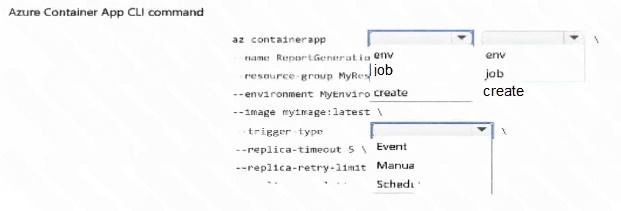
You are developing a microservices-based application that uses Azure Container Apps. The application consists of several containerized services that handle tasks, such as processing orders, managing inventory, and generating reports.
Report generation must be implemented as follows:
Process reports every Sunday at midnight.
Minimize app resources during report generation.
Record metrics in the same location as other containers.
Use the same virtual network as other containers.
Show answerHide answer

Explanation


Explanation

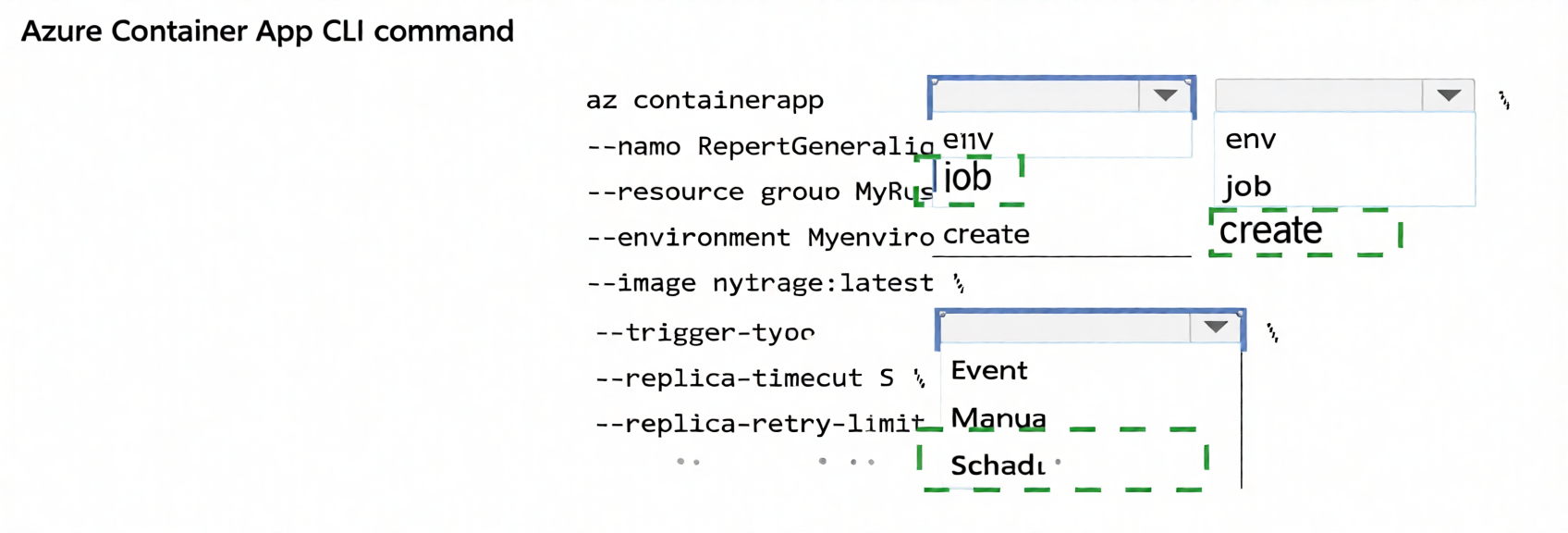
job (and create): The requirement states the process must run every Sunday at midnight and minimize app resources when not running. In Azure Container Apps, Jobs are designed for exactly this type of run-to-completion, task-based workload. Unlike standard Container Apps (which run continuously), Jobs spin up a container, perform the task, and then deallocate resources, saving costs. The command az containerapp job create is used to create this resource.

Schedule (trigger type): Because the report generation must run at a specific, recurring time (every Sunday at midnight), you must use a scheduled trigger. The --trigger-type Schedule parameter configures the Container App Job to run based on a CRON expression.

Note on the requirements: Using a Container App Job automatically satisfies the other requirements—it will be deployed into the same environment (virtual network) and sends logs/metrics to the same Log Analytics workspace as the other container apps by default.

Why the Other Options Are Incorrect

env (and its related command): This is used to create or manage a Container Apps Environment (the secure boundary around your apps and jobs), not the scheduled report generation workload itself.

Event: An Event trigger is used when the job should run in response to an event, such as a message arriving in a queue (like Azure Storage Queue or Kafka). It is not for time-based schedules.

Manual: A Manual trigger requires an external caller or script to explicitly start the job. It will not run automatically every Sunday at midnight.

References

Microsoft Learn: Jobs in Azure Container Apps (Explains the difference between apps and jobs, and trigger types).

That's the last free question in Topic 3, Standalone Questions Set

You've seen the free 30% (38 of 127 questions). Full access unlocks every question and full-length AI-200 mock exams (60 questions, 120 minutes), a different mock on every attempt.

Unlock full mock exam
Full mock exam

Sit the AI-200 exam before exam day

Full-length mocks with the same number of questions and the same time limit as the real AI-200 exam. Every attempt draws a new set of questions from the full bank, so you can keep going until you pass comfortably.

Get full AI-200 mock exam
  • 60questions per mock
  • 120 mintime limit
  • 142questions in the bank
  • Newmock on every attempt