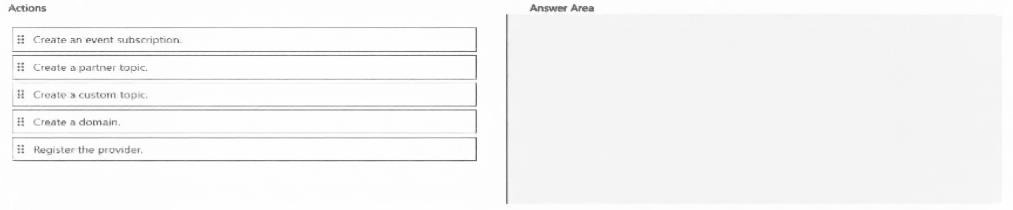
You have a newly provisioned Azure subscription. You are designing a custom Event Grid workflow for AI
inference events.
You need to implement the Event Grid components to support routing of high-confidence events to a
downstream processor.
Which three actions should you perform in sequence? To answer, move the appropriate actions from the list
of actions to the answer area and arrange them in the correct order.
Show answerHide answer
Explanation
Explanation
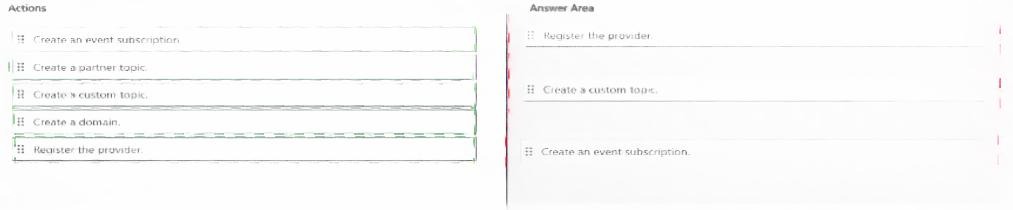
1. Register the provider: In a newly provisioned Azure subscription, the Azure Event Grid resource provider (Microsoft.EventGrid) must be registered before you can create or use Event Grid resources. This step makes the service available to your subscription.
2. Create a custom topic: To design a custom workflow for specific events (like AI inference events), you must create a custom topic. This defines the endpoint to which your application will publish events.
3. Create an event subscription: Finally, once the custom topic exists, you create an event subscription on that topic. This subscription defines the endpoint (the downstream processor) where the events will be delivered and can include filters (such as routing only high-confidence events).
Why the Other Options Are Incorrect
Create a partner topic: Partner topics are used for receiving events from third-party SaaS providers (like Auth0 or Datadog), not for custom application workflows.
Create a domain: Event domains are used to manage a large number of topics for multi-tenant applications (e.g., managing events for thousands of different customers). They are not necessary for a simple custom workflow.
References
Microsoft Learn:Azure Event Grid concepts (Explains custom topics and subscriptions).
Question 22Choose 1
You process Azure Service Bus messages that require a dependent external API call.
If the API is temporarily unavailable, you must delay processing of the message without incrementing the
delivery count. You need to find a way to process the message when the API is available while keeping the
message accessible. Which message action should you perform?
Show answerHide answer
Correct answer: ADefer
Explanation
Explanation
The requirement is to delay processing the message without incrementing the delivery count, while keeping the message accessible. The Defer action is the only one that satisfies these conditions.
When you defer a message, Service Bus sets its state to deferred. The message remains in the queue (it is not removed, abandoned, or dead-lettered), but it becomes hidden from normal receive operations. Crucially, deferring a message does not increment its DeliveryCount. To process the message later, the application must remember the message's SequenceNumber and explicitly retrieve the deferred message using ReceiveDeferredMessageAsync once the external API is available.
Why the Other Options Are Incorrect
B. Complete: This permanently removes the message from the queue. It is used when processing is successful and would result in losing the message.
C. Dead-letter: This moves the message to the Dead-Letter Queue (DLQ) for messages that cannot be processed (e.g., malformed or expired). It does not keep the message accessible for normal, delayed processing and increments the delivery count.
D. Abandon: This releases the message lock and makes it immediately available for other receivers. Crucially, abandoning a message increments the DeliveryCount, which violates the stated requirement.
References
Microsoft Learn:Deferral of Service Bus messages
Question 23Choose 1
You are designing an Azure Function app that exposes a public API.
The solution must:
Validate incoming request data and return results immediately to the caller.
Support Microsoft Entra ID authentication.
Scale automatically under variable load.
You need to implement a trigger.
Which trigger should you implement?
Show answerHide answer
Correct answer: AHTTP
Explanation
Explanation
The HTTP trigger is the only option that satisfies all the requirements for this scenario:
Validate incoming request data and return results immediately to the caller: The HTTP trigger allows an Azure Function to act as a RESTful API. It receives the HTTP request payload (which you can validate in code) and returns an HTTP response synchronously to the client.
Support Microsoft Entra ID authentication: HTTP-triggered functions can be easily secured using App Service Authentication (Easy Auth), which supports Microsoft Entra ID (formerly Azure AD) out of the box for validating bearer tokens.
Scale automatically under variable load: When hosted on the Consumption or Premium plans, HTTP-triggered functions automatically scale out based on incoming request volumes.
Why the Other Options Are Incorrect
B. Azure Queue storage: This is an asynchronous, background processing trigger. It does not accept public HTTP requests and cannot return an immediate response to a caller.
C. Azure Event Grid: This is an event-driven trigger designed to react to state changes in Azure resources. It does not expose a public HTTP API endpoint for clients to submit requests.
D. Service Bus topic: Similar to a queue, this is used for asynchronous message brokering. It is not designed to act as a public-facing API endpoint for synchronous requests.
References
Microsoft Learn:Azure Functions HTTP trigger (Details on returning HTTP responses and authentication).
Question 24
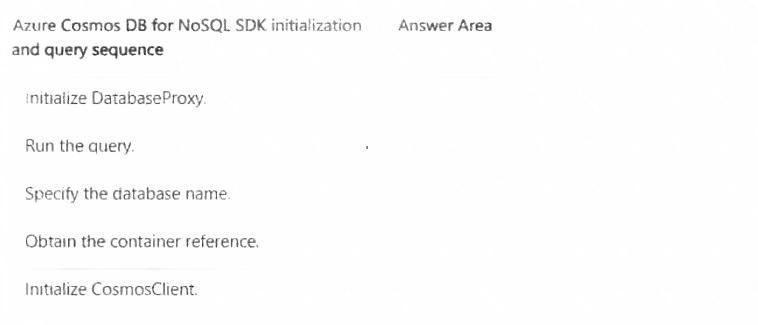
You are developing a Python application that reads data from Azure Cosmos DB for NoSQL by using the
azure-cosmos SDK.
You need to connect to an existing account and run a SQL query against an existing container.
Which four actions should you perform in sequence? To answer, move the appropriate actions from the list of
actions to the answer area and arrange them in the correct order.
Show answerHide answer
Explanation
Explanation
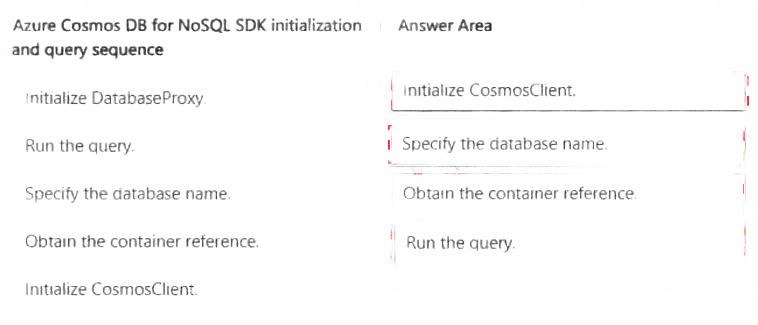
1. Initialize CosmosClient: The first step in any Cosmos DB Python application is to create an instance of CosmosClient. This requires your account endpoint URI and credential (like a key or managed identity) to establish a connection to the Cosmos DB account.
2. Specify the database name: Once the client is initialized, you must access the specific database that contains your data by using a method like client.get_database_client("database_name").
3. Obtain the container reference: After targeting the database, you need to get a reference to the specific container (collection) you want to query using a method like database.get_container_client("container_name").
4. Run the query: With the container reference established, you can finally execute your SQL query using methods like container.query_items(query="SELECT * FROM c", enable_cross_partition_query=True) to retrieve the data.
Why the Other Option Is Incorrect
Initialize DatabaseProxy: DatabaseProxy is an internal class within the SDK. As a developer, you do not instantiate this directly; it is automatically created and returned when you call get_database_client() during step 2.
References
Microsoft Learn:Quickstart: Azure Cosmos DB for NoSQL client library for Python
Question 25Choose 1
You are training a Language Understanding model for a user support system.
You create the first intent named GetContactDetails and add 200 examples.
You need to decrease the likelihood of a false positive.
What should you do?
Show answerHide answer
Correct answer: DAdd examples to the None intent.
Explanation
Explanation
In conversational AI (specifically using Azure AI Language Conversational Language Understanding - CLU, or the older LUIS), a false positive occurs when the system incorrectly matches a user's utterance to a specific intent (like GetContactDetails) when it should not have.
To decrease the likelihood of this, you must train the model on what it should ignore. The None intent is a catch-all for utterances that do not belong to any specific intent. By adding a variety of diverse examples to the None intent, you teach the model to distinguish between valid GetContactDetails requests and general chatter or off-topic questions that should not trigger the intent.
Why the Other Options Are Incorrect
A. Enable active learning: Active learning helps improve model accuracy over time by flagging ambiguous utterances from real user traffic for review. However, it is a reactive, long-term process and does not immediately solve the current problem of false positives during initial training.
B. Add a machine learned entity: Entities extract specific data (like dates or names) from within an utterance. They do not determine the overall intent of the utterance and will not prevent false positive intent matches.
C. Add additional examples to the GetContactDetails intent: Adding more examples to the target intent will help the model better recognize true positives (recall), but it will not help it recognize what is not that intent. It can even increase false positives if the examples share too many linguistic similarities with off-topic queries.
References
Microsoft Learn:None intent in conversational language understanding (Explains the role of the None intent in preventing false positives).
Question 26
You are developing an Azure Functions app.
All functions in the app meet the following requirements:
Run until either a successful run or until 10 run attempts occur.
Ensure that there are at least 20 seconds between attempts for up to 15 minutes.
You need to configure the host.json file.
How should you complete the code segment? To answer, select the appropriate options in the answer area.
NOTE: Each correct selection is worth one point.
Show answerHide answer
Explanation
Explanation
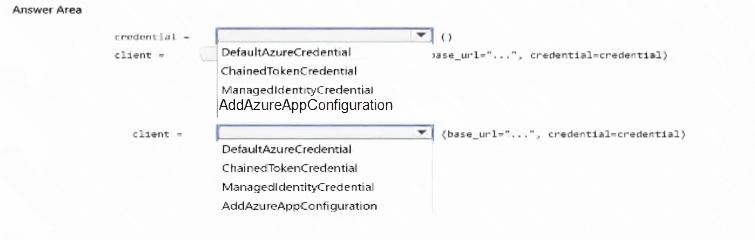
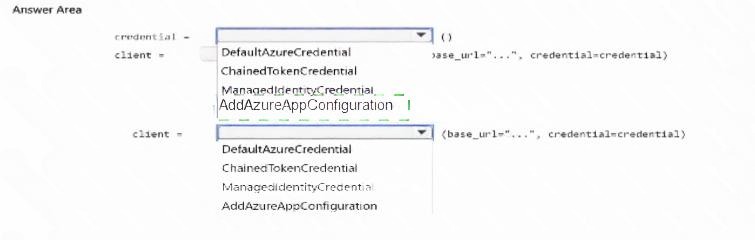
When initializing Azure SDK clients, you must instantiate a credential object and pass it to the service client.
ManagedIdentityCredential is selected for the credential variable because it strictly enforces the use of an Azure Managed Identity. When an application is hosted in Azure (like Azure Functions or App Service), this credential securely authenticates to the target service without requiring secrets or connection strings, ensuring a highly secure, zero-trust connection.
DefaultAzureCredential is selected to initialize the client object. It is a best practice for Azure applications because it provides a seamless authentication chain. It automatically attempts various authentication methods (such as Environment variables, Workload Identity, and Managed Identity) in a specific order. This allows the code to run locally using a developer's Visual Studio or CLI credentials, and then seamlessly transition to using the assigned Managed Identity when deployed to Azure, without any code changes.
Why Other Options Are Incorrect
ChainedTokenCredential: This allows developers to define a custom sequence of credentials. While useful in complex scenarios, it is not required here, as DefaultAzureCredential already provides a built-in chain.
AddAzureAppConfiguration: This is not a credential type. It is an extension method used to load configuration settings from Azure App Configuration into a .NET application, not for authenticating to services.
References
Microsoft Learn:Managed identity in Azure Functions
Question 27Choose 2
You have container source code stored in a Git repository
The container registry must automatically build and store a new container image whenever a developer
commits code to the Git repository.
You must minimize the use of an external build infrastructure.
You need to configure Azure Container Registry (ACR) to manage the build process natively and
automatically.
Which two ACR components should you use? Each correct answer presents part of the solution.
NOTE: Each correct selection is worth one point.
To automate container builds natively in Azure Container Registry (ACR) upon a Git commit while minimizing external build infrastructure, you use ACR Tasks.
D. Source-triggered task: This is the core component. You configure a multi-step or Docker build task with a source trigger (--source-trigger-enabled). ACR monitors your connected GitHub or Azure DevOps repository. When a developer commits code, the trigger fires, and ACR executes the build in the cloud, storing the resulting image in the registry. This eliminates the need for external CI/CD agents (like GitHub Actions runners or Jenkins) for the build process.
B. Quick task: To set up this automated pipeline initially, you use the az acr build command, often referred to as a Quick Task. This command allows you to build an image immediately from a local context or a remote Git repository without setting up a full pipeline. In the context of the exam, executing a Quick Task is the mechanism used to establish and initiate the build process from source code.
Why the Other Options Are Incorrect
A. Webhook: ACR webhooks are used to notify external systems (like a listening server or Azure Logic App) when an image is pushed or deleted. They do not trigger builds; they react to completed builds.
C. Artifact Cache rule: This is a feature used in ACR to cache artifacts (like Helm charts or OCI artifacts) from public registries (e.g., Docker Hub) to improve pull performance and reduce egress costs. It does not build container images from source code.
References
Microsoft Learn:Automate container builds with ACR Tasks (Explains source-triggered tasks).
Question 28Choose 2
You are designing an Azure Function that will process orders from a new Azure Service Bus queue.
You need to prevent the system from processing messages more than once and preserve failed messages for
investigation.
Which two actions should you implement? Each correct answer presents part of the solution.
NOTE: Each correct selection is worth one point.
Show answerHide answer
Correct answer: A, CInclude a dead-letter handling process.
Enable duplicate detection on the queue.
Explanation
Explanation
To meet the two requirements—preventing double processing and preserving failed messages—you must use specific Service Bus features:
C. Enable duplicate detection on the queue: Service Bus can automatically detect and remove duplicate messages sent to a queue or topic. When enabled, Service Bus tracks the MessageId of all incoming messages within a specified time window (the duplicate detection history). If a message with the same MessageId is sent during that window, it is dropped and not processed. This prevents duplicate orders from being processed.
A. Include a dead-letter handling process: If the Azure Function fails to process a valid message (e.g., due to a malformed payload or repeated processing errors), Service Bus will automatically move the message to the Dead-Letter Queue (DLQ) after the maximum delivery count is reached. Implementing a process to monitor, review, and requeue messages from the DLQ ensures failed messages are preserved for investigation rather than being lost or blocking the queue.
Why the Other Options Are Incorrect
B. Process orders by using an HTTP trigger: HTTP triggers are synchronous and not designed to consume messages from a Service Bus queue. A Service Bus trigger is required.
D. Enable sessions on Service Bus: Sessions are used to guarantee First-In-First-Out (FIFO) ordering and grouping of related messages. While useful for ordered processing, sessions do not inherently prevent duplicate message delivery (idempotency) or preserve failed messages for investigation.
References
Microsoft Learn:Duplicate detection in Azure Service Bus
Question 29
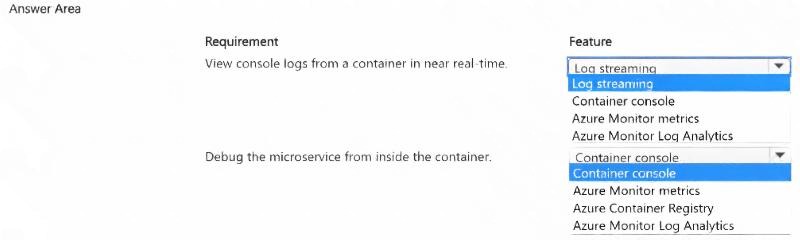
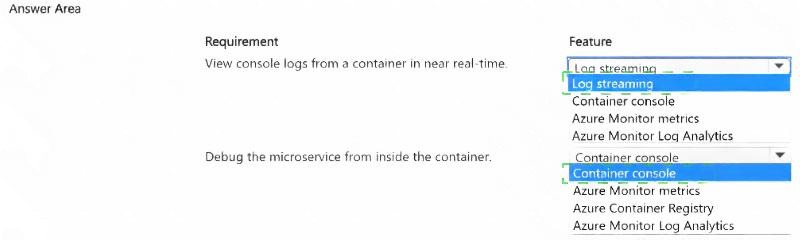
You are developing several microservices to run on Azure Container Apps.
You need to monitor and diagnose the microservices.
Which features should you use? To answer, select the appropriate feature in the answer area.
NOTE: Each correct selection is worth one point.
Show answerHide answer
Explanation
Explanation
Log streaming: This feature allows you to view the standard output (stdout) and standard error (stderr) logs of your containerized application in near real-time directly from the Azure portal or CLI. It is the best tool for observing live application behavior and troubleshooting issues as they happen without waiting for logs to be ingested into a logging backend.
Container console: This feature provides an interactive shell (like /bin/bash or /bin/sh) directly inside a running container instance. It allows you to execute commands, inspect the file system, and run diagnostic tools within the exact environment where your microservice is running, which is essential for in-depth debugging.
Why the Other Options Are Incorrect
Azure Monitor metrics: Provides numerical time-series data (like CPU and memory usage) but does not show application console output or allow interactive debugging.
Azure Monitor Log Analytics: Used for querying historical logs using KQL. While excellent for retrospective analysis, it involves ingestion latency and is not "near real-time" for live troubleshooting.
Azure Container Registry: This is a private registry for storing and managing container images. It is not a diagnostic tool.
References
Microsoft Learn:View log streams in Azure Container Apps
Question 30Choose 1
You deploy multiple instances of a change feed processor to handle a high ingestion rate within Azure
Cosmos DB for NoSQL.
Each processor instance must process a different subset of partitions.
You need to ensure the workload is load-balanced across all processor instances.
What should you configure?
Show answerHide answer
Correct answer: Clease container
Explanation
Explanation
When deploying multiple instances of a Change Feed Processor to handle a high ingestion rate, the processor instances must coordinate with each other to divide the work. They do this by using a lease container.
The lease container stores the lease documents (state) for each partition. Each processor instance acquires leases for a subset of the partitions. If a new instance starts, it acquires available leases to share the load. If an instance fails, its leases expire and are picked up by other instances. This ensures that partitions are distributed dynamically and the workload is perfectly load-balanced across all active processor instances. Crucially, a lease ensures that only one processor instance is reading a specific partition at a time.
Why the Other Options Are Incorrect
A. indexing precision: This is a setting that defines how often the database index is updated (Consistent or Lazy). It affects write performance and query consistency, not the load balancing of change feed processor instances.
B. strong consistency: This is an account-level data replication setting. It ensures reads reflect the most recent write, but it has no impact on how background processors distribute partition workloads.
D. autoscale throughput: This dynamically adjusts the Request Units (RUs) provisioned for the database based on traffic. While important for performance, it does not manage the distribution of partitions among multiple compute instances.
References
Microsoft Learn:Change feed processor in Azure Cosmos DB (Explains how the lease container manages partition distribution and load balancing).
Full mock exam
Sit the AI-200 exam before exam day
Full-length mocks with the same number of questions and the same time limit as the real AI-200 exam. Every attempt draws a new set of questions from the full bank, so you can keep going until you pass comfortably.