You are developing several microservices to run on Azure Container Apps. External HTTP ingress traffic has
been enabled for the Microservices.
A deployed microservice must be updated to allow users to test new features. You have the following requirements:
* Enable and maintain a single URL for the updated microservice to provide to test users.
* Update the microservice that corresponds to the current microservice version.
You need to configure Azure Container Apps.
Which features should you configure? To answer, select the appropriate options in the answer area. NOTE: Each correct selection is worth one point.
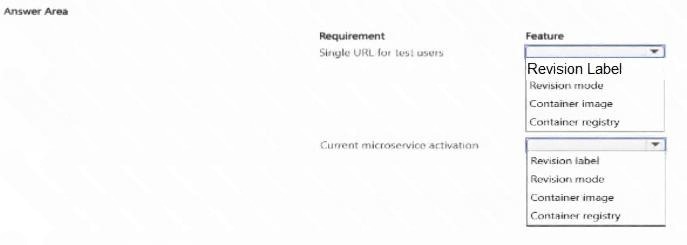
A deployed microservice must be updated to allow users to test new features. You have the following requirements:
* Enable and maintain a single URL for the updated microservice to provide to test users.
* Update the microservice that corresponds to the current microservice version.
You need to configure Azure Container Apps.
Which features should you configure? To answer, select the appropriate options in the answer area. NOTE: Each correct selection is worth one point.
Show answerHide answer
Explanation
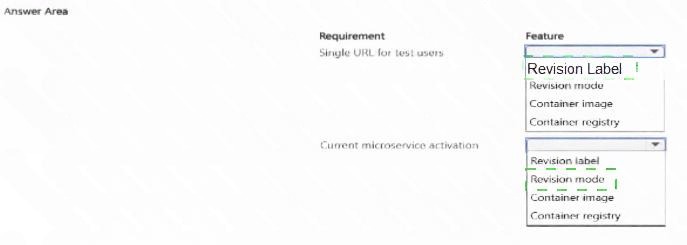
Explanation
- Revision Label: Azure Container Apps uses revisions to manage application deployments. To provide a single, static URL for test users to access new features, you must assign a revision label (e.g., "test") to the new revision. This creates a dedicated, stable Fully Qualified Domain Name (FQDN) that always routes traffic to that specific revision, regardless of how many times you update the container image or the revision itself.
- Revision mode: The requirement to "update the microservice that corresponds to the current microservice version" implies you are managing multiple versions. Revision mode determines how revisions are handled. By setting the revision mode to Single (as opposed to Multiple), you ensure that the application always routes 100% of traffic to the latest deployed revision, allowing you to systematically update the active version while managing test versions.
Why the Other Options Are Incorrect
- Container image: This specifies the actual code/application artifact to run. While you must update the image to deploy new features, changing the image alone does not guarantee a stable URL for testers or control how revisions are activated.
- Container registry: This is the storage location for your container images. It is an infrastructure setting and does not manage URLs or traffic routing.
- Revision label vs. Revision mode (Cross-check): You cannot use "Revision label" to activate the current version (labels are for routing specific traffic to specific URLs). You cannot use "Revision mode" to provide a single URL for testers, as the default application URL always points to the latest revision.
References
- Microsoft Learn: Revisions in Azure Container Apps