Microsoft certification · Exam AI-200

AI-200 Mock Exam Page 2

Developing AI Cloud Solutions on Azure

Free AI-200 questions on Topic 3, Standalone Questions Set, each with the answer and an explanation.

20 questions · 40 minutes · free, no sign-up

Topic 3, Standalone Questions Set questions

11–20 of 38 free
Question 11
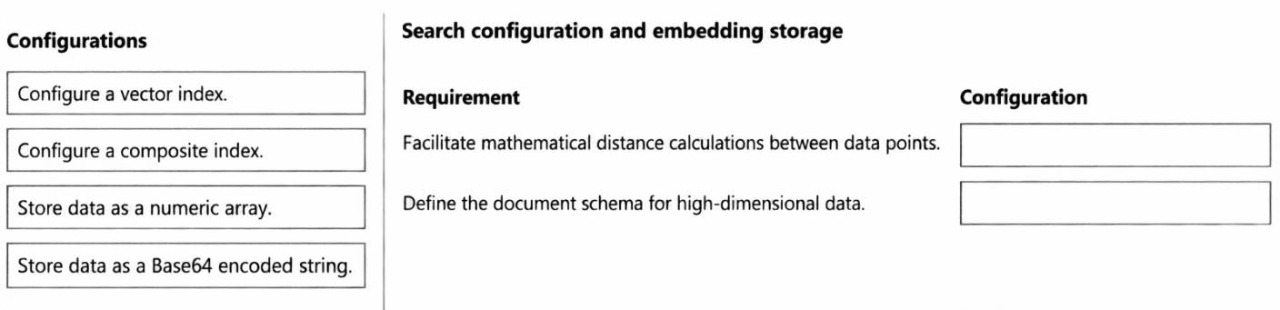
You are implementing a Retrieval-Augmented Generation (RAG) system by using the native vector search capabilities of Azure Cosmos DB for NoSQL API.
You have a container named Documents that stores technical articles. Each article includes a property named embedding.
You must ensure that the system can perform efficient similarity searches between user queries and the stored articles.
You need to configure the database resources to support semantic retrieval.
Which configurations should you use? To answer, move the appropriate configurations to the correct requirements. You may use each configuration once, more than once, or not at all. You may need to move the split bar between panes or scroll to view content.
NOTE: Each correct selection is worth one point.
Show answerHide answer

Explanation


Explanation

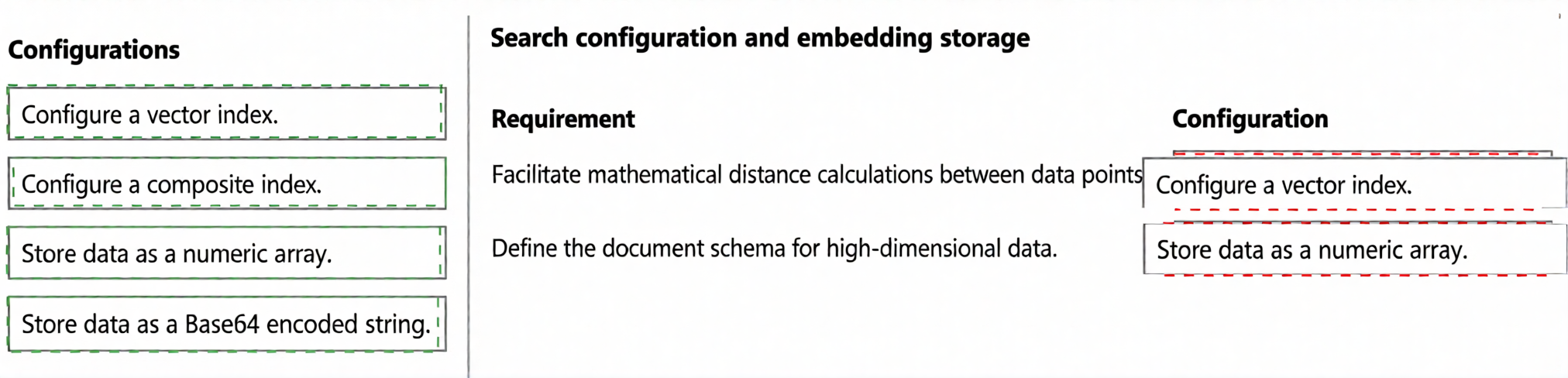
Configure a vector index: To perform efficient similarity searches (mathematical distance calculations like cosine or Euclidean distance) between a user's query vector and the stored article embeddings, you must define a vector policy and configure a vector index in your Cosmos DB container. This tells the database engine to use specialized algorithms (like flat, quantizedFlat, or DiskANN) to index and query the high-dimensional data efficiently.

Store data as a numeric array: In Azure Cosmos DB for NoSQL, vector embeddings must be stored in the JSON document as an array of numbers (e.g., `[0.1, 0.5, -0.2]`). When defining the container's vector policy, you specify that the `embedding` property path uses this numeric array format so the database can correctly interpret and index the vector data.

Why the Other Options Are Incorrect

Configure a composite index: Composite indexes are used to optimize queries that sort or filter on multiple scalar properties (e.g., `ORDER BY c.category, c.price`). They do not support high-dimensional vector fields.

Store data as a Base64 encoded string: Azure Cosmos DB for NoSQL vector search requires embeddings to be stored as native JSON numeric arrays. It does not natively parse Base64 strings for vector distance calculations.

References

Microsoft Learn: Vector search in Azure Cosmos DB for NoSQL (Details the required vector policy, including the numeric array data type and vector index configuration).
Question 12
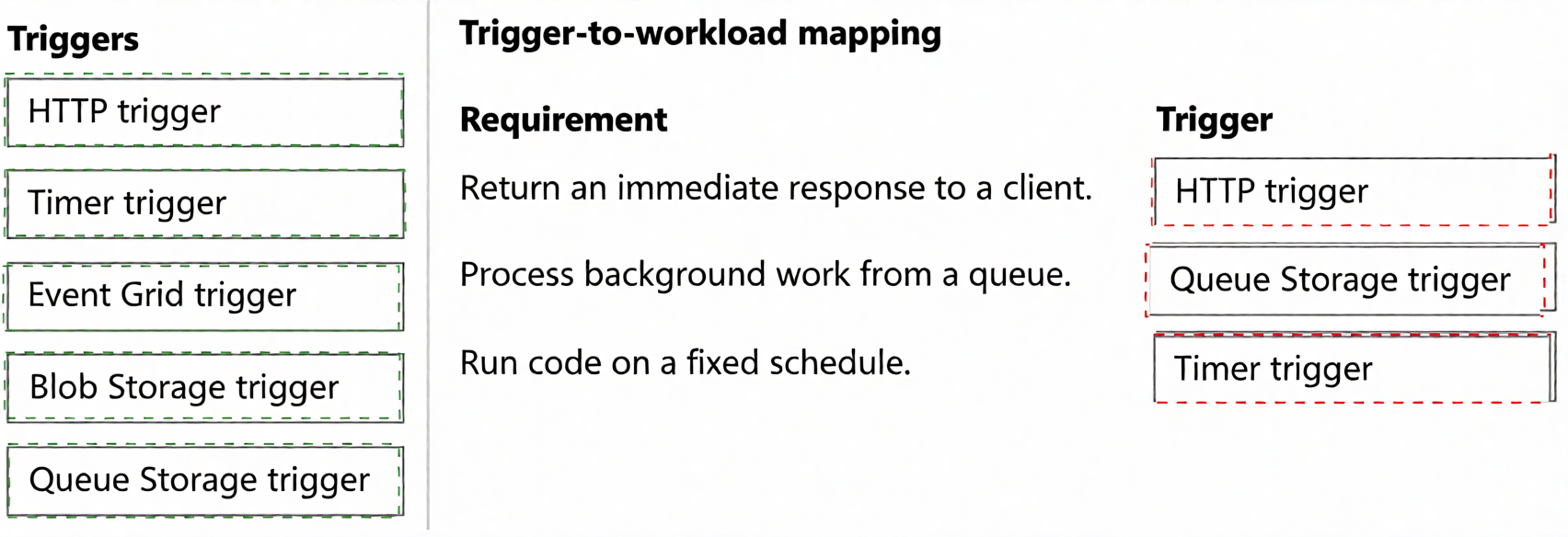
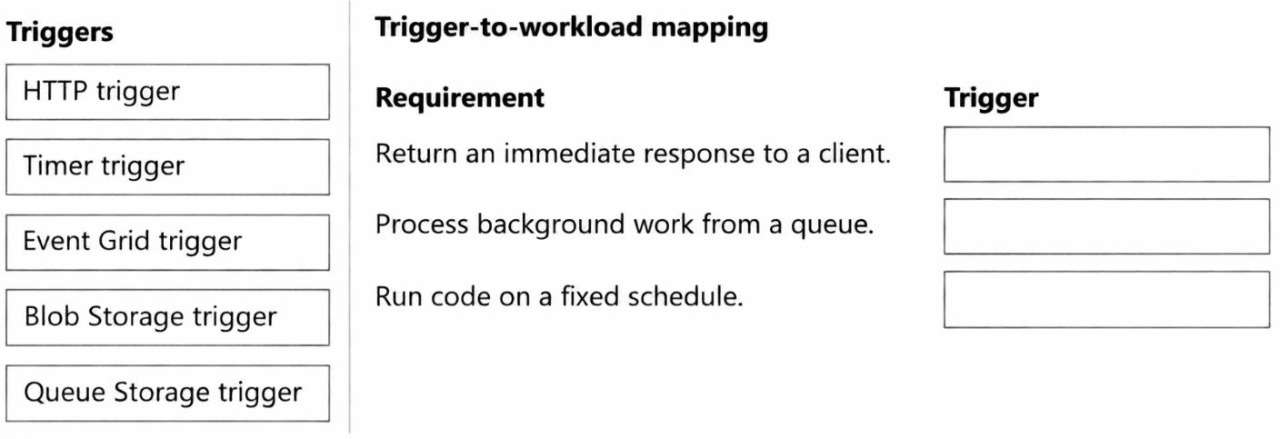
You are designing Azure Functions for three different backend workloads.
Each workload requires one of the following dispatching models:
- Return an immediate response to a client.
- Process background work from a queue.
- Run code on a fixed schedule.
You need to select the trigger for each requirement.
Which triggers should you select? To answer, move the appropriate triggers to the correct requirements. You may use each trigger once, more than once, or not at all. You may need to move the split bar between panes or scroll to view content.
NOTE: Each correct selection is worth one point.
Show answerHide answer

Explanation


Explanation

HTTP trigger: This trigger is specifically designed to execute code in response to an HTTP request. It allows the Azure Function to act as a REST API endpoint, enabling it to process incoming client requests and return an immediate HTTP response (synchronously).

Queue Storage trigger: When messages are added to an Azure Storage Queue, this trigger fires and invokes the function. It is the standard pattern for decoupling application components and processing background work asynchronously.

Timer trigger: This trigger invokes a function based on a predefined schedule using a CRON expression. It is the correct choice for running cleanup tasks, generating reports, or any workload that must run at a fixed, specific time.

Why the Other Options Are Incorrect

Event Grid trigger: This is an event-driven trigger used to react to state changes (like a blob being created or a resource being provisioned), but it does not fit the specific requirements of returning an immediate HTTP response, processing storage queues, or running on a strict schedule.

Blob Storage trigger: This trigger fires when a file is uploaded to or updated in Azure Blob Storage. It is not used for queue processing or fixed scheduling.

References

Microsoft Learn: Azure Functions triggers and bindings concepts
Question 13
You are deploying an AI service to Azure Container Apps.
The service must retrieve secrets securely from Key Vault by using managed identity.
You need to configure secure access.
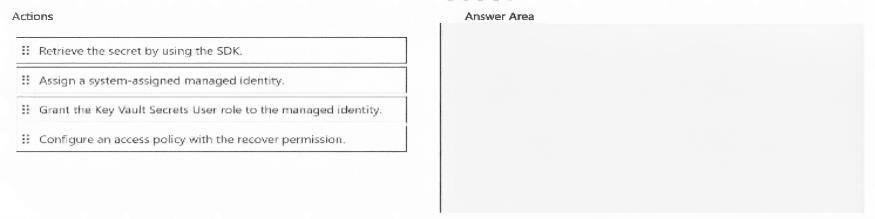
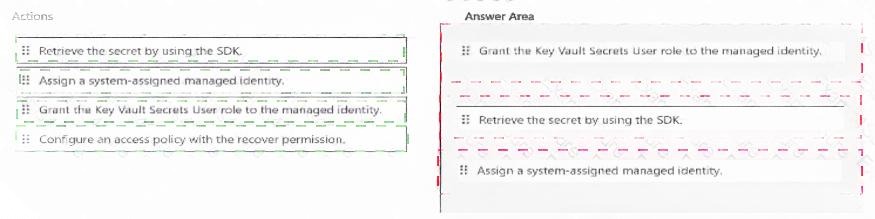
Which three actions should you perform in sequence? To answer, move the appropriate actions from the list of actions to the answer area and arrange them in the correct order.
Show answerHide answer

Explanation


Explanation

1. Assign a system-assigned managed identity: Before an application (like your Azure Container App) can authenticate to Azure Key Vault without using passwords or connection strings, it must be given an identity within Microsoft Entra ID. You assign a system-assigned managed identity directly to the Container App resource.

2. Grant the Key Vault Secrets User role to the managed identity: Once the identity exists, it needs authorization. By assigning the Key Vault Secrets User RBAC role to this managed identity on the Key Vault, you grant it the least-privilege permissions required to read secret contents.

3. Retrieve the secret by using the SDK: Finally, with the identity assigned and authorized, the application code can use an Azure SDK library (like `Azure.Identity` and `Azure.Security.KeyVault.Secrets`) to authenticate via the managed identity and fetch the secret securely at runtime.

Why the Other Option Is Incorrect

Configure an access policy with the recover permission: This is incorrect for two reasons. First, the "recover" permission is for recovering deleted Key Vault objects (like keys or secrets) and does not grant read access to active secrets. Second, modern Azure Key Vault implementations heavily favor Azure RBAC (Role-Based Access Control) over legacy Vault Access Policies for managing permissions.

References

Microsoft Learn: Use managed identities for Azure Container Apps
Microsoft Learn: Provide access to Key Vault with Azure RBAC
Question 14
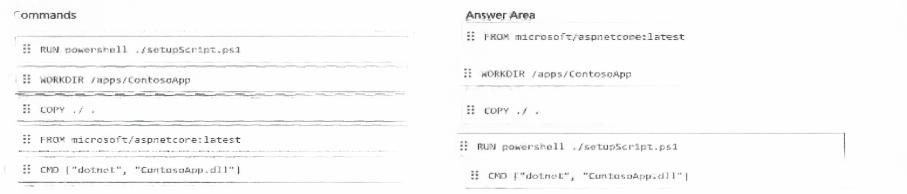
You plan to create a Docker image that runs an ASP.NET Core application named ContosoApp. You have a setup script named setupScript.psl and a series of application files including ContoscApp.dll.

You need to create a Dockerfile document that meets the following requirements:

• Call SQiupScript.psI when the container is built.
• Run CantosoApp.dill when the container starts.

The Dockerfile document must be created in the same folder where ContosoApp.dll and setupScnpt.ps! are stored.
Show answerHide answer

Explanation


Explanation

FROM [mcr.microsoft.com/dotnet/aspnet:latest](https://mcr.microsoft.com/dotnet/aspnet:latest): Every Dockerfile must begin with a `FROM` instruction to specify the base image. This sets the foundation for your container, in this case, the [ASP.NET](https://asp.net/) Core runtime.

WORKDIR /apps/ContosoApp: This command creates and sets the working directory for any subsequent `RUN`, `CMD`, `COPY`, or `ENTRYPOINT` instructions. It ensures your files are placed in a specific directory rather than the root.

COPY . .: This command copies the files from your local machine (the source `.`) into the current working directory of the container image (the destination `.`). This brings your application files (`ContosoApp.dll`) and the setup script into the image.

RUN powershell ./setupScript.ps1: The `RUN` instruction executes commands during the image build process. Since the requirement is to call the setup script when the container is built, you must use `RUN`.

CMD ["dotnet", "ContosoApp.dll"]: The `CMD` instruction specifies the default command to execute when the container starts. Using the JSON array format is the recommended best practice for running the .NET application.

References

Microsoft Learn: Dockerfile reference (Explains RUN vs CMD and general syntax).
Question 15 Choose 1
You have an Event Grid subscription that triggers an Azure Function.
You need to prevent loss of events in case the endpoint returns an HTTP 400 response. Which action should you perform?
Show answerHide answer

Correct answer: A Configure a dead letter destination.

Explanation

Explanation

In Azure Event Grid, when an event delivery fails, Event Grid automatically retries based on its retry policy. However, if the endpoint (your Azure Function) returns specific client error codes—specifically HTTP 400 (Bad Request) or HTTP 413 (Request Entity Too Large)—Event Grid recognizes this as a non-transient error (e.g., a malformed payload or a permanent validation failure).

Because retrying the exact same event will just fail again, Event Grid immediately stops retrying. To prevent the loss of these events, you must configure a dead-letter destination (such as an Azure Storage Blob container). If Event Grid cannot deliver an event, it drops it into the dead-letter destination so you can inspect and process it later.

Why the Other Options Are Incorrect

B. Implement asynchronous handshake validation: This is used during the initial subscription creation to prove endpoint ownership, not for handling delivery failures.

C. Implement optimistic batching: This is a method to increase throughput by sending multiple events in a single HTTP request. It does not address error handling or event loss.

D. Configure a retry policy: While configuring a retry policy is a good practice, Event Grid's default retry policy will not retry an event if the endpoint returns a 400 Bad Request. Retrying a request that the endpoint rejects as "bad" is pointless. Therefore, a retry policy alone cannot prevent the loss of events that trigger a 400 response.

References

Microsoft Learn: Event Grid message delivery and retry (Explains why 400 errors are not retried and the importance of dead-lettering).
Question 16 Choose 1
You need to add a custom voice that matches your company ' s brand for a text-to-speech feature, distinct from any standard neural voice. What should you use?
Show answerHide answer

Correct answer: B Azure AI Speech Custom Neural Voice

Explanation

Explanation

Azure AI Speech Custom Neural Voice: This is a feature that allows you to create a unique, synthetic voice for your applications. It is designed specifically for scenarios where a standard, prebuilt voice is not sufficient and a brand-specific, highly natural-sounding voice is required. You can train a custom neural voice using your own audio recordings to match your company's brand identity, tone, and style. This provides a distinct voice that is not available to other users.

Why the Other Options Are Incorrect

A. Azure AI Speech prebuilt neural voices: These are standard, off-the-shelf voices provided by Microsoft. They are highly natural but are shared across all Azure customers and cannot be customized to match a specific company's brand.

C. Azure AI Language sentiment analysis: This is a Natural Language Processing (NLP) service used to determine the positive, negative, or neutral sentiment of text. It does not generate speech.

D. Azure AI Translator: This service is used to translate text from one language to another. It does not create custom text-to-speech voices.

References

Microsoft Learn: What is Custom Neural Voice?
Question 17 Choose 2
You are designing an Azure Function app that processes large image uploads submitted by users through an HTTP endpoint.
The solution must:

• Prevent client timeouts by decoupling image processing from the initial upload request.
• Support automatic retry behavior for failed processing attempts.
• Scale the background processing independently of the rate of incoming HTTP uploads.

You need to design a scalable and reliable asynchronous processing solution.
Which two actions should you implement? Each correct answer presents part of the solution.
NOTE: Each correct selection is worth one point.
Show answerHide answer

Correct answer: A, B Implement a queue-triggered function for image processing. Configure retry policies on a storage queue.

Explanation

Explanation

A. Implement a queue-triggered function for image processing: This decouples the processing from the initial upload, preventing client timeouts. It also allows the background processing (the queue-triggered function) to scale independently based on the number of messages in the queue, rather than the rate of incoming HTTP requests.

B. Configure retry policies on a storage queue: To support automatic retry behavior for failed processing attempts, you configure retry policies either on the function's trigger (built-in retries for Event Grid/Queue) or specifically by using the maxDequeueCount property for Azure Storage Queues. When a queue-triggered function fails, the message is returned to the queue and retried.

Why the Other Options Are Incorrect

C. Process the image inside the HTTP-triggered function: This is a synchronous pattern. It would keep the HTTP request open during the entire image processing duration, which risks client timeouts and does not scale the processing independently.

D. Persist upload metadata to Azure Storage: While storing metadata is good practice for auditing, it does not solve the core requirements of decoupling processing, enabling automatic retries, or scaling independently.

References

Microsoft Learn: Asynchronous processing with Azure Functions and Queues
Question 18
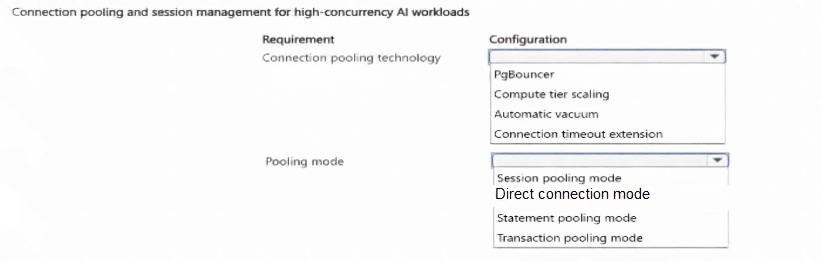
You are developing an application that uses a Python API to perform similarity queries against Azure Database for PostgreSQL. The application creates a new database connection for every request.
During peak traffic, the application intermittently fails to open new database sessions, logs indicate that the maximum number of connections have been reached.
You need to configure the connection pooling strategy to reduce connection setup overhead and maximize reuse for the high-concurrency workload.
What should you configure? To answer. select the appropriate options in the answer area NOTE: Each correct selection is worth one point.
Show answerHide answer

Explanation


Explanation

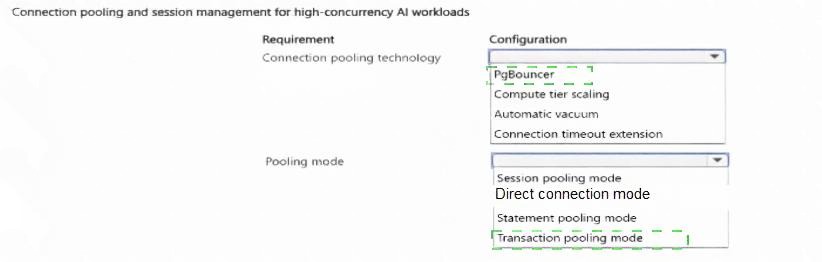
PgBouncer: The application is creating a new connection for every request, leading to connection exhaustion during peak traffic. PgBouncer is a lightweight, highly efficient connection pooler for PostgreSQL. It maintains a pool of active database connections and shares them among many clients, drastically reducing the overhead of connection setup and teardown. (Note: Azure Database for PostgreSQL Flexible Server offers PgBouncer as a built-in feature).

Transaction pooling mode: To maximize reuse for high-concurrency workloads, Transaction pooling mode is the most efficient. In this mode, a server connection is assigned to a client only for the duration of a single transaction. Once the transaction is complete, the connection is immediately returned to the pool for another client to use. This allows a very small number of actual database connections to serve a massive number of concurrent application requests.

Why the Other Options Are Incorrect

Compute tier scaling / Connection timeout extension: These are infrastructure or configuration tweaks that do not solve the fundamental issue of connection churn (opening and closing connections for every request).

Automatic vacuum: This is a database maintenance process for reclaiming storage, not a connection pooling technology.

Session pooling mode: In session mode, a server connection is assigned to a client for the entire duration of their session. While better than no pooling, it still holds connections open longer than necessary, limiting the maximum number of concurrent clients compared to transaction mode.

Statement pooling mode: This mode returns connections to the pool after every statement. It is rarely used because it breaks multi-statement transactions (unless auto-commit is used).

References

Microsoft Learn: Connection pooling in Azure Database for PostgreSQL - Flexible Server (Covers PgBouncer and pooling modes).
Question 19
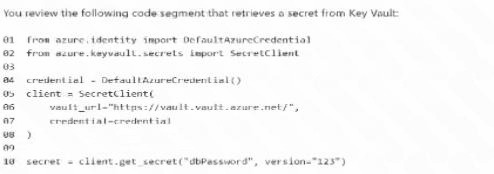
You are developing an AI application that retrieves database credentials from Key Vault by using the Azure SDK for Python.
The application must use managed identity for authentication.


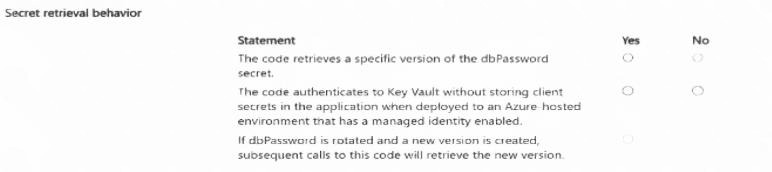
For each of the following statements, select Yes if the statement is true. Otherwise, select No. NOTE: Each correct selection is worth one point.
Show answerHide answer

Explanation


Explanation

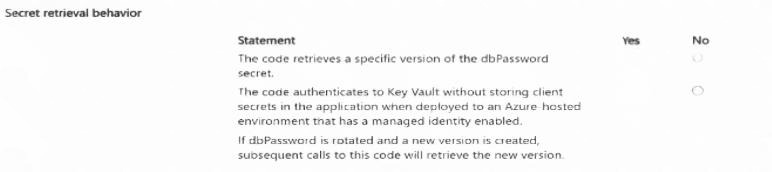
Statement 1 (Yes): Look at line 10 of the code: secret = client.get_secret("dbPassword", version="123"). The version="123" parameter explicitly tells the SDK to retrieve that exact version of the secret, rather than the latest one.

Statement 2 (Yes): Line 04 uses DefaultAzureCredential(). When an application is deployed to an Azure environment with a managed identity enabled (like Azure App Service, Azure Functions, or Azure Container Apps), DefaultAzureCredential automatically detects the managed identity and uses it to authenticate. This eliminates the need to store client secrets, passwords, or certificates in the code.

Statement 3 (No): Because line 10 explicitly pins the retrieval to version="123", the code will always retrieve version 123. If the secret is rotated and a new version (e.g., version "124") is created, this specific code will still return the older version "123" until the code is updated to request the new version or no version at all.

References

Microsoft Learn: DefaultAzureCredential overview
Question 20
You deploy an API to Azure Container Apps.
The solution must provide the following functionality:

• Support the concurrent activation of multiple application versions.
• Allocate a specific percentage of incoming requests to a secondary version
You need to configure revision behavior.

Which configurations should you use? To answer, move the appropriate configurations to the correct requirements. You may use each configuration once, more than once, or not at all. You may need to move the split bar between panes or scroll to view content.
NOTE: Each correct selection is worth one point.
Show answerHide answer

Explanation


Explanation

Multiple revision mode: By default, Azure Container Apps uses "Single revision mode," which automatically routes 100% of traffic to the latest deployed revision and deactivates older ones. To support concurrent activation of multiple application versions (allowing you to test a new revision while production traffic continues to flow to the stable version), you must enable Multiple revision mode.

Traffic splitting: Once multiple revisions are active, you can use traffic splitting to divide incoming requests between them. By assigning weights (e.g., 80% to the stable production revision and 20% to the new test revision), you can safely route a specific percentage of traffic to the new version for canary testing or A/B testing.

Why the Other Options Are Incorrect

Single revision mode: This mode forces all traffic to the newest revision, which would immediately affect production traffic and prevent testing a new revision in isolation.

Traffic isolation: This is not a standard Azure Container Apps configuration feature for version routing (though you can achieve isolation using dedicated environments or internal ingress). It does not handle percentage-based traffic allocation.

References

Microsoft Learn: Revisions in Azure Container Apps (Explains Single vs. Multiple revision modes).

Microsoft Learn: Traffic splitting in Azure Container Apps (Explains how to route percentages to different revisions).
Full mock exam

Sit the AI-200 exam before exam day

Full-length mocks with the same number of questions and the same time limit as the real AI-200 exam. Every attempt draws a new set of questions from the full bank, so you can keep going until you pass comfortably.

Get full AI-200 mock exam
  • 60questions per mock
  • 120 mintime limit
  • 142questions in the bank
  • Newmock on every attempt