Cisco certification · Exam 300-710

300-710 Mock Exam Page 10

Securing Networks with Cisco Firepower (300-710 SNCF)

Free 300-710 questions on Topic 1: Deployment, each with the answer and an explanation.

20 questions · 33 minutes · free, no sign-up

Topic 1: Deployment questions

91–100 of 108 free
Question 91 Choose 1
A hospital network needs to upgrade their Cisco FMC managed devices and needs to ensure that a disaster recovery process is in place. What must be done in order to minimize downtime on the network?
Show answerHide answer

Correct answer: C Configure the Cisco FMCs for failover

Explanation

Explanation

A hospital network requires high availability and minimal downtime. When upgrading the management platform (the Cisco FMC) and its managed devices, the biggest risk is a failure of the FMC itself, which would leave the managed devices without centralized policy management and event logging.

Configuring FMC High Availability (failover) ensures that a standby FMC is available if the primary FMC fails or needs to be taken offline for maintenance. This provides a disaster recovery mechanism for the management plane and helps administrators maintain management access and visibility with minimal disruption. However, FMC HA does not automatically guarantee a seamless upgrade; the upgrade procedure must follow Cisco's supported requirements and steps.

Why the Other Options Are Incorrect

A. Configure a second circuit to an ISP for added redundancy: This provides WAN redundancy, not disaster recovery for the FMC management platform or its upgrade process.

B. Keep a copy of the current configuration to use as backup: Having a backup is a good practice, but it does not provide high availability. Restoring a backup takes time and may cause downtime, which conflicts with the requirement to minimize downtime.

D. Configure the Cisco FMC managed devices for clustering: Clustering provides high availability for the data plane on supported FTD deployments, but it does not protect the FMC management plane. If the FMC becomes unavailable during an upgrade, clustered devices may continue enforcing their last deployed policies, but centralized management and event visibility can be affected. FMC HA specifically addresses management platform redundancy.

Reference

Cisco Documentation: Cisco Firepower Management Center High Availability Configuration Guide – Sections on FMC HA prerequisites, failover behavior, and supported upgrade procedures.
Question 92 Choose 1
An organization has a Cisco IPS running in inline mode and is inspecting traffic for malicious activity. When traffic is received by the Cisco IRS, if it is not dropped, how does the traffic get to its destination?
Show answerHide answer

Correct answer: C It is transmitted out of the Cisco IPS outside interface

Explanation

Explanation

When a Cisco IPS (Intrusion Prevention System) or FTD is deployed in inline mode, it acts as a "bump in the wire" at Layer 2. Traffic enters through one interface and, if it is not dropped by the inspection policy, it is forwarded out of the paired interface toward its destination.

In an inline set, the two interfaces are logically paired. The IPS inspects each packet in real time. If the packet is allowed, it is forwarded through the egress interface of the inline pair with minimal latency. The device forwards traffic at Layer 2 rather than routing it as a normal Layer 3 router would.

Why the Other Options Are Incorrect

A. It is retransmitted from the Cisco IPS inline set: The term "retransmitted" can imply that the IPS acts as a proxy or generates new packets, as in TCP termination. An inline IPS normally forwards the inspected packet through the egress interface rather than acting as a proxy.

B. The packets are duplicated and a copy is sent to the destination: This describes passive monitoring, such as tap or IDS mode, where a copy of the traffic is inspected while the original traffic continues along its normal path. In inline mode, the IPS is directly in the traffic path and inspects the actual traffic.

D. It is routed back to the Cisco ASA interfaces for transmission: In a typical inline deployment, the IPS is placed directly in the traffic path. It forwards allowed traffic through its own paired egress interface rather than routing it back to an ASA for transmission.

Reference

Cisco Documentation: Cisco Firepower Threat Defense Deployment Guide – Section on Inline Sets and Inline Mode, explaining how traffic entering an inline interface is inspected and forwarded through the paired interface when allowed.
Question 93 Choose 1
An engineer integrates Cisco FMC and Cisco ISE using pxGrid. Which role is assigned for Cisco FMC?
Show answerHide answer

Correct answer: C client

Explanation

Explanation

In the Cisco FMC and Cisco ISE integration using pxGrid, the roles are clearly defined:

Cisco ISE acts as the pxGrid server and controller, managing the grid, authenticating nodes, and publishing identity and context information.

Cisco FMC acts as a pxGrid client. It connects to the ISE pxGrid server, authenticates, and subscribes to the identity and session data that ISE publishes. FMC then uses this context, such as user identity, device type, and Security Group Tags (SGTs), to make more informed access control and threat containment decisions.

Why the Other Options Are Incorrect

A. Controller: The pxGrid controller role is handled by Cisco ISE, which manages the grid and its participating nodes.

B. Publisher: Although ISE publishes context data to the grid, publisher is not the standard pxGrid role assigned to FMC in this integration. FMC primarily consumes information provided by ISE.

D. Server: Cisco ISE functions as the pxGrid server. FMC initiates the connection and acts as the client.

Reference

Cisco Documentation: Cisco Platform Exchange Grid (pxGrid) Deployment Guide – Details on pxGrid node roles, including ISE as the server/controller and FMC as a client.
Question 94 Choose 1
A network engineer is tasked with minimising traffic interruption during peak traffic limes. When the SNORT inspection engine is overwhelmed, what must be configured to alleviate this issue?
Show answerHide answer

Correct answer: D Enable Automatic Application Bypass

Explanation

Explanation

Automatic Application Bypass (AAB) is designed to protect network availability when the Snort inspection engine becomes overwhelmed or experiences high latency. When the inspection engine is overloaded, such as during peak traffic periods, AAB monitors packet processing time. If the latency exceeds a configured threshold, AAB can automatically bypass inspection for affected traffic, depending on the configured policy and supported behavior. This helps minimize traffic interruption and maintain network availability. When processing conditions improve, normal inspection can resume according to the system's behavior and configuration.

Why the Other Options Are Incorrect

A. Enable IPS inline link state propagation: This feature ensures that if a link goes down on one side of an inline pair, the other side is also brought down. It helps prevent traffic blackholing but does not address high latency caused by an overloaded Snort inspection engine.

B. Enable Pre-filter policies before the SNORT engine failure: Prefilter policies, including Fastpath rules, can offload eligible traffic from Snort and reduce inspection workload. However, they require predefined rules and are not the same as the dynamic latency-based protection provided by AAB.

C. Set a Trust ALL access control policy: A Trust All rule allows matching traffic to bypass further inspection through the normal access control and intrusion inspection path. This can weaken security if applied broadly and does not provide the conditional, automatic response associated with AAB.

Reference

Cisco Documentation: Cisco Firepower Management Center Configuration Guide – Section on Automatic Application Bypass (AAB), covering latency thresholds and bypass behavior to help maintain network availability under high inspection load.
Question 95 Choose 1
A security analyst must create a new report within Cisco FMC to show an overview of the daily attacks, vulnerabilities, and connections. The analyst wants to reuse specific dashboards from other reports to create this consolidated one. Which action accomplishes this task?
Show answerHide answer

Correct answer: D Use the import feature in the newly created report to select which dashboards to add.

Explanation

Explanation

In Cisco Firepower Management Center (FMC), when creating a new report, you can use the Import feature to bring in existing dashboard widgets or sections from other reports. This allows the analyst to reuse specific views, such as those showing daily attacks, vulnerabilities, and connections, and consolidate them into a single new report. By importing these components, the analyst can build a comprehensive report without recreating each widget from scratch.

Why the Other Options Are Incorrect

A. Create a new dashboard object via Object Management to represent the desired views: Object Management is used for creating reusable objects, such as network objects, port objects, and security zones. It does not manage report dashboard components.

B. Modify the Custom Workflows within the Cisco FMC to feed the desired data into the new report: Custom Workflows are used for incident management and event analysis, not for building or consolidating report sections from multiple existing reports.

C. Copy the Malware Report and modify the sections to pull components from other reports: Copying a specific report template, such as the Malware Report, and modifying it is not the standard approach for consolidating content from multiple reports. The Import feature is intended to reuse supported report components when creating a new report.

Reference

Cisco Documentation: Cisco Firepower Management Center Configuration Guide – Section on Working with Reports, including creating a new report and using the Import feature to add supported sections from existing reports.
Question 96 Choose 1
administrator is configuring SNORT inspection policies and is seeing failed deployment messages in Cisco FMC . What information should the administrator generate for Cisco TAC to help troubleshoot?
Show answerHide answer

Correct answer: A A Troubleshoot" file for the device in question

Explanation

Explanation

When a deployment fails on a Cisco FTD managed by FMC, especially when related to Snort inspection policies, the most critical artifact for Cisco TAC to troubleshoot the issue is the Troubleshoot file generated for the specific managed device.

This file, often referred to as a troubleshoot file, contains the device's configuration, Snort policy compilation errors, system logs, and policy deployment details. It captures the exact state and errors encountered during the deployment process, which TAC needs to identify why the Snort policy failed to compile or apply.

Why the Other Options Are Incorrect

B. A "show tech" file for the device in question: While a "show tech" file contains useful system information, it primarily covers the general health and configuration of the device. It does not capture the specific policy deployment logs and Snort compilation errors required to troubleshoot a failed policy deployment.

C. A "show tech" for the Cisco FMC: A "show tech" on the FMC collects the health of the management server itself. While helpful in some scenarios, the deployment failure is tied to the managed device, making the device's troubleshoot file the primary requirement.

D. A "troubleshoot" file for the Cisco FMC: Similar to option C, this focuses on the FMC server. The most direct and specific file for a failed policy deployment to a specific FTD is the device's troubleshoot file.

Reference

Cisco Documentation: "Cisco Firepower Management Center Configuration Guide" – Section on Troubleshooting Policy Deployments, which explains how to generate troubleshoot files for managed devices to diagnose deployment failures.
Question 97 Choose 1

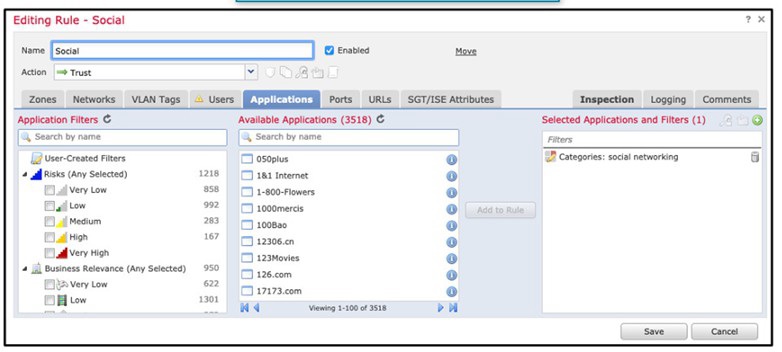
Refer to the exhibit.

An organization has an access control rule with the intention of sending all social media
traffic for inspection After using the rule for some time, the administrator notices that the
traffic is not being inspected, but is being automatically allowed What must be done to
address this issue?

Show answerHide answer

Correct answer: C Modify the rule action from trust to allow

Explanation

Explanation

Exhibit mein Access Control Rule ka Action "Trust" par set hai. Cisco Firepower mein, jab traffic kisi rule ke saath match karta hai jiska action Trust hota hai, to woh traffic deep inspection (Snort engine) ko bypass kar deta hai. Trust ka matlab hai ke firewall us traffic ko allow karta hai lekin uspar koi further inspection (intrusion prevention, file inspection, etc.) apply nahi karta.

Isi wajah se administrator dekh raha hai ke social media traffic inspect nahi ho raha balki automatically allow ho raha hai. Traffic ko inspect karne ke liye rule ka action Trust se "Allow" karna hoga. Allow action ke saath hi associated Intrusion Policy aur baaki inspection policies apply hoti hain.

Why the Other Options Are Incorrect

A. Modify the selected application within the rule: Rule mein "Social networking" application filter already sahi select kiya gaya hai (right side mein dikh raha hai). Application selection mein koi issue nahi hai; issue action ka hai.

B. Change the intrusion policy to connectivity over security: Intrusion policy change karne se traffic inspect karna shuru nahi hoga jab tak rule ka action Allow nahi hoga. Trust action intrusion policy ko bypass kar deta hai.

D. Add the social network URLs to the block list: Requirement traffic ko inspect karna hai, block karna nahi. Block list mein add karne se traffic block ho jayega, inspect nahi hoga.

Reference

Cisco Documentation: "Cisco Firepower Management Center Configuration Guide" – Section on Access Control Rule Actions, specifically Trust vs Allow. Trust action bypasses further inspection.
Question 98 Choose 1
A network administrator is configuring an FTD in transparent mode. A bridge group is set up and an access policy has been set up to allow all IP traffic. Traffic is not passing through the FTD. What additional configuration is needed?
Show answerHide answer

Correct answer: C An IP address must be assigned to the BVI.

Explanation

Explanation

When configuring a Cisco FTD in transparent mode and creating a bridge group, simply grouping the interfaces and allowing traffic in the Access Control Policy is not enough for the traffic to pass. In Cisco FTD, a bridge group requires a Bridge Virtual Interface (BVI).

Even in transparent mode, the BVI must be configured with an IP address (in the same subnet as the connected devices). This IP address is necessary for the FTD to participate in the network (e.g., for management, routing of some control plane traffic, or ARP resolution). Without an IP address assigned to the BVI, the bridge group does not become fully operational, and traffic will be dropped because the device cannot properly handle the Layer 3 requirements needed to bridge the traffic.

Why the Other Options Are Incorrect

A. The security levels of the interfaces must be set: Security levels are a concept from Cisco ASA (Adaptive Security Appliance). Cisco FTD uses Security Zones (assigning interfaces to zones) instead of numeric security levels.

B. A default route must be added to the FTD: While a default route is useful for routing management traffic out to the network, it is not the reason traffic is failing to pass through the transparent bridge. The bridge group itself operates at Layer 2 and doesn't require a route to forward bridged traffic.

D. A mac-access control list must be added to allow all MAC addresses: FTD does not use MAC ACLs to permit traffic in transparent mode. It uses the Access Control Policy. There is no requirement to add a MAC ACL for basic traffic pass-through.

Reference

Cisco Documentation: "Cisco Firepower Management Center Configuration Guide" – Section on Transparent Mode Bridge Groups and BVIs, which states that a BVI must be configured with an IP address for the bridge group to function.
Question 99 Choose 1
A network administrator cannot select the link to be used for failover when configuring an active/passive HA Cisco FTD pair. Which configuration must be changed before setting up the high availability pair?
Show answerHide answer

Correct answer: B The interface name must be removed from the interface on each Cisco FTD.

Explanation

Explanation

When setting up High Availability (Active/Passive) between two Cisco FTD devices, you must select a dedicated interface to act as the failover link. However, the FMC will only allow you to select a physical interface that is currently unconfigured (or has no name assigned to it).

In Cisco FTD, naming an interface (e.g., "inside" or "outside") effectively activates it and brings it into the configuration. If an interface already has a name, it is considered a "regular" interface and cannot be selected as the failover link. To use an interface for failover, you must first remove the name from the interface on both FTD devices, which makes it a "Not Configured" interface. Once unconfigured, you can select it as the failover link during the HA setup.

Why the Other Options Are Incorrect

A. An IP address in the same subnet must be added to each Cisco FTD on the interface: The failover link requires a dedicated IP address, but this is configured during the HA setup. The initial blocker preventing the selection is the interface name.

C. The name Failover must be configured manually on the interface on each Cisco FTD: The interface must be unnamed (unconfigured) before you can select it in the HA wizard. You do not manually name it "Failover" beforehand.

D. The interface must be configured as part of a LACP Active/Active EtherChannel: While an EtherChannel can be used as a failover link, it is not a mandatory requirement. A single unconfigured physical interface can be used.

Reference

Cisco Documentation: "Cisco Firepower Management Center Configuration Guide" – Section on FTD High Availability, which states that the failover link must be a physical interface that does not have a name configured.
Question 100 Choose 2
Which two considerations must be made when deleting and re-adding devices while managing them via Cisco FMC (Choose two).
Show answerHide answer

Correct answer: A, E Before re-adding the device In Cisco FMC, the manager must be added back.There is no option to re-apply NAT and VPN policies during registration is available, so users need to re-apply the policies after registration is completed.

Explanation

Explanation

When you delete a device from the Cisco Firepower Management Center (FMC) and want to re-add it, there are specific considerations regarding the device's state and policy application:

A. Before re-adding the device in Cisco FMC, the manager must be added back: When a device is deleted from the FMC, the FMC removes its management connection from the device. To re-register the device, you must first add the FMC back to the device (using the configure manager add CLI command on the FTD) so that a successful connection can be established between the two.

E. There is no option to re-apply NAT and VPN policies during registration is available, so users need to re-apply the policies after registration is completed: When you re-register an FTD device to the FMC, the FMC does not automatically push the previously configured NAT and VPN policies during the initial registration process. There is no checkbox or prompt to "re-apply" these specific policies at that moment. After the registration is complete, the administrator must manually deploy the configuration to re-apply the NAT and VPN policies to the device.

Why the Other Options Are Incorrect

B. The Cisco FMC web interface prompts users to re-apply access control policies: While the FMC may prompt you to deploy the configuration after adding a device, it does not specifically prompt you to "re-apply access control policies" as a mandatory step during the re-add process.

C. Once a device has been deleted, it must be reconfigured before it is re-added to the Cisco FMC: You do not need to completely reconfigure the device. The device retains its configuration, and you only need to re-establish the management connection (as stated in option A).

D. An option to re-apply NAT and VPN policies during registration is available: This is false. As stated in option E, there is no such option during registration; policies must be deployed after registration.

Reference

Cisco Documentation: "Cisco Firepower Management Center Configuration Guide" – Section on Device Management and Registration, which details the process of deleting and re-adding devices, including the need to re-add the manager on the device and manually deploy policies afterward.
Full mock exam

Sit the 300-710 exam before exam day

Full-length mocks with the same number of questions and the same time limit as the real 300-710 exam. Every attempt draws a new set of questions from the full bank, so you can keep going until you pass comfortably.

Get full 300-710 mock exam
  • 55questions per mock
  • 90 mintime limit
  • 420questions in the bank
  • Newmock on every attempt