An engineer must configure a Cisco FMC dashboard in a child domain. Which action must
be taken so that the dashboard is visible to the parent domain?
Show answerHide answer
Correct answer: DCreate a copy of the dashboard
Explanation
Explanation
In a Cisco Firepower Management Center (FMC) multi-domain deployment, domains are organized in a hierarchical structure (parent and child domains). A dashboard created in a child domain is private to that domain and is not automatically visible to the parent domain or sibling domains.
To make the dashboard visible in the parent domain, the engineer must create a copy of the dashboard. When copying the dashboard, FMC allows you to select the target domain (in this case, the parent domain) to where the copy will be placed. Once copied to the parent domain, the dashboard becomes available for users assigned to that domain.
Why the Other Options Are Incorrect
A. Add a separate tab:
Adding a tab to a dashboard only changes its layout within the child domain; it does not change the domain visibility of the dashboard itself.
B. Adjust policy inheritance settings:
Policy inheritance controls how policies (like Access Control or Intrusion policies) propagate from parent to child domains. It does not control dashboard visibility.
C. Add a separate widget:
Adding widgets customizes the dashboard's content within its current domain but does not move or share the dashboard to a parent domain.
Reference
Cisco Documentation: "Cisco Firepower Management Center Configuration Guide" – Section on Dashboard Management in Multiple Domains, which states that dashboards are domain-specific and must be copied to another domain (e.g., parent domain) to be visible there.
Question 52Choose 1
Which feature is supported by IRB on Cisco FTD devices?
Show answerHide answer
Correct answer: Bdynamic routing protocol
Explanation
Explanation
On Cisco Firepower Threat Defense (FTD) devices, Integrated Routing and Bridging (IRB) allows a device to route traffic between different Bridge Virtual Interfaces (BVIs) and routed interfaces. When IRB is configured, the BVI can be assigned an IP address and participate in dynamic routing protocols (such as OSPF, BGP, or EIGRP). This allows the FTD to advertise the bridged network into the routing domain and route traffic between the bridged segment and other routed networks.
Cisco documentation explicitly states that IRB supports dynamic routing protocols on the BVI, enabling the FTD to act as a router for the bridged traffic while still switching at Layer 2 within the bridge group.
Why the Other Options Are Incorrect
A. Redundant interface:
Redundant interfaces are a separate interface type in FTD (where two physical interfaces act as one for redundancy). IRB does not specifically enable or support redundant interfaces; they are independent features.
C. EtherChannel interface:
EtherChannel (port-channel) is a link aggregation technology. While EtherChannel interfaces can be members of a bridge group, IRB itself does not specifically "support" EtherChannel as a feature; the two are separate configuration concepts.
D. High-availability cluster:
HA clustering is a deployment mode for FTD devices (multiple devices acting as one). IRB is a routing/bridging feature and does not specifically enable or support HA clustering.
Reference
Cisco Documentation: "Cisco Firepower Management Center Configuration Guide" – Section on Integrated Routing and Bridging (IRB), which states that the BVI can participate in dynamic routing protocols.
Question 53Choose 1
An engineer is attempting to add a new FTD device to their FMC behind a NAT device with
a NAT ID of ACME001 and a password of Cisco388267669. Which command set must be
used in order to accomplish this?
When registering a Cisco Firepower Threat Defense (FTD) device to a Firepower Management Center (FMC) that is behind a NAT device, the configure manager add command must include the NAT ID as an optional argument. The correct syntax is:
In this scenario:
The FMC IP address (or hostname) is the first argument.
The registration key (password Cisco388267669) is the second argument.
The NAT ID (ACME001) is the third argument.
Option D correctly follows this order: → → ACME001.
Why the Other Options Are Incorrect:
A. configure manager add ACME001 – The arguments are in the wrong order. The NAT ID is placed first, which is invalid.
B. configure manager add ACME001 /– The NAT ID is placed before the registration key, which is the wrong order.
C. configure manager add DONTRESOLVE AMCE001 – If you use DONTRESOLVE, you do not provide an IP address. You would use configure manager add DONTRESOLVE . Providing both DONTRESOLVE and an IP address is invalid syntax .
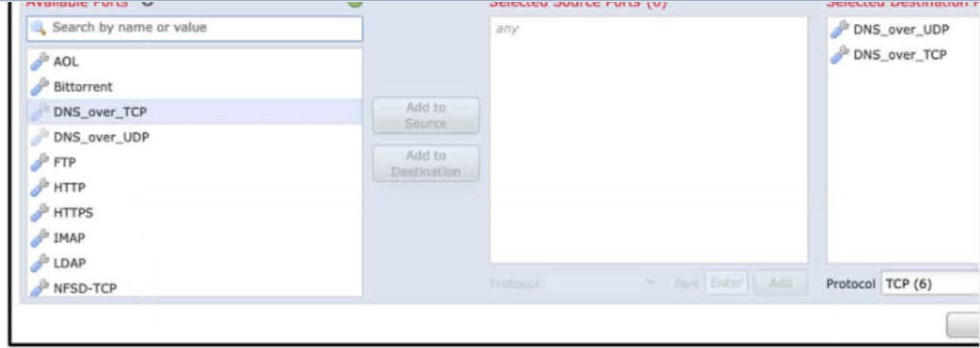
An engineer is modifying an access control policy to add a rule to Inspect all DNS traffic that passes it making the change and deploying the policy, they see that DNS traffic Is not being Inspected by the Snort engine.
Show answerHide answer
Correct answer: AThe action of the rule is set to trust instead of allow.
Explanation
Explanation
Exhibit ko dekhein: Rule configuration mein Destination Ports mein DNS_over_UDP aur DNS_over_TCP select kiye gaye hain, lekin Source Ports mein any set hai.
Cisco Firepower mein, jab aap kisi application ya port ko inspect karna chahte hain, to rule matching ke liye ports specify karna zaroori hota hai. DNS traffic (queries) client se random ephemeral source port (1024-65535) se originate hoti hai aur server ke port 53 (DNS) par jaati hai. Agar source port ko any chhod diya jaye, to ye rule keval un traffic ko match karega jahan source port specifically any ho — jo ke practically kisi traffic ko match nahi karta (kyunki source port hamesha koi number hota hai).
Isliye, DNS traffic ko Snort engine se inspect karwane ke liye source port ko any se hata kar specific source ports (jaise DNS_over_UDP / DNS_over_TCP) set karna chahiye, ya phir ports ko properly configure karna chahiye taake rule traffic ko match kar sake. (Aam taur par source port any hona chahiye, lekin FMC mein jab specific destination port select karte hain to source port field ko default any chhodne se rule match nahi karta, isliye usse explicitly empty karna ya proper value dena hota hai).
Why the Other Options Are Incorrect
A. The action of the rule is set to trust instead of allow:
Trust action traffic ko bypass kar deta hai (Snort inspection nahi hoti), lekin exhibit mein sirf port selection dikh rahi hai. Agar action Trust hota, to rule inspect hi nahi karta, lekin yahan main issue port configuration ka hai.
B. The rule must specify the security zone that originates the traffic:
Security zone specify karna rule ko narrow karne ke liye hai, lekin inspection na hone ka root cause port matching issue hai.
D. The rule must define the source network for inspection as well as the port:
Source network define karna optional hai. Issue port configuration mein hai, na ke source network mein.
Reference
Cisco Documentation: "Cisco Firepower Management Center Configuration Guide" – Section on Access Control Rule Ports, which explains that source/destination ports must be correctly configured for rules to match traffic.
Question 55Choose 1
An administrator is setting up Cisco Firepower to send data to the Cisco Stealthwatch
appliances. The NetFlow_Set_Parameters object is already created, but NetFlow is not
being sent to the flow collector. What must be done to prevent this from occurring?
Show answerHide answer
Correct answer: AAdd the NetFlow_Send_Destination object to the configuration
Explanation
Explanation
To successfully send NetFlow data to a Cisco Stealthwatch flow collector on Cisco FMC, you must configure both the global parameters and the destination. The NetFlow_Set_Parameters object only defines global settings such as timeouts and template rates; it does not tell the device where to send the data.
The FMC provides predefined FlexConfig objects for this purpose. According to Cisco documentation, the Netflow_Add_Destination object is the one that actually creates and configures the NetFlow export destination (the flow collector's IP address and port). Without applying this destination object (or a copy of it) in the FlexConfig policy, the FTD has no instructions to send flows to Stealthwatch, which explains why no data is reaching the collector. Therefore, adding the destination configuration is the necessary missing step.
Why the Other Options Are Incorrect
B. Create a Security Intelligence object to send the data to Cisco Stealthwatch:
Security Intelligence objects are used for blocking traffic based on reputation (IPs, URLs, domains). They do not handle NetFlow export.
C. Create a service identifier to enable the NetFlow service:
While the NetFlow service needs to be active, the core issue is the missing export destination. A service identifier alone does not specify where to send the flows.
D. Add the NetFlow_Add_Destination object to the configuration:
This is the correct object name. The option provided in the question is NetFlow_Send_Destination, which is a distractor; the valid Cisco object is Netflow_Add_Destination.
Reference
Cisco Documentation: "Configure NetFlow Secure Event Logging on Firepower Threat Defense" – Lists Netflow_Add_Destination as the object that creates the export destination.
Question 56Choose 1
Network traffic coining from an organization's CEO must never be denied. Which access
control policy configuration option should be used if the deployment engineer is not
permitted to create a rule to allow all traffic?
Show answerHide answer
Correct answer: CConfigure a trust policy for the CEO.
Explanation
Explanation
When a deployment engineer is restricted from creating a broad "Allow All" rule but needs to ensure that specific traffic (like the CEO's) is never denied, the best approach is to use the Trust action in an Access Control Policy rule.
By creating a rule that specifically matches the CEO's IP address or user identity and setting the action to Trust, the firewall allows the traffic to pass through without subjecting it to further inspection or blocking by lower-priority rules (such as IPS or Malware policies). The Trust action effectively bypasses the deeper inspection engines, ensuring the CEO's traffic is not inadvertently dropped by a security policy while still keeping the overall policy intact for everyone else.
Why the Other Options Are Incorrect
A. Configure firewall bypass:
There is no general "firewall bypass" configuration option in FMC/FTD access control policies that achieves this selective allow behavior. The correct mechanism is the Trust action.
B. Change the intrusion policy from security to balance:
Changing the intrusion policy alters the inspection strictness for all traffic matching that policy. It does not guarantee that the CEO's traffic will be exempt from denial, nor does it provide a targeted exception.
D. Create a NAT policy just for the CEO:
NAT policies translate IP addresses and do not control whether traffic is allowed or denied by the firewall's access control rules.
Reference
Cisco Documentation: "Cisco Firepower Management Center Configuration Guide" – Section on Access Control Rule Actions, specifically the Trust action, which allows traffic to bypass further inspection and prevents it from being dropped by subsequent rules.
Question 57Choose 1
An engineer is implementing Cisco FTD in the network and is determining which Firepower
mode to use. The organization needs to have multiple virtual Firepower devices working
separately inside of the FTD appliance to provide traffic segmentation Which deployment
mode should be configured in the Cisco Firepower Management Console to support these
requirements?
Show answerHide answer
Correct answer: Dmulti-instance
Explanation
Explanation
To create multiple virtual Cisco Firepower Threat Defense (FTD) devices that operate independently within a single physical FTD appliance for traffic segmentation, you must configure multi-instance mode.
In multi-instance deployment, the physical FTD appliance is divided into a container instance (which handles the management interface and orchestration) and multiple data instances. Each data instance acts as a fully separate, independent virtual FTD device with its own configuration, policies, and interfaces, allowing you to segment traffic and isolate management for different departments or tenants.
Why the Other Options Are Incorrect
A. Multiple deployment:
This is not a valid FTD deployment mode name.
B. Single-context:
This is the standard (default) deployment mode where the FTD appliance acts as a single, unified firewall. It does not support multiple independent virtual devices inside one appliance.
C. Single deployment:
Similar to single-context, this means the appliance operates as one single firewall instance, which does not meet the requirement for multiple isolated virtual devices.
Reference
Cisco Documentation: "Cisco Firepower Management Center Configuration Guide" – Section on FTD Multi-Instance Deployment, which explains how to configure a container instance and multiple data instances on a single FTD appliance for tenant segmentation.
Question 58Choose 1
A network administrator is configuring a Cisco AMP public cloud instance and wants to
capture infections and polymorphic variants of a threat to help detect families of malware.
Which detection engine meets this requirement?
Show answerHide answer
Correct answer: CEthos
Explanation
Explanation
In Cisco AMP for Endpoints, the Ethos detection engine is specifically designed for file grouping and uses fuzzy fingerprinting to identify malware families. When a new file is analyzed, Ethos compares its characteristics against known malware signatures and behaviors. If the file shares enough similarities (e.g., code structure or packer artifacts) with a known malware family, Ethos classifies it as a variant of that family. This capability allows AMP to detect polymorphic variants—malware that constantly changes its binary appearance to evade traditional signature-based detection—and group them into their correct malware family for effective blocking and tracking.
Why the Other Options Are Incorrect
A. RBAC:
Role-Based Access Control is an administrative feature for managing user permissions and roles within the AMP console. It is not a malware detection engine.
B. Tetra:
This is not a recognized detection engine in the Cisco AMP architecture for endpoint protection.
D. Spero:
The Spero engine is a machine learning-based technology used for analyzing the structure of executable files to identify unknown or zero-day threats. While powerful, its primary focus is proactive identification of new malicious executables, not the grouping of polymorphic variants into known malware families, which is the specific Ethos use case described in the scenario.
Reference
Cisco Documentation: "Cisco AMP for Endpoints Datasheet" – Outbreak Control section, which states the ability to "Block families of polymorphic malware".
Question 59Choose 1
An engineer is reviewing a ticket that requests to allow traffic for some devices that must
connect to a server over 8699/udp. The request mentions only one IP address,
172.16.18.15, but the requestor asked for the engineer to open the port for all machines
that have been trying to connect to it over the last week. Which action must the engineer
take to troubleshoot this issue?
Show answerHide answer
Correct answer: DFilter the connection events by the source port 8699/udp
Explanation
Explanation
The engineer needs to identify all the source machines that have been trying to connect to the server at 172.16.18.15 over the last week on port 8699/udp. To find these specific machines, the most direct and effective troubleshooting step is to review the firewall's connection events.
By filtering the connection events in the Cisco Firepower Management Center (FMC) specifically by destination port 8699/udp, the engineer will see all connection attempts to that server on that specific port. This allows the engineer to identify the source IP addresses of all the devices that attempted the connection, which can then be added to the access control policy.
Why the Other Options Are Incorrect
A. Use the context explorer to see the application blocks by protocol:
The Context Explorer provides high-level visual summaries and trends, but it is not granular enough to filter for a specific destination port and extract a list of specific source IP addresses for a custom policy update.
B. Use the context explorer to see the destination port blocks:
Similar to A, the Context Explorer is an analytical dashboard. It is not the primary tool for detailed, event-level filtering to find specific hosts attempting to reach a specific port.
C. Filter the connection events by the source port 8699/udp:
The request is to allow devices to connect to the server over port 8699. The server is listening on destination port 8699. The source ports used by the connecting devices will be random ephemeral ports. Filtering by source port 8699 would yield incorrect or no results.
Reference
Cisco Documentation: "Cisco Firepower Management Center Configuration Guide" – Section on Connection Events and Event Filtering.
Question 60Choose 1
A security engineer is configuring an Access Control Policy for multiple branch locations
These locations share a common rule set and utilize a network object called INSIDE_NET
which contains the locally significant internal network subnets at each location What
technique will retain the policy consistency at each location but allow only the locally
significant network subnet within the applicable rules?
Show answerHide answer
Correct answer: Dcreating an ACP with an INSIDE_NET network object and object overrides
Explanation
Explanation
To maintain a single, consistent Access Control Policy (ACP) across multiple branch locations while ensuring that the INSIDE_NET network object reflects the specific local subnets of each branch, the engineer should use Object Overrides.
Object overrides allow you to define a reusable object (like INSIDE_NET) at the global level and then override its value on a per-device (or per-domain) basis. In this scenario, the ACP is created once and shared across all branches, maintaining policy consistency. However, on the FMC, the engineer configures an override for the INSIDE_NET object for each specific FTD device, entering the locally significant subnet for that branch. When the policy is deployed, each FTD receives the same rule set but with its own specific IP subnet populated in the INSIDE_NET object.
Why the Other Options Are Incorrect
A. Utilizing policy inheritance:
Policy inheritance is a feature used in multi-domain FMC deployments (parent-child domains). It allows child domains to inherit policies from the parent, but it does not allow a single object within a shared policy to have different values per device.
B. Utilizing a dynamic ACP that updates from Cisco Talos:
Dynamic policies based on Talos intelligence are used for threat intelligence (Security Intelligence feeds), not for assigning locally significant internal subnets to a network object.
C. Creating a unique ACP per device:
While this would allow each branch to have its own local subnet in the policy, it violates the requirement to retain policy consistency. Managing dozens of unique ACPs becomes an administrative burden and increases the risk of policy drift.
Reference
Cisco Documentation: "Cisco Firepower Management Center Configuration Guide" – Section on Object Overrides, which explains how to use a single object in a shared policy while allowing device-specific values.
Full mock exam
Sit the 300-710 exam before exam day
Full-length mocks with the same number of questions and the same time limit as the real 300-710 exam. Every attempt draws a new set of questions from the full bank, so you can keep going until you pass comfortably.