Salesforce certification · Exam Salesforce-Platform-Developer

Salesforce-Platform-Developer Mock Exam Page 3

Salesforce Platform Developer - Plat-Dev-201

Free Salesforce-Platform-Developer mock exam questions 21–30, each with the answer and an explanation.

20 questions · 35 minutes · free, no sign-up

Free Salesforce-Platform-Developer questions

21–30 of 51 free
Question 21 Choose 3
Refer to the code snippet below:
import fetchOps from '@salesforce/apex/OpportunitySearch.fetchOpportunities';
@wire(fetchOps) opportunities;
When a Lightning web component is rendered, a list of opportunities that match certain criteria should be retrieved from the database and displayed to the end-user.
Which three considerations must the developer implement to make the fetchOpportunities method available when Lightning web component?
Show answerHide answer

Correct answer: A, C, D The method must be annotated with the @AuraEnabled annotationThe method cannot mutate the result set retrieved from the databaseThe method must specify the (cacheable=true) attribute.

Explanation

Explanation:

Why these options are correct:

A. @AuraEnabled — Any Apex method that needs to be exposed to Lightning components, either through @wire or imperative calls, must be marked as static and annotated with @AuraEnabled.

C. Cannot mutate result set / read-only data — When data is provisioned through the wire service, the data stream is immutable, and Apex methods used with cacheable=true must be strictly read-only, meaning they cannot perform DML operations.

D. cacheable=true — To use an Apex method with the @wire service adapter, the @AuraEnabled annotation must explicitly include the cacheable=true attribute.

Why the other options are incorrect:

B. @InvocableMethod — This annotation is used to expose Apex methods to Salesforce Flow and other supported automation tools, not for LWC wire adapters.

E. continuation=true — Continuations are used for handling long-running callouts asynchronously in Apex controllers. They are not a mandatory requirement for standard component wiring.

References
Lightning Web Components Developer Guide: Wire an Apex Method
Lightning Web Components Developer Guide: Client-Side Caching of Apex Results
Question 22 Choose 1
A developer created a new after insert trigger on the Lead object that creates Task records for each Lead. After deploying to production, an existing outside integration that inserts Lead records in batches to Salesforce is occasionally reporting total batch failures being caused by the Task insert statement. This causes the integration process in the outside system to stop, requiring a manual restart. Which change should the developer make to allow the integration to continue when some records in a batch cause failures due to the Task insert statement, so that manual restarts are not needed?
Show answerHide answer

Correct answer: A Use the Database method with allOrNone set to false.

Explanation

Explanation:

Why A is correct:
By default, standard DML statements, such as insert TaskList;, operate with allOrNone = true. This means that if even a single record in the transaction or batch fails validation or encounters an error, the entire database transaction rolls back, throwing an unhandled exception that causes the batch to fail entirely. Using the Database.insert(list, false) method allows partial success: valid records are successfully inserted, while failed records return result objects that can be logged or ignored without aborting the entire batch.

Why the other options are incorrect:

C. Use a try-catch block after the insert statement:
If a DML statement fails in a bulk context with allOrNone = true, a standard try-catch will catch the exception and roll back the entire batch anyway, preventing the successful records from committing unless paired with partial database methods.

B & D. Removing permissions or deactivating core automation business logic:
Removing permissions or deactivating core automation business logic would break the integration requirements and compliance rules. These approaches do not provide the required partial-success behavior for the DML operation.

References
Salesforce Apex Developer Guide: Using Database Methods for Partial Success
Question 23 Choose 1
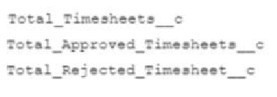
A developer created these three Rollup Summary fields in the custom object, Project_______c:


The developer is asked to create a new field that shows the ratio between rejected and approved timesheets for a given project. Which should the developer use to implement the business requirement in order to minimize maintenance overhead?
Show answerHide answer

Correct answer: B Formula field

Explanation

Explanation:

Key Point:
We already have roll-up summary fields on the Project object:
➡️ Total_Timesheets__c
➡️ Total_Approved_Timesheets__c
➡️ Total_Rejected_Timesheet__c
Now, the requirement is to calculate the ratio of rejected to approved timesheets.
This is a calculation between fields that already exist → no need to use automation (Flow, Trigger, Workflow).

Options Breakdown:

A. Record-triggered flow ❌
Flows are useful for automations or updating fields based on conditions.
But here, it’s just a simple formula calculation. Using a Flow would add unnecessary maintenance overhead.

B. Formula field ✅
Perfect choice.
You can define a formula like:
Total_Rejected_Timesheet__c / Total_Approved_Timesheets__c
Automatically recalculates whenever the underlying roll-up fields change.
Zero maintenance overhead, because it’s declarative and self-updating.

C. Apex trigger ❌
Triggers are overkill here. You’d only use Apex if the calculation were too complex for formulas.

D. Field Update action ❌
Workflow Field Updates are not suitable because they require additional automation and are being replaced by Flow.
Also, a formula field already solves this directly without extra processes.

✅ Correct Answer:
B. Formula field

Reference:
Salesforce Docs – Formula Fields
Question 24 Choose 2
A development team wants to use a deployment script to automatically deploy to a sandbox during their development cycles. Which two tools can they use to run a script that deploys to a sandbox? Choose 2 answers
Show answerHide answer

Correct answer: A, C VSCodeSFDX CLI

Explanation

Explanation:

A. VS Code ✅
Visual Studio Code (with Salesforce Extensions) can run Salesforce CLI commands and scripts.
You can create deployment scripts (using package.xml, metadata API, etc.) and execute them from VS Code’s terminal.
✅ Correct.

B. Change Sets ❌
Change Sets are a point-and-click tool in the Salesforce UI.
They cannot be scripted or automated — they’re manual.
❌ Incorrect.

C. SFDX CLI ✅
The Salesforce CLI (sfdx) is specifically designed for automation.
You can script deployments using commands like:
sfdx force:source:deploy -u MySandbox -p force-app/main/default
✅ Correct.

D. Developer Console ❌
The Developer Console is mainly for running queries, executing anonymous Apex, and debugging logs.
It has nothing to do with scripted deployments.
❌ Incorrect.

✅ Correct Answers:
A. VS Code
C. SFDX CLI

Reference:
Salesforce CLI Command Reference
Salesforce Extensions for VS Code
Question 25 Choose 3
A developer needs to allow users to complete a form on an Account record that will create a record for a custom object. The form needs to display different fields depending on the user's job role. The functionality should only be available to a small group of users. Which three things should the developer do to satisfy these requirements? Choose 3 answers
Show answerHide answer

Correct answer: A, B, C Create a Dynamic Form,Add a Dynamic Action to the Account Record Page.Create a Custom Permission for the users.

Explanation

Explanation:

Let’s look at each option to see which three will work best:

Option A: Create a Dynamic Form
A Dynamic Form lets the developer build a flexible form on a record page, like the Account record. It can show different fields based on rules, such as the user’s job role, using features like field visibility rules. This fits the need to display different fields depending on the role.
It’s a great start for creating the form on the Account page.

Option B: Add a Dynamic Action to the Account Record Page
A Dynamic Action is a button or link on the record page that can start a process, like creating a custom object record. By adding this action to the Account Record Page, users can use the form to create the new record. This ties the form to the Account and makes it easy to access.
It’s perfect for making the functionality available on the right page.

Option C: Create a Custom Permission for the users
A Custom Permission lets the developer control who can use a feature. By creating a permission and assigning it to the small group of users, the developer can restrict access to the form and action. This can be combined with profiles or permission sets to limit who sees or uses it.
This ensures only the right users can access the feature.

Option D: Add a Dynamic Action to the Users' assigned Page Layouts
Page Layouts control how records look for users, but Dynamic Actions are tied to Lightning Record Pages, not traditional layouts. Adding an action here wouldn’t work well because it’s not the modern way to handle this in Salesforce Lightning.
This option is outdated and less effective for this requirement.

Option E: Create a Lightning web component
A Lightning web component is a custom piece of code that can build a form. While it could work, it requires more effort to code, test, and maintain compared to using Dynamic Forms, which are built into Salesforce. It’s also harder to adjust fields based on roles without extra work.
This is overkill when simpler tools like Dynamic Forms can do the job.

Why A, B, and C?
Create a Dynamic Form (A): This builds the form and lets it show different fields based on the user’s job role using built-in rules.
Add a Dynamic Action to the Account Record Page (B): This adds a button on the Account page to start the form and create the custom object record.
Create a Custom Permission for the users (C): This limits the feature to the small group of users by controlling who can see or use the action and form.

Together, these three steps meet all the requirements without extra complexity. The developer can set up the form and action in the Lightning App Builder and use permissions to restrict access, keeping everything easy to manage.

Example Idea:
Imagine the form is like a worksheet on the Account page. For a manager, it shows extra fields like budget details, but for a team member, it shows only basic info. The Dynamic Form handles this switch, the Dynamic Action starts the worksheet, and the Custom Permission makes sure only a few users (like managers) can see it.

Reference:
Salesforce Documentation: Dynamic Forms (explains how to create flexible forms).
Salesforce Documentation: Custom Permissions (covers restricting access).
Salesforce Documentation: Actions in Lightning (details on adding actions to record pages).

Summary:
The developer should create a Dynamic Form (A), add a Dynamic Action to the Account Record Page (B), and create a Custom Permission for the users (C). These three steps will build the form, make it accessible, and limit it to the right users.
Question 26 Choose 1
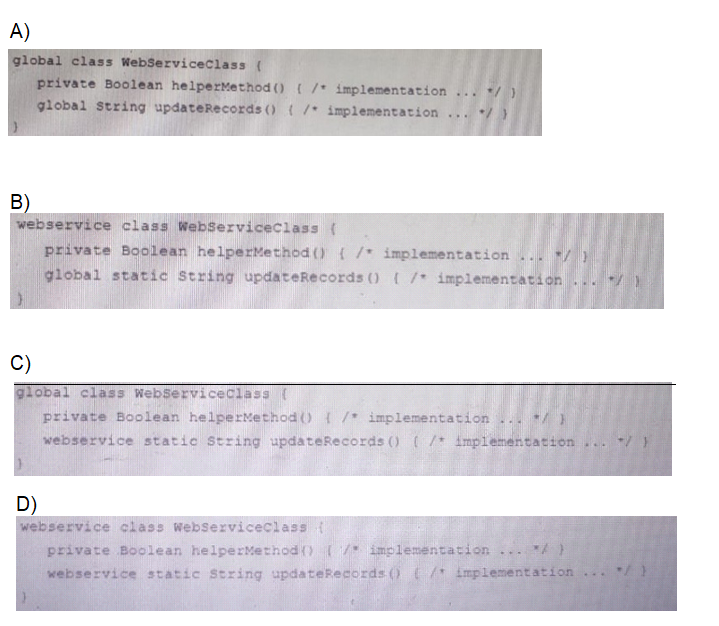
A developer needs to implement a custom SOAP Web Service that is used by an external Web Application. The developer chooses to Include helper methods that are not used by the Web Application In the Implementation of the Web Service Class. Which code segment shows the correct declaration of the class and methods?
Show answerHide answer

Correct answer: C Option C

Explanation

Explanation:

Why Option C is Correct:
The code structure in Option C follows all the mandatory requirements for a SOAP web service class in Salesforce:

1. global class WebServiceClass: A class containing web service methods must be declared as global. This makes the class accessible outside of your Salesforce org's namespace, which is a requirement for any external application to call it.

2. webservice static String updateRecords(): This is the correct syntax for the method that will be exposed as a SOAP endpoint.
→ The webservice keyword is mandatory to expose the method.
→ Web service methods must be declared static.
→ The method must be defined as global or public. (While public works, global is often used for consistency as the class itself is global).

3. private Boolean helperMethod(): This is a perfectly valid way to include a helper method. By declaring it as private, it is hidden from the external web application and can only be used within the class itself. This is a best practice for encapsulation.

❌ Why the Other Options Are Incorrect:

Option A:
→ global with sharing class WebServiceClass → The global modifier is correct.
→ global String updateRecords() → This is incorrect. The method is missing the critical webservice keyword and is not declared as static. Without webservice, it will not be exposed as a SOAP endpoint.
→ global Boolean helperMethod() → While technically possible, making a helper method global unnecessarily exposes it as a public API, which is a bad practice. It should be private.

Option B:
webservice class WebServiceClass → This is fundamentally incorrect. The webservice keyword is only valid for methods, not for classes. A class itself cannot be declared as webservice. This will cause a compilation error.

Option D:
webservice class WebServiceClass → This has the same critical error as Option B. You cannot use webservice as a modifier for a class. This is invalid syntax and will fail to compile.

Reference:
Apex Developer Guide - Defining Apex Web Services: This is the primary source. It explicitly states:
→ "Use the webservice keyword to define these methods."
→ "You must declare web service methods as static."
→ "Any class containing a method defined with the webservice keyword must be declared as global."
→ "If a method is defined with the webservice keyword, you must also declare the method as static."
Question 27 Choose 1
Universal Containers has a Visualforce page that displays a table of every Container_c. being ……. Is falling with a view state limit because some of the customers rent over 10,000 containers. What should a developer change about the Visualforce page to help with the page load errors?
Show answerHide answer

Correct answer: D Implement pagination with a StandardSetController,

Explanation

Explanation:

- StandardSetController is specifically designed for handling large datasets efficiently in Visualforce pages.
- It provides built-in pagination, reducing the amount of data stored in the view state and improving page performance.
- Since customers rent over 10,000 containers, loading all records at once would exceed the 170KB view state limit. Pagination ensures only a subset of records is loaded at a time.

✔️ Why D. StandardSetController is the best solution:

✅ Built-in support for pagination in Visualforce pages
✅ Handles view state efficiently
✅ Requires no custom code for managing offset, limits, or record counts
✅ Works well with Visualforce apex:pageBlockTable or apex:repeat

Key Takeaways:

✅ StandardSetController (D) is the Salesforce-recommended solution for large datasets.
🚫 Avoid manual offset (B/C) or transient hacks (A).
Question 28 Choose 3
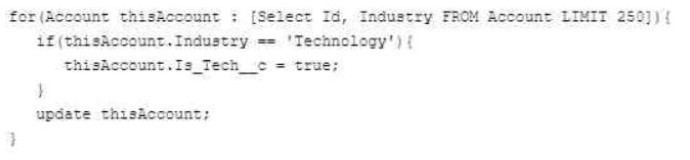
Refer to the following code snippet for an environment that has more than 200 Accounts belonging to the Technology' industry:


which three statements are accurate about debug logs? Choose 3 answers
Show answerHide answer

Correct answer: B, C, D The maximum size of a debug log is 5 MB.Only the 20 most recent debug logs for a user are kept.Debug logs can be set for specific users, classes, and triggers.

Explanation

Explanations:

A. Debug log levels are cumulative...

❌ Incorrect.
Log levels are NOT cumulative in Salesforce.
For example, selecting FINE logs only FINE-level events (not DEBUG, INFO, etc.).
Key Point: Each level must be explicitly set in the TraceFlag settings.

B. The maximum size of a debug log is 5 MB.

✅ Correct.
Salesforce enforces a 5 MB limit per debug log. If exceeded, the log is truncated.
Tip: Use selective logging (e.g., filters for classes/triggers) to stay within limits.

C. Only the 20 most recent debug logs for a user are kept.

✅ Correct.
Salesforce retains only the last 20 debug logs per user. Older logs are automatically deleted.
Note: Logs can be downloaded or deleted manually to free space.

D. Debug logs can be set for specific users, classes, and triggers.

✅ Correct.
Debug logs are configurable via TraceFlags, which can target:
Specific users (e.g., your own user for testing).
Specific Apex classes or triggers (to narrow down debugging).
How to Set: Setup → Debug Logs → Add Trace Flags.

E. System debug logs are retained for 24 hours.

❌ Incorrect.
Debug logs are retained indefinitely (until the 20-log limit is reached).
Exception: Org-wide monitoring logs (not user debug logs) may have retention policies.
Question 29 Choose 1
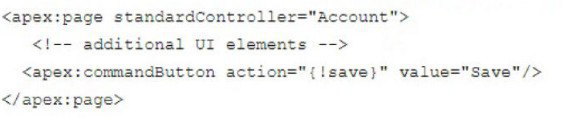
Consider the following code snippet for a Visualforce page that is launched using a Custom Button on the Account detail page layout.


When the Save button is pressed the developer must perform a complex validation that involves multiple objects and, upon success, redirect the user to another Visualforce page. What can the developer use to meet this business requirement?
Show answerHide answer

Correct answer: B Controller extension

Explanation

Explanation:

The Visualforce page is using a standard controller for the Account object:


However, you need to:

Perform complex validation logic involving multiple objects
Redirect the user to a different Visualforce page upon success
A controller extension is the correct approach because it allows you to:

Extend the standard controller
Add custom Apex logic
Still leverage the standard controller’s built-in actions (like save()), while overriding or supplementing them

✔️ Why Controller Extension is best:

Access to the standard controller’s context (Account record)
Ability to add custom logic before or after the save()
Supports redirecting to other pages via Page Reference

❌ Why the other options are incorrect:

A. Custom controller
❌ Would replace the standard controller entirely
You'd need to re-implement all standard logic, including save() — more work than needed

C. Validation rule
❌ Limited to single-object field validation
Can’t handle multi-object logic or perform redirects

D. Apex trigger
❌ Triggers are backend-only logic
Cannot redirect or provide user-facing feedback
Not intended for complex UI control or flow logic
Question 30 Choose 2
A development team wants to use a deployment script lo automatically deploy lo a sandbox during their development cycles. Which two tools can they use to run a script that deploys to a sandbox? Choose 2 answers
Show answerHide answer

Correct answer: A, B VS CodeSFDX CLI

Explanation

Explanation:

To automatically deploy code to a sandbox using a script, the development team needs tools that support automation and scripting. The correct tools are:

✔️ A. VS Code (Visual Studio Code)

✅ Used with the Salesforce Extension Pack
Allows running SFDX CLI commands directly from the terminal
Supports automated development workflows when combined with scripts

✔️ B. SFDX CLI (Salesforce CLI)

✅ The core tool for automated deployments in Salesforce
Enables scripting of deployments with commands like:

sfdx force:source:deploy -u SandboxAlias

Works seamlessly in CI/CD pipelines

❌ Incorrect Answers:

C. Change Sets
❌ Manual deployment tool
Not scriptable or automatable
Requires point-and-click actions in the UI

D. Developer Console
❌ Used for manual development and debugging
Cannot deploy code or run deployment scripts
Full mock exam

Sit the Salesforce-Platform-Developer exam before exam day

Full-length mocks with the same number of questions and the same time limit as the real Salesforce-Platform-Developer exam. Every attempt draws a new set of questions from the full bank, so you can keep going until you pass comfortably.

Get full Salesforce-Platform-Developer mock exam
  • 60questions per mock
  • 105 mintime limit
  • 184questions in the bank
  • Newmock on every attempt