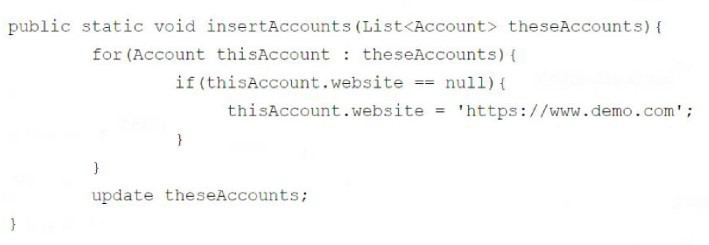
When the code executes, a DML exception is thrown. How should a developer modify the code to ensure exceptions are handled gracefully?
Show answerHide answer
Correct answer: C Implement a try/catch block for the DML.
Explanation
Explanation:In the code shown:
public static void insertAccounts(List
for(Account thisAccount : theseAccounts){
if(thisAccount.website == null){
thisAccount.website = 'https://www.demo.com';
}
}
update theseAccounts;
}
The method always calls update theseAccounts.
If even one record in theseAccounts causes an error (for example, a validation rule, required field missing, or duplicate rule), the entire DML operation fails and throws a DmlException.
To handle such errors gracefully, a developer should wrap the DML statement in a try/catch block. This allows you to catch the exception, log it, and maybe handle records individually if needed.
Corrected Example with try/catch:
public static void insertAccounts(List
for(Account thisAccount : theseAccounts){
if(thisAccount.website == null){
thisAccount.website = 'https://www.demo.com';
}
}
try {
update theseAccounts;
} catch (DmlException e) {
// Handle gracefully: log error or take corrective action
System.debug('Update failed: ' + e.getMessage());
}
}
Why not the other options?
A. Upsert → Wouldn’t solve the exception problem. Upsert only helps when you want to insert or update based on an external ID. Errors like validation failures would still throw exceptions.
B. Change Data Capture → This is for event-driven integration, not error handling.
D. Remove null items → That prevents null pointer issues but doesn’t stop DML exceptions (e.g., validation rules or required fields).
Reference:
Salesforce Apex Developer Guide – Exception Handling