Salesforce certification · Exam Salesforce-Platform-Developer

Salesforce-Platform-Developer Mock Exam Page 2

Salesforce Platform Developer - Plat-Dev-201

Free Salesforce-Platform-Developer mock exam questions 11–20, each with the answer and an explanation.

20 questions · 35 minutes · free, no sign-up

Free Salesforce-Platform-Developer questions

11–20 of 51 free
Question 11 Choose 1
Universal Containers wants to ensure that all new leads created in the system have a valid email address. They have already created a validation rule to enforce this requirement, but want to add an additional layer of validation using automation. What would be the best solution for this requirement?
Show answerHide answer

Correct answer: C Use a before-save Apex trigger on the Lead object to validate the email address and display an error message If it Is invalid

Explanation

Explanation:

C. Use a before-save Apex trigger on the Lead object to validate the email address and display an error message if it is invalid.
A before-save Apex trigger is the most effective solution for this requirement. It executes before the record is saved to the database, allowing you to validate data and prevent the record from being created or updated if the validation fails. Triggers can display a user-friendly error message directly on the page, which is a powerful way to provide immediate feedback to the user. This approach also works for all methods of record creation, including the user interface, data imports, and APIs, ensuring the validation is applied universally. This method is an excellent way to add an "additional layer of validation" to an existing validation rule.

❌ Why the Other Options Are Incorrect?

A. Submit a REST API Callout with a JSON payload and validate the fields on a third-party system.
While you could perform an API callout from Apex, doing so in a before-save trigger is not allowed. Callouts must be made from asynchronous Apex (future methods or queueable Apex) or after-save triggers, and they don't block the DML operation. You can't use an API callout to prevent a save from happening.

B. Use an Approval Process to enforce the completion of a valid email address using an outbound message action.
An Approval Process is designed to require a record to be approved before it can be finalized. It's not a direct data validation tool that prevents a record from being saved. An Outbound Message is an action that sends data to an external system, but it cannot be used to display an error message on the Salesforce record page or prevent the record from being saved.

D. Use a custom Lightning web component to make a callout to validate the fields on a third-party system.
This solution is not comprehensive enough. A Lightning Web Component (LWC) would only enforce the validation when a user is creating a lead via that specific component. It would not apply if a lead is created through a different method, such as a standard page layout, a data import, or an API call. For universal validation, a trigger is a better choice.
Question 12 Choose 1
Universal Containers needs to create a custom user interface component that allows users to enter information about their accounts. The component should be able to validate the user input before saving the information to the database. What is the best technology to create this component?
Show answerHide answer

Correct answer: B Lightning Web Components

Explanation

Explanation:

Lightning Web Components is Salesforce's modern, standards-based UI framework for building components on the Lightning Platform. It is the recommended approach for creating custom UI on Salesforce today due to its performance, reusability, and use of modern web standards like HTML, CSS, and JavaScript.

Validation in LWC is straightforward and can be implemented in two ways:
➡️ Built-in Validation: Base components like and have built-in validation attributes (e.g., required, pattern). When a user interacts with the component, it automatically checks for these conditions.
➡️ Custom Validation: For more complex business logic, you can write JavaScript to perform custom validation checks. You can use methods like checkValidity() and reportValidity() on the input fields to display user-friendly error messages before the data is processed or saved.

Why the Other Options Are Not the Best Choice?

A. Flow: While Flow can be used to build user interfaces through Screen Flows, it is a declarative tool for automating business processes. It's great for building multi-step wizards or simple forms, but it is not the ideal technology for creating a highly customized, standalone UI component. Flow's validation capabilities are more limited compared to LWC.

C. Visualforce: Visualforce is an older, tag-based framework. While it is still supported and used in many legacy applications, it is generally considered outdated. Salesforce recommends using Lightning Web Components for all new development because they are more performant and align with the modern web development ecosystem.

D. VUE JavaScript framework: Vue is an external, general-purpose JavaScript framework. While it's possible to build a Vue application and integrate it with Salesforce, it's not a native Salesforce technology. This approach would require more effort to set up, secure, and maintain, as you would have to manage the connection to the Salesforce platform, handle authentication, and integrate with the Salesforce Lightning Design System (SLDS) manually. It's not a native component-building solution.
Question 13 Choose 3
Which three Salesforce resources can be accessed from a Lightning web component? Choose 3 answers
Show answerHide answer

Correct answer: A, C, D SVG resourcesContent asset filesStatic resources

Explanation

Explanation:

Lightning Web Components (LWCs) can access a variety of Salesforce-managed resources. Here's a breakdown of what's correct:

✔️ A. SVG resources
✅ True
LWCs can use custom SVGs (either inline or from static resources).
You can embed them in templates or use them as part of component branding.

✔️ C. Content asset files
✅ True
Content assets (uploaded via Salesforce CMS or Files) can be referenced in LWCs using ContentAsset or by constructing public URLs.

✔️ D. Static resources
✅ True
You can import static resources (like images, CSS, JS, or fonts) using:
import myResource from '@salesforce/resourceUrl/resourceName';

❌ Incorrect Options:

B. Third-party web components
❌ False
LWC doesn’t natively support importing external web components unless wrapped manually in LWC or exposed via static resources — and they must follow strict security policies.

E. All external libraries
❌ False
You can use some external libraries by loading them via static resources, but not all are supported due to Locker Service/security restrictions.
External libraries must be manually loaded using loadScript() or loadStyle().
Question 14 Choose 1
Universal Containers wants to back up all of the data and attachments in its Salesforce org once month. Which approach should a developer use to meet this requirement?
Show answerHide answer

Correct answer: D Define a Data Export scheduled job.

Explanation

Explanation: Scheduling a Data Export job is the best way to back up all the data and attachments in a Salesforce org once a month. The Data Export job can be scheduled to run at a certain frequency so that the data can be backed up on a regular basis. This makes it easy to restore the data in case of any emergency.
Question 15 Choose 1
A developer must perform a complex SQL query that joins two objects in a Lightning
component.
How can the Lightning component execute the query?
Show answerHide answer

Correct answer: B Invoke an Apex class with the method annotated as @AuraEnabled to perform thequery.

Explanation

Explanation:

Why B is correct: Lightning components (both LWC and Aura) run on the client-side (the browser) and do not have direct access to the database or SOQL. To perform database operations, complex queries, or relationships/joins between objects, developers must write server-side Apex code. Exposing an Apex method with the @AuraEnabled annotation makes it callable from the Lightning component.

Why the other options are incorrect:

A (Flow): While Flows can be invoked from Lightning components, writing complex server-side queries or multi-object joins is best practice and most efficiently handled in Apex.

C (LWC wrapper): Client-side components cannot execute database queries directly without a server-side backend.

D (Streaming API): The Streaming API is used for real-time event subscription (such as PushTopics or Change Data Capture), not for executing standard database queries on demand.

Reference:
Salesforce Apex Developer Guide: Using @AuraEnabled Annotation
Lightning Web Components Developer Guide: Calling Apex
Question 16 Choose 1
A developer must provide custom user interfaces when users edit a Contact in either Salesforce Classic or Lightning Experience. What should the developer use to override the Contact's Edit button and provide this functionality?
Show answerHide answer

Correct answer: A A Visualforce page in Salesforce Classic and a Lightning component in Lightning Experience

Explanation

Explanation:

Salesforce allows developers to override standard buttons like Edit with custom user interfaces, but the technology used depends on the UI experience:

✔️ For Salesforce Classic:

You can only override buttons using Visualforce pages.
Lightning components do not run in Classic.

✔️ For Lightning Experience:

You can override buttons with Lightning components (Aura or LWC).
This allows for modern, responsive UI.

🔧 Override Configuration:

When overriding the Edit button on the Contact object, Salesforce lets you specify:

A Visualforce Page for Classic
A Lightning Component for Lightning Experience

❌ Why other options are incorrect:

B. Lightning component in both Classic and Lightning
❌ Lightning components cannot run in Classic.

C. Visualforce page and Lightning page
❌ Lightning pages (App Builder pages) are not valid for button overrides.

D. Lightning page in Classic and Visualforce in Lightning
❌ Lightning pages don’t work in Classic, and Visualforce in Lightning defeats the purpose of a native Lightning experience.
Question 17 Choose 1

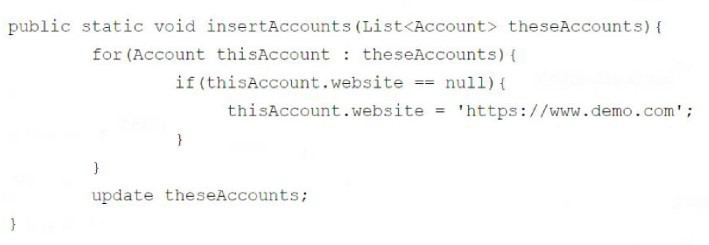
When the code executes, a DML exception is thrown. How should a developer modify the code to ensure exceptions are handled gracefully?
Show answerHide answer

Correct answer: C Implement a try/catch block for the DML.

Explanation

Explanation:

In the code shown:

public static void insertAccounts(List theseAccounts){
for(Account thisAccount : theseAccounts){
if(thisAccount.website == null){
thisAccount.website = 'https://www.demo.com';
}
}
update theseAccounts;
}

The method always calls update theseAccounts.
If even one record in theseAccounts causes an error (for example, a validation rule, required field missing, or duplicate rule), the entire DML operation fails and throws a DmlException.
To handle such errors gracefully, a developer should wrap the DML statement in a try/catch block. This allows you to catch the exception, log it, and maybe handle records individually if needed.

Corrected Example with try/catch:
public static void insertAccounts(List theseAccounts){
for(Account thisAccount : theseAccounts){
if(thisAccount.website == null){
thisAccount.website = 'https://www.demo.com';
}
}
try {
update theseAccounts;
} catch (DmlException e) {
// Handle gracefully: log error or take corrective action
System.debug('Update failed: ' + e.getMessage());
}
}

Why not the other options?

A. Upsert → Wouldn’t solve the exception problem. Upsert only helps when you want to insert or update based on an external ID. Errors like validation failures would still throw exceptions.

B. Change Data Capture → This is for event-driven integration, not error handling.

D. Remove null items → That prevents null pointer issues but doesn’t stop DML exceptions (e.g., validation rules or required fields).

Reference:
Salesforce Apex Developer Guide – Exception Handling
Question 18 Choose 2
A developer created a trigger on the Account object and wants to test if the trigger is properly bulklfield. The developer team decided that the trigger should be tested with 200 account records with unique names. What two things should be done to create the test data within the unit test with the least amount of code? Choose 2 answers
Show answerHide answer

Correct answer: B, D Use Test.loadData to populate data in your test methods.Create a static resource containing test data.

Explanation

Explanation:

When testing a bulkified trigger, you need to generate or load a large set of test records (like 200 Accounts). The goal is to do this efficiently and maintainably, without writing repetitive code. Both Test.loadData and static resources help you achieve this.

🔹 B. Use Test.loadData

This method allows you to load test records from a static CSV file into your test method.
Reduces the amount of boilerplate Apex code needed.
Ideal for creating large volumes of test data, such as the 200 unique Account records required.

🔹 D. Create a static resource containing test data

A CSV file can be uploaded as a static resource, which Test.loadData can then consume.
Maintains clean and reusable test data that's easy to modify without touching code.
Encouraged for bulk testing across classes and teams.

❌ Why Not the Other Options?

A. @isTest(isParallel=true)

This annotation is used to run test classes in parallel, which helps improve test execution time.
It does not help generate test data, so it's unrelated to the question's goal.

C. @isTest(seeAllData=true)
Allows access to existing org data, but Salesforce discourages this in most test cases.
Not reliable for bulk testing and does not ensure unique names or proper isolation for test scenarios.
Question 19 Choose 1
Universal Hiring uses Salesforce to capture job applications. A salesforce administrator created two custom objects; Job c acting as the maste object, Job _Application c acting as the detail. Within the Job c object, a custom multi-select picklist, preferred Locations c, contains a list of approved states for the position.

Each Job_Application c record relates to a Contact within the system through a master-detail relationship. Recruiters have requested the ability to view whether the Contact's Mailing State value matches a value selected on the Preferred_Locations c field, within the Job_Application c record. Recruiters would like this value to be kept in sync if changes occur to the Contact's Mailing State.

What is the recommended tool a developer should use to meet the business requirement?
Show answerHide answer

Correct answer: D Record-triggered flow

Explanation

Explanation:

The business requirement is to display whether a Contact’s Mailing State matches any value in the Preferred_Locations__c multi-select picklist on the Job__c object, within the related Job_Application__c record, and to keep this value in sync when the Contact’s Mailing State changes. Let’s analyze why a record-triggered flow is the recommended tool and why the other options are less suitable.

Why D. Record-triggered flow?

A record-triggered flow is a declarative automation tool in Salesforce that can be triggered when a record is created or updated. It’s ideal for this scenario because:

1. It can evaluate the Contact’s MailingState (from the Contact object) against the Preferred_Locations__c multi-select picklist on the related Job__c object (via the Job_Application__c master-detail relationship).

2. It can update a field on the Job_Application__c record (e.g., a checkbox or text field) to indicate whether the Contact’s MailingState matches any value in Preferred_Locations__c.

3. It can be configured to run when the Contact’s MailingState is updated, ensuring the Job_Application__c record stays in sync.

4. Flows are declarative, meaning no coding is required, which aligns with Salesforce’s preference for low-code solutions when possible, reducing maintenance overhead.

How it works:

1. Create a record-triggered flow on the Contact object that triggers on create or update when MailingState changes.

2. Use a Get Records element to retrieve related Job_Application__c records and their associated Job__c records.

3. Use a decision element to check if Contact.MailingState is contained in Job__c.Preferred_Locations__c (using the CONTAINS function for multi-select picklists).

4. Update a field on Job_Application__c (e.g., a checkbox Is_Location_Match__c) based on the result.

Why it’s recommended:

It’s a scalable, maintainable, and declarative solution that avoids custom code, aligning with Salesforce best practices for the Platform Developer I exam.

It can handle complex logic (e.g., multi-select picklist comparisons) without requiring Apex.

Why not the other options?

A. Roll-up summary field:

1. Roll-up summary fields are used to aggregate data (e.g., count, sum, min, max) from detail records to a master record in a master-detail relationship. They cannot perform complex logic like comparing a Contact’s MailingState to a multi-select picklist (Preferred_Locations__c) on the master Job__c object.

2. Roll-up summaries are limited to simple calculations and cannot dynamically check for matches or update fields based on external object data (e.g., Contact’s MailingState).

3. This option is incorrect because it doesn’t meet the requirement for dynamic comparison or synchronization.

B. Apex trigger:

An Apex trigger on the Contact object could achieve the requirement by:

1. Triggering on update of MailingState.
2. Querying related Job_Application__c and Job__c records.
3. Comparing MailingState with Preferred_Locations__c using Apex logic (e.g., splitting the multi-4. select picklist values).
4. Updating a field on Job_Application__c.

However, Apex is a coded solution, and Salesforce encourages declarative tools (like flows) over code when the functionality can be achieved declaratively, especially for the Platform Developer I exam, which emphasizes low-code solutions where possible.
While technically feasible, an Apex trigger is overkill and increases maintenance compared to a flow.

C. Formula field:

A formula field on Job_Application__c could theoretically compare Contact.MailingState (accessed via the master-detail relationship) to Job__c.Preferred_Locations__c using the INCLUDES function for multi-select picklists.

Example formula:

INCLUDES(Job__r.Preferred_Locations__c, Contact__r.MailingState)

This would return true if the MailingState matches any value in Preferred_Locations__c.

However, formula fields are recalculated on read (not stored in the database), which can lead to performance issues if used extensively in reports or list views. More importantly, formulas cannot trigger updates or ensure synchronization when MailingState changes—they are passive and only display data.

The requirement to “keep in sync” suggests an active update process, which a formula field cannot provide. Thus, it’s not the best fit.

Key Considerations:

Master-Detail Relationships:
Job__c is the master of Job_Application__c, and Contact is the master of Job_Application__c. This allows the flow to navigate relationships (e.g., Job_Application__c.Job__r.Preferred_Locations__c and Job_Application__c.Contact__r.MailingState).

Multi-Select Picklist:
The Preferred_Locations__c field requires a CONTAINS or INCLUDES check to compare against MailingState. Flows can handle this using formula expressions or decision elements.

Synchronization:
The requirement to keep the value in sync when MailingState changes implies an active update process, which flows can handle by triggering on Contact updates.

Declarative vs. Code:
The Platform Developer I exam prioritizes declarative solutions (e.g., flows) over coded solutions (e.g., Apex) when the requirement can be met without code, as per Salesforce best practices.

Reference:

Salesforce Documentation:
Record-Triggered Flows: Explains how to create flows that trigger on record changes.

Work with Multi-Select Picklists in Flows: Details on handling multi-select picklists in flows.

Salesforce Flow Developer Guide: Covers flow capabilities for automation.

Trailhead:
Automate Your Business Processes with Salesforce Flow: Practical guide to building record-triggered flows.

Salesforce Platform Developer I Certification Study Guide: Emphasizes declarative tools for automation.
Question 20 Choose 2
Universal Containers is developing a new Lightning web component for their marketing department. They want to ensure that the component is fine tuned and provides a seamless user experience. What are some benefits of using the Lightning Component framework?
Show answerHide answer

Correct answer: A, B Automatic support for accessibility standardsEasy integration with third-party libraries

Explanation

Explanation:

Why these options are correct:

A. Automatic support for accessibility standards:
The Lightning Web Components (LWC) framework and its base component library, such as lightning-*, are built with accessibility in mind. They provide built-in ARIA attributes, keyboard navigation support, and compliance with WCAG standards out of the box.

B. Easy integration with third-party libraries:
LWC makes it straightforward to include external JavaScript libraries, such as D3, Chart.js, or utility scripts, using standard static resources and the renderedCallback() lifecycle hook.

Why the other options are nuanced or incorrect:

C. Compatibility with all web browsers:
While LWC is compatible with modern, evergreen browsers such as Chrome, Safari, Firefox, and Edge, it does not support legacy browsers such as Internet Explorer 11.

D. Better performance due to client-side rendering:
While LWC leverages a lightweight native web components architecture for high performance, blanket "client-side rendering" is not the primary advertised unique architectural benefit compared to server-side rendering or modern DOM encapsulation.

References
Lightning Web Components Developer Guide: Accessibility
Lightning Web Components Developer Guide: Third-Party JavaScript Libraries
Full mock exam

Sit the Salesforce-Platform-Developer exam before exam day

Full-length mocks with the same number of questions and the same time limit as the real Salesforce-Platform-Developer exam. Every attempt draws a new set of questions from the full bank, so you can keep going until you pass comfortably.

Get full Salesforce-Platform-Developer mock exam
  • 60questions per mock
  • 105 mintime limit
  • 184questions in the bank
  • Newmock on every attempt