Salesforce certification · Exam Salesforce-MuleSoft-Developer

Salesforce-MuleSoft-Developer Mock Exam Page 4

Salesforce MuleSoft Developer - Mule-Dev-201

Free Salesforce-MuleSoft-Developer questions on MuleSoft Fundamentals, each with the answer and an explanation.

20 questions · 33 minutes · free, no sign-up

MuleSoft Fundamentals questions

31–39 of 39 free
Question 31 Choose 1
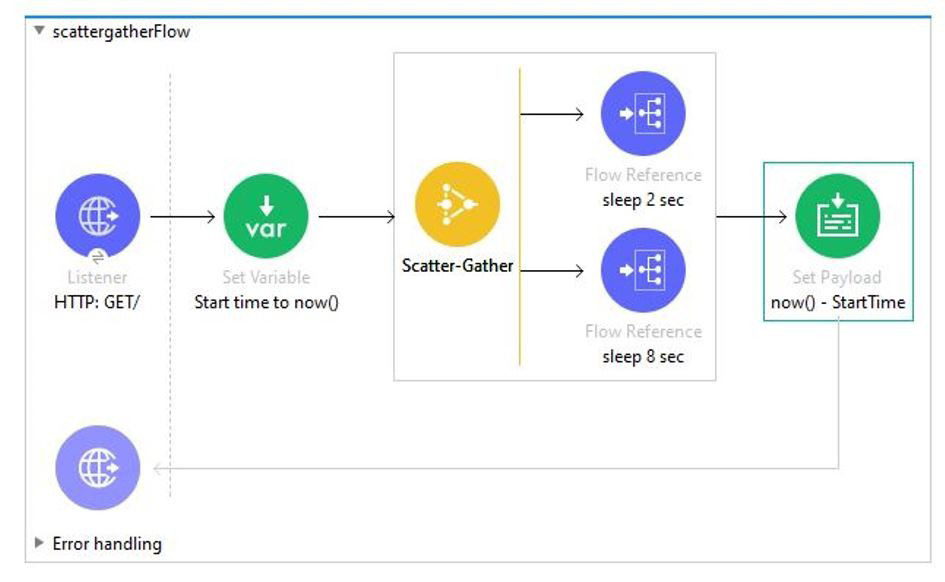
In the execution of scatter gather, the "sleep 2 sec" Flow Reference takes about 2 sec to complete, and the "sleep 8 sec" Flow Reference takes about 8 sec to complete.
About how many sec does it take from the Scatter-Gather is called until the "Set Payload" transformer is called?
Show answerHide answer

Correct answer: A 8

Explanation

Explanation:

The key to understanding this question is how the Scatter-Gather router works in Mule 4.

Scatter-Gather Behavior: The Scatter-Gather executes all of its routes concurrently. It does not execute them sequentially. It starts all routes at the same time and then waits for all of them to complete before aggregating the results and moving on to the next processor in the main flow.

Execution Timeline:
Time = 0 sec: The Scatter-Gather starts. It immediately launches both the "sleep 2 sec" and "sleep 8 sec" routes at the same time.

Time = 2 sec: The "sleep 2 sec" route finishes its execution. The Scatter-Gather has one result but continues to wait for the other route.

Time = 8 sec: The "sleep 8 sec" route finishes its execution. Now that all routes are complete, the Scatter-Gather aggregates the results (if any) and proceeds.

Total Time: Therefore, the total time from when the Scatter-Gather is called until it finishes and the subsequent Set Payload processor is called is determined by the longest-running route. In this case, that is 8 seconds.

Why the others are incorrect:
B. 0: This is incorrect because both routes perform a sleep operation, which takes real time. The Scatter-Gather does not bypass or ignore the processing time of its routes.

C. 2: This is the duration of the fastest route, but the Scatter-Gather must wait for the slowest one.

D. 10: This would be the result if the routes ran sequentially (2 + 8), but the Scatter-Gather's primary feature is parallel execution.

Reference:
MuleSoft Documentation - Scatter-Gather Router. The documentation states: "The Scatter-Gather component executes a set of routes in parallel, then aggregates the results into a single message." Its execution time is bound by the slowest parallel route. This concept falls under the Controlling Message Flow (19%) domain of the exam guide.
Question 32 Choose 1
A flow needs to combine and return data from two different data sources. It contains a Database SELECT operation followed by an HTTP Request operation.
What is the method to capture both payloads so the payload from the second request does not overwrite that from the first?
Show answerHide answer

Correct answer: D Save the payload from the Database SELECT operation to a variable

Explanation

Explanation:

In MuleSoft, each operation updates the payload with its result. That means:

The Database SELECT operation sets the payload to the query result.
The HTTP Request operation then overwrites the payload with its response.

If you need to combine data from both sources, you must preserve the first payload before it gets overwritten. The standard way to do this is to store the Database SELECT result in a variable (e.g., dbResult) using the Set Variable component. Later, you can reference this variable and merge it with the HTTP response payload.

❌ Why the Other Options Are Incorrect:
A. Cache scope ❌ Used for caching results to improve performance, not for preserving payloads between operations.

B. Message Enricher scope ❌ Message Enricher is used to enrich the message with additional data from a nested operation, but in this case, you want to explicitly capture both payloads. While Message Enricher could technically help, the exam expects the simpler and more direct solution: saving the first payload to a variable.

C. Nothing, previous payloads are combined ❌ Incorrect — Mule does not automatically combine payloads. Each operation replaces the payload with its own result.

🔗 Reference:
MuleSoft Docs – Variables
MuleSoft Docs – Message Structure
Question 33 Choose 1
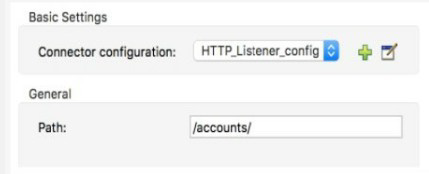
Refer to the exhibit.

What is the correct syntax to add a customer ID as a URI parameter in an HTTP Listener's path attribute?
Show answerHide answer

Correct answer: B {customerlD}

Explanation

Explanation:

URI Parameter Syntax: When defining an HTTP Listener's path in Mule 4, URI parameters (also known as path parameters) are defined using curly braces ({}) around the parameter name.

Example: If the Listener path is set to /accounts/{customerID}, a request to /accounts/12345 will be accepted.

Accessing the Parameter: The value of the URI parameter (12345 in the example) is then automatically extracted and made available in the Mule event as an attribute under attributes.uriParams.customerID.

❌ Incorrect Answers and Reasoning
A. (customerID): Parentheses are not the correct syntax for defining URI parameters in a Mule HTTP Listener path. This syntax is not used for this purpose in Mule.

C. #[customerID]: The #[...] syntax is used for DataWeave expressions to dynamically access variables, payloads, or attributes during message processing (runtime). It is not the correct way to define a path parameter in the Listener's configuration.

D. ${customerID}: The ${...} syntax is used for Mule Configuration Properties (placeholders) that are resolved when the application starts up. This is used for defining environment-specific values (like ports or credentials) from a properties file, not for defining variable parts of a request URI.

📚 References
MuleSoft Documentation on HTTP Listener: "The path parameter is defined by enclosing its name in curly braces (e.g., /users/{id}) in the Listener's path configuration."

MuleSoft Documentation on URI Parameters: "URI parameters are accessible in a flow using the DataWeave expression attributes.uriParams."
Question 34 Choose 1
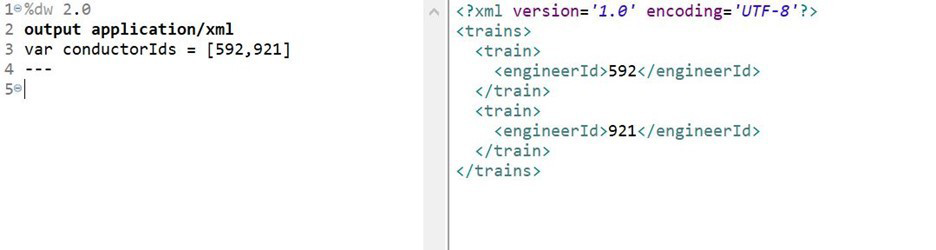
Refer to the exhibits.

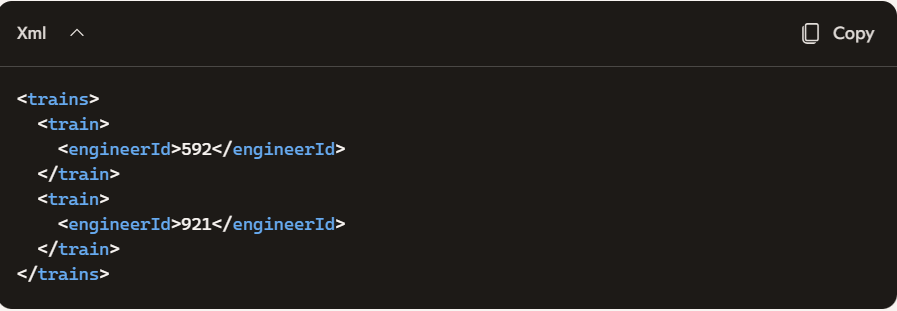
What DataWeave expression transforms the conductorIds array to the XML output?
Show answerHide answer

Correct answer: C 1. 1. trains:
2. 2. {(
3. 3. conductorIds map ((engId, index) ->
4. 4. train: {
5. 5. engineerId: engId
6. 6. }
7. 7. )
8. 8. )}

Explanation

Explanation:

This DataWeave expression correctly transforms the array conductorIds = [592, 921] into the desired XML structure:

Let’s break it down:

trains: defines the root element.

{(...)}: wraps the result of the map operation inside the trains object.

conductorIds map (...): iterates over each ID.

train: { engineerId: engId } creates a train element with a nested engineerid.

The parentheses around the map block ({(...)}) are crucial — they ensure the mapped array is unwrapped into individual train elements inside trains.

❌ Why the Other Options Are Incorrect:
A. Missing outer braces {(...)}: — would cause a syntax error or incorrect structure.
B. Wraps everything in { trains: ... } but lacks the unwrapping parentheses: — results in a nested array inside trains, not individual elements.
D. Starts with {( trains: ... )}: — invalid syntax; the placement of {( is incorrect.

🔗 Reference:
MuleSoft Docs – DataWeave XML Output
DataWeave Language Guide – Mapping and Object Construction
Question 35 Choose 1
Refer to the exhibit.


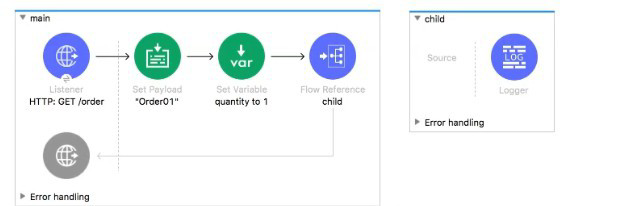
The main flow contains a Flow Reference for the child flow.
What values are accessible in the child flow after a web client submits a request to http://localhost:8Q81/order? color=red?
Show answerHide answer

Correct answer: D payload quantity var color query param

Explanation

Explanation:

When a Flow Reference component is used to call another flow, the entire Mule event (including its current state) is passed from the parent flow to the child flow. The child flow operates on the same event instance, unless an error occurs or the event is explicitly altered.

Let’s trace what is available in the child flow when it is called from the main flow:

Initial Request: The web client sends GET /order?color=red.

HTTP Listener (main flow): This component creates the initial event.

payload: The payload is set to the body of the HTTP request. For a GET request with no body, this is typically an empty string or null, but the payload variable exists and is accessible.

attributes: The HTTP request attributes (headers, query params, etc.) are stored here. Specifically, the query parameter color=red is accessible via attributes.queryParams.color or simply attributes.queryParams['color'].

Set Variable (main flow): The processor executes.

vars.quantity: This variable (quantity) is now part of the event and is set to 1.

Flow Reference (main flow): The child flow is invoked. At the moment of invocation, the event contains:

- The current payload.
- The current attributes (including the color query param).
- The current variables (including quantity).

All of these components (payload, vars.quantity, attributes.queryParams.color) are accessible in the child flow because they are part of the same event context passed by reference.

Why the others are incorrect:
A. payload: This is true but incomplete. The child flow has access to much more than just the payload.

B. payload quantity var: This is also incomplete. It misses the HTTP query parameters, which are a key part of the request and stored in attributes.

C. payload color query param: This is incomplete. It misses the quantity variable that was explicitly set in the main flow before the Flow Reference.

Reference:
MuleSoft Documentation - Flow Reference Component and Mule Event Structure. The documentation states that flows called via Flow Reference share the same Mule event, meaning all its parts (payload, attributes, variables, error) are accessible. This tests knowledge from the Controlling Message Flow (19%) and Handling Errors (22%) domains, specifically regarding event propagation between flows.
Question 36 Choose 1
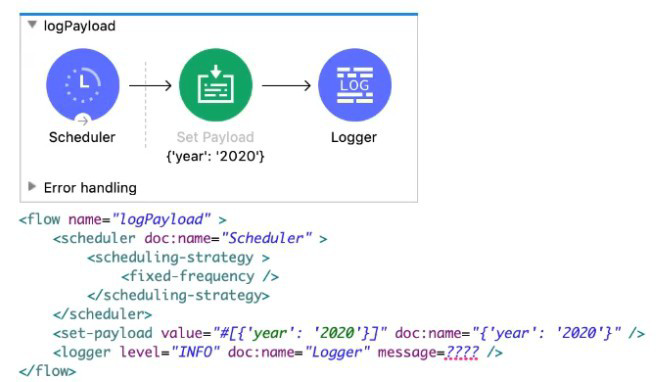
Refer to the exhibits.


The Set Payload transformer's value is set to {'year': '2020'}.
What message value should be added to the Logger component to output the message 'The year is 2020', without hardcoding 2020?
Show answerHide answer

Correct answer: D #["The year is "++ payload.year].

Explanation

Explanation:

The payload is:
{ "year": "2020" }

To log:
The year is 2020

• Without hardcoding 2020
• Using valid DataWeave expression syntax inside the Logger

You need:
✔ String concatenation
DataWeave uses ++ for concatenation:
"The year is " ++ payload.year

Wrapped in an expression:
#["The year is " ++ payload.year]

This matches Option D.

❌ Why the other options are incorrect
A. '#[The year is $(payload.year)]'
${} syntax is for property placeholders, not DW.
Wrong DW syntax.

B. 'The year is #[payload.year]'
Mixing literal text + DW expression is invalid without proper formatting.
DW inside quotes is not evaluated.

C. '#[The year is " + payload.year]'
Uses Java-style string concatenation (+) which is invalid in DW.
Missing quotes around the literal string.
Question 37 Choose 1
Which out of below is not an asset?
Show answerHide answer

Correct answer: C Exchange

Explanation

Explanation:

In the context of Anypoint Platform and MuleSoft's terminology, an asset is a reusable component or piece of content that can be developed, shared, and deployed. The Anypoint Exchange is the central repository where these assets are stored, discovered, and managed.

Let’s break down each option:

A. Template: Is an asset. Templates are pre-built project skeletons (e.g., API-led connectivity templates, Salesforce integration templates) available in Exchange to accelerate development.

B. Connector: Is an asset. Connectors (like Salesforce, Database, HTTP) are modular components published to Exchange that provide connectivity to external systems. They are installed as dependencies in a Mule project.

C. Exchange: Is NOT an asset. Anypoint Exchange is the platform service or portal itself—the marketplace or repository where assets (like Templates, Connectors, Examples, RAML specs, and Policies) are stored and shared. It is the container, not the content.

D. Example: Is an asset. Examples are specific, illustrative instances of code, configurations, or projects shared on Exchange to demonstrate how to use an API, connector, or other asset.

Therefore, Exchange is the service that hosts the assets, making it the item that is not classified as an asset itself.

Reference:
MuleSoft Documentation - Anypoint Exchange. The documentation describes Exchange as "a built-in, central repository for discovering, sharing, and reusing assets," clearly differentiating the repository from the assets it contains. This concept is part of the foundational knowledge for the Understanding MuleSoft (10%) domain.
Question 38 Choose 1
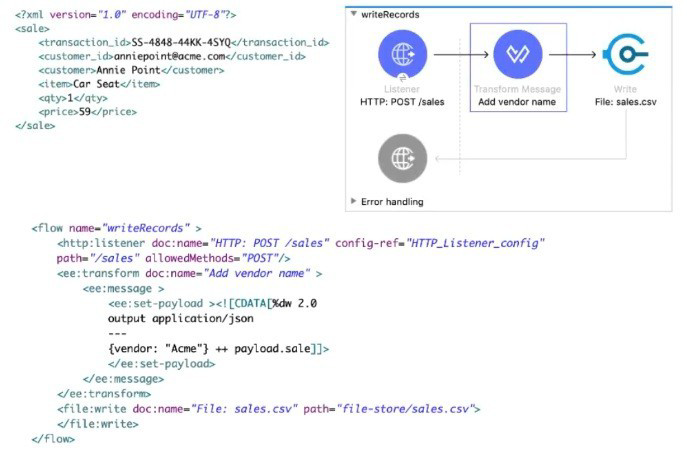
Refer to the exhibits.


A web client sends sale data in a POST request to the Mule application. The Transform Message component then enrich the payload by prepending a vendor name to the sale data. What is written to the sales.csv file when the flow executes?
Show answerHide answer

Correct answer: A The enriched payload in JSON format

Explanation

Explanation:

Why A is correct
Look at the Transform Message component in the exhibit:
%dw 2.0
output application/json
---
{
vendor: "Acme" ++ payload.sale]!,
sale: payload
}

It explicitly sets output application/json and builds a JSON object that contains:
- a new field vendor: "Acme" plus the original data
- the original sale object unchanged

So after the Transform Message, the payload is JSON like:
{
"vendor": "Acme",
"sale": {
"transaction_id": "SS-4848-44KK-45YQ",
"customer_id": "anniepoint@acme.com",
...
}
}

The File Write operation that follows has no DataWeave transformation or output format override defined.
When a File connector receives application/json payload and no writer configuration is specified, it writes the payload exactly as-is — in this case, the JSON string.
Therefore, the content written to sales.csv is the enriched JSON payload (not CSV, not XML).

Why the other options are wrong
B. The enriched payload in XML format – Wrong. The Transform Message outputs application/json, not application/xml.
C. The enriched payload in CSV format – Wrong. There is no CSV writer or output application/csv anywhere in the flow.
D. An error message – Wrong. Nothing in the flow will fail — the expression is valid and the File Write succeeds.

Even though the file is named sales.csv, Mule does not automatically convert JSON to CSV just because of the file extension.
Question 39 Choose 1
How can you call a subflow from Dataweave?
Show answerHide answer

Correct answer: C Lookup function

Explanation

Explanation:

In Mule 4, DataWeave is a powerful transformation language that is tightly integrated with the Mule runtime. One of its advanced capabilities is the ability to invoke Mule flows (including sub-flows) directly from within a DataWeave script using the lookup function.

Purpose: The lookup function allows DataWeave to call a flow by its name, pass a payload (and optionally variables), and receive the flow's result. This enables complex, flow-based logic (like calling external systems, performing business rules, or database operations) to be embedded within a data transformation.

Syntax: The basic syntax is lookup("flowName", payload) or lookup("flowName", payload, vars).

Example:
%dw 2.0
output application/json
---
{
originalData: payload,
processedResult: lookup("myProcessingSubflow", payload.someField)
}

Why the others are incorrect:
A. Not possible in Mule 4: This is false. Mule 4 specifically introduced this powerful integration feature.

B. Import function: The import directive in DataWeave is used to import DataWeave modules (.dwl files) containing reusable functions or declarations, not to call Mule flows.

D. Include function: There is no standard include function for flow invocation in DataWeave. The include directive is used in XML configuration files (like Mule config files) to include other XML resources.

Reference:
MuleSoft Documentation - DataWeave lookup Function. The official documentation details how to use lookup to call flows and sub-flows, passing parameters and handling results. This is an advanced feature within the Transforming Data (12%) and Processing Data (22%) domains.

That's the last free question in MuleSoft Fundamentals

You've seen the free 30% (39 of 133 questions). Full access unlocks every question and full-length Salesforce-MuleSoft-Developer mock exams (65 questions, 105 minutes), a different mock on every attempt.

Unlock full mock exam
Full mock exam

Sit the Salesforce-MuleSoft-Developer exam before exam day

Full-length mocks with the same number of questions and the same time limit as the real Salesforce-MuleSoft-Developer exam. Every attempt draws a new set of questions from the full bank, so you can keep going until you pass comfortably.

Get full Salesforce-MuleSoft-Developer mock exam
  • 65questions per mock
  • 105 mintime limit
  • 234questions in the bank
  • Newmock on every attempt