Salesforce certification · Exam OmniStudio-Developer

OmniStudio-Developer Mock Exam Page 5

Salesforce OmniStudio Developer - Plat-Dev-210

Free OmniStudio-Developer mock exam questions 41–49, each with the answer and an explanation.

20 questions · 35 minutes · free, no sign-up

Free OmniStudio-Developer questions

41–49 of 49 free
Question 41 Choose 1
An integration procedure contains a Remote Action element that calls a method of an APEXclass. The method requires two fields are input: Accountid and ProductId. The integration Procedure data JSON contains the following nodes: How should the Remote Action element be configured to pass the data correctly to the method?
Show answerHide answer

Correct answer: A Check the Send OnlyAdditional Input checkbox, and the following/ value pairs to Additional input:

Explanation

Summary
The requirement is to pass specific data nodes from the Integration Procedure's pipeline as discrete parameters to an Apex method via a Remote Action. The Apex method expects named parameters (AccountId and ProductId), not a monolithic JSON object. The correct configuration must explicitly map each pipeline value to its corresponding Apex method parameter.

Correct Option

A. Check the Send Only Additional Input checkbox, and add the following Key/Value pairs to Additional input:
This is the correct configuration. The "Send Only Additional Input" option ensures that only the explicitly defined key/value pairs in the "Additional Input" section are sent to the Apex method. Here, you would create two entries:

Key: accountId, Value: {%AccountId%}

Key: productId, Value: {%Details:ProductId%}

This maps the pipeline data directly to the expected Apex method parameters, ensuring they are passed by name correctly.

Incorrect Option

B. Set Return Only Additional Output to true, and add the following Key/Value pairs to additional input.
"Return Only Additional Output" controls what is returned from the action and stored in the pipeline, not what is sent to the action. Enabling this would not help in sending the correct input parameters to the Apex method and might even strip the response if not configured properly on the output side.

C. Check the DataRaptor Transform checkbox, and add the following Key/Value pairs to Output JSON Path:
The "DataRaptor Transform" checkbox is used to transform the response from the Apex call using a DataRaptor. It has no bearing on how the input parameters are structured or sent to the Apex method. The "Output JSON Path" is for mapping the action's result, not its input.

D. Add the following to Send JSON Path: accountId: %AccountId% ProductId: %Details:ProductId%
The "Send JSON Path" is used to send a single, structured JSON object as the input to the remote service. An Apex Remote Action expecting discrete named parameters will not be able to deserialize this single JSON string into its separate parameters correctly. The "Additional Input" method is the standard and correct way to pass multiple discrete parameters.

Reference
Salesforce OmniStudio Developer Guide: Remote Action
Question 42 Choose 1
Why would a developer clone an Integration Procedure instead of versioning it?
Show answerHide answer

Correct answer: B The new Integration Procedure will be used independently.

Explanation

Explanation:

This question tests your understanding of the core concepts of cloning versus versioning in OmniStudio and when to use each strategy.

Let's clarify the two concepts:

Versioning: Creating a new version of an existing Integration Procedure (IP). All versions are part of the same IP family. When you activate a new version, it replaces the old one in any OmniScript or application that references it. This is used for iterative development, bug fixes, or updates to the same business process.

Cloning: Creating a completely new and separate Integration Procedure that is a copy of an existing one. The cloned IP has its own unique name and is independent of the original. This is used when you need a new, distinct process.

Now, let's analyze the options:

A. The new Integration Procedure uses a Cache Block. This is incorrect. The use of a Cache Block is a feature within an IP and does not dictate whether you should clone or version. Both a cloned IP and a new version of an IP can use a Cache Block.

B. The new Integration Procedure will be used independently. This is correct. This is the primary reason for cloning. If the new IP needs to serve a different purpose, be called by a different OmniScript, or exist alongside the original without replacing it, you must clone it. Versioning would be incorrect here because activating the new version would unintentionally override the original IP everywhere it's used.

C. The new Integration Procedure is replacing stub data. This is incorrect. Replacing stub data with real integration calls is a classic example of iterative development. You would start with Version 1 (using a DataRaptor for stub data) and then create Version 2 (using an HTTP Action to call a real service). Versioning is the appropriate tool for this scenario.

D. The new Integration Procedure is Chainable. This is incorrect. Being "Chainable" (meaning it can be called from another Integration Procedure via a Remote Action) is a property of the IP's configuration. It is not a reason to choose cloning over versioning. You can enable the "Chainable" checkbox on either a cloned IP or a new version of an existing IP.

Summary

The decision between cloning and versioning hinges on the relationship between the old and new IPs:

Use Versioning when you are updating or modifying an existing process. The new version is the direct successor to the old one.
Use Cloning when you are creating a new, parallel process that happens to share some logic with an existing one. The new IP must exist independently.

Therefore, the scenario where the new IP "will be used independently" is the definitive reason to choose cloning.
Question 43 Choose 1
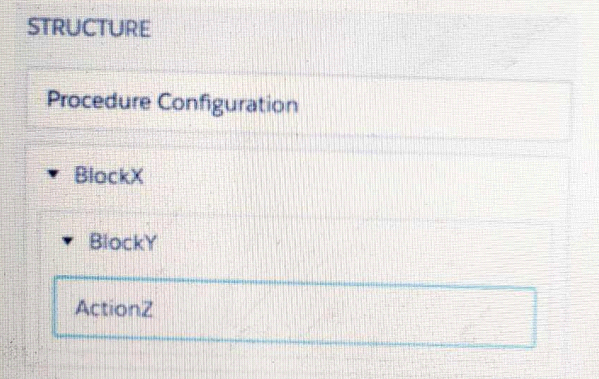
Refer to the exhibit below. In this Integration Procedure structure, what Send JSON Path would you use to send the output of the ActionZ element to a Response Action?
Show answerHide answer

Correct answer: D BlockX:BlockY:ActionAZ

Explanation

Explanation:

In an Integration Procedure, the Send JSON Path is used to reference the output of a previous element so it can be used as input for a subsequent element (like a Response Action). The path is constructed using the names of the elements in the hierarchy, separated by colons :.

Let's break down the structure shown in the exhibit:

The top-level element is BlockX.
Nested inside BlockX is BlockY.
Nested inside BlockY is ActionZ.

To form the path to the output of ActionZ, you start from the outermost element and move inward, separating each element's name with a colon.
Therefore, the correct path is: BlockX:BlockY:ActionZ

Why the other options are incorrect:
A. BlockX.BlockYActionZ:
This uses a dot (.) as a separator, which is incorrect. Integration Procedures use colons : for the JSON path. Also, BlockYActionZ incorrectly concatenates the two names without a separator.
B. ActionZ:BlockY:BlockX:
This path is in the reverse order (inner element to outer element). The path must be constructed from the top down, not the bottom up.
C. ActionZ:BlockY:BlockX:
This is a duplicate of option B and is also incorrect for the same reason (reverse order).
The final option you listed as "D. BlockX:BlockY:ActionAZ" appears to have a typo (ActionAZ instead of ActionZ). If the element is truly named ActionZ, then this option would be incorrect. The correct name must be used.

Key Takeaway:
The standard format for a Send JSON Path in an Integration Procedure is OuterBlockName:NestedBlockName:ElementName.

Reference:
Salesforce OmniStudio Developer Guide, specifically the sections on "Integration Procedure Elements" and "Using the Send JSON Path".
Question 44 Choose 1
An integration Procedure uses an HTTP action to make a REST API call. The response from the REST API must be converted into a specific XML structure before sending it as an input to another external wen service.
How should the developer configure the Integration Procedure to meet this requirement?
Show answerHide answer

Correct answer: C Use a DataRaptor Transform to convert JSON to XML

Explanation

Summary
The requirement is to transform the structure of data from one format (JSON from a REST API) to another (a specific XML structure). This is a data transformation task. The tool must be able to take the JSON response, map its values to a new schema, and output the result in XML format. This requires a component designed for declarative data shaping and format conversion.

Correct Option

C. Use a DataRaptor Transform to convert JSON to XML
This is the correct and most efficient method. A DataRaptor Transform is specifically designed for this purpose. It allows the developer to:

Define the JSON structure of the HTTP Action's response as the "Input JSON".

Use the Transform's mapping tools (Extract, Formula, Aggregation steps) to restructure the data.

Define the "Expected Output JSON" as the desired XML structure. The DataRaptor Transform can output its result as XML by selecting the appropriate output format.

Incorrect Option

A. Use a Remote Action that calls the XMLStreamReader class
XMLStreamReader is an Apex class for parsing XML, not for creating or converting data to XML. Using a Remote Action for this would require writing complex, custom Apex code to manually build the XML string, which is against the low-code principle of OmniStudio and is more error-prone than using a declarative tool.

B. Use a Remote Action that calls the XMLStreamWriter class
While XMLStreamWriter can be used to generate XML in Apex, this again forces a custom-coded solution. A DataRaptor Transform provides a declarative, manageable, and faster way to achieve the same result without code.

D. Use a DataRaptor Extract and check the XML checkbox on the Output JSON Path.
A DataRaptor Extract is used to retrieve data from Salesforce objects. It cannot transform the structure of data from an HTTP response. The "XML" output option for a DataRaptor Extract formats the extracted Salesforce data as XML; it does not transform an arbitrary JSON input from an HTTP Action into a new XML structure.

Reference
Salesforce OmniStudio Developer Guide: DataRaptor Transform
Question 45 Choose 1
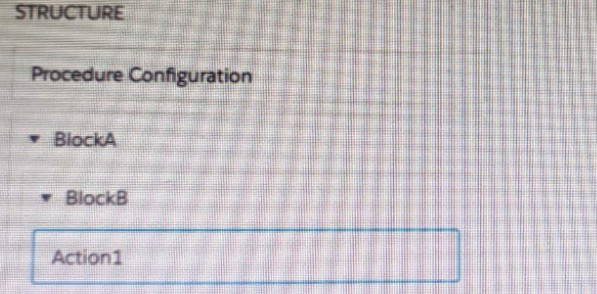
Refer to theexhibit below. In this integration production structure, what Send JSON Path would be used to send the Output of the Action1 element to a Remote Action?

Show answerHide answer

Correct answer: B Action1: BlockB. Block A

Explanation

Summary
In an Integration Procedure, the Send JSON Path is used to reference data from a previous element's output. The path is constructed by traversing the procedure's hierarchy from the top-level block down to the specific action, using colons (:) as delimiters. This structured path ensures the data pipeline correctly locates and retrieves the output from a nested action to pass it to a subsequent step.

Correct Option

B. Action1:BlockB:BlockA
This is the correct JSON Path syntax. It follows the hierarchical structure of the Integration Procedure, starting from the target action (Action1), moving up to its immediate parent block (BlockB), and finally to the top-level block (BlockA). The colons (:) are the standard delimiters used to separate each level in the hierarchy within the OmniStudio data pipeline for sending data between elements.

Incorrect Option

A. Action1.BlockB.BlockA
This uses periods (.) as delimiters, which is incorrect for navigating the block and action hierarchy in an Integration Procedure's JSON Path. Periods are typically used for accessing fields within a JSON object, not for traversing the procedural structure.

C. BlockA:BlockB:Action1
This path is in the wrong order. The correct navigation for a Send JSON Path starts from the element whose data you want to send (Action1) and then moves upward through its parent blocks. This path would not resolve correctly.

D. BlockB:BlockB:Action1
This path is incorrect and contains a redundancy (BlockB repeated). It also starts from the block level rather than from the specific action whose output needs to be sent. The path must begin with the source action name.

Reference
Salesforce OmniStudio Developer Guide: Integration Procedure Data Pipelining
Question 46 Choose 2
Which two fields in an Integration Procedure or Data Mapper can execute a function like CONCAT or DATEDIFF? Choose 2 answers
Show answerHide answer

Correct answer: B, C In a Set Values Action in a Value fieldIn a Data Mapper Action in an Input Parameters value field

Explanation

Explanation

The question is testing your understanding of where OmniScript Functions (like CONCAT, DATEDIFF, GETUTC, etc.) can be dynamically executed within an Integration Procedure.

OmniScript Functions are designed to perform real-time calculations, transformations, and data manipulations during the execution of the Integration Procedure. They are not static values but are evaluated each time the step runs.

Let's examine each option:

A. In a Data Mapper in an Output Tab Output JSON Path: This is incorrect. The Output JSON Path field is used to define the structure of the final output JSON. It specifies where to place a piece of data, not to perform a calculation on the data. You would map the result of a function (calculated elsewhere) to a JSON path, not execute the function within the path itself.

Example: You would set the Output JSON Path to response.fullName, and the value would come from a previous step where you used CONCAT(FirstName, LastName).

B. In a Set Values Action in a Value field: This is correct. The Set Values action is specifically designed to assign values to variables. Its Value field is a primary location for using OmniScript Functions to compute the value that will be assigned.

Example: In a Set Values element, you could set a variable named FullName to the value CONCAT(#FirstName#, " ", #LastName#).

C. In a Data Mapper Action in an Input Parameters value field: This is correct. The Data Mapper action is used to transform and map data from one structure to another (e.g., from the IP's context to a request payload for an external call). The Value field within the Input Parameters section is where you can use functions to transform the data before it is sent.

Example: When building a request to a REST service, you could use DATEDIFF(#StartDate#, #EndDate#, "DAYS") in the Value field for a parameter called durationInDays.

D. In a Remote Action in an Additional Output value field: This is incorrect. The Additional Output configuration in a Remote Action is used to define which data elements from the response should be extracted and added to the Integration Procedure's data JSON. It's about selecting nodes from the response (e.g., response.body.userId), not about executing functions to create new values.

Summary / Reference

The key concept is that functions are executed in fields that accept dynamic expressions or formulas. The primary locations for this are:

- The Value field in a Set Values element.
- The Value field in the Input Parameters of a Data Mapper or HTTP Action.

These fields support the use of merge fields (e.g., #Element#) and OmniScript functions to create powerful, dynamic logic within your Integration Procedures.
Question 47 Choose 1
An OmniStudio Developer needs to retrieve data and perform complex filtering, sorting, and aggregation before displaying it in an OmniScript.

Which OmniStudio tool is the recommended best practice for preparing this data?
Show answerHide answer

Correct answer: B Integration Procedure

Explanation

Explanation

This question tests knowledge of OmniStudio data-preparation patterns. It asks which tool should be used to perform complex filtering, sorting, and aggregation before data is passed into an OmniScript for display.

Correct Option

B. Integration Procedure
✔️ An Integration Procedure (IP) is the recommended best practice for preparing complex data for an OmniScript. It can contain DataRaptor Extract, Transform, and Load steps to filter, sort, and aggregate data, and can also include HTTP actions, formula actions, and caching. The IP runs as a backend service and returns a clean, transformed JSON result to the OmniScript, keeping the script itself focused on UI and flow rather than heavy data logic.

Incorrect Options

A. Data Mapper Extract Action
❌ A Data Mapper Extract can query and filter Salesforce data, but it is not designed to perform complex multi-step aggregation and orchestration across multiple sources. Using only an Extract inside the OmniScript would lead to heavy client-side logic and poorer performance, which violates OmniStudio best practices.

C. HTTP Action
❌ An HTTP Action is used to call external APIs, not to perform complex filtering, sorting, and aggregation of Salesforce data. It does not include DataRaptor-style extract/transform/load capabilities and is not suitable as the primary data-preparation tool for an OmniScript.

D. Set Values Action
❌ Set Values is used to create or update simple variables within an OmniScript or IP. It does not query, filter, sort, or aggregate data from Salesforce or external systems, so it cannot serve as the main data-preparation mechanism required here.

Reference
🔧 → Salesforce Help – Omnistudio Data Mapper Best Practices – Confirms that Data Mappers should be used for targeted extraction and filtering, while complex orchestration and aggregation are handled via Integration Procedures.

🔧 → Salesforce Trailhead – Discover DataRaptor Types and Functions – Explains that DataRaptors (Extract/Transform/Load) are typically used inside Integration Procedures to prepare data for OmniScripts.
Question 48 Choose 1
An OmniStudio Developer needs to duplicate an existing Data Mapper and begin development on a new requirement that uses the original as a starting point. What is the most straightforward method to accomplish this?
Show answerHide answer

Correct answer: C Use the Clone button within the Data Mapper Designer.

Explanation

Explanation:

This question tests your knowledge of developer workflows and metadata management in OmniStudio. It evaluates your ability to identify the most efficient, standard platform feature used to duplicate an existing Data Mapper as a starting point for new development.

✅ Correct Option C:

The Clone button within the OmniStudio Data Mapper Designer is the standard, most direct way to duplicate an existing component. Clicking this action copies all extract steps, formulas, and output mappings into a new instance, where you simply provide a unique name and save. This eliminates manual rebuilding while safeguarding the original version's configuration.

❌ Incorrect Option A:

Manually copying and pasting SOQL queries is highly inefficient and unnecessary. Because Data Mappers use a visual designer to structure queries and mappings rather than direct raw SOQL, attempting to copy code manually is error-prone and slow.

❌ Incorrect Option B:

Using the Salesforce CLI (SFCLI) to pull, rename JSON metadata, and push it back is overly complex for a simple duplication task. This developer workflow is typically reserved for deployment pipelines rather than quick, in-designer component duplication.

❌ Incorrect Option D:

Creating an Integration Procedure to call the old Data Mapper does not duplicate it. Instead, it wraps the existing component in a server-side process, leaving the developer unable to modify the core Data Mapper mapping for new requirements.

🔧 Reference:
⇒ Get and Combine Internal Data for FlexCards - Confirms that the standard developer workflow to reuse an existing Data Mapper as a template is to select the component and click the Clone button.
Question 49 Choose 1
An OmniStudio Developer has configured an Integration Procedure to use a Remote Action to call a custom Apex class method. When a user executes the Integration Procedure, the Remote Action fails with an " Unauthorized " message.

What is the missing access the developer should grant to the user ' s profile?
Show answerHide answer

Correct answer: B " Execute " permission on the specific custom Apex Class

Explanation

Explanation:

This question tests your understanding of security requirements for OmniStudio Remote Actions. When an Integration Procedure invokes a custom Apex class through a Remote Action, the executing user must have permission to run that Apex class; otherwise, the request fails with an "Unauthorized" error.

🟢 Correct Option:

Option B:
A Remote Action executes a custom Apex class in the context of the running user. If the user's profile or permission set does not include Apex Class Access for the specified class, Salesforce blocks the execution and returns an "Unauthorized" error. Granting access to the custom Apex class resolves the issue and allows the Integration Procedure to invoke the method successfully.

🔴 Incorrect Options:

Option A:
This option is incorrect because the Run Flows permission applies to Salesforce Flow execution, not Apex Remote Actions. An Integration Procedure calling a custom Apex class requires Apex Class Access rather than permissions related to Flow automation.

Option C:
This option is incorrect because object and field access alone do not authorize execution of a custom Apex class. Even if the user can access the underlying data, Salesforce still requires explicit Apex Class Access before a Remote Action can invoke the custom class.

Option D:
This option is incorrect because a try-catch block only handles exceptions after code execution begins. It cannot bypass Salesforce security checks or resolve an "Unauthorized" error caused by missing Apex Class Access permissions.

🔧 Reference:
⇒ Salesforce Developer Documentation – Apex Class Access
Explains that users must be granted access to Apex classes through profiles or permission sets before they can execute them.

That's the last free question

You've seen the free 30% (49 of 173 questions). Full access unlocks every question and full-length OmniStudio-Developer mock exams (60 questions, 105 minutes), a different mock on every attempt.

Unlock full mock exam
Full mock exam

Sit the OmniStudio-Developer exam before exam day

Full-length mocks with the same number of questions and the same time limit as the real OmniStudio-Developer exam. Every attempt draws a new set of questions from the full bank, so you can keep going until you pass comfortably.

Get full OmniStudio-Developer mock exam
  • 60questions per mock
  • 105 mintime limit
  • 173questions in the bank
  • Newmock on every attempt