A developer creates an OmniScript to update billing information.After analyzing the different types of customer interactions that occur at the company, the developer determines updating billing information should be included in the majority of customer interactions, which are represented by more than 20 different FlexCards.
What is the most efficient way for the developer to configure the action that invokes the OmniScript?
Show answerHide answer
Correct answer: AAs an OS Action
Explanation
Summary
The requirement is to reuse the same OmniScript across more than 20 different FlexCards. The most efficient configuration avoids recreating the same action in every card. An OS Action is a predefined action type specifically designed for this purpose. It allows a developer to create the action configuration once and then reference it by name in any number of FlexCards, ensuring consistency and simplifying maintenance.
Correct Option
A. As an OS Action
This is the most efficient method. An OS Action is a reusable action definition stored at the application level. The developer creates the OS Action once, configuring it to launch the specific OmniScript. This single OS Action can then be selected and used across all 20+ FlexCards. Any future updates to the action (e.g., changing a parameter) only need to be made in the single OS Action definition, and it will automatically propagate to all FlexCards using it.
Incorrect Option
B. As a Custom Action
A Custom Action is used to invoke an external, non-OmniStudio web service or Apex method. It is not the correct action type for launching another OmniScript. Using it for this purpose would be incorrect and require complex, custom configuration.
C. As an OmniStudio Action
This is the general category or family of actions (which includes OS Action, Data Action, etc.), not a specific, configurable type. When adding an action in a FlexCard, you select a specific type like "OS Action," not the generic "OmniStudio Action." This term is too vague for the specific configuration needed.
D. As a Lightning Action
A Lightning Action refers to a standard or quick action on a Salesforce object record page. It is not a type of action that can be configured within an OmniStudio FlexCard. FlexCards use the OmniStudio-specific action types, such as OS Action, to trigger other OmniStudio components.
Reference
Salesforce OmniStudio Developer Guide: OS Action
Question 32Choose 1
A developer creates a new FlexCardto display customer data and actions, such as updating billing information and changing the contact for the customer account. The FlexCard contains 10 fields and 5 actions.
During testing, several fields display with the correct data, but one of the fieldsshows only the label.
What could cause this?
Show answerHide answer
Correct answer: BThe field is null 0 the Salesforce record.
Explanation
Summary
When a FlexCard field displays its label but no value, it indicates a data mapping issue where the target field exists in the card's layout but the data source is not providing a value for it. The most common cause is that the specific field is empty (null) on the Salesforce record retrieved by the DataRaptor. The FlexCard renders the label as defined in the layout, but has no data to display for the value.
Correct Option
B. The field is null on the Salesforce record.
This is the most direct and likely cause. The FlexCard's DataRaptor successfully retrieved the record, which is why other fields display data. However, for this specific field, the value on the Salesforce record is blank (null). The FlexCard correctly renders the label defined in the designer but has no data to populate the value, resulting in an empty space next to the label.
Incorrect Option
A. The fields have exceeded the maximum number allowed on the card.
There is no strict, low limit (like 15 total elements) on the number of fields and actions a FlexCard can contain. If a maximum were exceeded, it would more likely cause broader rendering issues or errors, not a single field failing to display its data while others work correctly.
C. {recordId} is misspelled in the Data Source Input Map.
A misspelled {recordId} in the Data Source Input Map would prevent the DataRaptor from executing correctly for the specific record context. This would cause a complete data retrieval failure, meaning none of the fields would display data, not just a single field.
D. There are no test parameters configured.
Test parameters are used for previewing the FlexCard in the builder. If test parameters were missing, the card would fail to load data during preview. The scenario implies testing is occurring, and since most fields display correctly, the DataRaptor is successfully running and receiving a valid record ID, ruling this out as the cause.
A developer is creating a FlexCard and needs to display additional information using a Flyout.
Which two types of components can the developer embed in the flyout? (Choose 2 answer)
Show answerHide answer
Correct answer: A, DAn OmniScriptA Child FlexCard
Explanation
Summary
A Flyout is a UI component in OmniStudio that appears dynamically (e.g., on hover or click) to display additional information without navigating away from the main screen. It acts as a container for other interactive components. The elements that can be embedded within a Flyout are those that provide a user interface or visual representation, allowing for a rich and interactive user experience directly from the FlexCard.
Correct Option
A. An OmniScript
An OmniScript can be embedded within a Flyout. This allows the Flyout to present a multi-step, guided form for tasks like updating information or submitting a request without requiring the user to leave the context of the FlexCard. The OmniScript provides a structured user interface and logic flow.
D. A Child FlexCard
A Child FlexCard can be embedded within a Flyout. This is a common pattern for displaying related records or more detailed information in a structured card format. The Child FlexCard can have its own data source and design, providing a modular way to show additional data.
Incorrect Option
B. An Integration Procedure
An Integration Procedure is a headless, server-side component used for data processing and orchestration. It does not have a visual interface and therefore cannot be displayed or embedded directly within a Flyout. An Integration Procedure can be called by an OmniScript or FlexCard within the Flyout, but it is not the embedded component itself.
C. A DataRaptor
A DataRaptor is a data manipulation tool used for extracting, transforming, or loading data. Like an Integration Procedure, it is a headless component with no user interface. It cannot be embedded in a Flyout. A DataRaptor is used as a data source for a FlexCard or OmniScript that is embedded in the Flyout.
Reference
Salesforce OmniStudio Developer Guide: Configure a Flyout
Question 34Choose 1
A developer is creating a FlexCard for a new Community page. The FlexCard will display case information along with actions to close the case and update the case, and it will be styled using the Community's theme.
What must the developer do to configure the FlexCard for deployment in acommunity?
Show answerHide answer
Correct answer: BAdd the FlexCard's API name to the FlexCard Player component
Explanation
Summary
To display a FlexCard on a Salesforce Community page, it must be embedded within a specific Lightning component that acts as its container and renderer. The FlexCard itself is a headless component; it needs a visual host to be displayed to users. This is done by adding the FlexCard Player component to the Community page and configuring it to point to the specific FlexCard.
Correct Option
B. Add the FlexCard's API name to the FlexCard Player component
This is the correct and necessary step. The "FlexCard Player" is a pre-built Lightning component designed to host and display FlexCards within Lightning pages and Communities. The developer must add this component to the desired Community page and then set its "Card" property to the API name of the FlexCard they created. This creates the link between the visual container and the FlexCard's logic and design.
Incorrect Option
A. Set the Deployment property in Card Configuration to "Community"
There is no standard "Deployment" property within the FlexCard's configuration settings that is set to "Community." The deployment target is managed by how and where the FlexCard is used (e.g., by placing it in the FlexCard Player within a Community), not by an internal property.
C. Set the Target property in Publish Options to "CommunityPage"
The "Publish Options" in an OmniStudio component are used to make the component available in certain Salesforce environments, like the OmniScript in a Lightning App Page. It is not the mechanism for deploying a FlexCard to a Community. The deployment is handled by using the FlexCard Player on the page itself.
D. Configure the Component Visibility in the Custom Component
While Component Visibility settings can control when a component is shown (e.g., based on user profile or record type), this is a secondary step for controlling access. It does not perform the primary task of actually placing and rendering the FlexCard on the Community page. The foundational step is first to add the FlexCard Player component.
Reference
Salesforce OmniStudio Developer Guide: Add a FlexCard to a Community
A developer needs tocreateDataRaptor to retrieve the name of an account for a contact.
Following best practices, how should a developer configure the extraction steps?
Show answerHide answer
Correct answer: ADefine an extraction step for the Contact object and set the Extract JSON Path to Contact Account.Name
Explanation
Summary
The requirement is to retrieve a field (Name) from a parent object (Account) for a starting record (Contact). In a DataRaptor, this is accomplished by leveraging a lookup relationship. The correct approach is to define the extraction starting from the source object (Contact) and then use a JSON Path that traverses the relationship field (Account) to the target field (Name), without needing separate extraction steps for each object.
Correct Option
A. Define an extraction step for the Contact object and set the Extract JSON Path to Contact.Account.Name
This is the correct and most efficient best practice. A single DataRaptor Extract step starting from the Contact object can traverse the Account relationship to get the Account.Name using the JSONPath Contact.Account.Name. The DataRaptor internally handles the SOQL join, eliminating the need for multiple, manually configured extraction steps and simplifying the configuration.
Incorrect Option
B. Define extraction steps for the Contact and the Account objects, and set the Extract JSON Path to Contact.Account.Name
This is redundant and not a best practice. Defining a separate step for the Account object is unnecessary because the relationship from Contact to Account can be traversed directly in the JSON Path within a single step. Multiple steps would complicate the DataRaptor without providing any benefit for this simple lookup.
C. Define extraction steps for the Contact and the Account objects, and set the Extract JSON Path to Account.Name
This is incorrect. The JSON Path Account.Name is not rooted in the starting object of the extraction. The first step is based on the Contact object, so the pipeline data at that point is a Contact record. Referring directly to Account.Name without the Contact. prefix would be invalid as the context is wrong.
D. Define an extraction step for the Account object, and set the Extract JSON Path to Account.Contact.Name
This reverses the relationship logic. The requirement is to start from a Contact and get its parent Account's name. This option starts from the Account and tries to traverse to a child Contact (Account.Contact.Name), which is not a standard relationship and would not work. The relationship is Contact.Account, not Account.Contact.
Reference
Salesforce OmniStudio Developer Guide: Configure a DataRaptor Extract
Question 36Select all that apply
A developer creates a DataRaptor Extract to retrieve data to pass to an external service. The external service expects the field value to be an integer. However, the DataRaptor is sending it as a string.
Which action can the developer take to fix this?
Show answerHide answer
Correct answer: DIn the DataRaptor Formula tab, define a formula using the function TOINTEGER and usethe formula as output.
Explanation
Summary
The issue is a data type mismatch where a field value extracted from Salesforce is being cast as a string in the resulting JSON, but the external service requires an integer. The solution requires actively converting the data type before it is placed in the output. This type conversion is not handled by simple configuration in the Output tab but requires a data manipulation step.
Correct Option
D. In the DataRaptor Formula tab, define a formula using the function TOINTEGER and use the formula as output.
This is the correct and most direct solution. The Formula tab allows you to apply functions to your data. By creating a formula that uses the TOINTEGER() function on the source field, you explicitly convert the string value to a number. You then map this formula's result to the output field instead of the original source field, ensuring the JSON contains an integer.
Incorrect Option
A. In the DataRaptor Output tab, select the Output Data Type of that field to Integer.
The "Output Data Type" dropdown in the Output tab (e.g., String, Number, Boolean) is primarily for documentation and has limited functional impact on the actual JSON structure for basic extracts. It does not reliably perform type conversion. The field will often still be serialized as a string in the final JSON output.
B. In the DataRaptor Output tab, enter the default value as 0 on the field.
Setting a default value only provides a fallback if the source field is null or empty. It does not change the data type of an existing value. If the source field contains the string "123", the default value is ignored, and "123" is still sent as a string. This does not solve the type conversion problem.
C. In the DataRaptor Extract tab, set the Input Data Type field to Integer.
The "Input Data Type" in the Extract tab defines the data type of the parameters being passed into the DataRaptor (e.g., the filter value). It has no effect on the data type of the fields being extracted from the Salesforce object and output by the DataRaptor.
Reference
Salesforce OmniStudio Developer Guide: DataRaptor Formula Functions
Question 37Choose 1
A developer needs to limit the of a DataRaptor Extract to a maximum of one result. How should the developer configure this?
Show answerHide answer
Correct answer: CUse the LIMIT filter on the Extract definition
Explanation
Summary
To limit the number of records returned by a DataRaptor Extract, the configuration must be applied within the DataRaptor itself. This ensures the limit is enforced at the database query level, which is the most efficient approach. Applying the limit at the source reduces the data volume processed by the platform and guarantees that only the specified number of records is ever retrieved, regardless of how the DataRaptor is called.
Correct Option
C. Use the LIMIT filter on the Extract definition
This is the correct and most efficient method. In the DataRaptor Extract's configuration, under the "Filter" section, you can add a LIMIT clause. Setting this to 1 ensures the underlying SOQL query includes LIMIT 1, so the database returns only one record at most. This is a best practice as it optimizes performance by restricting results at the source.
Incorrect Option
A. Define a formula with the Filter function
Formula functions operate on data after it has been retrieved from the database. Using a FILTER function would first fetch all records matching the query and then apply the limit in memory. This is inefficient for large data sets and does not prevent the performance cost of initially retrieving multiple records.
B. Use a Custom Output Type when creating the DataRaptor
The Custom Output Type determines the structure of the returned JSON (e.g., "SObject" vs. "Custom"). It does not have a setting to limit the number of records returned by the query. This configuration is unrelated to result set sizing.
D. Set the Limit Property on the Action that calls the DataRaptor Extract.
There is no standard "Limit" property on the Integration Procedure or OmniScript action that calls a DataRaptor. The limiting logic must be defined within the DataRaptor's own configuration. The calling action can pass parameters to the DataRaptor but cannot directly impose a row limit on its results.
Reference
Salesforce OmniStudio Developer Guide: Configure a DataRaptor Extract
Question 38Choose 1
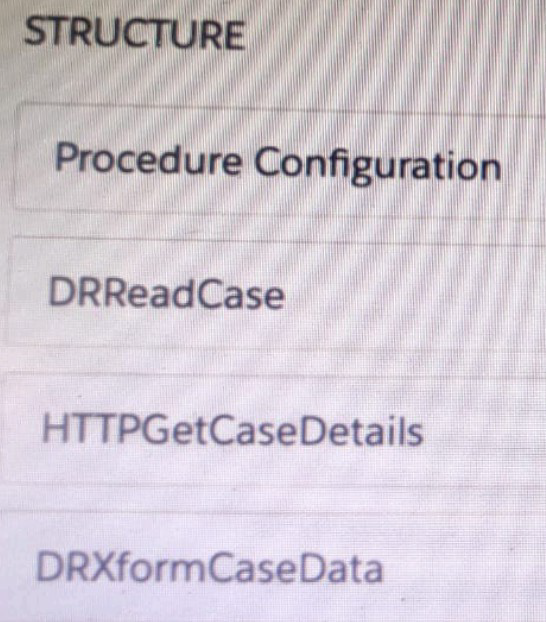
Refer to the exhibit below. What is the marge code needed for this integration procedure structure to pass a CaseNumber node from theDRReadCase DataRaptor Extract Action to the HTTP Action’s HTTP URL?
Show answerHide answer
Correct answer: A%DRReadCase: CaseNumber%
Explanation
Summary
In an Integration Procedure, data is passed between actions through a data pipeline. To reference an output from a previous action, you use a merge field syntax. The correct syntax follows a specific pattern that identifies the source action and the specific data node you want to access. This allows you to dynamically build values, such as a URL, with data retrieved earlier in the procedure's execution.
Correct Option
A. %DRReadCase:CaseNumber%
This is the correct merge field syntax for referencing data from a previous action within an Integration Procedure. It uses percent signs % to denote the merge field, followed by the name of the previous action (DRReadCase), a colon :, and the name of the specific output node from that action (CaseNumber). This tells the Integration Procedure to insert the value of the CaseNumber from the DRReadCase action's output into the HTTP URL.
Incorrect Option
B. ((DRRCase,CaseNumber))
This syntax is invalid. It uses parentheses and a comma, which are not part of the standard merge field syntax in Integration Procedures. The correct format uses percent signs and a colon as the delimiter.
C. %HTTPGetCaseDetails:CaseNumber%
This is incorrect because it references the HTTPGetCaseDetails action, which is the action that needs the value, not the action that provides it. The DRReadCase action occurs before HTTPGetCaseDetails in the procedure flow, so only DRReadCase's output is available at the time the HTTP Action is configured.
D. ((CaseNumber))
This syntax is incomplete and incorrect. It does not specify which action in the procedure is the source of the CaseNumber data. Without specifying the source action (e.g., DRReadCase), the Integration Procedure cannot resolve where to get the value from.
Reference
Salesforce OmniStudio Developer Guide: Integration Procedure Data Pipelining
Question 39Choose 1
A developer needs to configure a DataRaptor to retrieve data from a single object. The structure of the output data does not need to be changed.
Following best practices, which type of DataRaptor should the developer use?
Show answerHide answer
Correct answer: DDataRaptor Turbo Extract
Explanation
Summary
The scenario requires retrieving data from a single object without transforming its structure. While a standard DataRaptor Extract can perform this task, the key factor is following best practices for performance. Turbo Extract is a specialized, high-performance version of the Extract type, designed specifically for fast, straightforward data retrieval from a single object, making it the optimal choice when no complex data shaping is required.
Correct Option
D. DataRaptor Turbo Extract
A Turbo Extract is the best practice for this scenario because it is optimized for performance. It directly translates its configuration into a single, efficient SOQL query, minimizing processing overhead. Since the requirement is simple retrieval from one object with no need to change the output structure, Turbo Extract provides the fastest and most efficient method, adhering to the principle of using the least resource-intensive tool for the job.
Incorrect Option
A. DataRaptor Transform
A Transform is used when you need to significantly restructure, combine, or calculate values from the source data. Its primary purpose is to change the format of the JSON output, not just to retrieve data. Using a Transform for simple retrieval is inefficient and goes against best practices, as it introduces unnecessary complexity and processing.
B. DataRaptor Extract
A standard Extract can retrieve data and is more flexible than a Turbo Extract, allowing for multi-object relationships and some data manipulation. However, for the specific case of retrieving data from a single object with no structural changes, a Turbo Extract is the superior best-practice choice due to its performance advantages.
C. DataRaptor Load
A Load DataRaptor is used for a completely different purpose: to create, update, or upsert records in the database. It is not used for retrieving data at all. Using it in this context would be incorrect and would not fulfill the requirement.
Which two fields in an Integration Procedure can use a function like CONCAT or DATEDIFF?
(Choose 2 answers)
Show answerHide answer
Correct answer: C, DIn a Remote Action, in an Additional Output value field.In a Response Action, in an Additional input value field.
Explanation
Summary
OmniStudio functions like CONCAT or DATEDIFF are used to dynamically transform or calculate values within the Integration Procedure's data pipeline. They can be applied in fields that map data within the procedure's execution flow. Specifically, they are used to create new, calculated output values or to structure the final response, not for static configuration or external API settings.
Correct Option
C. In a Remote Action, in an Additional Output value field.
The "Additional Output" section of a Remote Action is used to define new fields derived from the action's results. Here, you can use functions like CONCAT to combine values from the remote response or DATEDIFF to calculate time spans, creating new data points in the pipeline for subsequent actions to use.
D. In a Response Action, in an Additional Input value field.
The "Additional Input" section of a Response Action allows you to add new fields to the final JSON response. You can use functions here to perform final transformations on the data from the pipeline before it is sent back. For example, using CONCAT to format a full name or DATEDIFF to calculate an age just before the response is returned.
Incorrect Option
A. In Procedure Configuration, in a Tracking Custom Data value field.
The Tracking Custom Data fields in the Procedure Configuration are for attaching static, high-level metadata to the entire procedure for analytics or logging purposes. They are not part of the dynamic data pipeline and do not support the use of real-time calculation functions like CONCAT or DATEDIFF.
B. In a Remote Action, in a Remote Options value field.
The "Remote Options" section is used to configure the HTTP request to the external system (e.g., headers, endpoint parameters). These values are typically static strings or simple pipeline references ({...}). They do not support the evaluation of OmniStudio formula functions, as these functions are executed by the OmniStudio runtime, not the external service.
Reference
Salesforce OmniStudio Developer Guide: Formula Functions
Full mock exam
Sit the OmniStudio-Developer exam before exam day
Full-length mocks with the same number of questions and the same time limit as the real OmniStudio-Developer exam. Every attempt draws a new set of questions from the full bank, so you can keep going until you pass comfortably.