Salesforce certification · Exam OmniStudio-Developer

OmniStudio-Developer Mock Exam Page 2

Salesforce OmniStudio Developer - Plat-Dev-210

Free OmniStudio-Developer mock exam questions 11–20, each with the answer and an explanation.

20 questions · 35 minutes · free, no sign-up

Free OmniStudio-Developer questions

11–20 of 49 free
Question 11 Choose 1
A developer is creating anOmniScript that Provisions trial orgs to their customers. The following text block in the OmniScript uses a merge code to display the ID for the new trial org:
Welcome to Salesforce
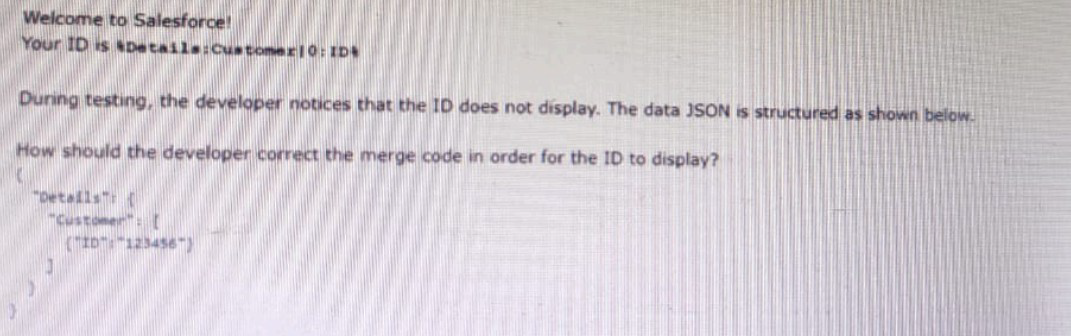
Your ID is %Details: Customer10:ID%
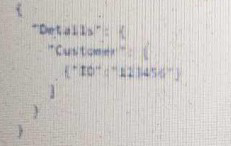
During testing, the developer noticesthat the ID does not display. The data JSON is structured as shown below.
How should the developer correct the merge code in order for the ID to display?
Show answerHide answer

Correct answer: A To %%Details:Customer|0:ID%%

Explanation

Summary
The issue is that the Customer node in the JSON structure is an array (indicated by the square brackets []), not a single object. To access a field from a specific record within an array, you must specify the index of that record using the pipe and index syntax |index. Array indices start at 0, so the first element in the array is at index 0.

Correct Option

A. To %%Details:Customer|0:ID%%
This is the correct merge field syntax. Details:Customer|0:ID breaks down as follows:

Details: The parent node.

Customer: The array node.

|0: The index specifier, targeting the first element in the Customer array.

ID: The target field within that specific array element.

Using %%...%% is the correct syntax for merge fields in an OmniScript Text Block.

Incorrect Option

B. To %%Details:Customer|n:ID%
Using |n is not valid syntax. The index must be a specific numerical value (e.g., 0, 1, 2) to pinpoint a single element within the array. The placeholder n will not resolve and will cause the merge field to fail.

C. To %%Details:Customer|1:ID%
While the syntax |1 is valid for accessing the second element in an array (since indices start at 0), the provided JSON structure shows only one object in the Customer array. Therefore, index 1 is out of bounds, and no data would be found.

D. To$Details:Customer|0:ID$
This uses the wrong delimiters for a merge field in an OmniScript Text Block. The correct delimiters are percent signs %%...%%, not dollar signs $...$. Using incorrect delimiters means the text will be treated as plain text, and the value will not be merged.

Reference
Salesforce OmniStudio Developer Guide: Merge Fields
Question 12 Choose 1
A developer is creating an OmniScript that provisions trail orgs to their customers. The following text block in the Omniscript uses a merge code to display the ID for the new trail org:

Show answerHide answer

Correct answer: C To %%sDetails: Customer|0: ID%%

Explanation

Summary
The issue is that the Customer node in the JSON structure is an array (indicated by the square brackets []), not a single object. To access a field from a specific record within an array, you must specify the index of that record using the pipe and index syntax |index. Array indices start at 0, so the first element in the array is at index 0. The correct merge field syntax in an OmniScript Text Block uses percent signs %%...%%.

Correct Option

C. To %%Details:Customer|0:ID%%
This is the correct merge field syntax. Details:Customer|0:ID breaks down as follows:

Details: The parent node.

Customer: The array node.

|0: The index specifier, targeting the first element in the Customer array.

ID: The target field within that specific array element.

Using %%...%% is the correct syntax for merge fields in an OmniScript Text Block.

Incorrect Option

A. To %sDetails: Customer|0: ID$
This uses incorrect delimiters. The correct delimiters for a merge field in an OmniScript Text Block are percent signs %%...%%, not a mix of %s and $.

B. To %Details: Customer|1: ID%
While the syntax |1 is valid for accessing the second element in an array (since indices start at 0), the provided JSON structure shows only one object in the Customer array. Therefore, index 1 is out of bounds, and no data would be found.

D. To %Details: Customer|n: ID%
Using |n is not valid syntax. The index must be a specific numerical value (e.g., 0, 1, 2) to pinpoint a single element within the array. The placeholder n will not resolve and will cause the merge field to fail.

Reference
Salesforce OmniStudio Developer Guide: Merge Fields
Question 13 Choose 1
What OmniStudio tool pre-populates the data m a PDF used by an OmniScript?
Show answerHide answer

Correct answer: D A DataRaptor Transform

Explanation

Summary
Generating a PDF from an OmniScript often requires restructuring the data collected during the script's execution into a specific format suitable for the PDF template. The data from the OmniScript is typically flat or structured for the UI, while the PDF may need a nested or differently organized JSON structure. This requires a data transformation step between the OmniScript and the PDF Action.

Correct Option

D. A DataRaptor Transform
A DataRaptor Transform is the correct tool for this purpose. It is specifically designed to take an input JSON (the data from the OmniScript) and restructure it into a different output JSON format. The PDF Action uses this transformed output to populate the PDF template fields. The Transform can nest data, combine values, calculate new fields, and format data exactly as required by the PDF layout.

Incorrect Option

A. A SOQL Query
While a SOQL query can retrieve data, it is not the tool used to structure data for a PDF. A SOQL query is typically embedded within a DataRaptor (Extract or Turbo Extract). The data for the PDF comes from the OmniScript's session data, not a direct database query at the moment of PDF generation.

B. A DataRaptor Load
A DataRaptor Load is used for creating, updating, or upserting records in the database. It is a tool for writing data, not for reading and restructuring data to pre-populate a document. Its function is the opposite of what is needed for PDF generation.

C. A DataRaptor Extract
A DataRaptor Extract is used to retrieve data from Salesforce objects. While it can be used to get data for the initial OmniScript, it is not the primary tool for restructuring the OmniScript's final state data into the specific format needed for the PDF template. That is the role of a Transform.

Reference
Salesforce OmniStudio Developer Guide: DataRaptor Transform
Question 14 Choose 2
The OmniScript must retrieve device details stored in the Assetobject and then call an external system to send troubleshooting commands via REST API to the device. Which two OmniScript element should the developer use to configure this functionality?
Show answerHide answer

Correct answer: A, E DataRaptor Extract ActionHTTP Action

Explanation

Summary
The requirement involves two distinct operations: retrieving data from Salesforce and sending data to an external system. The solution requires using specialized elements designed for each specific task. One element is optimized for internal Salesforce data queries, while the other is designed for external web service communication.

Correct Option

A. DataRaptor Extract Action
This element is specifically designed to retrieve data from Salesforce objects. A DataRaptor Extract can be configured to query the Asset object and fetch the necessary device details. It provides a declarative, efficient way to access Salesforce data and make it available in the OmniScript's data pipeline for use by subsequent actions.

E. HTTP Action
This element is used to call external REST APIs or web services. The developer can configure the HTTP Action with the external system's endpoint, headers, and the request body. The device details retrieved by the DataRaptor Extract can be used to construct the troubleshooting commands that are sent via this HTTP Action to the external device management system.

Incorrect Option

B. REST API Action
This is not a standard element in OmniStudio. The correct element for making external REST API calls is the HTTP Action.

C. Navigation Action
This element is used to control the user's flow within the OmniScript, such as moving to the next step or a different step set. It does not retrieve data or call external systems.

D. SOQL Action
While SOQL is used for querying data, there is no standalone "SOQL Action" element in OmniStudio. SOQL queries are executed within DataRaptor Extract actions, which are the declarative and recommended way to retrieve Salesforce data in OmniStudio.

Reference
Salesforce OmniStudio Developer Guide: DataRaptor Extract
Salesforce OmniStudio Developer Guide: HTTP Action
Question 15 Choose 1
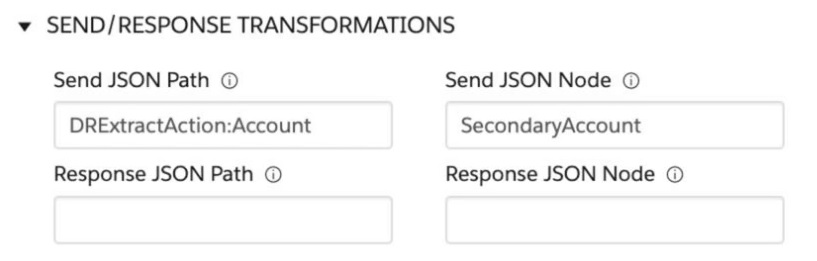
Refer to the exhibit below. A developer has configured an Integration Procedure element with SEND/RESPONSE TRANSFORMATIONS as shown.


Alternatively, how could the developer configure Additional Input to send exactly the same data? Assume that the developer checked Send Only Additional Input.
Show answerHide answer

Correct answer: A Key Value - SecondaryAccount DRExtractAction:Account

Explanation

Explanation:

Let’s figure this out step by step! In the exhibit, the Integration Procedure element is set up with SEND/RESPONSE TRANSFORMATIONS. The "Send JSON Path" is set to DRExtractAction:Account, and the "Send JSON Node" is set to SecondaryAccount. This means the data from DRExtractAction:Account will be sent and labeled as SecondaryAccount. Now, the question asks how to configure the "Additional Input" to send the same data, with the "Send Only Additional Input" option checked.

When you use "Additional Input" with "Send Only Additional Input," you need to pass the data using a key-value pair. The key will be the name you want (like SecondaryAccount), and the value will be the data source (like DRExtractAction:Account). So, the correct way is to set the key as SecondaryAccount and the value as DRExtractAction:Account. That matches option A!

Option B uses %DRExtractAction:Account%, which is a merge field syntax. This is used for dynamic values in OmniScripts, not for direct data mapping in this case, so it’s not right.

Option C switches the key and value, making DRExtractAction:Account the key and SecondaryAccount the value, which is the opposite of what we need.

Option D also uses %DRExtractAction:Account% and swaps the order, so it’s incorrect too.

Think of it like giving a nickname to some data. You name it SecondaryAccount (the key) and point it to the data in DRExtractAction:Account (the value). Option A does this perfectly!

Reference: Salesforce OmniStudio Developer Guide
Question 16 Choose 1
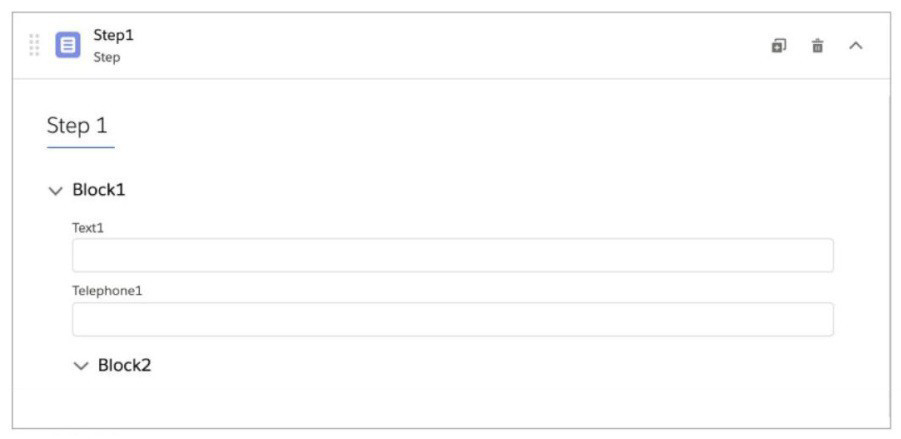
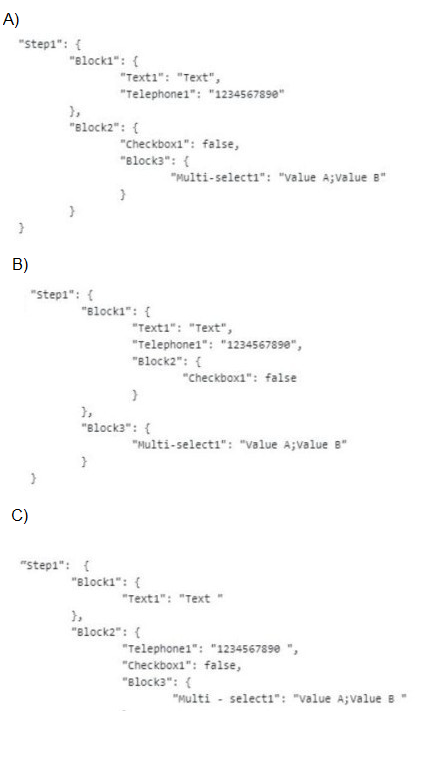
Refer to the exhibit below. What JSON code correctly represents the step in the OmniScript Structure panel shown?


Show answerHide answer

Correct answer: C Option C

Explanation

Summary:
This question assesses the ability to match a JSON structure to an OmniScript configuration displayed in the Structure panel. The panel shows a step with two blocks: Block1 (Text1 and Telephone1 fields) and Block2 (Checkbox1 and Multi-select fields). The correct JSON must accurately reflect this hierarchy and field names without extra or missing elements.

Correct Option:

C. Option C
Option C correctly represents the step with "Block1" containing "Text1" and "Telephone1" fields, and "Block2" containing "Checkbox1" and "Multi-select" fields. The JSON structure aligns with the UI, using proper nesting and including all specified fields with appropriate values, matching the OmniScript design.

Incorrect Option:

A. Option A
Option A includes an erroneous "Block3" with "Multi-select" and "Checkbox1" misplaced, which does not match the UI's two-block structure. This extra block and incorrect field placement make it an invalid representation.

B. Option B
Option B separates "Checkbox1" and "Multi-select" into different blocks ("Block2" and "Block3"), which does not align with the UI showing both under Block2. This misplacement disrupts the intended structure.

D. Option D
Option D lacks proper nesting under "Block2" for "Checkbox1" and includes a space in "Multi - select", which does not match the field name in the UI. This inconsistency renders it incorrect.

Reference:
Salesforce Help: OmniScript Designer
Question 17 Choose 1
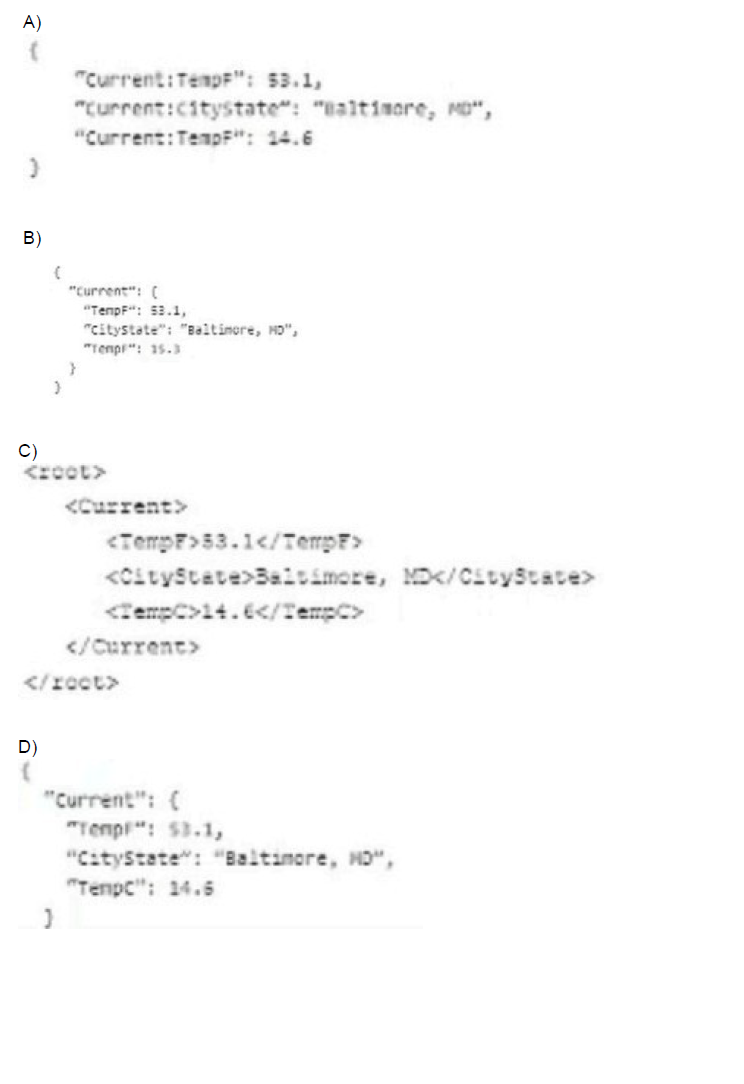
A developer needs to build a DataRaptor Transform to send current weather to both an OmniScript Card Layout. Which of these samples would be valid for the Expected Output JSON?

Show answerHide answer

Correct answer: D Option D

Explanation

Summary
The DataRaptor Transform requires a valid JSON structure for its "Expected Output JSON." This defines the schema that the Transform will build. A valid JSON object must have key-value pairs enclosed in curly braces {}, with keys in double quotes and values that can be strings, numbers, objects, or arrays. The structure must also be free of duplicate keys at the same level, as this makes the JSON invalid and unparsable.

Correct Option

D. Option D
This is the only valid JSON structure. It is a properly formatted JSON object {} with a single top-level key, "Current", whose value is another valid JSON object. This nested object contains unique keys ("TempF", "CityState", "TempC") with appropriate string and number values. This structure is both syntactically correct and semantically sound for representing structured weather data.

Incorrect Option

A. Option A
This is invalid JSON for two reasons. First, it uses a double colon :: as a separator (e.g., "Current::TempF"), which is not standard JSON syntax. Second, and most critically, it contains a duplicate key "Current::TempF" at the same level, which is not allowed in a JSON object and would cause a parsing error.

B. Option B
This option is invalid because it contains a duplicate key "TempF" within the same "Current" object. A JSON object cannot have two identical keys. This would fail during parsing and is not a valid structure.

C. Option C
This is not JSON; it is an XML structure. It is enclosed in and tags and uses XML syntax. The DataRaptor Transform's "Expected Output JSON" tab requires a JSON schema definition, not XML.

Reference
Salesforce OmniStudio Developer Guide: DataRaptor Transform
Question 18 Choose 1
Refer to the exhibit.


The card layout uses an integration Procedure as a data source. The cards use the layout data source.

Show answerHide answer

Correct answer: C Option C

Explanation

Summary
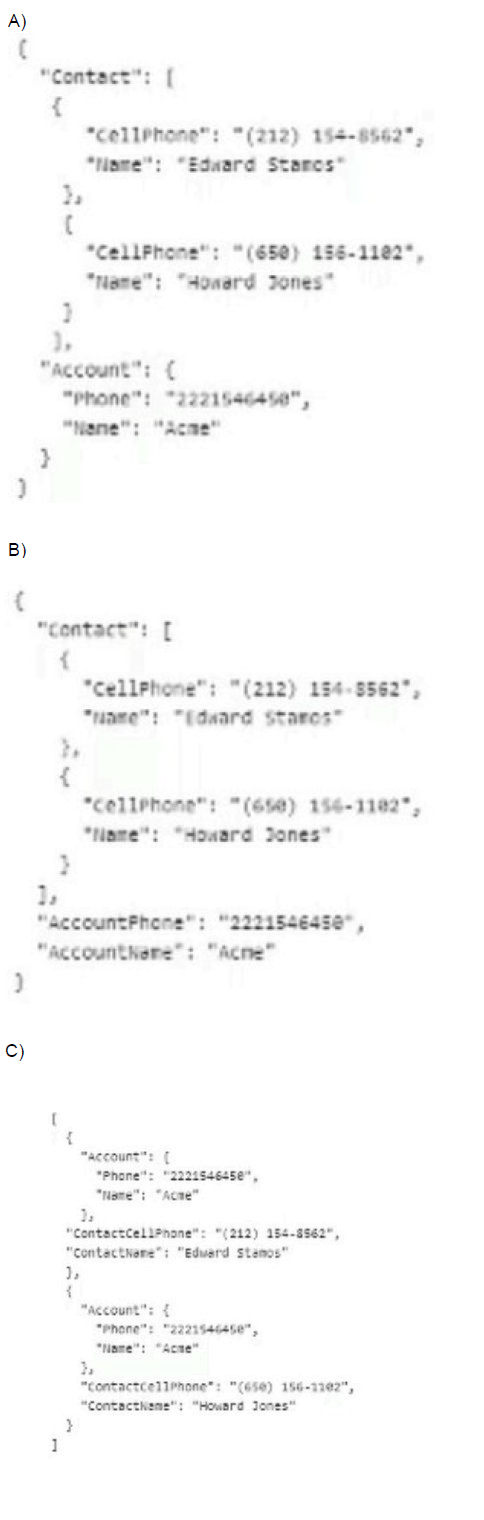
The card layout displays a single Account with multiple related Contacts. Each card combines the parent Account data with one of its child Contacts. The correct JSON structure must represent this one-to-many relationship in a way that the card layout can iterate over. The standard pattern is an array of objects, where each object contains both the parent record fields and the fields for a single child record.

Correct Option

C. Option C
This is the correct structure for a card layout with a one-to-many relationship. It presents an array of two objects. Each object contains:

The parent Account data (Name: "Acme", Phone: "2221546450")

The specific child Contact data for one record (e.g., ContactName: "Eduard Stancs", ContactCellPhone: "(212) 154-8562")

This format allows the card layout to create one card for each element in the outer array, with each card displaying the repeating Account information alongside a unique Contact.

Incorrect Option

A. Option A
This structure is invalid and illogical. It places the single Account object inside the same structure as the multiple Contact objects. A card layout using this would be unable to correctly associate one Account with multiple Contacts for iterative display, as the Account is not a peer to the Contacts in the array.

B. Option B
This structure is invalid JSON (mismatched brackets) and conceptually flawed. It tries to put the AccountPhone and AccountName at the same level as the Contact array, but not as a structured object. More importantly, it does not provide a clear, iterable array where each element contains the combined Account and Contact data needed to render individual cards.

Reference
Salesforce OmniStudio Developer Guide: FlexCard Data Sources
Question 19 Choose 1
A developer needs to configure a calculation procedure to calculation a subtotal using two different depending on whether the input Boolean variable isCustomer is set to true or false. How should a developer configure the calculation procedure to conditionally execute the correct formula?
Show answerHide answer

Correct answer: A Use two separate Calculation Steps with the Conditional Step property selected: use the ISTRUE (is Customer) and NOT (ISTRUE) (is Customer) functions in the Condition syntax.

Explanation

Summary
The requirement is to execute one of two different calculations based on the value of a Boolean variable (isCustomer). In a Calculation Procedure, this conditional logic is implemented using the "Conditional Step" property on individual Calculation Steps. This allows the procedure to evaluate a condition for each step and only execute that step if the condition is true, providing a clear, structured way to handle branching logic.

Correct Option

A. Use two separate Calculation Steps with the Conditional Step property selected: use the ISTRUE (isCustomer) and NOT (ISTRUE(isCustomer)) functions in the Condition syntax.
This is the correct and most explicit method. It involves creating two distinct Calculation Steps.

The first step has its Conditional Step property enabled with the condition ISTRUE(isCustomer). This step's formula will only execute if isCustomer is true.

The second step also has Conditional Step enabled with the condition NOT(ISTRUE(isCustomer)). This step's formula will only execute if isCustomer is false.

This ensures that only one of the two calculations runs, providing clean and reliable conditional logic.

Incorrect Option

B. Use two separate Calculation Steps with the Conditional Step property selected: reference just the isCustomer variable in the Conditional syntax (no comparison necessary)
This is incorrect. The condition field must evaluate to a Boolean value. Simply referencing isCustomer without a function or operator is syntactically invalid in the condition syntax. The condition must be a full expression, such as ISTRUE(isCustomer).

C. Use two separate Calculation Steps with the Conditional Step property selected: compare the isCustomer variable directly to the literal true and false values in the Condition syntax.
This approach is flawed. You cannot compare a variable directly to the literals true or false in the Calculation Procedure's condition syntax. The correct way to check a Boolean variable is to use the ISTRUE() or ISFALSE() functions. A direct comparison like isCustomer == true would not be recognized.

D. Use a single Calculation Step with an IF statement directly in the formula definition to reference the isCustomer variable and conditionally perform the appropriate calculation.
While a single complex formula with an IF statement might work in some contexts, it violates the principle of using the dedicated "Conditional Step" feature for this purpose in Calculation Procedures. Using Conditional Steps is the more declarative, manageable, and best-practice approach for this scenario, as it keeps the individual formulas simpler and the logic flow more visible.

Reference
Salesforce OmniStudio Developer Guide: Calculation Step Properties
Question 20 Choose 1
In a calculation procedure, what is required for the output of a calculation step to be used in an aggregation step?
Show answerHide answer

Correct answer: D It must be included in the calculation output.

Explanation

Explanation:

A Calculation Procedure is used to perform complex multi-step calculations. Its structure involves:

Calculation Steps: These steps perform the individual operations (e.g., formulas, matrix lookups).
Aggregation Step: This final step gathers results from the calculation steps to produce the overall procedure output.
For the result of a calculation step to be available for use in the Aggregation Step, it must be explicitly defined in the Calculation Output of that step.

Here’s the logical flow:
Each calculation step has its own Input and Output configuration.
The fields listed in a step's "Calculation Output" are the results that step produces.
The Aggregation Step can only reference and combine outputs that have been declared in the Calculation Output of previous steps.
If a value is computed but not included in the Calculation Output of its step, it is considered an intermediate variable and is not passed forward to the Aggregation Step.

Why the other options are incorrect:

A. It must be included in constants:
Constants are fixed values defined in the procedure's setup. They are input into calculation steps, not the output from them.

B. It must be a matrix lookup step:
The type of step (e.g., Formula, Matrix Lookup) does not matter. Any step—whether it's a Formula, Matrix Lookup, or another type—must have its result included in its Calculation Output to be used later.

C. It must be a calculation step:
This is tautological (true by definition). The output in question is already from a calculation step. However, this statement misses the specific requirement that the output must be explicitly declared to be passed on.

Reference:
Salesforce OmniStudio Documentation:
The "Calculation Procedures" section explains the data flow. It explicitly states that the Aggregation Step "aggregates the output from multiple calculation steps," meaning it can only use what those steps have emitted in their output.
Full mock exam

Sit the OmniStudio-Developer exam before exam day

Full-length mocks with the same number of questions and the same time limit as the real OmniStudio-Developer exam. Every attempt draws a new set of questions from the full bank, so you can keep going until you pass comfortably.

Get full OmniStudio-Developer mock exam
  • 60questions per mock
  • 105 mintime limit
  • 173questions in the bank
  • Newmock on every attempt