Fortinet certification · Exam NSE7_SSE_AR-26

NSE7_SSE_AR-26 Mock Exam Page 2

Fortinet NSE 7 - FortiSASE 26 Architect

Free NSE7_SSE_AR-26 questions on SD-WAN traffic control and IPsec, each with the answer and an explanation.

20 questions · 30 minutes · free, no sign-up

SD-WAN traffic control and IPsec questions

11–14 of 14 free
Question 11 Choose 2
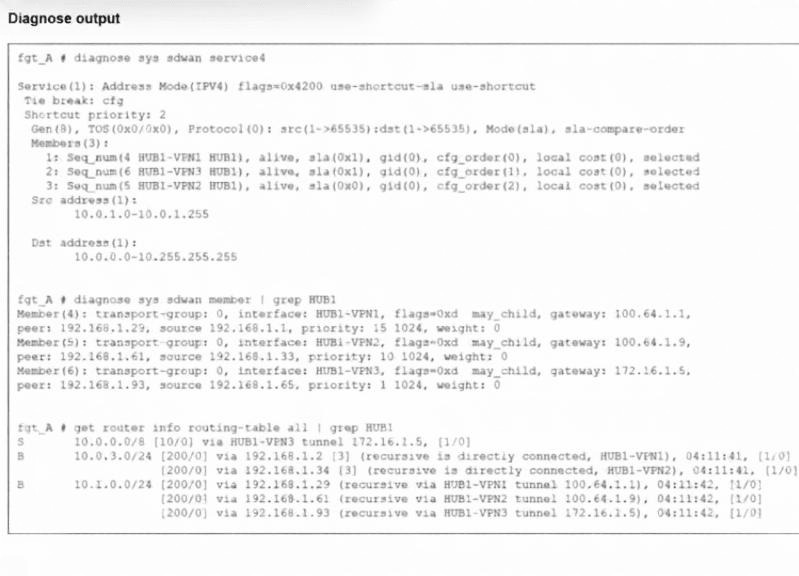
Refer to the exhibit. An administrator is troubleshooting SD-WAN on FortiGate. A device behind branch1_fgt generates traffic to the 10.0.0.0/8 network. The administrator expects the traffic to match SD-WAN rule ID 1 and be routed over HUB1-VPN1. However, the traffic is routed over HUB1-VPN3. Based on the output shown in the exhibit, which two reasons, individually or together, could explain the observed behavior? (Choose two.)
Show answerHide answer

Correct answer: B, D The traffic matches a regular policy route configured with HUB1-VPN3 as the outgoing device HUB1-VPN3 has a lower route priority value (higher priority) than HUB1-VPN1.

Explanation

Explanation

To understand why the traffic is routed over HUB1-VPN3 instead of the expected HUB1-VPN1, we must analyze the routing and SD-WAN processing order:

1. Option B is correct: In FortiOS, routing decisions follow a specific order: Policy Routes > SD-WAN Rules > Routing Table. If a standard (non-SD-WAN) policy route is configured on the FortiGate that matches the source and destination and points explicitly to HUB1-VPN3, it will be evaluated before the SD-WAN rule. If it matches, it will force the traffic out of HUB1-VPN3, bypassing the SD-WAN rule entirely.

2. Option D is correct: If the SD-WAN rule does evaluate, and all members are healthy (SLA is met), FortiGate uses the route table to determine which member is selected. Look at the routing table in the exhibit for the 10.0.0.0/8 network (which encompasses the destination).

The route via HUB1-VPN1 has an administrative distance (AD) and metric of [10/10].

The route via HUB1-VPN3 has an AD and metric of [1/0].

Because a lower value is preferred in routing, the route via HUB1-VPN3 (Priority 1) is preferred over HUB1-VPN1 (Priority 10). Even if the SD-WAN rule selects multiple members (as seen in the service4 output where both HUB1-VPN1 and HUB1-VPN3 are selected), the active route in the routing table dictates the forwarding path. HUB1-VPN3 wins because it has the better route priority/metric.

Why the other options are incorrect:

A (HUB1-VPN3 has a higher member configuration priority than HUB1-VPN1): The diagnose sys sdwan member output shows the member priority for both HUB1-VPN1 and HUB1-VPN3 is 1024. They have equal member configuration priority, so this cannot be the reason.

C (HUB1-VPN1 does not have a valid route to the destination): The routing table output clearly shows that HUB1-VPN1 does have a valid route to the 10.0.0.0/8 network (B 10.0.0.0/8 [200/0] via 192.168.1.2 (recursive is directly connected, HUB1-VPN1)). It is just not the preferred route because HUB1-VPN3 has a better priority.

References:

Fortinet Document Library: FortiOS Administration Guide — "Routing" > "Policy Routes" (Evaluation order of policy routes vs. SD-WAN rules).
Question 12 Choose 2
An administrator configures the performance service-level agreement (SLA) with the probe mode, Prefer Passive. What are two observable impacts of this configuration? (Choose two.)
Show answerHide answer

Correct answer: B, E FortiGate passively monitors the member if TCP traffic is passing through the member. During passive monitoring, the SLA performance rule cannot detect dead members.

Explanation

Explanation

In Prefer Passive probe mode, FortiGate measures link quality (latency, jitter, packet loss) from live user traffic instead of sending its own probes, and falls back to active probes when there isn’t enough traffic to measure.

B is correct. Passive measurement works from TCP sessions. FortiGate derives the metrics from the TCP flow (for example, from TCP handshake and acknowledgment timing). Other traffic, such as ICMP, isn’t used for passive measurement.

E is correct. While the rule is in passive mode, FortiGate only observes whatever traffic happens to be flowing. It sends no probes, so it has no reliable way to tell that a member is dead. Dead-member detection depends on active probes, which is why Prefer Passive switches to active mode when traffic is absent.

Why the other options are wrong

A: Passive monitoring does not use ICMP traffic. It relies on TCP sessions (see B).

C: This describes a fallback timer that I can’t confirm. Prefer Passive is described as switching to active probing when there is no suitable traffic and returning to passive when traffic is seen again. I’m not aware of a fixed 3-minute rule, so I’d treat this option as a distractor.

D: Passive measurement needs the traffic to be inspected by the CPU, so sessions subject to passive monitoring cannot be offloaded to the NPU. The documented setup requires disabling ASIC offload (auto-asic-offload disable) on the relevant firewall policy. This option states the opposite.

Confidence note: B and D/E are the points I’m most sure about (D being false is well-documented). E is the best fit for the second answer, but the exact wording of the fallback behavior (option C) varies by FortiOS version. If your answer key differs, check the “Passive WAN health measurement” section for your exam version.

References

FortiOS Administration Guide: SD-WAN > Performance SLA > Passive WAN health measurement (probe-mode prefer-passive)

FortiOS CLI Reference: config system sdwan > config health-check > set probe-mode

Question 13 Choose 1


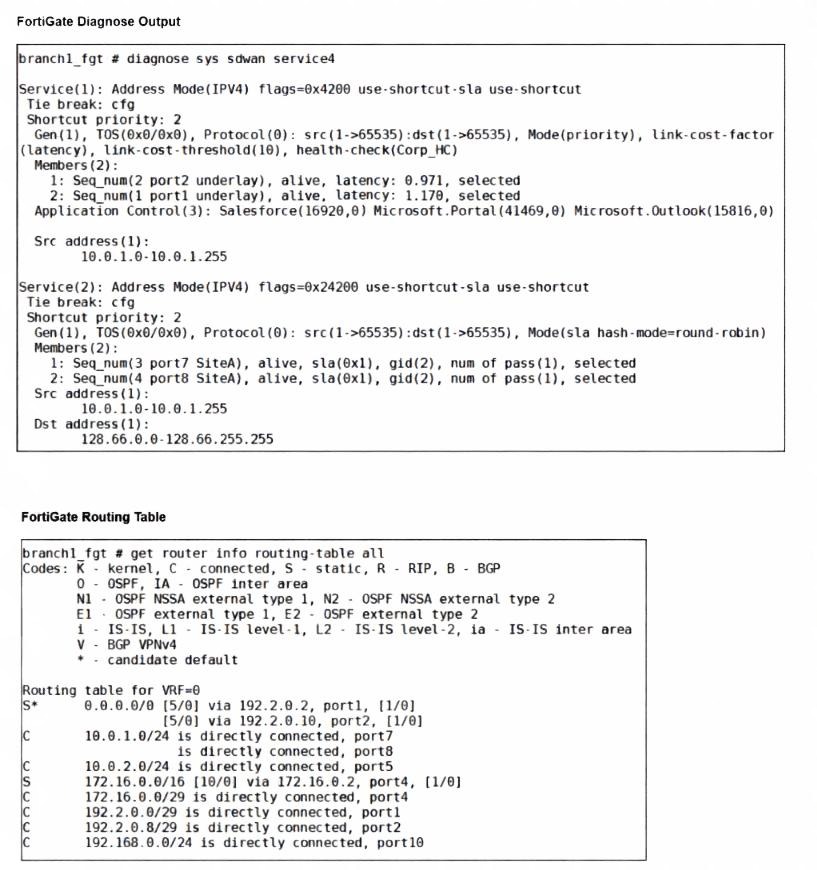
How does FortiGate handle the ICMP traffic with the source IP address 10.0.1.125 and the destination IP address 128.66.0.125?
Show answerHide answer

Correct answer: D FortiGate routes the traffic flow according to the forwarding information base (FIB).

Explanation

Explanation

To determine how FortiGate handles the specific traffic flow (Source: 10.0.1.125, Destination: 128.66.0.125, Protocol: ICMP), we must evaluate the SD-WAN service output and the routing table.

1. Rule 1 Evaluation:

Source matches: 10.0.1.0-10.0.1.255 (includes 10.0.1.125).

Application Control matches: Salesforce, Microsoft.Portal, Microsoft.Outlook.

Result: The traffic is ICMP. ICMP does not match these specific web applications. Therefore, it bypasses Rule 1.

2. Rule 2 Evaluation:

Source matches: 10.0.1.0-10.0.1.255.

Destination matches: 128.66.0.0-128.66.0.255 (includes 128.66.0.125).

Protocol/Criteria matches: None specified (matches any).

Result: The traffic matches the destination of Rule 2. However, look at the Mode for Rule 2: Mode(sla hash-mode=round-robin).

3. Why it bypasses SD-WAN load balancing:

Even though the traffic matches Rule 2, SD-WAN rules with load-balancing modes (like round-robin or source-ip-based) typically rely on session creation to assign a flow to a member.

More importantly, FortiOS SD-WAN load balancing is designed for session-based traffic (TCP/UDP). ICMP does not establish sessions in the same way.

When a matching SD-WAN rule cannot properly assign the flow (or if the SD-WAN feature is bypassed for that specific protocol), FortiGate falls back to standard routing. The traffic will be routed based on the FIB (Forwarding Information Base) for the destination 128.66.0.0/24.

Since the routing table does not show a specific route for 128.66.0.0/24, it would follow the default route (S* 0.0.0.0/0 via 192.2.0.2 port1 or port2), but the action is governed by standard FIB lookups.

Why the other options are incorrect:

A (FortiGate drops the traffic flow): There is no implicit deny rule or explicit drop action shown in the output for this traffic. FortiGate will route it.

B (FortiGate load balances the traffic flow through port7 and port8): While Rule 2 matches the destination, SD-WAN load balancing (round-robin) applies to sessions. Furthermore, the specific ICMP flow is not evaluated as an application session for load balancing in this context. Standard routing takes precedence for non-session traffic when SD-WAN doesn't explicitly capture it.

C (FortiGate steers the traffic flow through port2): While the default route points to port2, standard ICMP traffic matching a destination-only rule without application control will fall back to the FIB routing decision, which is the most accurate description of the mechanism.

References:

Fortinet Document Library: FortiOS Administration Guide — "SD-WAN" > "SD-WAN Rules" (Understanding how load balancing modes apply to sessions and the fallback to routing).

Question 14 Choose 1
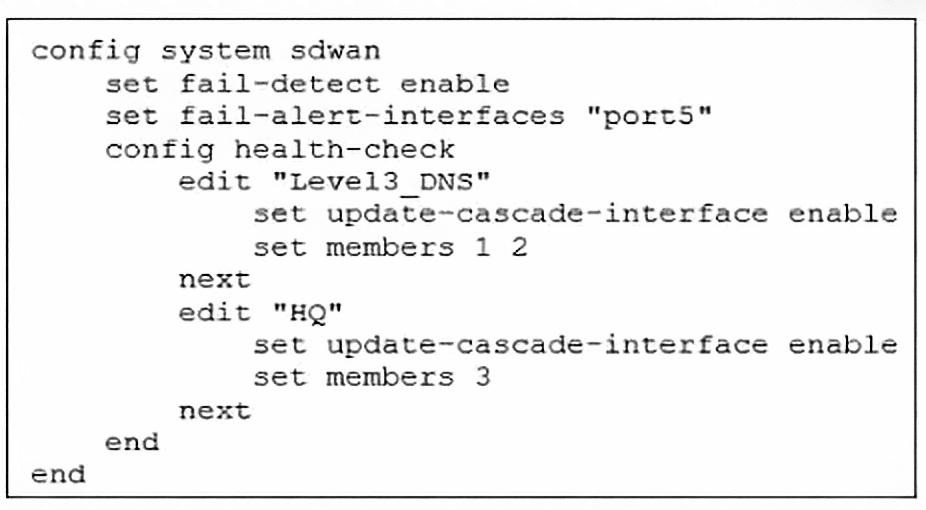
Refer to the exhibit. Which action will FortiGate take if it detects SD-WAN members as dead?
Show answerHide answer

Correct answer: A FortiGate sends alert messages through port5 when it detects any SD-WAN member as dead.

Explanation

Explanation

Let's look at the specific CLI commands configured in the exhibit:

1. set fail-detect enable: This enables the SD-WAN failure detection mechanism.

2. set fail-alert-interfaces "port5": This is the crucial command. In FortiOS, when fail-detect is enabled, the fail-alert-interfaces command specifies which interface(s) FortiGate will use to send alert messages (such as SNMP traps or log messages) when an SD-WAN health check fails and a member is marked as dead. It does not bring the interface up or down.

Why the other options are incorrect:

B & C (FortiGate brings up port5...): The fail-alert-interfaces command is strictly for sending notifications/alerts. To bring an interface up or down based on SD-WAN health, you would use SD-WAN member actions (config system sdwan > config members > edit X > set status enable/disable) or link-monitor actions, which are not present in this configuration.

D (...when it detects all SD-WAN members as dead): The fail-detect and fail-alert-interfaces feature is designed to trigger an alert whenever a health check fails (i.e., any monitored member is detected as dead), not just when all of them fail.

References:

Fortinet Document Library: FortiOS Administration Guide — "SD-WAN" > "Configuring SD-WAN health checks" and "Fail-detect and fail-alert-interfaces" (Explains how to configure the FortiGate to send alerts through specific interfaces when SD-WAN members go down).

That's the last free question in SD-WAN traffic control and IPsec

You've seen the free 30% (14 of 47 questions). Full access unlocks every question and full-length NSE7_SSE_AR-26 mock exams (50 questions, 75 minutes), a different mock on every attempt.

Unlock full mock exam
Full mock exam

Sit the NSE7_SSE_AR-26 exam before exam day

Full-length mocks with the same number of questions and the same time limit as the real NSE7_SSE_AR-26 exam. Every attempt draws a new set of questions from the full bank, so you can keep going until you pass comfortably.

Get full NSE7_SSE_AR-26 mock exam
  • 50questions per mock
  • 75 mintime limit
  • 110questions in the bank
  • Newmock on every attempt