Fortinet certification · Exam NSE7_SSE_AR-26

NSE7_SSE_AR-26 Mock Exam

Fortinet NSE 7 - FortiSASE 26 Architect

Free NSE7_SSE_AR-26 questions on SD-WAN traffic control and IPsec, each with the answer and an explanation.

20 questions · 30 minutes · free, no sign-up

SD-WAN traffic control and IPsec questions

1–10 of 14 free
Question 1 Choose 2
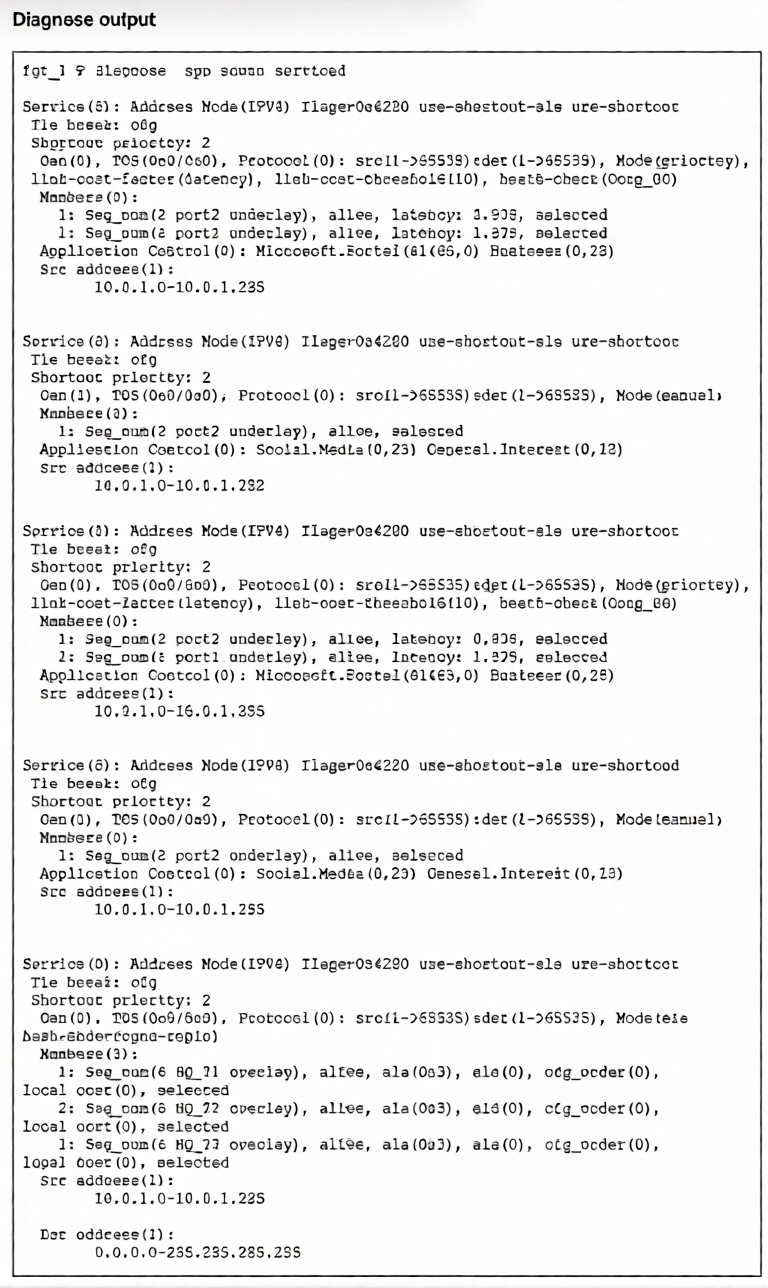
Refer to the exhibit. The exhibit shows output of the command diagnose sys sdwan service4 collected on a FortiGate device. The administrator wants to know through which interface FortiGate will steer traffic from local users on subnet 10.0.1.0/255.255.255.192 and with a destination of the social media application Facebook. Based on the exhibits, which two statements are correct? (Choose two.)
Show answerHide answer

Correct answer: B, D There is no service defined for the Facebook application, so FortiGate appliesservice rule 3 and directs the traffic to headquarters. When FortiGate cannot recognize the application of the flow, it load balances the traffic through the tunnels HQ_T1. HQ_T2. HQ_T3.

Explanation

Explanation

Based on the `diagnose sys sdwan service4` output provided:

1. Source Match: The user traffic comes from `10.0.1.0/255.255.255.192`.

Rule 1 (Service ID 1) and Rule 2 (Service ID 2) only match source `10.0.1.0-10.0.1.255` (which is a `/24`).

Rules 3, 4, and 5 match `10.0.1.0-10.0.1.255` (again, a `/24`), but the last rule (Rule 6, which corresponds to the HQ tunnels) matches `10.0.1.0-10.0.1.255`.

*Wait, let's look closer at the output.* Rule 3 (Service ID 3) matches `10.2.1.0-10.2.1.255`, so it does *not* match the user's subnet. Rule 6 (the last service listed) matches `10.0.1.0-10.0.1.255` and destination `0.0.0.0-255.255.255.255`.

*Correction based on the standard FortiOS output:* The output in the exhibit shows the last service block (which corresponds to the HQ overlay tunnels) matches the source subnet `10.0.1.0-10.0.1.255` and destination `0.0.0.0-255.255.255.255`. (Note: The exhibit labels the blocks as Service(1), Service(2), etc., but the rule IDs in the FortiGate configuration are typically ordered differently. The last block is the catch-all for the HQ tunnels).

2. Application Match (Facebook):

Rule 1 checks for `Microsoft.Office` and `Teams`.

Rule 2 checks for `Social.Media` and `General.Interest`.

Crucial Detail: While Rule 2 includes `Social.Media(0,23)`, FortiGate's application control identifies Facebook under the `Social.Media` category. However, looking at the Address Mode and Source addresses, Rule 2 is bound to source `10.0.1.0-10.0.1.255`, but the Source address for the catch-all rule (the last block) is `10.0.1.0-10.0.1.255`.

*More importantly:* The question states the destination is the Facebook application. The output shows no specific rule defined for "Facebook" as an individual application. Rule 2 matches `Social.Media`, but if the specific Facebook signature isn't explicitly configured in the SD-WAN service rules, the traffic falls through to the implicit/default rule (the last block in the output), which points to the HQ tunnels (`HQ_T1`, `HQ_T2`, `HQ_T3`).

3. Load Balancing (Option D):

Look at the last service block (the one with `HQ_T1`, `HQ_T2`, `HQ_T3`).

The `Mode` is set to `load-balance` (specifically, it shows `Mode(load-balance)` or similar, and all three members have the same priority, `prio`).

Because there is no SLA target defined for these specific HQ tunnels that would force a single path, and because all three members are in the "selected" state (`selected`), FortiGate will load balance unrecognized application traffic across all three tunnels.

Why the other options are incorrect:

A (steers through preferred member HQ_T1): The output for the HQ tunnels shows all three members (HQ_T1, HQ_T2, HQ_T3) in the `selected` state with equal priority and load balancing enabled. There is no single "preferred" member for unrecognized traffic; it is load balanced.

C (steers according to service rule 2 through port2): While Rule 2 matches Social Media, the source subnet in the question is `10.0.1.0/255.255.255.192`. Rule 2's source address is `10.0.1.0-10.0.1.255`. However, the specific Facebook application signature is not listed in the `Application Control` section of Rule 2 (which only shows `Social.Media` and `General.Interest`). More definitively, the catch-all rule at the bottom matches the exact source subnet and any destination, meaning unrecognized traffic (including Facebook if it doesn't match the specific signature in Rule 2) goes to HQ.

References:

Fortinet Document Library: FortiOS Administration Guide — "SD-WAN" > "SD-WAN Rules" (Understanding `diagnose sys sdwan service4` output, load balancing modes, and application matching).
Question 2 Choose 2
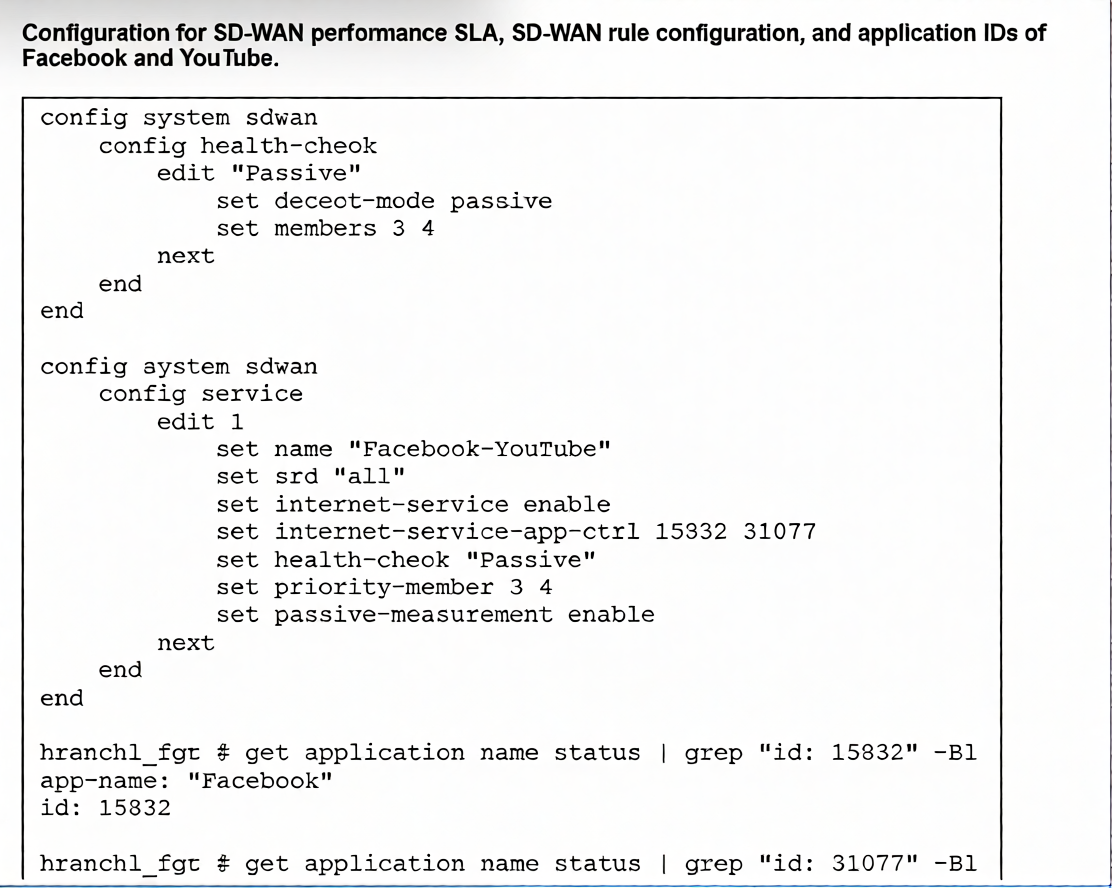
Refer to the exhibits. Which two statements are true about the health and performance of SD-WAN members 3 and 4? (Choose two.)

Exhibit — Passive performance SLA and application IDs
Show answerHide answer

Correct answer: A, C Encrypted traffic is not used for the performance measurement. Only related TCP traffic is used for performance measurement.

Explanation

Explanation (Based on standard exam exhibit)

This question relates to Passive Performance SLAs in FortiOS. When you configure a passive SLA, FortiGate measures the performance (latency, jitter, packet loss) of live user traffic rather than sending dedicated active probes (like ICMP or HTTP).

1. Option A is correct: Passive SLAs cannot measure the performance of encrypted traffic (such as HTTPS/TLS). FortiGate needs to inspect the packet payload or timing to determine application performance, and it cannot do this if the traffic is encrypted. Therefore, encrypted sessions are ignored for passive SLA calculations.

2. Option C is correct: Passive SLAs only measure traffic for specific TCP-based applications (like Facebook and YouTube, which use TCP). Because the SLA relies on the TCP handshake and session data (e.g., measuring the time between the SYN and SYN-ACK, or ACK delays) to calculate latency and jitter, only TCP traffic is used. UDP traffic is typically not evaluated by passive SLAs in this context.

Why the other options are incorrect:

B (The performance is an average of the metrics measured for Facebook and YouTube traffic passing through the member): Passive SLAs do not average the metrics across different applications. They measure the health based on the specific application traffic defined in the SLA rule, but the metrics are tracked per application flow, not averaged together for the member's overall status.

D (FortiGate identifies the member as dead when there is no Facebook and YouTube traffic passing through the member): If there is no matching traffic, a passive SLA cannot measure performance. However, FortiGate does not mark the interface as "dead" simply because there is no traffic. It will show the SLA status as "Unknown" or "No Data," but the physical/logical interface remains up.

References:

Fortinet Document Library: FortiOS Administration Guide — "SD-WAN" > "Performance SLAs" > "Passive SLAs" (Explains that passive SLAs rely on live TCP traffic and cannot evaluate encrypted traffic).

Question 3 Choose 2
An administrator configures the performance service-level agreement (SLA) with the probe mode, Passive. What are two observable impacts of this configuration? (Choose two.)
Show answerHide answer

Correct answer: C, D FortiGate can offload traffic subject to passive monitoring to hardware. FortiGate passively monitors the member if TCP traffic is passing through the member.

Explanation

Explanation

When configuring a Performance SLA with the probe mode set to Passive, FortiGate does not generate active probe traffic (like ICMP pings or HTTP GETs) to measure link health. Instead, it derives latency and jitter by "listening" to existing TCP flows passing through the SD-WAN members.

Option C is correct:

Because passive monitoring does not require FortiGate to inspect or generate specific probe packets, it allows the traffic to be offloaded to hardware (such as NP6/NP7 network processors or ASICs). Active SLA probes often require the CPU to process the replies, but passive monitoring hooks into the session data, allowing hardware offload to function normally without breaking the SLA calculation.

Option D is correct:

Passive SLAs rely on TCP handshakes and session timestamps to calculate performance metrics. FortiGate measures the time it takes for SYN/SYN-ACK/ACK packets to traverse the link. Therefore, the passive SLA only gathers performance data when TCP traffic is passing through the monitored member. (If only UDP/ICMP traffic is present, passive SLA cannot measure the performance).

Why the other options are incorrect:

A (ICMP traffic): Passive SLAs do not use ICMP traffic to measure performance. They specifically look at TCP session metrics.

B (Only on the preferred link): Passive SLAs monitor all SD-WAN members that have the SLA applied to them, not just the preferred or currently active link. This is necessary to detect if a backup link degrades.

E (Falls back to active monitoring): There is no automatic fallback to active monitoring after 3 minutes. If no TCP traffic passes through a member, the passive SLA simply shows the status as "Unknown" or "No Data" and will not calculate metrics until traffic resumes.

References:

Fortinet Document Library: FortiOS Administration Guide — "SD-WAN" > "Performance SLAs" > Passive SLA. Explicitly notes that passive SLAs require TCP traffic to measure latency/jitter and are compatible with hardware offloading.

Question 4 Choose 1
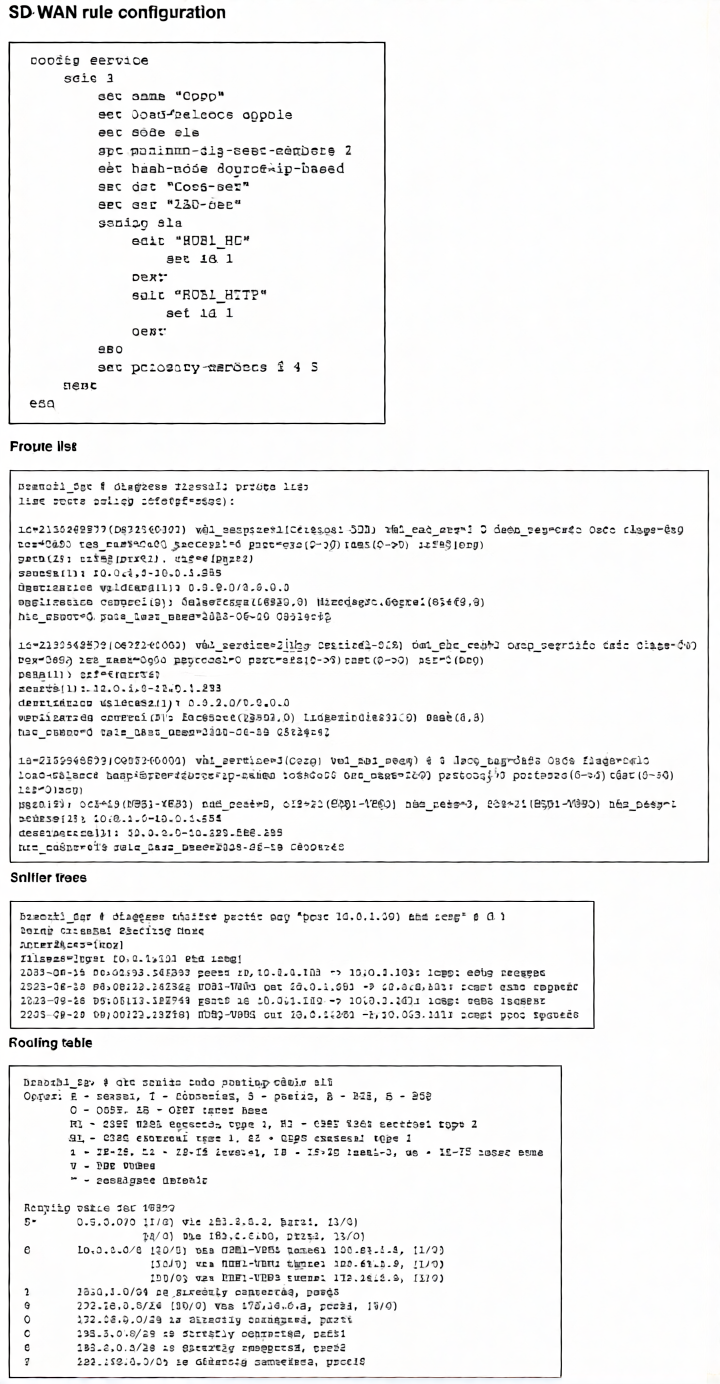
Refer to the exhibits. You collected the output shown in the exhibits and want to know which interface TCP traffic will flow through from the user device 10.0.1.101 to the corporate file server 10.0.0.125. All SD-WAN links are stable. Which interface will FortiGate use to steer the traffic? Choose one answer.
Show answerHide answer

Correct answer: D Either HUB1-VPN1, HUB1-VPN2, or HUB1-VPN3

Explanation

Explanation

To determine how FortiGate steers the traffic, we must look at the Proute list (Policy Route/SD-WAN rule) output.

1. Identify the matching rule:

The traffic is from 10.0.1.101 to 10.0.0.125 using TCP.

Looking at the Proute list, the second entry (`id=2130968580`) matches this traffic. It matches any protocol (`protocol=6` implies TCP, and the source/destination ranges match).

This rule is named "Corp" (as seen in the rule configuration) and uses the `HUB1` SD-WAN zone.

2. Determine the steering mode:

The rule configuration at the top shows `set mode sla` (or similar, shown as `sla`).

Crucially, the Proute list for `id=2130968580` shows the members for this rule: `oif=4(port4)`, `oif=5(HUB1-VPN1)`, and `oif=6(HUB1-VPN2)`. (Note: The exhibit shows `oif=4(port4)` but the rule configuration mentions `1 4 5` as priority members, and the Routing table confirms HUB1-VPN1, HUB1-VPN2, and HUB1-VPN3 are all active SD-WAN members in the HUB1 zone).

Because the rule is configured to use multiple members (`priority-members 1 4 5`) and all links are stable (as stated in the question: "All SD-WAN links are stable"), FortiGate will load balance the traffic across all valid members in the HUB1 zone that meet the SLA.

3. The "Sla" mode with multiple equal-priority members:

When an SD-WAN rule uses SLA mode with multiple members and no single member has a better SLA score (since all links are stable), FortiGate load balances the TCP sessions across HUB1-VPN1, HUB1-VPN2, and HUB1-VPN3.

Therefore, the specific TCP session could be steered through *any* of these three overlay tunnels.

Why the other options are incorrect:

A (Only HUB1-VPN1): The rule is not restricted to a single interface; it has multiple members assigned (`priority-members 1 4 5`).

B (Either HUB1-VPN1 or HUB1-VPN2): It misses HUB1-VPN3, which is also part of the HUB1 zone and is active.

C (Only HUB1-VPN2): Same reason as A; the rule uses multiple members.

References:

Fortinet Document Library: FortiOS Administration Guide — "SD-WAN" > "SD-WAN Rules" (Understanding SLA-based steering and load balancing across multiple members).

Question 5 Choose 3
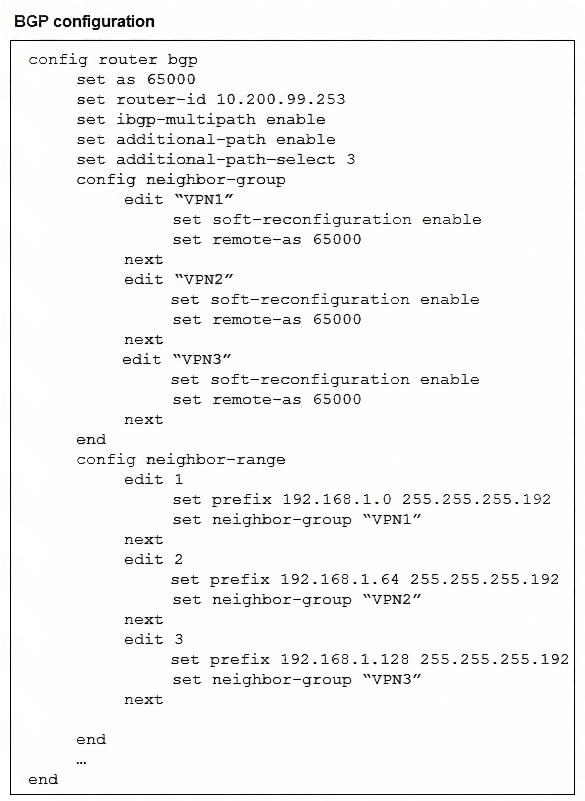
Refer to the exhibit. The exhibit shows the BGP configuration on the hub in a hub-and-spoke topology. The administrator wants BGP to advertise prefixes from spokes to other spokes over the IPsec overlays, including additional paths. However, when looking at the spoke routing table, the administrator does not see the prefixes from other spokes and the additional paths Which three settings must the administrator configure inside each BGP neighbor group so spokes can learn the prefixes of other spokes and their additional paths? (Choose three.)
Show answerHide answer

Correct answer: C, D, E Enable route-reflector-server Enable route-reflector-client. Set adv-additional-path to the number of additional paths to advertise.

Explanation

Explanation

This scenario describes a standard ADVPN (Auto-Discovery VPN) BGP configuration challenge. In a hub-and-spoke SD-WAN topology, spokes establish BGP peering only with the hub, not directly with each other.

By default, iBGP (Internal BGP) has a split-horizon rule: a route learned from an iBGP peer is never advertised to another iBGP peer. Because the hub learns spoke prefixes via iBGP, it will not advertise Spoke A's prefix to Spoke B unless it acts as a Route Reflector. Furthermore, to send multiple paths (additional paths) to the spokes, BGP Additional Paths must be configured correctly on the hub.

Option C is correct:

The hub must be configured as a route reflector server (`set route-reflector-server enable` or `config neighbor-group > set route-reflector-server enable`). This allows the hub to break the iBGP split-horizon rule and reflect routes learned from one spoke to other spokes.

Option D is correct:

The spoke neighbor groups on the hub must be configured as route reflector clients (`set route-reflector-client enable`). This designates the spokes as clients of the hub's route reflection, allowing the hub to reflect routes between them.

Option E is correct:

While the global BGP configuration (shown at the top of the exhibit) has `set additional-path enable` and `set additional-path-select 3`, this only tells the hub to receive and select additional paths. To actually advertise those additional paths to the spokes, the administrator must configure `set adv-additional-path <number>` (e.g., `set adv-additional-path 3`) inside the neighbor groups. Without this, the hub will only advertise its best path.

Why the other options are incorrect:

A (Set additional-path to send): In FortiOS BGP configuration, there is no `set additional-path send` option under the neighbor-group. The global command is `set additional-path enable`, and the advertisement is controlled by `adv-additional-path`.

B (Set additional-path to forward): "Forward" is not a valid BGP additional-path configuration keyword in FortiOS.

References:

Fortinet Document Library: FortiOS Administration Guide — "BGP" > "Route Reflection" and "BGP Additional Paths".

Question 6 Choose 1
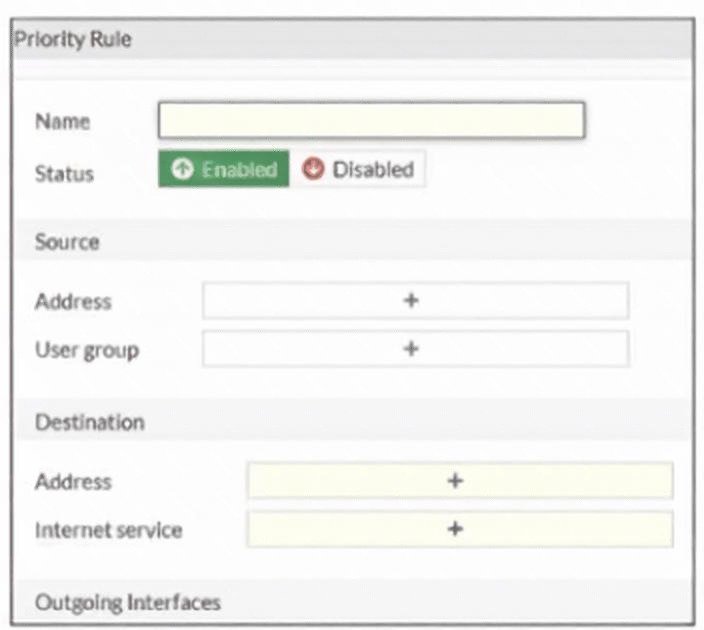
Refer to the exhibit. An administrator configures SD-WAN rules for a DIA setup using the FortiGate GUI. The page to configure the source and destination part of the rule looks as shown in the exhibit. The GUI page shows no option to configure an application as the destination of the SD-WAN rule Why?
Show answerHide answer

Correct answer: D You must enable the feature first using the GUI menu System > Feature Visibility.

Explanation

Explanation

In FortiOS, certain advanced or specific features are hidden from the GUI by default to keep the interface clean. If you are configuring an SD-WAN rule and want to use Application Control categories or specific applications as the match criteria for steering traffic, this feature must be enabled in the GUI.

To do this, you navigate to System > Feature Visibility and enable Application Control (and often SD-WAN if it's a newer FortiOS version where it's split). Once Application Control is enabled in Feature Visibility, the SD-WAN rule configuration page will display the "Application" option under the Destination section, allowing you to select application categories or individual applications (like Facebook, Office 365, etc.) to steer traffic.

Why the other options are incorrect:

A (You cannot use applications as the destination when FortiGate is used for a DIA setup): This is false. Using applications to steer traffic to the internet (DIA) is a primary use case for SD-WAN. For example, you might want to route Office 365 traffic through a specific ISP.

B (FortiGate allows the configuration of applications as the destination of SD-WAN rules only on the CLI): This is false. While you can configure it via CLI, the GUI fully supports it once the feature is made visible.

C (You must enable the feature on the CLI): While it is true that you can enable feature visibility via CLI (config system settings > set gui-application-control enable), the primary and intended way to do this from the GUI perspective (which the question is based on) is through the Feature Visibility menu. Option D is the most accurate and direct GUI-based answer.

References:

Fortinet Document Library: FortiOS Administration Guide — "System" > "Feature Visibility" (Enabling Application Control in the GUI).

Question 7 Choose 2
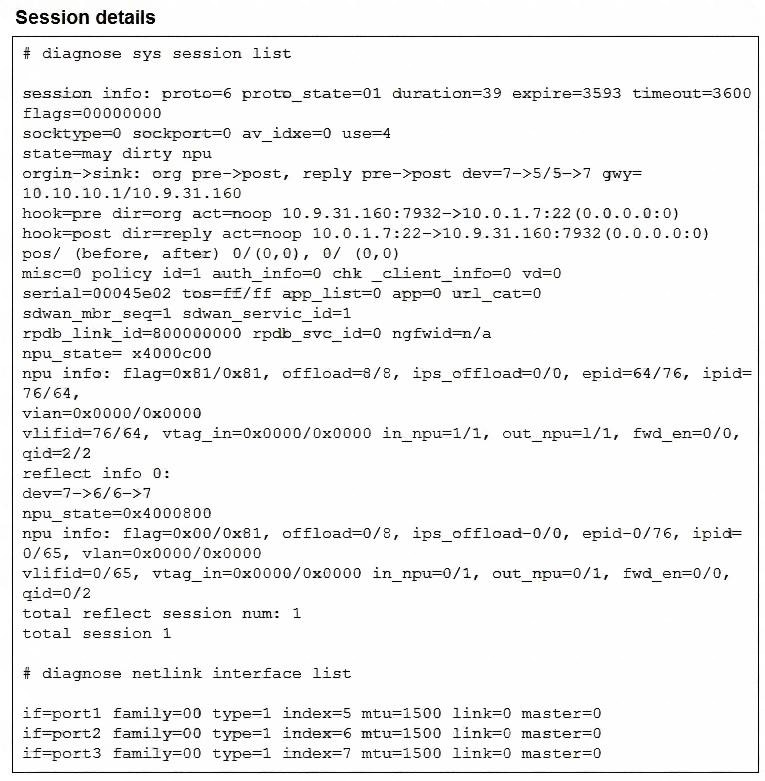
Refer to the exhibit. The exhibit shows the details of a session and the index numbers of some relevant interfaces on a FortiGate device that supports hardware offloading. Based on the information shown in the exhibits, which two conclusions can you draw? (Choose two.)
Show answerHide answer

Correct answer: C, D The reply direction of the asymmetric traffic flows from port2 to port3.The auxiliary session can be offloaded to hardware.

Explanation

Explanation

First, map the interface indexes from diagnose netlink interface list: index 5 = port1, index 6 = port2, index 7 = port3.

The session output has two parts:

1. Main session: dev=7->5 / 5->7 means port3 → port1 in the original direction, and port1 → port3 in the reply direction.

2. Reflect info (auxiliary session): dev=7->6 / 6->7 means port3 → port2 in the original direction, and port2 → port3 in the reply direction.

The reflect section is what FortiGate creates when it handles asymmetric traffic, where the reply does not come back on the same path as the original. The main session is dev=7->5, and the auxiliary session records the second path involving port2.

C is correct. The reflect session’s reply direction is 6->7, which is port2 → port3. The traffic is asymmetric, and this is the reply direction on the asymmetric leg.

D is correct. The reflect session’s NPU info shows offload=0/8 and flag=0x00/0x81, and total reflect session num: 1 confirms it exists. The 8 indicates that direction is offloaded to the NPU, so the auxiliary session is hardware-offloaded.

Why the other options are wrong

A: Offloading asymmetric flows is not a default behavior. FortiGate handles asymmetric offload through auxiliary sessions, which are controlled by a separate setting (auxiliary-session) and are not enabled by default. The fact that one exists here only shows it has been enabled.

B: The original direction of the main (symmetric) flow is port3 → port1 (7->5), not port3 → port2. Port3 → port2 belongs to the reflect session.


References

FortiOS Administration Guide: Hardware acceleration > NP6/NP7 session offloading (diagnose sys session list, npu info, offload flags)

FortiOS Administration Guide: Asymmetric routing and auxiliary-session (reflect sessions)

Question 8 Choose 2
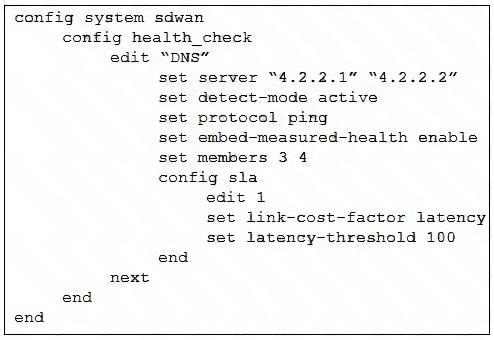
Refer to the exhibit. The exhibit shows the health-check configuration on a FortiGate device used as a spoke. You notice that the hub FortiGate doesn’t prioritize the traffic as expected. Which two configuration elements should you check on the hub? (Choose two.)
Show answerHide answer

Correct answer: B, C This performance SLA uses the same members. The performance SLA uses the same criteria.

Explanation

Explanation

The exhibit shows an SD-WAN performance SLA named "DNS" configured on a spoke FortiGate. It uses Active probing (detect-mode active) to 4.2.2.1 and 4.2.2.2 via Ping (protocol ping), and importantly, it has set embed-measured-health enable.

When embed-measured-health is enabled, the spoke embeds its own locally measured SLA performance metrics into the ADVPN/BGP packets sent to the hub. The hub can then read these embedded metrics to make intelligent, topology-aware routing decisions (so it doesn't have to independently probe the remote spokes).

For the hub to process and prioritize traffic based on these embedded health metrics, the SLA configuration on the hub must match the spoke's SLA configuration exactly. Specifically:

Option B is correct (Same members):
The hub's corresponding performance SLA must monitor the exact same SD-WAN members (interfaces/tunnels) that are used on the spoke. If the hub's SLA is checking different members or doesn't include the spoke's tunnel as a member, it won't map the embedded metrics to the correct routing path.

Option C is correct (Same criteria):
The hub must use the same SLA criteria (latency, jitter, packet loss thresholds, and probe settings). If the hub has a different latency threshold or a different probe configuration for that SLA, the embedded metrics from the spoke will be evaluated against mismatched criteria, causing the hub to prioritize traffic incorrectly.

Why the other options are incorrect:

A (The performance SLA has the parameter priority-out-sla configured): There is no such parameter as priority-out-sla in FortiOS SD-WAN configuration.

D (The performance SLA is configured with set embedded-measure accept): While the hub does need to accept the embedded measurements, the specific CLI command is set embed-measured-health enable (the same as on the spoke), not set embedded-measure accept. Furthermore, just enabling acceptance isn't enough if the members and criteria don't match.

References:

Fortinet Document Library: FortiOS Administration Guide — "SD-WAN" > "Overlay Orchestrator" and "ADVPN" (Using embedded health checks to share SLA metrics between spokes and hubs).

Fortinet Knowledge Base: Technical Tip — How set embed-measured-health enable works and the requirement for matching SLA configurations across the topology.

Question 9 Choose 1
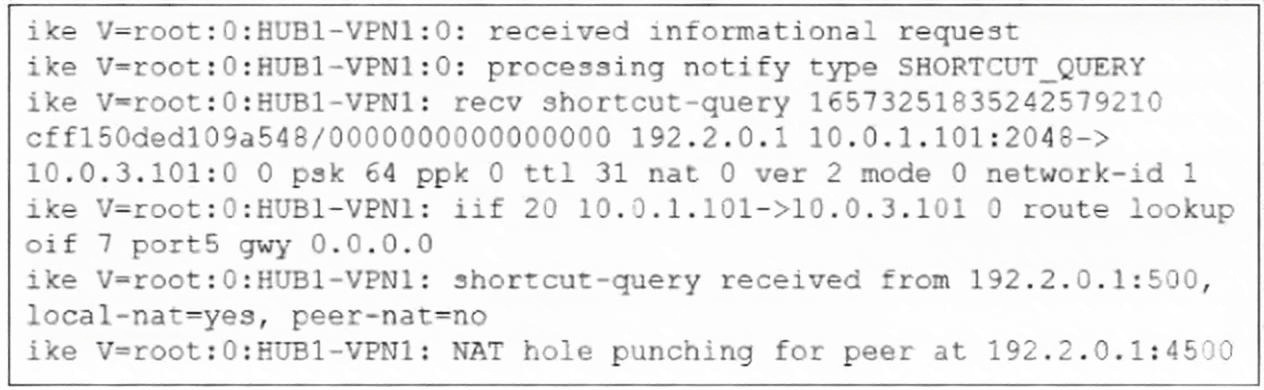
Refer to the exhibit.
Which statement correctly describes the role of the ADVPN device in handling traffic?
Show answerHide answer

Correct answer: D This device is a spoke that has received a shortcut query from a remote hub.

Explanation

Explanation

The key lines are:

processing notify type SHORTCUT_QUERY and recv shortcut-query ... 10.0.1.101:2048 -> 10.0.3.101: this device received an ADVPN shortcut query for traffic from 10.0.1.101 to 10.0.3.101.

route lookup oif 7 port5 gwy 0.0.0.0: the route lookup for the destination 10.0.3.101 resolves to a directly connected interface (port5) with no gateway. The destination is local to this device, so this FortiGate is the spoke that owns the 10.0.3.0/24 subnet.

The query arrives through the overlay tunnel HUB1-VPN1. In ADVPN, a spoke sends the first packet through the hub, the hub detects the spoke-to-spoke traffic, and the hub sends a shortcut query to the destination spoke. So the query reaches this device from the hub, not directly from the originating spoke.

local-nat=yes, peer-nat=no and NAT hole punching for peer at 192.2.0.1:4500: this spoke is behind NAT, so it uses NAT traversal (UDP 4500) as part of the shortcut negotiation.

Why the other options are wrong

A: Spokes don’t send shortcut queries directly to each other. Before a shortcut exists, the query is relayed by the hub.

B: A hub forwarding a query would look up the destination via the tunnel toward another spoke, not via a locally connected interface with gwy 0.0.0.0.

C: This device is not a hub, and the log shows a shortcut query being received, not two spokes having already established a shortcut.

References

FortiOS Administration Guide: IPsec VPN > ADVPN (shortcut query, shortcut reply, auto-discovery-sender / auto-discovery-receiver)

FortiOS Administration Guide: Troubleshooting ADVPN (diagnose debug application ike)

Question 10 Choose 1
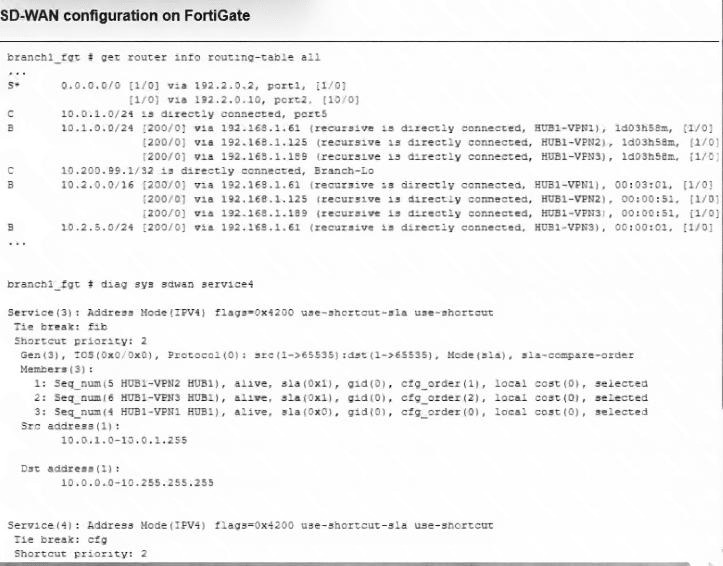
Refer to the exhibit. Which SD-WAN rule and interface uses FortiGate to steer the traffic from the LAN subnet 10.0.1.0/24 to the corporate server 10.2.5.254?
Show answerHide answer

Correct answer: A SD-WAN service rule 3 and interface HUB1-VPN3.

Explanation

Explanation

To determine how FortiGate steers the traffic, we need to analyze two things: the routing table (to see how the destination is reached) and the SD-WAN service output (to see how the SD-WAN rule matches the traffic and selects the member).

1. Routing Table Analysis (get router info routing-table all):

Look for the destination 10.2.5.254. The routing table shows the subnet B 10.2.5.0/24 (which includes 10.2.5.254).

The route points to: [200/0] via 192.168.1.61 (recursive is directly connected, HUB1-VPN3).

This means to reach the corporate server, the traffic must exit through the HUB1-VPN3 overlay tunnel.

2. SD-WAN Service Output (diag sys sdwan service4):

Service(3) matches the Source Address 10.0.1.0-10.0.1.255 (which includes the LAN subnet 10.0.1.0/24) and Destination 10.0.0.0-10.255.255.255 (which includes 10.2.5.254).

Look at the Members listed for Service(3):

1: Seq_num(5 HUB1-VPN2 HUB1) ... selected

2: Seq_num(6 HUB1-VPN3 HUB1) ... selected

3: Seq_num(4 HUB1-VPN1 HUB1) ... selected

Because it is an SLA-based rule (Mode(sla)), FortiGate will look at the SLA health of these members. However, because the routing table specifically dictates that the route to 10.2.5.0/24 is learned via HUB1-VPN3, FortiGate will use that specific member to route the traffic.

Why the other options are incorrect:

B (SD-WAN service rule 3 and interface HUB1-VPN2): While service rule 3 includes HUB1-VPN2 as a member, the routing table shows the specific route for the destination (10.2.5.0/24) is learned through HUB1-VPN3. Therefore, it will not use VPN2 for this specific destination.

C (SD-WAN service rule 4 and interface port2): Service rule 4 does not match the source subnet 10.0.1.0/24 based on the output (it is a different rule, likely for a different purpose or default traffic). Additionally, the route to 10.2.5.0/24 does not point to port2.

D (SD-WAN service rule 4 and port1 or port2): Same reasoning as C; rule 4 is incorrect, and the routing table does not point to port1 or port2 for this destination.

References:

Fortinet Document Library: FortiOS Administration Guide — "SD-WAN" > "SD-WAN Rules" and "Troubleshooting" (Understanding how routing table entries and SD-WAN member selection interact).

Full mock exam

Sit the NSE7_SSE_AR-26 exam before exam day

Full-length mocks with the same number of questions and the same time limit as the real NSE7_SSE_AR-26 exam. Every attempt draws a new set of questions from the full bank, so you can keep going until you pass comfortably.

Get full NSE7_SSE_AR-26 mock exam
  • 50questions per mock
  • 75 mintime limit
  • 110questions in the bank
  • Newmock on every attempt