Fortinet certification · Exam NSE7_SSE_AR-26

NSE7_SSE_AR-26 Mock Exam

Fortinet NSE 7 - FortiSASE 26 Architect

Free NSE7_SSE_AR-26 questions on Centralized management, visibility and troubleshooting, each with the answer and an explanation.

20 questions · 30 minutes · free, no sign-up

Centralized management, visibility and troubleshooting questions

1–6 of 6 free
Question 1 Choose 2
An organization is integrating a cloud-delivered security operations capability with its secure access service edge (SASE) architecture to enhance threat detection, investigation, and response across a distributed environment of users and endpoints. The security team is particularly focused on improving real-time threat monitoring and gaining unified visibility into security events across the infrastructure. Which two benefits are achieved by integrating SOC-as-a-Service (SOCaaS) with FortiSASE? (Choose two.)
Show answerHide answer

Correct answer: B, D Continuous threat monitoring across all connected endpoints Centralized visibility into all threat events

Explanation

Explanation

Fortinet SOCaaS (SOC-as-a-Service) is a cloud-delivered managed detection and response (MDR-style) service that integrates with the Fortinet Security Fabric — including FortiSASE — to give organizations 24/7 threat monitoring and a single pane of glass for security events. When integrated with FortiSASE, the two headline benefits relevant to this scenario are:

- Continuous threat monitoring (B): SOCaaS ingests telemetry from FortiSASE-connected users and endpoints and applies Fortinet's SOC analysts plus analytics/AI to monitor for threats around the clock — matching the scenario's goal of "improving real-time threat monitoring."

- Centralized visibility into all threat events (D): Events from FortiSASE (and other Fabric components) are aggregated and correlated in the SOCaaS portal, giving "unified visibility into security events across the infrastructure" — exactly what the security team is asking for.

Why the other options are incorrect

- A. Provides bandwidth usage analytics — Bandwidth analytics is a function of FortiSASE's SWG/traffic reporting and SD-WAN monitoring, not a benefit of SOCaaS integration. SOCaaS is a detection/investigation/response service, not a traffic-analytics tool.

- C. Eliminates the need for endpoint protection software — SOCaaS is a monitoring and response service; it does not replace endpoint protection (FortiClient/EDR). It consumes telemetry from endpoints and other Fabric sources but does not provide the preventive endpoint protection itself.

References

- Fortinet SOCaaS datasheet — describes 24×7 monitoring, expert SOC analysts, and centralized event visibility via the SOCaaS portal.
Question 2 Choose 1
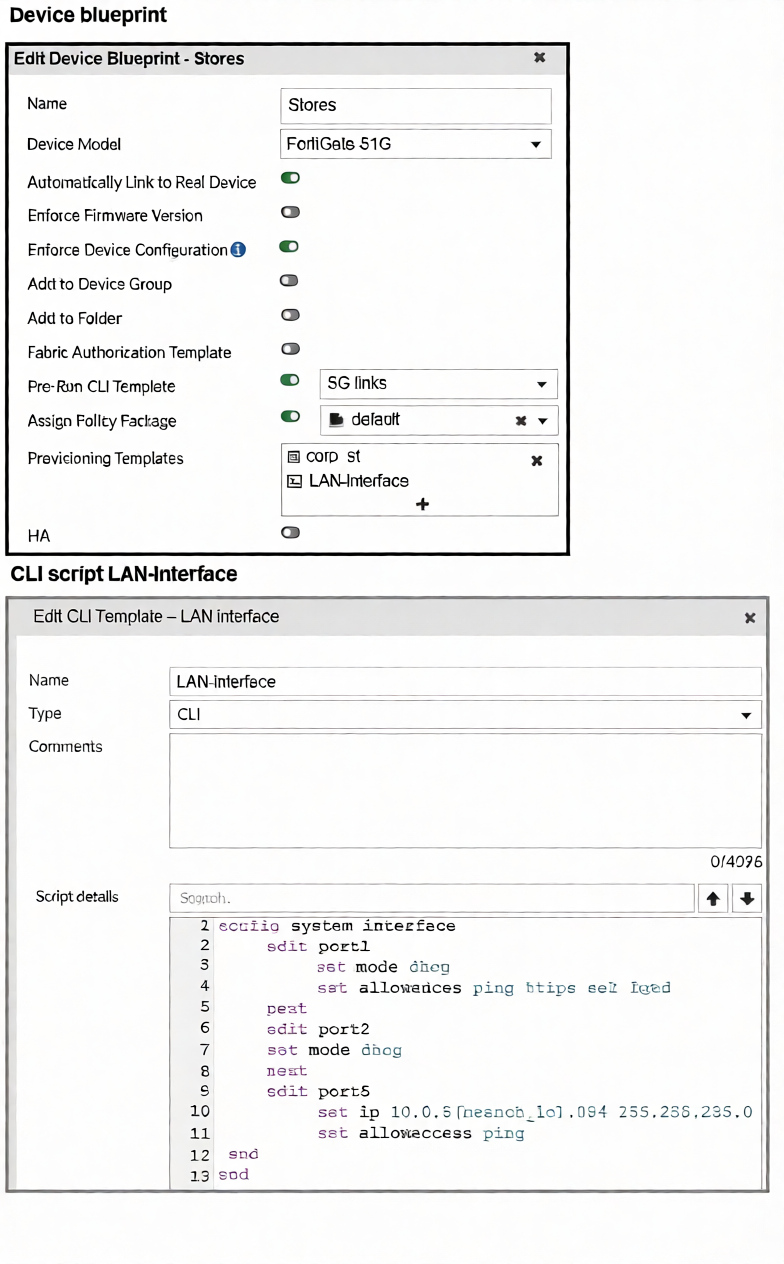
Refer to the exhibits. The administrator configured a device blueprint and CLI scripts as shown in the exhibits, to prepare for onboarding FortiGate devices in the company’s stores. Later, a technician prepares a FortiGate 51G with a basic configuration and connects it to the network. The basic configuration contains the port1 configuration and the minimal configuration required to allow the device to connect to FortiManager. After the device first connects to FortiManager, FortiManager updates the device configuration. Based on the exhibits, which actions does FortiManager perform?
Show answerHide answer

Correct answer: A FortiManager updates the device configuration according to the selected templates. It applies the corp_st template first.

Explanation

Explanation

Based on the device blueprint and CLI script exhibits, here is exactly what happens when the FortiGate 51G connects to FortiManager:

1. Provisioning Template Order: In FortiManager, when multiple provisioning templates are assigned to a device blueprint, they are applied in the order they are listed in the blueprint. The blueprint shows `corp_st` listed first, followed by `LAN-interface`. Therefore, FortiManager applies the `corp_st` template first, and then the `LAN-interface` CLI script.

2. Interface Configuration Override: The `LAN-interface` CLI script explicitly configures `port1`, `port2`, and `port5`. FortiManager will push this script to the device, overwriting the existing configuration on these interfaces. This includes changing `port1` to DHCP (overwriting the basic manual config), setting `port2` to DHCP, and setting `port5` to a static IP based on the `$branch_id` variable (`10.0.$branch_id.254`).

3. FGFM Protection Limitation: Option B mentions a common misconception. While FortiOS does have a built-in safeguard to prevent administrators from accidentally removing the `fgfm` access from the interface being used for management, FortiManager CLI scripts can successfully push changes to that interface (as long as the script doesn't explicitly remove `fgfm` access entirely without an alternative route). In this script, `port1` is set to DHCP and given `allowaccess ping https ssh fgfm`. FortiManager will apply this successfully.

Why the other options are incorrect

- B is incorrect: FortiManager does change the configuration of interfaces with `fgfm` access. While FortiOS prevents you from manually removing `fgfm` from the active management interface via GUI/CLI without a warning, FortiManager provisioning scripts will overwrite the interface configuration (including setting it to DHCP) as long as the script itself doesn't lock out management.

- C is incorrect: FortiManager does update the IP address of `port1`. The script explicitly includes `set mode dhcp` for `port1`, which will override the manually set static IP on the device. It also updates `port2` and `port5`, not just `port1`.

- D is incorrect: While it is true that FortiManager updates `port1`, `port2`, and `port5`, the statement that "The three ports might get new IP addresses" is only partially accurate and misses the crucial architectural detail asked by the question (the order of template application). Furthermore, `port5` gets a predictable static IP based on the `$branch_id` metadata variable, not a random/new IP. Option A is the most complete and accurate description of the FortiManager provisioning workflow shown in the exhibits.

References 

- Provisioning Templates vs. CLI Templates: In FortiManager, a "Provisioning Template" is often a meta-template that can contain system settings, interface settings, and scripts. A "CLI Template" is a raw script. The blueprint shows `corp_st` (likely a provisioning template) and `LAN-interface` (a CLI template). FortiManager processes them top-down.

Question 3 Choose 1
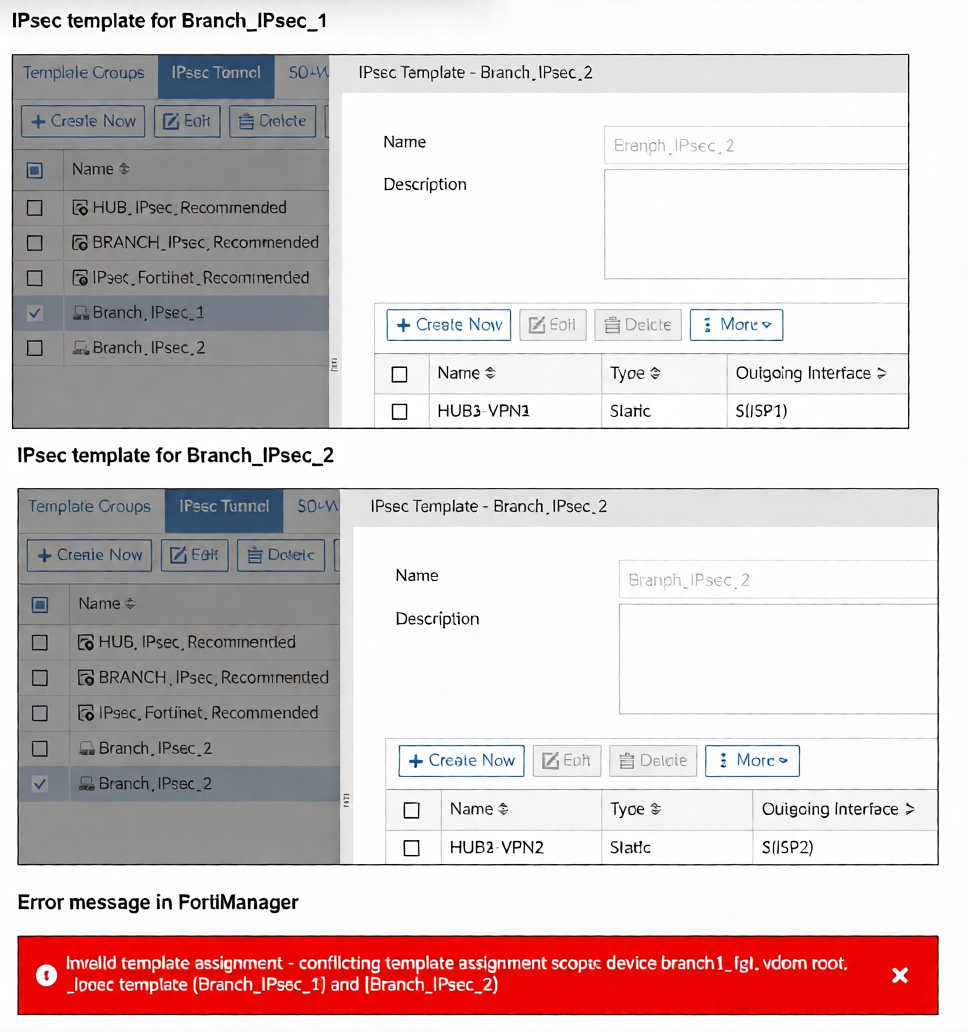
Refer to the exhibits. The exhibits show two IPsec templates to define Branch IPsec 1 and Branch_IPsec_2. Each template defines a VPN tunnel. The error message that FortiManager displayed when the administrator tried to assign the second template to the FortiGate device is also shown. Which statement best describes the cause of the issue?
Show answerHide answer

Correct answer: B You can assign only one IPsec template to each FortiGate device.

Explanation

Explanation

In FortiManager, an IPsec Template is a configuration model used in the SD-WAN or VPN provisioning workflow. A fundamental architectural rule in FortiManager is that only one IPsec template can be assigned to a single device (per VDOM).

The error message clearly states:

> "Invalid template assignment - conflicting template assignment scope: device branch1_fgt, vdom root, _ipsec_template [Branch_IPsec_1] and [Branch_IPsec_2]"

This indicates that `Branch_IPsec_1` is already assigned to the device `branch1_fgt` in the `root` VDOM. When the administrator attempts to assign `Branch_IPsec_2`, FortiManager rejects it because it would create a conflicting assignment scope.

If you need a device to have multiple IPsec tunnels (as defined by these two templates), the correct approach is to include both VPN tunnels within a single IPsec Template (using the "Create New" button shown in the template to add multiple tunnels, e.g., HUB1-VPN1 and HUB1-VPN2 inside the same template), rather than trying to assign two separate IPsec templates to the same device.

Why the other options are incorrect

- A is incorrect: While the tunnels in the templates are configured as `Static`, the restriction is not about the tunnel type. You can configure multiple static tunnels within a single IPsec template. The restriction is on assigning multiple templates.

- C is incorrect: The error message explicitly points to the conflicting assignment of the two templates. While reviewing the `branch1_fgt` configuration is always good practice, checking for manual tunnels in the root VDOM is not the cause of this specific assignment error. The conflict is between the templates themselves.

- D is incorrect: Using the same outgoing interface (`${ISP1}` vs `${ISP2}`) will not resolve the issue. In fact, to create redundant VPNs to a hub, you often need to use different outgoing interfaces. The error is structural (template assignment scope), not related to interface variables.

References & Key Concepts for your notes

- IPsec Templates in FortiManager: Used to define VPN topologies (Hub-and-Spoke, Full Mesh, etc.) and are assigned to devices via Device Blueprints or directly.

Question 4 Choose 1
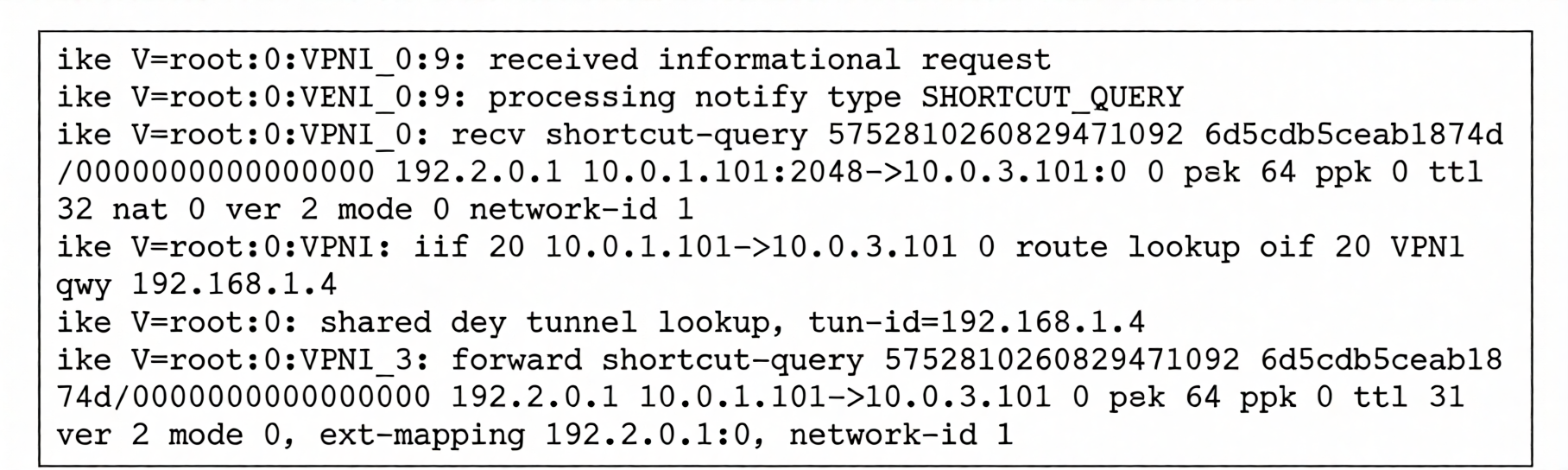
Refer to the exhibit. Which statement best describe the role of the ADVPN device in handling traffic?
Show answerHide answer

Correct answer: A This is a hub that has received a query from a spoke and has forwarded it to another spoke.

Explanation

Explanation

To understand the logs, we must break down the ADVPN (Auto-Discovery VPN) shortcut query process.

ADVPN allows spokes to dynamically establish direct (shortcut) tunnels with other spokes. When Spoke A wants to communicate with Spoke B, the traffic initially routes through the Hub. The Hub then sends a shortcut query to Spoke B on behalf of Spoke A.

Let's analyze the log line by line:

1. `ike V=root:0:VPN1_0:9: received informational request` - The device is receiving an IKE informational request. The `VPN1_0` indicates it arrived over the primary VPN tunnel.

2. `ike V=root:0:VPN1_0: revc shortcut-query ... 192.2.0.1 10.0.1.101:2048->10.0.3.101:0 ...` - The device receives a shortcut query. The source IP is `10.0.1.101` (Spoke A) and the destination IP is `10.0.3.101` (Spoke B). - Key Insight: Because this device receives the query from the initiating spoke, it must be the Hub.

3. `ike V=root:0:VPN1: iif 20 10.0.1.101->10.0.3.101 0 route lookup oif 20 VPN1 gwy 192.168.1.4` - The Hub performs a route lookup to find how to reach Spoke B (`10.0.3.101`). It determines that the traffic needs to go out of interface `20` (VPN1) using the gateway `192.168.1.4` (which is the public IP of Spoke B).

4. `ike V=root:0: shared dev tunnel lookup, tun-id=192.168.1.4` - The Hub looks up the existing IKE tunnel to Spoke B.

5. `ike V=root:0:VPN1_3: forward shortcut-query ... 10.0.1.101->10.0.3.101 ...` - Key Insight: The Hub is now forwarding the shortcut query to Spoke B over the tunnel (`VPN1_3`).

Why the other options are incorrect

- B is incorrect: While this is a hub, the log does not indicate a "dual-region topology" (which involves multiple Hubs or regions), and `10.0.2.101` is not the remote hub tunnel ID; the IPs involved belong to the spokes (`10.0.1.101` and `10.0.3.101`).

- C is incorrect: A spoke does not forward shortcut queries to its hub on behalf of another spoke. The hub is the central point of control for shortcut queries. If this were a spoke, it would either send a query to the hub or receive a forwarded query from the hub.

- D is incorrect: Similar to C, a spoke does not forward a shortcut query to another spoke before a direct tunnel is established. The route lookup and forwarding (`forward shortcut-query`) from one spoke IP to another is the exact behavior of the Hub.

References

- ADVPN Shortcut Query: A control message sent by the Hub to a destination Spoke, requesting it to establish a direct IPsec tunnel with the source Spoke.

Question 5 Choose 1
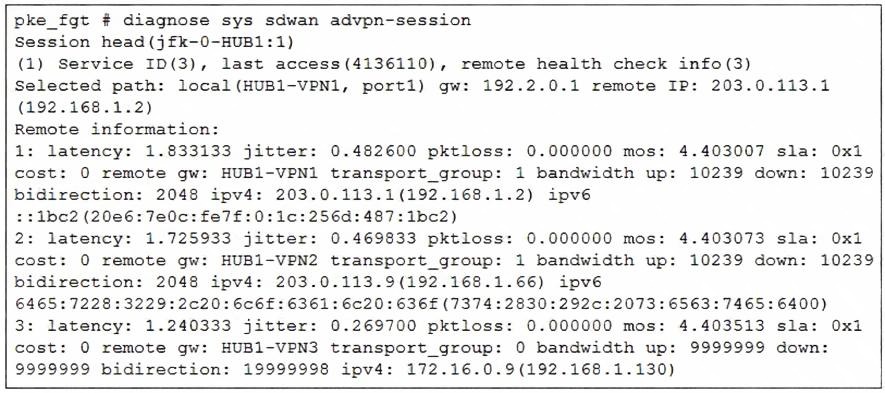
Refer to the exhibit that shows a diagnose output on FortiGate. Based on the output shown in the exhibit, what can you say about the device role and how it handles health checks?
Show answerHide answer

Correct answer: B The device is a hub. It receives embedded health-check measures for each tunnel from the spoke.

Explanation

Explanation

The exhibit displays the output of `diagnose sys sdwan advpn-session`. The session head is identified as `jfk-0-HUB1:1`, and the device is tracking multiple remote tunnels (`HUB1-VPN1`, `HUB1-VPN2`, `HUB1-VPN3`) with distinct remote IP addresses. This confirms the device operates as the hub in an ADVPN topology.

The "Remote information" section displays health metrics—latency, jitter, packet loss, MOS, and SLA state—for each remote gateway. In a scalable ADVPN design, the hub does not actively generate health-check probes to every spoke. Instead, the spokes perform local health checks on their own WAN links and embed those results into IKE/ADVPN control messages sent to the hub. The hub extracts and caches this embedded data to evaluate SLA targets and make intelligent routing decisions. Option B correctly identifies the device role and this embedded health-check mechanism.

Why the other options are incorrect:

- A & C are incorrect: The `HUB1` session head and the simultaneous tracking of multiple distinct remote spoke IPs clearly identify this device as a hub, not a spoke. A spoke's output would typically show only its primary connection to the hub or specific established shortcut peers, rather than centrally aggregating metrics for multiple branches.

- D is incorrect: The hub does not receive standalone, independent health-check probes for a spoke. The mechanism relies on the spokes proactively embedding their measured link-quality metrics within the IKE control messages. The hub passively extracts this data rather than actively receiving dedicated probe traffic.

References

1. Fortinet Document Library: FortiOS Administration Guide → SD-WAN → ADVPN → Embedded Health Checks. Details how spoke devices embed local link-quality data into IKE messages for the hub to process and utilize for routing.

Question 6 Choose 1
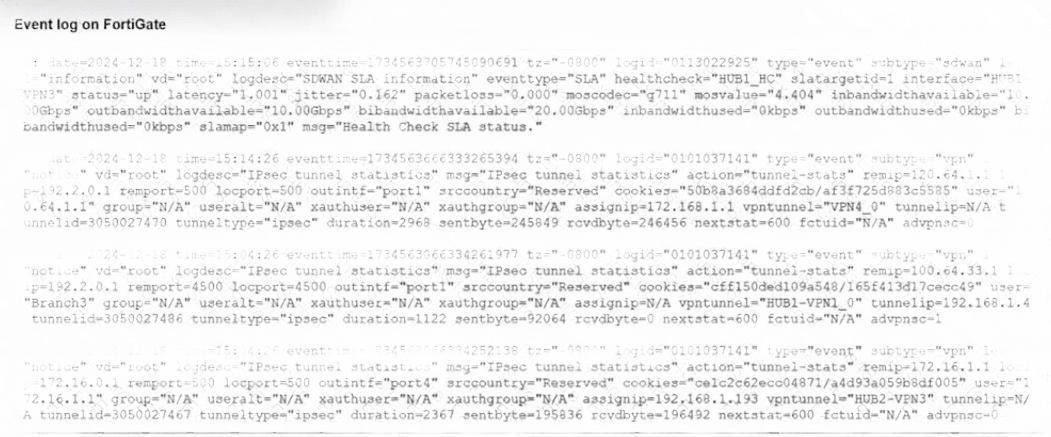
Refer to the exhibit that shows event logs on FortiGate. Based on the output shown in the exhibit, what can you say about the tunnels on this device?
Show answerHide answer

Correct answer: C The VPN tunnel HUB1-VPN1_0 is a shortcut tunnel.

Explanation

Explanation

The key field in the IPsec tunnel statistics logs is `advpnsc`, which flags whether a tunnel is an ADVPN shortcut tunnel (1 = shortcut, 0 = not a shortcut).

Why the other options are wrong

- A: HUB2-VPN3 shows `advpnsc=0`, so it is a normal tunnel, not a shortcut. Nothing in the log says it cannot accept ADVPN shortcuts. Whether shortcuts can be built from it depends on the ADVPN configuration (`auto-discovery-receiver`), which isn’t shown.

- B: Log 6 is only an SD-WAN SLA health-check result for HUB1-VPN3 (status up, latency, jitter, MOS value for the g711 codec, SLA target met). It shows link quality, not traffic steering. Whether voice traffic uses that tunnel would depend on the SD-WAN rules, which aren’t shown.

- D: The VPN4 tunnel (VPN4_0) has `advpnsc=0`, so it is not a shortcut. The only shortcut in the logs is HUB1-VPN1_0, and it was built from the HUB1-VPN1 parent, not VPN4.

References

- FortiOS Administration Guide: IPsec VPN > ADVPN (shortcut tunnels, `auto-discovery-sender` / `auto-discovery-receiver`).

That's the last free question in Centralized management, visibility and troubleshooting

You've seen the free 30% (6 of 22 questions). Full access unlocks every question and full-length NSE7_SSE_AR-26 mock exams (50 questions, 75 minutes), a different mock on every attempt.

Unlock full mock exam
Full mock exam

Sit the NSE7_SSE_AR-26 exam before exam day

Full-length mocks with the same number of questions and the same time limit as the real NSE7_SSE_AR-26 exam. Every attempt draws a new set of questions from the full bank, so you can keep going until you pass comfortably.

Get full NSE7_SSE_AR-26 mock exam
  • 50questions per mock
  • 75 mintime limit
  • 110questions in the bank
  • Newmock on every attempt