Fortinet certification · Exam NSE6_SDW_AD-7.6

NSE6_SDW_AD-7.6 Mock Exam Page 2

Fortinet NSE 6 - SD-WAN 7.6 Enterprise Administrator

Free NSE6_SDW_AD-7.6 mock exam questions 11–20, each with the answer and an explanation.

20 questions · 38 minutes · free, no sign-up

Free NSE6_SDW_AD-7.6 questions

11–20 of 28 free
Question 11 Choose 3
Which three factors about SLA targets and SD-WAN rules should you consider when configuring SD-WAN rules? (Choose three.)
Show answerHide answer

Correct answer: A, C, E Member metrics are measured only if a rule uses the SLA target. SD-WAN rules can use SLA targets to check whether the preferred members meet the SLA requirements. When configuring an SD-WAN rule, you can select multiple SLA targets from different performance SLAs.

Explanation

Explanation:

C is correct: The primary purpose of referencing an SLA target in an SD-WAN rule is to validate that selected members meet the defined performance thresholds (latency, jitter, loss) before being used for traffic steering.

E is correct: An SD-WAN rule can reference multiple SLA targets from different performance SLA configurations. This allows a rule to enforce composite performance requirements (e.g., one target for latency, another for jitter).

A is correct: SLA target measurement (active probing or passive monitoring) is only performed for members in rules that reference that SLA target. If no rule uses a particular SLA target, its probes are not sent, conserving bandwidth.

Why other options are incorrect:

B: Incorrect. SLA targets are not exclusive to Lowest Cost (SLA) strategy. They can also be used in Priority, Weighted, and Manual strategies to validate member performance before selection.

D: Incorrect. While you can select multiple SLA targets, they can be from different performance SLAs, not necessarily the same one. The requirement "from the same performance SLA" is false; you can mix targets across different SLA configurations.

Reference
FortiOS 7.6 SD-WAN Administration Guide > Configuring SD-WAN > Performance SLA:
SLA targets define thresholds; rules reference them to validate members.
Rules can use multiple targets from different SLA configurations for comprehensive checks.
Health-check probes run only for SLA targets referenced by active rules.
This ensures efficient resource usage and flexible performance validation across various traffic types.
Question 12 Choose 1
You are tasked with configuring ADVPN 2.0 on an SD-WAN topology already configured for ADVPN. What should you do to implement ADVPN 2.0 in this scenario?
Show answerHide answer

Correct answer: A Update the IPsec tunnel configurations on the hub.

Explanation

Explanation:

In an existing ADVPN-enabled SD-WAN topology, upgrading to ADVPN 2.0 does not require redesigning SD-WAN or hub configurations. The primary enhancement in ADVPN 2.0 is the ability for branches to dynamically establish shortcut tunnels directly with other branches. This behavior is controlled at the IPsec layer, not by SD-WAN policies. Because the hub already serves as a registration and routing point, it continues to function without modification. Therefore, updating the branch IPsec tunnel configuration is sufficient to enable ADVPN 2.0 functionality.

Why the incorrect options are wrong

A. Update the IPsec tunnel configurations on the hub
This is incorrect because ADVPN 2.0 eliminates the need for hub-assisted shortcut creation. The hub configuration remains unchanged in an existing ADVPN setup.

B. Update the SD-WAN configuration on the branches
SD-WAN is responsible for traffic steering, not for establishing ADVPN shortcut tunnels. Shortcut negotiation occurs at the IPsec level.

D. Delete the existing ADVPN configuration and configure ADVPN 2.0
ADVPN 2.0 is backward-compatible and implemented by modifying existing IPsec settings, not by rebuilding the configuration.

References
Fortinet FortiOS 7.6 IPsec VPN Administration Guide – Details ADVPN configuration and branch-initiated shortcuts.
Question 13 Choose 1
Refer to the exhibits.

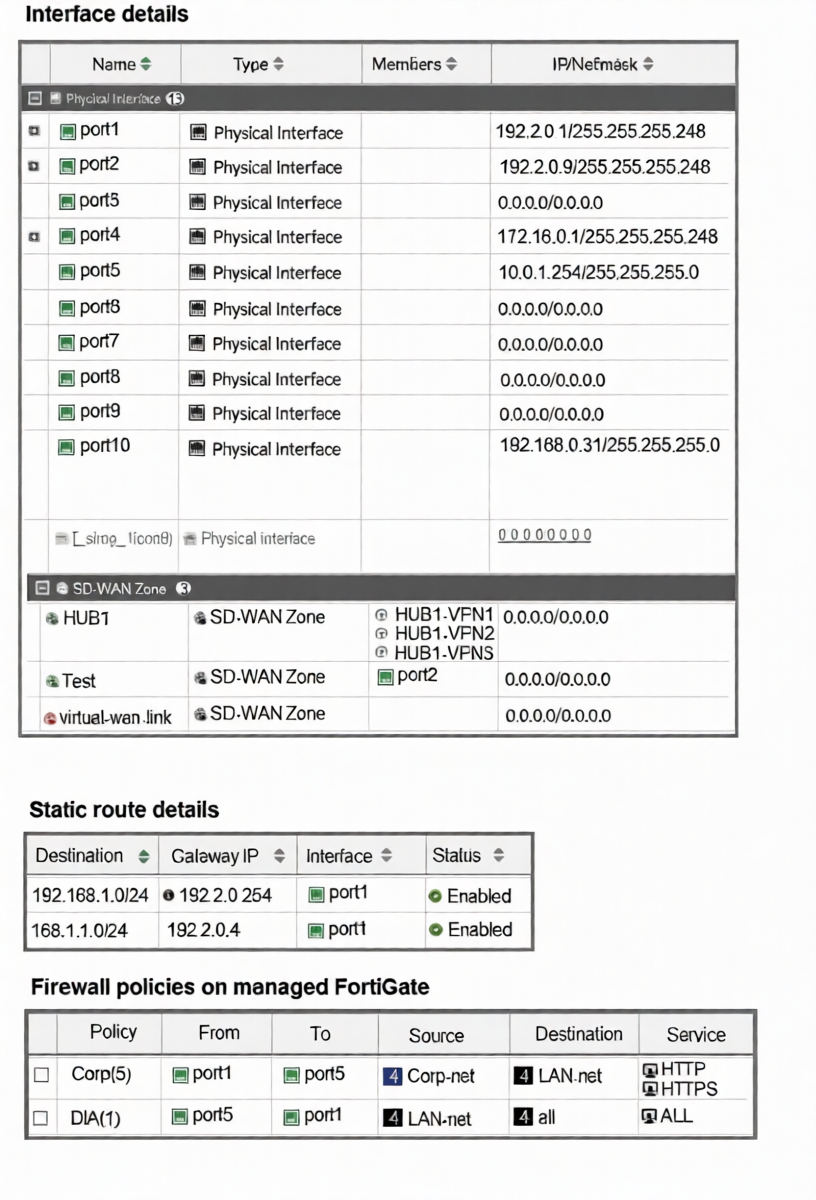
The interface details, static route configuration, and firewall policies on the managed FortiGate device are shown. You want to configure a new SD-WAN zone, named Underlay, that contains the interfaces port1 and port2. What must be your first action?
Show answerHide answer

Correct answer: B Delete the static routes.

Explanation

Explanation:

To add an interface to an SD-WAN zone, that interface must not be referenced by any other configuration object that would conflict with SD-WAN's dynamic path control. The exhibit shows that port1 is currently used by two static routes.

SD-WAN zones manage egress path selection dynamically, while static routes define fixed egress paths. If port1 is simultaneously a member of an SD-WAN zone and referenced in static routes, this creates a configuration conflict. The FortiGate will not allow the same interface to be used in both static routing and SD-WAN zone membership unless the static routes are removed first.
Therefore, the first action is to delete the static routes that use port1 as the egress interface.

Why other options are incorrect:

A: Defining port1 as an SD-WAN member is part of the process, but it cannot be done while port1 is still bound to static routes. The static routes must be removed first.

C: Deleting the "Test" SD-WAN zone is unnecessary. It contains only port2 and does not conflict with adding port1 to a new zone.

D: Deleting firewall policies is not required. The policies shown use port1 as a source/destination interface in rules, which is permissible. Firewall policies can coexist with SD-WAN zones.

Reference
FortiOS 7.6 SD-WAN Administration Guide > Configuring SD-WAN Members: An interface cannot be added to an SD-WAN zone if it is already referenced in a static route. The static route must be removed or modified to use a different interface or an SD-WAN zone itself before the interface can become an SD-WAN member.
Question 14 Choose 1
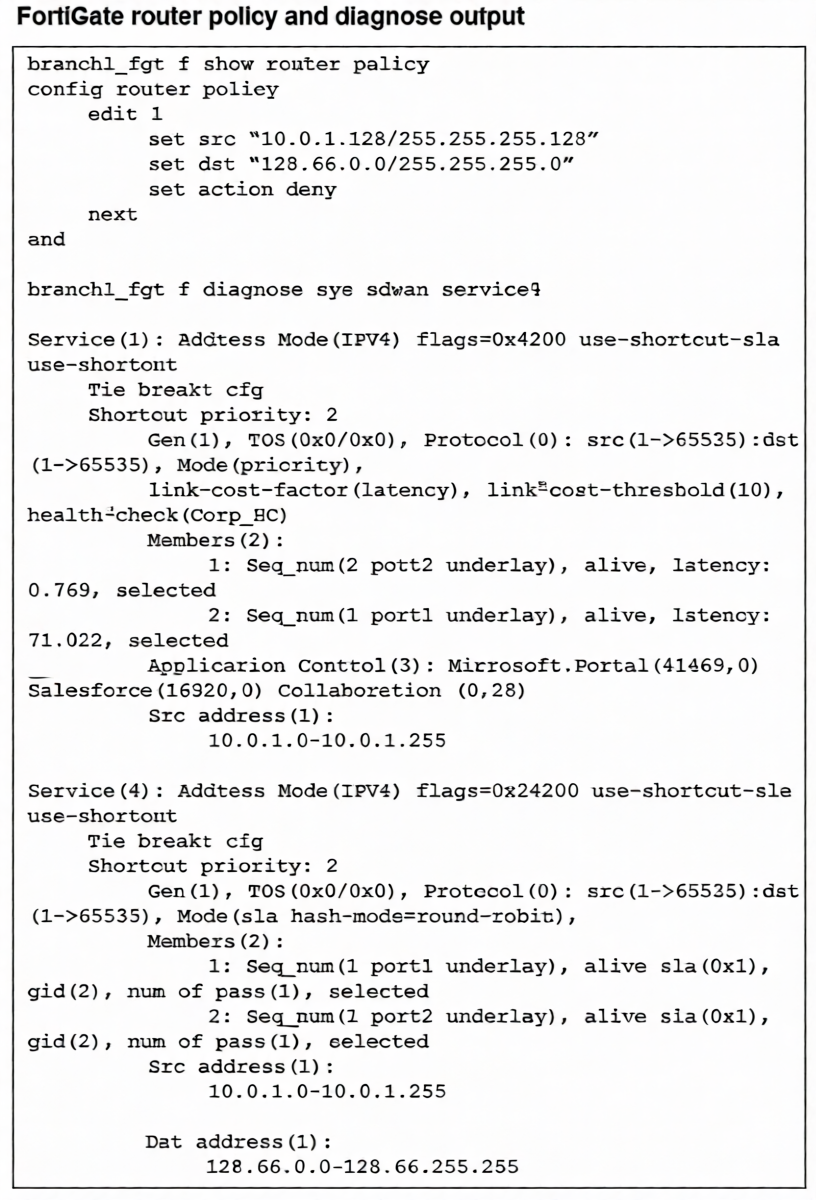
Refer to the exhibit.

How does FortiGate handle the traffic with the source IP 10.0.1.130 and the destination IP 128.66.0 125?
Show answerHide answer

Correct answer: A FortiGate drops the traffic flow.

Explanation

Explanation:

Traffic from 10.0.1.130 to 128.66.0.125 matches Router Policy 1, which has an action of deny. Router policies (policy-based routing) are evaluated before SD-WAN rules in the packet processing flow. Since a matching router policy with a deny action is found, the packet is discarded immediately. The SD-WAN rule (Service 4) that also matches this destination is never reached or evaluated. Therefore, despite SD-WAN being configured for load balancing, the traffic is blocked at the routing stage and never forwarded.

Correct Option

A is correct because a router policy with a deny action takes precedence over SD-WAN rules.
The matching policy (src 10.0.1.128/25, dst 128.66.0.0/24, action deny) causes the FortiGate to drop the packet before any SD-WAN path selection occurs.

Incorrect Options:

B: Incorrect. The forwarding information base (FIB) is not used because the router policy denies the traffic first, halting the routing process.

C: Incorrect. The traffic is not load-balanced; it is dropped. Additionally, the SD-WAN members are port1 and port2, not port7 and port8.

D: Incorrect. The traffic is not steered through any interface; it is denied. The referenced interface (port7) is also not a member of the relevant SD-WAN service, which uses port1 and port2.

Reference:
FortiOS 7.6 Router Policy Guide: Router policies are processed in the routing stage before SD-WAN evaluation. If a router policy matches and has action deny, the packet is discarded. The SD-WAN rule logic is only applied if the router policy action is permit or no router policy matches. This order ensures routing policies can override SD-WAN path selection, including blocking traffic entirely.
Question 15 Choose 1
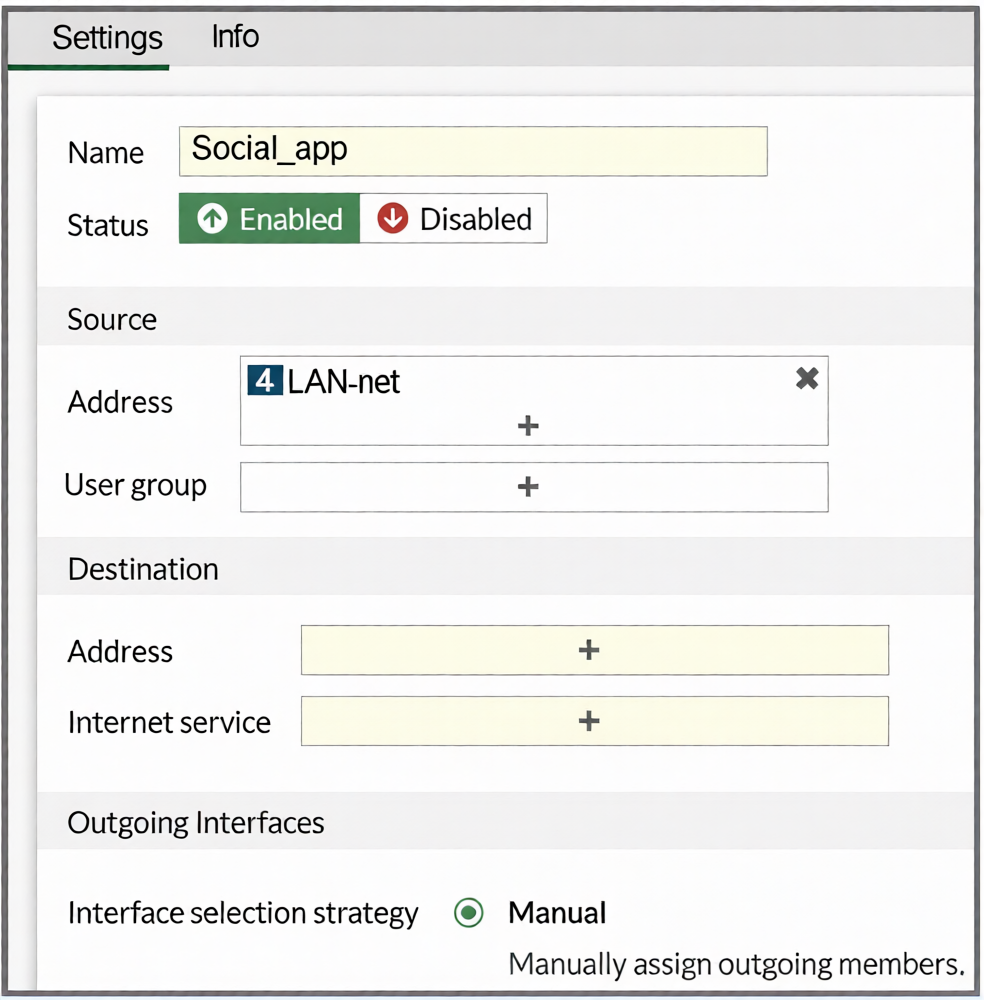
Refer to the exhibit.

You configure SD-WAN on a standalone FortiGate device. You want to create an SD-WAN rule that steers Facebook and Linkedin traffic through the less costly internet link. The FortiGate GUI page appears as shown in the exhibit. What should you do to set Facebook and LinkedIn as destinations?
Show answerHide answer

Correct answer: C Enable the applications as destinations of the SD-WAN rule feature visibility.

Explanation

Explanation:

The FortiGate GUI restricts certain configuration options by default to simplify the interface. The "Internet Service" field shown in the exhibit is visible because the Feature Visibility setting for "Internet Service Application in SD-WAN Rule" is enabled.

To use specific applications (Facebook, LinkedIn) as destinations in an SD-WAN rule, you must first enable the corresponding Feature Visibility setting: "Application as Destination in SD-WAN Rule." Once enabled, the GUI will present an "Application" field in the SD-WAN rule configuration, allowing you to select Facebook and LinkedIn directly.

Why other options are incorrect:

A: Incorrect. No special license is required to use applications as destinations in SD-WAN rules. This is a feature visibility setting, not a licensed feature.

B: Incorrect. The Internet Service field is for predefined FortiGuard Internet Service databases (IP ranges), not for individual applications like Facebook or LinkedIn. Selecting them here is not possible.

D: Incorrect. You can configure applications as destinations on a standalone FortiGate. The capability exists but is hidden by default in the GUI; it must be enabled via Feature Visibility.

Reference
FortiOS 7.6 Administration Guide > SD-WAN > Creating SD-WAN Rules: Details that to use "Application" as a match criterion in an SD-WAN rule, the administrator must first enable it under System > Feature Visibility > SD-WAN Components > "Application as Destination in SD-WAN Rule."
Question 16 Choose 3
You manage an SD-WAN topology. You will soon deploy 50 new branches. Which three tasks can you do in advance to simplify this deployment? (Choose three.)
Show answerHide answer

Correct answer: B, C, E Create model devices. Create a ZTP template. Create policy blueprint.

Explanation

Explanation:

B is correct: Creating model devices on FortiManager pre-defines device-specific configurations (like hostname, SNMP, and interface settings) in advance. This template can be cloned for each new branch, ensuring consistency and reducing manual configuration.

C is correct: A ZTP (Zero Touch Provisioning) template automates the initial deployment. When a new branch FortiGate boots and connects to the internet, it contacts FortiManager, which pushes the pre-configured ZTP template, automating the entire setup without onsite intervention.

E is correct: A policy blueprint defines a standard set of firewall policies, address objects, and services. When assigned to a new branch device, it automatically provisions the security policy framework, saving significant manual configuration time.

Why other options are incorrect:

A: Incorrect. While DHCP may be part of the network setup, updating the DHCP server is an infrastructure task specific to each site's local network. It is not a centralized SD-WAN topology preparation task that can be done in advance for all 50 branches on FortiManager.

D: Incorrect. Defining metadata variable values for each device is a per-device task, not something that can be fully done in advance for 50 unknown devices. You can define metadata variables, but their values (like specific IPs) are assigned per device during provisioning.

Reference
FortiManager 7.6 Administration Guide > Device & Manager > Model Devices: Describes using model devices as configuration templates.
Question 17 Choose 1
(Refer to the exhibits.

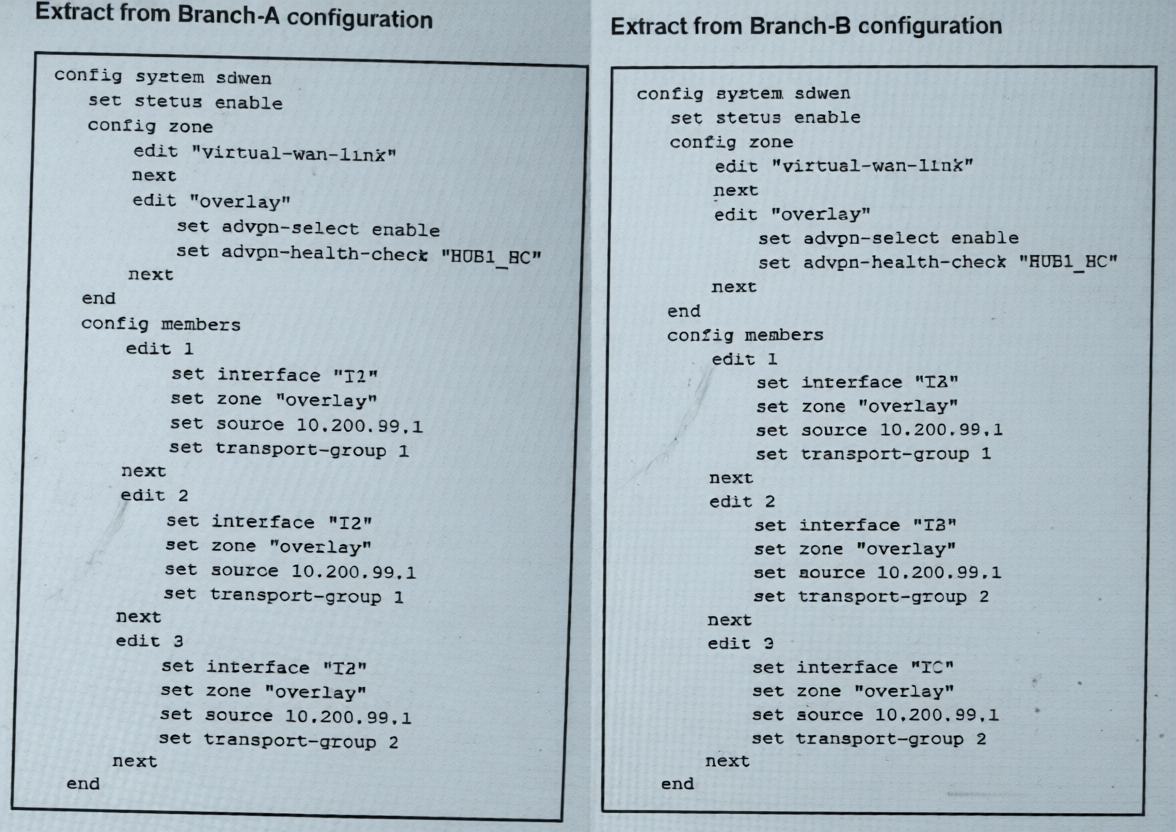
The SD-WAN zones and members configuration of two branch devices are shown. The two branch devices are part of the same hub-and-spoke topology and connect to the same hub. The devices are configured to allow Auto-Discovery VPN (ADVPN). The configuration on the hub allows the initial communication between the two spokes. When traffic flows require it, between which interfaces can the devices establish shortcuts? Choose one answer.)
Show answerHide answer

Correct answer: D Between T2 on Branch-A and TA on Branch-B

Explanation

Explanation:

Auto-Discovery VPN (ADVPN) shortcuts are established directly between spokes using their transport interfaces that belong to the same transport-group. The transport-group is a key identifier that determines which underlay paths can form direct tunnels.

Analyzing the configuration:
Branch-A has three members (T2, T2, T3) in transport-groups 1, 1, and 2 respectively.
Branch-B has three members (TA, TB, TC) in transport-groups 1, 2, and 2 respectively.
For a shortcut to form, both spokes must use an interface in a common transport-group.

The only shared transport-group between both branches is group 1. In group 1:
Branch-A uses T2 (member 1 or 2).
Branch-B uses TA (member 1).
Therefore, ADVPN shortcuts can only be established between T2 on Branch-A and TA on Branch-B.

Why Other Options Are Incorrect:

A: Incorrect. Shortcuts cannot use any interface in the overlay zones. They require a matching transport-group ID, which is a specific underlay path constraint.

B: Incorrect. Shortcuts are designed to bypass the hub for direct spoke-to-spoke communication. They are not built toward the hub.

C: Incorrect. While T3 (Branch-A) and TC (Branch-B) are both in transport-group 2, this pairing is not the primary or only valid shortcut path. The question implies a specific correct match based on the configuration, which clearly points to the group 1 interfaces (T2 and TA).

Reference
FortiOS 7.6 IPsec VPN & SD-WAN Administration Guide > ADVPN Configuration: States that ADVPN shortcuts are negotiated between spokes using their transport interfaces that share a common transport-group ID. The hub facilitates the initial discovery, but the shortcut tunnel is built directly between the spokes' designated transport interfaces in the same group. This ensures the underlay network path is correctly aligned for direct communication.
Question 18 Choose 3
Exhibit.

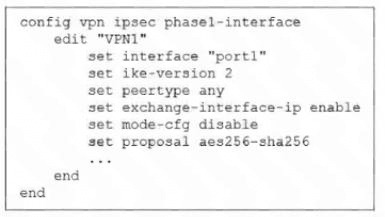
The administrator configured the IPsec tunnel VPN1 on a FortiGate device with the parameters shown in exhibit. Based on the configuration, which three conclusions can you draw about the characteristics and requirements of the VPN tunnel? (Choose three.)
Show answerHide answer

Correct answer: B, C, D The remote end can be a third-party IPsec device. The administrator must manually assign the tunnel interface IP address on the hub side The remote end must support IKEv2.

Explanation

Explanation:

Analysis of the Configuration

config vpn ipsec phase1-interface
edit "VPN1"
set interface "port1"
set ike-version 2
set peertype any
set exchange-interface-ip enable
set mode-cfg disable
set proposal aes256-sha256

This is a route-based IPsec VPN (phase1-interface) typically used in SD-WAN / ADVPN deployments.

Let’s interpret the key parameters.

✅ B. The remote end can be a third-party IPsec device — CORRECT

Why:

set peertype any means the peer is not restricted to FortiGate devices.

The tunnel can establish with:
another FortiGate
or a standards-compliant third-party IPsec device

✔ FortiGate accepts any compatible IKE peer.

✅ C. The administrator must manually assign the tunnel interface IP address on the hub side — CORRECT

Why:

set mode-cfg disable means IKE Mode Configuration is NOT used.
Therefore, the hub does not automatically assign IP addresses to peers.
Tunnel interface (overlay) IPs must be configured manually on the FortiGate interface.
Without mode-cfg, no automatic IP provisioning occurs.

✅ D. The remote end must support IKEv2 — CORRECT

Why:

set ike-version 2
The tunnel only negotiates using IKEv2.
Any peer must support IKEv2 or negotiation will fail.

❌ A. The tunnel interface IP address on the spoke side is provided by the hub — INCORRECT
This would require:
set mode-cfg enable
Mode-CFG allows a hub to assign IP addresses to dial-up spokes.
Since it is disabled, no IP assignment occurs.

❌ E. This configuration allows user-defined overlay IP addresses — INCORRECT (exam perspective)
Although overlay IPs can exist, this statement is misleading.
exchange-interface-ip enable does not enable user-defined IPs.
It only exchanges already configured interface IP information between peers during IKE negotiation.
The feature advertises overlay IPs; it does not “allow” or create them.

Key Exam Concept (Very Important)

Feature — Purpose
mode-cfg — Hub assigns IP addresses dynamically
exchange-interface-ip — Peers automatically learn each other’s tunnel interface IPs
ike-version 2 — Requires IKEv2 support
peertype any — Allows third-party VPN peers
Question 19 Choose 2
Refer to the exhibit.

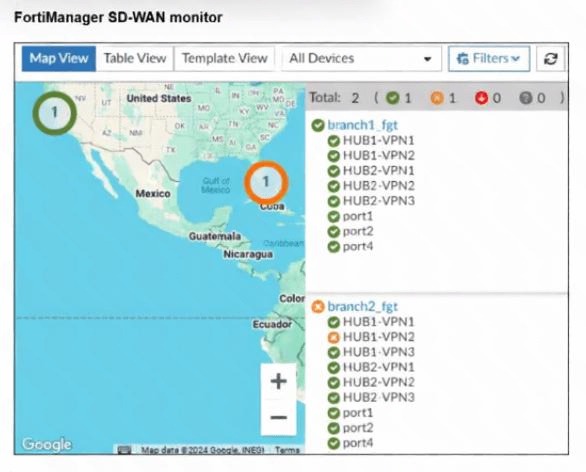
An administrator checks the status of an SD-WAN topology using the FortiManager SD-WAN monitor menus. All members are configured with one or two SLAs. Which two conclusions can you draw from the output shown? (Choose two.)
Show answerHide answer

Correct answer: B, D One member of branch2_fgt is missing the SLAs. This SD-WAN topology contains only two branch devices.

Explanation

Explanation:

Let’s examine the exhibit closely.

From the FortiManager SD-WAN monitor output, we see:
Map view lists Branch 1 and Branch 2.
Under each branch, there are listed VPN tunnels:

hub1-vpn1, hub1-vpn2, hub2-vpn1, hub2-vpn2, hub2-vpn3 → 5 tunnels per branch.
The numbers under countries show Total: 2 (1) 1 (0) 0 (0), which likely means 2 branches, 1 has some SLA status, etc.
Each branch also has physical interfaces port1, port2, port4 listed under SD-WAN members.
The exhibit does not show SLA details for each member; it only shows members and status icons.

Option Analysis:

A. The template view should be used to see the hub devices.
❌ Not supported by exhibit. The map view already shows branch devices, but hubs are not listed. Nothing indicates hubs are visible only in template view.

B. One member of branch2_fgt is missing the SLAs.
✅ Possibly correct. The total line 2 (1) might indicate that 1 branch has an SLA missing or down, and the other branch has both okay. If Branch 2 shows a warning icon on one member in the GUI, that would match one member missing SLAs. This aligns with the 1 (0) format—likely one member without SLA configured or applied.

C. branch2_fgt establishes six tunnels to the hubs and they are all up.
❌ Incorrect. Branch 2 lists 5 tunnels (hub1-vpn1, hub1-vpn2, hub2-vpn1, hub2-vpn2, hub2-vpn3) — that’s 5 tunnels, not 6. Also, all up cannot be confirmed without seeing explicit up/down indicators.

D. This SD-WAN topology contains only two branch devices.
✅ Correct. The map shows only Branch 1 and Branch 2, and the total line indicates 2 branch devices in this topology view.

Reference:
FortiManager SD-WAN monitor displays branch devices and SLA status counts. The format 2 (1) typically indicates two branches total, with one branch having an SLA-related issue or missing configuration.
Question 20 Choose 1
(Refer to the exhibit.

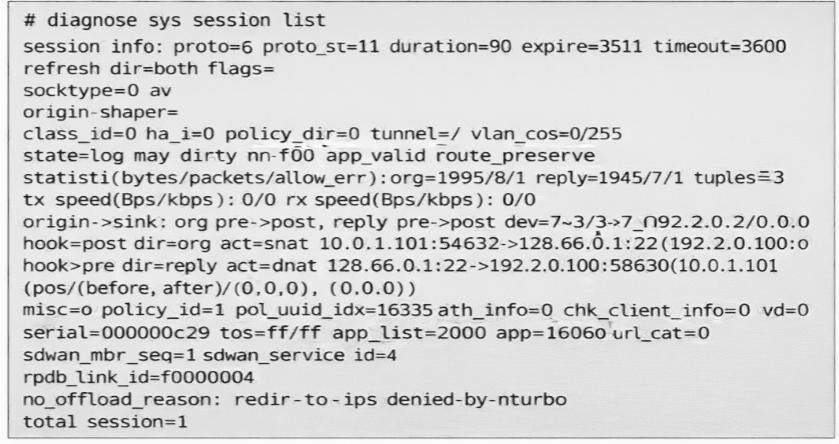
You noticed that one SD-WAN member went down and you immediately collected the session output shown in the exhibit. What can you conclude from this output? Choose one answer.)
Show answerHide answer

Correct answer: D FortiGate already reevaluated this session.

Explanation

Explanation

In FortiGate SD-WAN, when an SD-WAN member (outgoing interface) goes down, the behavior for existing sessions depends on whether the session is hardware-offloaded (for example, to NP6/NP7 processors) or software-handled (CPU-processed, non-offloaded).

Offloaded sessions are typically not reevaluated automatically when the path fails. They may stall, drop, or require manual intervention/clearing because the hardware forwarding path no longer exists.

Non-offloaded sessions (software sessions) can be reevaluated (re-looked up for a new best path) on the next packet arrival, especially if flagged as dirty due to route or interface changes.

Key Indicators from the Exhibit Output
no_offload_reason: redir-to-to-ips denied-by-nturbo
This line means the session was not (or could not be) offloaded to hardware acceleration (NTurbo/NP processors). "redir-to-to-ips" indicates traffic redirection to the IPS engine (or similar software path), and "denied-by-nturbo" confirms denial of hardware offload.
→ The session is handled in software (CPU), not hardware.

The session shows recent activity:
duration=90 (90 seconds old)
statistic(...): org=1995/81 reply=1945/71 → bytes and packets have been exchanged in both directions recently (not zeroed out)
expire=3511 (still has significant TTL left, not expired)

There is no indication of flushing or dead gateway.

Conclusion
Because the session is non-offloaded (software session), FortiGate is capable of reevaluating it when the original SD-WAN member fails. It flags such sessions as dirty and performs a new route and policy lookup on the next incoming packet for that flow, steering it to an available healthy member if possible.

A is incorrect: The byte and packet counters show traffic was received and processed after the failure (or at least the session is live and recently active).
B is incorrect: There is no evidence of gateway flush (for example, no "gw-flushed" or zeroed reply counters indicating dead gateway detection).
C is incorrect: The opposite is true — because it is non-offloaded, FortiGate can reevaluate it (and did, based on the context of this exam question).

This matches common NSE6_SDW_AD-7.6 exam patterns and FortiOS SD-WAN troubleshooting behavior, where non-offloaded sessions are reevaluated on path failure, while offloaded ones are not without clear or flush.
Full mock exam

Sit the NSE6_SDW_AD-7.6 exam before exam day

Full-length mocks with the same number of questions and the same time limit as the real NSE6_SDW_AD-7.6 exam. Every attempt draws a new set of questions from the full bank, so you can keep going until you pass comfortably.

Get full NSE6_SDW_AD-7.6 mock exam
  • 40questions per mock
  • 75 mintime limit
  • 95questions in the bank
  • Newmock on every attempt