Fortinet certification · Exam NSE6_SDW_AD-7.6

NSE6_SDW_AD-7.6 Mock Exam

Fortinet NSE 6 - SD-WAN 7.6 Enterprise Administrator

Find out if you're ready for NSE6_SDW_AD-7.6. Take the free timed mock exam and get your score in minutes, or study the free NSE6_SDW_AD-7.6 questions below with answers and explanations.

20 questions · 38 minutes · free, no sign-up

Free NSE6_SDW_AD-7.6 questions

1–10 of 28 free
Question 1 Choose 1
You configured an SD-WAN rule with the best quality strategy and selected the predefined health check, Default_FortiGuard, to check the link performances against FortiGuard servers. For the quality criteria, you selected Custom-profile-1. Which factors does FortiGate use, and in which order. to determine the link that it should use to steer the traffic?
Show answerHide answer

Correct answer: B Link quality index – Member configuration order – Link cost threshold

Explanation

Explanation

You configured:
Strategy: Best quality
Health check: Default_FortiGuard
Quality criteria: Custom-profile-1

With the Best Quality strategy, FortiGate does not load balance. Instead, it selects one single best SD-WAN member based on calculated link quality.

How FortiGate selects the link (decision order)

1️⃣ Link Quality Index (LQI)
FortiGate first calculates a Link Quality Index using the SLA profile.
The LQI is derived from the SLA metrics defined in the custom profile:
latency
jitter
packet loss
These values are combined into a single score representing overall link quality.
πŸ‘‰ The link with the best LQI is preferred.

2️⃣ Member configuration order
If multiple links have equal quality scores, FortiGate uses the member order (sequence in SD-WAN configuration) as a tie-breaker.

3️⃣ Link cost threshold
If still equal, FortiGate evaluates the configured link cost to finalize selection.

Why the other options are incorrect

A. Latency first β€” Incorrect
Best Quality does not evaluate latency alone; it evaluates the combined LQI.

C. Links meeting SLA targets β€” Incorrect
That logic applies to Lowest Cost (SLA) strategy, not Best Quality.

D. Latency β†’ Jitter β†’ Packet loss β†’ Bandwidth β€” Incorrect
Metrics are not evaluated sequentially; they are merged into the LQI score.

NSE6 SD-WAN Key Concept

Strategy-----Decision Basis
Best Quality-----    Link Quality Index (single best link)
Lowest Cost (SLA)-----    SLA compliance + load balancing
Manual/Priority    -----Static preference
Question 2 Choose 1
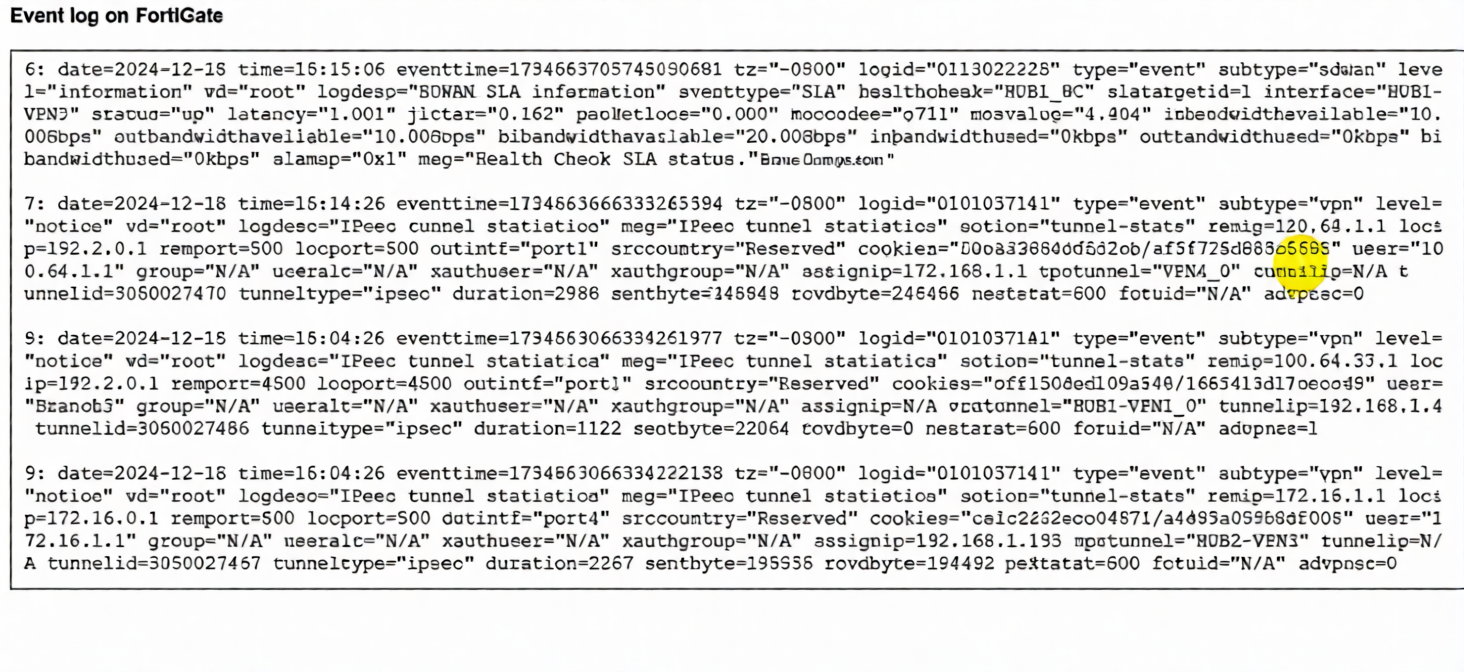
(Refer to the exhibit.


The event log on a FortiGate device is shown. Based on the output shown in the exhibit, what can you conclude about the tunnels on this device? (Choose one answer))
Show answerHide answer

Correct answer: C The VPN tunnel HUB1-VPN1_0 is a shortcut tunnel.

Explanation

Explanation:

The log entries are key for identifying Auto-Discovery VPN (ADVPN) shortcut tunnels. In ADVPN, a shortcut tunnel is a direct IPsec tunnel built dynamically between two spokes (or a hub and spoke for optimization), bypassing the hub for specific traffic. The critical indicator is the advpn=1 field.

Log Entry 9 (for HUB1-VPN1_0 tunnel) explicitly shows advpn=1. This confirms it is an ADVPN shortcut tunnel. The cvptunnel="HUB1-VPN1_0" is the name, and the presence of advpn=1 is the definitive flag.

Log Entry 6 (for HUB1-VPN3 tunnel) shows an SLA health check with slatargetid=1. While this indicates it's part of an SD-WAN performance SLA monitor, there is no advpn field in this SLA log entry to classify it as a shortcut or master tunnel for voice traffic.

Log Entry 8 (for HUB2-VPN3 tunnel) shows advpn=0. This means it is not a shortcut tunnel; it is a regular or master tunnel, which can accept ADVPN shortcuts (contradicting option D).

Why the other options are incorrect:

A: Incorrect. The logs do not show a tunnel named "VPN4," nor do they show a master/shortcut relationship between tunnels labeled "VPN4" and another.

B: Incorrect. Log Entry 6 for HUB1-VPN3 only shows SLA metrics (latency, jitter). While these metrics are relevant for voice, the log does not show any actual traffic being steered. It is a health check log, not a traffic flow log.

D: Incorrect. Log Entry 9 for HUB2-VPN3 shows advpn=0, meaning it is not itself a shortcut. However, a master tunnel (advpn=0) is the prerequisite for accepting shortcut requests. The statement that it "cannot accept" shortcuts is false.

Reference
Fortinet NSE 6 SD-WAN 7.6 Study Guide / Administration Guide: The advpn flag in IPsec tunnel logs (type="event" subtype="vpn") is the definitive field to identify ADVPN shortcut tunnels (advpn=1) versus regular/master tunnels (advpn=0).
Question 3 Choose 1
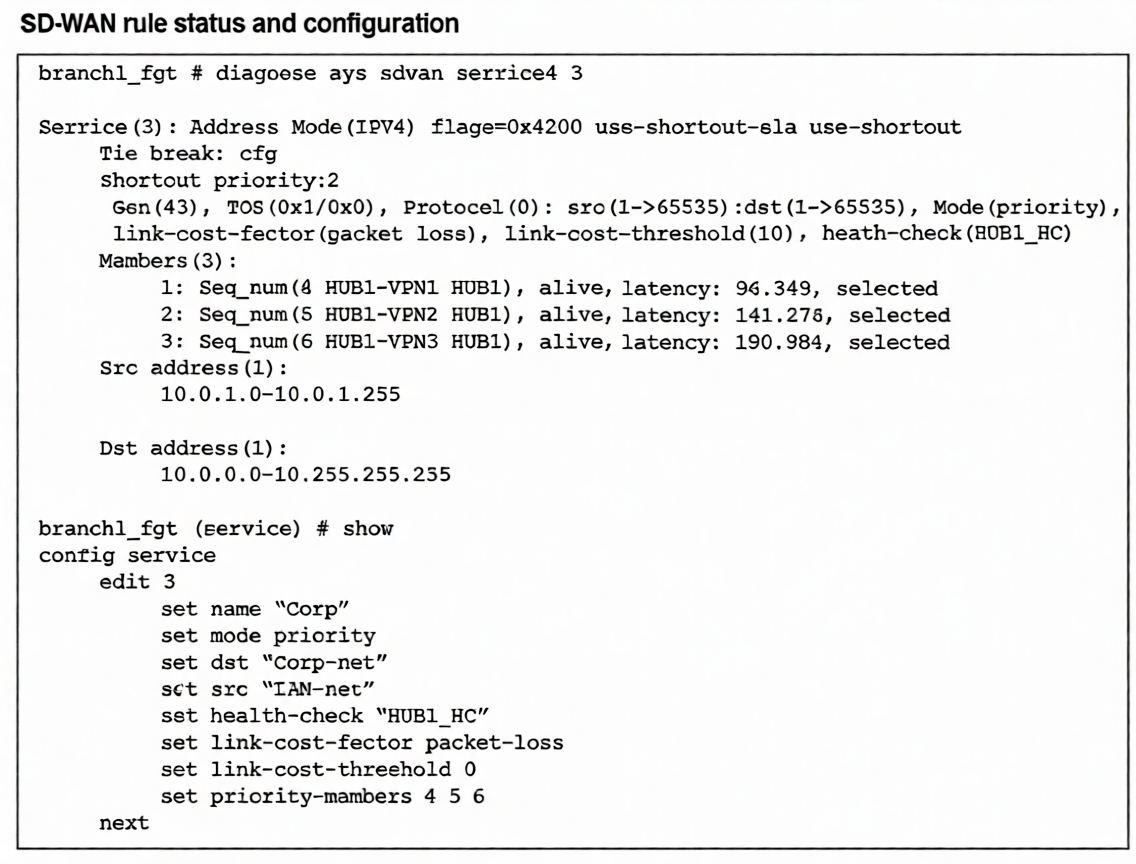
Refer to the exhibit, which shows the SD-WAN rule status and configuration.

Based on the exhibit, which change in the measured latency will first make HUB1-VPN3 the new preferred member?
Show answerHide answer

Correct answer: C When HUB1-VPN3 has a latency of 90 ms

Explanation

Explanation:

The SD-WAN service rule is configured in priority mode but includes the critical flag use-shortest-sla, as shown in the diagnose sys sdwan service output. This flag modifies standard priority behavior: instead of strictly following sequence number order, it selects the member with the best SLA performance (lowest latency, jitter, or loss) from among the configured priority members, provided all meet the link-cost-threshold.

Key parameters:
link-cost-factor: packet-loss
link-cost-threshold: 10 (members with packet loss >10% are excluded)
Current latencies: HUB1-VPN1=96.349 ms, HUB1-VPN2=141.278 ms, HUB1-VPN3=190.984 ms

Since all members are "alive" and presumably meeting the packet-loss threshold, the use-shortest-sla flag causes the member with the lowest latency to be preferred. Currently, HUB1-VPN1 is selected (lowest at 96.349 ms). For HUB1-VPN3 to become preferred, its latency must drop below HUB1-VPN1's current 96.349 ms. Option C (90 ms) is the only choice where HUB1-VPN3's latency falls below this threshold while still being the highest possible value under 96 ms, making it the precise point where preference would switch.

Why other options are incorrect:

A: Incorrect because it's incomplete. HUB1-VPN3 must have lower latency specifically than HUB1-VPN1's current 96 ms, not just lower than both.

B: While 80 ms would also make HUB1-VPN3 preferred, the question asks for the first change. With use-shortest-sla, preference switches as soon as latency drops below 96 ms. 90 ms represents that threshold valueβ€”the highest latency still triggering the change.

D: If HUB1-VPN1's latency rises to 200 ms, HUB1-VPN3 (190 ms) still wouldn't be preferred because HUB1-VPN2 (141 ms) has better latency and would be selected first under use-shortest-sla.

Reference
Fortinet SD-WAN 7.6 Administration Guide: The use-shortest-sla flag in priority mode enables performance-based selection where the member with the best SLA metrics (latency/jitter/loss) is chosen from the priority list, overriding strict sequence order when latency differences exceed measurement variations.
Question 4 Choose 2
(When you deploy SD-WAN, you can choose from several common designs. Each design best applies to specific contexts. Which two statements correctly associate a common SD-WAN design with its main indication or constraint? Choose two answers.)
Show answerHide answer

Correct answer: A, C Use a cloud on-ramp topology to improve the performance of cloud applications.

Explanation

Explanation:

βœ… A. Use a cloud on-ramp topology to improve the performance of cloud applications. β€” Correct
A cloud on-ramp SD-WAN design is specifically intended for:
- Optimizing access to SaaS and public cloud providers (AWS, Azure, Google Cloud)
- Reducing latency by steering traffic toward the nearest cloud edge or gateway
- Improving user experience for cloud applications

πŸ‘‰ This topology is chosen when cloud application performance is a primary objective.

βœ… C. Use remote breakout to centralize traffic inspection and limit local management requirements. β€” Correct
Remote breakout means:
- Branch traffic is backhauled to a central hub or data center
- Security inspection happens centrally
- Branch sites require less local security configuration

This design is common when organizations want:
βœ” centralized security policies
βœ” simplified branch management
βœ” MSSP-operated environments

❌ Why the other options are incorrect
B. Standalone design for one WAN link β€” Incorrect
SD-WAN provides benefits primarily when multiple WAN links exist. A single-link site gains little from SD-WAN steering.

D. DIA increases security for limited devices β€” Incorrect
Direct Internet Access (DIA) improves performance and reduces backhaul, but it does not inherently increase security unless additional security services are deployed locally or via SASE.

🧠 NSE6 SD-WAN Design Mapping
Design     Main Purpose
Cloud on-ramp     Optimize SaaS/cloud performance
Remote breakout     Centralized inspection
DIA     Local internet performance
Standalone     Minimal SD-WAN benefit

βœ… Final Answer: A and C
Question 5 Choose 1
Which statement describes FortiGate behavior when you reference a zone in a static route?
Show answerHide answer

Correct answer: D FortiGate installs a static route for each member in the zone.

Explanation

Explanation:

When you create an interface zone and add multiple physical or logical interfaces to it, then reference that zone in a static route, the FortiGate's behavior is to install an equal-cost multipath (ECMP) static route for every member interface within that zone.

This means:
The FortiGate creates a separate routing table entry for each interface in the zone, all pointing to the same destination network.
Traffic can be load-balanced across all zone members (if ECMP is enabled and properly configured).
This is a fundamental routing construct that treats the zone as a logical group of egress paths.

Why the other options are incorrect:

A: Incorrect. The FortiGate installs ECMP routes for all zone members, not just the first two. The number of routes equals the number of zone members.

B: Incorrect. The opposite is true; static routes are explicitly installed for each member. Ignoring them would break routing.

C: Incorrect. Static routes using a zone do not incorporate performance-based routing or SLA monitoring. The "best performing member" selection is a feature of SD-WAN rules, not basic static routing. A zone-based static route uses ECMP or routing priority settings, not real-time performance metrics.

Reference
FortiOS 7.6 Administration Guide > Network > Static Routes: Explicitly states, "When you add a zone to a static route, the route is added to the routing table for each zone member interface, creating equal-cost multipath (ECMP) routes."
Question 6 Choose 1
An SD-WAN member is no longer used to steer SD-WAN traffic. The administrator updated the SD-WAN configuration and deleted the unused member. After the configuration update, users report that some destinations are unreachable. You confirm that the affected flow does not match an SD-WAN rule. What could be a possible cause of the traffic interruption?
Show answerHide answer

Correct answer: B FortiGate can remove some static routes associated with an interface when the member is removed from SD-WAN.

Explanation

Explanation:

In FortiOS (including 7.6, as covered in NSE6_SDW_AD-7.6), when an interface is configured as an SD-WAN member and you point static routes to the SD-WAN zone (for example, virtual-wan-link) instead of a physical interface, removing that member from the SD-WAN configuration can cause FortiGate to automatically remove or invalidate associated static routes that referenced the zone or were tied to the member's behavior.

This happens because static routes using the SD-WAN zone rely on the zone's members for gateway resolution and validity. Deleting a member can trigger a cleanup or re-evaluation of routes dependent on that member (especially if the route was implicitly or explicitly linked via zone usage).

For traffic not matching any explicit SD-WAN rule (as stated in the question), FortiGate falls back to standard FIB lookup. If the removal of the member causes a previously valid static route (for example, default route or subnet route via the SD-WAN zone) to be removed or become inactive, destinations reachable only via that route become unreachable β†’ B is correct.

This is a common troubleshooting issue in SD-WAN changes. Administrators often forget to verify or recreate static routes after modifying members, which can lead to traffic blackholing for non-SD-WAN-steered flows.

Why not the others?

A. FortiGate, with SD-WAN enabled, cannot route traffic through interfaces that are not SD-WAN members.
Incorrect. SD-WAN is optional for steering. Non-SD-WAN traffic (flows not matching SD-WAN rules) can route normally via regular interfaces (physical ports, aggregates, etc.) using the FIB. Enabling SD-WAN does not block non-member interfaces.

C. FortiGate removes the layer 3 settings for interfaces that are removed from the SD-WAN configuration.
Incorrect. Removing an interface from SD-WAN (deleting the member entry) does not remove IP addresses, mode (static/DHCP), or other Layer 3 settings from the underlying interface. The interface remains fully configured and operational.

D. FortiGate administratively brings down interfaces when they are removed from the SD-WAN configuration.
Incorrect. The interface state (up or down) is independent of SD-WAN membership. Removal from SD-WAN does not administratively shut down the physical or logical interface.

Reference
FortiOS 7.6 Administration Guide β€” β€œSD-WAN members and zones” and β€œStatic routes with SD-WAN” sections. Static routes often use SD-WAN zones as the outgoing interface; changes to members can affect route validity and resolution.
Fortinet Community Technical Tips on SD-WAN static route behavior and member removal confirm that deleting SD-WAN members can lead to static route removal or invalidation if routes depend on the zone or its members.
Question 7 Choose 1
Refer to the exhibits.

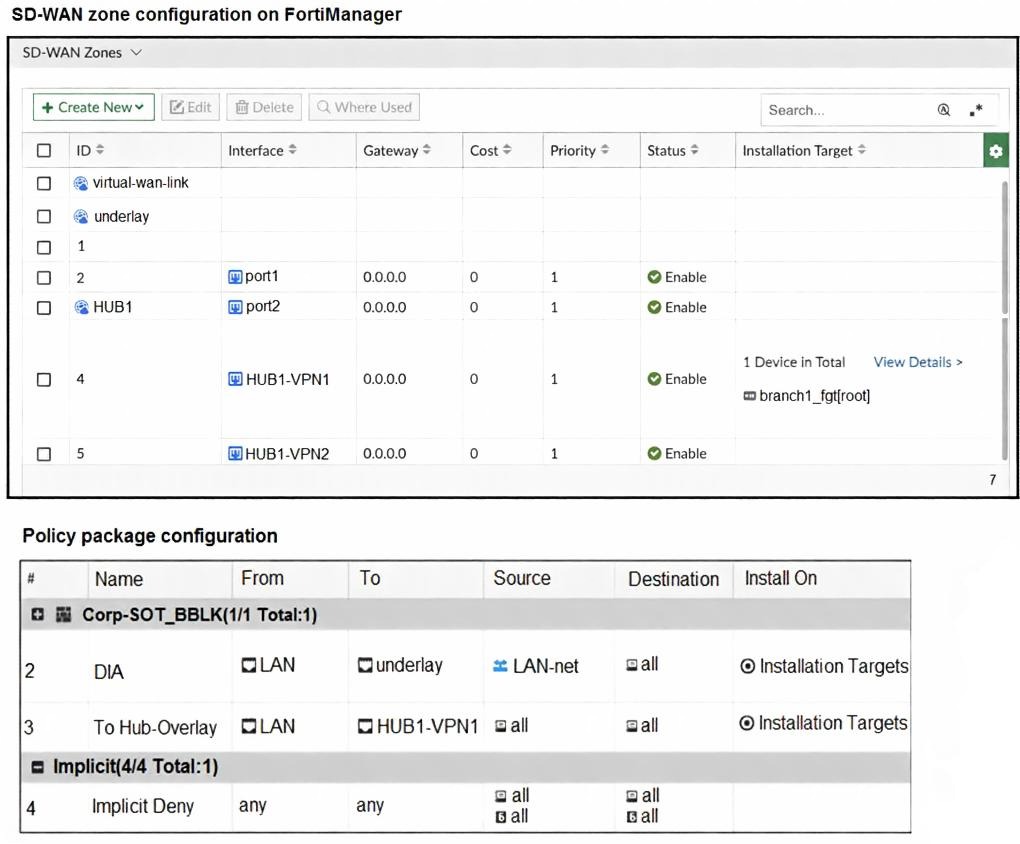
The exhibits show the SD-WAN zone configuration of an SD-WAN template prepared on FortiManager and the policy package configuration. When the administrator tries to install the configuration changes, FortiManager fails to commit. What should the administrator do to fix the issue?
Show answerHide answer

Correct answer: C Configure a normalized interface for the IPsec tunnel HUB1-VPN1.

Explanation

Explanation:

The installation fails because FortiManager cannot properly resolve or push the firewall policy that references HUB1-VPN1 as the outgoing interface (ToHub-Overlay policy: From LAN β†’ To HUB1-VPN1).

Key Observations from the Exhibits:
* SD-WAN zone configuration (template level):
HUB1 zone exists and contains HUB1-VPN1 and HUB1-VPN2 as members.
These are IPsec tunnel interfaces (phase1-interface names).
Installation target for HUB1 zone members: only branch1_fgt is shown.

* Policy Package:
Policy #3: To Hub-Overlay β†’ Destination interface = HUB1-VPN1 (single interface selected).
Installation targets: Installation Targets (generic, likely applies to the device group or ADOM devices).

Common FortiManager Failure Reason in This Scenario:
When a policy references a specific IPsec tunnel interface (e.g., HUB1-VPN1) created dynamically via an SD-WAN overlay template/IPsec template, FortiManager requires that interface to be defined as a normalized interface in the policy package.
Normalized interfaces are placeholders that FortiManager uses to consistently refer to dynamically named or template-generated interfaces across multiple devices.
Without normalization, FortiManager sees HUB1-VPN1 as a device-specific object that may not exist or match during validation/commit on the target FortiGate.
This causes commit failure with errors like:
* "interface not found"
* "invalid outgoing interface"
* "object dependency failure"
* Generic "commit failed" during install preview/log

Correct Fix (Option C):
In the policy package β†’ Edit policy #3 β†’ Outgoing Interface β†’ change from selecting the literal HUB1-VPN1 to a normalized interface (e.g., create/use a normalized interface named $$HUB1_VPN_OVERLAY$$ or HUB1-VPN that maps to the tunnel interface created by the template).
FortiManager will then substitute the correct per-device interface name during installation (HUB1-VPN1 on branch1_fgt).

Why Not the Others?

A. Configure branch1_fgt as the installation target for policy 3
Unlikely to fix it. The zone members already target branch1_fgt. The issue is interface resolution, not target device.

B. Configure HUB1 as the destination of policy 3
Incorrect. HUB1 is an SD-WAN zone, not an interface. Firewall policies require interface (or zone in some cases, but FortiManager SD-WAN policies prefer explicit interfaces or normalized ones). Using the zone name would fail.

D. Configure both HUB1-VPN1 and HUB1-VPN2 as the destination of policy 3
Makes the policy more redundant but does not solve the root cause (lack of normalized interface). Commit would still fail.

Reference:
FortiManager Administration Guide (7.4/7.6): "Normalized Interfaces" section β€” Required when using SD-WAN overlay templates or IPsec templates that create dynamic tunnel names (e.g., HUB*-VPN*).
Fortinet NSE7/FCSS SD-WAN exam topics: Common troubleshooting scenario β€” "FortiManager install fails when policy references template-created IPsec interface" β†’ solution is always normalized interface.
Question 8 Choose 1
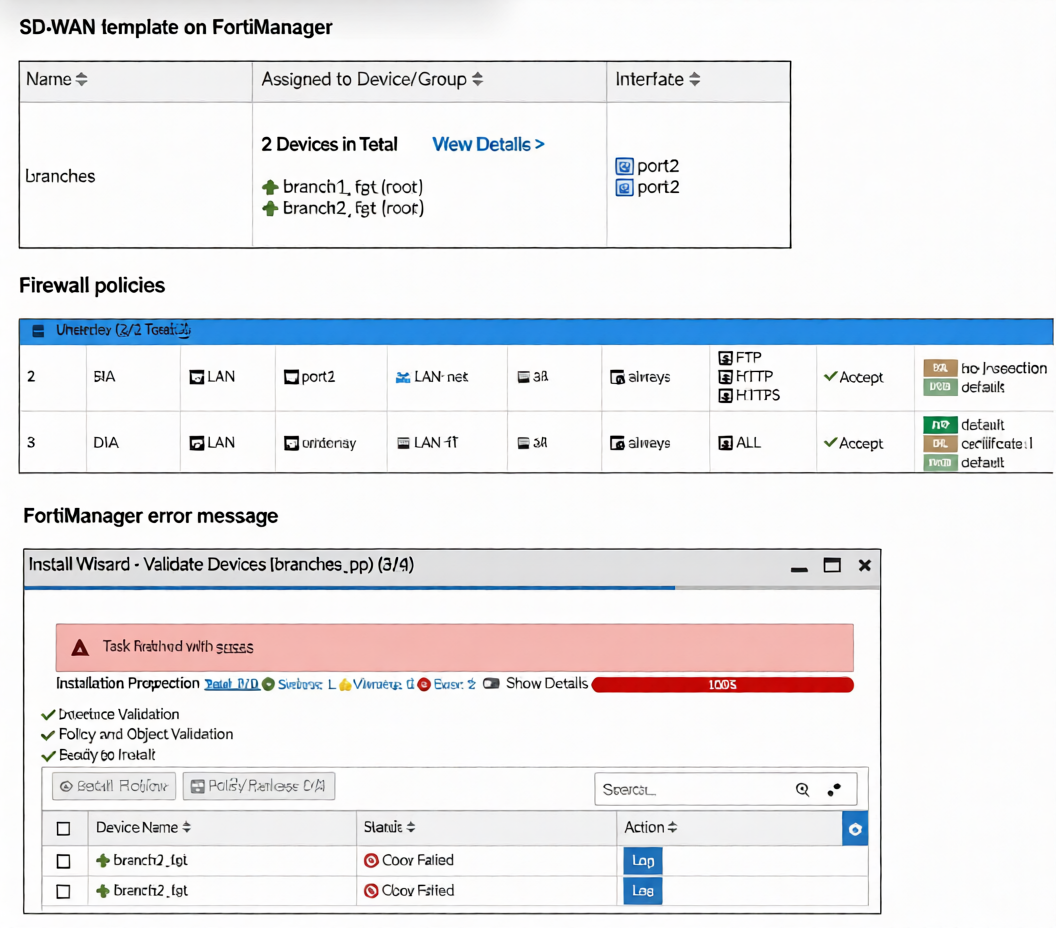
Refer to the exhibits. You use FortiManager to manage the branch devices and configure the SD-WAN template. You have configured direct internet access (DIA) for the IT department users. Now. you must configure secure internet access (SIA) for all local LAN users and have set the firewall policies as shown in the second exhibit. Then, when you use the install wizard to install the configuration and the policy package on the branch devices, FortiManager reports an error as shown in the third exhibit. Which statement describes why FortiManager could not install the configuration on the branches?
Show answerHide answer

Correct answer: B You cannot install firewall policies that reference an SD-WAN zone.

Explanation

Explanation :

FortiManager fails to install the configuration because the firewall policies reference SIA and DIA as outgoing interfaces. These are SD-WAN zones defined within an SD-WAN template. In FortiManager's architecture, SD-WAN template zones are not exposed as selectable interfaces in the firewall policy object database. During pre-install validation, FortiManager cannot resolve these zone references, resulting in a "Conf Failed" error. The policies must use concrete interfaces (e.g., port2, wan1) or a regular interface zone defined at the device level, not an SD-WAN template zone.

Correct Option

B is correct. Firewall policies in a policy package cannot use an SD-WAN zone from a template as an egress interface. These zones are part of the SD-WAN configuration namespace and are unavailable to the firewall policy engine, causing a validation failure upon installation.

Incorrect Options

A: Incorrect. The error is not about routing SIA traffic to a VPN tunnel; it is a configuration validation failure. A policy can successfully use a VPN tunnel interface (e.g., to_HUB) as its egress interface.

C: Incorrect.You can install policies that reference an individual SD-WAN member interface (e.g., port1). These are standard, concrete interfaces that exist in the global object database and are valid for policy configuration.

D: Incorrect. A FortiGate device can host both SIA and DIA rules simultaneously. The error is specific to the invalid interface reference in the policy configuration, not a conflict between SIA and DIA functionalities.

Reference:
FortiManager Administration Guide (v7.6): SD-WAN zones configured within an SD-WAN template are not available as outgoing interfaces in firewall policies. Policies must reference interfaces or zones defined at the device/global level. This separation prevents policy binding to dynamic SD-WAN objects, ensuring clean template management. The validation failure occurs when a policy package references an unresolved interface object from an SD-WAN template.
Question 9 Choose 1

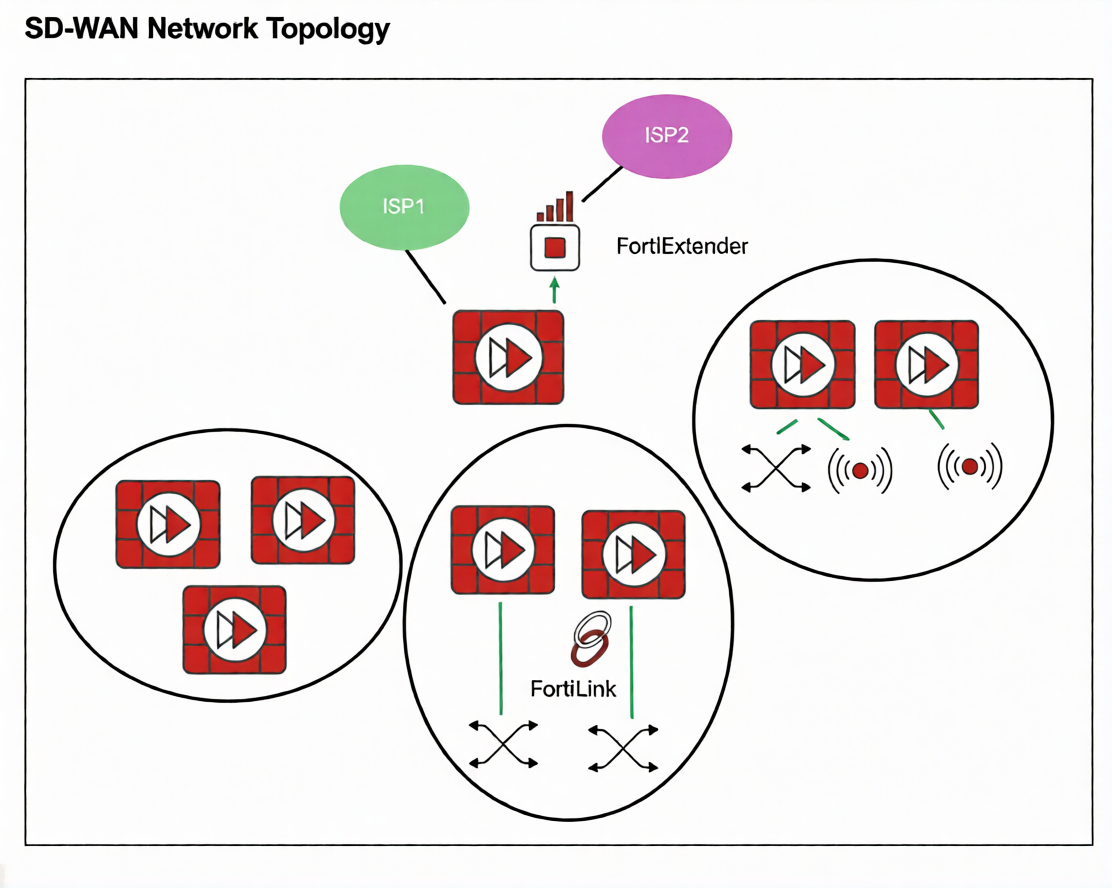
Refer to the exhibit. You want to configure SD-WAN on a network as shown in the exhibit. The network contains many FortiGate devices. Some are used as NGFW, and some are installed with extensions such as FortiSwitch. FortiAP. or Forti Ex tender. What should you consider when planning your deployment?
Show answerHide answer

Correct answer: B You can build an SD-WAN topology that includes all devices. The hubs must be devices without extensions.

Explanation

Explanation:

The exhibit shows a network with various Fortinet devices (FortiGate, FortiExtender, FortiSwitch, FortiAP). In a Fortinet SD-WAN fabric, hub devices are critical for establishing the overlay VPN mesh and managing control-plane traffic.

The key consideration is that hub FortiGates must be dedicated to the SD-WAN routing function. If a FortiGate acts as a hub and also manages local extensions (like a FortiSwitch, FortiAP, or FortiExtender) via FortiLink, it can lead to complex dependencies and potential traffic loops. Specifically, if the SD-WAN overlay relies on an underlay interface that is also part of a FortiLink aggregate (e.g., for switch or AP management), a failure in the local extension could destabilize the entire SD-WAN overlay.

Therefore, hubs should be devices without local FortiLink-managed extensions to ensure stability and simplified troubleshooting.

Why other options are incorrect:

A: Incorrect. Hubs should not have FortiExtender (or other extensions like FortiSwitch/FortiAP) managed via FortiLink, as this creates underlay dependency on the extension, risking SD-WAN stability.

C: Incorrect. While FortiManager is recommended for centralized management, it is not mandatory to build an SD-WAN topology. SD-WAN can be configured directly on FortiGates.

D: Incorrect. You do not need separate topologies per extension type. You can have a single SD-WAN topology, but spoke devices can have extensions (e.g., a branch FortiGate with FortiSwitch). The restriction primarily applies to hub devices.

Reference
Fortinet SD-WAN 7.6 Deployment Guide - Design Considerations: Recommends that SD-WAN hub FortiGates should not be used as FortiLink aggregation devices for switches, APs, or extenders to avoid underlay dependency and ensure overlay stability.
Question 10 Choose 1
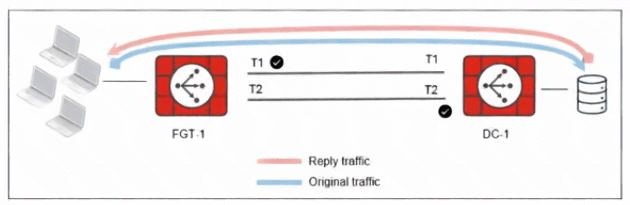
Refer to the exhibit.

The administrator analyzed the traffic between a branch FortiGate and the server located in the data center, and noticed the behavior shown in the diagram. When the LAN clients located behind FGT1 establish a session to a server behind DC-1, the administrator observes that, on DC-1, the reply traffic is routed overT2. even though T1 is the preferred member in the matching SD-WAN rule. What can the administrator do to instruct DC-1 to route the reply traffic through the member with the best performance?
Show answerHide answer

Correct answer: B Enable reply-session under config system sdwan.

Explanation

Explanation:

Why this happens

In SD-WAN, by default:
The reply traffic is routed based on the original session information.
FortiGate tries to maintain session symmetry.
That means reply traffic follows the same interface path used by the original traffic, even if another member now has better SLA performance.
In your diagram:
Original traffic goes via T1 (preferred).
On DC-1, the return traffic is going via T2, because the session was built that way (likely due to routing lookup or ingress-interface behavior at session creation).

βœ… What set reply-session enable does
When you enable:
config system sdwan
set reply-session enable
end
FortiGate performs a fresh SD-WAN rule lookup for reply traffic, instead of forcing it to follow the original session’s ingress interface.

This allows reply traffic to:
Follow the SD-WAN rule logic
Use the member with the best performance
Improve path symmetry and performance optimization

❌ Why the other options are incorrect

A. snat-route-change
This only affects SNAT session behavior when routing changes β€” unrelated to reply traffic path selection.
C. auxiliary-session
Used for asymmetric routing handling, not for SD-WAN reply path optimization.
D. Route lookup only considers original ingress interface
That describes default behavior, not the solution.
Full mock exam

Sit the NSE6_SDW_AD-7.6 exam before exam day

Full-length mocks with the same number of questions and the same time limit as the real NSE6_SDW_AD-7.6 exam. Every attempt draws a new set of questions from the full bank, so you can keep going until you pass comfortably.

Get full NSE6_SDW_AD-7.6 mock exam
  • 40questions per mock
  • 75 mintime limit
  • 95questions in the bank
  • Newmock on every attempt

How to Pass NSE6_SDW_AD-7.6 - Fortinet NSE 6 SD-WAN 7.6 Enterprise Administrator Exam: A Step-by-Step Preparation Guide


Step 1: Understand the Exam Objectives

Start by reviewing the official exam blueprint. Focus on key domains such as SD-WAN deployment, performance SLAs, routing configuration, security integration, centralized management, and troubleshooting. Knowing what topics carry the most weight helps you prioritize your study time effectively.

Step 2: Build Strong Conceptual Knowledge

Study Fortinet documentation and training materials related to FortiGate SD-WAN architecture. Make sure you clearly understand link health monitoring, traffic steering, application awareness, and automation features. Concept clarity is essential because exam questions often test real-world scenarios rather than definitions.

Step 3: Practice in a Lab Environment

Hands-on experience is critical. Set up a virtual lab using FortiGate devices or simulations to practice configuration tasks. Work on creating SD-WAN zones, defining rules, configuring overlays, and analyzing logs. Practical exposure helps reinforce theory and improves troubleshooting skills.

Step 4: Use Reliable Practice Tests

Practice exams help identify weak areas and familiarize you with the question format. Regularly testing yourself improves time management and reduces exam anxiety. Review explanations carefully to understand why answers are correct or incorrect.

Step 5: Create a Revision Strategy

In the final weeks, focus on reviewing configurations, command outputs, and common troubleshooting workflows. Short daily revisions are more effective than last-minute cramming.

Step 6: Prepare for Exam Day

Ensure you understand scenario-based questions, read carefully, and manage your time wisely during the test.

Trusted by Customers


"The enterprise-level troubleshooting scenarios for performance-based routing and VPN overlays were exceptional. I faced nearly identical logic puzzles in the actual exam. The insight that you must diagnose the problem from both the CLI and the GUI is 100% correct. This training builds real, operational skill."
- Noah William

β€œPrepforti made NSE6_SDW_AD-7.6 preparation efficient. The scenarios covered real enterprise SD-WAN operations and troubleshooting, and the timed tests improved my speed. I passed comfortably.”
- Lily Peterson

Enterprise SD-WAN deployment requires hands-on expertise. Prepforti NSE6_SDW_AD-7.6 practice test focused on real-world configuration scenarios traffic shaping, application steering, and link monitoring. The questions mirrored the actual exam perfectly.
Nicole Foster, SD-WAN Engineer | Chicago, IL