Fortinet certification · Exam NSE4_FGT_AD-7.6

NSE4_FGT_AD-7.6 Mock Exam Page 3

Fortinet NSE 4 - FortiOS 7.6 Administrator

Free NSE4_FGT_AD-7.6 mock exam questions 21–27, each with the answer and an explanation.

20 questions · 36 minutes · free, no sign-up

Free NSE4_FGT_AD-7.6 questions

21–27 of 27 free
Question 21 Choose 2
Refer to the exhibit.
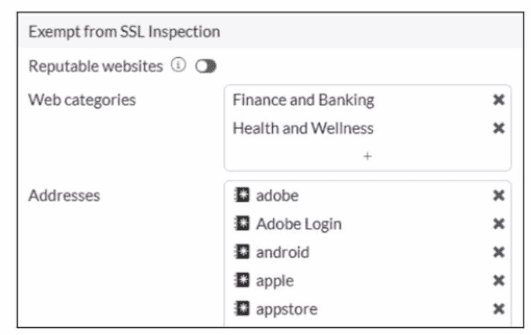
The predefined deep-inspection and custom-deep-inspection profiles exclude some web categories from SSL inspection, as shown in the exhibit For which two reasons are these web categories exempted? (Choose two.)
Show answerHide answer

Correct answer: B, C The legal regulation aims to prioritize user privacy and protect sensitive information for these websites. These websites are in an allowlist of reputable domain names maintained by FortiGuard.

Explanation

Explanation:

This question tests why FortiGate's default deep-inspection (and custom-deep-inspection) profiles exempt specific FortiGuard web categories like Finance and Banking and Health and Wellness from full SSL inspection. Exemptions prevent interference with sensitive sites while allowing inspection of other traffic. The two main reasons are privacy/legal concerns and FortiGuard's reputable classification.

✔️ B. The legal regulation aims to prioritize user privacy and protect sensitive information for these websites.
Categories like Finance and Banking (financial data, banking) and Health and Wellness (personal health info, medical advice) contain highly sensitive user data. Performing deep SSL inspection (MITM with FortiGate's proxy certificate) could violate privacy regulations (e.g., GDPR, HIPAA-like rules) or user trust. FortiOS exempts them by default to avoid legal/compliance issues and protect sensitive information.

✔️ C. These websites are in an allowlist of reputable domain names maintained by FortiGuard.
FortiGuard maintains a reputation-based allowlist of trusted/reputable sites. The exempt categories (Finance and Banking, Health and Wellness) include many high-reputation domains. Exempting them aligns with trusting FortiGuard-rated reputable sites, reducing unnecessary inspection on low-risk, high-trust traffic. (Note: There's a separate "Reputable Websites" toggle for broader exemptions, but these categories are pre-added defaults for similar trust reasons.)

❌ A. The resources utilization is optimized because these websites are in the trusted domain list on FortiGate.
While exemptions reduce CPU/resource use (no decryption/re-encryption for those categories), this is a side effect, not the primary reason. The defaults focus on privacy/compliance and reputation, not optimization as the main driver.

❌ D. The FortiGate temporary certificate denies the browser's access to websites that use HTTP Strict Transport Security.
HSTS sites (and certificate-pinned ones) can reject FortiGate's proxy certificate, causing access issues. However, exemptions are not primarily for HSTS; they apply broadly to categories regardless of HSTS. HSTS breakage is a known deep-inspection side effect, but not the stated reason for these specific category exemptions in FortiOS defaults.

Reference:
⇒ https://docs.fortinet.com/document/fortigate/7.6.6/administration-guide/709167/configuring-an-ssl-ssh-inspection-profile — Confirms Finance and Banking, Health and Wellness (and Personal Privacy) are added by default to exemptions in full SSL inspection; mentions reputable websites option separately.

⇒ https://docs.fortinet.com/document/fortigate/7.6.0/best-practices/598577/ssl-tls-deep-inspection — States these categories are exempt by default when using full SSL inspection, noting undesirability for banking/personal health sites (implying privacy reasons).

⇒ https://community.fortinet.com/t5/FortiGate/Technical-Tip-Exempting-certain-categories-from-SSL-inspection/ta-p/198046 — Notes default exemptions for Finance and Banking and Health and Wellness in deep-inspection profile.
Question 22 Choose 3
Which three statements about SD-WAN performance SLAs are true? (Choose three.)
Show answerHide answer

Correct answer: A, C, E They rely on session loss and jitter. All the SLA targets can be configured. They can be measured actively or passively.

Explanation

Explanation:

This question tests SD-WAN performance SLA functionality in FortiOS 7.6, which monitors link health for intelligent path selection. SLAs probe interfaces using configurable metrics and measurement methods to mark links up/down, influencing routing in SD-WAN rules. ​

✔️Why A Is Correct:
Performance SLAs measure link quality using latency, jitter, and packet loss (session loss). These thresholds determine if a link passes/fails, triggering route removal or failover in SD-WAN load balancing.

✔️Why C Is Correct:
All SLA targets—latency threshold (default 5ms), jitter threshold (default 5ms), and packet loss threshold (default 0%)—are fully configurable per SLA. This allows customization based on application needs like VoIP or general traffic. ​

✔️Why E Is Correct:
SLAs support active measurement (probing servers via ping/HTTP/TWAMP) and passive measurement (analyzing real firewall session data). Active uses probes; passive leverages existing traffic for realistic health checks without extra overhead. ​

❌Option B:
SLAs monitor SD-WAN member interface/link health, not FortiGate device state (CPU/memory). Device health uses separate monitors like hardware health checks, not performance SLAs. ​
No direct tie to FortiGate system status; focused solely on WAN link metrics.

❌Option D:
SLAs integrate with multiple strategies (lowest cost, best quality, maximum bandwidth, etc.), not exclusively lowest cost. Rules specify strategy; SLA provides pass/fail input for path selection. ​
Flexible across all SD-WAN strategies, not strategy-specific.

Reference:
⇒ https://docs.fortinet.com/document/fortigate/7.6.6/administration-guide/584396/sd-wan-performance-sla – Defines active/passive SLAs, jitter/loss metrics. ​

⇒ https://docs.fortinet.com/document/fortigate/7.6.4/administration-guide/867342/performance-sla-overview – Confirms configurable targets (latency/jitter/loss).
Question 23 Choose 2
What are two features of FortiGate FSSO agentless polling mode? (Choose two.)
Show answerHide answer

Correct answer: B, C FortiGate uses the SMB protocol to read the event viewer logs from the DCs. FortiGate does not support workstation check.

Explanation

Explanation:

Correct Answers: B and C
🟢 FortiGate FSSO agentless polling mode enables user authentication monitoring without deploying external DC or collector agents. FortiGate directly polls domain controllers using the SMB protocol over TCP port 445 to read Windows Security event logs (specifically event IDs 4768 and 4769 for logon/logoff), confirming option B. ​

🟢 Workstation check (verification of user IP-to-hostname binding) is not supported in agentless mode, as FortiGate lacks the additional capabilities of a dedicated collector agent, making option C correct. ​

🔴 Option A is incorrect because FortiGate itself acts as the collector, not the AD server.

🔴 Option D is wrong, as agentless polling does not involve directing a collector agent or remote LDAP for event collection; LDAP serves group filtering separately. ​

Reference: FortiGate 7.4 Administration Guide (FSSO Polling Connector) and NSE4 study materials covering FortiOS 7.6 FSSO topics.
Question 24 Choose 2
Refer to the exhibits.

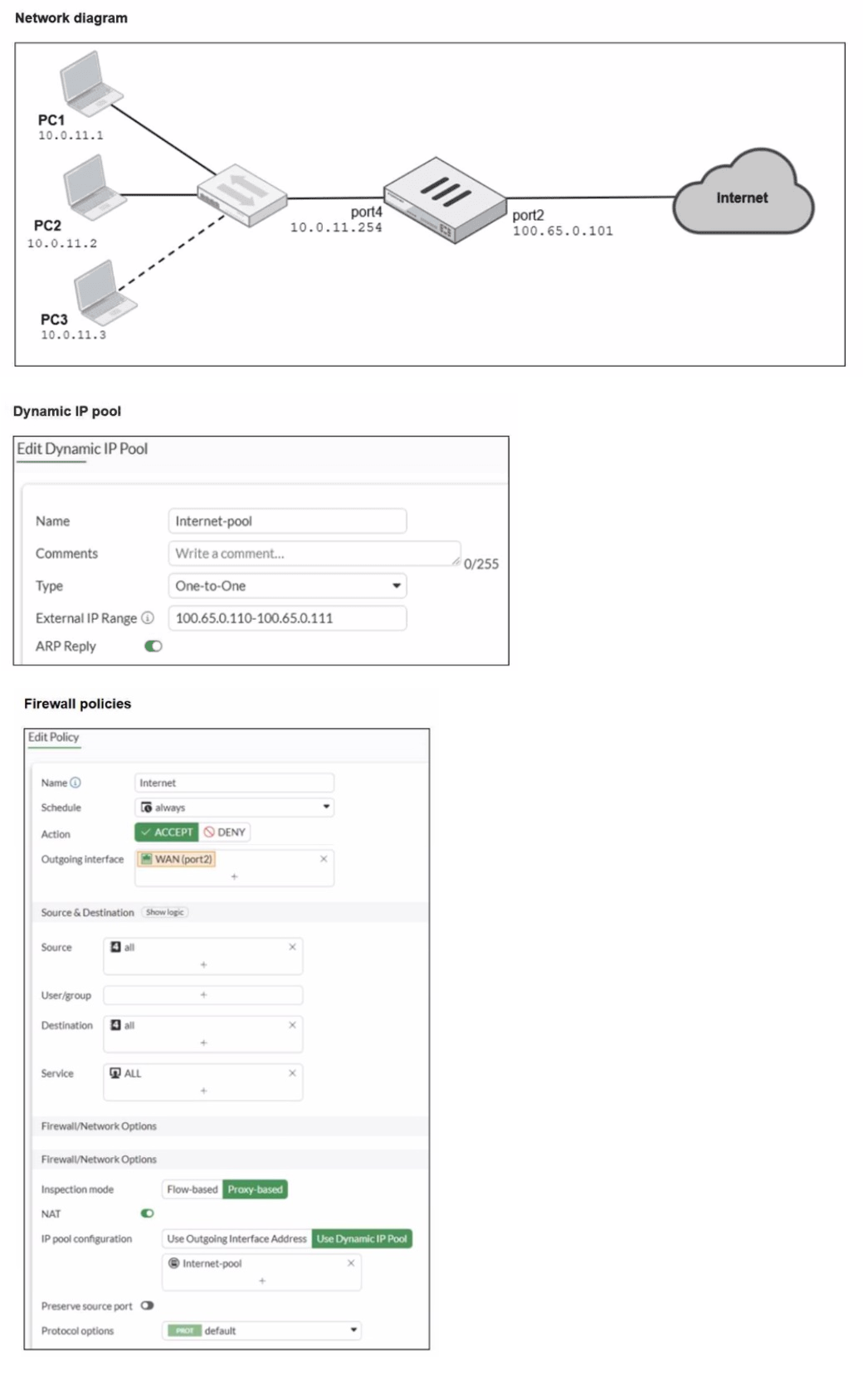
A diagram of a FortiGate device connected to the network, as well as the firewall policy and IP pool configuration on the FortiGate device are shown.
Two PCs. PC1 and PC2, are connected behind FortiGate and can access the internet successfully. However, when the administrator adds a third PC to the network (PC3), the PC cannot connect to the internet.
Based on the information shown in the exhibit, which two configuration options can the administrator use to fix the connectivity issue for PC3? (Choose two.)
Show answerHide answer

Correct answer: B, D In the IP pool configuration, set end ipto 100.65.0.112. In the IP pool configuration, set type to overload.

Explanation

Explanation:

This question tests your understanding of how Dynamic IP Pools and NAT work in FortiOS, specifically regarding the limitations of One-to-One IP pools and how address exhaustion can prevent connectivity for new hosts.

✔️Why B Is Correct:
The current One-to-One IP pool "Internet-pool" is configured with the range "100.65.0.110-100.65.0.111," which provides only two public IP addresses. Since PC1 and PC2 are already successfully accessing the internet, they are likely consuming both addresses in this pool. When PC3 attempts to connect, no public IP addresses remain available for allocation. Extending the range to include 100.65.0.112 would add a third address, accommodating PC3 and resolving the exhaustion issue while keeping the One-to-One NAT type.

✔️Why D Is Correct:
Changing the IP pool type from "One-to-One" to "Overload" (also known as Port Address Translation or PAT) would resolve the issue without requiring additional public IP addresses. With Overload NAT, all three private IP addresses (10.0.11.1, 10.0.11.2, and 10.0.11.3) can share the same public IP address(es) by using unique source ports to differentiate sessions. This maximizes the use of the existing public IP range and would immediately allow PC3 to connect.

❌Why the Other Options Are Wrong:

A. In the system settings, set Multiple Interface Policies to enable:
This setting relates to how FortiGate handles traffic when multiple policies match the same interface. It is not related to IP pool exhaustion or NAT capacity and would not resolve the connectivity issue for PC3.

C. In the firewall policy, set match-vip to enable using CLI:
The match-vip setting is used for Destination NAT (Virtual IPs) configurations, specifically to control how traffic matches VIPs before policy lookup. This issue involves Source NAT (IP pools), and enabling match-vip would not affect the availability of source IP addresses for outbound connections.

Reference:
⇒ Fortinet Document Library: One-to-One IP pools
This official guide explains that One-to-One NAT maps one private IP to one public IP, requiring enough public addresses for each concurrent private host.

⇒ Fortinet Document Library: Overload IP pools
This resource confirms that Overload NAT (Port Address Translation) allows multiple private IP addresses to share a single public IP by mapping unique source ports, conserving public address space.
Question 25 Choose 1
An administrator wants to configure dead peer detection (DPD) on IPsec VPN for detecting dead tunnels. The requirement is that FortiGate sends DPD probes only when there is no inbound traffic. Which DPD mode on FortiGate meets this requirement?
Show answerHide answer

Correct answer: C On Idle

Explanation

Explanation:

This question assesses understanding of Dead Peer Detection (DPD) modes in FortiGate IPsec VPNs. DPD is used to monitor the health of VPN tunnels and detect if the peer device is unreachable. The specific requirement here is that DPD probes should be sent only when there is no inbound traffic, ensuring the tunnel is checked for inactivity without generating unnecessary traffic.

✔️ Correct option:
On Idle mode is designed for this exact scenario. FortiGate will send DPD probes only when the tunnel is idle, meaning no inbound traffic is detected. If the tunnel is actively carrying traffic, probes are suppressed, avoiding redundant messages. This ensures the tunnel is monitored efficiently and the VPN can detect dead peers without impacting normal traffic flow.

❌ Incorrect Options:

A. On Demand
This mode sends DPD probes only when traffic is being sent and a response is required. It does not check idle tunnels and therefore does not meet the requirement of probing only when there is no inbound traffic.

B. Enabled
Enabled mode triggers DPD probes continuously at set intervals, regardless of tunnel activity. While it keeps the tunnel constantly monitored, it generates unnecessary traffic and does not fulfill the “only when idle” condition.

D. Usabled
This is not a valid DPD mode in FortiGate; selecting it would be incorrect as it does not exist in the configuration options.

Reference:
⇒ Fortinet Documentation – Configuring Dead Peer Detection
Confirms that On Idle mode sends DPD probes only when the tunnel is inactive, ensuring efficient monitoring without generating unnecessary traffic.
Question 26 Choose 1
Refer to the exhibits.

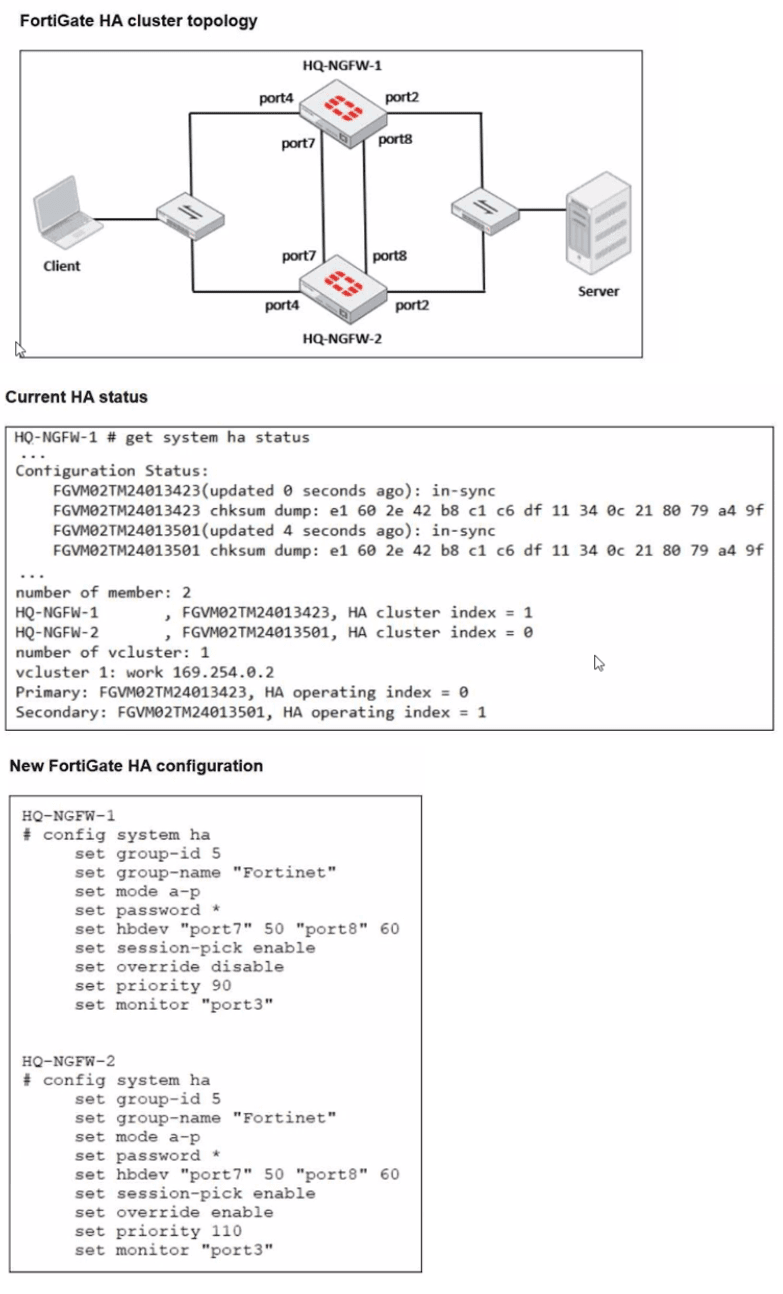
Based on the current HA status, an administrator updates the override and priority parameters on HQ-NGFW-1 and HQ-NGFW-2 as shown in the exhibits. What would be the expected outcome in the HA cluster?
Show answerHide answer

Correct answer: A HQ-NGFW-2 will take over as the primary because it has the override enable setting and higher priority than HQ-NGFW-1.

Explanation

Explanation:

This question tests the understanding of the High Availability (HA) Master Selection Process in FortiOS. It specifically focuses on how the override setting alters the default selection criteria, prioritizing device priority over system uptime.

✔️Why This Is Correct:
By default, FortiGate HA selection follows the APPU order (Override disabled): Alive members > Priority > Previous primary (Uptime) > Unit SN.
When set override enable is configured on a cluster member, the selection order changes to Priority > Alive members > Previous primary > Unit SN.
In the exhibit, HQ-NGFW-2 is configured with set override enable and a higher priority (110) compared to HQ-NGFW-1 (priority 90). Because override is enabled on the member with the higher priority, the cluster will trigger a re-election and select HQ-NGFW-2 as the new primary.

❌Why the Other Options Are Wrong:

B. HQ-NGFW-1 will remain the primary:
This is incorrect because HQ-NGFW-2 has a higher priority (110 vs 90) and override is enabled, forcing a transition.

C. The HA cluster will become out of sync:
The override and priority settings are device-specific (not synchronized). Having different values for these settings does not cause a synchronization error.

D. HQ-NGFW-1 will synchronize the override disable setting:
As mentioned, these specific parameters are excluded from synchronization to allow for cluster management.

Reference:
⇒ FortiGate HA Primary Election
Confirms that the override setting moves the Priority criteria to the top of the selection list, allowing a higher-priority unit to preempt the current primary.
Question 27 Choose 1
Refer to the exhibits.

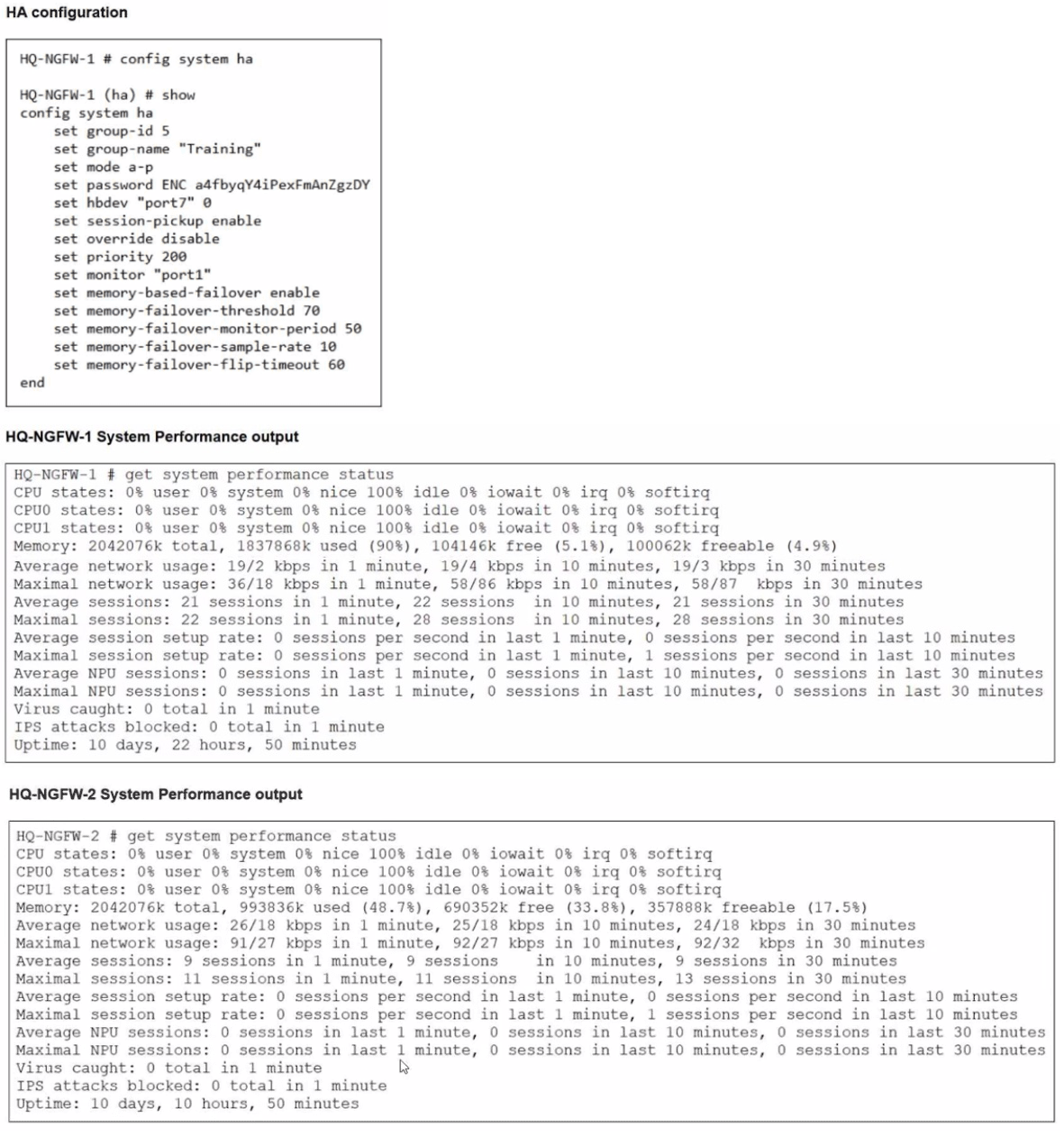
An administrator has observed the performance status outputs on an HA cluster for 55 seconds. Which FortiGate is the primary?
Show answerHide answer

Correct answer: D HQ-NGFW-2 with the parameter memory-failover-threshold setting

Explanation

Explanation:

The correct answer is D.

Technical Analysis
In this scenario, we must evaluate the HA election criteria specifically for memory-based failover, which is a feature enabled in this cluster's configuration.
➡️ Memory Threshold Breach: The configuration for HQ-NGFW-1 sets a memory-failover-threshold of 70%. Performance status shows HQ-NGFW-1 is currently at 90% memory usage, while HQ-NGFW-2 is at approximately 48.7%.
➡️ Monitoring Period: The memory-failover-monitor-period is set to 50 seconds. This is the duration the memory must stay above the threshold to trigger a failover.
➡️ Observation Window: The administrator has observed these statuses for 55 seconds. Because 55 seconds is greater than the 50-second monitor period, the threshold violation has been sustained long enough to trigger a failover.
➡️ Resulting Primary: Once the primary (HQ-NGFW-1) triggers a failover due to memory pressure, the secondary unit with memory usage below the threshold (HQ-NGFW-2) becomes the new primary.

Why Other Options are Incorrect

A: The memory-failover-flip-timeout (set to 60 minutes in this case) is a timer that prevents the cluster from failing back to the original unit too quickly to avoid "flapping". It does not determine which unit is currently primary during the initial 55-second window.

B: While HQ-NGFW-2 has a priority setting, the memory-based failover event overrides standard priority-based election when one unit exceeds its healthy resource threshold for the defined period.

C: Even though HQ-NGFW-1 has a higher priority (200) and override might be disabled, the specific memory-failover trigger has already transitioned the role to HQ-NGFW-2.

Reference
FortiOS 7.6 Administration Guide: "When memory-based failover is enabled, a failover occurs if the primary unit's memory usage exceeds the memory-failover-threshold for a duration longer than the memory-failover-monitor-period."

That's the last free question

You've seen the free 30% (27 of 92 questions). Full access unlocks every question and full-length NSE4_FGT_AD-7.6 mock exams (50 questions, 90 minutes), a different mock on every attempt.

Unlock full mock exam
Full mock exam

Sit the NSE4_FGT_AD-7.6 exam before exam day

Full-length mocks with the same number of questions and the same time limit as the real NSE4_FGT_AD-7.6 exam. Every attempt draws a new set of questions from the full bank, so you can keep going until you pass comfortably.

Get full NSE4_FGT_AD-7.6 mock exam
  • 50questions per mock
  • 90 mintime limit
  • 92questions in the bank
  • Newmock on every attempt