Fortinet certification · Exam NSE4_FGT_AD-7.6

NSE4_FGT_AD-7.6 Mock Exam Page 2

Fortinet NSE 4 - FortiOS 7.6 Administrator

Free NSE4_FGT_AD-7.6 mock exam questions 11–20, each with the answer and an explanation.

20 questions · 36 minutes · free, no sign-up

Free NSE4_FGT_AD-7.6 questions

11–20 of 27 free
Question 11 Choose 1
Refer to the exhibit.
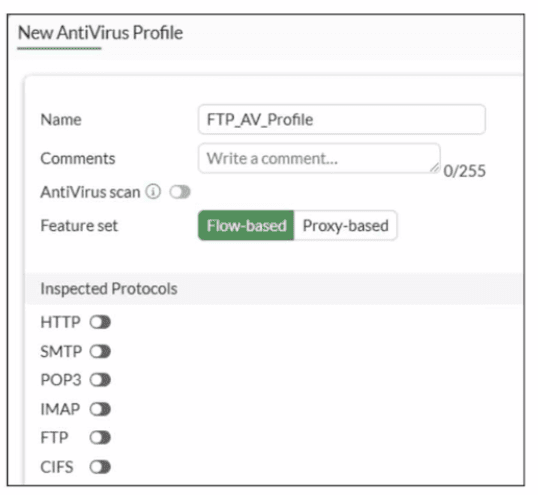
Why is the Antivirus scan switch grayed out when you are creating a new antivirus profile for FTP?
Show answerHide answer

Correct answer: B None of the inspected protocols are active in this profile.

Explanation

Explanation:

✅ Correct Answer: B
The Antivirus scan switch is grayed out because no inspected protocols are selected in the FTP Antivirus profile. In FortiGate, the Antivirus scan option becomes available only after enabling at least one protocol (such as FTP) under Inspected Protocols, as antivirus scanning requires a protocol context to operate.
The exhibit shows FTP unchecked along with all other protocols (HTTP, SMTP, IMAP, POP3, CIFS), leaving no scanning scope defined, which disables the feature toggle. ​

❌ Why others are wrong:

A: Feature visibility affects global UI options but doesn't gray out per-profile settings like this.​

C: Flow-based supports FTP AV scanning; Proxy-based isn't required for basic antivirus on FTP traffic.​

D: RAM size doesn't disable AV scan availability; it's a configuration prerequisite issue.​

Reference:
FortiOS 7.6 Administration Guide - Antivirus Profile configuration (Content Inspection section, NSE4_FGT_AD-7.6 exam topics).​
Question 12 Choose 1
A network administrator is reviewing firewall policies in both Interface Pair View and By Sequence View. The policies appear in a different order in each view. Why is the policy order different in these two views?
Show answerHide answer

Correct answer: C Interface Pair View sorts policies based on matching interfaces, while By Sequence View shows the actual processing order of rules.

Explanation

Explanation:

The correct answer is C. Interface Pair View sorts policies based on matching interfaces, while By Sequence View shows the actual processing order of rules.

Here's why the orders look different:

FortiGate evaluates firewall policies top-down in a single, fixed sequence—the order you see in By Sequence View. That's the real processing order: the first matching policy wins, full stop. This view lists every policy exactly as it's checked, without any grouping.

Interface Pair View organizes the same policies into collapsible sections/groups based on the incoming and outgoing interface pairs (e.g., all policies from port1 → port2 in one section, port2 → wan1 in another). Within each section, the relative order matches the global sequence, but because it's grouped by interface pairs, the overall list appears reordered compared to the flat By Sequence View. It's just a different way to display the same set of rules for easier management when you have many policies—especially useful when troubleshooting traffic between specific interfaces.

The key point: both views reflect the same evaluation logic and order; only the presentation changes. Interface Pair View doesn't change priorities or reorder anything—it groups by src/dst interfaces to make scanning faster.

Why the others don't hold up:

A — No, neither view bases order on traffic logs, and rule priority isn't a separate thing here (it's the sequence).

B — FortiGate doesn't dynamically reorder policies based on traffic patterns in any view. The order is static unless you manually move rules.

D — There's no prioritization by "security levels" in Interface Pair View (that's not a FortiGate concept for policy ordering). By Sequence does follow the admin's manual ordering, but that's true for both—the difference is grouping, not priority method.

This is straight from Fortinet's docs (FortiOS 7.6 Administration Guide, Firewall Policy section, and the Policy views/policy lookup topic): Interface Pair View groups by incoming/outgoing pairs while showing check order within groups; By Sequence is the ungrouped, full top-down list.
Question 13 Choose 1
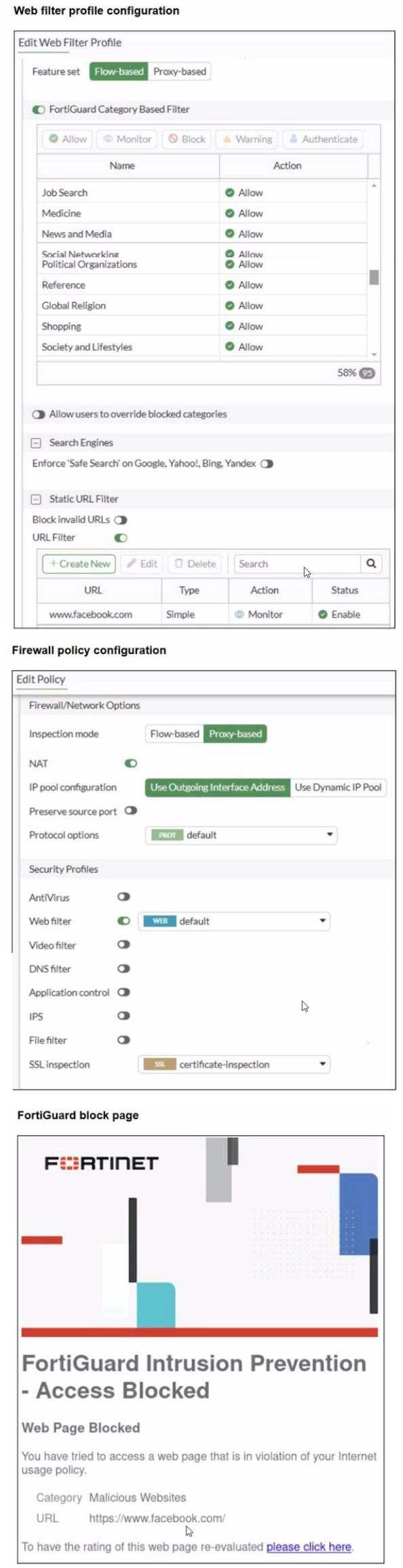
Refer to the exhibits.

A web filter profile configuration and firewall policy configuration are shown.
You are trying to access www. facebook.com, but you are redirected to a FortiGuard web filtering block page.
Based on the exhibits, what is the possible cause of the issue?
Show answerHide answer

Correct answer: C The firewall policy inspection mode is incorrect.

Explanation

Explanation:

Correct answer: B

What is happening (read the exhibits carefully)
🔹 The web filter profile is configured as Flow-based.
🔹 The firewall policy inspection mode is Proxy-based.
🔹 Accessing www.facebook.com results in a FortiGuard web filtering block page, categorized as Malicious Websites.
🔹 The URL filter entry for www.facebook.com is set to Monitor, not Block.
This mismatch is the key.

Why B is correct

B. The web filter profile feature set is configured incorrectly.
You are mixing flow-based security profiles with a proxy-based firewall policy.
In FortiOS:
🔹 Proxy-based inspection mode requires proxy-based security profiles
🔹 Flow-based profiles are not fully compatible with proxy mode
When this mismatch exists, FortiGate behavior becomes inconsistent. Web filtering decisions can fall back to FortiGuard category enforcement without correctly honoring URL filter actions like Monitor.

That explains why:
🔹 Facebook is being blocked
🔹 Even though its URL filter action is Monitor
🔹 And category list shows Social Networking allowed
This is a classic NSE4 exam scenario: profile type mismatch causes unexpected blocking.

Why the other options are wrong

A. The web rating override configuration is incorrect.
Incorrect.
There is no exhibit showing any web rating override configuration. Also, rating overrides are explicit entries and would be visible in the profile. This is a distraction option.

C. The firewall policy inspection mode is incorrect.
Incorrect.
Proxy-based inspection mode is valid and required for:
🔹 Web filtering
🔹 Certificate inspection
🔹 Advanced HTTP inspection features
The issue is not proxy mode itself, but that it is paired with a flow-based profile.

D. For www.facebook.com, the URL filter action is incorrect.
Incorrect.
The URL filter entry for www.facebook.com is:
🔹 Action: Monitor
🔹 Status: Enabled
Monitor does not block traffic. If this were the cause, the site would load and only be logged. The block page proves the decision is happening elsewhere.

Core rule you must remember for NSE4
Flow-based profiles must be used with flow-based inspection.
Proxy-based inspection requires proxy-based profiles.

Mixing them leads to:
🔹 Unexpected blocks
🔹 Category overrides not behaving correctly
🔹 URL filter actions ignored

Fortinet reference (official)
FortiOS 7.6 Administration Guide
🔹 Web Filter Profiles
🔹 Proxy-based vs Flow-based Inspection
Fortinet explicitly states that security profile feature sets must match the policy inspection mode
Question 14 Choose 1
Which statement correctly describes NetAPI polling mode for the FSSO collector agent?
Show answerHide answer

Correct answer: B The NetSessionEnum function is used to track user logouts.

Explanation

Explanation:

The correct statement describing the NetAPI polling mode for the FSSO collector agent is:

✅ B. The NetSessionEnum function is used to track user logouts.

Technical Explanation
The NetAPI polling mode is one of three collector-agent-based polling methods (the others being WinSecLog and WMI). Here is how it operates:

Mechanism: The Collector Agent periodically connects to the Domain Controllers (typically every 9 seconds) and calls the Windows NetSessionEnum function.

Tracking Logons/Logouts: This function retrieves a list of all active sessions currently established on the DC. By comparing the results of the current poll to the previous one, the collector agent can identify:

Logons: New sessions that appear in the list.

Logouts: Sessions that were present in the previous poll but are now missing from the list.

Pros and Cons: It is the fastest polling method because it queries RAM rather than parsing large log files. However, it can miss logon events if a user logs in and then logs out quickly between two 9-second polling intervals.

Why the Other Options are Incorrect

❌ A: The collector agent uses a Windows API to query DCs for user logins. While technically true that it uses an API, this statement is considered too "generic" for the exam. The exam specifically looks for the function name (NetSessionEnum) or the specific behavior of how it manages sessions (both login and logout).

❌ C: NetAPI polling can increase bandwidth usage in large networks. This is a characteristic of WinSecLog polling, not NetAPI. WinSecLog requires the collector agent to pull and parse large security event logs from the DCs, which consumes significantly more bandwidth than the lightweight NetAPI session query.

❌ D: The collector agent must search Windows application event logs. This is incorrect. NetAPI queries the active session table in RAM. Searching logs is the method used by WinSecLog (Security Event Logs) or WMI.

Reference
FortiOS 7.6 Study Guide - FSSO: "NetAPI: Polls temporary sessions created on the DC when a user logs in or logs out and calls the NetSessionEnum function on Windows. It is faster than WinSec and WMI methods but can miss logon events under heavy load."
Question 15 Choose 2
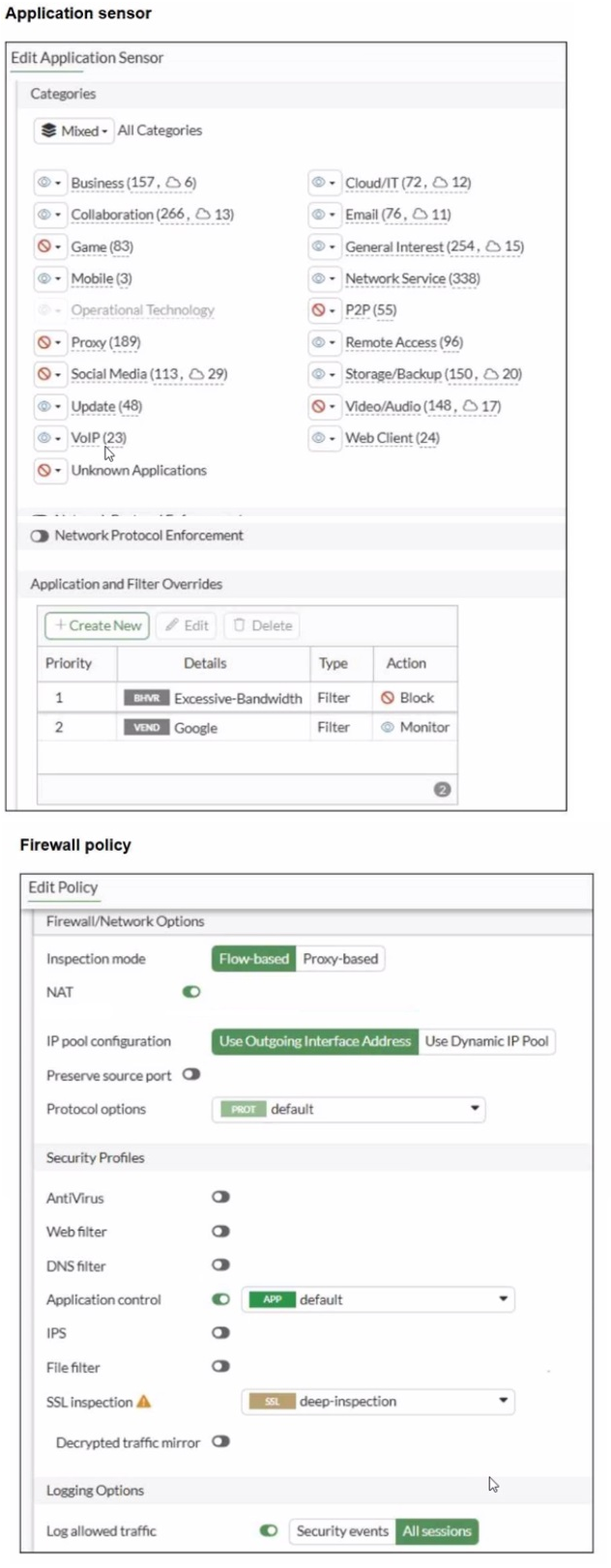
Refer to the exhibits.

You have implemented the application sensor and the corresponding firewall policy as shown in the exhibits.
Which two factors can you observe from these configurations? (Choose two.)
Show answerHide answer

Correct answer: B, D Facebook access is blocked based on the category filter settings. YouTube search is allowed based on the Google Application and Filter override settings.

Explanation

Explanation:

The question tests understanding of Application Control processing order in FortiOS 7.6, including category actions versus priority-based Application and Filter Overrides. The sensor shows category-level blocks (e.g., Social Media) and two overrides evaluated top-down. The firewall policy applies the sensor (APP default) with deep SSL inspection.

🟢 Key point: Overrides take precedence over category actions when matched, and are processed by priority (highest first).

Why This Is Correct:

➡️ In the sensor, Social Media category is marked for Block (red icon / crossed). Facebook belongs to Social Media → blocked at category level.
➡️ Overrides table:
Priority 1: BHRVR (likely behavior filter) Excessive-Bandwidth → Block.
Priority 2: VEND Google → Monitor.
➡️ Overrides evaluate top-down; first match wins.
➡️ YouTube (Google-owned) streaming/video traffic often matches Excessive-Bandwidth behavior → hits priority 1 → blocked.
➡️ Google vendor override (priority 2, Monitor) is not reached for bandwidth-heavy YouTube traffic.
✔️ Thus, full YouTube access (including videos) is blocked by the higher-priority override, and Facebook is blocked by category.

Why the Other Options Are Wrong:

❌ A. YouTube search is allowed based on the Google Application and Filter override settings.
🔴 Trap: Assumes Google Monitor always allows YouTube; ignores that Excessive-Bandwidth (priority 1) blocks streaming first. Search might pass in some cases, but overall access is not reliably allowed.

❌ C. Facebook access is allowed but you cannot play Facebook videos based on Video/Audio category filter settings.
🔴 Trap: Video/Audio is blocked (red), but Social Media block applies first to Facebook as a whole → entire access blocked, not just videos.

Reference:
⇒ https://docs.fortinet.com/document/fortigate/7.6.6/administration-guide/19814/basic-category-filters-and-overrides
Confirms overrides are evaluated by priority and override category settings when matched.
⇒ FortiOS 7.6 Application Control documentation (behavior filters like Excessive-Bandwidth and processing logic).
Question 16 Choose 1
Refer to the exhibit.

As an administrator you have created an IPS profile, but it is not performing as expected. While testing you got the output as shown in the exhibit What could be the possible reason of the diagnose output shown in the exhibit?
Show answerHide answer

Correct answer: B Administrator entered the command diagnose test application ipsmonitor 5.

Explanation

Explanation:

This question tests your ability to interpret diagnostic output related to the IPS engine on a FortiGate firewall. You must analyze the diagnose test application ipsmonitor 1 command output to determine why an IPS profile is not performing as expected.

🟢 The key concept is understanding IPS fail-open states and how they appear in diagnostic commands.

Why Option B Is Correct:

✅ B: FortiGate entered into IPS fail open state.
This is correct because the exhibit shows engine count = 0 (+1), which indicates that no IPS engine worker processes are currently running. The (+1) notation shows the system intends to start one engine. In a normal operational state, IPS engines run when traffic is being inspected. When the engine count drops to zero, it typically indicates that the FortiGate has stopped IPS inspection, which is characteristic of an IPS fail-open state . When IPS fails open, the firewall continues to pass traffic but without IPS inspection, matching the scenario where an IPS profile exists but is not performing as expected.

Why the Other Options Are Wrong:

❌ Option A: There is no firewall policy configured with an IPS security profile.
This is incorrect because if no firewall policy used an IPS profile, the IPS engine would not be initialized at all. The output shows engine count = 0 (+1), which indicates the system is attempting to start an engine, suggesting IPS is configured but not running properly .

❌ Option C: Administrator entered the command diagnose test application ipsmonitor 5.
This is incorrect. The command in the exhibit is ipsmonitor 1, which is valid. The output shown is consistent with this command, so an incorrect command parameter is not the issue.

❌ Option D: Administrator entered the command diagnose test application ipsmonitor 99.
This is incorrect for the same reason as option C. The exhibit clearly shows the correct command was used, and the output format matches what would be expected from ipsmonitor 1.

🔴 A common trap is assuming that a missing policy (Option A) would produce the same output. However, with no IPS policy configured, the system would not show engine count = 0 (+1) with an intent to start engines—it would simply show no engine activity at all .

Reference:
⇒ For more details, refer to the official Fortinet documentation:
Fortinet Community: Troubleshooting Tip - IPS engine new debug commands
Question 17 Choose 2
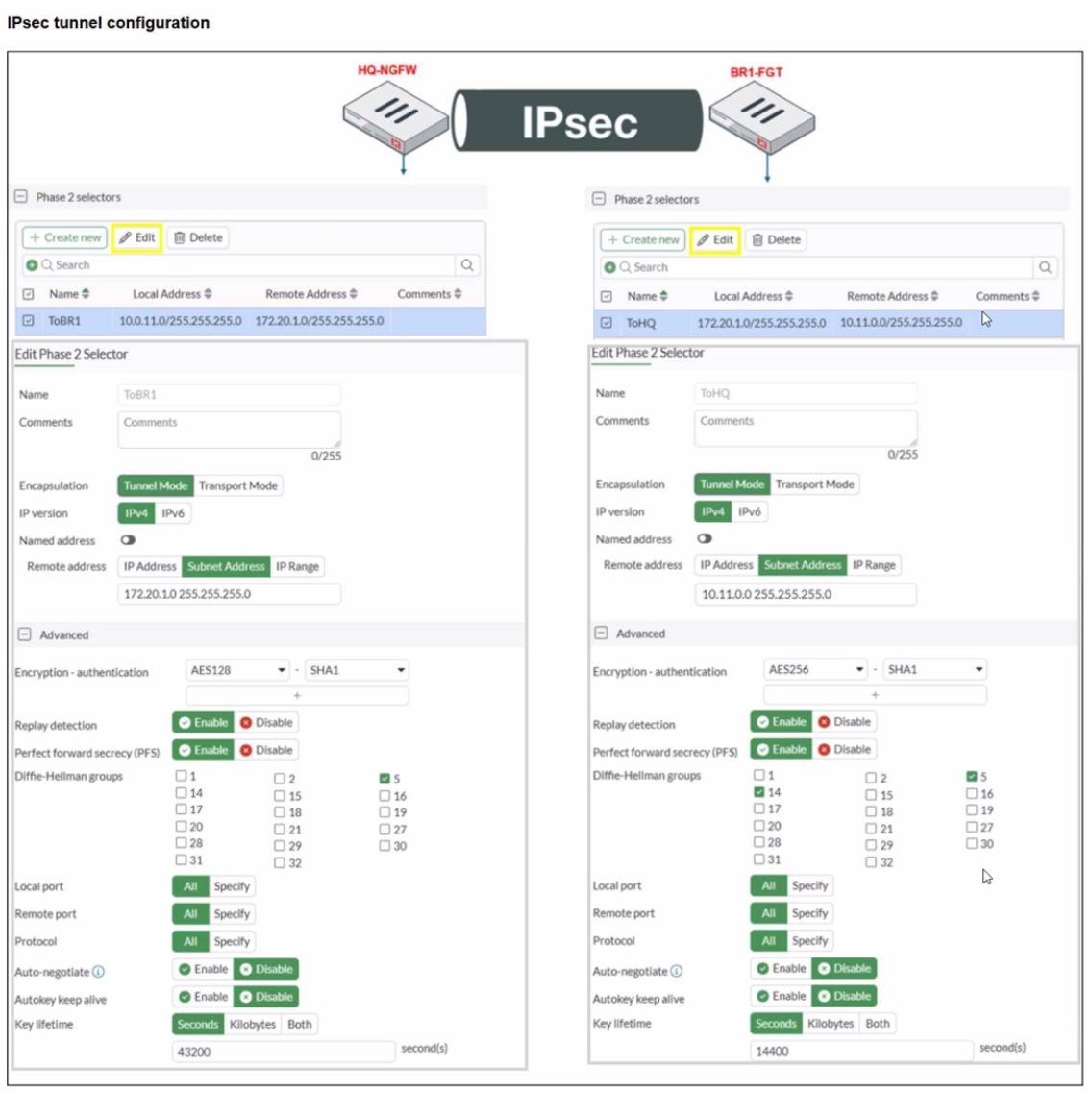
Refer to the exhibit.

A network administrator is troubleshooting an IPsec tunnel between two FortiGate devices. The administrator has determined that phase 1 status is up, but phase 2 fails to come up. Based on the phase 2 configuration shown in the exhibit, which two configuration changes will bring phase 2 up? (Choose two.)
Show answerHide answer

Correct answer: A, D On BR1-FGT, set Remote Address to 10.0.11.0/255.255.255.0. On HQ-NGFW. set Encryption to AES256.

Explanation

Explanation:

The question tests troubleshooting of IPsec phase 2 mismatches. The phase 1 tunnel is up, so the issue is in phase 2 configuration alignment.
🟢 Key concepts include matching IPsec selectors (local/remote subnets) and encryption/authentication settings on both FortiGate devices.

Why This Is Correct:

➡ Phase 2 requires that both ends have matching local and remote subnets. Currently, BR1-FGT’s remote address is set to 10.11.0.0/24, but HQ-NGFW expects 10.0.11.0/24. Changing BR1-FGT’s remote address to 10.0.11.0/24 ensures the selectors match.
➡ The encryption algorithms must match exactly. HQ-NGFW uses AES128, while BR1-FGT uses AES256. Changing HQ-NGFW to AES256 aligns both sides and allows phase 2 negotiation.

Why the Other Options Are Wrong:

❌ B. Enabling Diffie-Hellman Group 2 is irrelevant because DH group only affects phase 1, which is already up.
🔴 Common mistake: confusing phase 1 and phase 2 parameters.

❌ C. Changing the key lifetime on BR1-FGT does not resolve the mismatch in subnets or encryption.
🔴 Trap: key lifetime mismatch alone does not prevent phase 2 from coming up if selectors/encryption differ.

Reference:
⇒ Fortinet IPsec VPN Troubleshooting Guide – Confirms that phase 2 fails if selectors or encryption/authentication settings are not identical on both ends.
Question 18 Choose 1
Refer to the exhibits.

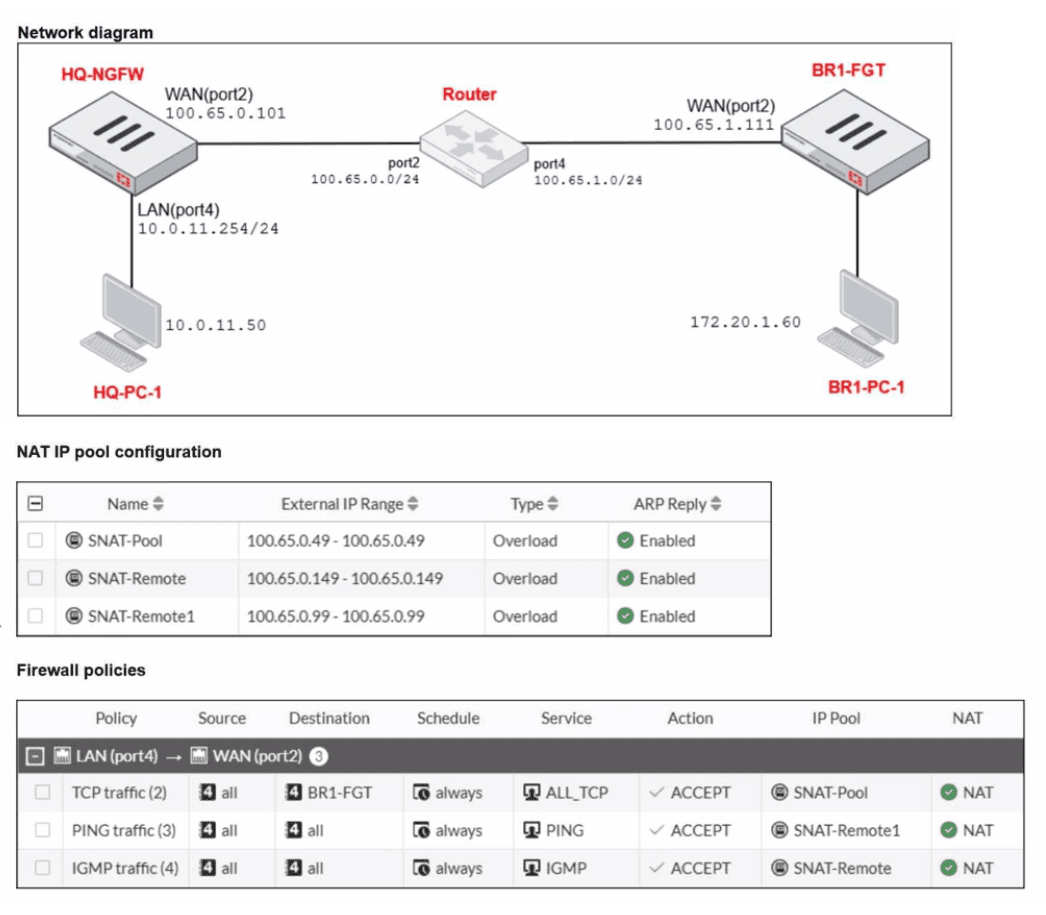
The exhibits show a diagram of a FortiGate device connected to the network, as well as the IP pool configuration and firewall policy objects.
The WAN (port2) interface has the IP address 100.65.0.101/24.
The LAN (port4) interface has the IP address 10.0.11.254/24.
Which IP address will be used to source NAT (SNAT) the traffic, if the user on HQ-PC-1 (10.0.11.50) pings the IP address of BR-FGT (100.65.1.111)?
Show answerHide answer

Correct answer: D 100.65.0.99

Explanation

Explanation:

The core of this question lies in FortiGate's firewall policy matching order and the NAT configuration bound to the policy.

Policy matching is top-down, first-match: FortiGate evaluates firewall policies in configuration order and stops once a match is found. Based on the exhibit, among the policies from LAN to WAN, the PING traffic policy explicitly matches the PING service, while the other policies (such as TCP traffic) do not match ICMP traffic.

The matched policy determines SNAT: The PING traffic policy has NAT enabled and specifies the dynamic IP pool as SNAT-Remote1. According to the IP pool configuration, the external IP of this pool is 100.65.0.99.

Why the other options are incorrect:

100.65.0.101 is the WAN interface IP. It is used only when the policy selects "Use Outgoing Interface Address," but the matched policy explicitly specifies an IP pool.

100.65.0.49 is the address of the SNAT-Pool pool, used for the TCP traffic policy, and does not match PING traffic.

100.65.0.149 is the address of the SNAT-Remote pool, used for the IGMP traffic policy, and does not match PING traffic.

Therefore, the ICMP traffic generated by the ping operation matches the PING traffic policy, and SNAT is performed using the IP pool 100.65.0.99 specified by that policy.
Question 19 Choose 2
What are two characteristics of HA cluster heartbeat IP addresses in a FortiGate device? (Choose two.)
Show answerHide answer

Correct answer: A, C Heartbeat IP addresses are used to distinguish between cluster members. A change in the heartbeat IP address happens when a FortiGate device joins or leaves the cluster.

Explanation

Explanation:

This question tests FortiGate HA heartbeat interface behavior in FortiOS 7.6. Heartbeat IPs enable cluster communication via link-local addresses in the vsys_ha VDOM, assigned automatically based on serial number priority when devices join. They support synchronization of configs, sessions, and routing while distinguishing members. ​

✔️Why A Is Correct:
Heartbeat IPs (169.254.0.1 to 169.254.0.63/26) uniquely identify cluster members by serial number priority. Higher priority (lower serialno_prio) gets lower IPs like 169.254.0.1, allowing the cluster to track primary/subordinate roles and sync status.

✔️Why C Is Correct:
IPs reassign dynamically on membership changes (join/leave). New members receive available IPs from the pool; departing units free theirs, ensuring the cluster maintains unique addressing for heartbeat and sync traffic. ​

❌Option B:
Primary does not always get 169.254.0.1; assignment depends on serial number priority across all members. The highest priority unit receives the lowest IP, regardless of primary role post-election. ​
Lowest available IP goes to highest serial priority, not fixed to primary.

❌Option D:
Heartbeat interfaces use auto-assigned link-local IPs, not manually configured virtual IPs. Physical heartbeat ports may have traffic IPs, but HA virtual interfaces (port_ha) are automatic per RFC 3927. ​
No manual assignment; dedicated for Layer 3 sync over Layer 2 heartbeat.

Reference:
⇒ https://docs.fortinet.com/document/fortigate/7.6.6/administration-guide/849059/ha-heartbeat-interface – Details link-local IP assignment and changes on cluster membership. ​
⇒ https://docs.fortinet.com/document/fortigate/7.6.6/administration-guide/849059/ha-heartbeat-interface – Confirms serial priority-based unique addressing.
Question 20 Choose 1
Refer to the exhibit.
A RADIUS server configuration is shown.

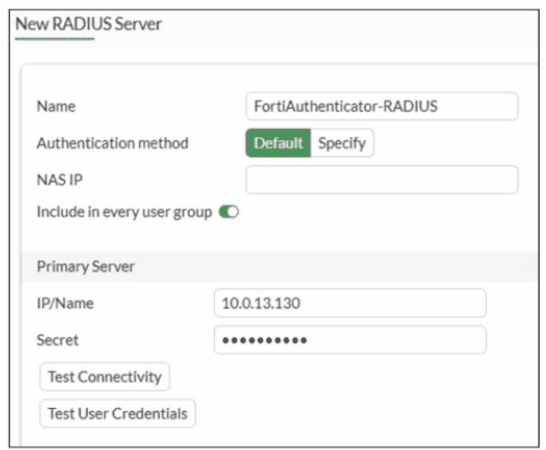
An administrator added a configuration for a new RADIUS server While configuring, the administrator enabled Include in every user group What is the impact of enabling Include in every user group in a RADIUS configuration?
Show answerHide answer

Correct answer: A This option places the RADIUS server, and all users who can authenticate against that server, into every FortiGate user group.

Explanation

Explanation:

This question tests your understanding of how RADIUS server configurations integrate with FortiGate user groups, specifically the function of the "Include in every user group" setting. This option simplifies user management by automatically making all users authenticated by the RADIUS server part of every local FortiGate user group.

✅Correct option: A
When "Include in every user group" is enabled, FortiGate automatically includes all users who successfully authenticate against the configured RADIUS server within every user group defined on the FortiGate itself. This means you don't have to manually add these RADIUS users to each FortiGate user group. It streamlines policy application, as any user authenticating via this RADIUS server will inherit the permissions and policies assigned to all FortiGate user groups.

❌Why the Other Options Are Wrong:

❌ B. This option places all FortiGate users and groups required to authenticate into the RADIUS server, which, in this case, is FortiAuthenticator.
This statement reverses the direction of integration. FortiGate is consuming user information from the RADIUS server (FortiAuthenticator), not pushing its local users or groups to it.

❌ C. This option places the RADIUS server, and all users who can authenticate against that server, into every RADIUS group.
The setting impacts FortiGate's local user groups, not groups defined on the RADIUS server itself. RADIUS groups are managed on the RADIUS server (e.g., FortiAuthenticator), while FortiGate manages its own user groups.

❌ D. This option places all users into every RADIUS user group, including groups that are used for the LDAP server on FortiGate.
This option incorrectly mixes RADIUS and LDAP concepts. The setting is specific to RADIUS authentication and its integration with FortiGate's local user groups, not RADIUS groups, nor does it involve LDAP server groups on FortiGate.

Reference:
⇒ FortiGate Administration Guide - External User Authentication (Confirms the functionality of RADIUS server integration and user group mapping on FortiGate.)
Full mock exam

Sit the NSE4_FGT_AD-7.6 exam before exam day

Full-length mocks with the same number of questions and the same time limit as the real NSE4_FGT_AD-7.6 exam. Every attempt draws a new set of questions from the full bank, so you can keep going until you pass comfortably.

Get full NSE4_FGT_AD-7.6 mock exam
  • 50questions per mock
  • 90 mintime limit
  • 92questions in the bank
  • Newmock on every attempt