Fortinet certification · Exam NSE4_FGT_AD-7.6

NSE4_FGT_AD-7.6 Mock Exam

Fortinet NSE 4 - FortiOS 7.6 Administrator

Find out if you're ready for NSE4_FGT_AD-7.6. Take the free timed mock exam and get your score in minutes, or study the free NSE4_FGT_AD-7.6 questions below with answers and explanations.

20 questions · 36 minutes · free, no sign-up

Free NSE4_FGT_AD-7.6 questions

1–10 of 27 free
Question 1 Choose 1
Refer to the exhibits.
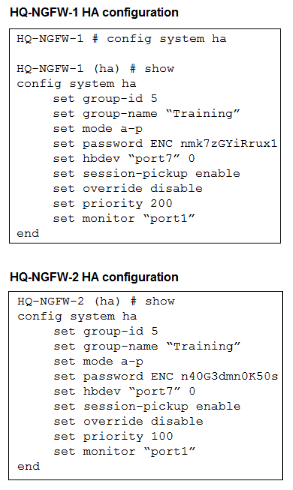


An administrator configured both members of an HA cluster at the same time. After one week of monitoring, the administrator wants to verify the HA failover performance. How can the administrator force a failover? (Choose one answer)
Show answerHide answer

Correct answer: D The administrator must set the monitored port1 to down on HQ-NGFW-1.

Explanation

Explanation:

In an HA cluster, the most direct and standard way to force a failover is to manually shut down a monitored interface on the primary device (HQ-NGFW-1).

The core logic is as follows:

Failover Trigger Mechanism: FortiGate HA (FGCP) continuously monitors the link status of specified interfaces. When a monitored interface on the primary unit goes down, the cluster immediately triggers a re-negotiation to select a new primary unit.

Option D is Correct: Shutting down the monitored port1 on HQ-NGFW-1 will cause the number of valid monitored interfaces on that device to decrease, thereby losing the election advantage and forcing the standby device HQ-NGFW-2 to take over as primary, achieving the purpose of testing failover performance.

Why the other options are incorrect:

Option A (Reset HA uptime): This only resets the device's HA operating time counter, affecting the election priority, but it does not directly trigger an immediate failover and cannot reliably achieve the testing purpose.

Option B (Enable override on HQ-NGFW-2): Enabling override means priority takes precedence over uptime. However, if HQ-NGFW-2's priority is not higher than HQ-NGFW-1's, simply enabling override will not cause it to preempt the primary role. Moreover, this is a configuration change, not a direct failover test method.

Option C (Increase HQ-NGFW-2's priority): If override is not enabled (disabled by default), priority alone cannot override the advantage of uptime. In the scenario, both devices have been running for a week; simply changing priority typically does not immediately trigger a switch unless override is also enabled.
Question 2 Choose 1
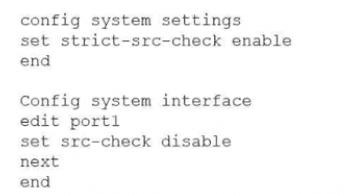
You have configured the below commands on a FortiGate.

What would be the impact of this configuration on FortiGate?
Show answerHide answer

Correct answer: A FortiGate will enable strict RPF on all its interfaces and porti will be exempted from RPF checks.

Explanation

Explanation:

The correct answer is A. FortiGate will enable strict RPF on all its interfaces and port1 will be exempted from RPF checks.

Here's what this configuration actually does:

✔️ config system settings → set strict-src-check enable
This globally enables strict Reverse Path Forwarding (RPF) mode for the VDOM.
In strict mode, FortiGate performs a stricter anti-spoofing check: for every incoming packet, it looks up the best route back to the source IP. If that best reverse route doesn't point out the same interface the packet came in on, the packet is dropped.
(By default, without this setting, it's feasible/loose mode, which only requires at least one feasible route back via the incoming interface.)

✔️ config system interface → edit port1 → set src-check disable
This disables the source/RPF check completely on port1 only.
So even though strict mode is active globally, port1 ignores the RPF check entirely—packets coming in on port1 won't be dropped for failing the reverse path check (useful for asymmetric routing scenarios or certain VPNs where return traffic takes a different path).

The per-interface src-check disable overrides the global strict-src-check setting for that specific interface. Strict mode applies to every other interface, but port1 is fully exempted from any RPF validation.

Why the others are incorrect:

B — "port1 will be enable for asymmetric routing" is vague and not precise. Disabling src-check on port1 does allow asymmetric traffic through that interface (since RPF won't block it), but the phrasing "enable for asymmetric routing" isn't how FortiGate describes it, and it doesn't match the full impact.

C — No, the interface-level setting takes precedence over the global one here. Global doesn't override per-interface disable.

D — "Flexible RPF" isn't a real term in FortiGate. The modes are strict vs feasible (loose). Disabling src-check isn't "flexible"—it's completely off for that interface.

Reference:
Fortinet's official documentation (e.g., FortiOS 7.6 Administration Guide → Routing concepts section) and the key technical tip on community.fortinet.com explain this behavior clearly:
🔹 strict-src-check enable → strict RPF globally
🔹 src-check disable on interface → bypasses RPF entirely on that interface, overriding the global mode
Question 3 Choose 1
A network administrator has enabled full SSL inspection and web filtering on FortiGate. When visiting any HTTPS websites, the browser reports certificate warning errors. When visiting HTTP websites, the browser does not report errors. What is the reason for the certificate warning errors?
Show answerHide answer

Correct answer: C The browser does not trust the certificate used by FortiGate for SSL inspection.

Explanation

Explanation:

Why C is correct
With full SSL inspection, FortiGate performs a man-in-the-middle operation on HTTPS traffic. It resigns the server certificate using a local CA certificate configured in the SSL/SSH inspection profile.
If the client browser does not trust that CA, it cannot validate the certificate chain, so it throws a certificate warning.

This behavior only affects HTTPS because:
🔹 HTTPS uses certificates and trust chains.
🔹 HTTP does not use certificates at all, so no warning appears.
This is the classic and expected outcome when the FortiGate CA certificate has not been installed and trusted on the client.

Why the other options are wrong

A. The option invalid SSL certificates is set to allow on the SSL/SSH inspection profile.
Incorrect.
This setting controls how FortiGate handles upstream server certificates that are invalid (expired, self-signed, etc.). It does not affect whether the client trusts FortiGate’s own inspection certificate. Even if set to allow, the browser will still warn if it does not trust FortiGate’s CA.

B. The matching firewall policy is set to proxy inspection mode.
Incorrect.
Proxy mode is required for full SSL inspection and web filtering. It is not the cause of certificate warnings. If anything, proxy mode is functioning correctly here.

D. The certificate used by FortiGate for SSL inspection does not contain the required certificate extensions.
Incorrect.
FortiGate-generated CA certificates include the necessary extensions for SSL inspection by default. Missing extensions would indicate a broken or manually misconfigured certificate, which is not the standard cause tested in NSE4. The exam expects you to recognize the client trust issue, not certificate structure problems.

Key exam takeaway
Full SSL inspection always causes certificate warnings unless the FortiGate CA certificate is trusted by the client.

Reference (Fortinet official)
🔹 FortiOS Administration Guide – SSL/SSH Inspection
Explains that the FortiGate re-signs certificates and requires the CA certificate to be installed on client devices.
Fortinet Documentation → FortiOS 7.6 → Security Profiles → SSL/SSH Inspection​
Question 4 Choose 1
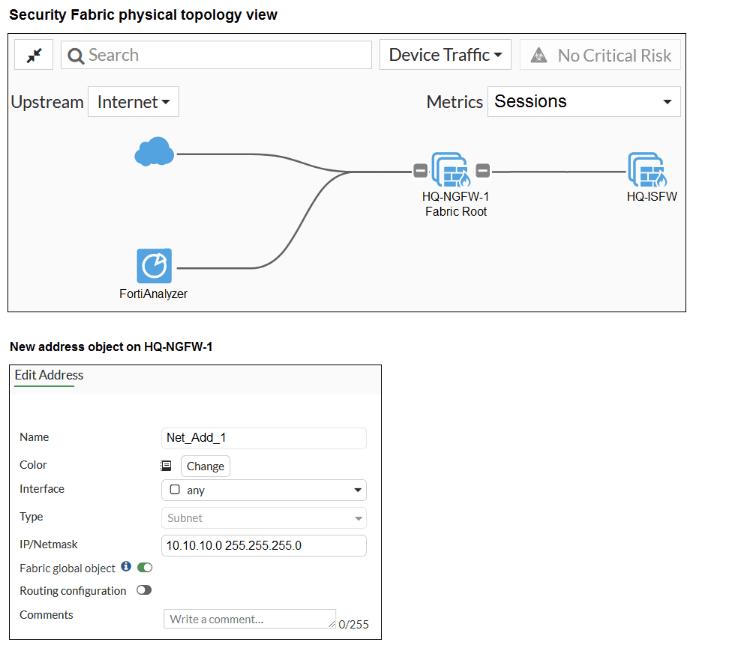
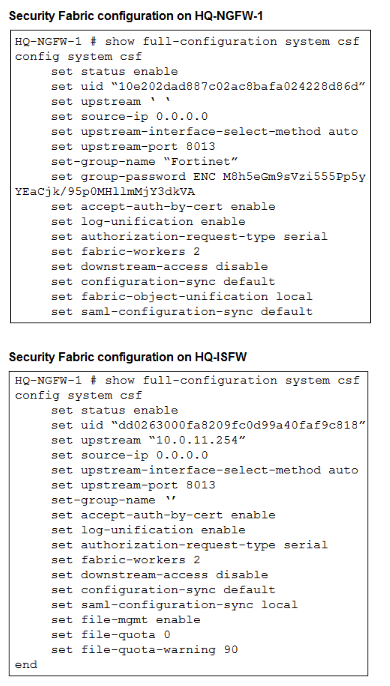
An administrator creates a new address object on the root FortiGate (HQ-NGFW-1) in the Security Fabric. After synchronization, this object is not available on the downstream FortiGate (HQ-ISFW).


What must the administrator do to synchronize the address object?
Show answerHide answer

Correct answer: C Change the csf setting on HQ-NGFW-1 (root) to set fabric-object-unification default.

Explanation

Explanation:
The exhibit shows the root FortiGate (HQ-NGFW-1) has fabric-object-unification set to local. This setting controls whether objects created on the root are synchronized downstream. When set to local, objects are not pushed to downstream devices. Changing it to default enables object unification across the Security Fabric.

Correct Option:

C. Change the csf setting on HQ-NGFW-1 (root) to set fabric-object-unification default.
The fabric-object-unification setting determines how address objects and other Fabric objects are synchronized. On the root FortiGate, set fabric-object-unification default (or enable) pushes objects created on the root to all downstream devices. The exhibit shows set fabric-object-unification local on HQ-NGFW-1, which prevents synchronization. Changing this to default will allow the address object Net_Add_1 to appear on HQ-ISFW after the next synchronization cycle.

Incorrect Option:

A. Change the csf setting on HQ-ISFW (downstream) to set configuration-sync local.
The downstream device (HQ-ISFW) already has set configuration-sync default (not shown in full but default behavior). Changing it to local would actually disable configuration synchronization from the root. This would worsen the problem, not fix it.

B. Change the csf setting on HQ-ISFW (downstream) to set saml-configuration-sync default.
saml-configuration-sync controls SAML configuration synchronization, not address objects. The exhibit shows HQ-ISFW has set saml-configuration-sync local. Even if changed to default, this would only affect SAML settings, not the Net_Add_1 address object. This is unrelated to the problem.

D. Change the csf setting on both devices to set downstream-access enable.
downstream-access controls whether downstream devices can be accessed for management from the root. It does not affect object synchronization. Additionally, the root does not have a downstream-access setting (it is a downstream-only parameter). Enabling this does not resolve object unification.

Reference:
Fortinet NSE4_FGT_AD-7.6 Study Guide, Chapter: Security Fabric (Object Unification & Synchronization)
Question 5 Choose 2
What are two features of collector agent advanced mode? (Choose two.)
Show answerHide answer

Correct answer: A, B In advanced mode, security profiles can be applied only to user groups, not individual users. In advanced mode. FortiGate can be configured as an LDAP client and group filters can be configured on FortiGate.

Explanation

Explanation:

The two correct features of collector agent advanced mode are:
🔹 Advanced mode supports nested or inherited groups.
🔹 In advanced mode, FortiGate can be configured as an LDAP client and group filters can be configured on FortiGate.
The information is consistent across multiple exam preparation sites. The table below breaks down why each answer choice is correct or incorrect.

✅ Correct

A. Supports nested or inherited groups
This is a key feature of advanced mode, allowing it to recognize users in subgroups within monitored Active Directory groups.

B. FortiGate as LDAP client with group filters
In advanced mode, FortiGate can query LDAP/AD directly, and group filters are configured on the FortiGate itself for more granular control.

❌ Incorrect

C. Security profiles only for user groups
In both standard and advanced modes, security profiles can be applied to individual users or groups. This is not a distinguishing feature of advanced mode.

D. Uses Windows convention (NetBIOS)
This is actually a feature of standard mode. Advanced mode typically uses the LDAP naming convention (CN=User, OU=Name, DC=Domain).

✍️ Key Takeaway for the Exam
The main distinctions between standard and advanced mode often center on nested group support and where configuration occurs (agent vs. FortiGate). To solidify this, focus on understanding the operational differences in how user and group information is retrieved and processed in each mode.
Question 6 Choose 2
Which two statements are correct when the FortiGate device enters conserve mode? (Choose two.)
Show answerHide answer

Correct answer: A, D FortiGate refuses to accept configuration changes. FortiGate continues to run critical security actions, such as quarantine.

Explanation

Explanation:

This question tests your knowledge of FortiGate's conserve mode, which is a critical state triggered when system memory resources become critically low. Understanding its behavior is crucial for maintaining network stability and security.

✔️Correct Option:

A. FortiGate refuses to accept configuration changes:
To prevent further memory consumption and maintain stability, the FortiGate will block attempts to apply new configurations or modify existing ones while in conserve mode.

D. FortiGate continues to run critical security actions, such as quarantine:
Even under severe resource constraints, the FortiGate prioritizes and attempts to maintain essential security functions like firewall policy enforcement, session cleanup, virus detection, and quarantining to protect the network.

❌Why the Other Options Are Wrong:

B. FortiGate halts complete system operation and requires a reboot to regain available resources:
This is incorrect. Conserve mode is designed to prevent a complete system halt. The FortiGate attempts to recover by shedding non-critical processes and may not require an immediate reboot.

C. FortiGate continues to transmit packets without IPS inspection when the fail-open global setting in IPS is enabled:
The "fail-open" setting for IPS usually refers to hardware bypass during specific failures. In conserve mode, the FortiGate might drop traffic or limit inspection due to resource constraints, but it does not universally "fail-open" all traffic without inspection in this context.

Reference:
⇒ FortiGate Conserve Mode (This section explains the different conserve mode levels and the actions FortiGate takes, including blocking configuration changes and maintaining critical security functions to prevent system crashes.)
Question 7 Choose 1
Refer to the exhibits.


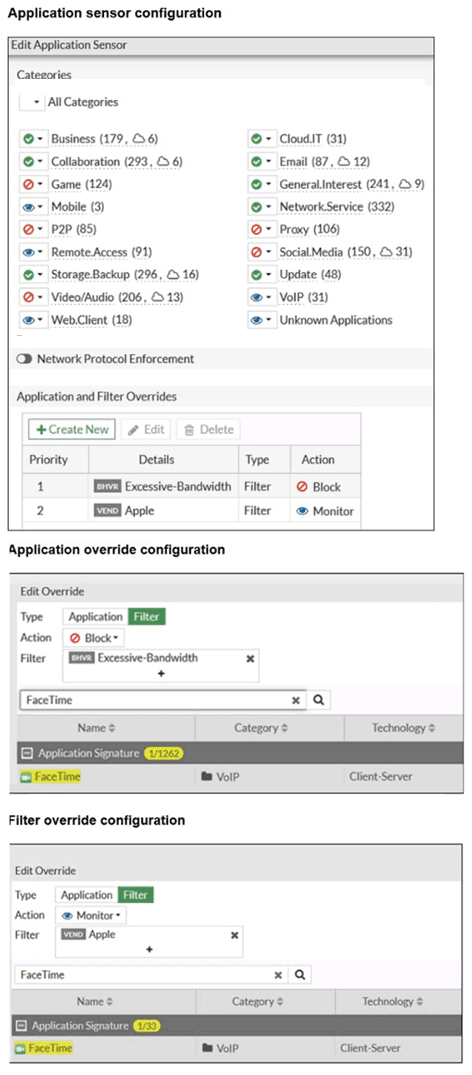
The exhibits show the application sensor configuration and the Excessive-Bandwidth and Apple filter details. Based on the configuration, what will happen to Apple FaceTime if there are only a few calls originating or incoming? (Choose one answer)
Show answerHide answer

Correct answer: C Apple FaceTime will be allowed, based on the Apple filter configuration.

Explanation

Explanation:
The exhibits show two filter overrides: "Excessive-Bandwidth" with Action Block, and "Apple" with Action Monitor. FaceTime belongs to both the Apple vendor and the Excessive-Bandwidth filter. However, "Excessive-Bandwidth" is typically triggered only by high bandwidth consumption. With only a few calls (low bandwidth), the Block action does not apply, leaving the "Apple" filter with Monitor action, which allows traffic.

Correct Option:

C. Apple FaceTime will be allowed, based on the Apple filter configuration.
The "Apple" filter override has an Action of Monitor, which allows traffic while generating logs for monitoring. The "Excessive-Bandwidth" filter only blocks traffic when bandwidth usage exceeds a defined threshold. Since the question states "only a few calls originating or incoming" (low bandwidth), the Excessive-Bandwidth condition is not met. Therefore, the Apple filter (Monitor) applies, and FaceTime is allowed.

Incorrect Option:

A. Apple FaceTime will be allowed, based on the Video/Audio category configuration.
While FaceTime belongs to the Video/Audio category, category-level settings are overridden by more specific Application and Filter Overrides. The presence of the Apple filter (Monitor) and Excessive-Bandwidth filter (Block, conditional) means the category setting is not the deciding factor.

B. Apple FaceTime will be blocked, based on the Excessive-Bandwidth filter configuration.
The Excessive-Bandwidth filter blocks only when bandwidth exceeds the configured threshold. With only a few calls, bandwidth usage is low, so the Block action is not triggered. Therefore, FaceTime is not blocked by this filter.

D. Apple FaceTime will be allowed only if the Apple filter in Application and Filter Overrides is set to Allow.
The Apple filter is already set to Monitor, which allows traffic while logging. It does not need to be changed to "Allow" (which is not a standard action; standard actions are Allow, Monitor, Block). Monitor is sufficient for allowing traffic with logging.

Reference:
Fortinet NSE4_FGT_AD-7.6 Study Guide, Chapter: Security Profiles (Application Control Filter Overrides)
Question 8 Choose 3
What are three key routing principles in SD-WAN? (Choose three answers)
Show answerHide answer

Correct answer: A, C, E By default, SD-WAN rules are skipped if the included SD-WAN members do not have a valid route to the destination.Regular policy routes have precedence over SD-WAN rules.By default, SD-WAN rules are skipped if the best route to the destination is not an SDWAN member.

Explanation

Explanation:
FortiGate SD-WAN has specific routing principles. SD-WAN rules take precedence over regular routes but not over policy routes (unless configured otherwise). SD-WAN rules are skipped when no SD-WAN member has a valid route or when the best route (longest prefix match) is not an SD-WAN member.

Correct Option:

A. By default, SD-WAN rules are skipped if the included SD-WAN members do not have a valid route to the destination.
SD-WAN rules only apply to traffic when at least one member interface in the rule has a route (connected, static, or dynamic) to the destination. If none have a valid route, the rule is skipped and normal routing table lookup occurs.

*Reference: FortiOS 7.6 SD-WAN Guide, Rule Matching Behavior*

B. SD-WAN rules have precedence over any other type of routes.
SD-WAN rules are evaluated before regular static routes and dynamic routes (OSPF, BGP). If an SD-WAN rule matches the traffic, it is applied immediately without checking the main routing table for other non-SD-WAN routes.

*Reference: FortiOS 7.6 SD-WAN Guide, Routing Precedence*

E. By default, SD-WAN rules are skipped if the best route to the destination is not an SD-WAN member.
When the routing table contains multiple routes, the "best" (lowest distance/longest prefix) route is considered. If that best route does not use an SD-WAN member interface, the SD-WAN rule is skipped and the best non-SD-WAN route is used instead. This prevents SD-WAN from overriding a more specific or lower-distance route.

*Reference: FortiOS 7.6 SD-WAN Guide, Route Lookup Behavior*

Incorrect Option:

C. Regular policy routes have precedence over SD-WAN rules.
This is false. By default, SD-WAN rules have precedence over regular policy routes. Policy routes are evaluated after SD-WAN rules unless set sdwan-policy-route-disable is enabled. The correct order is: SD-WAN rules → Policy routes → Static/Dynamic routes.

Reference: FortiOS 7.6 Routing Hierarchy

D. By default, SD-WAN rules are skipped if only one route to the destination is available.
Having only one route does not cause SD-WAN rules to be skipped. SD-WAN rules work with single or multiple routes. Skipping occurs only when no member has a valid route (A) or the best route is not an SD-WAN member (E).

*Reference: FortiOS 7.6 SD-WAN Rule Processing*

Reference:
Fortinet NSE4_FGT_AD-7.6 Study Guide, Chapter: SD-WAN (Routing Principles & Rule Evaluation Order)
Question 9 Choose 1
You are onboarding an agentless, secure web gateway (SWG) endpoint for secure internet access (SIA). What will happen to the user's nonweb traffic? (Choose one answer)
Show answerHide answer

Correct answer: A All the nonweb traffic will bypass FortiSASE.

Explanation

Explanation:
FortiSASE Secure Internet Access (SIA) using an agentless SWG endpoint relies on proxy-based methods (e.g., PAC files, explicit proxy, or GRE/IPsec tunnels) that typically handle only web traffic (HTTP/HTTPS). Non-web traffic (e.g., email on non-standard ports, VoIP, gaming) is not captured by the SWG proxy and therefore bypasses FortiSASE.

Correct Option:

A. All the nonweb traffic will bypass FortiSASE.
Agentless SWG deployment for SIA uses web proxy mechanisms (explicit or transparent) that only intercept HTTP/HTTPS traffic on ports 80 and 443 (and optionally other configured web ports). Non-web traffic such as SMTP (port 25), SSH (port 22), or custom UDP applications does not traverse the SWG proxy and directly egresses via the local internet connection, bypassing FortiSASE inspection.

Incorrect Option:

B. The endpoint will use split tunneling to redirect nonweb traffic to FortiSASE.
Split tunneling is a VPN concept (IPsec/SSL VPN) that selectively routes traffic. Agentless SWG does not use split tunneling; it relies on proxy configuration. Non-web traffic cannot be redirected via split tunneling in an agentless SWG deployment.

C. FortiSASE will use Firewall-as-a-Service (FWaaS) to redirect nonweb traffic.
FWaaS inspects traffic forwarded to FortiSASE via IPsec tunnels, but agentless SWG endpoints do not establish a full IPsec tunnel. FWaaS requires a different deployment method (e.g., FortiClient with ZTNA or IPsec). Agentless SWG does not trigger FWaaS for non-web traffic.

D. FortiSASE will use SWG to redirect nonweb traffic to FortiExtender.
SWG is designed for web traffic only and does not redirect any traffic to FortiExtender. FortiExtender is a cellular/LTE connectivity device for FortiGate, unrelated to FortiSASE traffic redirection.

Reference:
Fortinet NSE4_FGT_AD-7.6 Study Guide, Chapter: FortiSASE (Secure Internet Access & Deployment Methods)
Question 10 Choose 1
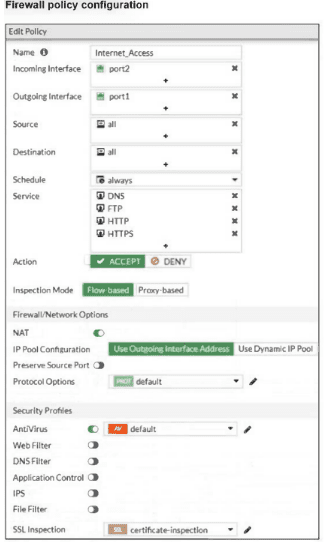
Refer to the exhibit to view the firewall policy.


Why would the firewall policy not block a well-known virus, for example EICAR? (Choose one answer)
Show answerHide answer

Correct answer: D The firewall policy does not apply deep content inspection.

Explanation

Explanation:
The exhibit shows the firewall policy has Antivirus profile set to "Default" but SSL Inspection is set to "certificate inspection" (also known as common-inspection). Certificate inspection only validates the certificate but does not decrypt the HTTPS payload. A well-known virus like EICAR delivered over HTTPS will remain encrypted, so the antivirus scanner cannot see it.

Correct Option:

D. The firewall policy does not apply deep content inspection.
The SSL Inspection field is set to "certificate inspection" (common-inspection), which only checks certificate validity without decrypting HTTPS traffic. Without deep inspection (full SSL decryption), the antivirus profile cannot scan encrypted HTTPS payloads for viruses like EICAR. The virus passes through encrypted, never reaching the AV engine.

Incorrect Option:

A. The action on the firewall policy is not set to DENY.
The policy action is explicitly set to ACCEPT (as shown in the exhibit). However, ACCEPT with security profiles (including antivirus) should still block viruses. The issue is not the ACCEPT action but the lack of decryption for HTTPS traffic.

B. Web filter is not enabled, so the firewall policy does not complement the antivirus profile.
Web filter is not required for antivirus functionality. Antivirus profiles scan files regardless of web filter status. Web filter blocks categories/URLs, while AV blocks malware signatures. Missing web filter does not prevent AV from detecting EICAR when traffic is decrypted.

C. The firewall policy is not configured in proxy-based inspection mode.
Flow-based inspection (the default in many FortiOS versions) can still scan for viruses, including EICAR, as long as the traffic is decrypted. Proxy-based mode is not required for antivirus detection. The issue remains SSL decryption, not inspection mode.

Reference:
Fortinet NSE4_FGT_AD-7.6 Study Guide, Chapter: Security Profiles (SSL Inspection & Antivirus Scanning of Encrypted Traffic)
Full mock exam

Sit the NSE4_FGT_AD-7.6 exam before exam day

Full-length mocks with the same number of questions and the same time limit as the real NSE4_FGT_AD-7.6 exam. Every attempt draws a new set of questions from the full bank, so you can keep going until you pass comfortably.

Get full NSE4_FGT_AD-7.6 mock exam
  • 50questions per mock
  • 90 mintime limit
  • 92questions in the bank
  • Newmock on every attempt

Your Roadmap to Fortinet NSE 4 FortiOS 7.6 Administrator Exam Success


Preparing for the NSE4_FGT_AD-7.6 exam requires a focused strategy. This checklist will guide you from your first study session to exam day confidence.

Exam Information at a Glance


Exam Code: NSE4_FGT-AD-7.6
Questions: Approximately 60 multiple-choice and hands-on lab items.
Duration: 105 minutes to complete.
Passing Score: A minimum of 70% is required to certify.

Core Exam Topics to Master


Ensure you have practical, hands-on experience with these key areas:

Security Policies & NAT: Configuration and troubleshooting
Firewall Authentication: User-based policies and portal management
Security Fabric & Advanced Protocols: SD-WAN, SSL-VPN, and IPsec VPNs
FortiGate Operations: System settings, firmware updates, and high availability (HA)
Monitoring & Analysis: Using FortiAnalyzer for logs and reports

Final Week Preparation Checklist


Gap Analysis: Review all official topics. Flag any areas where your knowledge feels weak.
Hands-On Practice: Spend time in a lab environment. Real configuration experience is irreplaceable.
Concept Reinforcement: Solidify your understanding of core concepts like Security Fabric integration and routing.
Exam Simulation: Take a timed NSE4_FGT_AD-7.6 practice test that mirrors the real exams pressure and format.

Simulate the Real Test Experience


Reading theory is not enough. The exam tests your ability to apply knowledge under time constraints. The best way to prepare is by taking challenging Fortinet NSE 4 FortiOS 7.6 Administrator practice exam that cover the current 7.6 syllabus in depth.

Ready to test your readiness?

The realistic NSE4_FGT_AD-7.6 practice questions at PrepForti.com are designed to pinpoint your weak spots and build exam-day stamina. Try their tests to walk into your exam fully prepared and confident.

Trusted, Tested, and Recommended


"This is the foundation for everything Fortinet. The platforms structured labs on VPNs, security policies, and routing are perfect. The insight that understanding the traffic flow logic is critical is the absolute truth. I aced the exam because I was not just memorizing menus—I understood how the FortiGate thinks."
- Ben Alexander

“Prepforti made NSE4_FGT_AD-7.6 prep simple and effective. The practice tests covered the FortiOS basics plus real troubleshooting scenarios. I practiced daily and passed on my first try.”
- Grace Williams

The NSE4 is the foundation of Fortinet certification. Prepforti.com made my study process efficient and effective. Their Fortinet NSE 4 FortiOS 7.6 Administrator practice test covered all the core topics firewall policies, routing, VPNs and prepared me perfectly for the real exam.
Emily Davis, Network Engineer | San Diego, CA