Fortinet certification · Exam FCSS_NST_SE-7.6

FCSS_NST_SE-7.6 Mock Exam Page 4

FCSS - Network Security 7.6 Support Engineer

Free FCSS_NST_SE-7.6 mock exam questions 31–40, each with the answer and an explanation.

20 questions · 38 minutes · free, no sign-up

Free FCSS_NST_SE-7.6 questions

31–40 of 40 free
Question 31 Choose 2
In which two slates is a given session categorized as ephemeral? (Choose two.)
Show answerHide answer

Correct answer: A, C A UDP session with only one packet received A TCP session waiting for the SYN ACK

Explanation

Explanation:

In FortiOS, an ephemeral session is a temporary session entry created when the firewall sees the first packet of a potential new session but has not yet confirmed that the session is fully established (bidirectional traffic flow). It remains ephemeral until the session is validated.

A. A UDP session with only one packet received is ephemeral because UDP is connectionless.
The firewall creates a session entry upon seeing the first packet but must see a return packet from the original destination to the source to confirm it's a valid, established session.

C. A TCP session waiting for the SYN-ACK is ephemeral.
After the initial SYN packet, the firewall creates an ephemeral entry. It remains ephemeral until the three-way handshake completes (SYN → SYN-ACK → ACK). The session transitions to an established state only after the handshake is successful.

Why the Other Options are Incorrect:

B. A UDP session with packets sent and received is established, not ephemeral. Bidirectional traffic confirms the session is active.

D. A TCP session waiting for FIN-ACK is in the teardown phase of an already established session. Ephemeral state applies only to session initiation, not termination.

Reference:
FortiOS session lifecycle:
Ephemeral state occurs during session setup before full establishment. This is documented in Fortinet's packet flow and session management guides. The diagnose sys session list shows ephemeral sessions with specific flags.
Question 32 Choose 2
Which two statements about Security Fabric communications are true? (Choose two.)
Show answerHide answer

Correct answer: B, D The default port for Neighbor Discovery can be modified. By default, the downstream FortiGate establishes a connection with the upstream FortiGate using TCP port 8013.

Explanation

Explanation:

B. The default port for Neighbor Discovery can be modified. ✔ True.
FortiOS allows administrators to change the default port used for Neighbor Discovery. This is useful in multi-tenant or segmented environments where port conflicts or custom routing policies exist. The default is UDP 8014, but it can be changed via CLI.

D. By default, the downstream FortiGate establishes a connection with the upstream FortiGate using TCP port 8013. ✔ True.
FortiTelemetry uses TCP port 8013 for downstream FortiGate devices to communicate with the upstream (root) FortiGate. This port must be allowed and reachable for Security Fabric handshakes and telemetry exchange.

❌ Why the other options are incorrect:

A. FortiTelemetry and Neighbor Discovery both operate using TCP. ✘ False.
FortiTelemetry uses TCP 8013, but Neighbor Discovery uses UDP 8014. They operate on different transport protocols.

C. FortiTelemetry must be manually enabled on the FortiGate interface. ✘ False.
FortiTelemetry is automatically enabled when Security Fabric is configured and the interface is selected during setup. Manual CLI enabling is not required unless troubleshooting or customizing.

📖 References:
Fortinet Ports and Protocols – Security Fabric
Question 33 Choose 1
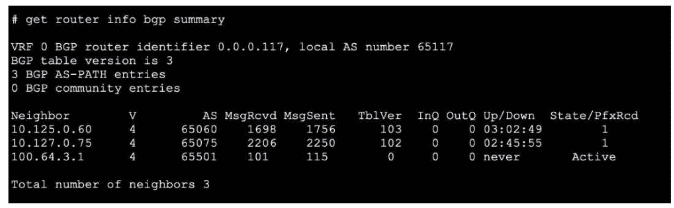
Refer to the exhibit, which shows the output of a BGP debug command.

What can you conclude about the router in this scenario?
Show answerHide answer

Correct answer: D The BGP session with peer 10.127.0.75 is up.

Explanation

Explanation:

Peer 10.127.0.75 is up: The “State/PfxRcd” column shows 1, meaning one prefix is received, and “Up/Down” shows 02:45:55, indicating an established session duration. That definitively means the BGP session is up.

Why the others are incorrect:

A: You cannot conclude a local AS mismatch for 100.64.3.1 from “State = Active” and “Up/Down = never.” “Active” means the router is attempting to establish a session but hasn’t succeeded; the root cause could be reachability, TCP 179 issues, timers, neighbor config, or ASN mismatch—insufficient evidence to assert AS needs updating.

B: An inbound route-map blocking prefixes would show an established state with PfxRcd = 0, not “Active/never.” Here the session isn’t up, so prefix filtering isn’t the immediate issue.

C: “Neighbor-range set to a value of 4” is irrelevant here. The output shows three individual neighbors; nothing in this summary implies a specific neighbor-range value or that all are created by one neighbor-range statement.

Reference:
FortiOS BGP status via get router info bgp summary: “Active” = session not established; “Established” shows duration in Up/Down and non-zero State/PfxRcd.
Question 34 Choose 1
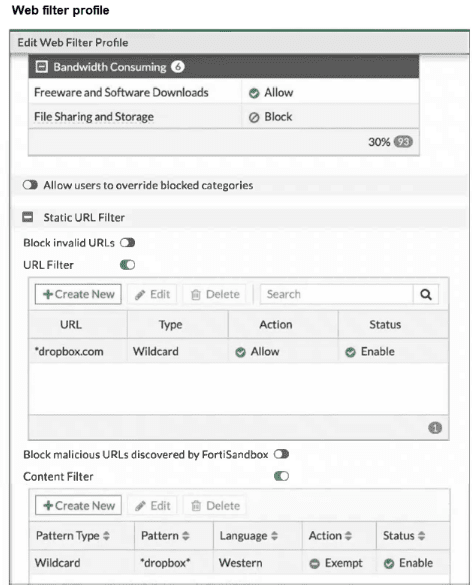
Refer to the exhibit, which shows a partial web filter profile configuration. The URL www.dropbox.com is categorized as File Sharing and Storage.
Which action does FortiGate take if a user attempts to access www.dropbox.com?
Show answerHide answer

Correct answer: B Based on the URL Filter configuration, FortiGate allows the connection.

Explanation

Explanation:

The web filter profile has three relevant components configured:
FortiGuard Category Filter: The category "File Sharing and Storage" is set to "Block".
URL Filter: A Static URL Filter entry for dropbox.com with type "Wildcard" and action "Allow" is enabled.
Content Filter: A Content Filter entry for pattern dropbox with type "Wildcard", language "Western", and action "Exempt" is enabled.
Order of Evaluation: FortiGate web filtering processes rules in a specific precedence order:
Static URL Filter entries (highest priority, overrides all other filters).
FortiSandbox malicious URL blocking (if enabled).
FortiGuard category-based filtering.
Content Filter entries (lowest priority among these).
Since the Static URL Filter has an explicit Allow rule for dropbox.com (wildcard matches www.dropbox.com), this rule takes highest precedence and overrides the category-based block. Therefore, the connection is allowed.

Why the Other Options are Incorrect:

A. "Block invalid URLs" is a separate setting that blocks malformed URLs. www.dropbox.com is a valid URL format, so this would not apply.

C. While the category "File Sharing and Storage" is set to Block, the explicit URL Filter Allow rule takes precedence, overriding the category block.

D. The Content Filter Exempt rule would also allow the connection, but it has lower precedence than the Static URL Filter. The correct reason for allowing is the higher-priority URL Filter, not the Content Filter.

Reference:
FortiOS Web Filter profile processing order. Static URL Filters override FortiGuard category filtering. This hierarchy is documented in Fortinet's web filtering administration guides and is key for FCSS exam scenarios involving rule conflicts.
Question 35 Choose 1
Refer to the exhibit.

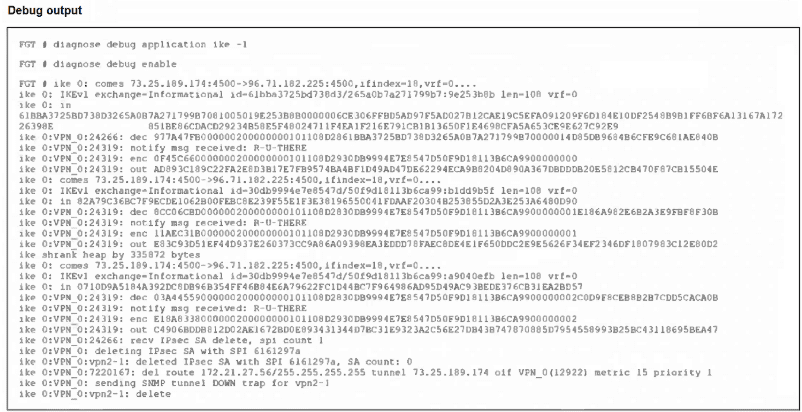
An IPsec VPN tunnel is dropping, as shown by the debug output.
Analyzing the debug output, what could be causing the tunnel to go down?
Show answerHide answer

Correct answer: C The tunnel drops during rekey negotiation.

Explanation

Explanation:

The debug repeatedly shows “notify msg received: NO_PROPOSAL_CHOSEN,” a clear indicator of a proposal mismatch during negotiation. This commonly occurs at Phase 2 rekey when the peers’ selectors or transform sets don’t match (e.g., encryption, auth, DH group, PFS, lifetimes). The log then shows “deleted Phase 1” and the tunnel route removal, confirming the session tears down as a consequence of failed rekey negotiation.

Why the others are incorrect:

A. Phase 2 drops but Phase 1 is up: The log explicitly shows “deleted Phase 1,” so Phase 1 is not up.

B. Dead Peer Detection not receiving its acknowledge: There are no DPD timeout or R-U-THERE/ACK messages; the cause reported is proposal mismatch, not liveness failure.

D. The tunnel drops after the timer expires: No lifetime or expire events are reported; the explicit cause is “NO_PROPOSAL_CHOSEN.”

Practical fix:
Align Phase 2 proposals (encryption/auth algorithms, PFS/DH group, lifetimes, proxy-ID/selectors) on both peers to prevent rekey failures.

References:
FortiGate IPSec VPN troubleshooting – IKE debug interpretation (“NO_PROPOSAL_CHOSEN” denotes proposal mismatch during negotiation)
Question 36 Choose 1
An administrator wants to capture encrypted phase 2 traffic between two FotiGate devices using the built-in sniffer.
If the administrator knows that there Is no NAT device located between both FortiGate devices, which command should the administrator run?
Show answerHide answer

Correct answer: B diagnose sniffer packet any 'lp proto 50'

Explanation

Explanation:

IPSec Phase 2 encrypts the actual data traffic using either:
ESP (Encapsulating Security Payload) – Protocol IP 50
AH (Authentication Header) – Protocol IP 51 (less common)
Since there is no NAT device between the FortiGates, the traffic will use ESP in tunnel mode (most common for site-to-site VPNs). ESP is identified by IP protocol number 50. The sniffer filter 'ip proto 50' will capture these encrypted ESP packets.

Why the Other Options are Incorrect:

A. 'udp port 500'
– Captures IKE Phase 1 negotiation traffic (unencrypted management traffic), not the encrypted Phase 2 data traffic.

C. 'udp port 4500'
– Captures IKE traffic when NAT-T (NAT Traversal) is used, which encapsulates IKE in UDP 4500. Since there is no NAT, NAT-T is not used, and this will not capture Phase 2 ESP data.

D. 'ah'
– Captures AH traffic (IP protocol 51), which is rarely used compared to ESP. Most FortiGate IPSec VPNs use ESP for encryption; AH provides only authentication and no encryption, so it wouldn't show "encrypted" traffic.

Reference:
IPSec protocol numbers:
ESP = IP 50, AH = IP 51. Without NAT, ESP packets are sent directly with IP protocol 50. The diagnose sniffer command uses tcpdump-style filters; ip proto 50 correctly matches the ESP header.
Question 37 Choose 2
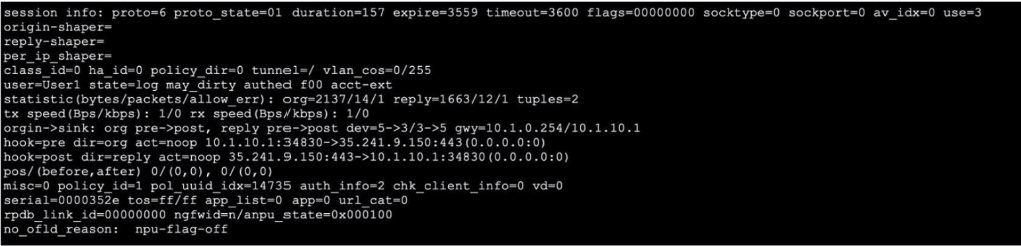
Exhibit.

Refer to the exhibit, which shows the output of a session. Which two statements are true? (Choose Iwo.)
Show answerHide answer

Correct answer: A, B The TCP session has been successfully established. The session was initiated from an authenticated user.

Explanation

Explanation:

A. proto_state=01
indicates the TCP session state is "established". In FortiOS session diagnostics, proto_state=01 means the TCP three-way handshake is complete and the connection is active.

B. The field user=User1
shows the session is associated with an authenticated user. The flag authed also appears in the state= field, confirming the session was authenticated (likely via FSSO, firewall authentication, or captive portal).

Why the Other Options are Incorrect:

C. The session is not using flow inspection. Key indicators:
hook=pre dir=org act=noop and hook=post dir=reply act=noop show the session is processed in the kernel with "noop" (no operation), meaning no proxy-based inspection.
There are no security profile references (av_idx=0, app_list=0, url_cat=0), confirming no UTM inspection is applied.
Flow-based inspection is the default, but these fields confirm no proxy-mode (deep inspection) is active.

D. The session is NOT offloaded.
The field npu_state=0x000100 and the explicit comment no_ofid_reason: npu-flag-off indicate NPU offloading is disabled for this session. This is likely because the traffic requires CPU processing (e.g., user authentication, certain policy features) that prevent hardware acceleration.

Reference:
FortiOS session table analysis:
proto_state=01 = TCP established.
user= and authed flag = authenticated session.
hook=... act=noop = flow-based, not proxy-based inspection.
npu_state and no_ofid_reason indicate offloading status.
Question 38 Choose 1
Which statement about IKEv2 is true?
Show answerHide answer

Correct answer: D IKEv1 and IKEv2 share the concept of phase1 and phase2.

Explanation

Explanation:

Both IKEv1 and IKEv2 fundamentally operate with a two-phase approach:
Phase 1 establishes a secure, authenticated channel (IKE SA) for management traffic.
Phase 2 negotiates the IPsec SAs (CHILD_SAs in IKEv2) used to encrypt actual user data. While IKEv2 simplifies and consolidates the exchanges (IKE_SA_INIT and IKE_AUTH for Phase 1+initial CHILD_SA), the conceptual separation of control channel setup (Phase 1) and data channel setup (Phase 2) remains.

Why the Other Options are Incorrect:

A. Asymmetric authentication (different authentication methods for each peer) is not a standard feature of IKEv1.
IKEv1 typically requires the same authentication method (e.g., PSK or certificates) on both ends. IKEv2 explicitly supports asymmetric authentication via the AUTH payload, allowing each peer to use a different method (e.g., certificates on one side, PSK on the other).

B. IKEv1 and IKEv2 cannot interoperate, but they do both run over UDP port 500 by default.
However, the statement says they have "enough of the header format in common," which is false. The packet formats are entirely different; they are separate protocols. The fact they share the same port is for convenience and convention, not due to header compatibility.

C. Both IKEv1 and IKEv2 use UDP port 500 (and UDP 4500 for NAT-T).
Neither uses TCP for standard operation. The claim that they use TCP is incorrect.

Reference:
RFC 7296 (IKEv2) and IKEv1 standards. IKEv2 merges some exchanges but retains the two-phase logical model. Asymmetric authentication is an IKEv2-specific feature. Both versions default to UDP/500.
Question 39 Choose 1
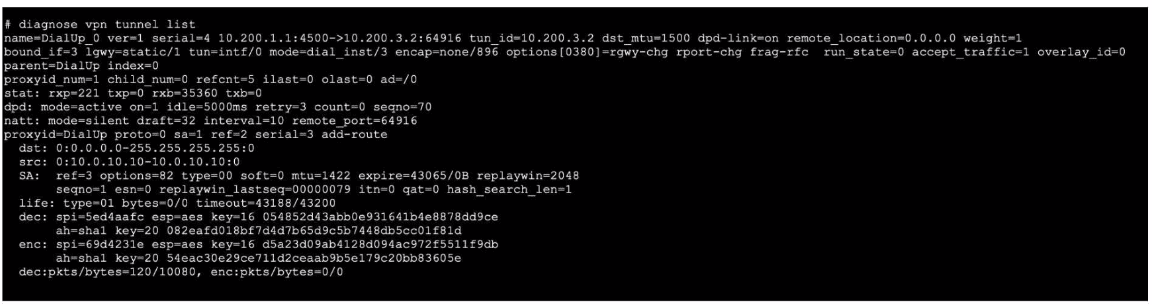
Refer to the exhibit, which contains the output of diagnose vpn tunnel list.

Which command will capture ESP traffic for the VPN named DialUp_0?
Show answerHide answer

Correct answer: C diagnose sniffer packet any 'esp and host 10.200.3.2'

Explanation

Explanation:

The VPN tunnel named DialUp_0 is using ESP encryption for data traffic, as shown by the esp=aes and SPI values in the output. The remote endpoint is 10.200.3.2. The filter 'esp and host 10.200.3.2' will capture the actual encrypted ESP packets (IP protocol 50) exchanged with that peer, which is the administrator's goal.

Why the Other Options are Incorrect:

A. 'ip proto 50'
would capture all ESP traffic, not just for this VPN, creating unnecessary noise.

B. 'host 10.0.10.10'
filters by the tunnel’s internal source IP, which is not visible in the outer ESP packet headers, so it will not match.

D. 'port 4500'
would capture IKE/NAT-T control traffic (UDP 4500), not the encrypted ESP data traffic (IP protocol 50). The output shows NAT-T is enabled (remote_port=64916), but ESP data remains IP protocol 50 unless UDP-encapsulated for NAT traversal; the sniffer filter must target ESP specifically.

Reference:
IPSec uses ESP (IP protocol 50) for encrypted data. FortiGate’s diagnose sniffer uses tcpdump syntax; esp matches IP protocol 50. The diagnose vpn tunnel list output shows ESP SPIs and remote endpoint 10.200.3.2.
Question 40 Choose 2
What are two reasons you might see iprope_in_check() check failed, drop when using the debug flow? (Choose two.)
Show answerHide answer

Correct answer: A, D Packet was dropped because of policy route misconfiguration. VIP or IP pool misconfiguration.

Explanation

Explanation:

The debug flow error iprope_in_check() check failed, drop indicates a failure in the IP routing policy engine during the initial routing lookup stage. This occurs when the FortiGate cannot determine the correct egress interface or routing path for a packet before policy checking. The two most common causes are:

A. Policy route misconfiguration:
An incorrectly configured policy route (static policy route or ISDB route) can create an ambiguous or invalid routing decision, causing the iprope check to fail.

D. VIP or IP pool misconfiguration:
A misconfigured Virtual IP (VIP) or IP pool (especially in NAT/port forwarding scenarios) can conflict with routing, as the engine cannot resolve the translation mapping or egress interface, leading to the drop.

Why the Other Options are Incorrect:

B. Traffic shaping:
Traffic shaping occurs after the routing decision and policy check in the packet flow. Shaping may drop or delay packets but does not cause an iprope_in_check() failure, which is specific to routing/policy resolution.

C. Trusted host list misconfiguration:
Trusted host settings are applied after the routing/policy check, during authentication or management access processing. This would not trigger iprope_in_check().

Reference:
FortiOS debug flow (diagnose debug flow) shows packet processing stages. iprope_in_check() is an early routing/policy validation step documented in Fortinet's packet flow diagrams. Misconfigured policy routes or VIPs disrupt this initial lookup, causing drops.

That's the last free question

You've seen the free 30% (40 of 134 questions). Full access unlocks every question and full-length FCSS_NST_SE-7.6 mock exams (40 questions, 75 minutes), a different mock on every attempt.

Unlock full mock exam
Full mock exam

Sit the FCSS_NST_SE-7.6 exam before exam day

Full-length mocks with the same number of questions and the same time limit as the real FCSS_NST_SE-7.6 exam. Every attempt draws a new set of questions from the full bank, so you can keep going until you pass comfortably.

Get full FCSS_NST_SE-7.6 mock exam
  • 40questions per mock
  • 75 mintime limit
  • 134questions in the bank
  • Newmock on every attempt