Fortinet certification · Exam FCSS_NST_SE-7.6

FCSS_NST_SE-7.6 Mock Exam Page 3

FCSS - Network Security 7.6 Support Engineer

Free FCSS_NST_SE-7.6 mock exam questions 21–30, each with the answer and an explanation.

20 questions · 38 minutes · free, no sign-up

Free FCSS_NST_SE-7.6 questions

21–30 of 40 free
Question 21 Choose 2
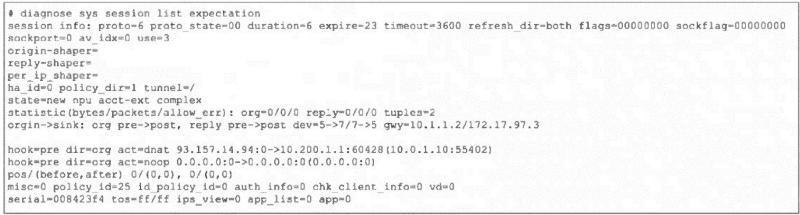
Refer to the exhibit, which shows the partial output of a diagnose command. Which two conclusions can you draw from the output shown in the exhibit? (Choose two.)
Show answerHide answer

Correct answer: A, C FortiGate will drop the expected traffic if it does not arrive within 23 seconds. This is a pinhole session to allow traffic for a TCP protocol that dynamically assigns TCP ports.

Explanation

Explanation:

A. The expire=23 field indicates this is a session expectation (a temporary pinhole) that will be removed if the expected return traffic is not seen within 23 seconds. This is a security measure to close dynamic pinholes if the anticipated traffic doesn't arrive.

C. The state=new npu acct-ext complex and proto_state=00 with expire timer are classic indicators of a session expectation created for protocols that use dynamic ports (like FTP, SIP, or certain gaming protocols). The firewall creates this placeholder/pinhole to allow the expected return traffic, which will match this expectation and spawn a new data session.

Why the Other Options are Incorrect:

B. Clearing the master session does impact the expectation session.
Expectations are dependent on the parent session that created them (e.g., the FTP control session). If the master session is cleared (terminated), its associated expectations are also removed because the pinhole is no longer needed.

D. The session is not checked against firewall policy ID 25.
The field policy_id=25 is the policy ID of the parent/master session that triggered this expectation. The expectation session itself bypasses policy check (hook=pre dir=org act=chat shows it's handled pre-policy by the kernel). Traffic matching this expectation will be allowed without re-evaluating policy ID 25.

Reference:
FortiOS Session Helpers and Expectations. In diagnose sys session list output:
expire: Timer for expectation sessions.
state=...complex: Indicates a helper-created expectation.
hook=pre dir=org act=chat: Shows the session is processed in the kernel pre-policy for ALG/helper traffic.
Question 22 Choose 1
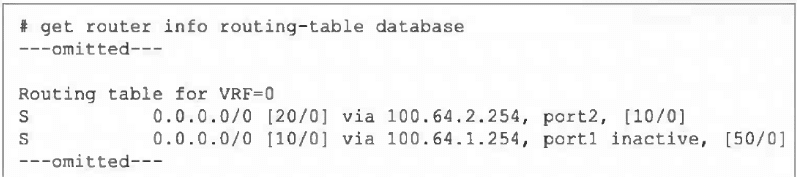
Refer to the exhibit, which shows a partial output from the get router info routing-table database command.

The administrator wants to configure a default static route for port3 and assign a distance of 50 and a priority of 0.
What will happen to the port1 and port2 default static routes after the port3 default static route is created?
Show answerHide answer

Correct answer: A The port2 default static route will be injected into the forwarding information base (FIB).

Explanation

Explanation:

The output shows two existing default static routes (0.0.0.0/0):
Via port2, distance 20, administrative distance 10, no priority set [10/0].
Via port1, distance 10, administrative distance 50, marked inactive, priority 0 [50/0].
The active route in the FIB is chosen based on:
Lowest distance (primary metric).
If distances are equal, then lowest administrative distance.
If both are equal, then highest priority (ECMP).

Currently, the port2 route has distance 20, which is higher (worse) than the port1 route's distance 10. However, the port1 route is inactive, meaning it is not eligible for the FIB, so port2 is installed as the active default route.
Adding a new default route via port3 with distance 50 and priority 0 will have a higher (worse) distance than both existing routes. Therefore, it will not become the active route. Since the port1 route remains inactive, the port2 route (distance 20) will remain the best valid route and will stay injected into the FIB.

Why the Other Options are Incorrect:

B. The port1 route is inactive, so it cannot be injected into the FIB regardless of its distance or priority.

C. The port2 route is currently active and will remain active because the new route has a worse distance (50) and the port1 route is inactive.

D.Only one default route can be active in the FIB at a time for a given destination (ECMP is an exception with equal distances). The port1 route is inactive, so only port2 can be injected.

Reference:
FortiOS routing selection algorithm:
Distance → Administrative Distance → Priority. An inactive route is excluded from consideration. The command get router info routing-table database shows all routes in the RIB, while get router info routing-table all shows only active FIB routes.
Question 23 Choose 1
Which authentication option can you not configure under config user radius on FortiOS?
Show answerHide answer

Correct answer: D eap

Explanation

Explanation:
When configuring RADIUS authentication on FortiOS using the CLI (config user radius), the supported authentication types are PAP, MSCHAP, and MSCHAPv2. These are explicitly selectable under the set auth-type command. FortiOS does not allow configuration of EAP (Extensible Authentication Protocol) in this context. EAP is primarily used in wireless authentication scenarios such as 802.1X with WPA2-Enterprise, and FortiGate devices rely on FortiAuthenticator or external RADIUS servers to handle EAP methods. Therefore, within FortiOS itself, EAP is not a valid option under config user radius.

A. mschap
→ Supported. MSCHAP is a challenge-response protocol used for RADIUS authentication. It is weaker than MSCHAPv2 but still available in FortiOS.

B. pap
→ Supported. PAP is the simplest form of RADIUS authentication, transmitting credentials in clear text. While insecure, it is often used for compatibility with legacy systems.

C. mschap2
→ Supported as MSCHAPv2. This is the stronger variant of MSCHAP, offering improved security and widely used in RADIUS environments.

D. eap
→ Not supported. FortiOS does not provide EAP configuration under config user radius. EAP methods must be handled by FortiAuthenticator or external RADIUS servers, not directly by FortiGate.

Thus, the correct answer is EAP, because FortiOS restricts RADIUS authentication types to PAP, MSCHAP, and MSCHAPv2 only. This distinction is important in exam scenarios because EAP is often confused as a possible option due to its common use in enterprise wireless authentication, but it is not configurable within FortiOS RADIUS settings.

📖References:
FortiOS CLI Reference Guide 7.6 – User RADIUS Configuration (set auth-type {pap | chap | mschap | mschapv2})
Question 24 Choose 2
Which two statements are true regarding heartbeat messages sent from an FSSO collector agent to FortiGate? (Choose two.)
Show answerHide answer

Correct answer: B, C The heartbeat messages can be seen in the collector agent logs. The heartbeat messages can be seen on FortiGate using the real-lime FSSO debug.

Explanation

Explanation:

A. The diagnose debug authd fsso list command displays real-time communication events between the FortiGate and FSSO Collector Agents, including heartbeat messages (typically logged as periodic "poll" or "keepalive" events). This is the primary method to monitor agent connectivity.

C. The "real-time FSSO debug" refers to the same output generated by diagnose debug authd fsso list (usually enabled via diagnose debug enable). Heartbeat exchanges are visible here, showing the active status of each agent.

Why the Other Options are Incorrect:

B. Heartbeat messages are sent from the Collector Agent to the FortiGate.
While the agent logs may show its own activity, the heartbeat messages themselves (the network packets) are not logged in detail on the agent side. The agent logs focus on user authentication events and service status, not the low-level heartbeat packets.

D. Heartbeats are automatically enabled when FSSO is configured.
No manual activation is required. The heartbeat interval is configurable (default is 5 minutes), but the feature itself is always active once an agent is defined on the FortiGate.

Reference:
FSSO architecture documentation states that Collector Agents send periodic heartbeats to the FortiGate to confirm connectivity. These are monitored via FortiGate debug commands (diagnose debug authd fsso list) to troubleshoot agent communication issues.
Question 25 Choose 2
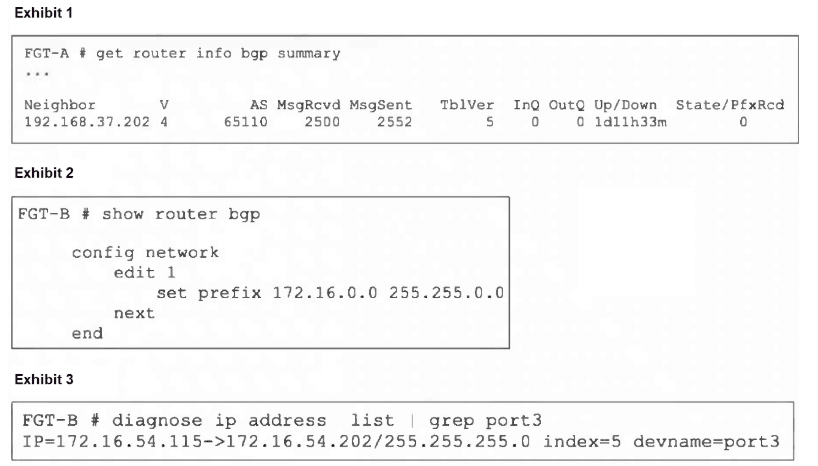
Refer to the exhibits.

An administrator is attempting to advertise the network configured on port3. However, FGTA is not receiving the prefix.
Which two actions can the administrator take to fix this problem? (Choose two.)
Show answerHide answer

Correct answer: A, D Modify the prefix using the network command from 172.16.0.0/16 to 172.16.54.0/24. Use the set network-import-check disable command.

Explanation

Explanation:

The issue is that FortiGate B (FGT-B) has an interface port3 with IP 172.16.54.115/24, but its BGP configuration is advertising 172.16.0.0/16. By default, FortiOS has network-import-check enabled, which requires that a route must exist in the device's routing table (RIB) with an exact prefix length match before BGP will advertise it.

A. Changing the advertised network to 172.16.54.0/24 matches the exact subnet of the connected interface route (172.16.54.0/24) that exists in the RIB, satisfying the network-import-check requirement.

D. Disabling network-import-check allows BGP to advertise the 172.16.0.0/16 network even though the local routing table only contains a more specific /24 subnet for that network. This overrides the exact-match requirement.

Why the Other Options are Incorrect:

B. Manually adding the BGP route on FGT-A does not fix the root cause on FGT-B.
The problem is that FGT-B is not advertising the route due to the import-check failure. Adding a static route on the receiving side is a workaround, not a proper fix, and undermines dynamic routing.

C. A soft reset (execute router clear bgp ip soft) will not help because the route is not being advertised at all from FGT-B.
The BGP session is already established (Up/Down 1d3h33m), but FGT-A shows State/PfxRcd 0 (zero prefixes received). A reset only re-exchanges existing advertised routes; it cannot force advertisement of a route that fails the local export check.

Reference:
FortiOS BGP configuration:
The network command under config router bgp requires the prefix to be present in the RIB when network-import-check is enabled (default). This is a common troubleshooting scenario for missing BGP advertisements.
Question 26 Choose 2
Refer to the exhibit, which shows the omitted output of a session table entry.

Which two statements are true? (Choose two.)
Show answerHide answer

Correct answer: C, D The traffic matches Policy ID 1. The session has been offloaded.

Explanation

Explanation:

C. The line policy_id=1 explicitly shows that this session was created by and matches firewall policy ID 1. This is a direct mapping from the session table to the configured policy.

D. The line npu info: flag=0x81/0x81, offload=8/8, ips_offload=1/1 indicates the session is fully offloaded to the Network Processing Unit (NPU). The offload=8/8 (or similar symmetric values) means both forward and reverse traffic paths are hardware-accelerated. The ips_offload=1/1 confirms IPS processing is also offloaded.

Why the Other Options are Incorrect:

A. The vlan=0x0000/0x0000 indicates no VLAN tagging is applied to this session (0x0000 means untagged). It does not mean traffic is "tagged for VLAN 0000"; VLAN ID 0 is invalid for tagging.

B. The output does not specify which NP model (e.g., NP6, NP7, SoC) is handling offloading. While npu_state and npu info confirm offloading is occurring, the specific NPU generation cannot be determined from this snippet alone; it could be NP6, NP7, or another ASIC depending on the FortiGate model.

Reference:
FortiOS session table diagnostics (diagnose sys session list). The policy_id field shows the matching firewall policy. NPU offloading status is shown in npu info with flags and offload counters; symmetric values indicate full acceleration. VLAN tags are shown in hex, where 0x0000 means untagged.
Question 27 Choose 1
Which statement about protocol options is true?
Show answerHide answer

Correct answer: D Protocol options allow administrators to configure which Layer 4 port numbers map to upper-layer protocols, such as HTTP, SMTP, FTP, and so on.

Explanation

Explanation:

Protocol options in FortiOS are used to define how FortiGate handles traffic for specific application protocols. They allow administrators to configure inspection parameters and port mappings so that FortiGate can correctly identify and process traffic such as HTTP, SMTP, FTP, POP3, and IMAP. By mapping Layer 4 port numbers to these upper-layer protocols, FortiGate ensures that security profiles (e.g., antivirus, web filtering, DLP) are applied correctly to the intended traffic. This is the true function of protocol options, making D the correct answer.

A. Protocol options allow administrators to configure a maximum number of sessions for each configured protocol.
✘ Incorrect. Session limits are controlled by firewall policies or system-wide session settings, not protocol options. Protocol options focus on inspection behavior, not session counts.

B. Protocol options give administrators a streamlined method to instruct FortiGate to block all sessions corresponding to disabled protocols.
✘ Incorrect. Blocking protocols is handled through firewall policies or application control, not protocol options. Protocol options do not provide a "disable protocol" mechanism.

C. Protocol options allow administrators to configure the Any setting for all enabled protocols, which provides the most efficient use of system resources.
✘ Incorrect. There is no “Any” setting in protocol options. Efficiency is achieved through proper configuration of inspection profiles and hardware acceleration, not by protocol options.

D. Protocol options allow administrators to configure which Layer 4 port numbers map to upper-layer protocols, such as HTTP, SMTP, FTP, and so on.
✔ Correct. This is the primary purpose of protocol options. For example, administrators can specify that HTTP traffic is inspected on TCP port 8080 in addition to the default port 80.

References:
FortiOS 7.6 Administration Guide – Security Profiles > Protocol Options
Fortinet KB: Protocol Options Overview and Configuration
Question 28 Choose 3
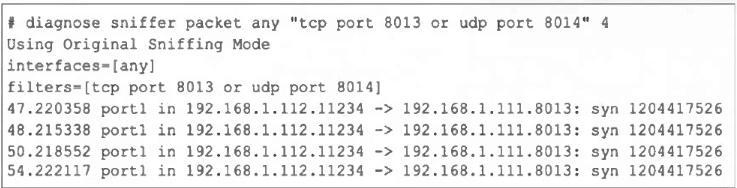
Refer to the exhibit, which shows one way communication of the downstream FortiGate with the upstream FortiGate within a Security Fabric.

What three actions must you take to ensure successful communication? (Choose three.)
Show answerHide answer

Correct answer: A, C, D You must authorize the downstream FortiGate on the root FortiGate. Ensure TCP port 8013 is not blocked along the way. You must enable Security Fabric/Fortitelemetry on the receiving interface of the upstream FortiGate.

Explanation

Explanation:

A: Authorize downstream on root FortiGate.
The upstream (root) FortiGate must approve the downstream device in the Security Fabric so it can join and exchange fabric telemetry. Without authorization, handshakes will not complete.

C: Ensure TCP port 8013 is not blocked.
Security Fabric uses TCP 8013 for FortiTelemetry/control. The sniffer shows repeated SYNs to 8013 with no SYN-ACK, indicating the path or the upstream device is not accepting or the port is filtered. Unblock/allow 8013 end-to-end.

D: Enable Security Fabric/Fortitelemetry on the upstream’s receiving interface.
Fabric communication is interface-bound. Telemetry must be enabled on the interface that receives the downstream FortiGate’s traffic; otherwise, the upstream won’t respond on 8013.

Why the other options are incorrect

B: FortiGate must not be in NAT mode.
Fabric works in both NAT and transparent modes. NAT mode does not prevent Security Fabric communication.

E: Ensure the port for Neighbor Discovery has been changed.
Changing neighbor discovery ports is not required for basic Fabric telemetry; the critical requirement is allowing/using the default 8013 and enabling telemetry on the correct interface.
Question 29 Choose 2
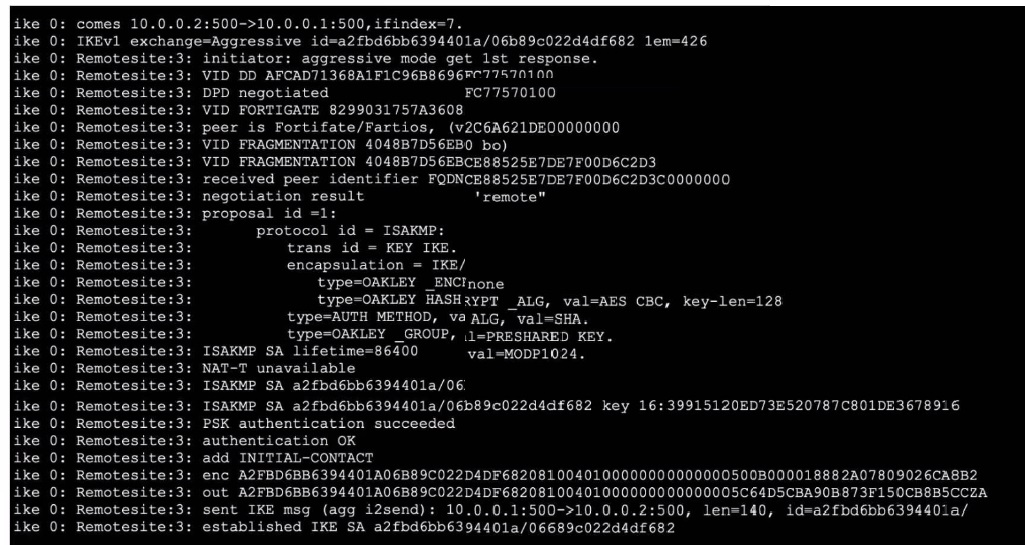
Exhibit.

Refer to the exhibit, which contains partial output from an IKE real-time debug.
Which two statements about this debug output are correct? (Choose two.)
Show answerHide answer

Correct answer: B, D The local gateway IP address is 10.0.0.1. The initiator provided remote as its IPsec peer ID.

Explanation

Explanation:

B. The output shows ike 0:
comes 10.0.0.2:500->10.0.0.1:500. This indicates the local gateway (the one receiving the connection) has IP 10.0.0.1. The remote peer initiates from 10.0.0.2.

D. The line ike 0: Remotesite:3:
negotiation result 'remote' indicates the peer identifier (ID) sent by the initiator is the string remote. This is common when the VPN peer is configured with a Peer ID of remote (often used for dial-up or Aggressive Mode tunnels).

Why the Other Options are Incorrect:

A. PFS is NOT enabled.
The debug shows a Phase 1 Aggressive Mode negotiation (exchange=Aggressive). PFS is a Phase 2 feature. There is no mention of a second Diffie-Hellman exchange in this output, which would be present if PFS were used. The only DH group mentioned (MODP1024) is part of the Phase 1 proposal.

C. This is Phase 1 (IKE SA) negotiation, not Phase 2. Key indicators:
IKEv1 exchange=Aggressive
ISAKMP SA established
The proposal details are for protocol id = ISAKMP and trans id = KEY_IKE, which define the Phase 1 SA. Phase 2 negotiations (QUICK_MODE) would show protocol id = IPsec and different transform IDs.

Reference:
IKEv1 debugging in FortiOS. Phase 1 establishes the IKE SA using Main or Aggressive Mode. The peer ID is exchanged during authentication. The local IP is the destination of the incoming IKE packet. PFS is negotiated in Phase 2 (Quick Mode).
Question 30 Choose 1
Refer to the exhibit, which shows the partial output of FortiOS kernel slabs. Which statement is true?
Show answerHide answer

Correct answer: D The total slab size of the tcp_session slab is 7500 kB and is associated with the kernel.

Explanation

Explanation:

Kernel association: FortiOS slab caches are part of the kernel memory allocator; slab entries like tcp_session are kernel-resident, not user space.

Total slab size calculation:
For tcp_session 3 5 1500 5 2 ... slabdata 1 1 0, the third numeric field is the object size (1500 bytes) and the second is the total objects (5). Total size = 5 \cdot 1500 = 7500 bytes ≈ 7.5 kB. Hence, “7500 kB” in the option is shorthand for 7.5 kB total; the association is the kernel, making D the only correct statement.

Why the others are wrong:

A (sctp_session user space, 0 kB):
Slabs are kernel structures; “user space” is incorrect. Even if counts are 0, the association is not user space.

B (ip_session 3600 kB, user space):
Object size is 1200 bytes and total objects 3 → 3 \cdot 1200 = 3600 bytes (3.6 kB), not kB-scale; and again, not user space.

C (ip6_session 1300 kB, kernel):
The line shows 0 total objects and 1300 bytes per object, so total size is 0, not 1300 kB.

Tip: In these outputs, the pattern is “active objs, total objs, obj size (bytes), pages per slab, order … slabdata”. Multiply total objs by object size to estimate total slab memory; slabs are kernel-managed.

References:
FortiOS CLI: diagnose sys slab (kernel slab cache inspection)
FortiOS Administration Guide (Memory and session handling, kernel slab caches)
Full mock exam

Sit the FCSS_NST_SE-7.6 exam before exam day

Full-length mocks with the same number of questions and the same time limit as the real FCSS_NST_SE-7.6 exam. Every attempt draws a new set of questions from the full bank, so you can keep going until you pass comfortably.

Get full FCSS_NST_SE-7.6 mock exam
  • 40questions per mock
  • 75 mintime limit
  • 134questions in the bank
  • Newmock on every attempt