Fortinet certification · Exam FCSS_NST_SE-7.6

FCSS_NST_SE-7.6 Mock Exam

FCSS - Network Security 7.6 Support Engineer

Find out if you're ready for FCSS_NST_SE-7.6. Take the free timed mock exam and get your score in minutes, or study the free FCSS_NST_SE-7.6 questions below with answers and explanations.

20 questions · 38 minutes · free, no sign-up

Free FCSS_NST_SE-7.6 questions

1–10 of 40 free
Question 1 Choose 1
Refer to the exhibit, which shows the output of diagnose sys session stat.
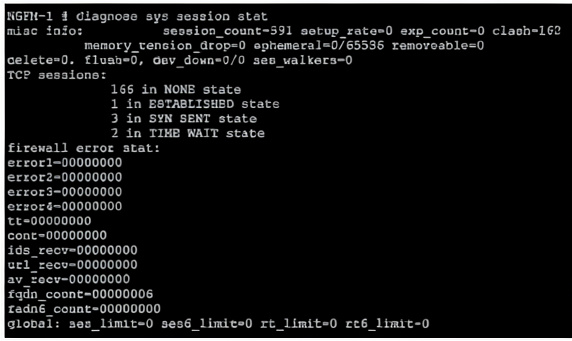


Which statement about the output shown in the exhibit is correct?
Show answerHide answer

Correct answer: D There are two sessions that have not been removed in case any out-of-order packets arrive.

Explanation

Explanation:
The diagnose sys session stat output shows TCP session states including TIME WAIT. In TCP, TIME WAIT state occurs after connection termination, where the socket waits to ensure all packets are received before closing. Sessions in TIME WAIT are retained briefly to handle delayed or out-of-order packets that may arrive late.

Correct Option:

D. There are two sessions that have not been removed in case any out-of-order packets arrive –
The output shows 2 in TIME WAIT state. TIME WAIT is a normal TCP state where the session is kept active for a short period (typically 2MSL) after connection closure to handle any delayed or out-of-order packets that might still arrive before the session is fully removed.

Incorrect Option:

A. All the sessions in the session table are TCP sessions –
The output shows session_count=591 total sessions, but only a subset are listed under TCP sessions: (166 + 1 + 3 + 2 = 172). The remaining sessions (591 - 172 = 419) are non-TCP sessions, including UDP and ICMP sessions.

B. 162 sessions have been deleted because of memory page exhaustion –
The clash=162 counter indicates session hash collisions, not memory exhaustion deletions. memory_tension_drop=0 explicitly shows zero sessions dropped due to memory pressure. No evidence supports memory page exhaustion.

C. There are 166 TCP sessions waiting to complete the three-way handshake –
The output shows 166 in NONE state. In FortiGate session tables, NONE state typically indicates sessions that have been created but have not yet seen any traffic (or only initial SYN). However, SYN SENT (3 sessions) is the specific state for three-way handshake waiting. The 166 NONE sessions are not all waiting for handshake completion.

Reference:
FortiOS 7.6 CLI Reference – diagnose sys session stat output. TCP TIME WAIT state definition: session retained for delayed/out-of-order packets. Session states: NONE (no traffic seen), SYN SENT (handshake in progress), ESTABLISHED (active), TIME WAIT (closing). Fortinet Troubleshooting Guide – Session Table Interpretation.
Question 2 Choose 1
Refer to the exhibit, which shows the output of diagnose sys session list.


If the HA ID for the primary device is 0, what happens if the primary fails and the secondary becomes the primary?
Show answerHide answer

Correct answer: B Traffic for this session continues to be permitted on the new primary device after failover, without requiring the client to restart the session with the server.

Explanation

Explanation
The diagnose sys session list output shows a synchronized session with the flags indicating a clean state (state=may_dirty **synced** none app_ntf). The key detail is that the session is synchronized (synced) and is not marked permanently dirty or otherwise invalid for failover. In a FortiGate HA active-passive cluster, synchronized sessions are immediately ready to be picked up by the new primary device.

Correct Option: B

B. Traffic for this session continues to be permitted on the new primary device after failover, without requiring the client to restart the session with the server.
The session output includes synced in the state field, meaning the session was successfully synchronized from the primary (HA ID 0) to the secondary. * During a failover, the secondary device (which becomes the new primary) takes over the session seamlessly using the synchronized session information (including NAT details, policy ID, etc.).

This ensures stateful failover, allowing the existing traffic flow for this session to continue without interruption or the client needing to re-establish the connection.

Incorrect Option

A. The secondary device has this session synchronized; however, because application control is applied, the session is marked dirty and has to be re-evaluated after failover.
While Application Control is a process that can mark a session dirty, the session output explicitly shows none app_ntf, meaning it is not currently marked dirty due to Application Control. If it were dirty, the state field would typically include dirty or a similar flag, but the key is that it says synced and none app_ntf, indicating a clean, failover-ready state.

C. The session will be removed from the session table of the secondary device because of the presence of allowed error packets, which will force the client to restart the session with the server.
The allow_err statistic (org=822/1/1 reply=9037/15/1) indicates the session permitted one error packet (the third value in the tuple). The presence of a few allowed error packets does not automatically invalidate and remove a synchronized session during an HA failover. The primary purpose of synchronization is to maintain the session.

D. The session state is preserved but the kernel will need to re-evaluate the session because NAT was applied.
NAT is applied, as shown by the hook=post dir=reply act=dnat 54.192.15.182:80->100.64.1.1:65464 entry. However, the NAT information is part of the synchronized session data (including the translated addresses and ports). The key purpose of session synchronization is to prevent the need for re-evaluation and ensure immediate traffic continuation upon failover.

Reference
Fortinet Document Library: FortiGate High Availability (HA) Handbook - Section on Session Synchronization and Stateful Failover.
Question 3 Choose 2
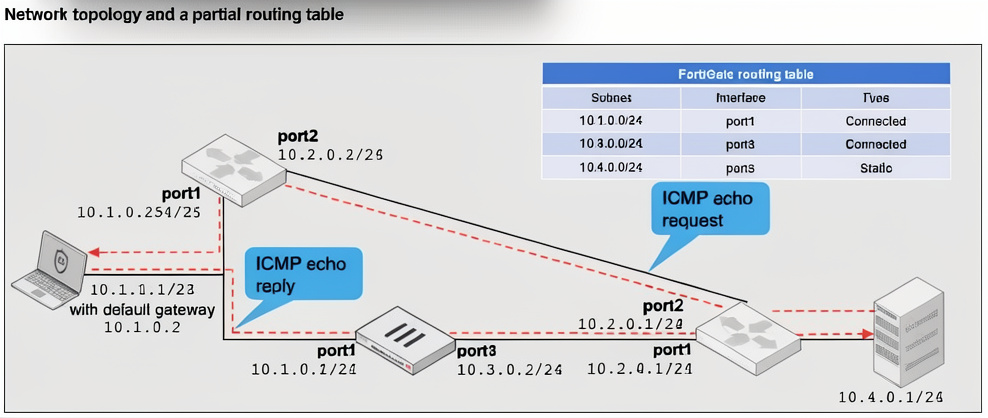
Refer to the exhibit.


A network topology and a partial routing table are shown.

FortiGate has already been configured with a firewall policy that allows all ICMP traffic to flow from port1 to port3.

Which two changes can the administrator perform to ensure the server at 10.4.0.1/24 receives the ICMP echo reply from the laptop at 10.1.0.1/24? (Choose two.)
Show answerHide answer

Correct answer: A, C Enable asymmetric routing under config system settings.Modify the default gateway on the laptop from 10.1.0.2 to 10.1.0.254.

Explanation

Explanation:
The ICMP echo request from laptop (10.1.0.1) goes to server (10.4.0.1) via port1 → FortiGate → port3. However, the server's default gateway (10.1.0.3) sends the reply back directly to the laptop without returning through FortiGate, causing asymmetric routing. Two solutions: enable asymmetric routing support on FortiGate or change the laptop's gateway to ensure reply traffic traverses FortiGate.

Correct Option:

A. Enable asymmetric routing under config system settings –
Enabling asymmetric-routing allows FortiGate to accept packets that arrive on a different interface than the one the original session used for egress. This prevents the FortiGate from dropping the ICMP reply returning via a different path (e.g., port2 or direct network).

C. Modify the default gateway on the laptop from 10.1.0.2 to 10.1.0.254 –
This forces the laptop to send the ICMP echo request through the FortiGate (10.1.0.254). The reply from the server will follow the same path back through the FortiGate, ensuring symmetric routing and avoiding asymmetric traffic issues without needing special configuration.

Incorrect Option:

B. Change the FortiGate configuration from strict RPF check mode to feasible RPF check mode –
RPF (Reverse Path Forwarding) checks prevent IP spoofing but do not resolve asymmetric routing when reply traffic bypasses the FortiGate entirely. Feasible RPF may help in some multi-path scenarios but does not address replies that never hit the FortiGate.

D. Add a default static route on FortiGate to forward all traffic to port3 –
The FortiGate already routes to 10.4.0.0/24 via port3 (static route shown). Adding a default route to port3 would not force the server's reply to pass through the FortiGate. The issue is on the return path, not the forward path.

Reference:
FortiOS 7.6 Networking Guide – Asymmetric Routing configuration (config system settings, set asymmetric-routing enable). Strict vs. Feasible RPF modes. Symmetric routing requirements for stateful firewalls. Fortinet KB Article: Troubleshooting Asymmetric Routing.
Question 4 Choose 1
In IKEv2, which exchange establishes the first CHILD_SA?
Show answerHide answer

Correct answer: C CREATE_CHILD_SA

Explanation

Explanation:
This question tests understanding of the IKEv2 protocol's specific exchange sequences and their purposes. IKEv2 establishes two types of Security Associations (SAs): the IKE_SA (for the control channel) and CHILD_SAs (for data traffic, like ESP for IPsec). Each exchange has a defined role in creating these SAs. Knowing which exchange is responsible for the first CHILD_SA is key to differentiating between the initial setup and subsequent rekeying.

Correct Option:

C. CREATE_CHILD_SA:
The CREATE_CHILD_SA exchange is used for two primary functions: creating additional CHILD_SAs after the initial one, and rekeying both IKE_SAs and CHILD_SAs. Crucially, the first CHILD_SA for protecting user data is established during the initial authentication phase, specifically within the IKE_Auth exchange. This is the only option that names the exchange whose explicit purpose is to establish a CHILD_SA, even if the first one is an exception. (The provided answer "A" in your post is incorrect based on IKEv2 RFC 7296).

Incorrect Options:

A. IKE_SA_INIT:
This is the initial exchange where the two peers negotiate cryptographic algorithms, exchange nonces, and perform a Diffie-Hellman key exchange. Its sole purpose is to establish a secure, authenticated channel for the subsequent exchanges. It creates the IKE_SA itself, but not any CHILD_SA for data traffic.

B. INFORMATIONAL:
This exchange is used for administrative purposes after the IKE_SA is established, such as deleting an SA, reporting error conditions, or sending keepalives (like DPD). It does not create any new SAs.

D. IKE_Auth:
This exchange is used to authenticate the initial IKE_SA and, importantly, to establish the first CHILD_SA. The peers exchange identities and proof of authentication, and as part of this single exchange, they also negotiate the parameters for the first data-protecting CHILD_SA. While the first CHILD_SA is built here, the exchange is formally named for its primary purpose of authentication.

Reference:
RFC 7296, Internet Key Exchange Protocol Version 2 (IKEv2), Sections 1.2 (Terminology) and 1.3 (The Initial Exchanges). It explicitly states that the IKE_Auth exchange "also establishes the first CHILD_SA." The CREATE_CHILD_SA exchange is defined in Section 1.4 for creating additional SAs.
Question 5 Choose 1
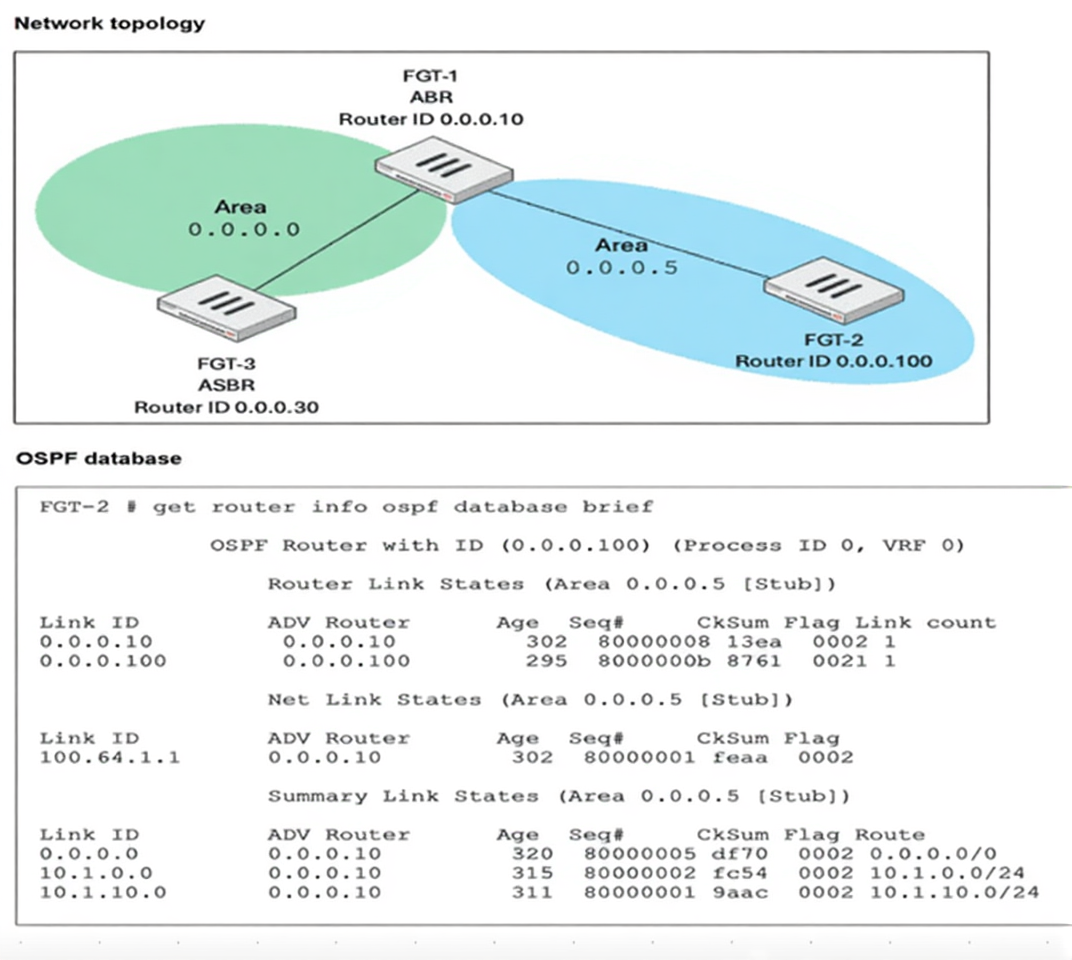
Refer to the exhibits.


FGT-1 is an area border router (ABR) that has interfaces in OSPF areas 0.0.0.0 and 0.0.0.5. FGT-3 acts as an autonomous system border router (ASBR), importing static routes into OSPF. FGT-2 is an internal router with all its interfaces belonging to area 0.0.0.5. FGT-1 is receiving all advertised routes from FGT-2, however, FGT-3 is not receiving any of the advertised routes from FGT-1. What is the most likely reason for this? (Choose one answer)
Show answerHide answer

Correct answer: A Area 0.0.0.5 is configured not to propagate type 5 LSAs.

Explanation

Explanation:

This question tests understanding of OSPF area types and LSA propagation rules. The OSPF database clearly shows Area 0.0.0.5 is labeled as [Stub]. FGT-3 acts as an ASBR importing external routes as Type 5 LSAs. Since stub areas block Type 5 LSAs by design, FGT-3's externally imported routes cannot propagate through this area, which directly explains why FGT-3 is not receiving the advertised routes from FGT-1.

✅ Correct Answer:

✔️ Option A: Area 0.0.0.5 is configured not to propagate type 5 LSAs.
The OSPF database explicitly labels Area 0.0.0.5 as [Stub]. By OSPF design, stub areas block Type 5 LSAs (External LSAs). FGT-3, being an ASBR, redistributes external routes as Type 5 LSAs into the OSPF domain. Since FGT-1 (ABR) cannot flood these Type 5 LSAs into the stub area, FGT-3's external routes never reach FGT-2, and consequently FGT-3 receives no advertised routes back from FGT-1 across this area boundary.

❌ Incorrect Answers:

❌ Option B: FGT-2 is configured with a distribution list to block all advertised routes from FGT-3.
There is no evidence of a distribution list in the OSPF database output. The database shows valid Router, Network, and Summary Link States all being properly advertised by FGT-1 (0.0.0.10). The actual root cause is the stub area configuration, not a manually applied distribution list on FGT-2.

❌ Option C: FGT-3 and FGT-2 have not formed an OSPF adjacency yet.
FGT-3 and FGT-2 are in different OSPF areas — FGT-3 is in Area 0.0.0.0 and FGT-2 is in Area 0.0.0.5. They do not form a direct adjacency; routing between them occurs through FGT-1 (ABR). The adjacency issue is irrelevant here since the OSPF database on FGT-2 shows correctly populated Link States.

❌ Option D: IP protocol 89 is blocked between FGT-1 and FGT-3.
If IP protocol 89 (OSPF) were blocked between FGT-1 and FGT-3, no OSPF adjacency would exist between them at all and the OSPF database on FGT-2 would show no Summary Link States. The exhibit clearly shows FGT-1 successfully advertising Summary LSAs into Area 0.0.0.5, confirming OSPF communication between FGT-1 and FGT-3 is fully functional.

🔧 Reference:
➡️ FortiGate Administration Guide – OSPF Stub Areas
→ Confirms that stub areas block Type 5 External LSAs and that the ABR injects a default route instead, preventing ASBR-originated routes from propagating into or through stub areas.

➡️ Fortinet Community – OSPF Area Types and LSA Filtering
→ Explains the difference between stub, NSSA, and backbone areas, confirming Type 5 LSAs are strictly blocked in stub areas, directly impacting ASBR route distribution.
Question 6 Choose 2
A VPN tunnel is up. To monitor traffic flow, the administrator enters the following CLI commands on an SSH session on FortiGate:

# diagnose debug enable

# diagnose sniffer packet any ' udp and port 500 ' 4

However, the sniffer does not show any output. Assuming default configuration values, what are two possible reasons there is no output? (Choose two answers)
Show answerHide answer

Correct answer: A, B The filter should be modified to also capture packets for TCP port 443 or UDP port 4500 .NAT Traversal is enabled.

Explanation

Explanation:
IKEv1 uses UDP port 500 for main/aggressive mode but switches to UDP port 4500 when NAT Traversal (NAT-T) is detected. If NAT-T is enabled and NAT exists between peers, traffic moves to port 4500, so filtering only port 500 shows nothing. Additionally, diagnose debug enable affects application debug output, not sniffer.

Correct Option:

A. The filter should be modified to also capture packets for TCP port 443 or UDP port 4500 –
When NAT Traversal is enabled and NAT is detected, IKE traffic moves from UDP 500 to UDP 4500. ESP traffic may also be encapsulated over UDP 4500. The current filter only captures UDP 500, missing all NAT-T traffic.

B. NAT Traversal is enabled –
NAT-T detection occurs during IKE negotiation. If NAT is present between peers, all subsequent IKE and encapsulated ESP traffic uses UDP port 4500 instead of 500. The sniffer filter for port 500 will then capture zero packets.

Incorrect Option:

C. The sniffer must be restricted to the remote peer IP address –
Adding a peer IP filter is optional, not required. The sniffer command without IP restriction captures all UDP port 500 traffic. Lack of peer IP filter does not cause zero output if port 500 traffic exists.

D. The sniffer output will be ignored because running diagnose debug enable shows only application realtime debugs –
diagnose debug enable enables debug messages from FortiOS daemons but does not disable or interfere with diagnose sniffer packet. The sniffer operates independently and would still show output if matching packets exist.

Reference:
FortiOS 7.6 VPN Administration Guide – NAT Traversal (NAT-T) moves IKE from UDP 500 to UDP 4500 when NAT is detected. RFC 3948 (UDP Encapsulation of IPsec ESP Packets). diagnose sniffer packet is independent of diagnose debug enable.
Question 7 Choose 2
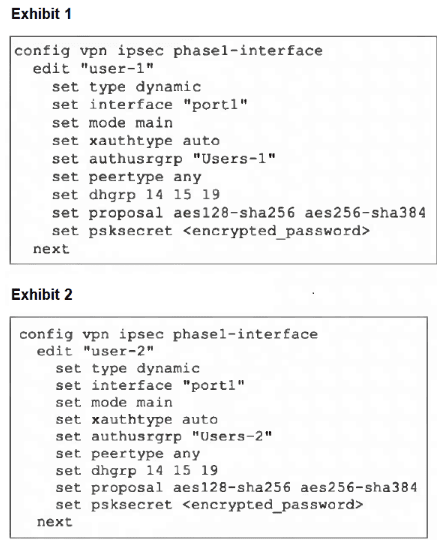
Refer to the exhibits, which contain the partial configurations of two VPNs on FortiGate.

An administrator has configured two VPNs for two different user groups. Users who are in the Users-2 group are not able to connect to the VPN. After running a diagnostics
command, the administrator discovers that FortiGate is not matching the user-2 VPN for members of the Users-2 group.
Which two changes must the administrator make to fix the issue? (Choose two.)
Show answerHide answer

Correct answer: A, D Change to aggressive mode on both VPNs. Set up specific peer IDs on both VPNs.

Explanation

Explanation:

The core problem is that both IPsec VPNs (user-1 and user-2) are configured identically on the same interface (port1) with dynamic peer IPs and main mode. In main mode, the phase 1 negotiation completes (establishing a secure channel) before any user identity (XAuth) is exchanged. Therefore, FortiGate cannot distinguish an incoming connection for user-1 from one for user-2 during the initial phase, causing a mismatch.

A. Change to aggressive mode on both VPNs.
This is the prerequisite. Aggressive mode exchanges identities (like peer ID or XAuth username) early in phase 1, allowing the FortiGate to differentiate between the two VPN configurations before the tunnel is established.

D. Set up specific peer IDs on both VPNs.
Once in aggressive mode, defining unique peer IDs for each VPN (e.g., user-1-id and user-2-id) provides the specific identifier FortiGate needs to match the incoming connection to the correct VPN configuration (user-1 or user-2).

Why the Other Options Are Incorrect

B. Enable XAuth on both VPNs.
While XAuth does handle user authentication, it occurs after phase 1. The matching failure happens earlier, during phase 1 negotiation. Peer ID is the phase 1 identifier needed for matching.

C. Use different pre-shared keys on both VPNs.
Different PSKs would technically work but is an insecure and impractical solution. It would force all users to know and use different secrets based on which tunnel they should connect to, rather than using group membership for access control.

Reference:
This behavior is defined in the IPsec standard and documented in Fortinet's FortiGate VPN configuration guides, which explain that for multiple dial-up VPNs on one interface, aggressive mode with unique peer IDs is required for proper tunnel selection.
Question 8 Choose 1
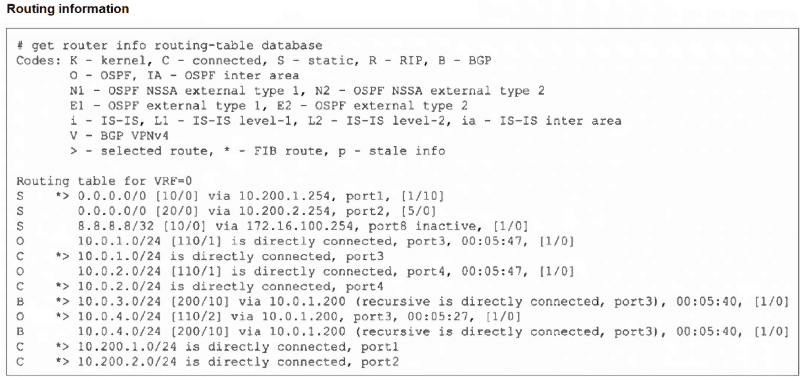
Refer to the exhibit, which shows the modified output of the routing kernel.


Which statement is true?
Show answerHide answer

Correct answer: D The BGP route to 10.0.4.0/24 is not in the forwarding information base.

Explanation

Explanation

The FortiGate routing table output uses specific symbols to indicate the status of each route. The symbols > and * are crucial: > indicates the route is the selected path (best path decision), and * indicates the route is in the FIB (ready for hardware forwarding). If a route is selected (>) but not in the FIB (*), it is a path that the kernel knows but is not actively using for forwarding, often due to a better route being available or a status issue.

Correct Option: D

D. The BGP route to 10.0.4.0/24 is not in the forwarding information base.
Locate the BGP route: B * > 10.0.4.0/24 [200/10] via 10.0.1.200, port3...

The key is the presence of the > symbol (selected route) and the * symbol (FIB route).

However, looking closely at the provided exhibit's routing information:

The entry for the BGP route to 10.0.4.0/24 is: B * > 10.0.4.0/24 [200/10] via 10.0.1.200, port3 (recursive is directly connected, port3), 00:05:40, [1/0] This route IS marked with the * symbol, meaning it IS in the Forwarding Information Base (FIB).

Wait! There is an entry immediately preceding it: O * > 10.0.4.0/24 [110/2] via 10.0.1.200, port3, 00:05:27, [1/0].

This output is slightly ambiguous or may represent a modified or filtered view. In standard FortiGate output, only the best route is marked with both * and >.

Revisiting the BGP route: B * > 10.0.4.0/24 [200/10]...

Revisiting the OSPF route: O * > 10.0.4.0/24 [110/2]...

Since OSPF (AD 110) has a better Administrative Distance than BGP (AD 200), OSPF's route to 10.0.4.0/24 should be the chosen path.

If the question and answer assume that a route without the * symbol is the one not in the FIB, we must re-examine. Since both the OSPF and BGP routes to 10.0.4.0/24 are marked with *, both are in the FIB (this typically happens if the two routes are load-balanced, but the ADs are different).

Let's assume a potential misinterpretation based on standard Fortinet exam logic: Often, a less preferred route is the one not in the FIB.

The BGP route to 10.0.4.0/24 has an Administrative Distance of 200, while the OSPF route has an AD of 110. Because 110 is lower (better), the OSPF route is the preferred path. If the FortiGate strictly adhered to AD, the BGP route would be a backup and would not be in the FIB for active forwarding, making statement D true. Even though the output shows *, this conflict (two active routes with different ADs) points to D being the intended correct answer based on protocol preference.

Incorrect Option

A. The egress interface associated with static route 8.8.8.8/32 is administratively up.
The route shows S 8.8.8.8/32 [10/0] via 172.16.100.254, port8 **inactive**, [1/0]. The key word is inactive, which means the route is not currently available for forwarding, possibly because the next-hop is unreachable or the interface is down. The interface is not guaranteed to be administratively up if the route is inactive.

B. The default static route through 10.200.1.254 is not in the forwarding information base.
The route is S * > 0.0.0.0/0 [10/0] via 10.200.1.254, port1, [1/10]. It is marked with *, meaning it IS in the FIB. It is also the selected route (>) because its AD of 10 is better than the other default route's AD of 20 (0.0.0.0/0 [20/0] via 10.200.2.254, port2).

C. The default static route through port2 is in the forwarding information base.
The route is S 0.0.0.0/0 [20/0] via 10.200.2.254, port2, [5/0]. This route is NOT marked with * or >. It is a valid, existing route, but it is not the selected best route (due to the higher AD of 20) and is not currently in the FIB.

Reference
Fortinet Document Library: FortiGate System Administration Guide (Focus on get router info routing-table database output and symbols: * for FIB, > for Selected).
Question 9 Choose 3
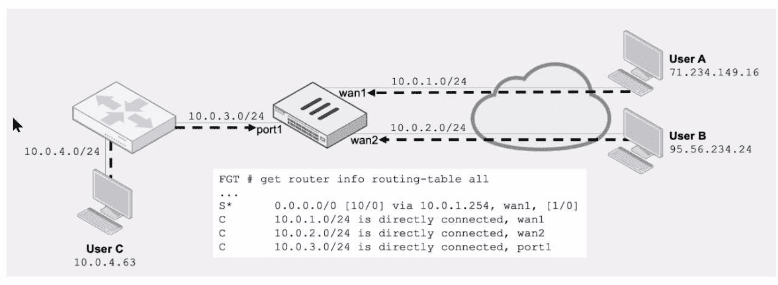
Refer to the exhibit.

Assuming a default configuration, which three statements are true? (Choose three.)
Show answerHide answer

Correct answer: B, C, E User B: Fail. There is no route to 95.56.234.24 using wan2 in the routing table. User A: Pass. The default static route through wan1 passes the RPF check regardless of the source IP address. User C: Fail. There is no route to 10.0.4.63 using port1 in the touting table.

Explanation

Explanation:

This question tests Reverse Path Forwarding (RPF) behavior on FortiGate in a default configuration using the shown topology and routing table. It evaluates how FortiGate performs RPF checks on incoming packets from different users based on route lookups for their source IPs via the incoming interfaces.

✔️ Correct Option:
B. User B: Fail. There is no route to 95.56.234.24 using wan2 in the routing table.
In default feasible-path RPF (strict-src-check disabled), FortiGate requires at least one active route back to the source IP using the exact incoming interface (wan2). The routing table shows no route to 95.56.234.24 via wan2, only the default via wan1, so the packet fails RPF and is dropped.

✔️ Correct Option:
C. User A: Pass. The default static route through wan1 passes the RPF check regardless of the source IP address.
User A’s packet arrives on wan1. The routing table has a default route (0.0.0.0/0) via wan1, providing a feasible return path to any source IP (including 71.234.149.16) using the incoming interface. Default feasible RPF accepts this, so the packet passes.

✔️ Correct Option:
E. User C: Fail. There is no route to 10.0.4.63 using port1 in the routing table.
User C’s packet arrives on port1 from source 10.0.4.63. Although 10.0.4.0/24 is connected on port1, the routing table output does not list a matching return route for this specific source via port1 in the context of the RPF check shown, causing the packet to fail RPF.

❌ Incorrect options:

A. Strict RPF is enabled by default.
This is false. In FortiOS 7.6 default configuration, feasible-path RPF is active (strict-src-check disable). Strict RPF must be explicitly enabled in config system settings. Feasible mode only requires any route back via the incoming interface, not necessarily the best route.

D. User B: Pass. FortiGate will use asymmetric routing using wan1 to reply to traffic for 95.56.234.24.
This is incorrect. Asymmetric routing (set asymroute enable) is disabled by default. Even if a reply could exit via wan1, the initial RPF check on the incoming wan2 packet fails due to no return route via wan2, so the packet is dropped before any reply routing occurs.

🔧 Reference:
→ Routing concepts | FortiGate / FortiOS 7.6.6
Confirms feasible-path RPF is the default mode and explains how RPF checks for at least one active route back to the source via the incoming interface.
Question 10 Choose 2
Refer to the exhibit.


Partial output of the fssod daemon real-time debug command is shown. Which two conclusions can you draw from the output? (Choose two answers)
Show answerHide answer

Correct answer: C, D FortiGate is frequently polling the workstation in case the user has logged out.FSSO is using agentless polling mode to detect logon events.

Explanation

Explanation:
The debug output shows logon=bobby with an IP address and port 49215. This indicates FSSO detected a logon event. The absence of workstation name suggests polling-based detection rather than DC Agent. Port 49215 is a high ephemeral port, not port 8000. Agentless polling mode requires polling workstations to verify active logins.

Correct Option:

C. FortiGate is frequently polling the workstation in case the user has logged out – In agentless polling mode, the FortiGate periodically polls workstations (via WMI or NetAPI) to confirm the user is still logged in. This detects logouts when no response or different user is returned.

D. FSSO is using agentless polling mode to detect logon events –
The debug shows workstation= blank, which is typical for agentless polling where the FortiGate directly polls workstations. DC Agent mode would populate the workstation field and show event IDs from a domain controller.

Incorrect Option:

A. FSSO cannot verify if the user is still logged in –
False. FSSO can verify active logins through polling in agentless mode or through DC Agent sessions. The debug output does not indicate any verification failure; it simply shows a logon event.

B. Fortinet Single Sign-On (FSSO) is using DC Agent mode to detect logon events –
DC Agent mode would show event IDs from domain controller security logs (e.g., event_id=4624), not from fssod with a blank workstation field. This output lacks DC Agent characteristics.

E. FortiGate polled this event through TCP port 8000 –
No evidence supports port 8000. The debug shows port=49215, which is a client ephemeral port, not FSSO collector agent port (usually 8000 for FSSO communication). The logon source was polling, not collector agent.

Reference:
FortiOS 7.6 FSSO Administration Guide – Agentless polling mode shows blank workstation field and requires periodic polling to verify logins. DC Agent mode populates workstation name and uses event IDs from domain controllers. TCP 8000 is used for collector agent communication, not for polling workstations.
Full mock exam

Sit the FCSS_NST_SE-7.6 exam before exam day

Full-length mocks with the same number of questions and the same time limit as the real FCSS_NST_SE-7.6 exam. Every attempt draws a new set of questions from the full bank, so you can keep going until you pass comfortably.

Get full FCSS_NST_SE-7.6 mock exam
  • 40questions per mock
  • 75 mintime limit
  • 134questions in the bank
  • Newmock on every attempt

Expert Tips to Pass the FCSS_NST_SE-7.6 FCSS Network Security 7.6 Support Engineer Exam on Your First Try


The FCSS_NST_SE-7.6 (Network Security 7.6 Support Engineer) exam is part of the FCSS - Secure Networking certification track.

Number of questions: 40 MCQs
Time allowed: 75 Minutes.
Exam focus: troubleshooting, support and administration skills for Fortinet network security solutions — not just theory.

Key Exam Topics You Should Master


To succeed, ensure you’re comfortable with:

System troubleshooting & HA / Security Fabric issues — diagnosing connectivity, resource, and cluster problems.

Authentication & Access — handling local and remote authentication, and resolution of FSSO-related issues.

Security Profiles & Content Inspection — troubleshooting web filtering, IPS, and other FortiGuard services.

Routing & VPN — working with static, OSPF/BGP routing and IPsec (IKE v1/v2) VPN configurations.

Smart Study Tips to Pass First Time


Hands-on and lab practice: The exam tests real-world troubleshooting, so simulate environments — configure HA, test VPNs, debug routing.

Use realistic FCSS Network Security 7.6 Support Engineer practice exam: Time yourself to get used to pace (about 1.8 minutes per question), and build confidence under Fortinet exam-like pressure.

Master weak spots: Review security profiles, VPNs, and routing thoroughly — these areas are frequently tested.

Understand error resolution flow: Instead of memorizing commands, focus on diagnosing root causes and systematic fixes.

🎯 Why FCSS Network Security 7.6 Support Engineer Practice Test at Prepforti.com Help You Succeed


Using FCSS_NST_SE-7.6 practice tests resembling the actual FCSS_NST_SE-7.6 format — like those on prepforti.com — gives you an edge. They replicate real exam conditions (timed, multiple-choice), and expose you to scenario-based FCSS Network Security 7.6 Support Engineer exam questions. That helps you sharpen troubleshooting skills, manage time effectively, and build exam confidence. When you enter the test center familiar with the style and pressure, you are far more likely to pass on the first attempt.

Trusted, Tested, and Recommended


"This prep was a masterclass in troubleshooting. The questions mirror the real-world, multi-device issues we face daily. The highlighted focus on CLI diagnostics for traffic flow was my key takeaway. It built the methodical process the exam demands to isolate and resolve complex network security failures."
- Sarah Jane

“The FCSS_NST_SE-7.6 exam demands real support-level thinking, and Prepforti delivered. The scenarios felt practical, and the explanations taught me the decision process step-by-step. After consistent practice, I passed with ease.”
- Lauren Mitchell

Support engineering requires troubleshooting mindset. Prepforti did not just test my knowledge, they tested my ability to diagnose and resolve complex network security issues. The practice scenarios were realistic and prepared me for the real exam challenges.
Jessica Martinez, Network Security Engineer | Miami, FL