Fortinet certification · Exam FCSS_EFW_AD-7.6

FCSS_EFW_AD-7.6 Mock Exam Page 3

FCSS - Enterprise Firewall 7.6 Administrator

Free FCSS_EFW_AD-7.6 mock exam questions 21–30, each with the answer and an explanation.

20 questions · 39 minutes · free, no sign-up

Free FCSS_EFW_AD-7.6 questions

21–30 of 33 free
Question 21 Choose 2
Refer to the exhibit, which shows the ADVPN network topology and partial BGP configuration.
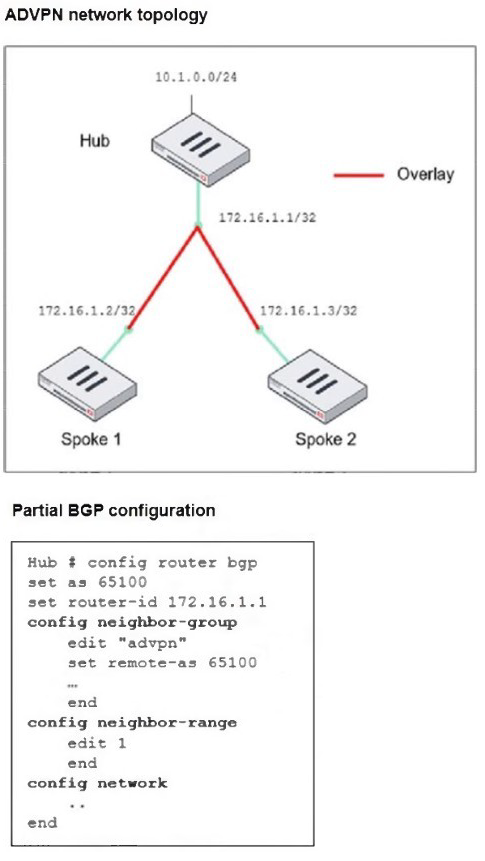
Which two parameters must an administrator configure in the config neighbor range for spokes shown in the exhibit? (Choose two.)
Show answerHide answer

Correct answer: B, D set neighbor-group advpnset prefix 172.16.1.0 255.255.255.0

Explanation

Explanation:
In an Auto-Discovery VPN (ADVPN) setup using BGP, the config neighbor-range command is used on the hub FortiGate to automatically accept and establish BGP sessions with spokes without needing to statically define each one. The configuration defines a range of IP addresses from which neighbors can connect.

Let's analyze the required parameters based on the topology:

D. set prefix 172.16.1.0 255.255.255.0
This is correct. The prefix command defines the IP address range from which the hub will accept dynamic BGP peerings. The exhibit shows the spokes have IP addresses 172.16.1.2/32 and 172.16.1.3/32. These addresses fall within the 172.16.1.0/24 subnet. Configuring this prefix tells the hub to accept BGP connections from any spoke whose IP is within this network.

B. set neighbor-group advpn
This is correct. The neighbor-group command applies a pre-defined set of BGP settings (like remote-as 65100 and any associated route-maps) to all neighbors that fall within the specified prefix range. The exhibit shows a neighbor-group named "advpn" has already been created. Associating this group with the neighbor-range ensures all dynamically discovered spokes inherit the correct BGP configuration.

Why the other options are incorrect:

A. set max-neighbor-num 2
Incorrect. While this command exists and can limit the number of dynamic peers, it is not a required parameter. The hub will function correctly without it, learning as many spokes as connect from the defined prefix. It is an optional administrative control, not a mandatory configuration for the setup to work.

C. set route-reflector-client enable
Incorrect. This command is typically applied within the config neighbor-group "advpn" section, not under the config neighbor-range. The "advpn" neighbor-group is where you would configure set route-reflector-client enable to allow the hub to reflect routes between spokes. Placing it directly in the neighbor-range stanza would be syntactically incorrect.

Reference:
Fortinet Documentation: FortiOS Handbook - BGP, specifically the section on "Configuring dynamic BGP neighbors (neighbor range)". The documentation confirms that the prefix is required to define the IP range, and the neighbor-group is used to assign common parameters to these dynamic peers.
Question 22 Choose 1
An administrator is setting up an ADVPN configuration and wants to ensure that peer IDs are not exposed during VPN establishment.
Which protocol can the administrator use to enhance security?
Show answerHide answer

Correct answer: A Use IKEv2, which encrypts peer IDs and prevents exposure.

Explanation

Explanation:

IKEv2 encrypts identity payloads during Phase 1, so peer IDs (FQDN, user ID) are not exposed to passive observers. It also aligns with ADVPN requirements for scalable shortcut tunnels, network-id support, and efficient rekeying, making it the right choice when the goal is both security and operational robustness. In FortiGate deployments, ADVPN is designed around IKEv2 to enable automatic spoke-to-spoke shortcuts without leaking identity information in transit.

Why B is incorrect:
SSL VPN web mode is unrelated to ADVPN (IPsec). It doesn’t use IPsec’s IKE identity exchange at all, and cannot provide ADVPN shortcut behavior or route-based VPN semantics required for dynamic peer discovery and on-demand tunnels. Choosing SSL VPN here does not solve peer ID exposure in an ADVPN context.

Why C is incorrect:
IKEv1 aggressive mode explicitly sends the initiator’s identity in cleartext for speed, which is the opposite of the security goal. It’s known to expose peer IDs and is generally discouraged for enterprise deployments, especially where privacy and reconnaissance resistance matter.

Why D is incorrect:
IKEv1 main mode does protect identity better than aggressive mode, but it lacks the ADVPN feature set and scalability of IKEv2 (e.g., network-id–based shortcut formation, improved NAT traversal behavior, and more efficient rekeying). Performance alone is not the deciding factor; capability and security are. Fortinet’s ADVPN feature set is centered on IKEv2.

References:
FortiOS Administration Guide (IPsec VPN, ADVPN, IKEv2): Configuring ADVPN with IKEv2 and identity protection; route-based VPN and shortcut tunnels.
Fortinet Technical Tips: ADVPN with network-id and IKEv2 requirements; identity handling in IKE exchanges.
Question 23 Choose 1
What does the command set forward-domain in a transparent VDOM interface do?
Show answerHide answer

Correct answer: B It isolates traffic within a specific VLAN by assigning a broadcast domain to an interface based on the VLAN ID.

Explanation

Explanation:
In a transparent VDOM, the set forward-domain command creates isolated Layer 2 segments by assigning a domain ID (1-4094) to an interface or VLAN subinterface. Interfaces with the same forward-domain ID can communicate directly at Layer 2. Interfaces with different IDs are completely isolated—no traffic passes between them unless explicitly permitted by a firewall policy, enabling multiple separate logical networks on a single physical device.

Why other options are incorrect:

A. Incorrect. The command controls traffic isolation, not QoS prioritization.

C. Incorrect.
This describes basic VLAN tagging (set vlanid), not forward-domain’s role in defining inter-VLAN communication.

D. Incorrect. Assigning a unique ID isolates an interface. To allow an interface to operate across multiple VLANs, those VLANs must share the same forward-domain ID.

Reference:

Fortinet Documentation:
FortiOS Handbook – Transparent Mode > Configuring multiple transparent mode networks (forward domains). It states forward-domains "divide a transparent mode VDOM into multiple Layer 2 networks that are isolated from each other."
Question 24 Choose 1
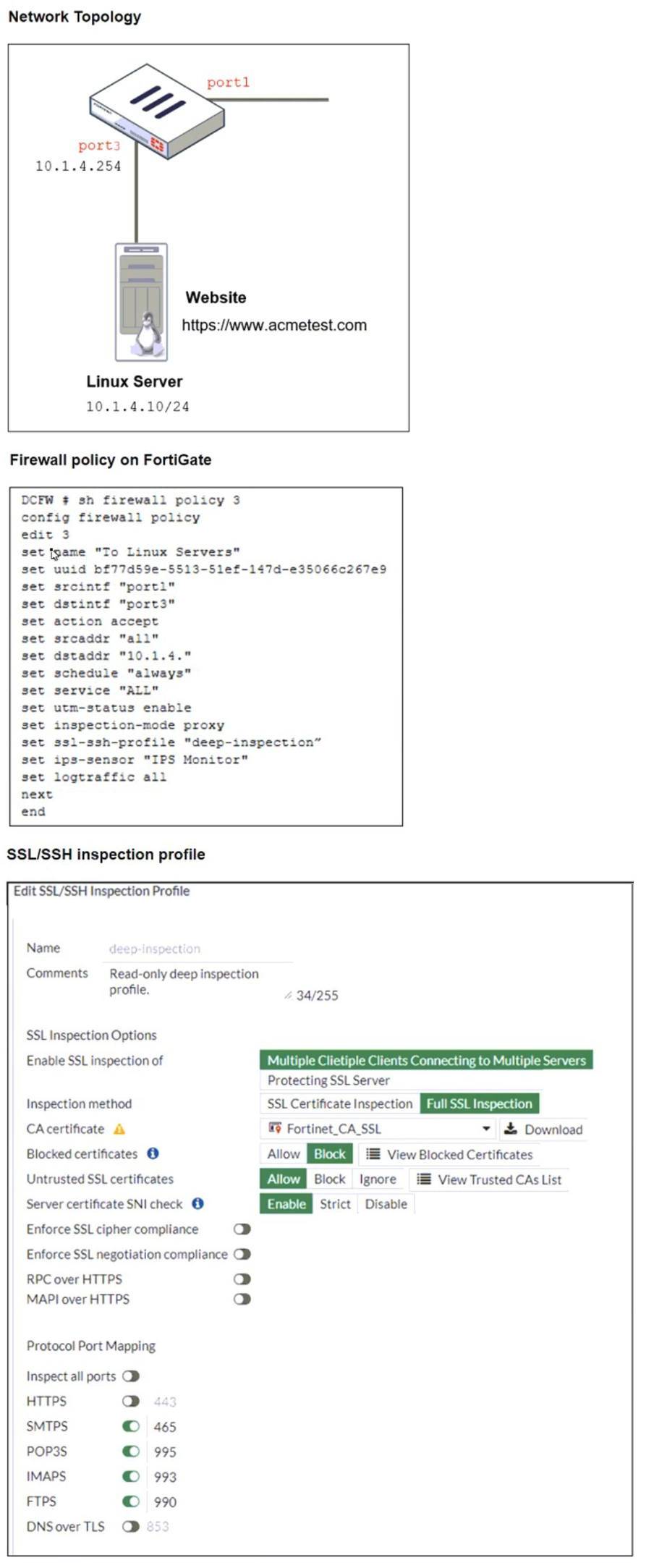
Refer to the exhibits. The exhibits show a network topology, a firewall policy, and an SSL/SSH inspection profile configuration.

Why is FortiGate unable to detect HTTPS attacks on firewall policy ID 3 targeting the Linux server?
Show answerHide answer

Correct answer: C The administrator must enable SSL inspection of the SSL server and upload the certificate of the Linux server website to the SSL/SSH inspection profile.

Explanation

Explanation:
FortiGate cannot detect HTTPS-based attacks unless it can decrypt and inspect the encrypted traffic. In this scenario, the Linux server hosts a site at https://www.acmetest.com, and the firewall policy uses deep inspection with proxy mode. However, for FortiGate to inspect inbound HTTPS traffic targeting the server, it must be able to re-sign the server’s certificate using a trusted certificate authority (CA) or have access to the original server certificate and private key.

Option C is correct because it addresses the core requirement:
uploading the server certificate to the SSL/SSH inspection profile allows FortiGate to decrypt inbound HTTPS traffic destined for the Linux server. Without this, FortiGate cannot perform full inspection and will bypass encrypted payloads, missing potential threats.

Why other options are incorrect:

A. Set the policy to inspection mode ❌
Already configured as proxy mode in the exhibit, which supports full SSL inspection. Changing inspection mode is not the issue.

B. Enable HTTPS in protocol port mapping ❌
HTTPS (port 443) is already mapped in the profile. This setting controls which ports are inspected, not certificate handling.

D. Duplicate of C ❌
This is a distractor. It repeats option C verbatim and is not a valid separate choice.

References
FortiOS 7.6 Administration Guide – SSL/SSH Inspection: Inbound HTTPS inspection requires uploading the server certificate and enabling inspection of SSL server traffic.
Question 25 Choose 2
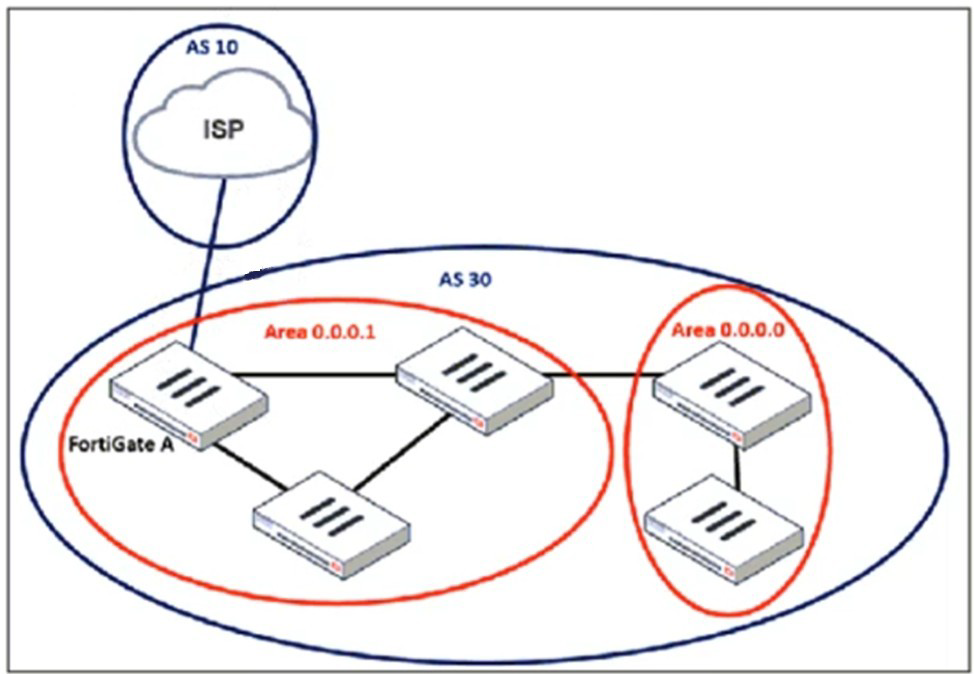
Refer to the exhibit, which shows an enterprise network connected to an internet service provider.

An administrator must configure a loopback as a BGP source to connect to the ISP.
Which two commands are required to establish the connection? (Choose two.)
Show answerHide answer

Correct answer: A, B ebgp-enforce-multihopupdate-source

Explanation

Explanation:

When using a loopback interface as the source for a BGP session (instead of a directly connected physical interface), two specific issues must be addressed in the BGP neighbor configuration:

B.update-source:
This command specifies the local interface/IP that the FortiGate uses to originate the BGP TCP connection. To use the loopback interface (loopback1, for example) as the stable source, you must configure set update-source under the BGP neighbor settings.

A. ebgp-enforce-multihop:
By default, eBGP sessions (between different Autonomous Systems, like AS 10 and AS 30 in the exhibit) expect the peer to be directly connected (TTL=1). Since a loopback interface is not a directly connected network from a routing perspective, this default behavior will cause the session to fail. The ebgp-enforce-multihop command increases the TTL, allowing the BGP packets to traverse multiple hops to reach the peer's loopback address, which is essential when the loopback is reachable via an IGP (like OSPF, shown in Area 0.0.0.0).

Why the other options are incorrect:

C. ibgp-enforce-multihop:
This command is used for iBGP sessions (within the same AS). The exhibit clearly shows an eBGP connection between different AS numbers (AS 10 and AS 30), making this command irrelevant.

D. recursive-next-hop:
This command relates to how BGP resolves the next-hop for installed routes (recursively via the RIB). It is a global BGP setting, not a required command for establishing the basic TCP neighbor connection using a loopback source.

Reference:

Fortinet Documentation:
FortiOS Handbook - BGP, specifically the sections on "Configuring BGP neighbors" and "eBGP multihop." The documentation states that update-source defines the source IP for BGP packets, and ebgp-enforce-multihop is required when an eBGP peer is not directly connected.
Question 26 Choose 1
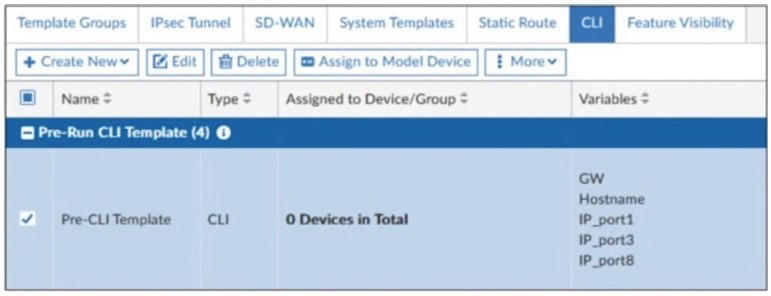
Refer to the exhibit.
A pre-run CLI template that is used in zero-touch provisioning (ZTP) and low-touch provisioning (LTP) with FortiManager is shown.

The template is not assigned even though the configuration has already been installed on FortiGate.
What is true about this scenario?
Show answerHide answer

Correct answer: B Pre-run CLI templates are automatically unassigned after their initial installation

Explanation

Explanation:

In FortiManager’s Zero-Touch Provisioning (ZTP) and Low-Touch Provisioning (LTP) workflows, pre-run CLI templates are used to push initial configuration to FortiGate devices before they are fully onboarded. These templates typically include interface IPs, hostnames, default routes, and other bootstrap settings.

Once the FortiGate device receives and applies the pre-run CLI template during provisioning, FortiManager automatically unassigns the template. This behavior is by design — it ensures that the template does not persist and interfere with future policy package installations or device-level configuration updates.

This automatic unassignment avoids:
Redundant configuration pushes
Conflicting object errors during policy import
Misalignment between template logic and policy package logic

Why other options are incorrect:

A. Pre-CLI templates remain permanently assigned ❌ Incorrect.
They are not permanently assigned. FortiManager automatically detaches them post-installation to prevent conflicts.

C. Must be unassigned manually ❌ Incorrect.
Manual unassignment is not required. FortiManager handles this automatically after the initial provisioning.

D. Use post-run CLI templates instead ❌
Misleading. Post-run templates are used after device onboarding, not for ZTP/LTP. They serve different purposes and do not replace pre-run templates in provisioning workflows.

References

FortiManager Administration Guide – ZTP and CLI Template Behavior:
Confirms automatic unassignment of pre-run templates after initial install.
Fortinet KB Article: Understanding CLI template lifecycle in ZTP/LTP workflows
NSE 5 FortiManager Training – Device Provisioning and Template Assignment
Question 27 Choose 1
An administrator wants to scale the IBGP sessions and optimize the routing table in an IBGP network.
Which parameter should the administrator configure?
Show answerHide answer

Correct answer: D route-reflector-client

Explanation

Explanation:

The core scaling challenge in an iBGP network is the full mesh requirement, where every router must peer with every other router (n*(n-1)/2 sessions). This does not scale. The primary solution is Route Reflection.

Configuring route-reflector-client on an iBGP neighbor achieves both stated goals:

1.Scales iBGP Sessions:
A Route Reflector (RR) can re-advertise iBGP-learned routes to its clients, eliminating the need for a full mesh. Clients only need to peer with the RR.

2.Optimizes the Routing Table:
It prevents unnecessary route propagation and path hiding, ensuring clients receive the best paths efficiently from a single, authoritative source (the RR).

Why other options are incorrect:

A. network-import-check:
This verifies if a BGP network route exists in the RIB before advertising it. It prevents invalid advertisements but does not scale or optimize iBGP session topology.

B. ibgp-enforce-multihop:
This allows iBGP sessions with non-directly connected peers, which is sometimes necessary but does not reduce the number of required sessions or optimize the routing table structure.

C. neighbor-group:
This is a configuration template for applying common settings to multiple BGP peers. It simplifies configuration but does not change the fundamental iBGP full-mesh scaling problem.

Reference:

Fortinet Documentation:
FortiOS Handbook - BGP, section "Configuring route reflectors." It explicitly describes route reflectors as the method to "simplify iBGP configuration and improve scalability" by allowing a router to reflect routes to clients, breaking the full-mesh requirement.
Question 28 Choose 2
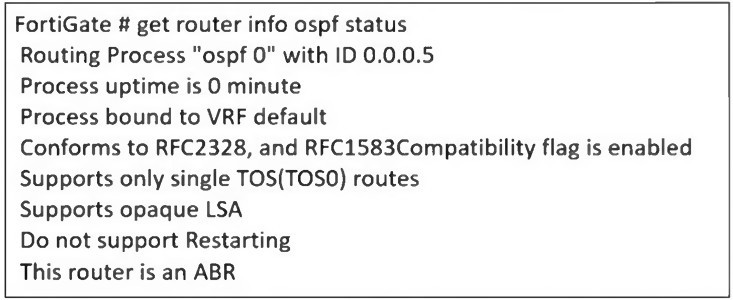
Refer to the exhibit, which contains the partial output of an OSPF command.

An administrator is checking the OSPF status of a FortiGate device and receives the output shown in the exhibit.
What two conclusions can the administrator draw? (Choose two.)
Show answerHide answer

Correct answer: B, C The FortiGate device is connected to multiple areasThe FortiGate device injects external routing information

Explanation

Explanation:

The key to answering this question is interpreting the status line: "This router is an ABR".
An ABR (Area Border Router) is an OSPF router with interfaces in more than one OSPF area. It connects one or more non-backbone areas (Area 0.0.0.1, etc.) to the backbone area (Area 0).

Let's evaluate each option:

B. The FortiGate device is connected to multiple areas.
This is correct. By definition, an ABR (Area Border Router) must have interfaces in at least two OSPF areas, including the backbone area (Area 0). The status explicitly identifies the router as an ABR.

C. The FortiGate device injects external routing information.
This is correct. An ABR has the additional role of being an ASBR (Autonomous System Boundary Router) if it is also configured to redistribute routes from other sources (static, BGP, connected, etc.) into OSPF. The command output does not explicitly say "ASBR," but the ABR functionality inherently involves summarizing and injecting inter-area routes. More importantly, in practical FortiOS OSPF scenarios, an ABR is typically the device where route redistribution is configured to inject external routes into the OSPF domain.

A. The FortiGate device is a backup designated router (BDR).
Incorrect.The output shows "This router is an ABR", which is a role related to areas. The DR/BDR role is per multi-access network segment (like a LAN) and is indicated by the state of individual OSPF interfaces (e.g., get router info ospf interface would show "BDR"). The provided status does not contain this information.

D. The FortiGate device has OSPF ECMP enabled.
Incorrect. The output does not provide any information about Equal-Cost Multi-Path (ECMP) routing. ECMP is a global routing table feature, not an OSPF process status detail shown here.

Reference:

Fortinet Documentation: FortiOS Handbook - OSPF, section "OSPF router types." The documentation defines an Area Border Router (ABR) as a router that has interfaces in multiple areas and summarizes routes between them. It also explains that an ABR can function as an ASBR if it redistributes external routes, which is a common administrative task on such a device.
Question 29 Choose 1
A company's guest internet policy, operating in proxy mode, blocks access to Artificial Intelligence Technology sites using FortiGuard. However, a guest user accessed a page in this category using port 8443.
Which configuration changes are required for FortiGate to analyze HTTPS traffic on nonstandard ports like 8443 when full SSL inspection is active in the guest policy?
Show answerHide answer

Correct answer: B In the Protocol Port Mapping section of the SSL/SSH Inspection Profile, enter 443, 8443 to analyze both standard (443) and non-standard (8443) HTTPS ports.

Explanation

Explanation:

To inspect HTTPS traffic on nonstandard ports like 8443, FortiGate must be explicitly configured to treat those ports as SSL traffic. By default, FortiGate only inspects standard SSL ports (e.g., 443, 465, 993). When operating in proxy mode with full SSL inspection, the firewall relies on the Protocol Port Mapping section of the SSL/SSH inspection profile to determine which ports should be decrypted and analyzed.

Adding port 8443 to this section ensures FortiGate applies deep inspection to traffic on that port, enabling category-based filtering (e.g., blocking Artificial Intelligence Technology sites via FortiGuard). Without this configuration, traffic on port 8443 bypasses SSL inspection and web filtering, allowing users to access blocked content.

Why other options are incorrect:

A. Add a URL wildcard domain to the website CA certificate… ❌
Irrelevant. Certificates are used for trust and re-signing, not for port-based inspection. Wildcard domains in certificates do not affect port mapping or traffic analysis.

C. Use TLSv1.3 in the SSL/SSH Inspection Profile… ❌
Misleading. TLS version selection affects protocol negotiation, not port-based inspection. TLSv1.3 does not enable inspection on nonstandard ports by itself.

D. Enable SNI check… ❌ Incorrect.
SNI (Server Name Indication) helps identify the requested domain during SSL handshake but does not control port-based inspection. It’s useful for blocking based on domain, not for enabling inspection on ports like 8443.

Reference
Fortinet Technical Tip: Protocol Port Mapping in SSL/SSH deep inspection
Fortinet KB: Configuring FortiGate to inspect HTTPS traffic over nonstandard ports

🔍 Summary:
To inspect HTTPS traffic on port 8443, explicitly add it to the Protocol Port Mapping in the SSL/SSH inspection profile. This enables full inspection and FortiGuard filtering. Correct answer: B.
Question 30 Choose 1
How will configuring set tcp-mss-sender and set tcp-mss-receiver in a firewall policy affect the size and handling of TCP packets in the network?
Show answerHide answer

Correct answer: B Applying commands in a firewall policy determines the largest payload a device can handle in a single TCP segment.

Explanation

Explanation:

The tcp-mss-sender and tcp-mss-receiver commands are used to enforce a Maximum Segment Size (MSS) for TCP connections traversing the firewall. The MSS defines the maximum amount of payload data (excluding TCP/IP headers) in a single packet.
tcp-mss-sender limits the MSS advertised in the TCP SYN packet from the sender (client).
tcp-mss-receiver limits the MSS advertised in the TCP SYN-ACK packet from the receiver (server). This ensures both ends of the connection use packet sizes that can safely traverse the network path without requiring fragmentation, which is especially critical for VPN tunnels where the overhead reduces the effective MTU.

Why other options are incorrect:

A. Incorrect.
These commands clamp (modify) the MSS value in TCP handshakes; they do not allow or deny packets based on size. They are a MTU path adjustment tool, not an access control rule.

C. Incorrect.
This option is unrelated to TCP MSS. It incorrectly discusses TLS version settings for web filtering on nonstandard ports, which is a different feature.

D. Incorrect.
This option discusses Server Name Indication (SNI) checking in SSL inspection, which is a method for filtering HTTPS traffic by domain name, not for controlling TCP packet size.

Reference:

Fortinet Documentation:
FortiOS CLI Reference for config firewall policy. The description for tcp-mss-sender and tcp-mss-receiver states they are used to "set maximum TCP segment size" to "prevent TCP fragmentation." This directly corresponds to controlling the largest payload in a TCP segment.
Full mock exam

Sit the FCSS_EFW_AD-7.6 exam before exam day

Full-length mocks with the same number of questions and the same time limit as the real FCSS_EFW_AD-7.6 exam. Every attempt draws a new set of questions from the full bank, so you can keep going until you pass comfortably.

Get full FCSS_EFW_AD-7.6 mock exam
  • 36questions per mock
  • 70 mintime limit
  • 112questions in the bank
  • Newmock on every attempt